Desktop: Unable to debug "ERR_BAD_SSL_CLIENT_AUTH_CERT"
Trying to sign in to Mattermost Desktop using Smart Badge with certificate. I'm getting the following error message:

I've tried debugging via Developer tools for application wrapper and current server but neither return any useful details. Security sections are all showing items as valid.
Sign in works fine from Chrome. How can this be debugged and fixed?
 bbodenmiller
All 25 comments
@Willyfrog @lieut-data @devinbinnie @jgilliam17 this seems to have started around https://github.com/mattermost/desktop/pull/1169. Ideas?
bbodenmiller
on 22 Jun 2020
is this with the latest version?
that code is for handling certificate problems, do you see any error being raised or in the console logs?
 Willyfrog
on 22 Jun 2020
Willyfrog
on 22 Jun 2020
@Willyfrog yes this is with 4.5.0. I do not see any further errors in Developer tools for application wrapper and current server. Should I be looking for logs somewhere else?
bbodenmiller
on 23 Jun 2020
if you look where the config is saved (depends on OS and install method), there might be some extra logs.
Do you get a dialog like the one shown here: https://github.com/mattermost/desktop/pull/1148#issuecomment-575390778
in the network tab, are there differences between the one on the desktop (current server) and the one on chrome?
Willyfrog
on 23 Jun 2020
@Willyfrog Yes...
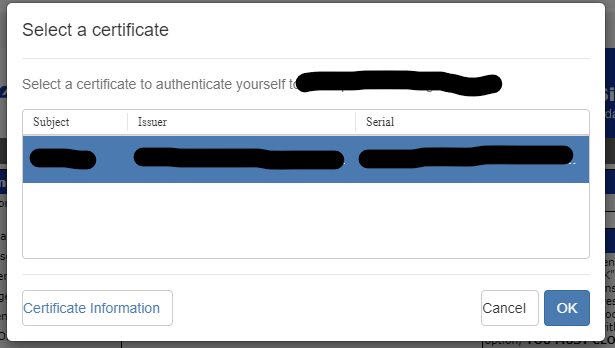
then get prompted for PIN
then get
App Wrapper dev tools show

I found a file at %localappdata%\programs\mattermost-desktop with [0619/183653.213:ERROR:registration_protocol_win.cc(131)] TransactNamedPipe: The pipe has been ended. (0x6D). Not finding any other logs with details in meaningful details in C:\Users\xxxx\AppData\Roaming\Mattermost
bbodenmiller
on 23 Jun 2020
A couple of things to try:
- disable antivirus/firewall and try to connect. if it does connect, you'll need to configure it to allow SSL connections with mattermost app.
- go to the APPDATA/Mattermost directory and remove anything that is not a
*.jsonfile. that way you'll keep your config but remove any cached data that might be corrupted.
Edit to add a few questions:
- did it work previously? (which versions? any 4.4.X?)
- what makes you think it is related to https://github.com/mattermost/desktop/pull/1169 ?
Willyfrog
on 24 Jun 2020
@Willyfrog I will try the troubleshooting ideas in the morning. In the mean time worth noting it used to work but I'm not sure the exact version nor if it's strictly caused by a new version or something else . Also worth noting is that only smart badge login fails and I can still login using using username and password. Many people in my company have reported the same issue. The hidden URL isn't a Mattermost server URL but rather the URL that processes the certificate for authentication. The only reason I called out #1169 is because it looks to be recently changed code related to certificate auth.
bbodenmiller
on 25 Jun 2020
FYI there is a similar report here https://github.com/mattermost/mattermost-server/issues/14863.
 amyblais
on 25 Jun 2020
amyblais
on 25 Jun 2020
@Willyfrog
disable antivirus/firewall and try to connect. if it does connect, you'll need to configure it to allow SSL connections with mattermost app.
Disabling this is prevented on my system.
go to the APPDATA/Mattermost directory and remove anything that is not a *.json file. that way you'll keep your config but remove any cached data that might be corrupted.
Still not working.
did it work previously? (which versions? any 4.4.X?)
I uninstalled and starting installing versions going backwards until I found one that works. Works in 4.3.2 but 4.4.0 does not work.
what makes you think it is related to #1169 ?
Added in 4.4.0 but could be unrelated.
bbodenmiller
on 7 Jul 2020
@Willyfrog @amyblais this is causing issues for a significant number of users for us. How can we help get this prioritized? Note how this worked in 4.3.2 and stopped working in 4.4.0.
bbodenmiller
on 14 Jul 2020
The dev team is working on investigating this,
amyblais
on 15 Jul 2020
@bbodenmiller would you be open to run one of the versions found here: https://app.circleci.com/pipelines/github/mattermost/desktop/1329/workflows/388b9766-3df9-4ce5-a927-5dc651db4e6e/jobs/6845/artifacts
it has a small fix (which might help or not with your problem) and some extra logging around the process of authenticating via client certificate so it would be great to run it from a terminal (let me know if you need any help with that)
Willyfrog
on 16 Jul 2020
@amyblais thank you! @Willyfrog can do in ~12 hours or so.
How would I go about running it from terminal? I normally run setup exe so I assume you mean just unzip files and launch Mattermost.exe from command prompt so we can get logs to command prompt?
bbodenmiller
on 16 Jul 2020
@amyblais thank you! @Willyfrog can do in ~12 hours or so.
How would I go about running it from terminal? I normally run setup exe so I assume you mean just unzip files and launch
Mattermost.exefrom command prompt so we can get logs to command prompt?
Yes, also make sure you have exited any other mattermost app before running this one.
Bear in mind that the logs will contain sensitive information, so feel free to contact me on the community server to send them
Willyfrog
on 16 Jul 2020
i've created this PR which doesn't show the certificate request if there is only one valid certificate: https://github.com/mattermost/desktop/pull/1354
can you check if this one works? you can find a build in the artifacts section of circleci's build: https://app.circleci.com/jobs/github/mattermost/desktop/6908
Willyfrog
on 27 Jul 2020
@Willyfrog that test build works! Verified on two machines. Just to make sure nothing else changed I also verified that https://app.circleci.com/pipelines/github/mattermost/desktop/1329/workflows/388b9766-3df9-4ce5-a927-5dc651db4e6e/jobs/6845/artifacts still does not work on those machines as well. So it seems something must be flawed in the current handleSelectCertificate logic? 🤔 Also I think the UX is better when it doesn't prompt for cert if there is only one... but I imagine you want to solve the issue such that selecting does work when needed.
bbodenmiller
on 28 Jul 2020
but I imagine you want to solve the issue such that selecting does work when needed.
the problem is that if it's asking you the pin number for the certificate, there isn't anything else left for us to do. It is already being managed by electron or the OS so I'm not aware of anything we can do to prevent that.
i'll reconvert the PR to be a proper one so it is available for the next version :)
Willyfrog
on 28 Jul 2020
the problem is that if it's asking you the pin number for the certificate, there isn't anything else left for us to do. It is already being managed by electron or the OS so I'm not aware of anything we can do to prevent that.
@Willyfrog Not sure I'm following... it doesn't ask for the pin until after a certificate is selected. I'd think that when certificate is selected it should kick of normal process that happens when there is only 1 certificate but it seems like somehow it's being treated differently?
bbodenmiller
on 30 Jul 2020
exactly, and it shouldn't. Once the certificate is selected, we ask electron to take care of it, so it asks you the pin number.
Willyfrog
on 30 Jul 2020
@Willyfrog any ideas when https://github.com/mattermost/desktop/pull/1354 might be able to be released?
bbodenmiller
on 11 Aug 2020
I'm afraid I dont have a timeline for that, my guess is september, but that's quite broad
Willyfrog
on 17 Aug 2020
Also very interested in this fix - is there a way to find out the release time more accurately? Or even make sure it's soon?
 aarowman
on 20 Aug 2020
aarowman
on 20 Aug 2020
we created a dot release containing this PR. Would you mind to give it a spin and see if everything works as expected? You can find the RC in the release page
Willyfrog
on 21 Aug 2020
@Willyfrog been using today, so far looks good. As expected sign in if multiple certificates exists isn't working (as it wasn't before) but if only single certificate it is working.
bbodenmiller
on 21 Aug 2020
Final release is here: https://github.com/mattermost/desktop/releases/tag/v4.5.3.
amyblais
on 25 Aug 2020
Related issues
 mcfedr
·
3Comments
mcfedr
·
3Comments
 jasonblais
·
6Comments
jasonblais
·
6Comments
 zetaab
·
5Comments
zetaab
·
5Comments
 fmp777
·
6Comments
fmp777
·
6Comments
 mcarthur-cpt
·
6Comments
mcarthur-cpt
·
6Comments