Desktop: Design details for tray menu
Just tested with the latest nightly build on Ubuntu 20.04 with Gnome. Here are some details which came up:
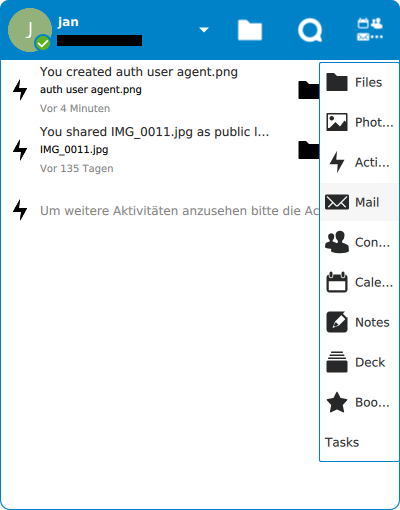
- [x] Width of the app menu is too narrow, almost all app names ellipsize → https://github.com/nextcloud/desktop/pull/2059
- [ ] When a menu is open and you click on the toggle again, the menu should close. Currently it reopens – this is the case for the app menu, account switcher, and for the action menu of each account.
- [ ] File name is duplicated in the subline of the title
- [ ] Top bar icons are blurry (folder, Talk icon, apps icon)
- [ ] Blue border around tray menu and also the inner menus is a bit much. Better just use a slight grey like var(--color-border): #ededed
- [ ] Text on the bottom of the list to view more activity seems too long and ellipsizes? Also the whole entry should be clickable, and not have the link icon on the right
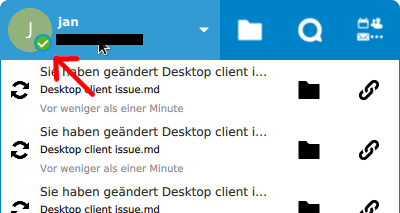
- [ ] Tiny detail: When hovering the account switcher in the top bar (and the blue background gets lighter) you can see the border of the green checkmark indicator icon on the avatar is still darker. This should get lighter blue on hover as well.
 jancborchardt
All 6 comments
Blurry SVG graphics are a known issue in Qt: they are rendered as pixel graphics and scaled afterwards. There are workarounds for that, e.g., see https://forum.qt.io/topic/52161/properly-scaling-svg-images/6 … however, I think this workaround cannot be simply applied to a QtQuick Button's icon, one would have to choose another QtQuick control element... What would probably help is to "scale" each SVG's coordinates.
 sbeyer
on 6 Jun 2020
sbeyer
on 6 Jun 2020
@sbeyer hmm, bummer. So how could we scale the SVG coordinates as you say? Or would it be better to actually render out pixel icons and use those?
jancborchardt
on 7 Jun 2020
So how could we scale the SVG coordinates as you say? Or would it be better to actually render out pixel icons and use those?
The best thing would be that Qt fixes the SVG rendering. ;-)
But what we could do now to not rely on a possible feature of a future Qt version is to probably replace the Button control by something different where we can apply the custom QML component that applies the pre-scaling hack.
Using pixel graphics is in my opinion the worst idea. I am not sure about the scaling of the SVG images, but I guess it is the second worst idea. By the way, simply changing width and height attributes in the <svg> entity seems not to solve the issue (which I did not expect), so probably all coordinates given in the SVG files have to be transformed.
sbeyer
on 7 Jun 2020
But what we could do now to not rely on a possible feature of a future Qt version is to probably replace the Button control by something different where we can apply the custom QML component that applies the pre-scaling hack.
I can play around a little with that, however, the potential pull request would be based on #1890 which is currently blocked by (and conflicts) #1939.
sbeyer
on 7 Jun 2020
* [ ] Tiny detail: When hovering the account switcher in the top bar (and the blue background gets lighter) you can see the border of the green checkmark indicator icon on the avatar is still darker. This should get lighter blue on hover as well. 
I think your eyes are fooling you there. I couldn't see it locally or on your screenshot and magnified both, the border of the indicator is transparent so it's really the color of the button coming through.
 er-vin
on 15 Jun 2020
er-vin
on 15 Jun 2020
Blurry SVG graphics are a known issue in Qt: they are rendered as pixel graphics and scaled afterwards. There are workarounds for that, e.g., see https://forum.qt.io/topic/52161/properly-scaling-svg-images/6 … however, I think this workaround cannot be simply applied to a QtQuick Button's icon, one would have to choose another QtQuick control element... What would probably help is to "scale" each SVG's coordinates.
"Yes" but... no. ;-)
I think it's more of a grid alignment issue in that case due to the weird size we'd computing in Style.qml. Got a simple fix locally which makes them look sharper (I decided to make them a few pixels bigger since I was at it, there was slightly too much negative space for my taste).
PR addressing (AFAICT) all the paper cuts mentioned here should follow shortly.
er-vin
on 15 Jun 2020
Related issues
 Valdiralita
·
3Comments
Valdiralita
·
3Comments
 MichaIng
·
3Comments
MichaIng
·
3Comments
 steven-omaha
·
3Comments
steven-omaha
·
3Comments
 js-d-coder
·
3Comments
js-d-coder
·
3Comments
 Engineer-of-Stuff
·
3Comments
Engineer-of-Stuff
·
3Comments
Most helpful comment
I can play around a little with that, however, the potential pull request would be based on #1890 which is currently blocked by (and conflicts) #1939.