Desktop: Clicking on a file:// including Japanese text does not open local file
I confirm (by marking "x" in the [ ] below: [x]):
- [x] This is not a troubleshooting question. Troubleshooting questions go here: http://www.mattermost.org/troubleshoot/.
- [x] This doesn't reproduce on web browsers (such as in Chrome). If it does, issue reports go to the Mattermost Server repository.
- [x] I have read contributing guidelines.
Summary
Since desktop v4.4.0, desktop app can open local file from file://C:\test.txt link, but the link including Japanese character (e.g.: file://C:\test.txt) can't be opened.
Environment
- Operating System: Windows 10
- Mattermost Desktop App version:4.4.0 and 4.4.1-rc1
- Mattermost Server version: 5.22.0
Steps to reproduce
- Set
fileprotocol to System Console > Site Configuration > Posts > Custom URL Schemes - Create a post including
file://C:\テスト.txt - Click
file://C:\テスト.txt
Expected behavior
Open テスト.txt with default edtior
Observed behavior
Do nothing

(Clicking the link above will open the editor, but clicking the link below won't do anything.)
Possible fixes additional comments
I'm not sure whether or not opening local file from file:// link is intensional.
Clicking on a file:// does not work for local folders · Issue #821 · mattermost/desktop
This issue said that desktop app drop the support file://~ protocol.
If this action is intensional, the following feature requests seems to be resolved.
Enable the click on a file link – Mattermost Feature Proposal Forum
 kaakaa
All 7 comments
I'm not sure how did you manage to open the file, i tried and in both cases and two OS (mac and win) couldn't get it to open:

have you done something special to get it to work?
 Willyfrog
on 18 Apr 2020
Willyfrog
on 18 Apr 2020
Thanks for commenting.
No, I haven't done any special instructions and settings. In my environment, message seems not to indicate error (but it looks warning).

One special situation that I didn't mention in the Issue is that the warning dialog opens after clicking on the link. When clicking file://C:\テスト.txt link, this dialog also open (but if clicking yes, do nothing)
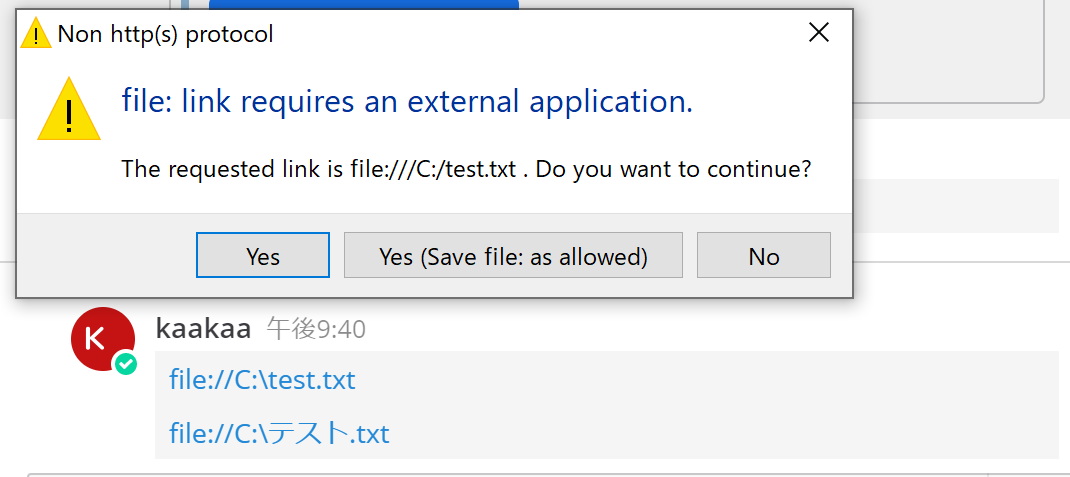
I used .exe file from release page for installing. And I used older version of desktop app, so it's not clean install.
kaakaa
on 18 Apr 2020
trying a few more i managed to get a similar situation, and it seems it is being converted to different links
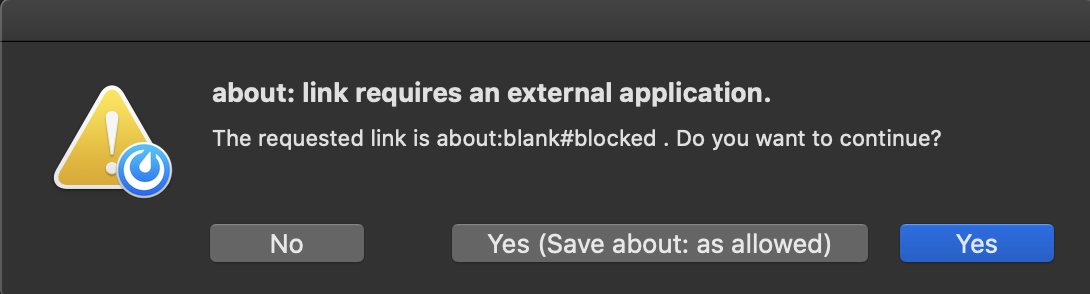
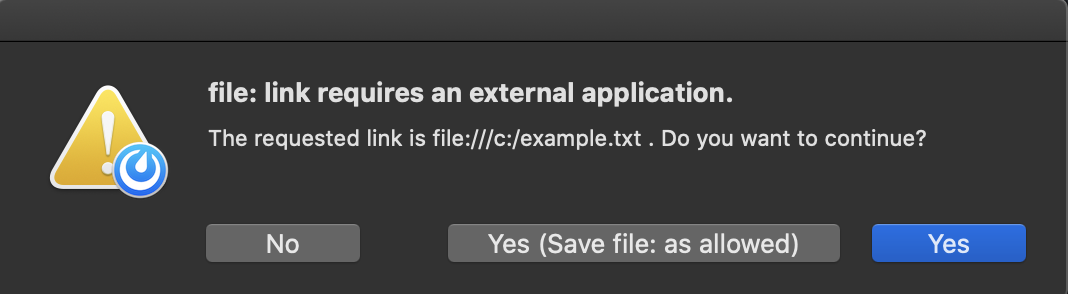
one of the links is being blocked, we already have a ticket to review url validation, so this case might prove useful to test different configurations.
the ticket in question: https://mattermost.atlassian.net/browse/MM-24160
Willyfrog
on 20 Apr 2020
Thanks for your investigation, and I'm sorry for my late replying @Willyfrog. It would be nice to have the same validation for webapp and desktop.
If webapp and desktop have the same validation, will we never be able to open the file protocol? (I feel like that's the right thing to do in terms of web security)
kaakaa
on 28 Apr 2020
if the webapp is allowing it (as it is) that would be the default behaviour, although you'll get a warning about having to trust such a link
Willyfrog
on 28 Apr 2020
Hi, this is only report I searched and tested to solve this problem.
Hope this helps someone.
As a preliminary note, in older versions (Electron around the time of Mattermost Desktop 4.1), the file://servername\link
were allowed. This is now also considered a local resource and is blocked.
In addition, it was possible to open URIs containing Japanese text.
To come to the point,
you can modify webSecurity to open URIs beginning with file://c: in the file protocol, but it did not work for Japanese text.
On the other hand, if you want to provide a custom protocol to solve the problem, you need to modify Mattermost Desktop to handle the backslash.
Here are the details.
1. Currently (ver 4.6.1), the file protocol is rejected with "Not allowed to load local resource".
If you disable webSecurity like following, you can use file protocol.
However, it should not be implemented except in environments where security issues can be ignored.
src/browser/components/MattermostView.jsx
    componentDidMount() {
      const self = this;
      const webview = this.webviewRef.current;

+     webview.setAttribute('disablewebsecurity', true);
Although backslashes are rewritten to forward slashes, you can now open a network shared folder if the URI is an alphabetic character only.
From my experience, Win8.1 and Win10 can open a shared folder from the URI of file://servername/foldername.
However, it could not open a shared folder which contains Japanese characters.
I tried URIdecode before shell.openExternal(e.url);, but it didn't work. I think it is a problem of character encoding (cp932), but I don't know the exact cause.
2. Even if I dealt with No.1, Electron seemed to rewrite the URI in case of file protocol.
- The backslash is converted to a forward slash.
In the case of file protocol, it is already a forward slash whenwebview.addEventListener('new-window', (e) => {.
But custom protocol doesn't. - The first block is converted to lowercase.
file://Users/Testwill be rewritten tofile://uesrs/Test
3. Custom protocols cannot handle backslashes due to problems on the part of Mattermost.
The cause is below:
src/browser/components/MattermostView.jsx
    webview.addEventListener('new-window', (e) => {
      if (!Utils.isValidURI(e.url)) {
        return;
      }
Utils.isValidURI ( by https://github.com/ogt/valid-url ) does not allow backslash .
This means custom protocol can't handle Windows path.
We need change like following to allow backslash for our custom protocol.
for example (myownp: is a example of custom protocol )
+      const urlForValidate = (e.url.indexOf("myownp:") === 0) ? e.url.replace(/\\/gi, "%5c") : e.url;
+      if (!Utils.isValidURI(urlForValidate)) {
-      if (!Utils.isValidURI(e.url)) {
         return;
       }
Conclusion:
If you can create a custom protocol, I think that's a relatively safe way to handle it.
I think a new custom protocol on Windows can be achieved if you can create a program that can handle a few lines of registry and command line arguments.
However you need fix or avoid backslash problem with custom protocol I explain above.
If you already have a large number of messages containing file: links, and you are in a secure, disconnected environment where you can ignore problems with XSS, SameOriginPolicy, etc., you can disable webSecurity and add a custom protocol just before it is opened, for example There are also means of conversion.
src/main/allowProtocolDialog.js
 function initDialogEvent(mainWindow) {
   ipcMain.on('confirm-protocol', (event, protocol, URL) => {
     URL = decodeURI(URL)
+    if (protocol === "file:" && URL.indexOf('file:')===0) {
+      URL = decodeURI(URL)
+      URL = URL.replace('file:', 'myownp:')
+    }
But of course such a fix (especially disabling webSecurity) will not be incorporated into Mattermost Desktop, so you will have to do it yourself and do it at your own risk.
Of course, I don't recommend it.
Sorry for the long description.
 fliedonion
on 1 Nov 2020
fliedonion
on 1 Nov 2020
thanks for the thorough response!
Willyfrog
on 3 Nov 2020
Related issues
 DanShockley
·
6Comments
DanShockley
·
6Comments
 mcfedr
·
3Comments
mcfedr
·
3Comments
 attzonko
·
5Comments
attzonko
·
5Comments
 fmp777
·
6Comments
fmp777
·
6Comments
 aborderon
·
5Comments
aborderon
·
5Comments