I confirm (by marking "x" in the [ ] below: [x]):
- [x] This is not a troubleshooting question. Troubleshooting questions go here: http://www.mattermost.org/troubleshoot/.
- [x] This doesn't reproduce on web browsers (such as in Chrome). If it does, issue reports go to the Mattermost Server repository.
- [x] I have read contributing guidelines.
Summary
Environment
- Operating System: Ubuntu 18.04 - 64 Bit
- Mattermost Desktop App version: 4.1.2
- Mattermost Server version: 4.10
Steps to reproduce
I've installed the mattermost client with the .deb package. Configured my server and then try to configure the client itself.
Expected behavior
Display icon in good quality when launching the application.
Observed behavior
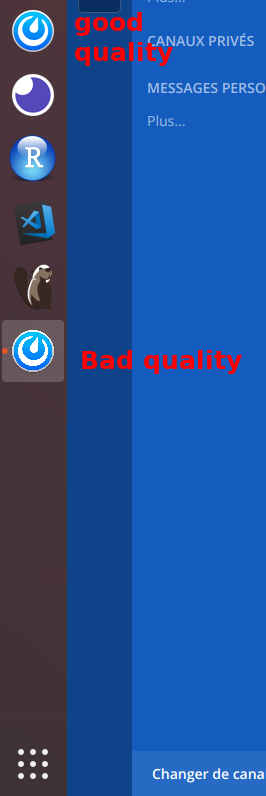
The icon in the favorites of the ubuntu dock is in good quality but at the launch of mattermost a new icon appears for the application and this one does not have a good quality icon.
Possible fixes
 aborderon
All 5 comments
The next release has an SVG icon instead of PNG, maybe that will solve this issue. Or it might be the same issue as KDE, where all electron systray icons are lowres ones.
 ArchangeGabriel
on 15 Jun 2018
ArchangeGabriel
on 15 Jun 2018
SVG doesn't affect .deb packages. Actually too high resolution icon is applied on Linux. It's the reason.
https://github.com/mattermost/desktop/blob/v4.1.2/src/main/mainWindow.js#L34-L36
However I'm not sure what is correct handling about this because Linux has various window managers. I'm wondering if you could help testing.
 yuya-oc
on 15 Jun 2018
yuya-oc
on 15 Jun 2018
I managed to solve the problem by avoiding having a second icon open when launching Mattermost by modifying the launcher's (.desktop file).
I added the following line at the end of the file:
StartupWMClass=Mattermost
Here is the complete output of the .desktop
[Desktop Entry]
Name=Mattermost
Comment=Mattermost
Exec="/opt/Mattermost/mattermost-desktop" %U
Terminal=false
Type=Application
Icon=mattermost-desktop
Categories=InstantMessaging;
I managed to solve the problem by avoiding having a second icon open when launching Mattermost by modifying the launcher's (.desktop file).
I added the following line at the end of the file:
StartupWMClass=MattermostHere is the complete output of the .desktop
[Desktop Entry]
Name=Mattermost
Comment=Mattermost
Exec="/opt/Mattermost/mattermost-desktop" %U
Terminal=false
Type=Application
Icon=mattermost-desktop
Categories=InstantMessaging;
Adding StartupWMClass=Mattermost to the end of mattermost-desktop.desktop did the trick
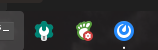
Previously it was all jagged and horrible.
 erik-alatest
on 28 Jan 2019
erik-alatest
on 28 Jan 2019
@yuya-oc while somebody is in the .desktop file adding a StartupWMClass=Mattermostline, perhaps the Exec= line should also be changed to Exec=env GTK_THEME=Adwaita:light /opt/Mattermost/mattermost-desktop %U until #899 is resolved.
PS: don't forget to re-open this issue until the issue is actually resolved. I believe currently it is only solved.
 skewty
on 10 Jun 2019
skewty
on 10 Jun 2019
Related issues
 lip-d
·
6Comments
lip-d
·
6Comments
 gitfizicist
·
5Comments
gitfizicist
·
5Comments
 mcarthur-cpt
·
6Comments
mcarthur-cpt
·
6Comments
 i23098
·
4Comments
i23098
·
4Comments
 NeroBurner
·
4Comments
NeroBurner
·
4Comments
Most helpful comment
Adding
StartupWMClass=Mattermostto the end of mattermost-desktop.desktop did the trickPreviously it was all jagged and horrible.