Desktop: NC 2.6.0 client shows an unstable GUI window on Mac OS X after first config
EDIT:
re-opened for similar issues: #1602
NC desktop App macOS -- Version 2.6.1stable (build 291105)
Expected behaviour
The NC client should show a stable GUI window.
Actual behaviour
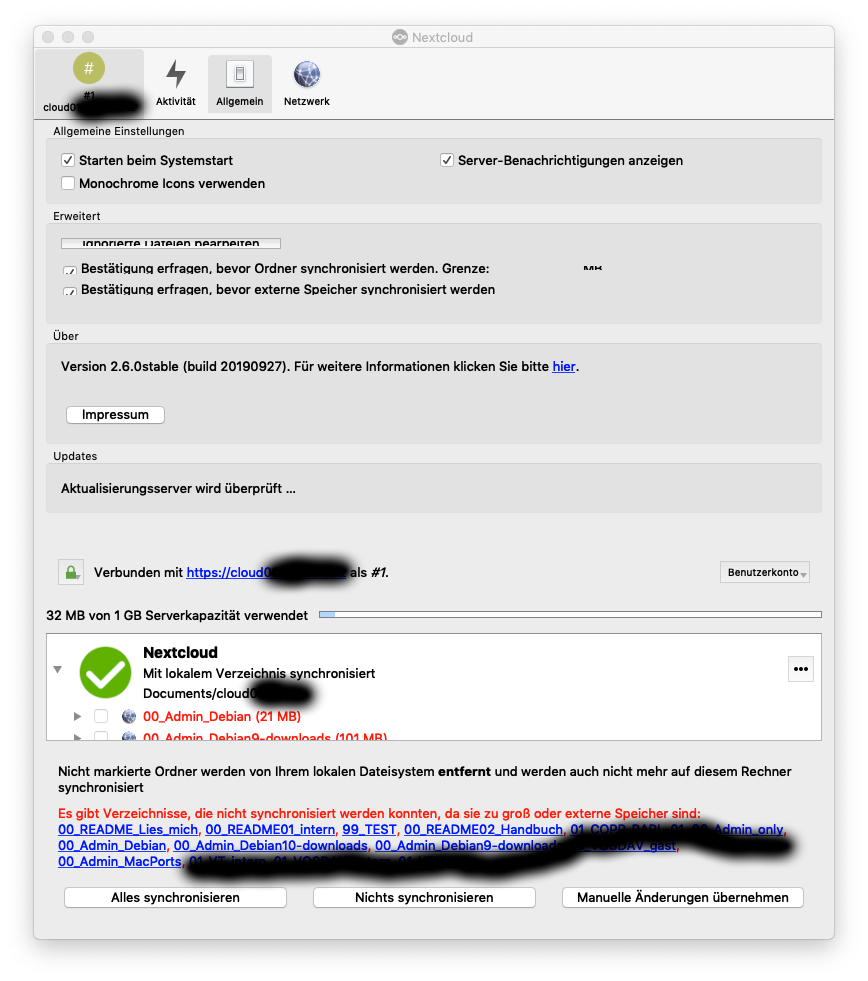
The NC client repeatedly shows an unstable GUI window with mixed content of otherwise different sub-views.
Steps to reproduce
- establish a fresh client to the environment of an user account
- select Network view after configuration
- change to Server view
Apparently happens to fresh configured client only. De-selecting the client and opening of a new NC client window continued this GUI issue. Later application of the client seems to be stable.
Client configuration
Client version: _2.6.0stable (build 20190927)_
Operating system:
- _MacOS X / macOS Mojave 10.14.6_
- _Mac OS X / macOS HighSierra 10.13.6_
OS language:
- _German (Deutsch / DE)_
- _Dutch (Nederlands / NL)_
_presumably more if not all languages or independent from OS locale & language_
Qt version used by client package (Linux only, see also Settings dialog): _Qt 5.9.2_
Client package (From Nextcloud or distro) (Linux only): _n.a._
Installation path of client:
/Applications/nextcloud.app
Server configuration
Nextcloud version: _16.0.4.1_ & _16.0.5.1_
Storage backend (external storage): _n.a._
Logs
Please use Gist (https://gist.github.com/) or a similar code paster for longer
logs.
Client logfile: _n.a._
Web server error log: _n.a._
Server logfile: nextcloud log (data/nextcloud.log): _n.a._
Screenshot
 TP75
TP75
All 10 comments
This issue shows a similar behaviour after first setup in an OS locale environment different from the a.m. German example. NC 2.6.0 client and Mac OS X / macOS HighSierra 10.13.6
TP75
on 14 Oct 2019
Hey,
we've just released 2.6.1 RC1 which is built with Qt 5.12.5 on all platforms (also has OpenSSL 1.1.1d, so it features TLS 1.3).
You may give it a try:
https://github.com/nextcloud/desktop/releases/tag/v2.6.1-rc1
Would be good to know if the problem was caused by the older Qt versions used in the previous builds.
 misch7
on 19 Oct 2019
misch7
on 19 Oct 2019
Please also have a look at the b.m. issue and certain comment:
Desktop client not syncing changes # 597 (as referenced above) includes the 2.6.1 RC1 client apparently.
Alright. Reproduced it now also on
* Server 16.0.5

* Group Folders 4.1.3

* Desktop client 2.6.0 (and 2.6.1 RC1)
and also on
* Server 17.0.0

* Group Folders 5.0.3

* Desktop client 2.6.0 (and 2.6.1 RC1)
Extra info: once _any_ change is made to a normal folder on the server (or another connected client), the group folder sync gets triggered also - but not if changes on the server have been made within a group folder only.
However, I will give it a try and will come back on the results and the GUI on MacOS X issue.
TP75
on 19 Oct 2019
@misch7 Thank you very much.
Conclusion
The intermediate NC Client Version 2.6.1rc1 (build 20191018) showed a behaviour as expected. The intermediate NC client shows a stable GUI window on Mac OS X / macOS again.
Client configuration
Client version: _Version 2.6.1rc1 (build 20191018)_
Operating system:
- _MacOS X / macOS Mojave 10.14.6_
- _Mac OS X / macOS HighSierra 10.13.6_
- _Mac OS X / macOS Sierra 10.12.6_
OS language:
- _German (Deutsch / DE)_
- _Dutch (Nederlands / NL)_
- _German (Deutsch / DE)_
Qt version used by client package (Linux only, see also Settings dialog): _Qt 5.12.5_
Server configuration
Nextcloud version: _16.0.5.1_
Brief description of tests:
- MacOS X / macOS Mojave 10.14.6
- delete old installation i.e. removal of app folder from
/Applicationsand clean trash basket - remote install of RC1 by help of Apple Remote Desktop 3.9
- establish a fresh new local user account
- login to this user account and make a new NC client setup
- play around with the NC client GUI window
- Mac OS X / macOS HighSierra 10.13.6
- do not delete old installation
- remote install of RC1 by help of Apple Remote Desktop 3.9
- login to an applicable existing user account and make a new NC client setup
- play around with the NC client GUI window
- Mac OS X / macOS Sierra 10.12.6
- do not delete old installation
- local install of RC1 from admin account
- establish a fresh new local user account
- login to this user account and make a new NC client setup
- play around with the NC client GUI window
Further remarks:
Other issues were identified for the RC1 version besides the a.m. original issue (which is resolved).
I may identify the other issues by tickets of their own in the near future.
I will presumably close this issue after I get the NL results.
TP75
on 20 Oct 2019
The major GUI issue of the NC client 2.6.0 version can be called resolved by the NC client 2.6.1 RC1 version.
TP75
on 21 Oct 2019
1602
TP75
on 13 Nov 2019
Here's a new test build, based on PR #1651 (macOS 10.12+):
https://download.nextcloud.com/desktop/daily/Mac/Installer/Nextcloud-qt5.12.5-2.7.0.20191201daily.pkg
misch7
on 1 Dec 2019
@misch7 :+1:
Here's a new test build, based on PR #1651 (macOS 10.12+):
https://download.nextcloud.com/desktop/daily/Mac/Installer/Nextcloud-qt5.12.5-2.7.0.20191201daily.pkg
THX
I'll give it a look and some trial when I find the time. However: Why 2.7.0 and not 2.6.2 if I may?
Anyway, added to: https://help.nextcloud.com/t/macos-nc-2-7-0-bucket-list/64890
TP75
on 2 Dec 2019
I'll give it a look and some trial when I find the time.
👍
However: Why 2.7.0 and not 2.6.2 if I may?
This is just our development branch version; Next release is 2.6.2
Anyway, added to: https://help.nextcloud.com/t/macos-nc-2-7-0-bucket-list/64890
This is no public test candidate - just a test build (patched daily) - please don't advertise it as such on the forums, it's not considered stable for general testing.
But thanks for your community efforts, keep up with 2.6 :-)
misch7
on 2 Dec 2019
TP75
on 3 Dec 2019
Related issues
 linucksrox
·
3Comments
linucksrox
·
3Comments
 dkebler
·
3Comments
dkebler
·
3Comments
 Engineer-of-Stuff
·
3Comments
Engineer-of-Stuff
·
3Comments
 andresantacruz
·
3Comments
andresantacruz
·
3Comments
 rguenther-dz
·
3Comments
rguenther-dz
·
3Comments