Desktop: Virtual Drive Preview v2 Partially Successful on Windows 10 Pro v1903
Hello folks,
I too have tried to test v2 of the Virtual Drive preview client, but my installation - though successful (_somewhat_) - yielded no fruitful results. In summary, the Dokan install appears to have been partial (_explained below_), and the Nextcloud client fails to connect to my server (_citing a TLS handshake error_).
This is my PC environment:

Dokan Installation Error
This appears after clicking the “Finish” button for the Dokan installer. For all intents and purposes, it appears the installation is successful (_as I can see it listed in Programs and Features_), yet still this error pops up right after you click “Finish”.

Nextcloud Desktop Client Stuck in Waiting State
After rebooting the PC (_following the Dokan installation_), the Nextcloud desktop client still remains in a “_waiting to start sync state_”. With v1 of the preview build, it shows no errors. With v2, it shows “_TLS handshake failed_”.

Exit button hides below taskbar
Finally, I noticed that when you right-click on the taskbar icon the “Exit” button immediately sinks below the taskbar - making it difficult to quit the client.

Hope you guys are able to resolve the problems above so I can test. I like the idea of the Virtual Drive, but hope that it functions in the same way as Dropbox currently functions.
 kismetgerald
All 6 comments
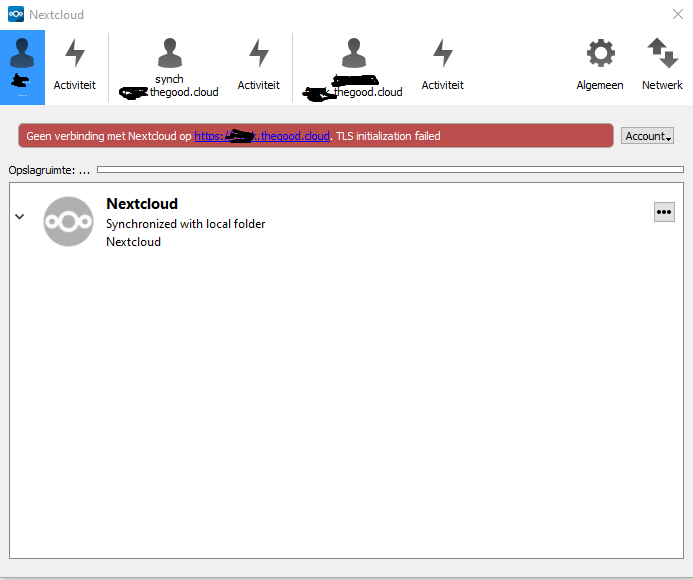
Exactly the same happende to my installation. Got the very same Windwows warning and could not finish the install wizard. After restarting my system the Client could not sync. Warning: TLS initialization failed. System: Windows 10 Home v1903
 Frank360ict
on 26 Sep 2019
Frank360ict
on 26 Sep 2019
For your problem @Frank360ict you have to verify in your Nextcloud server if T.L.S 1.3 is ON.
The Tech V2 preview accept only this new protocol.
It's a shame they should do a T.L.S. 1.2 and 1.3 compatibility.
 warnerbryce
on 1 Oct 2019
warnerbryce
on 1 Oct 2019
Hello,
I have the same problem. My server doesn't accept the TLS 1.3 version. Is there any chance that TLS 1.2 will be supported, maybe with an extra flag in the settings?
 mr-manuel
on 12 Oct 2019
mr-manuel
on 12 Oct 2019
For your problem @Frank360ict you have to verify in your Nextcloud server if T.L.S 1.3 is ON.
The Tech V2 preview accept only this new protocol.
It's a shame they should do a T.L.S. 1.2 and 1.3 compatibility.
Sorry for the late response, but TLS 1.3 is on and yet I still have the same problems. Still I get the windows warning while doing a clean install and after opening Nextcloud client I still get the warning TLS initialization failed....
Frank360ict
on 13 Dec 2019
@kismetgerald @Frank360ict
Did you guys have success using nextCloud + Dokan for virtual file system?
 dverzolla
on 16 Dec 2020
dverzolla
on 16 Dec 2020
Hi David,
No I did not succeed. I’m now testing the owncloud client for virtual file system, which so far seem to be working fine with nextcloud.
Regards,
Frank
From: David Verzolla notifications@github.com
Sent: Wednesday, 16 December 2020 20:47
To: nextcloud/desktop desktop@noreply.github.com
Cc: Frank Geuyen frank@thegood.cloud; Mention mention@noreply.github.com
Subject: Re: [nextcloud/desktop] Virtual Drive Preview v2 Partially Successful on Windows 10 Pro v1903 (#1432)
@kismetgeraldhttps://github.com/kismetgerald @Frank360icthttps://github.com/Frank360ict
Did you guys have success using nextCloud + Dokan for virtual file system?
—
You are receiving this because you were mentioned.
Reply to this email directly, view it on GitHubhttps://github.com/nextcloud/desktop/issues/1432#issuecomment-746906682, or unsubscribehttps://github.com/notifications/unsubscribe-auth/ANKCBXLTNFCBHPGD24Z4523SVEFEPANCNFSM4IYX24CQ.
Frank360ict
on 21 Dec 2020
Related issues
 despens
·
3Comments
despens
·
3Comments
 kaysond
·
3Comments
kaysond
·
3Comments
 js-d-coder
·
3Comments
js-d-coder
·
3Comments
 Valdiralita
·
3Comments
Valdiralita
·
3Comments
 Engineer-of-Stuff
·
3Comments
Engineer-of-Stuff
·
3Comments
Most helpful comment
Exactly the same happende to my installation. Got the very same Windwows warning and could not finish the install wizard. After restarting my system the Client could not sync. Warning: TLS initialization failed. System: Windows 10 Home v1903
