Desktop: Desktop Client New Connection Wizard Freezes/glitches
Expected behaviour
The Assistant continues with the next step, and does not freeze.
Actual behaviour
After entry of the server address in the first screen of the Assistant and after pressing "next" the application seems to freeze and shows a strange white border around the window.
The wheel to the right of the entry field also does not spin.
However the window can still be closed by clicking the top right close button
After clicking:

The server address is valid and everything is working if using the old 2.3.3.1cllient ( was not installed before).
Entering a wrong address also does not expose this behaviour ( expected error message appears)
Steps to reproduce
- Open new Connection Assistant , either via the Client Application or by popping up after first start
- Enter a valid Server Address
- Presss next
--> Freeze + white border appears ( see Screenshot
Client configuration
Client version: 2.5.0 (release)
Operating system: Windows 10 (1709)
OS language: German
Installation path of client:
C:\Program Files (x86) (default)
Server configuration
Operating system: nextcloudplus (14.0.4)
Nextcloud version:14.0.4
Logs
Client Log
[OCC::FolderMan::setupFoldersMigration Setup folders from "C:/Users/pm/AppData/Roaming/Nextcloud/folders" (migration)
[OCC::ClientProxy::setupQtProxyFromConfig Set proxy configuration to use NO proxy
[OCC::ownCloudGui::slotOpenSettingsDialog No configured folders yet, starting setup wizard
[unknown Could not parse stylesheet of object 0x207e46df360
[OCC::WebViewPage::WebViewPage Time for a webview!
[unknown Could not parse stylesheet of object 0x207e46df360
[unknown Could not parse stylesheet of object 0x207e46df360
[OCC::SocketApi::slotNewConnection New connection QLocalSocket(0x207ea3513f0)
[OCC::OCUpdater::backgroundCheckForUpdate Checking for available update
[OCC::AccessManager::createRequest 2 "" "https://updates.nextcloud.org/client/?version=2.5.0.20181112&platform=win32&oem=Nextcloud&versionsuffix=v2.5.0" has X-Request-ID "815cce0d-3ad8-4708-99a9-da21d71cc706"
[OCC::NSISUpdater::versionInfoArrived Client is on latest version!
[OCC::AccessManager::createRequest 2 "" "https://edited/status.php" has X-Request-ID "eb9a9904-50f9-4b7c-9015-35b891c55cd2"
[OCC::AbstractNetworkJob::start OCC::CheckServerJob created for "https://edited" + "status.php" "OCC::OwncloudSetupWizard"
[OCC::CheckServerJob::finished No SSL session identifier / session ticket is used, this might impact sync performance negatively.
[OCC::CheckServerJob::finished status.php returns: QJsonDocument({"edition":"","installed":true,"maintenance":false,"needsDbUpgrade":false,"productname":"","version":"14.0.4.2","versionstring":"14.0.4"}) QNetworkReply::NetworkError(NoError) Reply: QNetworkReplyHttpImpl(0x207ea33d070)
[OCC::DetermineAuthTypeJob::start Determining auth type for QUrl("https://edited/remote.php/webdav/")
[OCC::AccessManager::createRequest 2 "" "https://edited/remote.php/webdav/" has X-Request-ID "2c47bc30-44d5-4c97-8d02-cb3d3ed2e030"
[OCC::AbstractNetworkJob::start OCC::SimpleNetworkJob created for "https://edited" + "" "OCC::Account"
[OCC::AccessManager::createRequest 6 "PROPFIND" "https://edited/remote.php/webdav/" has X-Request-ID "53c23f3a-fa86-417e-89ab-663aefefd494"
[OCC::AbstractNetworkJob::start OCC::SimpleNetworkJob created for "https://edited" + "" "OCC::Account"
[OCC::DetermineAuthTypeJob::checkBothDone Auth type for QUrl("https://edited/remote.php/webdav/") is 3
[OCC::WebViewPage::initializePage Url to auth at: "https://edited/index.php/login/flow"Web server error log:
Server logfile: nextcloud log (data/nextcloud.log):
-- no entries
 pemuelle79
All 10 comments
Same issue also with daily build, tested with "Nextcloud-2.5.0.61573-daily-20181125"
 pjao
on 26 Nov 2018
pjao
on 26 Nov 2018
Same here (do we want +1 posts? I am sure many people suffer from this).
Clicking and dragging from various locations on the (seemingly frozen) screen uncovered some sort of "overlay image" showing the following::
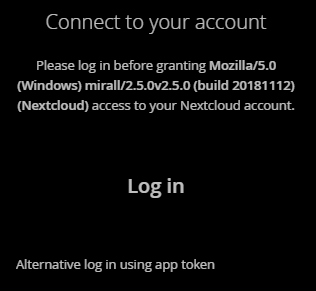
Possibly (hopefully) this helps pinpointing the technical root-cause and helps towards a (quick)fix!
Thanks for this amazing peace of FOSS!
Client configuration
Client version: 2.5.0 (release)
Operating system: Windows 10 Enterprise
OS language: English
Installation path of client: C:\Program Files (x86) (default)
Server configuration
Operating system: Debian 9.x
Nextcloud version: 14.0.4
 woosting-tue
on 3 Dec 2018
woosting-tue
on 3 Dec 2018
Server
Operating system: Raspbian somewhat
Nextcloud version: 14.0.4
Client
Operating system: KDE neon (aka Ubuntu)
Client version: 2.5.0
Same computer, dualboot, Windows is working, Linux is not working. Entering the server adress, something about certs, i do accept and then a white screen.
Could it because the server is in the same network? For that reason i use the local IP and not the normal URL i normally use.
I think it worked with the old OS-Installation where it was 2.3.0 before and i upgraded to 2.5.0. This is now a complete fresh installation (OS and Nextcloud)
EDIT:
Also happens with the Beta, i installed the following
Versionstabelle:
 *** 2.5.1-20181209.014857~bionic1 500
        500 http://ppa.launchpad.net/nextcloud-devs/client-beta/ubuntu bionic/main amd64
 natrius
on 9 Dec 2018
natrius
on 9 Dec 2018
@camilasan
Maybe want to add the label Linux too? Is more information needed? Its annoying because i'm dualbooting with linux as my main working space and its working with Windows 10 and not working with Ubuntu :/
natrius
on 26 Dec 2018
I got the same on Windows 10. Tried various versions (Nextcloud-2.5.1, Nextcloud-2.5.1.61659-daily-20181211, Nextcloud-2.5.0.0-Debug-20180622). I can login and use it with the android client and also via Web. It is also possible to use it with latest owncloud client (2.51).
It is also possible to use it with the latest nextcloud client in a KubuntuVM on the same device on the same network. So it should not be a network problem (local address,..).
I think its a Problem with "qtwebengineprocess" because a process of it starts when I try to login and does not go away until I kill it (even if I quit or kill nextcloud client completely).
 6i6i
on 28 Dec 2018
6i6i
on 28 Dec 2018
I did have to kill off qtwebengineprocess a few times.
One thing I found was that the next screen was there, and if I clicked in the right place I could get it to go back to the previous step, but I couldn't fumble my way to the next step.
Eventually, I downloaded build 2.3.2 and was able to install the client and sync (link below).
I tried installing 2.5.1 over 2.3.2, however, it wouldn't use the same settings so needed to be set up again (even though uninstalling 2.5.1 and reinstalling 2.3.2 didn't require setup again).
https://download.nextcloud.com/desktop/releases/Windows/Nextcloud-2.3.2.1-setup.exe
This was on Windows 10.
Darren.
 darren-harrison
on 6 Jan 2019
darren-harrison
on 6 Jan 2019
I purged nextcloud and installed Nextcloud-2.3.2-x86_64.AppImage but it seems not to install it is just a, well, "open now".
With ''apt-cache policy nextcloud-client'' would show the packages i can install, unfortunately there is just 2.5.1 whats not working sigh
natrius
on 17 Jan 2019
Have the same issue here. Only way I've found around it is to install 2.3.2.
I tried upgrading again after that, but same issue again. Stuck on 2.3.2 for no
 AlNotSteve
on 31 Jan 2019
AlNotSteve
on 31 Jan 2019
These versions seem to solve the problems we were having behind our proxy:
2.6 RC1 on Windows 10
2.7.0git on Ubuntu 19.04 (beta from https://launchpad.net/~nextcloud-devs)
Thank you for the updates.
 brtptrs
on 9 Sep 2019
brtptrs
on 9 Sep 2019
After entering the server (in my case https://
Clicking with the right mouse button gives a menu. When I click on 'View page source' this leads to a website, which is in my case https://
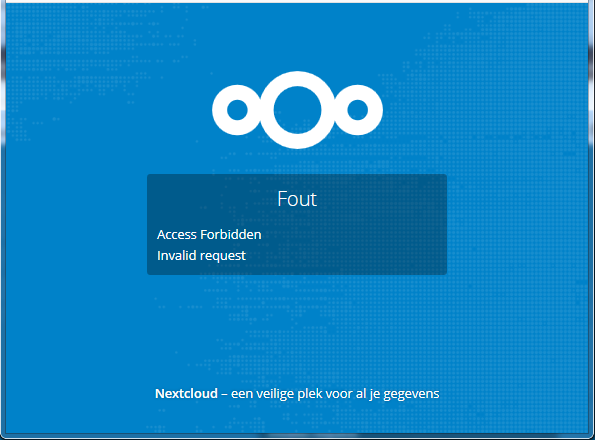
So, the blank login screen is caused by the provider not understanding the new way in which the recent version (>= 2.5.0) NextCloud clients try to authenticate.
The only solution is to stay with version 2.3.3.1 ???
Can we have the old client authentication method back?
 0xCAFEDECAF
on 8 Oct 2019
0xCAFEDECAF
on 8 Oct 2019
Related issues
 andresantacruz
·
3Comments
andresantacruz
·
3Comments
 despens
·
3Comments
despens
·
3Comments
 steven-omaha
·
3Comments
steven-omaha
·
3Comments
 Valdiralita
·
3Comments
Valdiralita
·
3Comments
 DBLouis
·
3Comments
DBLouis
·
3Comments
Most helpful comment
Same issue also with daily build, tested with "Nextcloud-2.5.0.61573-daily-20181125"