Desktop: Client marks file on ignore list and symbolic links as "conflicts"
Expected behaviour
After updating the client, files should be synced as before.
Actual behaviour
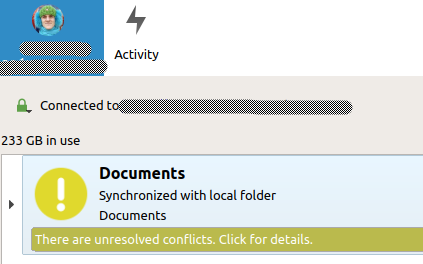
Yellow exclamation mark appears, claiming there are "unresolved conflicts". When examining these conflicts, it turns out they are just files on the ignore list or symbolic links. Since typically file systems are full of files on the ignore list (lock files, Mac OS X metadata files, etc), it makes no sense to clean the file system from them. The yellow exclamation mark can appear or disappear while the client is running.
Steps to reproduce
- Update client to 2.5
- Sync
Client configuration
Client version: 2.5.0git
Operating system: Ubuntu 18.04
OS language: English
Qt version used by client package (Linux only, see also Settings dialog): Settings dialog doesn't show Qt version.
Client package (From Nextcloud or distro) (Linux only): nextcloud-client/bionic,now 2.5.0-20181111.015125~bionic1 amd64 [installed] from deb http://ppa.launchpad.net/nextcloud-devs/client/ubuntu bionic main
Installation path of client: /usr/bin/nextcloud
 despens
All 9 comments
Hi!
Yellow exclamation mark appears, claiming there are "unresolved conflicts"
Where do they appear? Are you talking about the Activities list? Could you share some screenshots?
Thanks!
 camilasan
on 27 Nov 2018
camilasan
on 27 Nov 2018
For me the symlinks were not the issue, they don’t cause a yellow warning or "!" icon. It must be the files on the ignore list or something else for you?
Symlink syncing is tracked at https://github.com/nextcloud/desktop/issues/250
 jancborchardt
on 27 Nov 2018
jancborchardt
on 27 Nov 2018
This is what I'm seeing on the client's main screen:
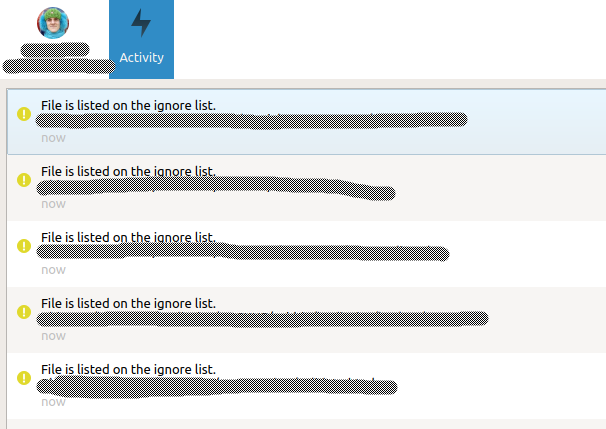
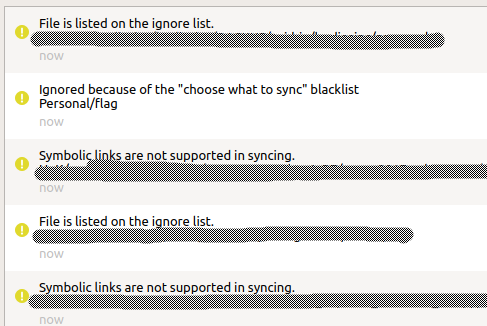
Upon "click for details" I'm getting to activities with a list of hundreds of yellow exclamation mark signs, some excerpts:
So the exclamation mark is given for
- Files on the ignore list
- Files on the blacklist (what's the difference to ignore list?)
- Symbolic Links
None of these raised an error/warning before. Files on the ignore list and symbolic links were just not synced. Now it seems like the client suggests that I should go in and weed out all the problematic files, but that's kind of impossible. I'm regularly exchanging files and directories with folks using Mac OS or Windows, and these operating systems automatically create all kinds of hidden files. Lock files that are the results of editor crashes or an unfortunate system shutdown are not ultimately valuable, but the Nextcloud client seems the wrong place to point them out to me :smile:
despens
on 27 Nov 2018
Thanks @despens! That is the same problem @jancborchardt also have.
camilasan
on 27 Nov 2018
Thanks same problem here 👍
 Railsimulatornet
on 29 Jan 2019
Railsimulatornet
on 29 Jan 2019
Also see this behavior since upgrading to the 2.5 branch (2.5.1git from Ubuntu PPA)
 tjakobi
on 13 Feb 2019
tjakobi
on 13 Feb 2019
Same problem here.
I like to hide subfolders that I do not want to sync, In the past, there were no errors with this method. Now nextvloud is complaining about every file which is recognized by the ignore ilist.
Why?
Any solutions?
 ar-ml
on 21 May 2019
ar-ml
on 21 May 2019
Duplicate of #566 (?)
 keunes
on 13 Oct 2019
keunes
on 13 Oct 2019
This should be solved with the upcoming new GUI in 2.7.
 er-vin
on 11 Jun 2020
er-vin
on 11 Jun 2020
Related issues
 kaysond
·
3Comments
kaysond
·
3Comments
 TP75
·
3Comments
TP75
·
3Comments
 Ich5003
·
3Comments
Ich5003
·
3Comments
 MichaIng
·
3Comments
MichaIng
·
3Comments
 rguenther-dz
·
3Comments
rguenther-dz
·
3Comments
Most helpful comment
This is what I'm seeing on the client's main screen:

Upon "click for details" I'm getting to activities with a list of hundreds of yellow exclamation mark signs, some excerpts:

So the exclamation mark is given for
None of these raised an error/warning before. Files on the ignore list and symbolic links were just not synced. Now it seems like the client suggests that I should go in and weed out all the problematic files, but that's kind of impossible. I'm regularly exchanging files and directories with folks using Mac OS or Windows, and these operating systems automatically create all kinds of hidden files. Lock files that are the results of editor crashes or an unfortunate system shutdown are not ultimately valuable, but the Nextcloud client seems the wrong place to point them out to me :smile: