Desktop: File Manager Overlay Icons not visible in macOS Mojave 10.14 or 10.14.1
Expected behaviour
I expect to see File Manager Overlay icons on files and folders inside of a Nextcloud sync folder as referenced here - https://docs.nextcloud.com/desktop/2.3/navigating.html#file-manager-overlay-icons
Actual behaviour
After upgrading to macOS Mojave 10.14, the icons disappeared. When I upgraded I was running 2.3.3 build 84 and just today I installed the macOS client version 2.5.0rc1 (build 20181026). No luck either.
Interesting change - after installing the 2.5.0rc1 client and before rebooting, I could see the right-click menu but after a reboot the 'Nextcloud' right-click menu disappeared in addition to the overlay icons. To recover the right-click menu, I had to to a 'Force Quit' on the Finder and 'Relaunch' it. Once that was done, the Nextcloud right-click menu was back but the icons are still missing.
Steps to reproduce
Start the Finder and browse to a Nextcloud folder
Troubleshooting steps tried:
Confirmed in System Preferences that the Nextcloud extension is activated > Quit and restarted Nextcloud app > turned off Dark Mode > Rebooted computer > upgraded from Mojave 10.14 to 10.14.1 > upgraded client from 2.3.3 to 2.5.0rc1 = Same results. No overlay icons in Nextcloud Finder folders.
Operating system:
OS language:
English
Server configuration
Operating system:
Linux
Web server:
Apache 2.4
Database:
MySQL
PHP version:
5.6
Nextcloud version:
13.0.5
 mm8974
All 16 comments
Workaround: 🍎 > Force Quit … > Finder – (needed after every reboot)
Seems this only happens when the client is "autostarted" from the system. After installing the 2.5.0rc1, the client was started manually.
BTW Same for OneDrive:
https://answers.microsoft.com/en-us/msoffice/forum/all/os-x-mojave-onedrive-finder-integration/57413b30-5ae5-4253-8580-282afb3e1d73
 michaelstingl
on 1 Nov 2018
michaelstingl
on 1 Nov 2018
Workaround: 🍎 > Force Quit … > Finder – (needed after every reboot)
Doesn't work for me on 10.14.1 with 2.3.3. Still no overlay icons nor a "Share with Nextcloud" in the context menu of files in my Nextcloud folder.
 binarious
on 8 Nov 2018
binarious
on 8 Nov 2018
Workaround: 🍎 > Force Quit … > Finder – (needed after every reboot)
Doesn't work for me on 10.14.1 with 2.3.3. Still no overlay icons nor a "Share with Nextcloud" in the context menu of files in my Nextcloud folder.
I am currently running the macOS client version 2.5.0rc1. I had a right-click Nextcloud but no overlay icons. I now have both and this is what I did:
- 🍎 > Force Quit … > Finder (This step is probably not needed.)
- 🍎 > System Preferences > Extensions > Finder Extensions > remove the checkmark from "Nextcloud Extensions"
- 🍎 > Force Quit … > Finder
- Check in the Finder to confirm that there is no right-click option or overlay icons.
- 🍎 > System Preferences > Extensions > Finder Extensions > add the checkmark to "Nextcloud Extensions"
- 🍎 > Force Quit … > Finder
- Check Finder now. I have both.
mm8974
on 8 Nov 2018
Hello,
I'm running the latest version, 2.5.1 final, with macOS 10.14.2
The client app is opened at system startup. After I close a session, when I login again, no more Finder extension (share with nextcloud) nor green dots on folders :)
I have to manually relaunch the Finder (right-click + alt -> Relaunch) to make everything work again.
 anybodesign
on 11 Jan 2019
anybodesign
on 11 Jan 2019
Hello,
I'm running the latest version, 2.5.1 final, with macOS 10.14.2
The client app is opened at system startup. After I close a session, when I login again, no more Finder extension (share with nextcloud) nor green dots on folders :)
I have to manually relaunch the Finder (right-click + alt -> Relaunch) to make everything work again.
Same here.
 jonasgarstick
on 11 Jan 2019
jonasgarstick
on 11 Jan 2019
same here guys, pretty annoying
 squareclouds
on 23 Jan 2019
squareclouds
on 23 Jan 2019
Recently updated to the latest Nextcloud client 2.5.1final (build 20181204), and using 10.14.2 - seeing the same issue.
 Upperholme
on 30 Jan 2019
Upperholme
on 30 Jan 2019
same here.
client (Version 2.5.1final (build 20181204), Mac OS 10.14.3 ) works only if not loaded at system startup
 benediktlechner
on 20 Feb 2019
benediktlechner
on 20 Feb 2019
Same here, two different machines both same config:
Version 2.5.1final (build 20181204), Mac OS 10.14.3
 antonyjsmith
on 8 Mar 2019
antonyjsmith
on 8 Mar 2019
macOS Mojave (10.14.4) - Nextcloud app 2.5.2git (build 20190319)
When I open the finder, it shows the Nextcloud folder in my favourites sidebar but no icon to it. The icon is just a grey square with rounded edges. I tried the above workarounds without success.
I even tried reinstalling the app without success.
 HigH-HawK
on 6 May 2019
HigH-HawK
on 6 May 2019
macOS Mojave (10.14.4) - Nextcloud app 2.5.2git (build 20190319)
When I open the finder, it shows the Nextcloud folder in my favourites sidebar but no icon to it. The icon is just a grey square with rounded edges. I tried the above workarounds without success.
I even tried reinstalling the app without success.
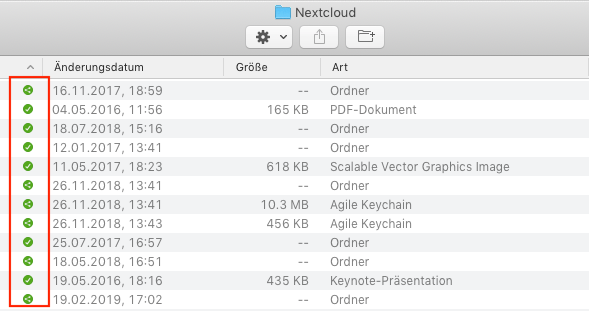
We were talking about these green overlay icons not the Nextcloud symbol in the sidebar. You are right, the symbol is just a grey square even after a forced finder reboot. That's not nice but the functionality of the overlay icons should work also for you.
jonasgarstick
on 6 May 2019
Oh dear I may have mistaken the subject here. You are right, these are working for me. Sorry for the confusion
HigH-HawK
on 6 May 2019
Same problem. No context menu and no overlay icons
Latest Mohave and 2.5.1 client here
 croessner
on 15 May 2019
croessner
on 15 May 2019
Same for me:
Client version: Version 2.5.2git (build 20190319)
Operating System: macOS Mojave 10.14.3 (18D109) (Dark Mode)
OS language: English
I even do not see the nextcloud sharing item which is shown in the doc here.
That is how it looks for me:

(with relaunch finder it works as expected)
 Mojo90
on 11 Jun 2019
Mojo90
on 11 Jun 2019
@Mojo90 @croessner @michaelstingl @antonyjsmith
Yesterday, I found a Dropbox tech support link that indicates that the missing overlay icons in the macOS finder "Nextcloud Extensions" could be caused by 3rd party finder extensions such as OneDrive. As a result, I am now testing and only allowing Dropbox and Nextcloud "Finder Extensions" to be enabled. So far the overlay icons are visible and working as designed.
https://www.dropboxforum.com/t5/Installs-integrations/Smart-sync-icons-missing/td-p/322123
- macOS > System Preferences > Extensions > Finder Extensions - review all software injecting finder extensions and disable them all except for Nextcloud.
- Then... exit and restart the Nextcloud software
- Check Finder for Overlay icons (green circle with checkmarks or three dotted triangle). If not, then...
- Restart the finder using "Force Quit"
- Check Finder again.
Please test and let me know how it works for you.
Server - 14.0.8
Desktop for Mac client 2.5.2
macOS Mojave 10.14.4
mm8974
on 11 Jun 2019
@mm8974
Thanks for this hint, you are right when only Nextcloud is activated it works without any problems. I have Dropbox and OneDrive installed as well.
Mojo90
on 12 Jun 2019
Related issues
 MichaIng
·
3Comments
MichaIng
·
3Comments
 andresantacruz
·
3Comments
andresantacruz
·
3Comments
 Engineer-of-Stuff
·
3Comments
Engineer-of-Stuff
·
3Comments
 despens
·
3Comments
despens
·
3Comments
 dkebler
·
3Comments
dkebler
·
3Comments
Most helpful comment
I am currently running the macOS client version 2.5.0rc1. I had a right-click Nextcloud but no overlay icons. I now have both and this is what I did: