Desktop: Windows sync client connection issues after hibernation
Details
- Windows 10, version 1703 (Build 15063.1088), company laptop, using system proxy
- Sync client 2.3.3 build 1
- Nextcloud 13 von CentOS 7.4 VPS
JavaScript Console Output
I think this does not apply in this case
Steps to reproduce
Not clearly reproducible
- Hibernate Windows
- Wake up from hibernation
- Notice gray tray icon and see "No connection to $host: Timeout" in sync client
Clicking the $host in the error message opens a browser window and shows $host's login page. Pausing and resuming the sync does not help.
The only solution so far is to restart the client which immediately reconnects.
 rimeraz
All 14 comments
Could you provide the client logs?
 camilasan
on 17 May 2018
camilasan
on 17 May 2018
This is from .owncloudsync.log for last two days:
[... snip ...]
#=#=#=# Syncrun started 2018-05-16T12:41:55
#=#=#=#=# Propagation starts 2018-05-16T12:41:56 (last step: 451 msec, total: 451 msec)
#=#=#=# Syncrun finished 2018-05-16T12:41:56 (last step: 36 msec, total: 488 msec)
#=#=#=# Syncrun started 2018-05-16T15:10:56
#=#=#=#=# Propagation starts 2018-05-16T15:11:06 (last step: 10525 msec, total: 10525 msec)
#=#=#=# Syncrun finished 2018-05-16T15:11:06 (last step: 20 msec, total: 10545 msec)
#=#=#=# Syncrun started 2018-05-16T15:11:12
#=#=#=# Syncrun started 2018-05-16T15:14:26
#=#=#=#=# Propagation starts 2018-05-16T15:14:29 (last step: 2816 msec, total: 2816 msec)
#=#=#=# Syncrun finished 2018-05-16T15:14:29 (last step: 17 msec, total: 2834 msec)
#=#=#=# Syncrun started 2018-05-17T07:41:56
#=#=#=#=# Propagation starts 2018-05-17T07:42:11 (last step: 15132 msec, total: 15132 msec)
#=#=#=# Syncrun finished 2018-05-17T07:42:11 (last step: 28 msec, total: 15160 msec)
#=#=#=# Syncrun started 2018-05-17T08:30:18
#=#=#=#=# Propagation starts 2018-05-17T08:30:19 (last step: 425 msec, total: 425 msec)
#=#=#=# Syncrun finished 2018-05-17T08:30:19 (last step: 29 msec, total: 454 msec)
#=#=#=# Syncrun started 2018-05-17T10:30:20
#=#=#=#=# Propagation starts 2018-05-17T10:30:20 (last step: 497 msec, total: 497 msec)
#=#=#=# Syncrun finished 2018-05-17T10:30:20 (last step: 26 msec, total: 524 msec)
#=#=#=# Syncrun started 2018-05-17T12:30:22
#=#=#=#=# Propagation starts 2018-05-17T12:30:23 (last step: 510 msec, total: 510 msec)
#=#=#=# Syncrun finished 2018-05-17T12:30:23 (last step: 28 msec, total: 539 msec)
Laptop has been hibernated 2018-05-16 17:00 and I noticed the issue 2018-05-17 07:40.
Maybe it is related to the syncrun started 2018-05-16 15:11:12 which has not been finished. But IIRC the laptop needed a reboot at that time.
I will try to provide logs from within the sync client via F12 when the issue occurs again.
rimeraz
on 17 May 2018
.owncloudsync.log:
[... snip ...]
#=#=#=# Syncrun started 2018-05-17T14:30:26
#=#=#=#=# Propagation starts 2018-05-17T14:30:27 (last step: 694 msec, total: 694 msec)
#=#=#=# Syncrun finished 2018-05-17T14:30:27 (last step: 20 msec, total: 715 msec)
#=#=#=# Syncrun started 2018-05-17T16:27:29
#=#=#=#=# Propagation starts 2018-05-17T16:27:48 (last step: 18984 msec, total: 18984 msec)
#=#=#=# Syncrun finished 2018-05-17T16:27:48 (last step: 19 msec, total: 19004 msec)
#=#=#=# Syncrun started 2018-05-18T07:52:04
#=#=#=#=# Propagation starts 2018-05-18T07:52:20 (last step: 16557 msec, total: 16557 msec)
||myfilename1.whatever|INST_REMOVE|Down|1509198877||718567||4||0|0|0|||INST_NONE|
||myfilename2.whatever|INST_REMOVE|Down|1509198877||593707||4||0|0|0|||INST_NONE|
#=#=#=# Syncrun finished 2018-05-18T07:52:20 (last step: 72 msec, total: 16630 msec)
05-18 08:13:05:877 9724 OCC::FolderWatcher::changeDetected: detected changes in paths: QSet("C:/Users/myuser/nc/syncissue.log")
05-18 08:13:07:877 9724 OCC::FolderMan::scheduleFolder: Schedule folder  "1"  to sync!
05-18 08:13:07:877 9724 OCC::FolderMan::scheduleFolder: Folder is not ready to sync, not scheduled!
05-18 08:13:07:877 9724 OCC::SocketListener::sendMessage: SocketApi:  Sending message:  "UPDATE_VIEW:C:\\Users\\myuser\\nc"
05-18 08:13:10:395 9724 OCC::CheckServerJob::slotTimeout: TIMEOUT virtual void OCC::CheckServerJob::slotTimeout()
05-18 08:13:10:395 9724 OCC::AccountSettings::showConnectionLabel: "Keine Verbindung zu Nextcloud auf <a href=\"https://myhost.example/nc\">https://myhost.example/nc</a>\nZeitüberschreitung"
05-18 08:13:10:395 9724 OCC::FolderMan::slotAccountStateChanged: Account "[email protected]" disconnected or paused, terminating or descheduling sync folders
05-18 08:13:15:388 9724 OCC::Account::resetNetworkAccessManager: Resetting QNAM
05-18 08:13:15:388 9724 OCC::ConnectionValidator::checkServerAndAuth: Checking server and authentication
05-18 08:13:15:388 9724 OCC::ConnectionValidator::checkServerAndAuth: Trying to look up system proxy
05-18 08:13:15:388 9724 OCC::ConnectionValidator::systemProxyLookupDone: No system proxy set by OS
05-18 08:13:15:388 9724 OCC::AbstractNetworkJob::start: !!! OCC::CheckServerJob created for "https://myhost.example/nc" + "status.php" "OCC::ConnectionValidator"
Timeline:
- ~16:45 hibernate
- ~07:51 wake up
- 07:52 local removal of two files that have been deleted remotely
- 08:10 noticing the gray icon
- 08:13 saving the log
please note that the client log (F12) was empty at first. when I saved the file into the sync folder (doh!) it started to show the content pasted above.
selecting "Open Nextcloud in browser" from sync client tray menu, the website opens in browser so I can exclude a general connectivity issue. and to be honest, I don't believe the following log entry:
OCC::ConnectionValidator::systemProxyLookupDone: No system proxy set by OS
Shouldn't the client retry? To me it seems that it does not.
rimeraz
on 18 May 2018
same problem here.
 haegelix
on 4 Dec 2018
haegelix
on 4 Dec 2018
Same problem here. Version version to 2.5.1. Windows 10.
 HirIMogul
on 20 Jan 2019
HirIMogul
on 20 Jan 2019
+1
2.5.1. Windows 10
 timdah
on 2 Feb 2019
timdah
on 2 Feb 2019
I have the same problem with Windows 10 Home, version 1809, build 17763.316, OS language: German
But I not have a gray icon, but a red cross. If I close the desktop client and start it again it works. But this requires manual intervention after each wake up from hibernate which should not be the case.
Client Log:
|[OCC::ActivityListModel::startFetchJob |Start fetching activities for "[email protected]"|
|—|---|
|[OCC::AccessManager::createRequest |2 “” “http://192.168.253.23/cloud/ocs/v2.php/cloud/activity?start=0&count=100&format=json” has X-Request-ID “0b4002c0-35d7-4744-9fe0-5d8814b7566c”|
|[OCC::AbstractNetworkJob::start |OCC::JsonApiJob created for “http://192.168.253.23/cloud” + “ocs/v2.php/cloud/activity” “OCC::ActivityListModel”|
|[OCC::AccessManager::createRequest |2 “” “http://192.168.253.23/cloud/ocs/v2.php/apps/notifications/api/v2/notifications?format=json” has X-Request-ID “e6a22fe3-c10d-4542-a09e-40a813891721”|
|[OCC::AbstractNetworkJob::start |OCC::JsonApiJob created for “http://192.168.253.23/cloud” + “ocs/v2.php/apps/notifications/api/v2/notifications” “OCC::ServerNotificationHandler”|
|[OCC::WebFlowCredentials::slotFinished |request finished|
|[OCC::AbstractNetworkJob::slotFinished |QNetworkReply::NetworkError(UnknownNetworkError) “Der Zugriff auf das Netzwerk ist nicht gestattet.” QVariant(Invalid)|
|[OCC::WebFlowCredentials::stillValid |Still valid?|
|[OCC::WebFlowCredentials::stillValid |QNetworkReply::NetworkError(UnknownNetworkError)|
|[OCC::WebFlowCredentials::stillValid |“Der Zugriff auf das Netzwerk ist nicht gestattet.”|
|[OCC::JsonApiJob::finished |JsonApiJob of QUrl(“http://192.168.253.23/cloud/ocs/v2.php/cloud/activity?start=0&count=100&format=json”) FINISHED WITH STATUS “UnknownNetworkError Der Zugriff auf das Netzwerk ist nicht gestattet.”|
|[OCC::JsonApiJob::finished |Network error: “ocs/v2.php/cloud/activity” “Der Zugriff auf das Netzwerk ist nicht gestattet.” QVariant(Invalid)|
|[OCC::WebFlowCredentials::slotFinished |request finished|
|[OCC::AbstractNetworkJob::slotFinished |QNetworkReply::NetworkError(UnknownNetworkError) “Der Zugriff auf das Netzwerk ist nicht gestattet.” QVariant(Invalid)|
|[OCC::WebFlowCredentials::stillValid |Still valid?|
|[OCC::WebFlowCredentials::stillValid |QNetworkReply::NetworkError(UnknownNetworkError)|
|[OCC::WebFlowCredentials::stillValid |“Der Zugriff auf das Netzwerk ist nicht gestattet.”|
|[OCC::JsonApiJob::finished |JsonApiJob of QUrl(“http://192.168.253.23/cloud/ocs/v2.php/apps/notifications/api/v2/notifications?format=json”) FINISHED WITH STATUS “UnknownNetworkError Der Zugriff auf das Netzwerk ist nicht gestattet.”|
|[OCC::JsonApiJob::finished |Network error: “ocs/v2.php/apps/notifications/api/v2/notifications” “Der Zugriff auf das Netzwerk ist nicht gestattet.” QVariant(Invalid)|
|[OCC::ServerNotificationHandler::slotNotificationsReceived |Notifications failed with status code 0|
|[OCC::Folder::slotRunEtagJob |Trying to check “http://192.168.253.23/cloud/remote.php/dav/files/Thomas/ 1” for changes via ETag check. (time since last sync: 500 s)|
|[OCC::AccessManager::createRequest |6 “PROPFIND” “http://192.168.253.23/cloud/remote.php/dav/files/Thomas/ 1” has X-Request-ID “7ece8acf-9c9e-42fa-8f7c-6bd4a67a6ec4”|
|[OCC::RequestEtagJob::start |request network error: “Der Zugriff auf das Netzwerk ist nicht gestattet.”|
|[OCC::AbstractNetworkJob::start |OCC::RequestEtagJob created for “http://192.168.253.23/cloud” + “/” “OCC::Folder”|
|[OCC::WebFlowCredentials::slotFinished |request finished|
|[OCC::AbstractNetworkJob::slotFinished |QNetworkReply::NetworkError(UnknownNetworkError) “Der Zugriff auf das Netzwerk ist nicht gestattet.” QVariant(Invalid)|
|[OCC::WebFlowCredentials::stillValid |Still valid?|
|[OCC::WebFlowCredentials::stillValid |QNetworkReply::NetworkError(UnknownNetworkError)|
|[OCC::WebFlowCredentials::stillValid |“Der Zugriff auf das Netzwerk ist nicht gestattet.”|
|[OCC::RequestEtagJob::finished |Request Etag of QUrl(“http://192.168.253.23/cloud/remote.php/dav/files/Thomas/ 1”) FINISHED WITH STATUS “UnknownNetworkError Der Zugriff auf das Netzwerk ist nicht gestattet.”|
|[OCC::ActivityWidget::slotPrimaryButtonClickedOnListView |Opening “d:%5CNextcloud%5Clocal_sync_Thomas” in browser for Notification/Activity “Beim Öffnen eines Ordners ist ein Fehler aufgetreten. Der Zugriff auf das Netzwerk ist nicht gestattet.”|
|[unknown |ShellExecute ‘d:%5CNextcloud%5Clocal_sync_Thomas’ failed (error 2).|
|[OCC::Utility::openBrowser |QDesktopServices::openUrl failed for QUrl(“d:%5CNextcloud%5Clocal_sync_Thomas”)|
 Chingato
on 18 Feb 2019
Chingato
on 18 Feb 2019
This is really annoying on laptops and big repos, as I often change VPN and often send the laptop to sleep.
The repos practically never get synced, as the sync-client is always offline.
 panspectron2017
on 18 Mar 2019
panspectron2017
on 18 Mar 2019
I have been monitoring this thread, hoping for a quick fix. Our company has a number of people with the same problem.
 darren-harrison
on 18 Mar 2019
darren-harrison
on 18 Mar 2019
I am suffering from the same problem. I work part time from home, so too often data "stays at home" ;)
 swaechter
on 22 Mar 2019
swaechter
on 22 Mar 2019
I am have also this problem for longer time. Only a restart of the app helps ... thats annoying.
I also have a red cross. The context menu opens also just fine, but if I double click or also try rightclick > preferences the window can't open.
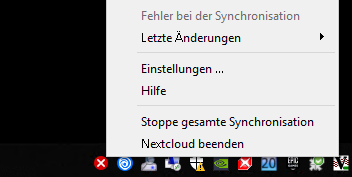
Only a Nextcloud entry is on the Taskbar - but no window pops up. When I hover over the entry I have only a blank window in the preview.
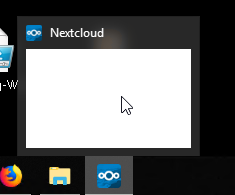
Oh, installed is nextcloud client 2.5.1 - on %AppData%\Nextcloud\Nextcloud_sync.log you find only entrys about synced files - no hint to the problem.
And I also have two accounts - maybe others have also more then one account?
 ThomasCr
on 15 Apr 2019
ThomasCr
on 15 Apr 2019
for me the issue is solved since I upgraded the desktop sync client. I am using hibernate under Windows 10 (1809)
Server: 15.0.7
Desktop: 2.5.2git (build 20190319)
Chingato
on 25 Apr 2019
I can confirm what @Chingato reported. I have three different servers/accounts and 2.5.2 resolved the problem
swaechter
on 26 Apr 2019
I still have the problem with 2.6.4.
 nagua
on 27 May 2020
nagua
on 27 May 2020
Related issues
 Linuxfabrik
·
3Comments
Linuxfabrik
·
3Comments
 Ich5003
·
3Comments
Ich5003
·
3Comments
 nilsbecker
·
3Comments
nilsbecker
·
3Comments
 TP75
·
3Comments
TP75
·
3Comments
 Valdiralita
·
3Comments
Valdiralita
·
3Comments
Most helpful comment
I have the same problem with Windows 10 Home, version 1809, build 17763.316, OS language: German
But I not have a gray icon, but a red cross. If I close the desktop client and start it again it works. But this requires manual intervention after each wake up from hibernate which should not be the case.
Client Log:
|[OCC::ActivityListModel::startFetchJob |Start fetching activities for "[email protected]"|
|—|---|
|[OCC::AccessManager::createRequest |2 “” “http://192.168.253.23/cloud/ocs/v2.php/cloud/activity?start=0&count=100&format=json” has X-Request-ID “0b4002c0-35d7-4744-9fe0-5d8814b7566c”|
|[OCC::AbstractNetworkJob::start |OCC::JsonApiJob created for “http://192.168.253.23/cloud” + “ocs/v2.php/cloud/activity” “OCC::ActivityListModel”|
|[OCC::AccessManager::createRequest |2 “” “http://192.168.253.23/cloud/ocs/v2.php/apps/notifications/api/v2/notifications?format=json” has X-Request-ID “e6a22fe3-c10d-4542-a09e-40a813891721”|
|[OCC::AbstractNetworkJob::start |OCC::JsonApiJob created for “http://192.168.253.23/cloud” + “ocs/v2.php/apps/notifications/api/v2/notifications” “OCC::ServerNotificationHandler”|
|[OCC::WebFlowCredentials::slotFinished |request finished|
|[OCC::AbstractNetworkJob::slotFinished |QNetworkReply::NetworkError(UnknownNetworkError) “Der Zugriff auf das Netzwerk ist nicht gestattet.” QVariant(Invalid)|
|[OCC::WebFlowCredentials::stillValid |Still valid?|
|[OCC::WebFlowCredentials::stillValid |QNetworkReply::NetworkError(UnknownNetworkError)|
|[OCC::WebFlowCredentials::stillValid |“Der Zugriff auf das Netzwerk ist nicht gestattet.”|
|[OCC::JsonApiJob::finished |JsonApiJob of QUrl(“http://192.168.253.23/cloud/ocs/v2.php/cloud/activity?start=0&count=100&format=json”) FINISHED WITH STATUS “UnknownNetworkError Der Zugriff auf das Netzwerk ist nicht gestattet.”|
|[OCC::JsonApiJob::finished |Network error: “ocs/v2.php/cloud/activity” “Der Zugriff auf das Netzwerk ist nicht gestattet.” QVariant(Invalid)|
|[OCC::WebFlowCredentials::slotFinished |request finished|
|[OCC::AbstractNetworkJob::slotFinished |QNetworkReply::NetworkError(UnknownNetworkError) “Der Zugriff auf das Netzwerk ist nicht gestattet.” QVariant(Invalid)|
|[OCC::WebFlowCredentials::stillValid |Still valid?|
|[OCC::WebFlowCredentials::stillValid |QNetworkReply::NetworkError(UnknownNetworkError)|
|[OCC::WebFlowCredentials::stillValid |“Der Zugriff auf das Netzwerk ist nicht gestattet.”|
|[OCC::JsonApiJob::finished |JsonApiJob of QUrl(“http://192.168.253.23/cloud/ocs/v2.php/apps/notifications/api/v2/notifications?format=json”) FINISHED WITH STATUS “UnknownNetworkError Der Zugriff auf das Netzwerk ist nicht gestattet.”|
|[OCC::JsonApiJob::finished |Network error: “ocs/v2.php/apps/notifications/api/v2/notifications” “Der Zugriff auf das Netzwerk ist nicht gestattet.” QVariant(Invalid)|
|[OCC::ServerNotificationHandler::slotNotificationsReceived |Notifications failed with status code 0|
|[OCC::Folder::slotRunEtagJob |Trying to check “http://192.168.253.23/cloud/remote.php/dav/files/Thomas/ 1” for changes via ETag check. (time since last sync: 500 s)|
|[OCC::AccessManager::createRequest |6 “PROPFIND” “http://192.168.253.23/cloud/remote.php/dav/files/Thomas/ 1” has X-Request-ID “7ece8acf-9c9e-42fa-8f7c-6bd4a67a6ec4”|
|[OCC::RequestEtagJob::start |request network error: “Der Zugriff auf das Netzwerk ist nicht gestattet.”|
|[OCC::AbstractNetworkJob::start |OCC::RequestEtagJob created for “http://192.168.253.23/cloud” + “/” “OCC::Folder”|
|[OCC::WebFlowCredentials::slotFinished |request finished|
|[OCC::AbstractNetworkJob::slotFinished |QNetworkReply::NetworkError(UnknownNetworkError) “Der Zugriff auf das Netzwerk ist nicht gestattet.” QVariant(Invalid)|
|[OCC::WebFlowCredentials::stillValid |Still valid?|
|[OCC::WebFlowCredentials::stillValid |QNetworkReply::NetworkError(UnknownNetworkError)|
|[OCC::WebFlowCredentials::stillValid |“Der Zugriff auf das Netzwerk ist nicht gestattet.”|
|[OCC::RequestEtagJob::finished |Request Etag of QUrl(“http://192.168.253.23/cloud/remote.php/dav/files/Thomas/ 1”) FINISHED WITH STATUS “UnknownNetworkError Der Zugriff auf das Netzwerk ist nicht gestattet.”|
|[OCC::ActivityWidget::slotPrimaryButtonClickedOnListView |Opening “d:%5CNextcloud%5Clocal_sync_Thomas” in browser for Notification/Activity “Beim Öffnen eines Ordners ist ein Fehler aufgetreten. Der Zugriff auf das Netzwerk ist nicht gestattet.”|
|[unknown |ShellExecute ‘d:%5CNextcloud%5Clocal_sync_Thomas’ failed (error 2).|
|[OCC::Utility::openBrowser |QDesktopServices::openUrl failed for QUrl(“d:%5CNextcloud%5Clocal_sync_Thomas”)|