Desktop: NextCloud snap client in Ubuntu not saving credentials due to AppArmor policy.
Installing the Snap version of nextcloud-client works and the application syncs fine, however reboot or even restart of the application itself results in it asking for a password. It does not save the password to the gnome keyring, displaying a message in the password dialog, "No keychain service available." I have verified that gnome-keyring is installed and the daemon is running.
Installing and using the apt version of nextcloud-client works perfectly fine and in fact stores and uses the credentials in the keyring without fail.
Running the nexcloud-client snap from the command line results in the following:
Qt: Session management error: Authentication Rejected, reason : None of the authentication protocols specified are supported and host-based authentication failed
QNetworkManagerInterface::QNetworkManagerInterface(QObject) propsReply "An AppArmor policy prevents this sender from sending this message to this recipient; type=\"method_call\", sender=\":1.125\" (uid=1000 pid=6412 comm=\"nextcloud \") interface=\"org.freedesktop.DBus.Properties\" member=\"GetAll\" error name=\"(unset)\" requested_reply=\"0\" destination=\"org.freedesktop.NetworkManager\" (uid=0 pid=811 comm=\"/usr/sbin/NetworkManager --no-daemon \")"
QNetworkManagerInterface::QNetworkManagerInterface(QObject) nmReply "An AppArmor policy prevents this sender from sending this message to this recipient; type=\"method_call\", sender=\":1.125\" (uid=1000 pid=6412 comm=\"nextcloud \") interface=\"org.freedesktop.NetworkManager\" member=\"GetDevices\" error name=\"(unset)\" requested_reply=\"0\" destination=\"org.freedesktop.NetworkManager\" (uid=0 pid=811 comm=\"/usr/sbin/NetworkManager --no-daemon \")"
"Object path cannot be empty"
Gkr-Message: secret service operation failed: An AppArmor policy prevents this sender from sending this message to this recipient; type="method_call", sender=":1.151" (uid=1000 pid=6412 comm="nextcloud ") interface="org.freedesktop.DBus.Peer" member="Ping" error name="(unset)" requested_reply="0" destination="org.freedesktop.secrets" (uid=1000 pid=1902 comm="/usr/bin/gnome-keyring-daemon --daemonize --login ")
The very last line indicates why it's not saving the password (or reading them) as it's not able to communicate with the keyring daemon.
 ByteSizeOtter
All 6 comments
i run in this, too.
do you have a workaround?
 elcolumbio
on 1 Apr 2018
elcolumbio
on 1 Apr 2018
Hi
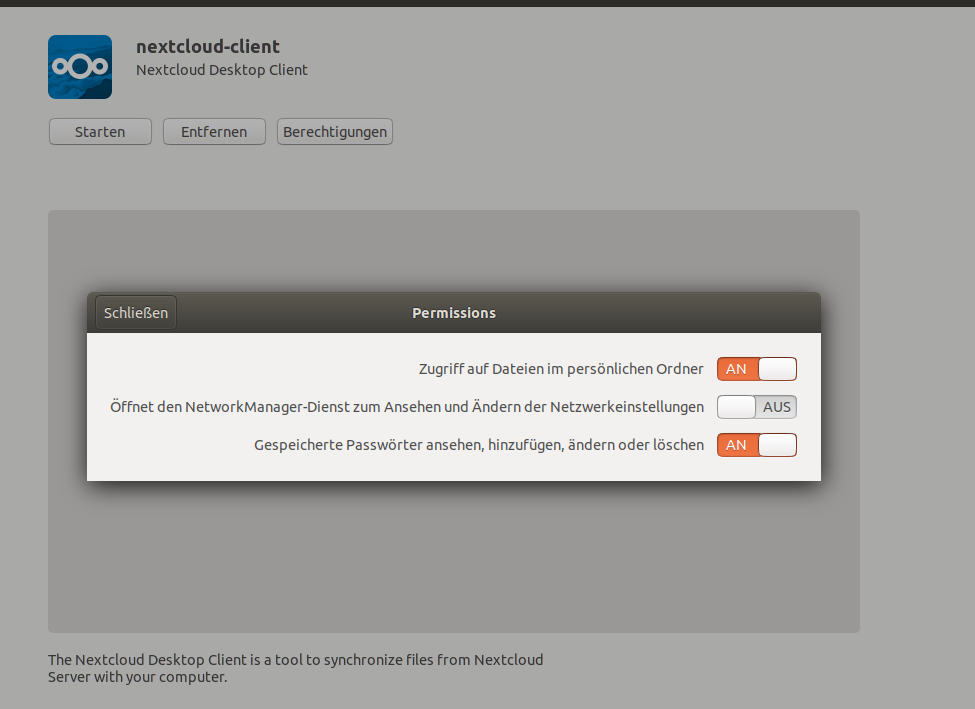
I also Encountered this problem under ubuntu 18.04 with the snap version,
However i could solve it by adding the permission to add/store/modify passwords in the software center
 norbekaiser
on 2 May 2018
norbekaiser
on 2 May 2018
I have the same issue with apparmor policy preventing storing and fetching the password. I am not able to set permissions through the above suggested way.
 brzd
on 4 May 2018
brzd
on 4 May 2018
There is an ongoing discussion here: Nextcloud-client snap doesn’t remember password in the snapcraft forum involving (I think?) the snap author and some snap devs.
 stooj
on 16 Jun 2018
stooj
on 16 Jun 2018
Got same problem, but can't change the permissions , too
snap connect nextcloud-client:password-manager-service solved the problem
Thanks @stooj
 gerhardbeck
on 10 Jul 2018
gerhardbeck
on 10 Jul 2018
Closing this here becaue it seems to be solved.
For another libgnome-keyring issue please see: https://github.com/nextcloud/desktop/issues/1292#issuecomment-560008811
 misch7
on 30 Nov 2019
misch7
on 30 Nov 2019
Related issues
 jospoortvliet
·
4Comments
jospoortvliet
·
4Comments
 kaysond
·
3Comments
kaysond
·
3Comments
 andresantacruz
·
3Comments
andresantacruz
·
3Comments
 steven-omaha
·
3Comments
steven-omaha
·
3Comments
 RobertZenz
·
3Comments
RobertZenz
·
3Comments
Most helpful comment
Hi

I also Encountered this problem under ubuntu 18.04 with the snap version,
However i could solve it by adding the permission to add/store/modify passwords in the software center