Desktop: Icon in Windows Explorer - like Dropbox, OneDrive etc.
Hi,
here is my problem:
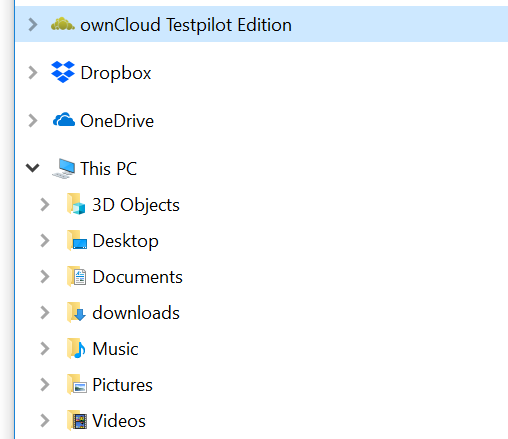
I just set up Nextcloud, created Group Folder, groups and users, assigned Access rights and did some testing. So far everything Looks fine, however there is one thing stopping me from deploying it to multiple users. It is the fact that I don’t get an Icon or shortcut in Windows Explorer or on the Desktop.
After the Setup of the client is completed, there is this menue to use browser or open the local Explorer. If I choose the Explorer it is fine, however. As soon as the window is closed, there is no link / Icon available to get back to the nextcloud Directory.
Of course I know where the nextcloud directory is located, but I have to roll out the Client to several users, I mean USERS, no admins, no PC skills beside using Office and the Win File Explorer.
And I have no Access to their PCs, they are far away, all across the Country.
Dropbox, OneDrive, SynologyDrive, all working flawless with this respect, offering a Symbol in the WIN Explorer.
Having this Icon is a "must have" I'd say.
 gidhap
All 10 comments
Related: https://github.com/owncloud/client/issues/5295
You could give it a try in the 2.5.0 daily pre-release builds of the ownCloud upstream project.
 michaelstingl
on 13 Jan 2018
michaelstingl
on 13 Jan 2018
THANKS !
I used todays testpilotcloud-2.5.0.8981-nightly20180112-setup.exe and - here you go
gidhap
on 13 Jan 2018
Hi,
I was looking for this and updated the nextcloud-client to version 2.5.1 on Windows 10 pro.
First the install hang at the end, after a restart everything works but I do not see the symbol like in the last post from gidhap. Do I need to mark a chechbox and which one?
regards,
Jan
 janvanl
on 7 Jan 2019
janvanl
on 7 Jan 2019
@janvanl I had the same problem.
Before you install the new version, uninstall the old version and delete all nextcloud folders in Appdata.
 GrameJunior
on 9 Jan 2019
GrameJunior
on 9 Jan 2019
This seems to work: https://help.nextcloud.com/t/shortcut-in-windows-file-explorer-similar-to-one-drive/5521/6
 brknkfr
on 8 May 2019
brknkfr
on 8 May 2019
Since we are working on it - https://nextcloud.com/blog/nextcloud-introduces-virtual-drive-in-desktop-client-to-simplify-desktop-integration - I will close this issue.
 camilasan
on 8 May 2019
camilasan
on 8 May 2019
Reopening, since it does not seem to be available right now.
 claell
on 4 Apr 2020
claell
on 4 Apr 2020
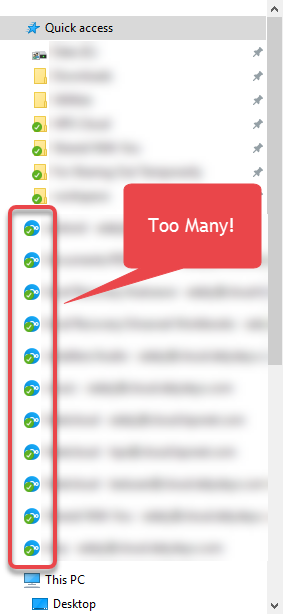
I like this feature, except on one of my machines I'm logged into multiple accounts each with multiple folder sync connections (not just the entire folder). For each sync connection, I have another drive shortcut in Windows Explorer. I would prefer to disable these or at least have the option to turn them off, since they take up a majority of the "quick access" area.
 linucksrox
on 18 Sep 2020
linucksrox
on 18 Sep 2020
@linucksrox This seems to be a problem with this feature or a feature request to improve it. Since this is only for the original feature request and not follow-ups, it would be great, if you created a new issue with this instead. Then the progress and discussion of that can be tracked there.
@camilasan Not sure, is this available now, so can this be closed?
claell
on 18 Sep 2020
Yep, this should work, I clearly see it here. :-)
 er-vin
on 29 Sep 2020
er-vin
on 29 Sep 2020
Related issues
 DBLouis
·
3Comments
DBLouis
·
3Comments
 TP75
·
3Comments
TP75
·
3Comments
 kaysond
·
3Comments
kaysond
·
3Comments
 dkebler
·
3Comments
dkebler
·
3Comments
 RobertZenz
·
3Comments
RobertZenz
·
3Comments
Most helpful comment
Related: https://github.com/owncloud/client/issues/5295
You could give it a try in the 2.5.0 daily pre-release builds of the ownCloud upstream project.