Desktop: clicking on a file:// protocol path does not open windows explorer since version 3.5.0
I confirm (by marking "x" in the [ ] below):
- [x] This is not a troubleshooting question. Troubleshooting questions go here: http://www.mattermost.org/troubleshoot/.
- [x] This doesn't reproduce on web browsers (such as in Chrome). If it does, issue reports go to the Mattermost Server repository.
- [x] I have read contributing guidelines.
Summary
clicking on a file:// protocol path does not open windows explorer
Steps to reproduce
steps to reproduce:
- type a new message containing:
file:c:\
(note that mattermost will autoconvert this to file:///C:/)
Expected behavior
the windows explorer opens when clicking on the path/file
Observed behavior
nothing happens
Possible fixes
none
 maximd
All 12 comments
Thanks @maximd for the report!
Can you try if the expected behaviour
- works in Chrome (or other browser)
- works in another desktop app that you use?
 jasonblais
on 29 Aug 2017
jasonblais
on 29 Aug 2017
No, the expected behaviour does not work in chrome either.
Though this behaviour (clicking on a file:// link opens windows explorer) works in mattermost desktop 3.4.1. In fact, in version 3.4.1, a dialog box would appear the first time a file:// link is clicked:
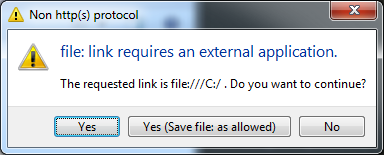
The expected behaviour stopped working in mattermost desktop 3.5.0
maximd
on 30 Aug 2017
Oh interesting, didn't realize it used to work.
@yuya-oc Would it be related to this PR? https://github.com/mattermost/desktop/pull/359
jasonblais
on 30 Aug 2017
Not related.
I feel that Chrome's rule to handle file:// was changed. Now Electron and Chrome show an error message Not allowed to load local resource: file:///C:/ in the devtools console. And Electron doesn't emit the necessary event to open the dialog in our code.
electron/electron#9393 looks a similar issue of Electron. As far as I read it, changing file: protocol behavior seems hard in Electron and our end. And protocol.interceptFileProtocol('file', handler) doesn't perform for me.
 yuya-oc
on 30 Aug 2017
yuya-oc
on 30 Aug 2017
Possible solution
Using Electron's method "shell.openItem" when the error occurs.
This is not a smart way, but it works for me and may be a possible fix. What do you think?
Sample code
src/browser/components/MattermostView.jsx
added line 161-186
    webview.addEventListener('console-message', (e) => {
      const message = `[${this.props.name}] ${e.message}`;
      switch (e.level) {
      case 0:
        console.log(message);
        break;
      case 1:
        console.warn(message);
        break;
      case 2:
        console.error(message);

        // Chrome's console message
        var regex = /Not allowed to load local resource:\s*file:\/+(.+)/;
        var match = regex.exec(e.message);
        if (match != null) {
          if (match.length == 2) {
            // For Windows, change path separator
            var fpath = match[1].replace(/\//g, "\\").trim();

            // For multibyte characters. (e.g. Japanese)
            fpath = decodeURI(fpath);

            // For local drive. (e.g. C:\Windows)
            if (fpath.search(/^[A-Z]:/i) == 0) {
              // Better not to open it for security reasons
            }
            // For network drive. (e.g. \\COMPUTER\SharedFolder)
            else {
              fpath = "\\\\" + fpath;

              if (shell.openItem(fpath) != true) {
                console.log("Failed to open: " + fpath);
              }
            }
          }
        }
        break;
      default:
        console.log(message);
        break;
      }
    });
- Mattermost desktop app 4.0.0
- Windows 7 and 10
 lip-d
on 11 Feb 2018
lip-d
on 11 Feb 2018
Nice! @yuya-oc thoughts? The Electron issue was closed as "won't fix".
jasonblais
on 12 Feb 2018
Actually, @lip-d , would you be open to submitting a pull request and we'll review? We'll test it out and merge if it looks good
jasonblais
on 15 Feb 2018
Would you give me a few weeks? Then I'd like to try it.
lip-d
on 15 Feb 2018
@lip-d Most certainly. Let us know if you have any questions then
jasonblais
on 15 Feb 2018
712 would solve the problem. On macOS and Linux, I think remote servers should be mounted as local directories. So I guess the feature was originally not working. So I add "Windows" label for this.
yuya-oc
on 26 Feb 2018
Awesome, thanks everyone for your work!
maximd
on 27 Feb 2018
Hi to all,
I think the problem is happening again.
Can't open "file:///O:/
Could anybody help me out?
Happening on Desktop Version 4.1.2
Best wishes
Timo
 synotic
on 12 Mar 2019
synotic
on 12 Mar 2019
Related issues
 AKorezin
·
5Comments
AKorezin
·
5Comments
 mcarthur-cpt
·
6Comments
mcarthur-cpt
·
6Comments
 bentolor
·
6Comments
lip-d
·
6Comments
bentolor
·
6Comments
lip-d
·
6Comments
 i23098
·
4Comments
i23098
·
4Comments