Desktop: Tray icon on Linux is too large
I confirm (by marking "x" in the [ ] below):
- [x] This is not a feature idea. Feature ideas go here: http://www.mattermost.org/feature-ideas/
- [x] This is not a troubleshooting question. Troubleshooting questions go here: http://www.mattermost.org/troubleshoot/
- [x] This is a product defect issue that can be reproduced using the steps listed below.
- [x] I have read CONTRIBUTING.md.
Summary
The tray icon on Linux is just not looking that great, but the biggest issue I think is that it is too large compared to my other icons.
Steps to reproduce
- Run Mattermost 3.4.0 on Linux.
- Enable "icon in menu bar".
- Make sure to have a tray available to see the "menu bar icon".
- Operating System: Arch Linux
- Mattermost Desktop App version: 3.4.0
- Mattermost Server version: 3.4.0
Expected behavior
To see a tray icon that matches other tray icons in size.
Observed behavior

Icons are, from left to right: CopyQ, DeaDBeeF, Discord, Mattermost, volume, Slack, Steam, Telegram.
Notice how the Mattermost tray icon is larger than other icons, and does not fit. It's pretty ugly.
Possible fixes
I believe you may just need to add some padding around the logo. The edge of the logo itself probably touches the edge of the entire image, while for other icons there some padding? I am not entirely sure.
While we're at it, the "unread counter" is a black blob with red border, this _could_ be done nicer, imo. That dot is also rather large. Maybe take inspiration from how the Slack icon handles unread messages?
 Brottweiler
All 23 comments
Hello,
On Mint 18 with cinnamon it's ok.

Would you have an option to choose between 2 size of icon ?
 St-Ex
on 28 Sep 2016
St-Ex
on 28 Sep 2016
I should have mentioned I am using XFCE, and the mattermost-desktop AUR package.
Option? Where?
Brottweiler
on 28 Sep 2016
Currently there is no option to do so. I was thinking of one, perhaps add a scale factor on the icon. By the way, you mentionned
To see a tray icon that matches other tray icons in size.
Current icon has the same size as DeaDBeeF ( width / hight )
St-Ex
on 28 Sep 2016
@St-Ex I don't think no other application has a "scale factor" for the icon. There's something about the icon that just makes it look off...
Do you mean the same image size? Maybe the actual logo inside the image is different size, though? I guess it might just look like it's larger. I definitely think the icon is out of place, maybe replacing it with a different icon would be good.
Brottweiler
on 28 Sep 2016
In my understanding, need padding around the logo in the png (indicated with the red square).

It would make better, but what size is consistent in Linux desktop? Are there any guidelines?
 yuya-oc
on 28 Sep 2016
yuya-oc
on 28 Sep 2016
In kde (plasmashell 5.8.1) it is also totally broken: 
 nightvisi0n
on 22 Nov 2016
nightvisi0n
on 22 Nov 2016
Just like @nightvisi0n said ... on Mint 18 KDE (Plasma) it's broken and almost invisible using a dark threme.
 frittentheke
on 10 Jan 2017
frittentheke
on 10 Jan 2017
Hi,
tray icon is invisible on i3wm (http://i3wm.org/).
 fauust
on 9 Mar 2017
fauust
on 9 Mar 2017
Icon appeared this morning.
I didn't restart the OS but I restarted Mattermost.

fauust
on 10 Mar 2017
Hello everyone.
I was complaining of this issue as well. I tried several tricks.
- Adding a padding to the icon image not working. The image still takes the same width end height.
- If the icon is not visible on KDE Plasma, this is maybe due to the fact by default light is choosen. You can change the application references (
File->Settings...in the desktop app):

Please pay attention that thedarkandlightvalues here are not related to your desktop theme. You must choose them in reverse order. For dark theme desktops, chooselight. For light desktops, choosedark. - The position issue is due to the GTK tray implementation of electron.
- This issue could ultimately be fixed by implementing SVG support and overhauling the GTK tray support directly on electron.
- The
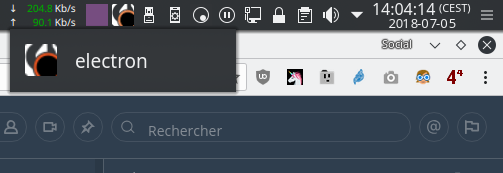
electrontext appearing as overlay when hovering the tray is not due to Mattermost but also to the electron GTK implementation (happening with Riot - electron based app - as well).
 wget
on 5 Jul 2018
wget
on 5 Jul 2018
wget
on 5 Jul 2018
wget
on 5 Jul 2018
Tests
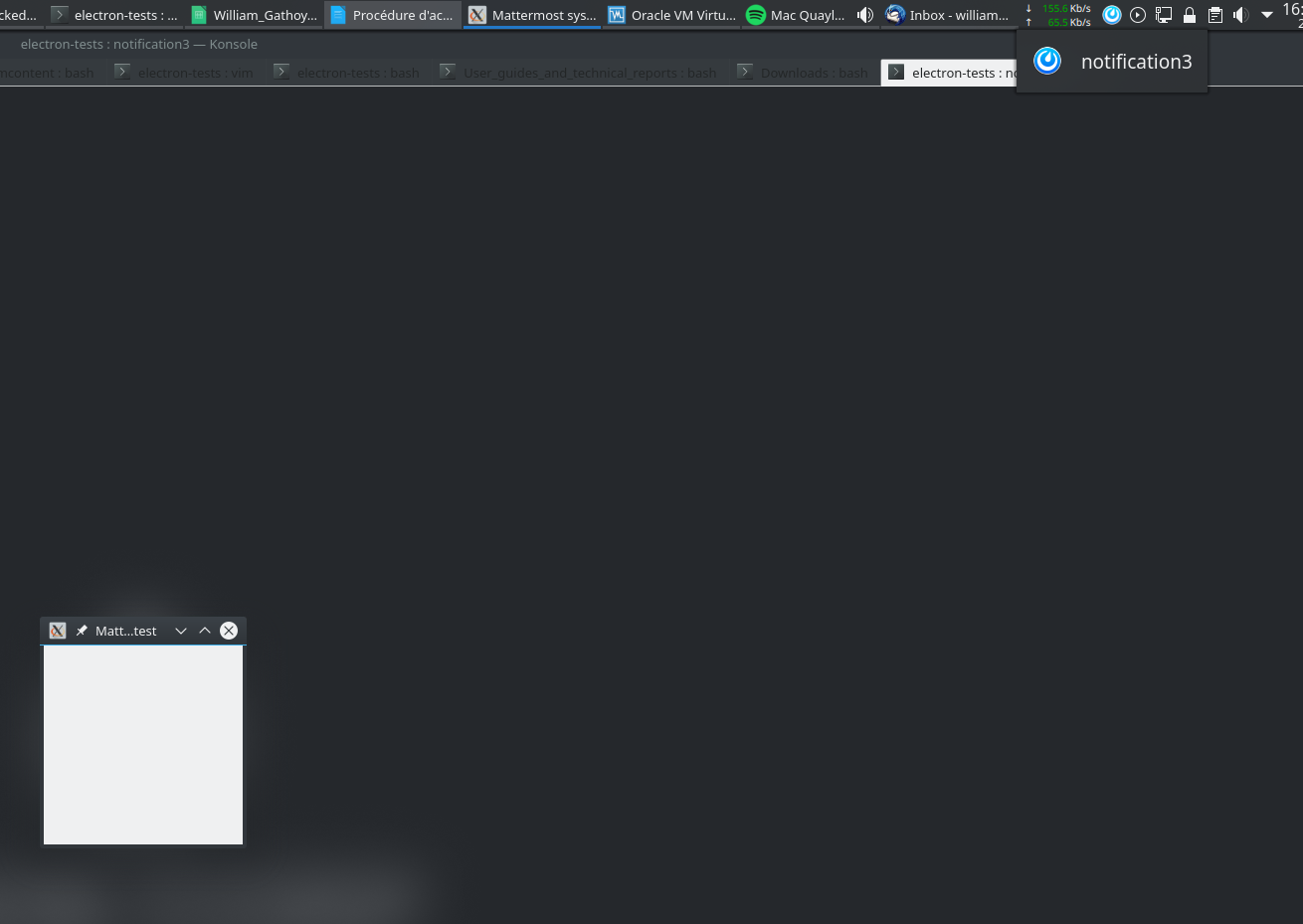
I have made further tests wrt GTK Status Icon.
Here is the code I used on different desktop environments:
#include <gtk/gtk.h>
#include <stdlib.h>

void quitMenu(GtkWidget *p_widget, gpointer user_data) {
    printf("Mattermost is quitting\n");
    gtk_main_quit();
}

void sysTrayMenu(GtkStatusIcon *status_icon, guint button, guint activate_time, gpointer user_data) {
    GtkWidget *menu = gtk_menu_new();
    GtkWidget *item = gtk_menu_item_new_with_mnemonic("Quit Mattermost");
    gtk_menu_shell_append(GTK_MENU_SHELL (menu), item);
    g_signal_connect_swapped(item, "activate", G_CALLBACK(quitMenu), NULL);
    gtk_widget_show_all(menu);
    gtk_menu_popup(GTK_MENU(menu), NULL, NULL, gtk_status_icon_position_menu, status_icon,button, activate_time);
}

int main (int argc, char ** argv) {
    GtkWidget *pWindow = NULL;
    GtkStatusIcon *pSysTrayIcon = NULL;

    gtk_init(&argc, &argv);
    pWindow = gtk_window_new(GTK_WINDOW_TOPLEVEL);
    gtk_window_set_position(GTK_WINDOW(pWindow), GTK_WIN_POS_CENTER_ALWAYS);
    gtk_window_set_title(GTK_WINDOW(pWindow), "Mattermost systray test");
    g_signal_connect(G_OBJECT(pWindow), "destroy", G_CALLBACK(gtk_main_quit), NULL);

    // Status icon
    pSysTrayIcon = gtk_status_icon_new_from_file("./mattermost.png");
    gtk_status_icon_set_tooltip_text(pSysTrayIcon, "The text as tooltip");
    printf("DEBUG tooltip text: %s\n", gtk_status_icon_get_tooltip_text(pSysTrayIcon));
    fflush(stdout);

    g_signal_connect(G_OBJECT(pSysTrayIcon), "popup-menu", G_CALLBACK(sysTrayMenu), pWindow);
    gtk_widget_show_all(pWindow);
    gtk_main();
    return 0;
}
I made the tests using GTK2 and GTK3 to show case the differences between both library versions.
If you're using Fedora, install gtk2-devel and gtk3-devel in order to have all the requirements for pkg-config.
Compilation lines:
- For GTK2:
gcc -Wall notif.c $(pkg-config --libs --cflags gtk+-2.0) -o notif - For GTK3:
gcc -Wall notif.c $(pkg-config --libs --cflags gtk+-3.0) -o notif
Results
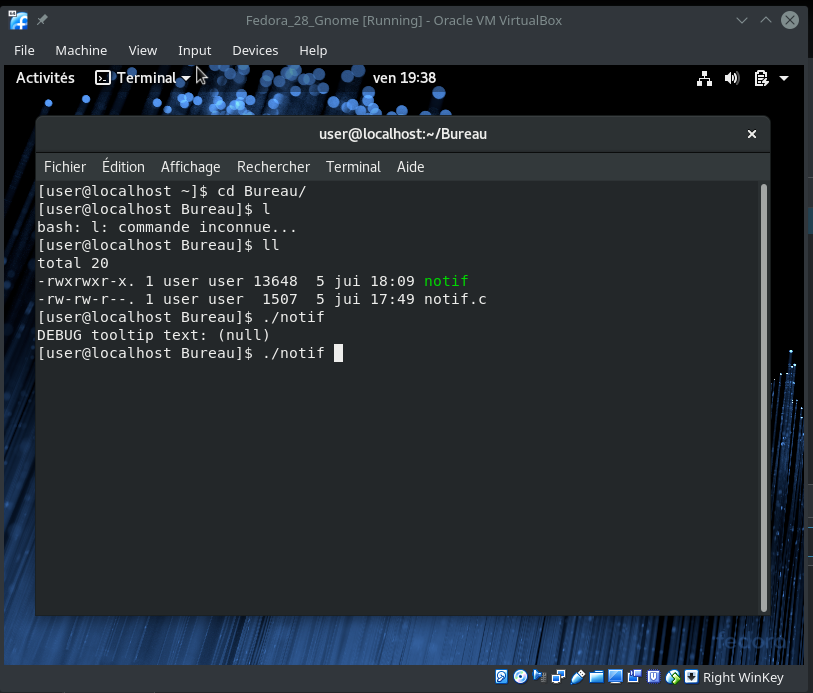
On Gnome, the status icon is not really useful. Tooltips and icons are not displayed and are not even taken into account (look at the (null) which is being returned). Only the actions implemented on the right click are actually used:
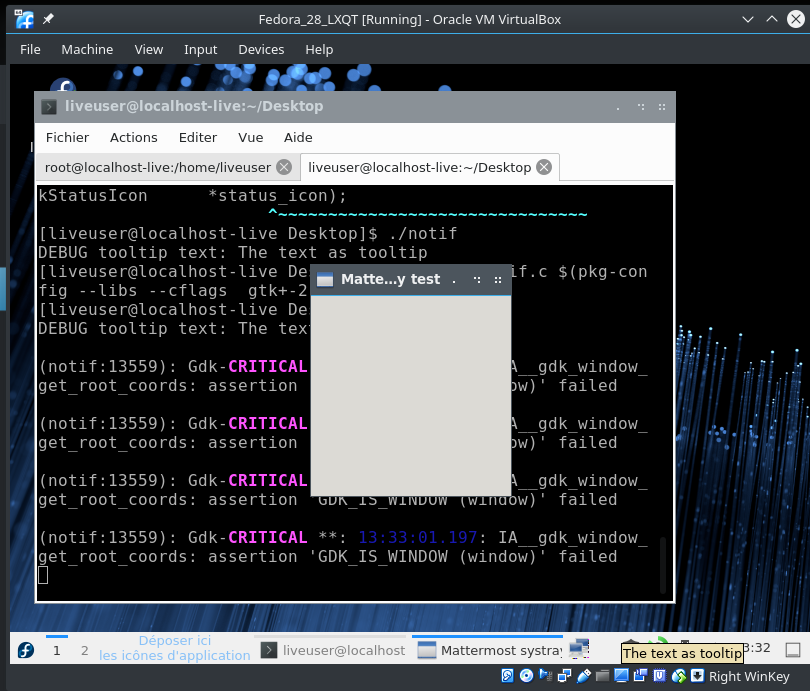
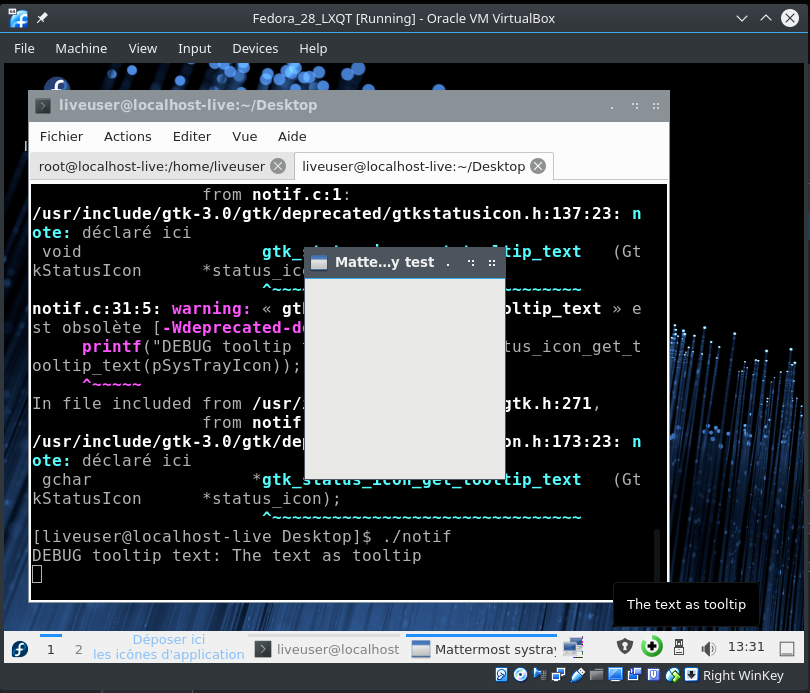
On LXQT, depending on the GTK version, the result is different, but the status, tooltips and right click actions are working like expected.
GTK2:
GTK3:
On KDE Plasma 5, the right click action and icon are working like expected, the tooltip is not taken into account, but is returned properly from the code (we don't have a (null) statement: DEBUG tooltip text: The text as tooltip is displayed like expected). Only the name of the executable is important here. On Linux, this means that using a shell (like the following line) to launch Mattermost desktop is not a good solution:
electron /usr/lib/mattermost-desktop/app.asar --disable-dev-mode "$@"
Because such a configuration will display electron as application name in the tray location on Plasma 5. Maybe using a JS wrapper could help. See here for more info how to do this. This is a point I still need to test.
Conclusions
If we want to fix this use and bring SVG support in the process, hacking the status icon code in Google Chromium is needed because the Tray implementation of electron is based on the Chromium implementation (because they include files like chrome/browser/ui/libgtkui/gtk_status_icon.h which comes from the libgtkui, a component of chromium. See the GTK status icon implementation on Chromium repo.
wget
on 7 Jul 2018
There seems to be a workaround though: https://forum.kde.org/viewtopic.php?f=289&t=139804&sid=126b7c810ffe90ca3247790b364770ea&p=400696#p400696
 ArchangeGabriel
on 19 Jul 2018
ArchangeGabriel
on 19 Jul 2018
Some great news from here: https://github.com/vector-im/riot-web/issues/6767#issuecomment-412674274
Chromium code has been fixed in libappindicator case while GTK StatusIcon is being deprecated. Chromium 70 should contain the fix, and when Electron will use this version it should be fixed too.
ArchangeGabriel
on 26 Sep 2018
Ticket for tracking: https://mattermost.atlassian.net/browse/MM-14131
 amyblais
on 12 Feb 2019
amyblais
on 12 Feb 2019
Hello,
On Manjaro 18.02 XFCE looks bad:

I am using mattermost-desktop from AUR package.
 pedroSBastos
on 14 Feb 2019
pedroSBastos
on 14 Feb 2019
another nuance: mm icon looks ugly on the side panel in gnome 3

 emergie
on 26 Feb 2019
emergie
on 26 Feb 2019
over 3 years and nothing has been done. Linux and it typical minimized importance due to market share.. Does anyone have a link to any relevant Electron upstream issue(s)?
 skewty
on 13 Dec 2019
skewty
on 13 Dec 2019
Electron 8.x completely changed the way tray icon are handled. I have not tried Mattermost Desktop with this electron version because I am currently not part of any Mattermost instance, but I guess it’s worth the try.
ArchangeGabriel
on 17 Feb 2020
I don't know if this is of importance to you. But I've experienced this with Slack and rambox too, so don't know if it's general Ubuntubudgie problem in my case or if it's all apps having the same issue.
Sounds more like the first one.
 tomasnorre
on 23 May 2020
tomasnorre
on 23 May 2020
I came to this issue from one on the Electron GitHub, and in my limited experience with Ubuntu AppIndicator icons, basing the margins on the ones used by GNOME's "symbolic" icons seems to work reasonably well. Specifically, these are based on a 16x16 grid (though the dimensions of the actual PNG export can be a larger base-2 multiple for better downscaling to Electron's fixed tray-icon dimensions), and the artwork should fit within 14x14 units on the 16x16-unit canvas. If Chromium is updated to support SVG tray icons, they would probably also be tinted according to the desktop theme, since that's how GNOME (and presumably also KDE) treats SVG "symbolic" icons.
 elsiehupp
on 18 Jan 2021
elsiehupp
on 18 Jan 2021
Using Arch Linux with Gnome 40 and have the same issue. 
 enginhu
on 29 Apr 2021
enginhu
on 29 Apr 2021
Oh. Mine is at least not cropped, but just resizing my bar.
tomasnorre
on 29 Apr 2021
Related issues
 mcarthur-cpt
·
6Comments
mcarthur-cpt
·
6Comments
 mcfedr
·
3Comments
mcfedr
·
3Comments
 DanShockley
·
6Comments
DanShockley
·
6Comments
 attzonko
·
5Comments
attzonko
·
5Comments
 aborderon
·
5Comments
aborderon
·
5Comments
Most helpful comment
In kde (plasmashell 5.8.1) it is also totally broken: