Deno: Typescript error [TS2345] in the 'asserts' test library
I tried to run Deno inside a Docker container and I got this error

error: TS2345 [ERROR]: Argument of type '{ depth: number; sorted: boolean; trailingComma: boolean; compact: boolean; iterableLimit: number; }' is not assignable to parameter of type 'InspectOptions'.
Object literal may only specify known properties, and 'sorted' does not exist in type 'InspectOptions'.
sorted: true,
~~~~~~~~~~~~
at https://deno.land/[email protected]/testing/asserts.ts:26:9
The command '/bin/sh -c deno cache modules/deps.ts' returned a non-zero code: 1
▸    Error: docker build exited with Error: 1
Dockerfile line:
RUN deno cache modules/deps.ts
Docker command:
/bin/sh -c deno cache modules/deps.ts
/modules/deps.ts content:
import { Router } from "https://deno.land/x/oak/mod.ts";
import { Application } from "https://deno.land/x/oak/mod.ts";
import { config } from "https://deno.land/x/dotenv/mod.ts";

const deps = {
Router,
Application,
config,
};

export default deps;
 mateusfg7
All 7 comments
Same issue here
 amillett
on 15 Jul 2020
amillett
on 15 Jul 2020
What version of Deno are you using? Based on your example, it needs to be version 1.2.0 or later.
 kitsonk
on 15 Jul 2020
kitsonk
on 15 Jul 2020
I get it with deno 1.1.0, running the oak example code will trigger:
import { Application } from "https://deno.land/x/oak/mod.ts";

const app = new Application();

app.use((ctx) => {
  ctx.response.body = "Hello World!";
});

await app.listen({ port: 8000 });
I first ran into this while testing out yolk (which currently does not support deno 1.2.0)
amillett
on 15 Jul 2020
If you are using the main branch of oak (which it appears you are) it requires Deno 1.2.0 or later.
Generally you shouldn't be using main branch. You should be using specific versions. https://deno.land/x/[email protected]/mod.ts is the last version compatible with 1.1.0.
kitsonk
on 15 Jul 2020
Yes, switching to 5.3.1 in the example works in deno 1.1.0. I'll poke around in the yolk dependencies to see if I can find the root there, it doesn't appear to be with oak (yolk has oak pinned at 5.1.1). Thanks!
amillett
on 15 Jul 2020
it worked, that was the error so I changed the version of Deno in the Dockerfile
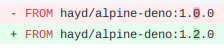
and updated the version of Deno on my machine to 1.2.0
deno upgrade --version 1.2.0
and everything went back to working correctly
mateusfg7
on 15 Jul 2020
Related issues
 CruxCv
·
3Comments
CruxCv
·
3Comments
 justjavac
·
3Comments
justjavac
·
3Comments
 metakeule
·
3Comments
metakeule
·
3Comments
 motss
·
3Comments
motss
·
3Comments
 zugende
·
3Comments
zugende
·
3Comments