Deltachat-desktop: Import backup not working
- export backup from android (old app)
- login on desktop
- import backup
Cannot import backups to accounts in use.error in console
How is importing a backup supposed to work? Since you need to be logged in in order to select Import Backup... how can this have worked ever?
 ralphtheninja
All 6 comments
Managed to get it work, but I had to manually close desktop, enter the correct folder and rename the .bak file to db.sqlite. Something must have changed, either we have broken something in desktop or core is doing things a bit differently.
cc @r10s @Jikstra
ralphtheninja
on 31 Dec 2018

@r10s Are we doing something wrong from desktop or is this a bug in core?
ralphtheninja
on 3 Jan 2019
Nevermind, it seems that this error is by design:
    if (dc_is_configured(context)) {
        dc_log_error(context, 0, "Cannot import backups to accounts in use.");
        goto cleanup;
        }
So this means this has never worked. This is more than just a bug. We have to rethink how an import should be made. At the moment you have to be logged in in order to even do the import, but being logged in (configured) means you can't do it...
ralphtheninja
on 3 Jan 2019
Just checked android-ii and it has the import functionality on the first screen, so it makes sense to have this in desktop as well.
ralphtheninja
on 4 Jan 2019
I would really like if the rule to prevent loading a backup file whenever I will do would be disabled. Currently it is blocking me from using desktop (I have 2 mobile devices which I try to have in sync and without an import I would destroy my keys !)
In mobile ui the import is offered, but fails (on my tablet) :-(
And later on the import backup option is not any longer offered (in mobile).
Maybe there are dummies who will destroy there database by importing an old backup unwanted (after selecting it, entering the key and accepting a question ...), but for experienced users it is a nightmare that the import is blocked (either by that message in desktop or the missing option in mobile ..)
 haeckser
on 28 Jan 2019
haeckser
on 28 Jan 2019
- Platform (linux/mac/windows): Linux
- Delta Chat Desktop Version: 0.100
- Expected behavior: Import Backup
- Actual behavior: Cannot import backups to accounts in use.
- Steps to reproduce the problem: I have made a backup of my account in the app for Android and importing the backup into the account of Linux gives error
Screenshots:
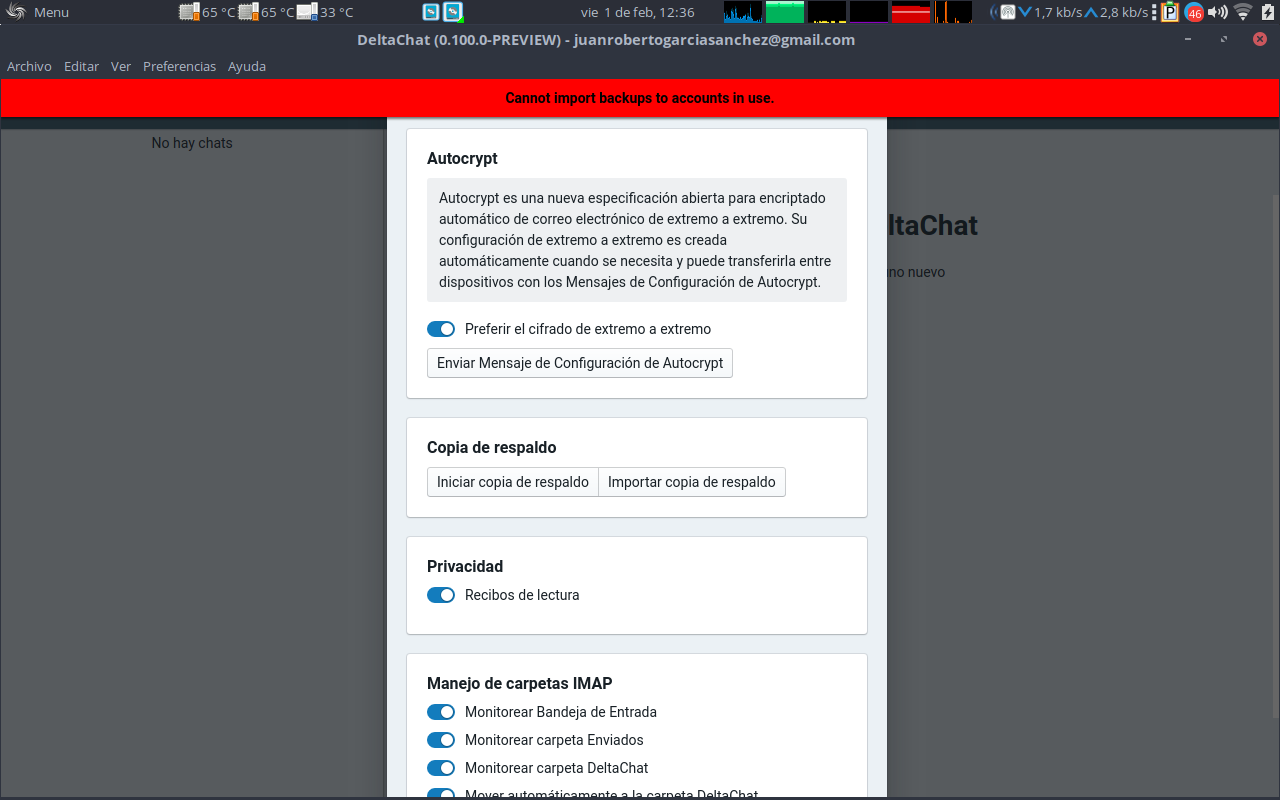
Logs:
"2019-02-01T11:36:42.203Z" "main/deltachat" "ERROR" [{"columnNumber":11,"lineNumber":127,"fileName":"/opt/DeltaChat/resources/app.asar/src/main/deltachat.js","functionName":"onError","source":" at onError (/opt/DeltaChat/resources/app.asar/src/main/deltachat.js:127:11)"},{"columnNumber":7,"lineNumber":131,"fileName":"/opt/DeltaChat/resources/app.asar/src/main/deltachat.js","functionName":"DeltaChat.dc.on","source":" at DeltaChat.dc.on (/opt/DeltaChat/resources/app.asar/src/main/deltachat.js:131:7)"},{"columnNumber":13,"lineNumber":182,"fileName":"events.js","functionName":"DeltaChat.emit","source":" at DeltaChat.emit (events.js:182:13)"},{"columnNumber":12,"lineNumber":628,"fileName":"/opt/DeltaChat/resources/app.asar/node_modules/deltachat-node/index.js","functionName":"handleEvent","source":" at handleEvent (/opt/DeltaChat/resources/app.asar/node_modules/deltachat-node/index.js:628:12)"},{"columnNumber":13,"lineNumber":509,"fileName":"/opt/DeltaChat/resources/app.asar/node_modules/deltachat-node/index.js","functionName":"Timeout._pollInterval.setInterval [as _onTimeout]","source":" at Timeout._pollInterval.setInterval [as _onTimeout] (/opt/DeltaChat/resources/app.asar/node_modules/deltachat-node/index.js:509:13)"},{"columnNumber":11,"lineNumber":425,"fileName":"timers.js","functionName":"ontimeout","source":" at ontimeout (timers.js:425:11)"},{"columnNumber":5,"lineNumber":289,"fileName":"timers.js","functionName":"tryOnTimeout","source":" at tryOnTimeout (timers.js:289:5)"},{"columnNumber":5,"lineNumber":252,"fileName":"timers.js","functionName":"listOnTimeout","source":" at listOnTimeout (timers.js:252:5)"}] "Cannot import backups to accounts in use."
I solved it moving DeltaChat.bak to /home/user/.config/DeltaChat/*/db.sqlite, but you need implement the import backup option to the first screen when user is logged out to work fine
 juanro49
on 1 Feb 2019
juanro49
on 1 Feb 2019
Related issues
 webratte
·
7Comments
webratte
·
7Comments
 Jikstra
·
6Comments
Jikstra
·
6Comments
 IHateMicroSoft
·
4Comments
Jikstra
·
7Comments
IHateMicroSoft
·
4Comments
Jikstra
·
7Comments
 Simon-Laux
·
3Comments
Simon-Laux
·
3Comments
Most helpful comment
Just checked
android-iiand it has the import functionality on the first screen, so it makes sense to have this in desktop as well.