Deltachat-android: New UI is unresponsive
I was thinking the buttons were hard to tap(and opened an issue about it: #203), but it was actually related to unresponsiveness in the Delta Chat UI, I was thinking it was just me because I have a low RAM device, but now a friend upgraded to 0.98 and is complaining about this and he has a device with 3GB of RAM. I(and my friend) sometimes have to tap a button(ex. emoji keyboard, camera, etc) several times before it finally react to the click event, also in general the UI feels much more slow than in 0.20. My friend also says scrolling in chats felt slow and described the UI as "clumsy".
I think this is related with the imap/smtp threads, Often when I have experienced this I was sending/receiving messages... but I'm not sure about this...
- Platform (android/blackberry/anbox): 6.0 and 8.1
- Device: BLU(RAM:458MB) and Xiaomi(RAM:3GB)
- Delta Chat Version: 0.98
 adbenitez
All 16 comments
well, there is a difference to 0.20, which just paints everything on it's own which is fast, but got unmaintainable and also has many other issues eg. wrt accessibility. the new iu does everything the "android way" and uses views for basically everything.
so, i would say there is a difference to 0.20, but i would not say the ui is really slow :)
(also using older devices as the nexus s and nexus 4 here)
i do not think, there is a difference since the threads were activated in 0.98.2, in fact, the threads are there already since mid-december or so, however, these threads, just do nothing most of the time.
however, might be i've overseen things, so, of course, concrete tips to make things faster are very welcome.
wrt to the emoji-keyboard-switch-button: this is too small, i've also noticed this :)
 r10s
on 17 Jan 2019
r10s
on 17 Jan 2019
No, I noticed this lowliness since I moved from 0.20, it is not related to 0.98.2, my friend complained now, because he updated from 0.20 to 0.98 (because of me) I had explained him how to update to that version (exporting backup from 0.20, installing 0.90 and updating to 0.98) I was the only one trying dev versions because registration(and import on >0.90) was broken for them (#179)
adbenitez
on 17 Jan 2019
I was not worried about this with my low ram phone, but with 3GB of RAM... this smells like a bug... or some bottleneck... seems like the background threads are affecting the UI responsiveness...
adbenitez
on 17 Jan 2019
okay, i see, thanks for explanation. yes, there is a difference between 0.20.0 and 0.98.0 which mainly comes from the fact that the telegram-ui does not use activities and just "paints" everything on its own. this is not bad per se, however, it has issues with accessibility and, in case of the telegram-code, it is just unmaintainable.
compared to other apps on my phones, i do not think 0.98 is slow, it's just that 0.20 was faster.
of course, and as mentioned above, might be we've overseen something, however, of course, we're not aware of it (otherwise we'd fixed it already :)
r10s
on 17 Jan 2019
I think the migration from the telegram-code is ok, I think you are not able to notice this because your network is fast, so emails are sent/received almost immediately, but in our slow network this process can take several seconds or even minutes, while users try to interact with the UI and the app is busy with this background activities the app doesn't respond well to tap events...
well sure you are busy so I will stop posting here for now...
adbenitez
on 17 Jan 2019
I think we are doing too much work on the main thread, so frames are skipped. Will have to debug this.
 angelo-fuchs
on 17 Jan 2019
angelo-fuchs
on 17 Jan 2019
@adbenitez i don't think that the network or watching threads havel much to do with
slowness. You can try to switch network off completely and then navigate through
the app -- is there a change in speed?
I also brought up this speed issue last month or so -- it seems to be related to
changing Android activities -- the chatlist is one, and the single chat view
another activity etc. One could use "fragments" instead says the internet but
in any case, this issue has been postponed for further investigation. Myself
i switched off change-activity-animations -- and Delta now feels faster ;)
On Thu, Jan 17, 2019 at 14:37 -0800, Angelo Fuchs wrote:
I think we are doing too much work on the main thread, so frames are skipped. Will have to debug this.
--
You are receiving this because you are subscribed to this thread.
Reply to this email directly or view it on GitHub:
https://github.com/deltachat/deltachat-android-ii/issues/240#issuecomment-455358197
 hpk42
on 18 Jan 2019
hpk42
on 18 Jan 2019
I'm still using v0.20.0 and sometimes I have the feeling too, that under bad network conditions the UI response is slow. Even if 0.20.0 in general is quicker than the new UI there could be a relation to the network conditions. Or some locks in db handling? Maybe database handling should be moved to threads? Isn't it?
Meanwhile I have a really huge db at the phone and a feel it gets slower (Have an old S3 Mini in use).
 csb0730
on 18 Jan 2019
csb0730
on 18 Jan 2019
@hpk42 not tested deeply but with the cell data off I don't get the lacks, personally I don't have seen the lacks too often, my networks conditions are "fast" (enough) most the time, and I don't use to send messages bigger than 10KB, but in situations when I had being receiving "big" (time consuming) messages or the app is busy trying to send a message I have noticed some lowliness, but this friend of mine seems to have being experimenting a sync operation or something because he described the whole app being slow and unresponsive even to scroll, he said something like picture-transition-effects in the UI (like if frames were skipped) (his device has 3GB of RAM, and he was not using other apps)
adbenitez
on 18 Jan 2019
also I see some flickering in avatar images in the chats list, as is the whole list is redraw every time some chat receive a message or a read receipt...
adbenitez
on 18 Jan 2019
On Fri, Jan 18, 2019 at 07:55 -0800, Asiel Díaz Benítez wrote:
also I see some flickering in avatar images in the chats list, as is the whole list is redraw every time some chat receive a message or a read receipt...
i think android just listens dumbly on "DC_EVENT_MSGS_CHANGED" events
and redraws everything. Not sure why this causes flickering, though.
hpk42
on 20 Jan 2019
Not sure why this causes flickering, though.
pretty sure, this can be optimized.
r10s
on 20 Jan 2019
I just tried deltachat with fast wlan, HSDPA and offline. I had it terminated before every try so to cause a sync while I was testing (not a lot of data was transmitted, though). In this test there was no noticeable difference. It felt faster then normal though, so maybe we have some kind of ceiling pileup, so a fresh start is faster then an app that has run for a while...?
angelo-fuchs
on 21 Jan 2019
This is noticeable since the change to the signal database. Also signal itself isn't super responsive, so maybe this is a general signal code problem. But without a doubt this should be fixed/improved.
 Jikstra
on 21 Jan 2019
Jikstra
on 21 Jan 2019
On my phone the performance improved rapidly with use, so after about 5 minutes of use (after a restart of the phone) the switches between screens were down to 1.5 secs (which is a little bit worse then delta 0.20 but not much). I tried probing around if I can remove some elements - And I could, but it didn't make much of an impact. Effort ongoing, but I don't see a fast solution to this anytime soon.
angelo-fuchs
on 25 Jan 2019
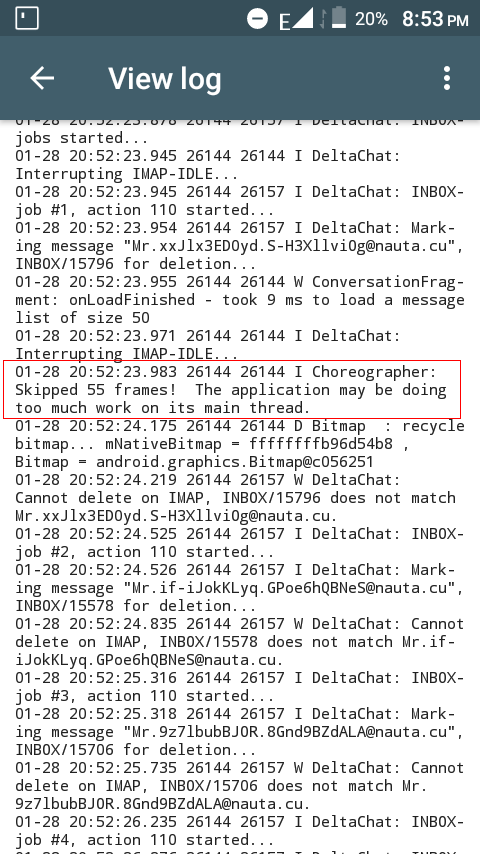
Not sure if this is useful, but some days ago while seeing the logs, I found a message that said: "Skipped 55 frames! The application may be doing too much work on its main thread."
Screenshot:
adbenitez
on 30 Jan 2019
Related issues
adbenitez
·
4Comments
 AndreasLattmann
·
4Comments
r10s
·
4Comments
AndreasLattmann
·
4Comments
r10s
·
4Comments
 webratte
·
4Comments
webratte
·
4Comments
 gerryfrancis
·
4Comments
gerryfrancis
·
4Comments
Most helpful comment
I think we are doing too much work on the main thread, so frames are skipped. Will have to debug this.