Hi, I'm trying to set up the theme used by delta, but I'm not sure if I'm missing something or this is the way it's supposed to work.
I'm using alacrity and the gruvbox colors.
I think my screenshot is basically self-explanatory since I'm doing a git diff with changes related to delta and this is what I'm seeing (gd is my alias for git diff):

As you can see, most of the lines are appearing in black although the line numbers are green.
Is it possible that it's doing that because I'm using a "non-conventional" name gitconfig.conf that's sourced from my ~/.gitconfig?
I tried setting stynax-theme to gruvbox, but it doesn't change anything
 farzadmf
All 18 comments
@farzadmf can you check that your terminal emulator is supporting 24-bit color (truecolor) correctly using the instructions here: https://github.com/dandavison/delta#24-bit-color-truecolor?
If that doesn't solve it, to do more self-contained debugging, try piping into delta and applying command-line options explicitly, e.g.
git show | delta --no-gitconfig
git show | delta --no-gitconfig --plus-style 'red yellow'
git show | delta --no-gitconfig --plus-style '#aa0000 #dddddd'
etc, playing around with colors.
Is it possible that it's doing that because I'm using a "non-conventional" name gitconfig.conf that's sourced from my ~/.gitconfig?
I don't think that's likely to be a problem as delta uses libgit2 to read the config which doubtless does this right. (You could always check though by renaming it temporarily.)
 dandavison
on 1 Dec 2020
dandavison
on 1 Dec 2020
Thank you so much @dandavison for the very quick reply and sorry for the delay to get back to you.
You were right about the 24-bit color; it wans't properly working using tmux inside alacritty. I took care of that and now the colors look better :slightly_smiling_face:
However, I don't seem to be able to set the theme :slightly_frowning_face:
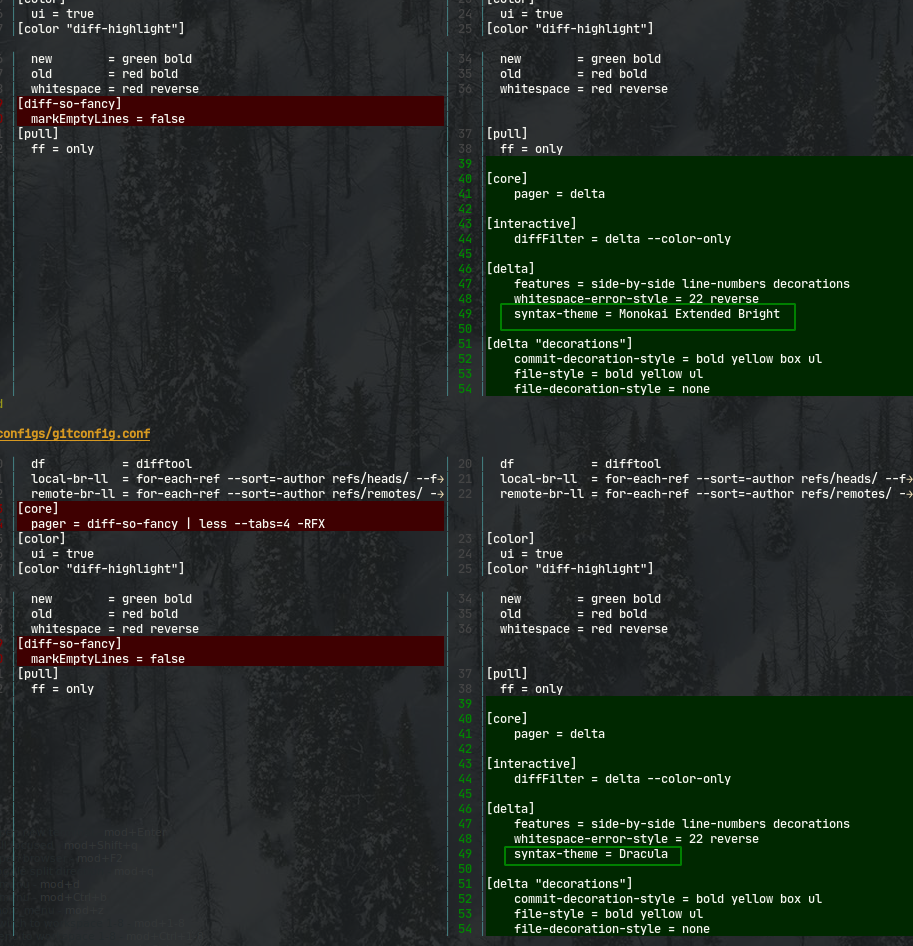
Below, I post a screenshot, and you can see from the diffs, I'm setting the theme to Monokai Extended Bright and Dracula, but they look the same:
Also, another thing I notice is that when I do delta --show-syntax-themes --dark, the red and green I see there are different than what I see in my terminal, as you can see in the screenshot below:
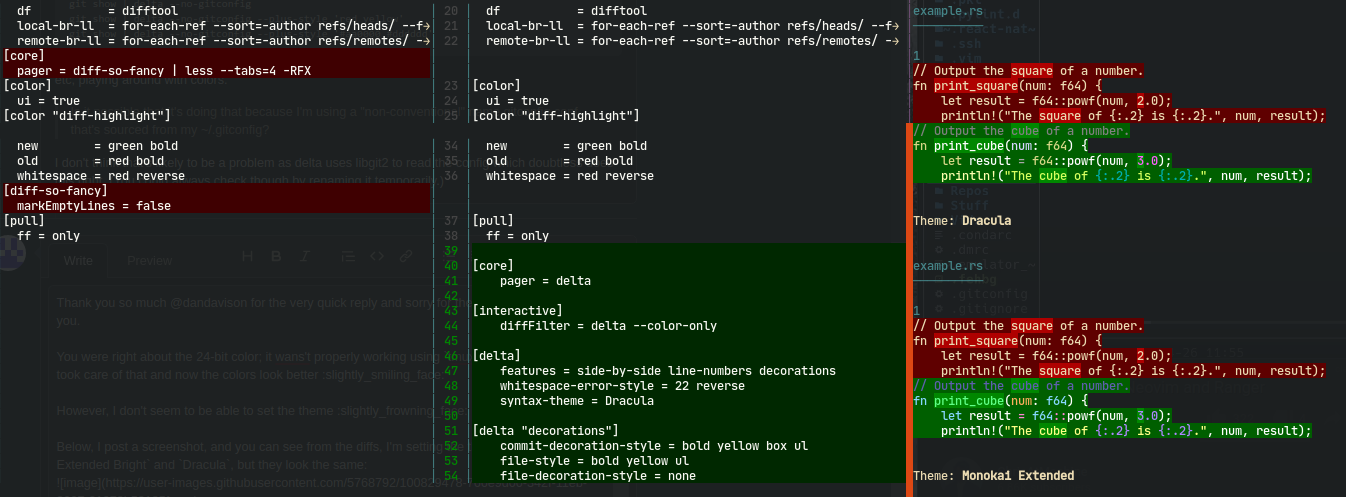
And also, as you probably figured out from the screenshots, my changes are basically a copy/paste of the quick example mentioned in the beginning section of the README
Also, it's confirmed, the name of the file _does_ matter (renaming my gitconfig.conf to gitconfig enables syntax coloring):
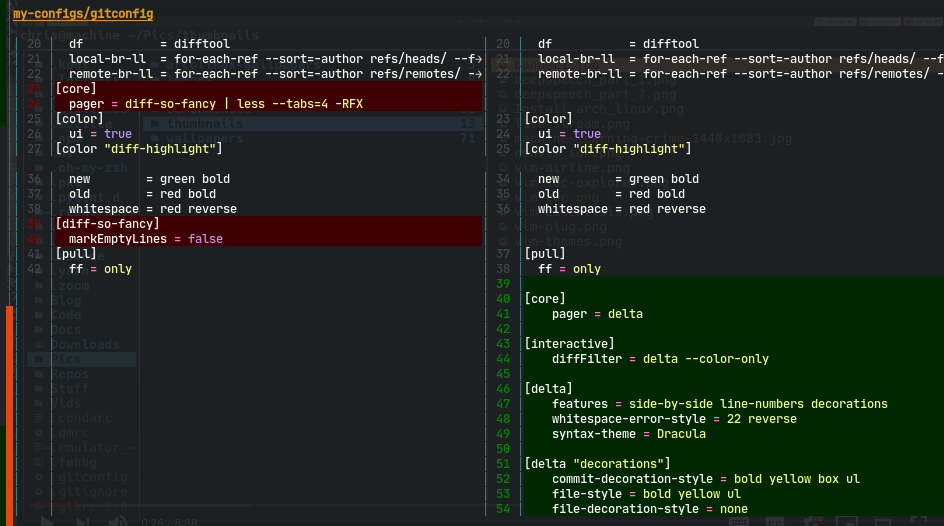
However, still the issue of reds and greens being darker exists.
And, is there a way to make it recognize the file based on something other than name?
farzadmf
on 2 Dec 2020
Hi @farzadmf,
There are a few different questions here. First, note that syntax-theme affects the _foreground_ colors only, not background. In other words, syntax-themes is for language syntax highlighting; to set the background colors you use the delta options like plus-style, etc. See delta --help.
the name of the file does matter (renaming my gitconfig.conf to gitconfig enables syntax coloring):
Yes, sorry, I see what you mean now. (I initially thought you were saying that delta wasn't reading settings from your git config.) Yes, that's correct: if you want delta to syntax highlight the file as a gitconfig file, it must have one of the recognized file name suffixes. You can see what these are by doing delta --list-languages. Here's a fragment of that output.
Git Config                           gitconfig, .gitconfig, .gitmodules
nginx                                conf.erb, conf, nginx.conf, mime.types, fastcgi_params, scgi_params, uwsgi_params
So it looks like *.conf is recognized as nginx config file format. These aren't delta's rules -- these are inherited from the sublime syntax definitions that bat also uses. It's not yet possible in delta to remap these syntax definitions. See https://github.com/dandavison/delta/issues/326
I'm setting the theme to Monokai Extended Bright and Dracula, but they look the same:
I think that this is because, when you made your screenshot, the file was named gitconfig.conf. But as I said above, remember that syntax-theme only affects foreground colors, not background. Maybe try it out on a git repo containing some code in a programming language, rather than config files. The difference should be obvious then.
And, is there a way to make it recognize the file based on something other than name?
Remember that delta is reading a git diff, which may have sections corresponding to many files in many different programming languages. So delta parses the diff, and infers each file section's language from the file name. But it would be nice to implement https://github.com/dandavison/delta/issues/326.
Maybe have a look at delta --show-config, that might be helpful while you are configuring your background colors.
dandavison
on 2 Dec 2020
Thank you very much @dandavison for the detailed explanation and taking the time to answer all my questions, much appreciated.
Just one more question: when I do bat --list-themes, I see, for example, gruvbox listed there (in fact, it has three: gruvbox, gruvbox-light, and gruvbox-white), but when I do delta --show-syntax-themes (or delta --show-syntax-themes --dark), I don't see any sign of gruvbox
The reason I'm specifically mentioning gruvbox is that I recently switched _everything_ to gruvbox :slightly_smiling_face:
farzadmf
on 3 Dec 2020
Hi @farzadmf, no problem! Which version are you using? The gruvbox* themes are available in the current release delta 0.4.4:
~ delta --version
delta 0.4.4
~ delta --list-syntax-themes
Light themes:
    GitHub
    Monokai Extended Light
    OneHalfLight
    Solarized (light)
    ansi-light

Dark themes:
    1337
    DarkNeon
    Dracula
    Monokai Extended
    Monokai Extended Bright
    Monokai Extended Origin
    Nord
    OneHalfDark
    Solarized (dark)
    Sublime Snazzy
    TwoDark
    ansi-dark
    base16
    base16-256
    gruvbox
    gruvbox-light
    gruvbox-white
    zenburn
There is a bug there in that the two light ones are incorrectly classified as dark; but that does not stop you using them. That bug has been fixed in master (unreleased).
dandavison
on 3 Dec 2020
@dandavison Wow :open_mouth: OK, that's interesting; I have this:
❯ delta --version
delta 0.4.4
❯ delta --list-syntax-themes
Light themes:
    GitHub
    Monokai Extended Light
    OneHalfLight
    Solarized (light)
    ansi-light

Dark themes:
    1337
    DarkNeon
    Dracula
    Monokai Extended
    Monokai Extended Bright
    Monokai Extended Origin
    Nord
    OneHalfDark
    Solarized (dark)
    Sublime Snazzy
    TwoDark
    ansi-dark
    base16
    zenburn

Use delta --show-syntax-themes to demo the themes.
Also, as I was trying to copy/paste these, I noticed a couple of things that I'm gonna put here as suggestions (I'm not super comfortable with rust :slightly_frowning_face: , otherwise I would create a PR myself :thinking: )
- It happened to me that I wanted to pipe, say,
delta --helpto be copied to my clipboard, and I noticed that it's copying including the ANSI color escapes - I noticed for example that
batdoes a very cool thing:
- If I do
bat --list-themesinside the terminal, it does something likedelta --show-syntax-themes(demoes the themes) - But if I pipe the result into something (for example
bat --list-themes | nvim), it only prints the theme names (similar output todelta --list-syntax-themes)
- If I do
farzadmf
on 3 Dec 2020
FYI, I just tried delta out (0.4.4), and I'm not seeing all the themes either (e.g. gruvbox-* and base16-256 are missing). That's on Ubuntu 20.04.
 ncadou
on 4 Dec 2020
ncadou
on 4 Dec 2020
Hmm... On my side, delta --list-syntax-themes does list exactly the same themes I have available in bat (delta 0.4.4 that is).
Could you check the output of bat --list-themes | grep ^Theme @farzadmf @ncadou ?
If the bat output lists the same themes as delta does, you could try bat cache --build, and see what delta --list-syntax-themes gives you after that. Maybe that helps.
 Kr1ss-XD
on 4 Dec 2020
Kr1ss-XD
on 4 Dec 2020
@farzadmf @ncadou the only reason I haven't replied yet is because I'm confused about this and didn't know what to reply and haven't had time to look into it :) Thanks @Kr1ss-XD. Let's get to the bottom of this and then improve the documentation because something's obviously sufficiently confusing to confuse all four of us.
dandavison
on 4 Dec 2020
Boom! @Kr1ss-XD @dandavison The bat cache --build seems to do the trick, now I see this:
❯ delta --list-syntax-themes
Light themes:
    GitHub
    Monokai Extended Light
    OneHalfLight
    Solarized (light)
    ansi-light

Dark themes:
    1337
    Coldark-Cold
    Coldark-Dark
    DarkNeon
    Dracula
    Monokai Extended
    Monokai Extended Bright
    Monokai Extended Origin
    Nord
    OneHalfDark
    Solarized (dark)
    Sublime Snazzy
    TwoDark
    ansi-dark
    base16
    base16-256
    gruvbox
    gruvbox-light
    gruvbox-white
    zenburn

Use delta --show-syntax-themes to demo the themes.
I'm just curious how rebuilding the cache in bat affects delta
farzadmf
on 4 Dec 2020
I _think_ delta just uses the bat cache ?
Kr1ss-XD
on 4 Dec 2020
Yes, it does. So one question is: under what circumstances would a user need to run bat cache --build?
dandavison
on 4 Dec 2020
I do it after every update of bat, just in case there are new themes bundled with it.
EDIT According to the bat man page, it needs to be done whenever new themes or syntaxes have been added.
I could add that to the documentation.
Kr1ss-XD
on 4 Dec 2020
@Kr1ss-XD I don't have bat installed, only delta.
Edit: this machine has never seen either bat or delta before. I just installed delta today, and it gives me this short theme list right out of the box.
ncadou
on 4 Dec 2020
Ah okay, I see.
Most likely you'll need bat then in order to use its additional syntax highlighting themes. As fas as I understand, you need some files inside of ~/.cache/bat/ - those describe the syntax themes, and are created by bat. I'm not aware of any other way to create these files.
The app should be in the Ubuntu repositories, IIRC it's called rust-bat there.
Kr1ss-XD
on 4 Dec 2020
OK, so another way of saying this is:
What I said above was incorrect. The current released version of delta does not include these themes. The latest themes from bat have however been added in Delta's master branch and will be in the next release.
Meanwhile, there is a trick for making extra themes available in delta: install bat and run bat cache --build.
dandavison
on 4 Dec 2020
I'm just curious how rebuilding the cache in bat affects delta
So to summarize this situation:
Bat ships with a collection of sublime themes and language syntax definitions in a binary format which is convenient for other (especially Rust) projects to use.
Delta (which came into existence after bat) makes use of this collection by copying the binary assets from the bat repo into the delta repo and also shipping with these binary assets. So a user who has both bat and delta installed has two independent copies of the binary assets, which may or may not be the same version.
Bat also provides a concept of a local cache, as well as local custom themes and syntax definitions under
~/.config. Delta does not provide parallel versions of all those things; it simply uses the same locations on disk as bat, and bat and delta will therefore share these resources if both are installed.
In principle, one could imagine separating the binary theme and syntax assets from the bat project and turning them explicitly into a resource which multiple different applications could share (a bit like font files perhaps).
dandavison
on 4 Dec 2020
Great explanation @dandavison , so I'm going to close this as I think this specific issue is resolved
farzadmf
on 5 Dec 2020
Related issues
 jakabk
·
11Comments
jakabk
·
11Comments
 neerajbadlani
·
8Comments
neerajbadlani
·
8Comments
 FranklinYu
·
9Comments
FranklinYu
·
9Comments
 mstrYoda
·
4Comments
dandavison
·
9Comments
mstrYoda
·
4Comments
dandavison
·
9Comments
Most helpful comment
So to summarize this situation:
Bat ships with a collection of sublime themes and language syntax definitions in a binary format which is convenient for other (especially Rust) projects to use.
Delta (which came into existence after bat) makes use of this collection by copying the binary assets from the bat repo into the delta repo and also shipping with these binary assets. So a user who has both bat and delta installed has two independent copies of the binary assets, which may or may not be the same version.
Bat also provides a concept of a local cache, as well as local custom themes and syntax definitions under
~/.config. Delta does not provide parallel versions of all those things; it simply uses the same locations on disk as bat, and bat and delta will therefore share these resources if both are installed.In principle, one could imagine separating the binary theme and syntax assets from the bat project and turning them explicitly into a resource which multiple different applications could share (a bit like font files perhaps).