Delta: Width when using delta under fzf preview
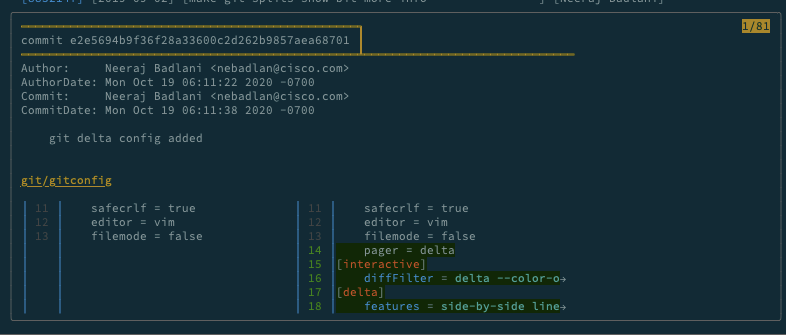
As you can see in the above screenshot , there is ample space to the right , but still the output is left compressed .
 neerajbadlani
All 8 comments
Hi @neerajbadlani, thanks. I don't think I've seen this problem before, let's try to figure out what's going wrong. I think it will be a problem with your system, not a bug in delta. Can you post the output of tput cols and echo $COLUMNS? If you change the width of your terminal window, those numbers should change accordingly (and they should be the correct width in characters!). Does that seem to be true?
Also, if possible could you compare results in a different terminal emulator? For example I'm on MacOS and I have iTerm2 and Terminal.app (also Alacritty, etc).
 dandavison
on 27 Oct 2020
dandavison
on 27 Oct 2020
Also, the screenshot does look as if you're using some kind of wrapper interface around git, maybe something like tig or lazygit, is that correct @neerajbadlani ?
I'm wondering because of the rectangular border around the output and the (page- ?) numbering at the top right. Unfortunately, one can not recognize if that's the entered command at the top of the image, or some kind of header coming from a git wrapper, tmux/screen or whatever.
 Kr1ss-XD
on 27 Oct 2020
Kr1ss-XD
on 27 Oct 2020
Hi Guys , Thanks for quick check-in . My bad , heres more info :
Above screenshot is fzf preview window running inside vim running inside tmux .
My side by side diffs works fine within tmux ( when i do git diff ).
Problem is only within fzf preview window running inside vim ( fzf preview window running outside vim is OK ).
Before delta I had hooked up ydiff with fzf preview window and it works fine .
tput cols and COLUMNS seem to work correctly within the preview window .
Heres how i checked it :
" NOTE : Check after bug of left compression has been solved by delta git
command! -bang -nargs=* FuzzyBCommits
            \ call fzf#vim#buffer_commits({'options': ['--preview', 'tput cols ',
            \ '--preview-window=down:70%']})
Just checked on Terminal ( I use Iterm ) , same issue happens there too .
neerajbadlani
on 28 Oct 2020
Hi @neerajbadlani, can you reproduce the problem outside vim? If so, could you post the fzf command that results in the incorrect width? I'm happy to try to find the solution here (and I like fzf also!).
dandavison
on 28 Oct 2020
Oh, nm, just re-read your post and you say it works outside vim.
I think that using delta's --width option will solve this. Can you confirm?
I'm also curious to see the fzf command you're using with delta, could you post that?
dandavison
on 28 Oct 2020
Hi @dandavison , I dont think explicitly using --width would work for me , since I do quite a bit of resizing of tmux windows / vim buffers when I am coding .
Although I tried --width option , it works , however left and right sides of side by side diff are not balanced.
Way to Repro this issue ( and the way I use delta with fzf )
I have this git history alias :

As you can see , i have 2 key bindings , when i press enter , it calls git split-diff-commit ( which is another alias I have and this alias uses delta )

Thanks , Please let me know if any other alternative is available or something needed from my side to fix this issue .
neerajbadlani
on 29 Oct 2020
I have been experiencing something similar. I use forgit to wrap around fzf and git and when doing git diff with delta's side-by-side option enabled everything seems to work correctly but as soon as I run it with fzf preview, the output is all messed up as reported here.
I tried what was suggested in the other issue and git diff | delta --side-by-side works fine while git diff | delta --side-by-side | less does not. This would suggest that delta has problems running properly when it's not in a tty.
 mrswats
on 4 Nov 2020
mrswats
on 4 Nov 2020
NOTE I've just noticed a paragraph in the fzf(1) manual, which might be relevant for this ticket :
fzf exports $FZF_PREVIEW_LINES and $FZF_PREVIEW_COLUMNS so that they represent the exact size of the preview window. (It also overrides $LINES and $COLUMNS with the same values but they can be reset by the default shell, so prefer to refer to the ones with FZF_PREVIEW_ prefix.)
It's in the "Preview" section.
Kr1ss-XD
on 5 Nov 2020
Related issues
 andrei-pavel
·
12Comments
andrei-pavel
·
12Comments
 simokhwang
·
9Comments
simokhwang
·
9Comments
 infokiller
·
5Comments
infokiller
·
5Comments
 jakabk
·
11Comments
jakabk
·
11Comments
 chmln
·
10Comments
chmln
·
10Comments
Most helpful comment
NOTE I've just noticed a paragraph in the
fzf(1)manual, which might be relevant for this ticket :It's in the "Preview" section.