Delta: Would it be possible to add a line number sidebar?
Thanks for the amazing work on delta!
Do you think it would be possible to add an optional line number sidebar similar to the one that bat has? If delta had something like that, I think it could really help when there are large multi-line hunks where it's impractical to count past the first twenty or so lines.
 eth-p
eth-p
All 4 comments
Hi @eth-p, thanks for your work on bat! Yes, this makes sense and is doable and there have been a few requests for it.
There are a couple of design decisions I see: in delta's case (unlike bat) we have line numbers in the previous version and the new version. So, do we emulate (e.g.) GitLab and GitHub's two-column line number display, and is there an argument for a single-column line number display showing line numbers in the new version only, and what is the default going to be.
(When implementing, we need to be careful with the terminal-width accounting; people's customized $LESS settings easily cause the right-padding to overflow.)
 dandavison
on 28 Apr 2020
dandavison
on 28 Apr 2020
There are a couple of design decisions I see: in delta's case (unlike bat) we have line numbers in the previous version and the new version. So, do we emulate (e.g.) GitLab and GitHub's two-column line number display, and is there an argument for a single-column line number display showing line numbers in the new version only, and what is the default going to be.
That's definitely a pretty tough decision to make. Personally, I would be find a two column display like this to work for me (and line numbers could be dimmed where aren't any changes):
120 ⋮ 120 │ This line is the same.
⋮ 121 │ This line was added.
121 ⋮ 122 │ This line is the same.
122 ⋮ 123 │ This line was modified.
123 ⋮ │ This line was removed.
I'm not sure how you have printing implemented with delta, but that approach might be a bit difficult or space-consuming unless you knew the maximum line number before printing the sidebar (for example, in bat we use a fixed width and let the formatting break between line 9999 and 10000).
(When implementing, we need to be careful with the terminal-width accounting; people's customized
$LESSsettings easily cause the right-padding to overflow.)
If you don't mind leaving it up to the user, you could change --width=[number] to accept offsets in the form of +[number]/-[number], which would be used to set the width to width + [offset]. It would require people with customized less settings to do a little bit more work, but it also provides a way to let them to keep using their custom settings without breaking delta's output.
eth-p
on 28 Apr 2020
Personally, I would find a two column display like this to work for me
Thanks, that looks like a very reasonable design.
that approach might be a bit difficult or space-consuming unless you knew the maximum line number before printing the sidebar
I think we're good on that front. Delta works on one diff hunk at a time, so it knows the starting line number, and it has to read it all into memory before emitting anything in order to do the within-line edit detection between candidate matching pairs of plus and minus lines.
If you don't mind leaving it up to the user, you could change --width=[number] to accept offsets in the form of +[number]/-[number],
Yes, although it would be a breaking change, bat's solution seems nice to me. Also, as a general rule I've been making delta consistent with bat wherever that makes sense, with the intention that it can be a complementary app, taking over from bat for highlighting diff output. (E.g. delta honors BAT_THEME and BAT_PAGER; it uses custom themes and syntax definitions from the bat cache directory, the executable includes the syntax and theme binaries straight from bat, and several of the command line flags are the same).
dandavison
on 28 Apr 2020
Delta now has line numbers (delta --line-numbers in v0.2.0 which was released today). They were added by @clnoll in #190 and #219. It's documented in --help and in a README section, which is copied below. Thanks @eth-p the defaults are basically what you suggested! cc @Kr1ss-XD @lorenzleutgeb @mitsuhiko @SamHasler @yamatsum @zack.
Line numbers
Use --line-numbers to activate line numbers.
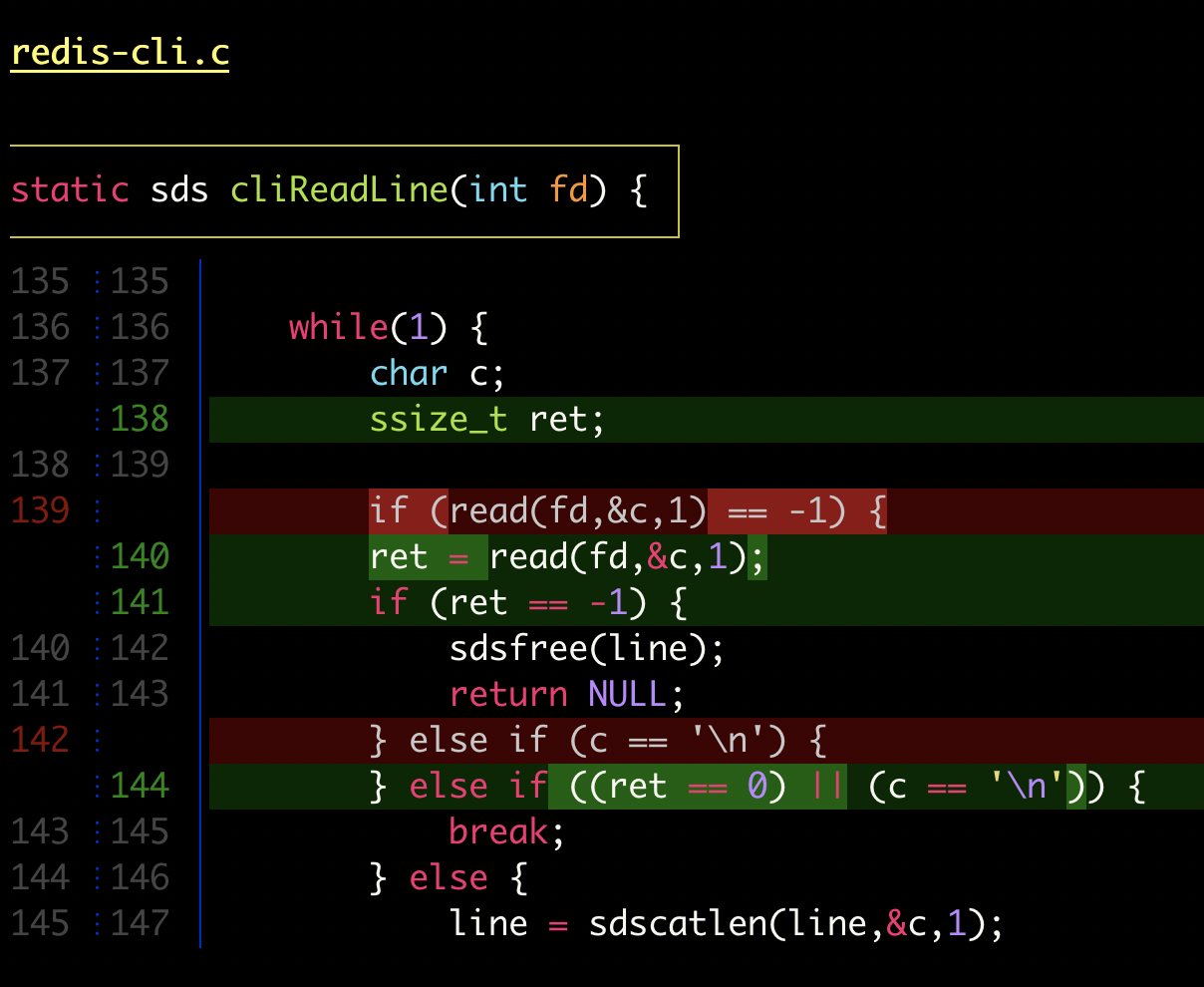 |
The numbers are displayed in two columns and there are several configuration options: see the LINE NUMBERS section in delta --help for details, and see the next section for an example of configuring line numbers.
Custom features
All delta options can go under the [delta] section in your git config file. However, you can also use named "features" to keep things organized: these are sections in git config like [delta "my-feature"]. Here's an example using two custom features:
[delta]
    features = unobtrusive-line-numbers decorations
    whitespace-error-style = 22 reverse

[delta "unobtrusive-line-numbers"]
    line-numbers = true
    line-numbers-minus-style = "#444444"
    line-numbers-zero-style = "#444444"
    line-numbers-plus-style = "#444444"
    line-numbers-left-format = "{nm:>4}┊"
    line-numbers-right-format = "{np:>4}│"
    line-numbers-left-style = blue
    line-numbers-right-style = blue

[delta "decorations"]
    commit-decoration-style = bold yellow box ul
    file-style = bold yellow ul
    file-decoration-style = none
    hunk-header-decoration-style = yellow box
 |
dandavison
on 2 Jul 2020
Related issues
 jakabk
·
11Comments
jakabk
·
11Comments
 mstrYoda
·
4Comments
mstrYoda
·
4Comments
 infokiller
·
5Comments
infokiller
·
5Comments
 gpressutto5
·
9Comments
gpressutto5
·
9Comments
 neerajbadlani
·
8Comments
neerajbadlani
·
8Comments
Most helpful comment
Delta now has line numbers (
delta --line-numbersin v0.2.0 which was released today). They were added by @clnoll in #190 and #219. It's documented in--helpand in a README section, which is copied below. Thanks @eth-p the defaults are basically what you suggested! cc @Kr1ss-XD @lorenzleutgeb @mitsuhiko @SamHasler @yamatsum @zack.Line numbers
Use
--line-numbersto activate line numbers.The numbers are displayed in two columns and there are several configuration options: see the
LINE NUMBERSsection indelta --helpfor details, and see the next section for an example of configuring line numbers.Custom features
All delta options can go under the
[delta]section in your git config file. However, you can also use named "features" to keep things organized: these are sections in git config like[delta "my-feature"]. Here's an example using two custom features: