Deeplabcut: No tracklet assembly for unique bodyparts
Your Operating system and DeepLabCut version
OS: Ubuntu 20.04 LTS
DeepLabCut Version: 2.2b5
Anaconda env used: DLC-CPU
Describe the problem
I attempted to assemble tracklets from analysed videos, but initially saw no labels at all. After decreasing the minimalnumberofconnections and pafthreshold parameters in inference_cfg.yaml, I now get tracklets for multi-animal body parts using the box tracker, but the unique body parts are still missing. I checked the detections video at pcutoff 0.9 and all labels I expect to see are in the video; tracking is good quality and actually better for unique body parts than the multi-animal ones. I played with the other parameters (both those that are cross-validated and those that are not) but I'm unable to get all labels to appear.
Additional context
My cross-validation results:

My inference_cfg.yaml file:
addlikelihoods: 0.15
averagescore: 0.1
boundingboxslack: 10
detectionthresholdsquare: 0.1
distnormalization: 700
distnormalizationLOWER: 50
iou_threshold: 0.2
lowerbound_factor: 0.5
max_age: 100
method: m1
min_hits: 12
minimalnumberofconnections: 1
pafthreshold: 0.020727079665286208
topktoretain: 3
upperbound_factor: 1.25
variant: 0
withid: false
Note 1: Every unique body part is over-connected to every other unique body part so I don't expect a problem with the skeleton.
Note 2: There are 4 multi-animal body parts and 12 unique body parts, perhaps differences in number are important.
 xneven
All 43 comments
Yep! This support was added in 2.2b6, so please upgrade 👯
 MMathisLab
on 2 Jul 2020
MMathisLab
on 2 Jul 2020
I had to downgrade to 2.2b5 because launching the refine tracklets GUI in 2.2b6 caused a memory leak and crashed dlc (on multiple systems). I should have clarified this.
xneven
on 3 Jul 2020
can you share the memory leak issue?
MMathisLab
on 3 Jul 2020
On Ubuntu it doesn't produce an error message, the terminal simply reports that the process has been killed.
This peak in RAM usage after I launch the tracklet GUI that renders the PC unresponsive until dlc is killed suggested a memory leak to me:
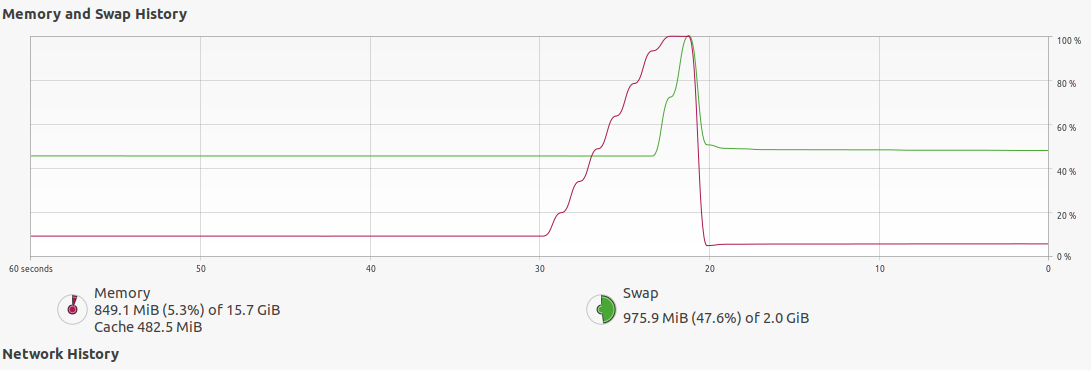
My videos are 12 minutes long and are at most 200 MB big, though the crash doesn't happen with a short 30 second clip where all labels appear as expected.
xneven
on 3 Jul 2020
awe yes, the video is just too large, unfortunately given the available memory then.
One workflow is to simply use shorted videos and use the GUI to be sure you have optimal tracking parameters.
then, you can skip the GUI if you are happy in general:
Lastly, let's say you've optimized the inference_cfg.yaml (i.e., tracking) parameters, and you want to just apply this to a set of videos and by-pass the tracklet GUI, you can pass the pickle file directly from analyze_videos (and your config.yaml full path) and run:
deeplabcut.convert_raw_tracks_to_h5(path_config_file, picklefile)
so, in short, you should update to 2.2b6 so you get all the points, but your RAM is too small for such a large video to parse, so set your tracking parameters on a shorter one 👍
MMathisLab
on 3 Jul 2020
Thank you, I've tried to circumvent the GUI using the convert_raw_tracks_to_h5() function, however, I still run out of memory as with the GUI:
Code output
MemoryError                               Traceback (most recent call last)

<ipython-input-8-3d1e39fa01e7> in <module>

      1 for pickle_file in pickles:

      2     print(pickle_file)

----> 3     dlc.convert_raw_tracks_to_h5(config_path, pickle_file)

      4


~\anaconda3\envs\DLC-GPU\lib\site-packages\deeplabcut\refine_training_dataset\tracklets.py in convert_raw_tracks_to_h5(config, tracks_pickle, output_name)

   1071 def convert_raw_tracks_to_h5(config, tracks_pickle, output_name=""):

   1072     manager = TrackletManager(config, 0, 0)

-> 1073     manager.load_tracklets_from_pickle(tracks_pickle)

   1074     manager.save(output_name)


~\anaconda3\envs\DLC-GPU\lib\site-packages\deeplabcut\refine_training_dataset\tracklets.py in load_tracklets_from_pickle(self, filename, auto_fill)

    330         with open(filename, "rb") as file:

    331             tracklets = pickle.load(file)

--> 332         self._load_tracklets(tracklets, auto_fill)

    333         self._xy = self.xy.copy()

    334


~\anaconda3\envs\DLC-GPU\lib\site-packages\deeplabcut\refine_training_dataset\tracklets.py in _load_tracklets(self, tracklets, auto_fill)

    205                 is_single = np.isnan(to_fill[:, mask_multi]).all()

    206                 if is_single:

--> 207                     to_fill = to_fill[:, mask_single]

    208                 else:

    209                     to_fill = to_fill[:, mask_multi]


MemoryError:
Is this expected even for a 12MB .pickle file?
xneven
on 7 Jul 2020
Hi @xneven, could you re-try as follows and let me know if things changed?
manager = TrackletManager(config, 0, 0.01, max_gap=1)
manager.load_tracklets_from_pickle(tracks_pickle)
 jeylau
on 8 Jul 2020
jeylau
on 8 Jul 2020
That works! thank you :)
xneven
on 8 Jul 2020
On closer inspection the .h5 files were successfully generated, however, they are now missing the unique body parts. I checked that this only happens with the code modification discussed above.
xneven
on 9 Jul 2020
@xneven, the only explanation I have is that your "unique" keypoints are made of a succession of very short tracklets (less than 1% the number of frames), and are therefore discarded. There is a coming update that will let you specify that threshold in absolute (rather than relative) # of frames. Meanwhile, you could try with an even lower value (perhaps 0.0005; i.e., if your video is 10k-frame long, you'll get rid of artifacts shorted than 5 frames).
jeylau
on 9 Jul 2020
I've been playing around with this threshold but I cannot get these missing body parts to appear, even though they are the most robustly tracked i.e. they are almost never occluded whereas the multianimal body parts are occluded or missing from frame quite frequently and yet their tracklets still get assembled. The unique body part tracklets should therefore definitely be longer than 1% of frames. On a shorter video lowering the threshold did make the unique body parts appear (0.0005 for 900 frame video) but I haven't had the same success with longer videos (~21500 frames), where making the threshold too low (e.g. 0.000045) leads to a memory crash again.
xneven
on 13 Jul 2020
I am having this exact same problem with hour long 90 fps videos. I am thinking ill have to read the pickle files directly into my analysis perhaps instead of converting to h5. Does this sound feasible in your opinion @jeylau ?. I made the changes you suggested to the convert_raw_tracks function but its still using up 99% of my memory (though this time it at least hasnt crashed yet). Ill leave it running overnight and update you in the morning.
your help is greatly appreciated.
 PolarBean
on 15 Jul 2020
PolarBean
on 15 Jul 2020
Didnt have to wait so long for a result :)
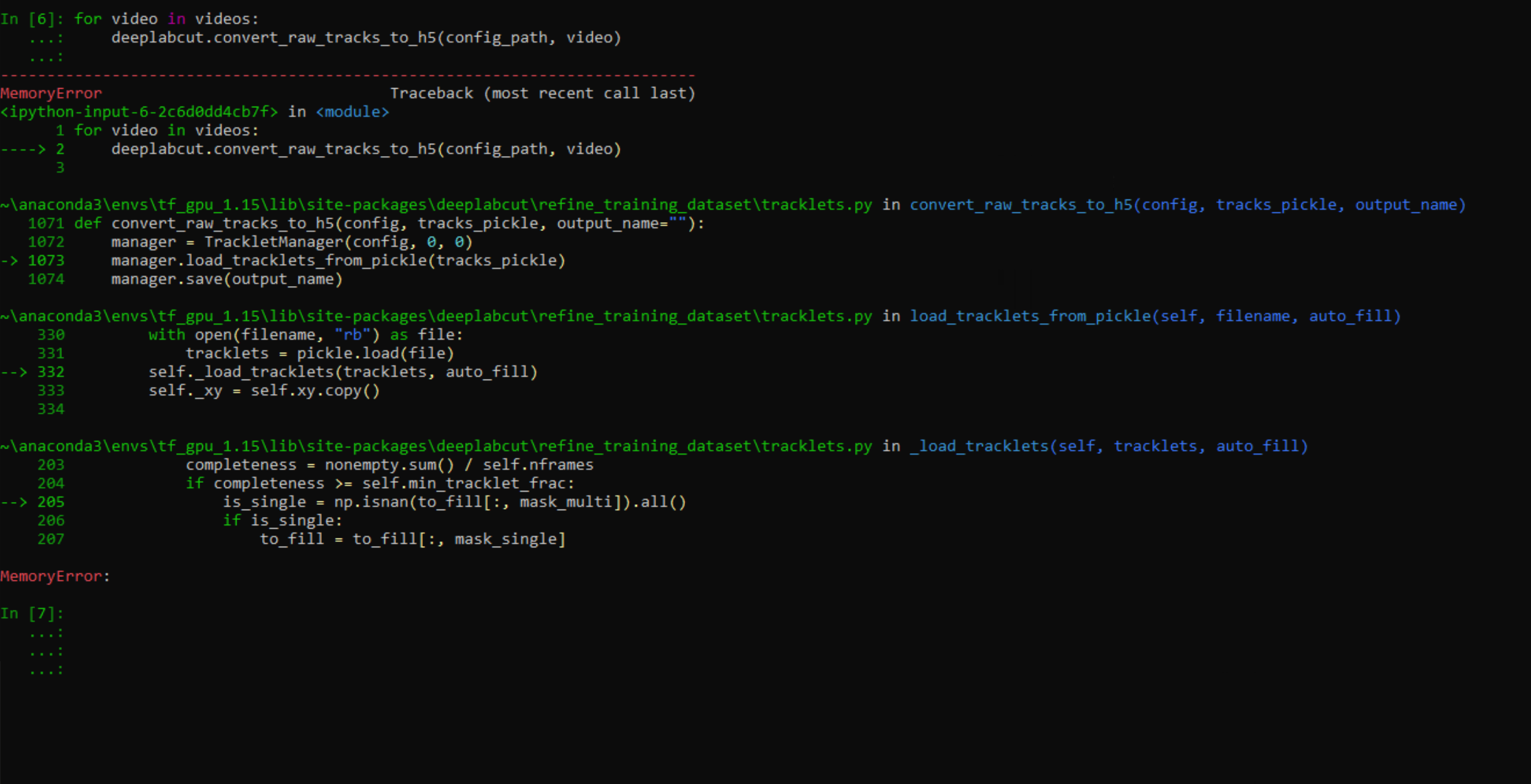
If theres anything i can contribute to help solve this let me know!
PolarBean
on 15 Jul 2020
Hi @PolarBean we just updated the code base last night, to 2.2b7, which includes memory improvements for the tracklet manager, looking forward to your feedback. pip install deeplabcut==2.2b7 (although any 1 hour video for a python/matplotlib fxn is going to be really hard ;)
@xneven, the only explanation I have is that your "unique" keypoints are made of a succession of very short tracklets (less than 1% the number of frames), and are therefore discarded. There is a coming update that will let you specify that threshold in absolute (rather than relative) # of frames., the only explanation I have is that your "unique" keypoints are made of a succession of very short tracklets (less than 1% the number of frames), and are therefore discarded. There is a coming update that will let you specify that threshold in absolute (rather than relative) # of frames.
@xneven, this update is out! ^
MMathisLab
on 15 Jul 2020
Hmm i experienced this using a deeplabcut Version cloned from the github ~an hour ago. Would you still recommend updating? Alternatively I may just read the pickle files directly as I understand most people wont be converting so many frames at once. Thanks for the quick reply 😊
PolarBean
on 15 Jul 2020
I think trying out the default settings would be good, but agreed the current code is not beyond pypi ;)
MMathisLab
on 15 Jul 2020
Just to keep you guys in the loop, I looked into this loop with tqdm and found that it runs quite slowly and is where the memory starts to get out of control.
for num_tracklet in tqdm(sorted(tracklets)):
        to_fill = np.full((self.nframes, len(bodyparts)), np.nan)
        for frame_name, data in tracklets[num_tracklet].items():
            ind_frame = int(re.findall(r"\d+", frame_name)[0])
            to_fill[ind_frame] = data
        nonempty = np.any(~np.isnan(to_fill), axis=1)
        completeness = nonempty.sum()
        if completeness >= self.min_tracklet_len:
            is_single = np.isnan(to_fill[:, mask_multi]).all()
            if is_single:
                to_fill = to_fill[:, mask_single]
            else:
                to_fill = to_fill[:, mask_multi]
            if to_fill.size:
                tracklets_unsorted[num_tracklet] = to_fill, completeness, is_single`
As you can see from the following screenshot it takes much longer than expected.

If I run it on a 90 FPS 20 second video this same function is incredibly fast.

Then the same function on a 90 fps 5 minute video is moderately slow and still uses all the memory very quickly (32gb).

I'll look into this further and get back to you :)
PolarBean
on 16 Jul 2020
So it looks like this is caused by appending to_fill to the tracklets_unsorted dict in tracklets.py
tracklets_unsorted[num_tracklet] = to_fill, completeness, is_single
Given to_fill is mostly np.nan values I'm trying to think of a more memory efficient way to do this :)
PolarBean
on 16 Jul 2020
I also rewrote the function with cupy and it runs a whole lot faster!
PolarBean
on 16 Jul 2020
Oh Also i run into OOM in the 5min video so i think it may be a problem others are going to run into down the track (:
PolarBean
on 16 Jul 2020
Hey @PolarBean, thanks a lot for profiling that part of the code 😃 I'll look at it this weekend, but please do not hesitate to submit a PR with your changes!
jeylau
on 16 Jul 2020
I solved the issue! Instead of adding each to_fill array to the dict, i instead only added the non-zero values and their indexes so as to rebuild them later.
          if to_fill.size:
                non_empty_indexes = cp.invert(cp.isnan(to_fill[:, mask_multi]))
                ##here we save only the data which is not a nan value
                to_fill_blank = to_fill[non_empty_indexes]
                ##we also get the indexes of these values so that we can rebuild them later
                tracklets_unsorted[num_tracklet] = to_fill_blank, completeness, is_single, cp.where(non_empty_indexes)
    tracklets_sorted = sorted(tracklets_unsorted.items(), key=lambda kv: kv[1][1])
and for the rebuilding later on we do the following
        while tracklets_sorted:
            _, (compress_data, _, is_single, indexes) = tracklets_sorted.pop()
            data = cp.full((self.nframes, len(bodyparts)), cp.nan)
            data[indexes] = compress_data
            has_data = ~cp.isnan(data)
Also this is all running on cupy to make the analysis of the massive tracklets possible. The main drawback at the moment is the spline_fitting as cupy has no CubicSpline implementation that I can see.
This fixes the issues OOM I was facing but I need to test out the h5 files and make sure everything makes sense.
here it is running on a 90fps 50 min video.

Im not sure if I should make a pull request before fully testing out my code but if youre interested here it is:
https://github.com/PolarBean/DeepLabCut/blob/master/deeplabcut/refine_training_dataset/tracklets.py
PolarBean
on 16 Jul 2020
Sweet! Do you think we could reach even faster speeds by getting rid of cp.invert (e.g., with scipy's sparse matrix format)?
jeylau
on 16 Jul 2020
Yes!! Great idea, sparse matrix would be even better
PolarBean
on 16 Jul 2020
I think we could really speed the function up by running the cubic spline function on CUDNN
https://github.com/cupy/cupy/issues/1523
Not sure how long the scipy implementation will take on an hour+ long video :grimacing:
Im running it on a long video now and ill give you an update in the morning (Australia time :))
PolarBean
on 16 Jul 2020
I think a smarter strategy than what I implemented at first would be to locate the gaps to be filled, and fit these short segments only (vs the entire time series). I suspect this would run very fast! I can implement that this weekend, but I'd be more than happy if you want to take a shot at it! :)
jeylau
on 16 Jul 2020
haha I'll take a crack tomorrow morning and let you know how it goes. I think it sounds like a good plan!
PolarBean
on 16 Jul 2020
Update: running BSpline overnight on a large file crashed the PC aha. Will attempt the updates we discussed now :)
PolarBean
on 17 Jul 2020
Ok finally fixed, the BSpline wasnt the issue i dont think though I havent timed it, Im pretty sure it was the second half of load tracklets so i converted that to cupy and also everything except for cubicSpline itself in columnwise_spline_interp
PolarBean
on 17 Jul 2020
The whole thing takes about an hour 20 minutes on a 90fps 45 minute vid
PolarBean
on 17 Jul 2020
Thanks for fixing this @PolarBean, could you post your updated code so I can test it on my system/dataset?
xneven
on 17 Jul 2020
Its having some issues i still need to fix :I
PolarBean
on 17 Jul 2020
OK should be all done
these are the two scripts where I have made some changes, you'll also have to conda install cupy ( I hope you have a GPU! )
https://github.com/PolarBean/DeepLabCut/blob/master/deeplabcut/post_processing/filtering.py
https://github.com/PolarBean/DeepLabCut/blob/master/deeplabcut/refine_training_dataset/tracklets.py
Dont worry if the script pauses for a long time after analyzing the tracklets, its fitting your data points and I didnt get around to implementing @jeylau's suggestion to fit short segments at a time. I ran into a few other bugs in my implementation.
I still need to test it more on larger video files but the fitting stage does take a long time at the moment.
Please give me feedback if something doesnt work as this is a bit experimental. I hope this helps!
PolarBean
on 17 Jul 2020
Great! Thanks so much for your contribution. Feel free to make a PR, we can review it and also help debug, etc! Great contribution ❤️
MMathisLab
on 17 Jul 2020
Sure thing! :)
PolarBean
on 17 Jul 2020
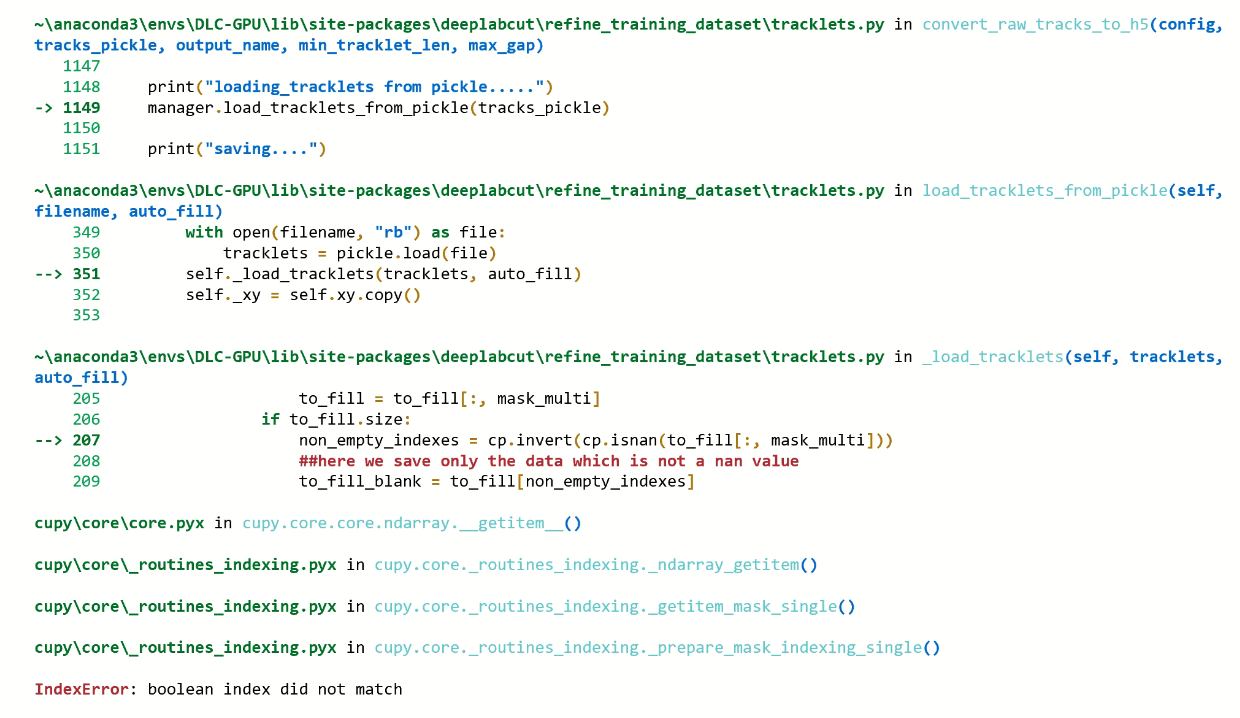
I had a go at testing your update with parameters min_tracklet_len=1, max_gap=20. I got a ModuleNotFoundError at
from deeplabcut_code.post_processing import CUDNN_columnwise_spline_interp
I removed the _code bit and got the following error:
xneven
on 18 Jul 2020
Oh woops, I thought i had removed that good catch. Ive only tested this with multi animal projects that dont have any unique body parts so that could be the issue. I will have a look tomorrow.
PolarBean
on 18 Jul 2020
Can you do me a favour and run it without changing the parameters, I'd be interested in whether that fixes it.
PolarBean
on 18 Jul 2020
Sorry, it does not.
xneven
on 18 Jul 2020
Hey @PolarBean, I was just wondering, how large is your pickle file?
jeylau
on 20 Jul 2020
the bx file is 110 MB
PolarBean
on 20 Jul 2020
Hello, has there been any update on this?
xneven
on 29 Jul 2020
@xneven, yes! The improved tracklet loading will be pulled before the weekend 😃
jeylau
on 29 Jul 2020
Related issues
 vvolhejn
·
4Comments
vvolhejn
·
4Comments
 dusa2
·
3Comments
dusa2
·
3Comments
 haofanglee
·
3Comments
haofanglee
·
3Comments
 guyts
·
3Comments
guyts
·
3Comments
 phcao101
·
4Comments
phcao101
·
4Comments