Deeplabcut: pickle file not saved to dlc_models subfolder
Your Operating system and DeepLabCut version
MacOS with Anaconda Env DLC-CPU created from deeplabcut's env file
DeepLabCut version 2.2b6
Describe the problem
I have successfully created a project, labelled frames, checked frames, and trained the dataset.
I am working from within pythonw for the following steps.
Before training the dataset I ran:
deeplabcut.cropimagesandlabels(config_path)
To train the dataset I ran:
[deeplabcut.create_multianimaltraining_dataset(config_path)]
There were some errors, but an alternate path was taken?
Code output
[/Users/kperks/Documents/Wesleyan_Research/DLC_data/GroupFish/GroupFish-KPerks-2020-06-15/labeled-data/GroupFish1_dnsampled_cropped_cropped/CollectedData_KPerks.h5  not found (perhaps not annotated). If training on cropped data, make sure to call `cropimagesandlabels` prior to creating the dataset.
/Users/kperks/Documents/Wesleyan_Research/DLC_data/GroupFish/GroupFish-KPerks-2020-06-15/labeled-data/GroupFish4_compressed_cropped_cropped/CollectedData_KPerks.h5  not found (perhaps not annotated). If training on cropped data, make sure to call `cropimagesandlabels` prior to creating the dataset.
/Users/kperks/Documents/Wesleyan_Research/DLC_data/GroupFish/GroupFish-KPerks-2020-06-15/labeled-data/GroupFish3_compressed_cropped_cropped/CollectedData_KPerks.h5  not found (perhaps not annotated). If training on cropped data, make sure to call `cropimagesandlabels` prior to creating the dataset.
/Users/kperks/Documents/Wesleyan_Research/DLC_data/GroupFish/GroupFish-KPerks-2020-06-15/labeled-data/GroupFish2_compressed_cropped_cropped/CollectedData_KPerks.h5  not found (perhaps not annotated). If training on cropped data, make sure to call `cropimagesandlabels` prior to creating the dataset.
Annotation data was not found by splitting video paths (from config['video_sets']). An alternative route is taken...
The following folders were found: ['/Users/kperks/Documents/Wesleyan_Research/DLC_data/GroupFish/GroupFish-KPerks-2020-06-15/labeled-data/GroupFish3_compressed_cropped', '/Users/kperks/Documents/Wesleyan_Research/DLC_data/GroupFish/GroupFish-KPerks-2020-06-15/labeled-data/GroupFish1_dnsampled_cropped', '/Users/kperks/Documents/Wesleyan_Research/DLC_data/GroupFish/GroupFish-KPerks-2020-06-15/labeled-data/GroupFish4_compressed_cropped', '/Users/kperks/Documents/Wesleyan_Research/DLC_data/GroupFish/GroupFish-KPerks-2020-06-15/labeled-data/GroupFish2_compressed_cropped']
Utilizing the following graph: [[0, 1], [1, 2], [1, 3], [1, 4], [2, 4], [2, 3], [0, 4], [0, 3], [3, 4], [0, 2]]
Creating training data for  1 0.95]
Then to train the network (this is a multi-animal project so I reduced save and max iters).
[deeplabcut.train_network(config_path,saveiters=10000,maxiters=50000)]
However, when I went to train the network I got an error about the pickle file not existing.
Although dlc-models/iteration-0/[project_name][date]trainset95shuffle1/train was created, and there is a pose_cfg.yaml file in it, there is no pickle file here.
I DO see a pickle file in the iteration-0 subfolder created under training-datasets:
training-datasets/iteration-0/UnaugmentedData[etc]/GroupFish_KPerks95shuffle1.pickle
In addition, there are 3 other files in UnaugmentedDatea[etc]: CollectedData_KPerks.csv, CollectedData_KPerks.h5, Documentation_data-GroupFish_95shuffle1.pickle.
Specifically, the error from the train_network command is this:
Code input
[Activating limb prediction...
Starting with multi-animal imaug + adam pose-dataset loader.
Traceback (most recent call last):
  File "<stdin>", line 1, in <module>
  File "/anaconda3/envs/DLC-CPU/lib/python3.7/site-packages/deeplabcut/pose_estimation_tensorflow/training.py", line 193, in train_network
    raise e
  File "/anaconda3/envs/DLC-CPU/lib/python3.7/site-packages/deeplabcut/pose_estimation_tensorflow/training.py", line 176, in train_network
    allow_growth=allow_growth,
  File "/anaconda3/envs/DLC-CPU/lib/python3.7/site-packages/deeplabcut/pose_estimation_tensorflow/train_multianimal.py", line 137, in train
    dataset = create_dataset(cfg)
  File "/anaconda3/envs/DLC-CPU/lib/python3.7/site-packages/deeplabcut/pose_estimation_tensorflow/dataset/factory.py", line 56, in create
    data = MAPoseDataset(cfg)
  File "/anaconda3/envs/DLC-CPU/lib/python3.7/site-packages/deeplabcut/pose_estimation_tensorflow/dataset/pose_multianimal_imgaug.py", line 34, in __init__
    self.data = self.load_dataset()
  File "/anaconda3/envs/DLC-CPU/lib/python3.7/site-packages/deeplabcut/pose_estimation_tensorflow/dataset/pose_multianimal_imgaug.py", line 42, in load_dataset
    with open(os.path.join(self.cfg.project_path, file_name), "rb") as f:
FileNotFoundError: [Errno 2] No such file or directory: 'training-datasets/iteration-0/UnaugmentedDataSet_GroupFishJun15/GroupFish_KPerks95shuffle1.pickle']
I copied the 4 files from training-datasets/iteration-0/UnaugmentedData[etc]/ to dlc-models/iteration-0/[project_name][date]trainset95shuffle1/train/ and tried to train again:
Code input
[deeplabcut.train_network(config_path,saveiters=10000,maxiters=50000)]
The output got to the stage of "Starting multi-animal training" but needing to copy and paste those files seems like something that should not need to happen.
Is there something that I am missing or misplacing that is preventing the file structure from being generated correctly?
Thank you for your help!
-Krista Perks
(working on tracking multiple weakly electric fish for studying electrocommunication behavior)
If it is helpful, here is the pose_cfg.yaml that was created and did end up automatically in the dlc-models///train subdirectory:
pose_cfg.yaml
[all_joints:
- - 0
- - 1
- - 2
- - 3
- - 4
all_joints_names:
- head
- finL
- finR
- tail_attach
- tail_tip
batch_size: 8
bottomheight: 400
crop: true
cropratio: 0.4
dataset: training-datasets/iteration-0/UnaugmentedDataSet_GroupFishJun15/GroupFish_KPerks95shuffle1.pickle
dataset_type: multi-animal-imgaug
display_iters: 500
global_scale: 0.8
init_weights: /anaconda3/envs/DLC-CPU/lib/python3.7/site-packages/deeplabcut/pose_estimation_tensorflow/models/pretrained/resnet_v1_50.ckpt
intermediate_supervision: false
intermediate_supervision_layer: 12
leftwidth: 400
location_refinement: true
locref_huber_loss: true
locref_loss_weight: 0.05
locref_stdev: 7.2801
max_input_size: 1500
metadataset: training-datasets/iteration-0/UnaugmentedDataSet_GroupFishJun15/Documentation_data-GroupFish_95shuffle1.pickle
min_input_size: 64
minsize: 100
mirror: false
multi_step:
- - 0.0001
  - 7500
- - 5.0e-05
  - 12000
- - 1.0e-05
  - 200000
net_type: resnet_50
num_joints: 5
num_limbs: 10
optimizer: adam
pafwidth: 20
pairwise_huber_loss: false
pairwise_loss_weight: 0.1
pairwise_predict: false
partaffinityfield_graph:
- - 0
  - 1
- - 1
  - 2
- - 1
  - 3
- - 1
  - 4
- - 2
  - 4
- - 2
  - 3
- - 0
  - 4
- - 0
  - 3
- - 3
  - 4
- - 0
  - 2
partaffinityfield_predict: true
pos_dist_thresh: 17
project_path: /Users/kperks/Documents/Wesleyan_Research/DLC_data/GroupFish/GroupFish-KPerks-2020-06-15
rightwidth: 400
save_iters: 10000
scale_jitter_lo: 0.5
scale_jitter_up: 1.25
topheight: 400
weigh_only_present_joints: false]
 neurologic
All 20 comments
Hi @neurologic there is no copying required, indeed. For any new code update, especially beta code, it's a good idea to first run a test script, so you know our code is working as provided.
If you have not run the test scripts, I would recommend this as a first step for any system.
Here is a video on how to do this: https://www.youtube.com/watch?v=IOWtKn3l33s
Please git clone the repo: ( git clone https://github.com/DeepLabCut/DeepLabCut.git)
cd DeepLabCut/examples
pythonw testscript.py
then:
pythonw testscript_multianimal.py
let me know if those pass.
 MMathisLab
on 17 Jun 2020
MMathisLab
on 17 Jun 2020
Aha. Thank you for that! You are so organized. I really appreciate that you have prepared canned test scripts (and the video was helpful too)!
I only ran the single animal testscript.py so far. Along the way exceptions and tracebacks appeared and the end result of the script running was an "h5 file not found" rather than "All Done! Default cases are functional". Below is the full terminal output as a result of running pythonw testscript.py in the DLC-CPU environment. (Let me know if it would help you for me to also report results of multi-animal here in addition to this single animal test.)
Code output
[(DLC-CPU) Markov:examples kperks$ pythonw testscript.py
Imported DLC!
On Windows/OSX tensorpack is not tested by default.
CREATING PROJECT
Created "/Users/kperks/Documents/Wesleyan_Research/DeepLabCut/examples/TEST-Alex-2020-06-17/videos"
Created "/Users/kperks/Documents/Wesleyan_Research/DeepLabCut/examples/TEST-Alex-2020-06-17/labeled-data"
Created "/Users/kperks/Documents/Wesleyan_Research/DeepLabCut/examples/TEST-Alex-2020-06-17/training-datasets"
Created "/Users/kperks/Documents/Wesleyan_Research/DeepLabCut/examples/TEST-Alex-2020-06-17/dlc-models"
Copying the videos
/Users/kperks/Documents/Wesleyan_Research/DeepLabCut/examples/TEST-Alex-2020-06-17/videos/reachingvideo1.avi
Generated "/Users/kperks/Documents/Wesleyan_Research/DeepLabCut/examples/TEST-Alex-2020-06-17/config.yaml"

A new project with name TEST-Alex-2020-06-17 is created at /Users/kperks/Documents/Wesleyan_Research/DeepLabCut/examples and a configurable file (config.yaml) is stored there. Change the parameters in this file to adapt to your project's needs.
 Once you have changed the configuration file, use the function 'extract_frames' to select frames for labeling.
. [OPTIONAL] Use the function 'add_new_videos' to add new videos to your project (at any stage).
EXTRACTING FRAMES
Config file read successfully.
Extracting frames based on kmeans ...
Kmeans-quantization based extracting of frames from 0.0  seconds to 8.53  seconds.
Extracting and downsampling... 256  frames from the video.
256it [00:01, 235.27it/s]
Kmeans clustering ... (this might take a while)
Frames were successfully extracted.

You can now label the frames using the function 'label_frames' (if you extracted enough frames for all videos).
CREATING-SOME LABELS FOR THE FRAMES
Plot labels...
Creating images with labels by Alex.
100%|█████████████████████████████████████████████| 5/5 [00:02<00:00,  2.27it/s]
If all the labels are ok, then use the function 'create_training_dataset' to create the training dataset!
CREATING TRAININGSET
The training dataset is successfully created. Use the function 'train_network' to start training. Happy training!
CHANGING training parameters to end quickly!
TRAIN
Selecting single-animal trainer
Config:
{'all_joints': [[0], [1], [2], [3]],
 'all_joints_names': ['bodypart1', 'bodypart2', 'bodypart3', 'objectA'],
 'batch_size': 1,
 'bottomheight': 400,
 'crop': True,
 'crop_pad': 0,
 'cropratio': 0.4,
 'dataset': 'training-datasets/iteration-0/UnaugmentedDataSet_TESTJun17/TEST_Alex80shuffle1.mat',
 'dataset_type': 'default',
 'deterministic': False,
 'display_iters': 2,
 'fg_fraction': 0.25,
 'global_scale': 0.8,
 'init_weights': '/anaconda3/envs/DLC-CPU/lib/python3.7/site-packages/deeplabcut/pose_estimation_tensorflow/models/pretrained/resnet_v1_50.ckpt',
 'intermediate_supervision': False,
 'intermediate_supervision_layer': 12,
 'leftwidth': 400,
 'location_refinement': True,
 'locref_huber_loss': True,
 'locref_loss_weight': 0.05,
 'locref_stdev': 7.2801,
 'log_dir': 'log',
 'max_input_size': 1500,
 'mean_pixel': [123.68, 116.779, 103.939],
 'metadataset': 'training-datasets/iteration-0/UnaugmentedDataSet_TESTJun17/Documentation_data-TEST_80shuffle1.pickle',
 'min_input_size': 64,
 'minsize': 100,
 'mirror': False,
 'multi_step': [[0.001, 5]],
 'net_type': 'resnet_50',
 'num_joints': 4,
 'optimizer': 'sgd',
 'pairwise_huber_loss': False,
 'pairwise_predict': False,
 'partaffinityfield_predict': False,
 'pos_dist_thresh': 17,
 'project_path': '/Users/kperks/Documents/Wesleyan_Research/DeepLabCut/examples/TEST-Alex-2020-06-17',
 'regularize': False,
 'rightwidth': 400,
 'save_iters': 5,
 'scale_jitter_lo': 0.5,
 'scale_jitter_up': 1.25,
 'scoremap_dir': 'test',
 'shuffle': True,
 'snapshot_prefix': '/Users/kperks/Documents/Wesleyan_Research/DeepLabCut/examples/TEST-Alex-2020-06-17/dlc-models/iteration-0/TESTJun17-trainset80shuffle1/train/snapshot',
 'stride': 8.0,
 'topheight': 400,
 'weigh_negatives': False,
 'weigh_only_present_joints': False,
 'weigh_part_predictions': False,
 'weight_decay': 0.0001}
Switching batchsize to 1, as default/tensorpack/deterministic loaders do not support batches >1. Use imgaug loader.
Starting with standard pose-dataset loader.
Initializing ResNet
Loading ImageNet-pretrained resnet_50
2020-06-17 20:14:38.932630: I tensorflow/core/platform/cpu_feature_guard.cc:141] Your CPU supports instructions that this TensorFlow binary was not compiled to use: SSE4.1 SSE4.2 AVX AVX2 FMA
2020-06-17 20:14:38.932975: I tensorflow/core/common_runtime/process_util.cc:71] Creating new thread pool with default inter op setting: 8. Tune using inter_op_parallelism_threads for best performance.
Training parameter:
{'stride': 8.0, 'weigh_part_predictions': False, 'weigh_negatives': False, 'fg_fraction': 0.25, 'mean_pixel': [123.68, 116.779, 103.939], 'shuffle': True, 'snapshot_prefix': '/Users/kperks/Documents/Wesleyan_Research/DeepLabCut/examples/TEST-Alex-2020-06-17/dlc-models/iteration-0/TESTJun17-trainset80shuffle1/train/snapshot', 'log_dir': 'log', 'global_scale': 0.8, 'location_refinement': True, 'locref_stdev': 7.2801, 'locref_loss_weight': 0.05, 'locref_huber_loss': True, 'optimizer': 'sgd', 'intermediate_supervision': False, 'intermediate_supervision_layer': 12, 'regularize': False, 'weight_decay': 0.0001, 'mirror': False, 'crop_pad': 0, 'scoremap_dir': 'test', 'batch_size': 1, 'dataset_type': 'default', 'deterministic': False, 'weigh_only_present_joints': False, 'pairwise_huber_loss': False, 'partaffinityfield_predict': False, 'pairwise_predict': False, 'crop': True, 'cropratio': 0.4, 'minsize': 100, 'leftwidth': 400, 'rightwidth': 400, 'topheight': 400, 'bottomheight': 400, 'all_joints': [[0], [1], [2], [3]], 'all_joints_names': ['bodypart1', 'bodypart2', 'bodypart3', 'objectA'], 'dataset': 'training-datasets/iteration-0/UnaugmentedDataSet_TESTJun17/TEST_Alex80shuffle1.mat', 'display_iters': 2, 'init_weights': '/anaconda3/envs/DLC-CPU/lib/python3.7/site-packages/deeplabcut/pose_estimation_tensorflow/models/pretrained/resnet_v1_50.ckpt', 'max_input_size': 1500, 'metadataset': 'training-datasets/iteration-0/UnaugmentedDataSet_TESTJun17/Documentation_data-TEST_80shuffle1.pickle', 'min_input_size': 64, 'multi_step': [[0.001, 5]], 'net_type': 'resnet_50', 'num_joints': 4, 'pos_dist_thresh': 17, 'project_path': '/Users/kperks/Documents/Wesleyan_Research/DeepLabCut/examples/TEST-Alex-2020-06-17', 'save_iters': 5, 'scale_jitter_lo': 0.5, 'scale_jitter_up': 1.25}
Starting training....
iteration: 2 loss: 1.2766 lr: 0.001
iteration: 4 loss: 0.6336 lr: 0.001
2020-06-17 20:15:14.909532: W tensorflow/core/kernels/queue_base.cc:277] _0_fifo_queue: Skipping cancelled enqueue attempt with queue not closed
Exception in thread Thread-3:
Traceback (most recent call last):
  File "/anaconda3/envs/DLC-CPU/lib/python3.7/site-packages/tensorflow/python/client/session.py", line 1334, in _do_call
    return fn(*args)
  File "/anaconda3/envs/DLC-CPU/lib/python3.7/site-packages/tensorflow/python/client/session.py", line 1319, in _run_fn
    options, feed_dict, fetch_list, target_list, run_metadata)
  File "/anaconda3/envs/DLC-CPU/lib/python3.7/site-packages/tensorflow/python/client/session.py", line 1407, in _call_tf_sessionrun
    run_metadata)
tensorflow.python.framework.errors_impl.CancelledError: Enqueue operation was cancelled
     [[{{node fifo_queue_enqueue}}]]

During handling of the above exception, another exception occurred:

Traceback (most recent call last):
  File "/anaconda3/envs/DLC-CPU/lib/python3.7/threading.py", line 926, in _bootstrap_inner
    self.run()
  File "/anaconda3/envs/DLC-CPU/lib/python3.7/threading.py", line 870, in run
    self._target(*self._args, **self._kwargs)
  File "/anaconda3/envs/DLC-CPU/lib/python3.7/site-packages/deeplabcut/pose_estimation_tensorflow/train.py", line 91, in load_and_enqueue
    sess.run(enqueue_op, feed_dict=food)
  File "/anaconda3/envs/DLC-CPU/lib/python3.7/site-packages/tensorflow/python/client/session.py", line 929, in run
    run_metadata_ptr)
  File "/anaconda3/envs/DLC-CPU/lib/python3.7/site-packages/tensorflow/python/client/session.py", line 1152, in _run
    feed_dict_tensor, options, run_metadata)
  File "/anaconda3/envs/DLC-CPU/lib/python3.7/site-packages/tensorflow/python/client/session.py", line 1328, in _do_run
    run_metadata)
  File "/anaconda3/envs/DLC-CPU/lib/python3.7/site-packages/tensorflow/python/client/session.py", line 1348, in _do_call
    raise type(e)(node_def, op, message)
tensorflow.python.framework.errors_impl.CancelledError: Enqueue operation was cancelled
     [[node fifo_queue_enqueue (defined at /anaconda3/envs/DLC-CPU/lib/python3.7/site-packages/deeplabcut/pose_estimation_tensorflow/train.py:77) ]]

Caused by op 'fifo_queue_enqueue', defined at:
  File "testscript.py", line 136, in <module>
    deeplabcut.train_network(path_config_file)
  File "/anaconda3/envs/DLC-CPU/lib/python3.7/site-packages/deeplabcut/pose_estimation_tensorflow/training.py", line 189, in train_network
    allow_growth=allow_growth,
  File "/anaconda3/envs/DLC-CPU/lib/python3.7/site-packages/deeplabcut/pose_estimation_tensorflow/train.py", line 171, in train
    batch, enqueue_op, placeholders = setup_preloading(batch_spec)
  File "/anaconda3/envs/DLC-CPU/lib/python3.7/site-packages/deeplabcut/pose_estimation_tensorflow/train.py", line 77, in setup_preloading
    enqueue_op = q.enqueue(placeholders_list)
  File "/anaconda3/envs/DLC-CPU/lib/python3.7/site-packages/tensorflow/python/ops/data_flow_ops.py", line 345, in enqueue
    self._queue_ref, vals, name=scope)
  File "/anaconda3/envs/DLC-CPU/lib/python3.7/site-packages/tensorflow/python/ops/gen_data_flow_ops.py", line 4158, in queue_enqueue_v2
    timeout_ms=timeout_ms, name=name)
  File "/anaconda3/envs/DLC-CPU/lib/python3.7/site-packages/tensorflow/python/framework/op_def_library.py", line 788, in _apply_op_helper
    op_def=op_def)
  File "/anaconda3/envs/DLC-CPU/lib/python3.7/site-packages/tensorflow/python/util/deprecation.py", line 507, in new_func
    return func(*args, **kwargs)
  File "/anaconda3/envs/DLC-CPU/lib/python3.7/site-packages/tensorflow/python/framework/ops.py", line 3300, in create_op
    op_def=op_def)
  File "/anaconda3/envs/DLC-CPU/lib/python3.7/site-packages/tensorflow/python/framework/ops.py", line 1801, in __init__
    self._traceback = tf_stack.extract_stack()

CancelledError (see above for traceback): Enqueue operation was cancelled
     [[node fifo_queue_enqueue (defined at /anaconda3/envs/DLC-CPU/lib/python3.7/site-packages/deeplabcut/pose_estimation_tensorflow/train.py:77) ]]


The network is now trained and ready to evaluate. Use the function 'evaluate_network' to evaluate the network.
EVALUATE
Config:
{'all_joints': [[0], [1], [2], [3]],
 'all_joints_names': ['bodypart1', 'bodypart2', 'bodypart3', 'objectA'],
 'batch_size': 1,
 'bottomheight': 400,
 'crop': True,
 'crop_pad': 0,
 'cropratio': 0.4,
 'dataset': 'training-datasets/iteration-0/UnaugmentedDataSet_TESTJun17/TEST_Alex80shuffle1.mat',
 'dataset_type': 'default',
 'deterministic': False,
 'display_iters': 2,
 'fg_fraction': 0.25,
 'global_scale': 0.8,
 'init_weights': '/anaconda3/envs/DLC-CPU/lib/python3.7/site-packages/deeplabcut/pose_estimation_tensorflow/models/pretrained/resnet_v1_50.ckpt',
 'intermediate_supervision': False,
 'intermediate_supervision_layer': 12,
 'leftwidth': 400,
 'location_refinement': True,
 'locref_huber_loss': True,
 'locref_loss_weight': 0.05,
 'locref_stdev': 7.2801,
 'log_dir': 'log',
 'max_input_size': 1500,
 'mean_pixel': [123.68, 116.779, 103.939],
 'metadataset': 'training-datasets/iteration-0/UnaugmentedDataSet_TESTJun17/Documentation_data-TEST_80shuffle1.pickle',
 'min_input_size': 64,
 'minsize': 100,
 'mirror': False,
 'multi_step': [[0.001, 5]],
 'net_type': 'resnet_50',
 'num_joints': 4,
 'optimizer': 'sgd',
 'pairwise_huber_loss': False,
 'pairwise_predict': False,
 'partaffinityfield_predict': False,
 'pos_dist_thresh': 17,
 'project_path': '/Users/kperks/Documents/Wesleyan_Research/DeepLabCut/examples/TEST-Alex-2020-06-17',
 'regularize': False,
 'rightwidth': 400,
 'save_iters': 5,
 'scale_jitter_lo': 0.5,
 'scale_jitter_up': 1.25,
 'scoremap_dir': 'test',
 'shuffle': True,
 'snapshot_prefix': '/Users/kperks/Documents/Wesleyan_Research/DeepLabCut/examples/TEST-Alex-2020-06-17/dlc-models/iteration-0/TESTJun17-trainset80shuffle1/test/snapshot',
 'stride': 8.0,
 'topheight': 400,
 'weigh_negatives': False,
 'weigh_only_present_joints': False,
 'weigh_part_predictions': False,
 'weight_decay': 0.0001}
Running  DLC_resnet50_TESTJun17shuffle1_5  with # of trainingiterations: 5
Initializing ResNet
Analyzing data...
5it [00:13,  2.63s/it]
Done and results stored for snapshot:  snapshot-5
Results for 5  training iterations: 80 1 train error: 409.77 pixels. Test error: 318.44  pixels.
With pcutoff of 0.01  train error: 409.77 pixels. Test error: 318.44 pixels
Thereby, the errors are given by the average distances between the labels by DLC and the scorer.
Plotting...
100%|████████████████████████████████████████████████████████████████████████████████████████████████████| 5/5 [00:02<00:00,  1.70it/s]
The network is evaluated and the results are stored in the subdirectory 'evaluation_results'.
If it generalizes well, choose the best model for prediction and update the config file with the appropriate index for the 'snapshotindex'.
Use the function 'analyze_video' to make predictions on new videos.
Otherwise consider retraining the network (see DeepLabCut workflow Fig 2)
CUT SHORT VIDEO AND ANALYZE (with dynamic cropping!)
Slicing and saving to name /Users/kperks/Documents/Wesleyan_Research/DeepLabCut/examples/TEST-Alex-2020-06-17/videos/reachingvideo1short.avi
dyld: Library not loaded: /usr/local/opt/openssl/lib/libssl.1.0.0.dylib
  Referenced from: /usr/local/bin/ffmpeg
  Reason: image not found
Config:
{'all_joints': [[0], [1], [2], [3]],
 'all_joints_names': ['bodypart1', 'bodypart2', 'bodypart3', 'objectA'],
 'batch_size': 1,
 'bottomheight': 400,
 'crop': True,
 'crop_pad': 0,
 'cropratio': 0.4,
 'dataset': 'training-datasets/iteration-0/UnaugmentedDataSet_TESTJun17/TEST_Alex80shuffle1.mat',
 'dataset_type': 'default',
 'deterministic': False,
 'display_iters': 2,
 'fg_fraction': 0.25,
 'global_scale': 0.8,
 'init_weights': '/anaconda3/envs/DLC-CPU/lib/python3.7/site-packages/deeplabcut/pose_estimation_tensorflow/models/pretrained/resnet_v1_50.ckpt',
 'intermediate_supervision': False,
 'intermediate_supervision_layer': 12,
 'leftwidth': 400,
 'location_refinement': True,
 'locref_huber_loss': True,
 'locref_loss_weight': 0.05,
 'locref_stdev': 7.2801,
 'log_dir': 'log',
 'max_input_size': 1500,
 'mean_pixel': [123.68, 116.779, 103.939],
 'metadataset': 'training-datasets/iteration-0/UnaugmentedDataSet_TESTJun17/Documentation_data-TEST_80shuffle1.pickle',
 'min_input_size': 64,
 'minsize': 100,
 'mirror': False,
 'multi_step': [[0.001, 5]],
 'net_type': 'resnet_50',
 'num_joints': 4,
 'optimizer': 'sgd',
 'pairwise_huber_loss': False,
 'pairwise_predict': False,
 'partaffinityfield_predict': False,
 'pos_dist_thresh': 17,
 'project_path': '/Users/kperks/Documents/Wesleyan_Research/DeepLabCut/examples/TEST-Alex-2020-06-17',
 'regularize': False,
 'rightwidth': 400,
 'save_iters': 5,
 'scale_jitter_lo': 0.5,
 'scale_jitter_up': 1.25,
 'scoremap_dir': 'test',
 'shuffle': True,
 'snapshot_prefix': '/Users/kperks/Documents/Wesleyan_Research/DeepLabCut/examples/TEST-Alex-2020-06-17/dlc-models/iteration-0/TESTJun17-trainset80shuffle1/test/snapshot',
 'stride': 8.0,
 'topheight': 400,
 'weigh_negatives': False,
 'weigh_only_present_joints': False,
 'weigh_part_predictions': False,
 'weight_decay': 0.0001}
Using snapshot-5 for model /Users/kperks/Documents/Wesleyan_Research/DeepLabCut/examples/TEST-Alex-2020-06-17/dlc-models/iteration-0/TESTJun17-trainset80shuffle1
Starting analysis in dynamic cropping mode with parameters: (True, 0.1, 5)
Switching batchsize to 1, num_outputs (per animal) to 1 and TFGPUinference to False (all these features are not supported in this mode).
Initializing ResNet
No video(s) were found. Please check your paths and/or 'video_type'.
analyze again...
Config:
{'all_joints': [[0], [1], [2], [3]],
 'all_joints_names': ['bodypart1', 'bodypart2', 'bodypart3', 'objectA'],
 'batch_size': 1,
 'bottomheight': 400,
 'crop': True,
 'crop_pad': 0,
 'cropratio': 0.4,
 'dataset': 'training-datasets/iteration-0/UnaugmentedDataSet_TESTJun17/TEST_Alex80shuffle1.mat',
 'dataset_type': 'default',
 'deterministic': False,
 'display_iters': 2,
 'fg_fraction': 0.25,
 'global_scale': 0.8,
 'init_weights': '/anaconda3/envs/DLC-CPU/lib/python3.7/site-packages/deeplabcut/pose_estimation_tensorflow/models/pretrained/resnet_v1_50.ckpt',
 'intermediate_supervision': False,
 'intermediate_supervision_layer': 12,
 'leftwidth': 400,
 'location_refinement': True,
 'locref_huber_loss': True,
 'locref_loss_weight': 0.05,
 'locref_stdev': 7.2801,
 'log_dir': 'log',
 'max_input_size': 1500,
 'mean_pixel': [123.68, 116.779, 103.939],
 'metadataset': 'training-datasets/iteration-0/UnaugmentedDataSet_TESTJun17/Documentation_data-TEST_80shuffle1.pickle',
 'min_input_size': 64,
 'minsize': 100,
 'mirror': False,
 'multi_step': [[0.001, 5]],
 'net_type': 'resnet_50',
 'num_joints': 4,
 'num_outputs': 1,
 'optimizer': 'sgd',
 'pairwise_huber_loss': False,
 'pairwise_predict': False,
 'partaffinityfield_predict': False,
 'pos_dist_thresh': 17,
 'project_path': '/Users/kperks/Documents/Wesleyan_Research/DeepLabCut/examples/TEST-Alex-2020-06-17',
 'regularize': False,
 'rightwidth': 400,
 'save_iters': 5,
 'scale_jitter_lo': 0.5,
 'scale_jitter_up': 1.25,
 'scoremap_dir': 'test',
 'shuffle': True,
 'snapshot_prefix': '/Users/kperks/Documents/Wesleyan_Research/DeepLabCut/examples/TEST-Alex-2020-06-17/dlc-models/iteration-0/TESTJun17-trainset80shuffle1/test/snapshot',
 'stride': 8.0,
 'topheight': 400,
 'weigh_negatives': False,
 'weigh_only_present_joints': False,
 'weigh_part_predictions': False,
 'weight_decay': 0.0001}
Using snapshot-5 for model /Users/kperks/Documents/Wesleyan_Research/DeepLabCut/examples/TEST-Alex-2020-06-17/dlc-models/iteration-0/TESTJun17-trainset80shuffle1
Initializing ResNet
No video(s) were found. Please check your paths and/or 'video_type'.
CREATE VIDEO
No video(s) were found. Please check your paths and/or 'video_type'.
Making plots
No videos found. Make sure you passed a list of videos and that *videotype* is right.
EXTRACT OUTLIERS
No suitable videos found in ['/Users/kperks/Documents/Wesleyan_Research/DeepLabCut/examples/TEST-Alex-2020-06-17/videos/reachingvideo1short.avi']
No suitable videos found in ['/Users/kperks/Documents/Wesleyan_Research/DeepLabCut/examples/TEST-Alex-2020-06-17/videos/reachingvideo1short.avi']
RELABELING
Traceback (most recent call last):
  File "testscript.py", line 216, in <module>
    DF = pd.read_hdf(file, "df_with_missing")
  File "/anaconda3/envs/DLC-CPU/lib/python3.7/site-packages/pandas/io/pytables.py", line 395, in read_hdf
    raise FileNotFoundError(f"File {path_or_buf} does not exist")
FileNotFoundError: File /Users/kperks/Documents/Wesleyan_Research/DeepLabCut/examples/TEST-Alex-2020-06-17/labeled-data/reachingvideo1short/machinelabels-iter0.h5 does not exist]
neurologic
on 18 Jun 2020
no worries! Okay let's see what happens if we address this error:
Library not loaded: /usr/local/opt/openssl/lib/libssl.1.0.0.dylib
(what version of macOS is this?) googling gives many options, but seems OS dependent; i.e. https://stackoverflow.com/questions/35129977/how-to-install-latest-version-of-openssl-mac-os-x-el-capitan
you can also see what (if any?) is installed.
run openssl version -a
i.e.
(base) mwmathis@Mackenzies-MacBook-Pro ~ % openssl version -a
OpenSSL 1.1.1d  10 Sep 2019
built on: Fri Sep 27 14:21:15 2019 UTC
platform: darwin64-x86_64-cc
The macOS is specifically
macOS Mojave
Version 10.14.6
And the openssl details are:
(DLC-CPU) Markov:examples kperks$ openssl version -a
OpenSSL 1.1.1g  21 Apr 2020
built on: Tue Apr 21 13:49:54 2020 UTC
platform: darwin64-x86_64-cc
So, based on the error from the test script, is it correct that DLC require OpenSSL 1.0.0 specifically instead of 1.1 series?
This may be related...
When trying to use ffmpeg explicitly (or deeplabcut.DownsampleVideo) to downsample my videos from within the DLC_CPU environment I get a similar error:
dyld: Library not loaded: /usr/local/opt/openssl/lib/libssl.1.0.0.dylib
  Referenced from: /usr/local/bin/ffmpeg
  Reason: image not found
Abort trap: 6
However, within my native 'base' environment I am able to use ffmpeg successfully.
EX:
ffmpeg -i [filename] -filter:v scale=400:-1 -c:a copy [newname]
Let me know if I should try to switch versions of openssl within DLC_CPU environment. I do have homebrew installed already.
I have found a solution to get to v1.0 using homebrew in two different threads.
brew uninstall openssl; brew uninstall openssl; brew install https://github.com/tebelorg/Tump/releases/download/v1.0.0/openssl.rb
I have also come across notes about 1.0.0 reaching EOL: mysql-connector-c awsume #45270
comment from Homebrew thread https://github.com/Homebrew/homebrew-core/issues/46454
[OpenSSL 1.0 will reach EOL on 2019-12-31. Here are the few remaining formulas that depend on it, and need to be fixed (or removed). They are sorted by analytics (higher usage first):
erlang@19 (needed by couchdb)
rethinkdb
freerdp
[email protected]
[email protected]
erlang@17 (needed by riak)
bulk_extractor
nut
ipmiutil
freeswitch
libcapn
virtuoso
pound
Edit: Sadly, we have added new formulas with OpenSSL 1.0 dependency (by mistake)
dvc #45709
manticoresearch #42026]
<\p><\details
neurologic
on 18 Jun 2020
maybe try to run pip install imageio-ffmpeg in your env; it used to be a dependency of another package, but I will see if that has changed!
MMathisLab
on 19 Jun 2020
input/output of that step:
(DLC-CPU) Markov:~ kperks$ pip install imageio-ffmpeg
Requirement already satisfied: imageio-ffmpeg in /anaconda3/envs/DLC-CPU/lib/python3.7/site-packages (0.4.2)
I'm jumping in: the "cropped_cropped" suffix in the folder paths looks wrong, and I bet this may explain why the training data were saved to the wrong location. @neurologic, can you confirm you have a "croppedtraining" entry in your config.yaml that is correctly set to True?
 jeylau
on 23 Jun 2020
jeylau
on 23 Jun 2020
Hi @jeylau,
Here is the config as txt:
config.txt
With (screenshot):

neurologic
on 23 Jun 2020
@jeylau but from the tesscript output it's about the h5 file from machine-labeled.h5 no?
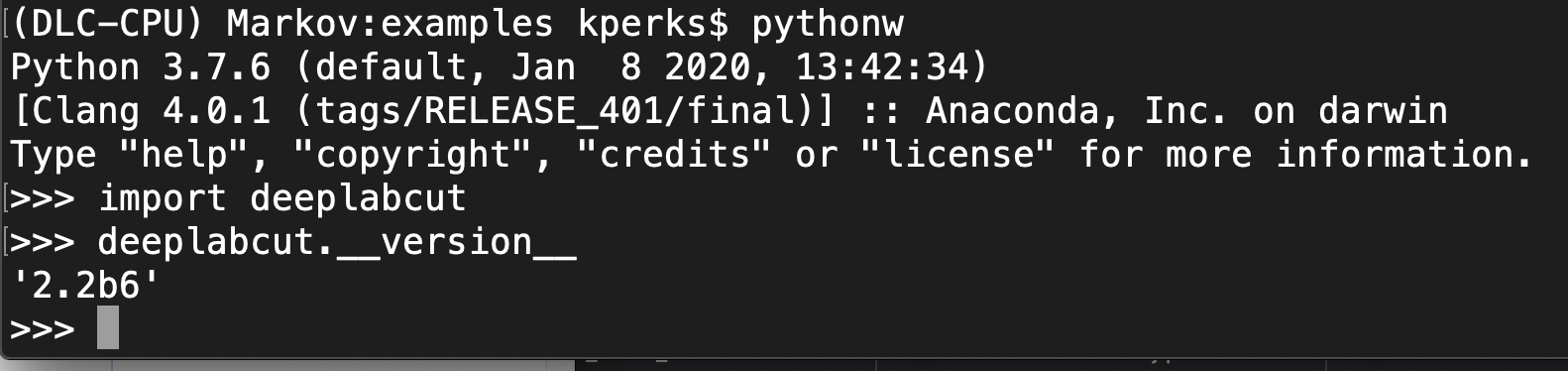
@neurologic can you double check this is DeepLabCut version 2.2b6?
MMathisLab
on 23 Jun 2020
I confirmed deeplabcut version 2.2b6 with pythonw; import deeplabcut
I also just ran pythonw testscript.py from within /examples/ again after doing a git pull from my local DeepLabCut git cloned directory just in case something had changed over the past week that made a difference. I still get the same error at the point where testscript.py breaks:
Code output
...
Using snapshot-5 for model /Users/kperks/Documents/Wesleyan_Research/DeepLabCut/examples/TEST-Alex-2020-06-23/dlc-models/iteration-0/TESTJun23-trainset80shuffle1
Initializing ResNet
No video(s) were found. Please check your paths and/or 'video_type'.
CREATE VIDEO
No video(s) were found. Please check your paths and/or 'video_type'.
Making plots
No videos found. Make sure you passed a list of videos and that videotype is right.
EXTRACT OUTLIERS
No suitable videos found in ['/Users/kperks/Documents/Wesleyan_Research/DeepLabCut/examples/TEST-Alex-2020-06-23/videos/reachingvideo1short.avi']
No suitable videos found in ['/Users/kperks/Documents/Wesleyan_Research/DeepLabCut/examples/TEST-Alex-2020-06-23/videos/reachingvideo1short.avi']
RELABELING
Traceback (most recent call last):
File "testscript.py", line 216, in
DF = pd.read_hdf(file, "df_with_missing")
File "/anaconda3/envs/DLC-CPU/lib/python3.7/site-packages/pandas/io/pytables.py", line 395, in read_hdf
raise FileNotFoundError(f"File {path_or_buf} does not exist")
FileNotFoundError: File /Users/kperks/Documents/Wesleyan_Research/DeepLabCut/examples/TEST-Alex-2020-06-23/labeled-data/reachingvideo1short/machinelabels-iter0.h5 does not exist
(Let me know if you need full output again)
neurologic
on 23 Jun 2020
no problem, thanks! and sorry could you just run pip install --upgrade tables just in case?
MMathisLab
on 23 Jun 2020
Looks like tables were all set:
Output of pip install --upgrade tables :
(DLC-CPU) Markov:examples kperks$ pip install --upgrade tables
Requirement already up-to-date: tables in /anaconda3/envs/DLC-CPU/lib/python3.7/site-packages (3.6.1)
Requirement already satisfied, skipping upgrade: numpy>=1.9.3 in /anaconda3/envs/DLC-CPU/lib/python3.7/site-packages (from tables) (1.16.4)
Requirement already satisfied, skipping upgrade: numexpr>=2.6.2 in /anaconda3/envs/DLC-CPU/lib/python3.7/site-packages (from tables) (2.7.1)
neurologic
on 23 Jun 2020
@neurologic, if the ffmpeg issue still isn't solved, have you tried these commands?
brew reinstall ffmpeg
brew switch openssl 1.0.2p or possibly different versions depending on your exact configuration https://stackoverflow.com/a/59184347
jeylau
on 25 Jun 2020
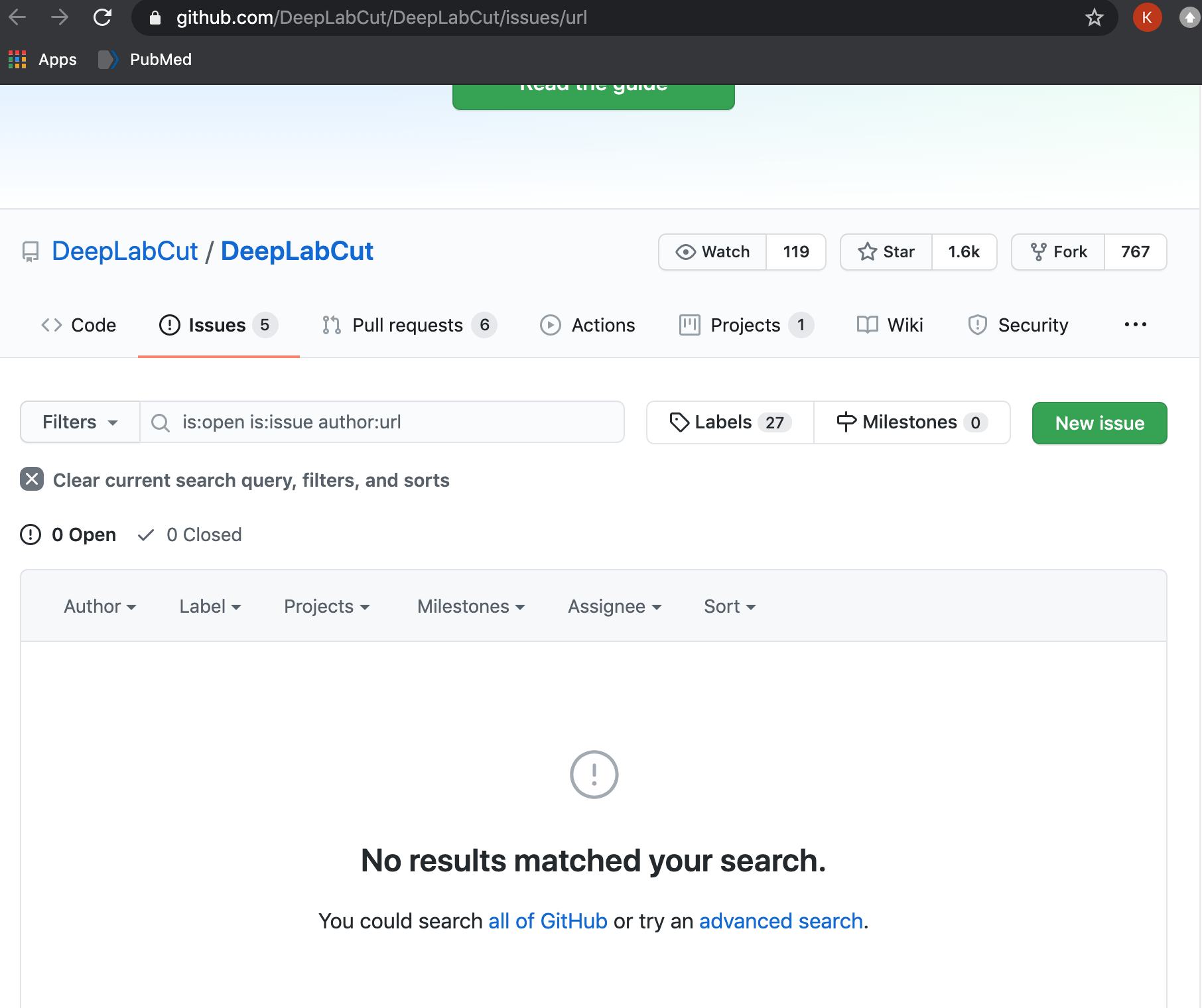
@jeylau sorry for the delay. I will be out of town and away from my computer until Wednesday, but can try this when I am back. I just check the stackoverflow link above and it brought me to a 'page not found' page within DLC github:
neurologic
on 28 Jun 2020
No worries, I've just updated the link. It should work now :)
jeylau
on 28 Jun 2020
closing due to stale issue
MMathisLab
on 8 Jul 2020
@jeylau Looks like I revisited this about an hour too late and became stale ;)
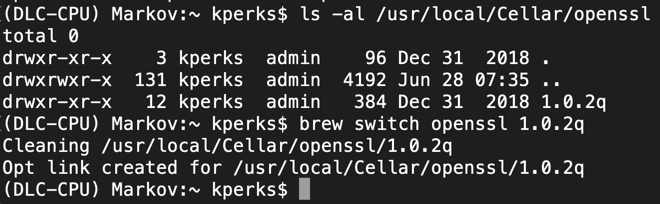
I just got a chance to try your last suggestion.
- I ran
brew reinstall ffmpeg - I ran
brew switch openssl 1.0.2qaccording to the following:
- I re-ran
pythonw testscript.py
It looks like the testscript completed successfully!
Thank you for the help.
Is there an easy answer to "what did those commands do for my problem?" I had been using ffmpeg for other things successfully so not sure what updating might have done. I am more unlearned about openssl. What is the "switch" and why would it have mattered for the issue you saw? If it is too much to explain then no worries... I just figured the more I understand about why that worked then the more I can troubleshoot in the future.
neurologic
on 8 Jul 2020
sorry @neurologic but very happy it's resolved :)
MMathisLab
on 8 Jul 2020
Awesome! I am no openssl expert either, so stackoverflow members are definitely more helpful 😄
jeylau
on 8 Jul 2020
@MMathisLab, no worries!
@jeylau, ok sounds good. Thank you.
neurologic
on 8 Jul 2020
Related issues
 tvajtay
·
4Comments
tvajtay
·
4Comments
 guyts
·
3Comments
guyts
·
3Comments
 lauritk
·
3Comments
lauritk
·
3Comments
 dusa2
·
3Comments
dusa2
·
3Comments
 jennymsmith94
·
3Comments
jennymsmith94
·
3Comments