Your Operating system and DeepLabCut version
I am using WIN 10 OS. Anaconda 2020 python 3.7 env DeepLabCut 2.x.
Please complete the following information about your system:
OS: [Windows 10]
DeepLabCut Version 2x (please check with import deeplabcut, deeplabcut.__version__)
Browser [chrome]
Describe the problem
Could not load iPython -- Nothing happens if I run this deeplabcut.create_new_project(‘project_name’,‘experimenter’, [‘path of video 1’,‘path of video2’,...])
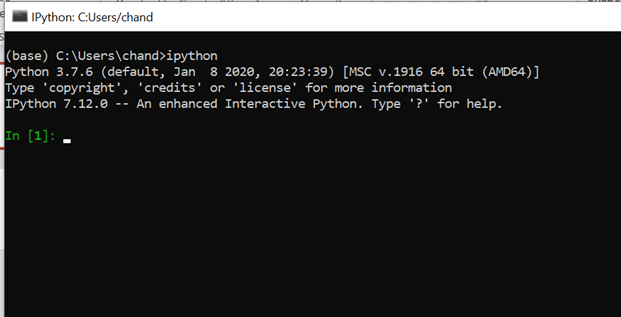
Additional context
Add any other context about the problem here.
 chanduborkar
All 4 comments
I suppose it throws an error, rather than "nothing"... but anyway, did you run import deeplabcut first?
 AlexEMG
on 24 Apr 2020
AlexEMG
on 24 Apr 2020
You are right! But if I run deeplabcut.create_new_project(‘project_name’,‘experimenter’, [‘path of video 1’,‘path of video2’,...])---with my computer directory, nothing happens!
I did run run 'import deeplabcut' and closed anaconda prompt and then restarted. Do I need to run this command every time I start Anaconda prompt?
chanduborkar
on 24 Apr 2020
Yes, you need to always import the package first - this is true for any python package.
Here is a resource that is helpful: https://realpython.com/python-modules-packages/
I would also suggest if you are just starting with DLC, you
(1) check out this "course": https://github.com/DeepLabCut/DeepLabCut-Workshop-Materials/blob/master/summer_course2020.md
(2) and always work through the DEMO's first; they show the minimal code required to run things: https://github.com/AlexEMG/DeepLabCut/blob/master/examples/README.md
 MMathisLab
on 24 Apr 2020
MMathisLab
on 24 Apr 2020
Thank you so much!
chanduborkar
on 24 Apr 2020
Related issues
 monajalal
·
4Comments
monajalal
·
4Comments
 tvajtay
·
4Comments
tvajtay
·
4Comments
 cathy-liu23
·
3Comments
cathy-liu23
·
3Comments
 vvolhejn
·
4Comments
vvolhejn
·
4Comments
 WernTanj
·
3Comments
WernTanj
·
3Comments
Most helpful comment
Thank you so much!