Deeplabcut: Why the MAE not as expected?
Your Operating system and DeepLabCut version
Windows 10,Anaconda3和DeepLabCut 2.1.5.2
Describe the problem
hi!I'm new to DeepLabCut. I have trained three networks, they come from same 7 videos, have different number frames and Iterations. (I list the difference in the Screenshots)
but the evaluate result(MAE) not like what I think, I have three questions:
- Isn't it true that the more iterations, the smaller the MAE(Train error)? If so, why is the Train error of network 1 less than network 3?
- Isn't it true that the larger database(frame), the smaller the MAE(Train error)? If so, why is the Train error of network 1 less than network 2?
- Besides the cross entropy loss and the MAE, is there anything else that can be used to compare and evaluate the two networks?
Looking forward to your reply. Thank you!
Screenshots

The picture information is as follows:
Network | System | Database(frame) | Iterations | Train error(px) | Test error(px) | Other conditions
1 | Windows | 234 | 135K | 2.17 | 7.33 | K-means, ResNet-50
2 | Windows | 234 | 200K | 2.24 | 6.76 | K-means, ResNet-50
3 | Windows | 309 | 135K | 3.08 | 6.82 | K-means, ResNet-50
Additional context
I learned from the NN paper named DeepLabCut: markerless pose estimation of user-defined body parts with deep learning
 Xieyuanting
All 15 comments
Hi Xieyuanting!
Did you freeze the train–test split indices for comparison? That is, were networks 1 and 2 strictly trained on the same training data? Comparing performance is otherwise tricky. This could be done using deeplabcut.create_training_model_comparison().
Moreover, instead on training 2 networks on the same database, you could train one only, but store a larger number of snapshots to obtain a broader view of the trend of error vs # iterations (by opposition to a single metric).
 jeylau
on 19 Mar 2020
jeylau
on 19 Mar 2020
Great points from @jeylau -- just to emphasize, for different splits there will be variability (which you can also see in the figure in the paper). Also, keep in mind that your larger sample could contain different/more difficult or even less precisely labeled frames. Ideally you would always compare against labeling accuracy (of the human annotator).
 AlexEMG
on 19 Mar 2020
AlexEMG
on 19 Mar 2020
I will try _deeplabcut.create_training_model_comparison()_ thank you for your advice!
and I also want to ask where I can find "the human annotator"?In the config.yaml that "dotsize: 12"?
Xieyuanting
on 20 Mar 2020
When I used deeplabcut.create_training_model_comparison(), It's can't work!
the GUI is in the screenshoot:
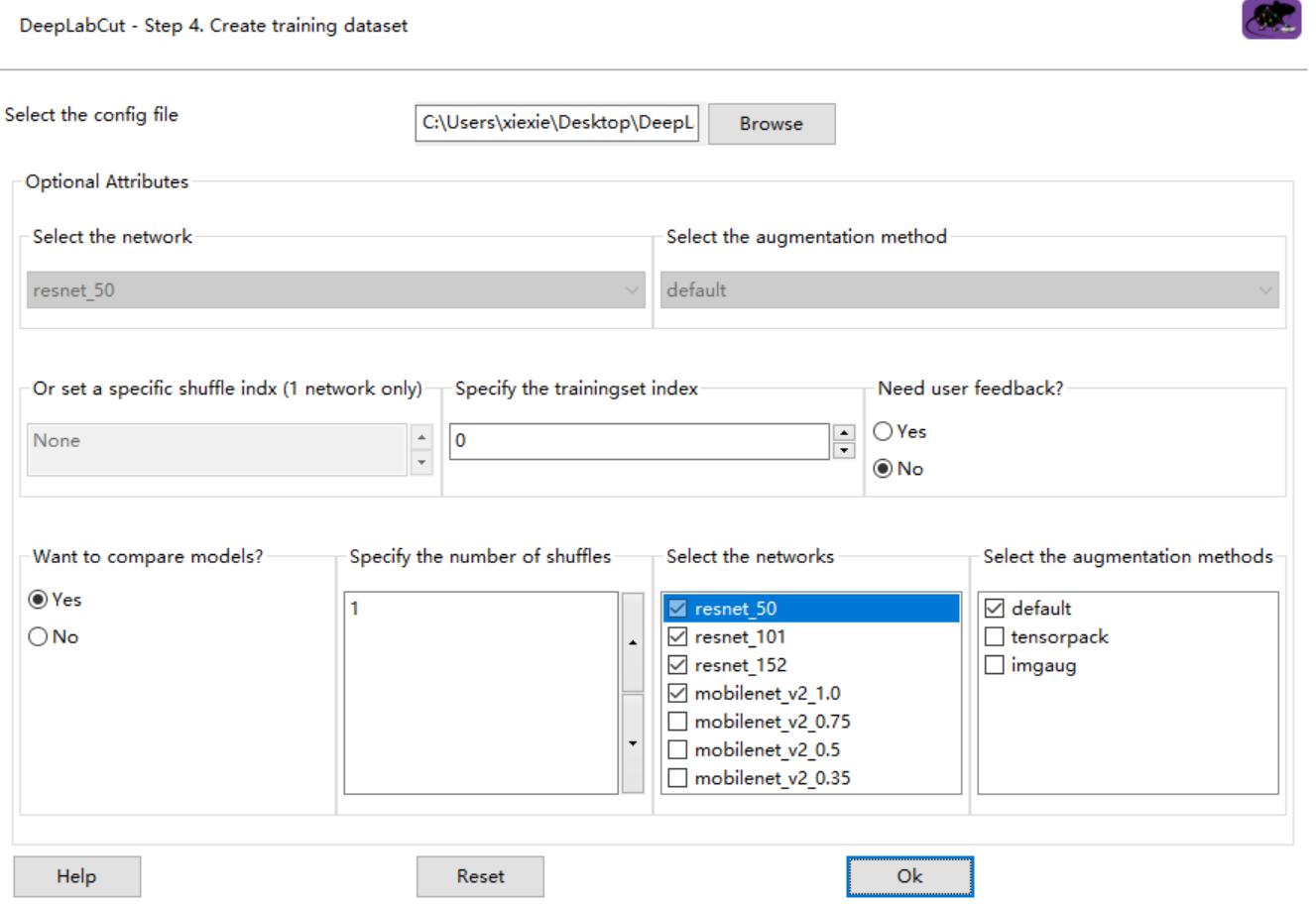
and the error is:
C:\Users\xiexie\Desktop\DeepLabCut\try-1-2020-03-20\training-datasets\iteration-0\UnaugmentedDataSet_tryMar20 already exists!
C:\Users\xiexie\Desktop\DeepLabCut\try-1-2020-03-20\training-datasets\iteration-0\UnaugmentedDataSet_tryMar20 already exists!
ValueError Traceback (most recent call last)
~.conda\envs\dlc-windowsGPU\lib\site-packages\deeplabcut\gui\create_training_dataset.py in create_training_dataset(self, event)
230 deeplabcut.create_training_dataset(self.config,num_shuffles,Shuffles=[self.shuffle.GetValue()], userfeedback=userfeedback,net_type=self.net_choice.GetValue(),augmenter_type = self.aug_choice.GetValue())
231 if self.model_comparison_choice.GetStringSelection() == 'Yes':
--> 232 deeplabcut.create_training_model_comparison(self.config,trainindex=trainindex, num_shuffles=num_shuffles,userfeedback=userfeedback,net_types=self.net_type,augmenter_types=self.aug_type)
233
234
~.conda\envs\dlc-windowsGPU\lib\site-packages\deeplabcut\generate_training_dataset\trainingsetmanipulation.py in create_training_model_comparison(config, trainindex, num_shuffles, net_types, augmenter_types, userfeedback, windows2linux)
804 get_max_shuffle_idx=(largestshuffleindex+idx_aug+idx_netlen(augmenter_types)+shufflelen(augmenter_types)*len(net_types))+1 #get shuffle index; starts ith 0 so added 1
805 log_info = str("Shuffle index:" + str(get_max_shuffle_idx) + ", net_type:"+net +", augmenter_type:"+aug + ", trainsetindex:" +str(trainindex))
--> 806 create_training_dataset(config,Shuffles=[get_max_shuffle_idx],net_type=net,trainIndexes=trainIndexes,testIndexes=testIndexes,augmenter_type=aug,userfeedback=userfeedback,windows2linux=windows2linux)
807 logger.info(log_info)
~.conda\envs\dlc-windowsGPU\lib\site-packages\deeplabcut\generate_training_dataset\trainingsetmanipulation.py in create_training_dataset(config, num_shuffles, Shuffles, windows2linux, userfeedback, trainIndexes, testIndexes, net_type, augmenter_type)
653 else:
654 if len(trainIndexes) != len(testIndexes):
--> 655 raise ValueError('Number of train and test indexes should be equal.')
656 splits = []
657 for shuffle, (train_inds, test_inds) in enumerate(zip(trainIndexes, testIndexes)):
ValueError: Number of train and test indexes should be equal.
it's the same error when I used the command:

Looking forward to your reply. Thank you!
Xieyuanting
on 20 Mar 2020
I try to solve the issue, so I change the _specify the trainingset index_, but a new problem has arisen:
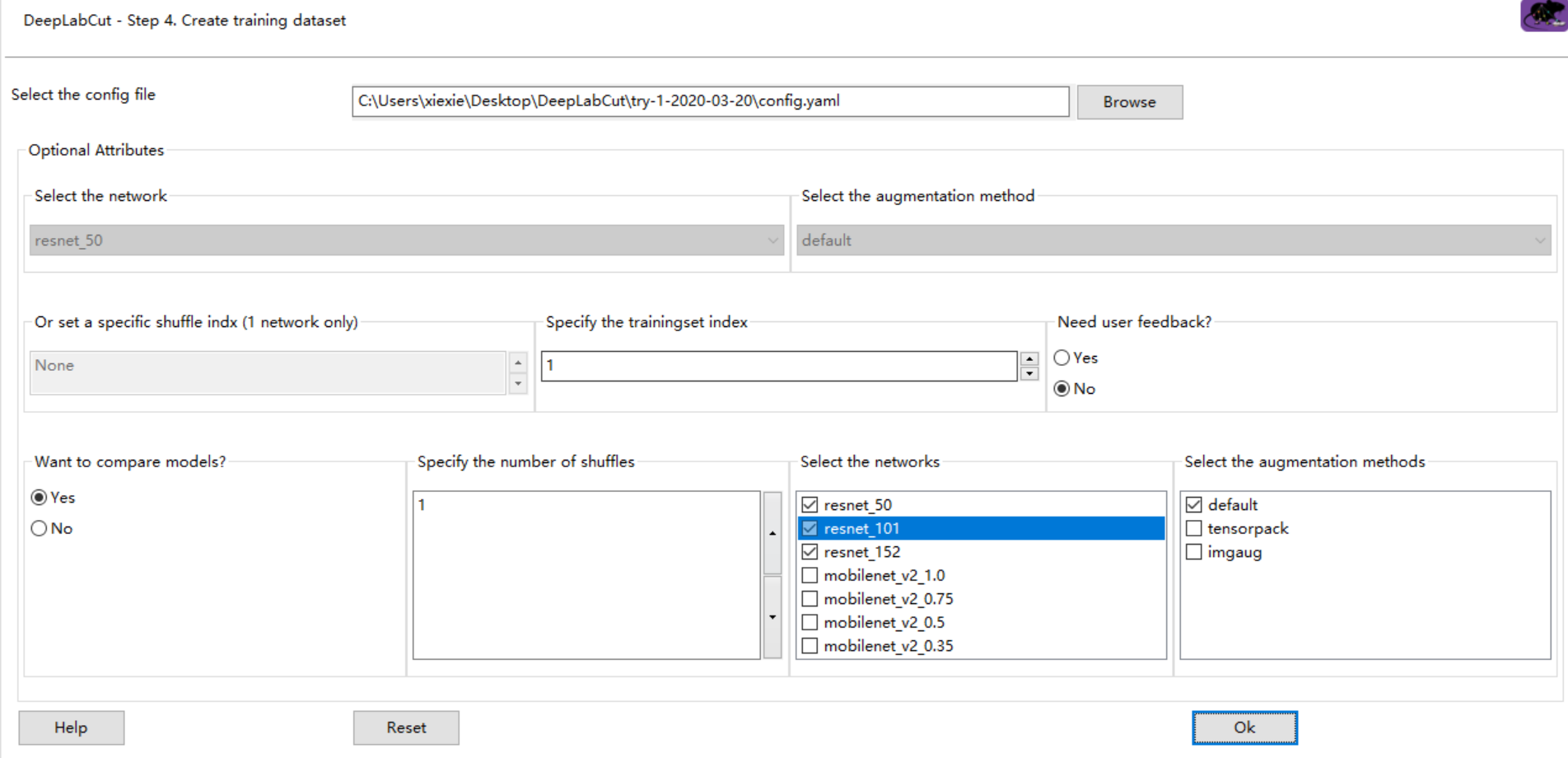
C:\Users\xiexie\Desktop\DeepLabCut\try-1-2020-03-20\training-datasets\iteration-0\UnaugmentedDataSet_tryMar20 already exists!
IndexError Traceback (most recent call last)
~.conda\envs\dlc-windowsGPU\lib\site-packages\deeplabcut\gui\create_training_dataset.py in create_training_dataset(self, event)
230 deeplabcut.create_training_dataset(self.config,num_shuffles,Shuffles=[self.shuffle.GetValue()], userfeedback=userfeedback,net_type=self.net_choice.GetValue(),augmenter_type = self.aug_choice.GetValue())
231 if self.model_comparison_choice.GetStringSelection() == 'Yes':
--> 232 deeplabcut.create_training_model_comparison(self.config,trainindex=trainindex, num_shuffles=num_shuffles,userfeedback=userfeedback,net_types=self.net_type,augmenter_types=self.aug_type)
233
234
~.conda\envs\dlc-windowsGPU\lib\site-packages\deeplabcut\generate_training_dataset\trainingsetmanipulation.py in create_training_model_comparison(config, trainindex, num_shuffles, net_types, augmenter_types, userfeedback, windows2linux)
799
800 for shuffle in range(num_shuffles):
--> 801 trainIndexes, testIndexes=mergeandsplit(config,trainindex=trainindex,uniform=True)
802 for idx_net,net in enumerate(net_types):
803 for idx_aug,aug in enumerate(augmenter_types):
~.conda\envs\dlc-windowsGPU\lib\site-packages\deeplabcut\generate_training_dataset\trainingsetmanipulation.py in mergeandsplit(config, trainindex, uniform, windows2linux)
504 if uniform==True:
505 TrainingFraction = cfg['TrainingFraction']
--> 506 trainFraction=TrainingFraction[trainindex]
507 trainIndexes, testIndexes = SplitTrials(range(len(Data.index)), trainFraction)
508 else: #leave one folder out split
~.conda\envs\dlc-windowsGPU\lib\site-packages\ruamel\yaml\compat.py in __getitem__(self, index)
271 # type: (Any) -> Any
272 if not isinstance(index, slice):
--> 273 return self.__getsingleitem__(index)
274 return type(self)([self[i] for i in range(*index.indices(len(self)))]) # type: ignore
275
~.conda\envs\dlc-windowsGPU\lib\site-packages\ruamel\yaml\comments.py in __getsingleitem__(self, idx)
386 def __getsingleitem__(self, idx):
387 # type: (Any) -> Any
--> 388 return list.__getitem__(self, idx)
389
390 def __setsingleitem__(self, idx, value):
IndexError: list index out of range
sorry I can't deal with it, Looking forward to your help! Thank you!
Xieyuanting
on 20 Mar 2020
The earlier error was a bug of 2.1.5.2 >> just update DLC to 2.1.6.2!
AlexEMG
on 21 Mar 2020
hi! Thank you for your answer!I install DLC to 2.1.6.2
I choose 'compare models' with 'resent_50, with 'resent_101, with 'resent_152', and 'augmentation' is 'default' in the GUI, and training 8000 to test, but when evaluate the network, the result in the CSV, I only got a set of data. I don't know what I did something wrong? or Where should I get the three sets of comparison data ('resent_50, with 'resent_101, with 'resent_152')
Config:
{'all_joints': [[0], [1], [2], [3]],
'all_joints_names': ['bodypart1', 'bodypart2', 'bodypart3', 'objectA'],
'batch_size': 1,
'bottomheight': 400,
'crop': True,
'crop_pad': 0,
'cropratio': 0.4,
'dataset': 'training-datasets\iteration-0\UnaugmentedDataSet_tryMar20\try_195shuffle1.mat',
'dataset_type': 'default',
'deterministic': False,
'display_iters': 1000,
'fg_fraction': 0.25,
'global_scale': 0.8,
'init_weights': 'C:\Users\xiexie\.conda\envs\dlc-windowsGPU\lib\site-packages\deeplabcut\pose_estimation_tensorflow\models\pretrained\resnet_v1_101.ckpt',
'intermediate_supervision': False,
'intermediate_supervision_layer': 12,
'leftwidth': 400,
'location_refinement': True,
'locref_huber_loss': True,
'locref_loss_weight': 0.05,
'locref_stdev': 7.2801,
'log_dir': 'log',
'max_input_size': 1500,
'mean_pixel': [123.68, 116.779, 103.939],
'metadataset': 'training-datasets\iteration-0\UnaugmentedDataSet_tryMar20\Documentation_data-try_95shuffle1.pickle',
'min_input_size': 64,
'minsize': 100,
'mirror': False,
'multi_step': [[0.005, 10000],
[0.02, 430000],
[0.002, 730000],
[0.001, 1030000]],
'net_type': 'resnet_101',
'num_joints': 4,
'optimizer': 'sgd',
'pos_dist_thresh': 17,
'project_path': 'C:\Users\xiexie\Desktop\DeepLabCut\try-1-2020-03-20',
'regularize': False,
'rightwidth': 400,
'save_iters': 50000,
'scale_jitter_lo': 0.5,
'scale_jitter_up': 1.25,
'scoremap_dir': 'test',
'shuffle': True,
'snapshot_prefix': 'C:\Users\xiexie\Desktop\DeepLabCut\try-1-2020-03-20\dlc-models\iteration-0\tryMar20-trainset95shuffle1\train\snapshot',
'stride': 8.0,
'topheight': 400,
'weigh_negatives': False,
'weigh_only_present_joints': False,
'weigh_part_predictions': False,
'weight_decay': 0.0001}
Switching batchsize to 1, as default/tensorpack/deterministic loaders do not support batches >1. Use imgaug loader.
Starting with standard pose-dataset loader.
Initializing ResNet
WARNING:tensorflow:From C:\Users\xiexie.conda\envs\dlc-windowsGPU\lib\site-packages\tensorflow\python\framework\op_def_library.py:263: colocate_with (from tensorflow.python.framework.ops) is deprecated and will be removed in a future version.
Instructions for updating:
Colocations handled automatically by placer.
WARNING:tensorflow:From C:\Users\xiexie.conda\envs\dlc-windowsGPU\lib\site-packages\tensorflow\python\framework\op_def_library.py:263: colocate_with (from tensorflow.python.framework.ops) is deprecated and will be removed in a future version.
Instructions for updating:
Colocations handled automatically by placer.
WARNING:tensorflow:From C:\Users\xiexie.conda\envs\dlc-windowsGPU\lib\site-packages\tensorflow\python\ops\losses\losses_impl.py:209: to_float (from tensorflow.python.ops.math_ops) is deprecated and will be removed in a future version.
Instructions for updating:
Use tf.cast instead.
WARNING:tensorflow:From C:\Users\xiexie.conda\envs\dlc-windowsGPU\lib\site-packages\tensorflow\python\ops\losses\losses_impl.py:209: to_float (from tensorflow.python.ops.math_ops) is deprecated and will be removed in a future version.
Instructions for updating:
Use tf.cast instead.
Loading ImageNet-pretrained resnet_101
WARNING:tensorflow:From C:\Users\xiexie.conda\envs\dlc-windowsGPU\lib\site-packages\tensorflow\python\training\saver.py:1266: checkpoint_exists (from tensorflow.python.training.checkpoint_management) is deprecated and will be removed in a future version.
Instructions for updating:
Use standard file APIs to check for files with this prefix.
WARNING:tensorflow:From C:\Users\xiexie.conda\envs\dlc-windowsGPU\lib\site-packages\tensorflow\python\training\saver.py:1266: checkpoint_exists (from tensorflow.python.training.checkpoint_management) is deprecated and will be removed in a future version.
Instructions for updating:
Use standard file APIs to check for files with this prefix.
INFO:tensorflow:Restoring parameters from C:\Users\xiexie.conda\envs\dlc-windowsGPU\lib\site-packages\deeplabcut\pose_estimation_tensorflow\models\pretrained\resnet_v1_101.ckpt
INFO:tensorflow:Restoring parameters from C:\Users\xiexie.conda\envs\dlc-windowsGPU\lib\site-packages\deeplabcut\pose_estimation_tensorflow\models\pretrained\resnet_v1_101.ckpt
Max_iters overwritten as 8000
Display_iters overwritten as 1000
Save_iters overwritten as 50000
Training parameter:
{'stride': 8.0, 'weigh_part_predictions': False, 'weigh_negatives': False, 'fg_fraction': 0.25, 'weigh_only_present_joints': False, 'mean_pixel': [123.68, 116.779, 103.939], 'shuffle': True, 'snapshot_prefix': 'C:\Users\xiexie\Desktop\DeepLabCut\try-1-2020-03-20\dlc-models\iteration-0\tryMar20-trainset95shuffle1\train\snapshot', 'log_dir': 'log', 'global_scale': 0.8, 'location_refinement': True, 'locref_stdev': 7.2801, 'locref_loss_weight': 0.05, 'locref_huber_loss': True, 'optimizer': 'sgd', 'intermediate_supervision': False, 'intermediate_supervision_layer': 12, 'regularize': False, 'weight_decay': 0.0001, 'mirror': False, 'crop_pad': 0, 'scoremap_dir': 'test', 'batch_size': 1, 'dataset_type': 'default', 'deterministic': False, 'crop': True, 'cropratio': 0.4, 'minsize': 100, 'leftwidth': 400, 'rightwidth': 400, 'topheight': 400, 'bottomheight': 400, 'all_joints': [[0], [1], [2], [3]], 'all_joints_names': ['bodypart1', 'bodypart2', 'bodypart3', 'objectA'], 'dataset': 'training-datasets\iteration-0\UnaugmentedDataSet_tryMar20\try_195shuffle1.mat', 'init_weights': 'C:\Users\xiexie\.conda\envs\dlc-windowsGPU\lib\site-packages\deeplabcut\pose_estimation_tensorflow\models\pretrained\resnet_v1_101.ckpt', 'net_type': 'resnet_101', 'num_joints': 4, 'display_iters': 1000, 'max_input_size': 1500, 'metadataset': 'training-datasets\iteration-0\UnaugmentedDataSet_tryMar20\Documentation_data-try_95shuffle1.pickle', 'min_input_size': 64, 'multi_step': [[0.005, 10000], [0.02, 430000], [0.002, 730000], [0.001, 1030000]], 'pos_dist_thresh': 17, 'project_path': 'C:\Users\xiexie\Desktop\DeepLabCut\try-1-2020-03-20', 'save_iters': 50000, 'scale_jitter_lo': 0.5, 'scale_jitter_up': 1.25, 'output_stride': 16, 'deconvolutionstride': 2}
Starting training....
iteration: 1000 loss: 0.0211 lr: 0.005
iteration: 2000 loss: 0.0079 lr: 0.005
iteration: 3000 loss: 0.0063 lr: 0.005
iteration: 4000 loss: 0.0051 lr: 0.005
iteration: 5000 loss: 0.0047 lr: 0.005
iteration: 6000 loss: 0.0043 lr: 0.005
iteration: 7000 loss: 0.0042 lr: 0.005
iteration: 8000 loss: 0.0041 lr: 0.005
Exception in thread Thread-1:
Traceback (most recent call last):
File "C:\Users\xiexie.conda\envs\dlc-windowsGPU\lib\site-packages\tensorflow\python\client\session.py", line 1334, in _do_call
return fn(*args)
File "C:\Users\xiexie.conda\envs\dlc-windowsGPU\lib\site-packages\tensorflow\python\client\session.py", line 1319, in _run_fn
options, feed_dict, fetch_list, target_list, run_metadata)
File "C:\Users\xiexie.conda\envs\dlc-windowsGPU\lib\site-packages\tensorflow\python\client\session.py", line 1407, in _call_tf_sessionrun
run_metadata)
tensorflow.python.framework.errors_impl.CancelledError: Enqueue operation was cancelled
[[{{node fifo_queue_enqueue}}]]
During handling of the above exception, another exception occurred:
Traceback (most recent call last):
File "C:\Users\xiexie.conda\envs\dlc-windowsGPU\lib\threading.py", line 916, in _bootstrap_inner
self.run()
File "C:\Users\xiexie.conda\envs\dlc-windowsGPU\lib\threading.py", line 864, in run
self._target(self._args, *self._kwargs)
File "C:\Users\xiexie.conda\envs\dlc-windowsGPU\lib\site-packages\deeplabcut\pose_estimation_tensorflow\train.py", line 81, in load_and_enqueue
sess.run(enqueue_op, feed_dict=food)
File "C:\Users\xiexie.conda\envs\dlc-windowsGPU\lib\site-packages\tensorflow\python\client\session.py", line 929, in run
run_metadata_ptr)
File "C:\Users\xiexie.conda\envs\dlc-windowsGPU\lib\site-packages\tensorflow\python\client\session.py", line 1152, in _run
feed_dict_tensor, options, run_metadata)
File "C:\Users\xiexie.conda\envs\dlc-windowsGPU\lib\site-packages\tensorflow\python\client\session.py", line 1328, in _do_run
run_metadata)
File "C:\Users\xiexie.conda\envs\dlc-windowsGPU\lib\site-packages\tensorflow\python\client\session.py", line 1348, in _do_call
raise type(e)(node_def, op, message)
tensorflow.python.framework.errors_impl.CancelledError: Enqueue operation was cancelled
[[node fifo_queue_enqueue (defined at C:\Users\xiexie.conda\envs\dlc-windowsGPU\lib\site-packages\deeplabcut\pose_estimation_tensorflow\train.py:67) ]]
Caused by op 'fifo_queue_enqueue', defined at:
File "C:\Users\xiexie.conda\envs\dlc-windowsGPU\Scripts\ipython-script.py", line 10, in
sys.exit(start_ipython())
File "C:\Users\xiexie.conda\envs\dlc-windowsGPU\lib\site-packages\IPython__init__.py", line 126, in start_ipython
return launch_new_instance(argv=argv, *kwargs)
File "C:\Users\xiexie.conda\envs\dlc-windowsGPU\lib\site-packages\traitlets\config\application.py", line 664, in launch_instance
app.start()
File "C:\Users\xiexie.conda\envs\dlc-windowsGPU\lib\site-packages\IPython\terminal\ipapp.py", line 356, in start
self.shell.mainloop()
File "C:\Users\xiexie.conda\envs\dlc-windowsGPU\lib\site-packages\IPython\terminal\interactiveshell.py", line 558, in mainloop
self.interact()
File "C:\Users\xiexie.conda\envs\dlc-windowsGPU\lib\site-packages\IPython\terminal\interactiveshell.py", line 549, in interact
self.run_cell(code, store_history=True)
File "C:\Users\xiexie.conda\envs\dlc-windowsGPU\lib\site-packages\IPython\core\interactiveshell.py", line 2858, in run_cell
raw_cell, store_history, silent, shell_futures)
File "C:\Users\xiexie.conda\envs\dlc-windowsGPU\lib\site-packages\IPython\core\interactiveshell.py", line 2886, in _run_cell
return runner(coro)
File "C:\Users\xiexie.conda\envs\dlc-windowsGPU\lib\site-packages\IPython\core\async_helpers.py", line 68, in _pseudo_sync_runner
coro.send(None)
File "C:\Users\xiexie.conda\envs\dlc-windowsGPU\lib\site-packages\IPython\core\interactiveshell.py", line 3063, in run_cell_async
interactivity=interactivity, compiler=compiler, result=result)
File "C:\Users\xiexie.conda\envs\dlc-windowsGPU\lib\site-packages\IPython\core\interactiveshell.py", line 3254, in run_ast_nodes
if (await self.run_code(code, result, async_=asy)):
File "C:\Users\xiexie.conda\envs\dlc-windowsGPU\lib\site-packages\IPython\core\interactiveshell.py", line 3331, in run_code
exec(code_obj, self.user_global_ns, self.user_ns)
File "
deeplabcut.launch_dlc()
File "C:\Users\xiexie.conda\envs\dlc-windowsGPU\lib\site-packages\deeplabcut\gui\launch_script.py", line 45, in launch_dlc
app.MainLoop()
File "C:\Users\xiexie.conda\envs\dlc-windowsGPU\lib\site-packages\wx\core.py", line 2166, in MainLoop
rv = wx.PyApp.MainLoop(self)
File "C:\Users\xiexie.conda\envs\dlc-windowsGPU\lib\site-packages\deeplabcut\gui\train_network.py", line 268, in train_network
maxiters=maxiters)
File "C:\Users\xiexie.conda\envs\dlc-windowsGPU\lib\site-packages\deeplabcut\pose_estimation_tensorflow\training.py", line 132, in train_network
train(str(poseconfigfile),displayiters,saveiters,maxiters,max_to_keep=max_snapshots_to_keep,keepdeconvweights=keepdeconvweights,allow_growth=allow_growth) #pass on path and file name for pose_cfg.yaml!
File "C:\Users\xiexie.conda\envs\dlc-windowsGPU\lib\site-packages\deeplabcut\pose_estimation_tensorflow\train.py", line 118, in train
batch, enqueue_op, placeholders = setup_preloading(batch_spec)
File "C:\Users\xiexie.conda\envs\dlc-windowsGPU\lib\site-packages\deeplabcut\pose_estimation_tensorflow\train.py", line 67, in setup_preloading
enqueue_op = q.enqueue(placeholders_list)
File "C:\Users\xiexie.conda\envs\dlc-windowsGPU\lib\site-packages\tensorflow\python\ops\data_flow_ops.py", line 345, in enqueue
self._queue_ref, vals, name=scope)
File "C:\Users\xiexie.conda\envs\dlc-windowsGPU\lib\site-packages\tensorflow\python\ops\gen_data_flow_ops.py", line 4158, in queue_enqueue_v2
timeout_ms=timeout_ms, name=name)
File "C:\Users\xiexie.conda\envs\dlc-windowsGPU\lib\site-packages\tensorflow\python\framework\op_def_library.py", line 788, in _apply_op_helper
op_def=op_def)
File "C:\Users\xiexie.conda\envs\dlc-windowsGPU\lib\site-packages\tensorflow\python\util\deprecation.py", line 507, in new_func
return func(
File "C:\Users\xiexie.conda\envs\dlc-windowsGPU\lib\site-packages\tensorflow\python\framework\ops.py", line 3300, in create_op
op_def=op_def)
File "C:\Users\xiexie.conda\envs\dlc-windowsGPU\lib\site-packages\tensorflow\python\framework\ops.py", line 1801, in __init__
self._traceback = tf_stack.extract_stack()
CancelledError (see above for traceback): Enqueue operation was cancelled
[[node fifo_queue_enqueue (defined at C:\Users\xiexie.conda\envs\dlc-windowsGPU\lib\site-packages\deeplabcut\pose_estimation_tensorflow\train.py:67) ]]
The network is now trained and ready to evaluate. Use the function 'evaluate_network' to evaluate the network.
the evaluate result is that:

| Training iterations: | %Training dataset | Shuffle number | Train error(px) | Test error(px) | p-cutoff used | Train error with p-cutoff | Test error with p-cutoff
0 | 8000 | 95 | 1 | 2.45 | 70.53 | 0.1 | 2.45 | 70.53 |
Xieyuanting
on 21 Mar 2020
another question is that when I choose the 'mobilenet_v2_1.0' in the 'compare models' . It will stop in one interface, It is no use waiting a long time about four hours, so I would like to ask is there any other way to download a ImageNet-pretrained model?thank you very much!

Xieyuanting
on 21 Mar 2020
You need to run evaluate on each different shuffle. If you look in the folder you have 3 shuffles now.
 MMathisLab
on 21 Mar 2020
MMathisLab
on 21 Mar 2020
Thank you! I'm trying your suggestion.
But when I create training dataset, I found different model will split the fraction again(As shown in the following screenshot). So I want to ask: Are these data sets the same? How I can freeze the train–test split indices for comparison, so that I can I can compare the training effects of different models?
Looking forward to your reply! thank you!
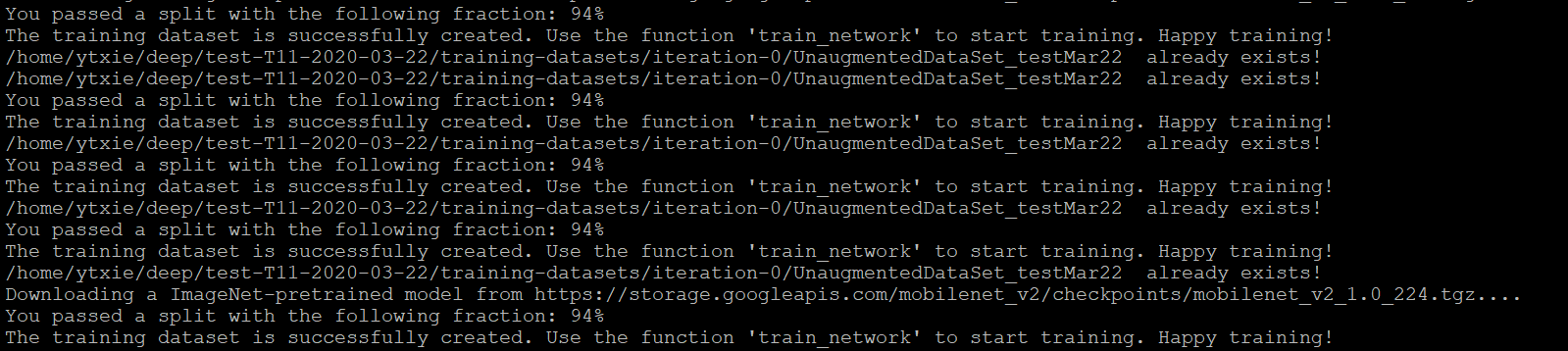
Xieyuanting
on 22 Mar 2020
Using the model comparison function freezes the splits - you can look at the indexes in the splits for each shuffle. Also in the folder a new human readable file is created that lists which shuffle includes what...
MMathisLab
on 22 Mar 2020
Thank you for your reply. I'm sorry. I have another question.
I did a full text search for the 'p-cutoff' and found that there was no complete definition, just like 'We then used a p-cutoff of X (i.e. 0.9) to condition the X,Y coordinates for future analysis'.
After evaluating the network, the csv shows different values. What's the difference between the two values of ' Train error' and 'Train error with p-cutoff' ?Where should I get the information?
And my p-cutoff used is 0.6, In the example, it's 0.9. How should this value be determined in the config. yaml?
Looking forward to your reply! thank you!
Xieyuanting
on 25 Mar 2020
hi @Xieyuanting (1) the original paper explains the scoremaps well, which is what the pcutoff us thresholding. https://t.co/Grkqck2tka
(2) the Nature Protocol paper also describes this, and in Box1 it has info (also here on github, but since it's an image, it's not searchable). https://rdcu.be/bHpHNhttps://github.com/AlexEMG/DeepLabCut/blob/master/docs/functionDetails.md#a-create-a-new-project
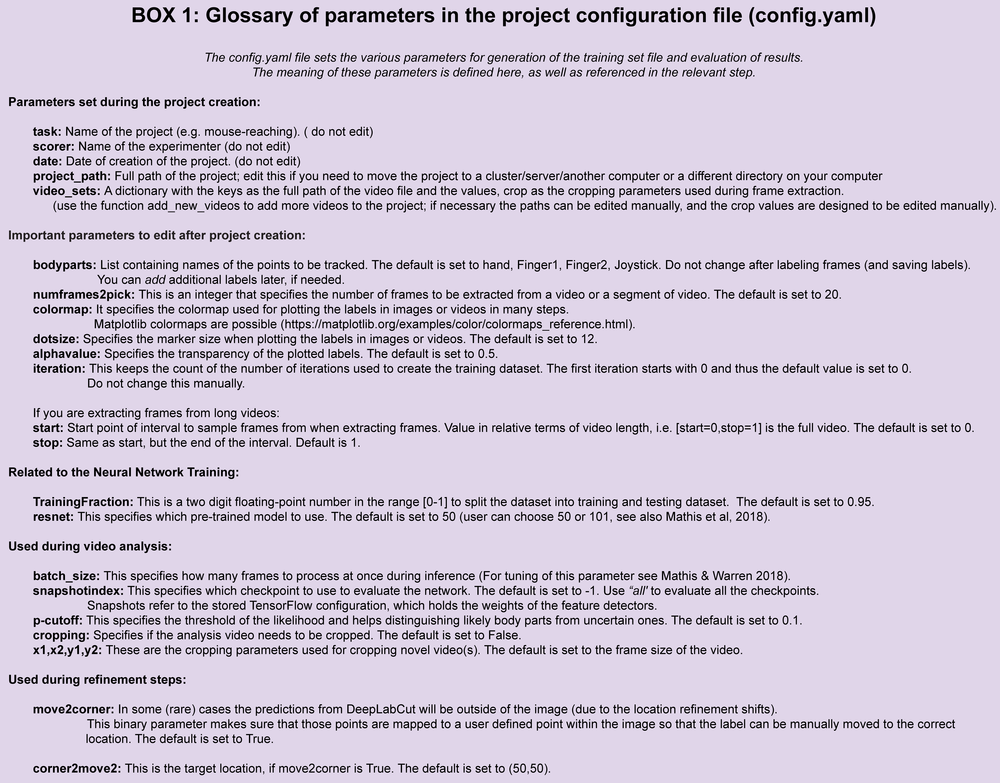
(3) I agree it should be easier to find a description of when one should change it, so I will update the docs for this (on the wiki).
MMathisLab
on 26 Mar 2020
Hi! I read about the paper, it's really help me!
Thank you for your reply! I'm so sorry. I have another question.
I connect to the Linux server remotely with putty. I want to shutdown my computer will not affect the network training in Linux server. So I used the command _# ./deeplabcut.train_network('/home/ytxie/deep/6-T1-8+10-2020-03-13/config.yaml', shuffle=2, maxiters=700000) &_
or _# nohup ./deeplabcut.train_network('/home/ytxie/deep/6-T1-8+10-2020-03-13/config.yaml',shuffle=2,maxiters=700000) &_
It's doesn't work. _deeplabcut.train_network('/home/ytxie/deep/6-T1-8+10-2020-03-13/config.yaml',shuffle=2,maxiters=700000)_ will start training.
Do you have any ieda about training network in the background! Please help me!
Looking forward to your reply! thank you very much!
Xieyuanting
on 27 Mar 2020
Just make a executable script with the commands of interest. Your example doesn’t wir as you are calling a python function from the command line. Just add python in front and edit accordingly.
https://dbader.org/blog/how-to-make-command-line-commands-with-python
Please also use the user forum for such questions.
From: Xieyuanting notifications@github.com
Sent: Friday, March 27, 2020 10:15:02 AM
To: AlexEMG/DeepLabCut DeepLabCut@noreply.github.com
Cc: Mathis, Alexander Thomas amathis@fas.harvard.edu; Comment comment@noreply.github.com
Subject: Re: [AlexEMG/DeepLabCut] Why the MAE not as expected? (#623)
Hi! I read about the paper, it's really help me!
Thank you for your reply! I'm so sorry. I have another question.
I connect to the Linux server remotely with putty. I want to shutdown my computer will not affect the network training in Linux server. So I used the command # ./deeplabcut.train_network('/home/ytxie/deep/6-T1-8+10-2020-03-13/config.yaml', shuffle=2, maxiters=700000) &
or # nohup ./deeplabcut.train_network('/home/ytxie/deep/6-T1-8+10-2020-03-13/config.yaml',shuffle=2,maxiters=700000) &
It's doesn't work. deeplabcut.train_network('/home/ytxie/deep/6-T1-8+10-2020-03-13/config.yaml',shuffle=2,maxiters=700000) will start training.
Do you have any ieda about training network in the background! Please help me!
Looking forward to your reply! thank you very much!
—
You are receiving this because you commented.
Reply to this email directly, view it on GitHubhttps://urldefense.proofpoint.com/v2/url?u=https-3A__github.com_AlexEMG_DeepLabCut_issues_623-23issuecomment-2D605023636&d=DwMCaQ&c=WO-RGvefibhHBZq3fL85hQ&r=11wEEDBv3Ke3n3b8dICjuQC5vgZ23dfGPax018VOZ2g&m=g0PSFpg-vcllqLGBTepFG0io8jwcICRwOZlxiuIoiog&s=ntXSG_kv2qMHTo0cjzltXmLu_f0m6QRChSdZqjXlgtA&e=, or unsubscribehttps://urldefense.proofpoint.com/v2/url?u=https-3A__github.com_notifications_unsubscribe-2Dauth_AE7CMXX7KPP72I5LMD2AXCTRJSYGNANCNFSM4LPEM4WQ&d=DwMCaQ&c=WO-RGvefibhHBZq3fL85hQ&r=11wEEDBv3Ke3n3b8dICjuQC5vgZ23dfGPax018VOZ2g&m=g0PSFpg-vcllqLGBTepFG0io8jwcICRwOZlxiuIoiog&s=hXc7oo6OUcdeSaWtAbu8TdsSsw83GlNJ3x8y5xdAIS4&e=.
AlexEMG
on 27 Mar 2020
Related issues
 WernTanj
·
3Comments
WernTanj
·
3Comments
 N-Sensho
·
3Comments
N-Sensho
·
3Comments
 jennymsmith94
·
3Comments
jennymsmith94
·
3Comments
 ForgottenOneNyx
·
4Comments
ForgottenOneNyx
·
4Comments
 tvajtay
·
4Comments
tvajtay
·
4Comments
Most helpful comment
Hi Xieyuanting!
Did you freeze the train–test split indices for comparison? That is, were networks 1 and 2 strictly trained on the same training data? Comparing performance is otherwise tricky. This could be done using
deeplabcut.create_training_model_comparison().Moreover, instead on training 2 networks on the same database, you could train one only, but store a larger number of snapshots to obtain a broader view of the trend of error vs # iterations (by opposition to a single metric).