Deeplabcut: dNN training speed seems to be low: low GPU clock speed; however, full VRAM utilization
Operating system and DeepLabCut version
Windows 10, with an Anaconda Env, & DeepLabCut 2.x.
CUDA 10, tf 1.13.1
GTX 1080 TI
The problem
When I launch the training, the training starts, but it doesn't utilize my GPU that well. 1000 iterations took about 5-11 minutes(?). Here is my log.txt
I have reinstalled my drivers, including CUDA; rebuilt my conda environment. In the meantime, I should mention that the card does in fact draw a lot of power, and that it may in fact be utilized. I just can't see it on task manager.
How to Reproduce the problem
Steps to reproduce the behavior:
Run deeplabcut.train_network(path_config_file, gputouse=0)
Over view of my GPU usage

 caniko
All 21 comments
How large are your frames?
Can you test:
What happens if you set: allow_growth=True
https://forum.image.sc/t/how-to-stop-running-out-of-vram/30551/7?u=mwmathis
 MMathisLab
on 16 Nov 2019
MMathisLab
on 16 Nov 2019
How large are your frames?
My frames are uncropped, and are 1920x1080.
Can you test:
What happens if you set:allow_growth=Truehttps://forum.image.sc/t/how-to-stop-running-out-of-vram/30551/7?u=mwmathis
Seems to not have any effect on my situation. I don't get any errors, or exception raises; the high VRAM usage just caught my attention.
caniko
on 16 Nov 2019
Then you are exceeding your set max input size, and your network is not training.
From your log.txt
'max_input_size': 1500,
Also, the allow growth is not related fully to vram - so you might want to still test allocating more gpu memory up front. You’re frames are very large.
MMathisLab
on 16 Nov 2019
A few thoughts:
- I think the windows task manager does not properly display the GPU usage well. I would recommend nvidia-smi.
- training always grabs frames, does some augmentation passes is to TF (which updates weights) etc. Now for large frames the first step takes longer as it is not processed on the GPU the usage will go down (this is for the default loader). The imgaug/tensorpack loaders will have more streamlined processing and let TF exercise more frequently...
- 'max_input_size': 1500 > due to the random augmentation every so often it will find frames that are smaller than 1500**2. But yes that number should be adjusted.
 AlexEMG
on 16 Nov 2019
AlexEMG
on 16 Nov 2019
What is 1500 in max_input_size referring to? Number of pixels?
I am guessing that there is not tensorpack or imagaug support at the moment, right?
Any other optimizations? Maybe I could augment my frames prior to the training, store the augmented frames for use during training.
Would storing the project on an external hard drive introduce a bottleneck?
caniko
on 16 Nov 2019
Please see the docstring of this function. Both imgaug and tensorpack are supported.
MMathisLab
on 16 Nov 2019
Please see the docstring of this function. Both imgaug and tensorpack are supported.
Strange, they are not mentioned in the docstring.
def train_network(config,shuffle=1,trainingsetindex=0,
            max_snapshots_to_keep=5,displayiters=None,saveiters=None,maxiters=None,
            allow_growth=False,gputouse=None,autotune=False,keepdeconvweights=True):
    """Trains the network with the labels in the training dataset.

    Parameter
    ----------
    config : string
        Full path of the config.yaml file as a string.

    shuffle: int, optional
        Integer value specifying the shuffle index to select for training. Default is set to 1

    trainingsetindex: int, optional
        Integer specifying which TrainingsetFraction to use. By default the first (note that TrainingFraction is a list in config.yaml).

    Additional parameters:

    max_snapshots_to_keep: int, or None. Sets how many snapshots are kept, i.e. states of the trained network. Every savinginteration many times
        a snapshot is stored, however only the last max_snapshots_to_keep many are kept! If you change this to None, then all are kept.
        See: https://github.com/AlexEMG/DeepLabCut/issues/8#issuecomment-387404835

    displayiters: this variable is actually set in pose_config.yaml. However, you can overwrite it with this hack. Don't use this regularly, just if you are too lazy to dig out
        the pose_config.yaml file for the corresponding project. If None, the value from there is used, otherwise it is overwritten! Default: None

    saveiters: this variable is actually set in pose_config.yaml. However, you can overwrite it with this hack. Don't use this regularly, just if you are too lazy to dig out
        the pose_config.yaml file for the corresponding project. If None, the value from there is used, otherwise it is overwritten! Default: None

    maxiters: this variable is actually set in pose_config.yaml. However, you can overwrite it with this hack. Don't use this regularly, just if you are too lazy to dig out
        the pose_config.yaml file for the corresponding project. If None, the value from there is used, otherwise it is overwritten! Default: None

    allow_groth: bool, default false.
        For some smaller GPUs the memory issues happen. If true, the memory allocator does not pre-allocate the entire specified
        GPU memory region, instead starting small and growing as needed. See issue: https://forum.image.sc/t/how-to-stop-running-out-of-vram/30551/2

    gputouse: int, optional. Natural number indicating the number of your GPU (see number in nvidia-smi). If you do not have a GPU put None.
        See: https://nvidia.custhelp.com/app/answers/detail/a_id/3751/~/useful-nvidia-smi-queries

    autotune: property of TensorFlow, somehow faster if 'false' (as Eldar found out, see https://github.com/tensorflow/tensorflow/issues/13317). Default: False

    keepdeconvweights: bool, default: true
        Also restores the weights of the deconvolution layers (and the backbone) when training from a snapshot. Note that if you change the number of bodyparts, you need to
        set this to false for re-training.
Check out this PR: https://github.com/AlexEMG/DeepLabCut/pull/409
and for example usage: https://github.com/AlexEMG/DeepLabCut/blob/master/examples/testscript_openfielddata_augmentationcomparison.py#L81
There is a github search bar that would lead you to this: https://github.com/AlexEMG/DeepLabCut/blob/ca93b3e7a69c674abb31bfaa812cb38940a5d598/deeplabcut/pose_cfg.yaml#L76
# all images larger with size
# width * height > max_input_size*max_input_size are not used in training.
# Prevents training from crashing with out of memory exception for very
# large images.
max_input_size: 1500
# all images smaller than 64*64 will be excluded.
min_input_size: 64
Check out this PR: #409
and for example usage: https://github.com/AlexEMG/DeepLabCut/blob/master/examples/testscript_openfielddata_augmentationcomparison.py#L81There is a github search bar that would lead you to this:
# all images larger with size
# width * height > max_input_size*max_input_size are not used in training.
# Prevents training from crashing with out of memory exception for very
# large images.
max_input_size: 1500
# all images smaller than 64*64 will be excluded.
min_input_size: 64
Edited:
But my total number of pixels frame size is 1920*1080*1.25*.8 = 1440^2, which is < 1500^2
Looking into tensorpack, thank you.
caniko
on 16 Nov 2019
Can, this is done when you create the training set ;)
MMathisLab
on 16 Nov 2019
Can, this is done when you create the training set ;)
Ah, ok :D
caniko
on 16 Nov 2019
You are right -- the upper limit in your case during augmentation is: np.sqrt(1920*1080*1.25*.8) =1440 so all frames will be used for training. Anyway that is hardly the point, the point is these are large frames, and processing outside of TF takes time... which is why your GPU usage is not high.
AlexEMG
on 16 Nov 2019
Would you recommend any of these augmenters? There are so many to choose from:
augmenter_type: string
        Type of augmenter. Currently default, imgaug, tensorpack, and deterministic are supported.
Basically:
- default: our standard DLC 2.0 introduced in Nature Protocols variant
- deterministic: only useful for testing, freezes numpy seed otherwise like default
- tensorpack: a lot of augmentation, multi CPU support, maps are created less efficiently than in imgaug, does not allow batchsize>1
- imgaug: a lot of augmentation, efficient code for map creation & batchsizes >1 supported.
AlexEMG
on 16 Nov 2019
- imgaug: a lot of augmentation, efficient code for map creation & batchsizes >1 supported.
The batch_size is set to 8 in the config file; however, it is set to 1 when I start training.
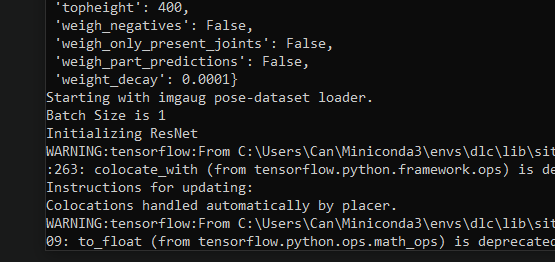
Could you also elaborate on map creation?
How would I use imgaug inside your framework. I see that I have many options for augmenting my images, which is great, I would love to do that; moreover, I was mainly after solving my batch problems. Could you please provide a definitive rough guide for handling large images using imgaug in DeepLabCut?
Thank you
Can
caniko
on 17 Nov 2019
You can set the parameters such as the batch_size in the pose_cfg.yaml file for the model you are training. For training the batchsize the value in pose_cfg.yaml is considered; the reason is that typically larger batchsizes during inference are possible for many users and that is the more common step, but during training most users have GPUs and image sizes that only allow batchsize =1.
AlexEMG
on 17 Nov 2019
@AlexEMG I ran my training the whole day now, and it keeps crashing at 1000-3000 iters. I have to start from scratch every time
This was the same issue as I had with the normal settings.
caniko
on 18 Nov 2019
Then you probably do not have enough juice.
From: Can H. Tartanoglu notifications@github.com
Sent: Sunday, November 17, 2019 6:10:40 PM
To: AlexEMG/DeepLabCut DeepLabCut@noreply.github.com
Cc: Mathis, Alexander Thomas amathis@fas.harvard.edu; Mention mention@noreply.github.com
Subject: Re: [AlexEMG/DeepLabCut] dNN training speed seems to be low: low GPU clock speed; however, full VRAM utilization (#491)
@AlexEMGhttps://urldefense.proofpoint.com/v2/url?u=https-3A__github.com_AlexEMG&d=DwMCaQ&c=WO-RGvefibhHBZq3fL85hQ&r=11wEEDBv3Ke3n3b8dICjuQC5vgZ23dfGPax018VOZ2g&m=YKDaiGDoDGB0SfbAIO4oL6AI4ESZWn9g1Rfqtd1xb-w&s=PaIWdM_coQ8nc9zxY6r2yZKygashtWGBqjixUHu9omY&e= I ran my training the whole day now, and it keeps crashing at 1000-3000 iters. I have to start from scratch every time
—
You are receiving this because you were mentioned.
Reply to this email directly, view it on GitHubhttps://urldefense.proofpoint.com/v2/url?u=https-3A__github.com_AlexEMG_DeepLabCut_issues_491-3Femail-5Fsource-3Dnotifications-26email-5Ftoken-3DAE7CMXQIGRN4F42BHK3KLTDQUHFPBA5CNFSM4JOGEW52YY3PNVWWK3TUL52HS4DFVREXG43VMVBW63LNMVXHJKTDN5WW2ZLOORPWSZGOEEIY4UI-23issuecomment-2D554798673&d=DwMCaQ&c=WO-RGvefibhHBZq3fL85hQ&r=11wEEDBv3Ke3n3b8dICjuQC5vgZ23dfGPax018VOZ2g&m=YKDaiGDoDGB0SfbAIO4oL6AI4ESZWn9g1Rfqtd1xb-w&s=L-GwOLWLYyOnhVjtau7Q711SYAIXB3dcW0Km49ABfLc&e=, or unsubscribehttps://urldefense.proofpoint.com/v2/url?u=https-3A__github.com_notifications_unsubscribe-2Dauth_AE7CMXS275WXNFBI3J42MJLQUHFPBANCNFSM4JOGEW5Q&d=DwMCaQ&c=WO-RGvefibhHBZq3fL85hQ&r=11wEEDBv3Ke3n3b8dICjuQC5vgZ23dfGPax018VOZ2g&m=YKDaiGDoDGB0SfbAIO4oL6AI4ESZWn9g1Rfqtd1xb-w&s=-S-wiCN6JHW-jAG4xrLQ_Q6a9uQftpnfIvQte-Y48e4&e=.
AlexEMG
on 18 Nov 2019
That is strange because I have trained many networks with the same resolution using the same GPU before, and it has never been a problem.
caniko
on 18 Nov 2019
Are there any environment variables like GPU_MAX_ALLOC_PERCENT 100 that you could recommend? The 1080ti I am using is a display GPU
caniko
on 18 Nov 2019
I tested it with a 2080 TI using your Linux docker container, and it worked splendidly. I noticed that your Docker Container runs on CUDA 9. Perhaps the issue was with TF 13.1 + CUDA 10.0 + Windows 10.
caniko
on 19 Nov 2019
Related issues
 Jonathan-Oehley
·
4Comments
Jonathan-Oehley
·
4Comments
 haofanglee
·
3Comments
haofanglee
·
3Comments
 dusa2
·
3Comments
dusa2
·
3Comments
 ForgottenOneNyx
·
4Comments
ForgottenOneNyx
·
4Comments
 jennymsmith94
·
3Comments
jennymsmith94
·
3Comments