Deeplabcut: Training not starting and exiting from python [not finding model weights/path issue]
*Windows 10 (Education), Python 3.6.9 *
I'm using a pc running Windows 10 (Education) on my CPU, with Anaconda3 Env, and DeepLabCut 2.1.2.
Please complete the following information about your system:
OS: Windows10
DeepLabCut Version 2.1.2
Browser chrome
I am having issues getting the network trained. I am not used to using PCs. It will start then give a "Starting training" message but then exit from ipython (Screenshot included below).
A clear and concise description of what the problem is.
How to Reproduce the problem
I followed instructions normally (started on the dlc-windowsCPU env, ran ipython, imported DLC, created a new project, set frame selection to automatic (checked folder to make sure frames were there, they were), labelled the frames (excel file had numbers in it, so I'm assuming this worked), checked labelled frames, then created a new training dataset, and then ran the train the network command. I tried this a couple times and got the same result where it would stop at Starting training.... then would exit out.
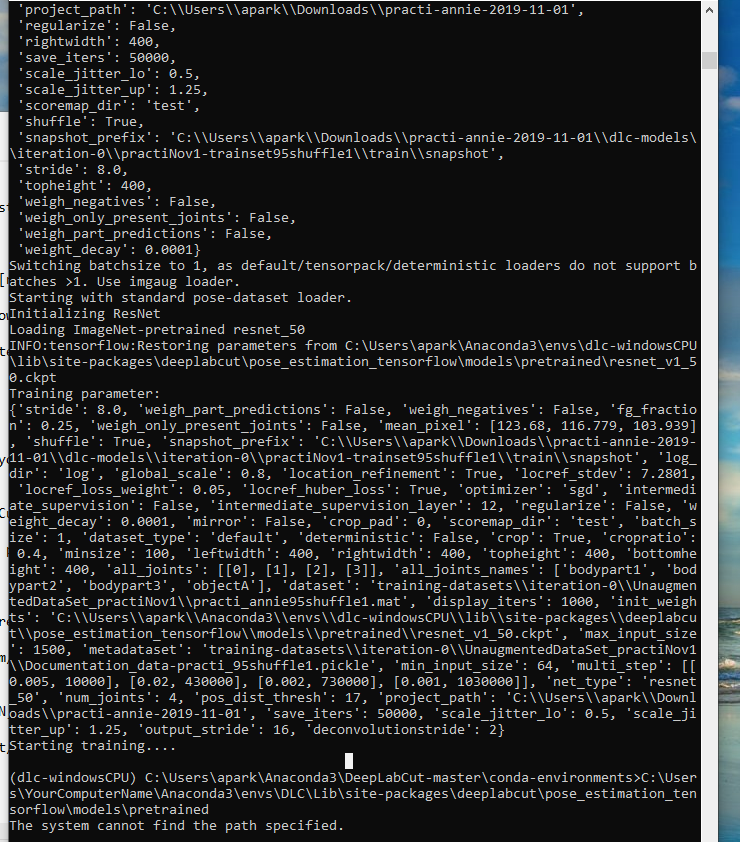
I've gotten this to work on my mac computer but am not used to using PC's and am not sure what the issue is.
 annieandbrianneedacode
All 27 comments
Dear @annieandbrianneedacode -- the weights are not found. Check out this FAQ: https://github.com/AlexEMG/DeepLabCut/wiki/Troubleshooting-Tips
 AlexEMG
on 4 Nov 2019
AlexEMG
on 4 Nov 2019
Hi Alex,
Thanks for the response. I'm not really familiar with dos what are the equivalent commands for this?:
If it is not there, run sudo download.sh then change the permissions: sudo chown yourusername:yourusername resnet_v1_50.ckpt
sudo doesn't seem to work.
Thanks,
Annie
annieandbrianneedacode
on 5 Nov 2019
Sorry, also I noticed that I don't even have a DLC folder in my envs folder.
annieandbrianneedacode
on 5 Nov 2019
there is sudo in windows, if you have gitbash installed: https://github.com/AlexEMG/DeepLabCut/wiki/Troubleshooting-Tips
bash: git: command not found. Git is not installed on the computer. Install git using https://git-scm.com/book/en/v2/Getting-Started-Installing-Git
I would be sure bitbash is installed, then open the cmd program as an admin, then try to download the weights again.
 MMathisLab
on 5 Nov 2019
MMathisLab
on 5 Nov 2019
Hi Alex,
I tried installing docker but we are running this on the windows cpu and I noticed it says the container for deeplabcut2.0 isn't supported on windows? Am I just forced to buy a nvidia gpu?
Thanks,
Annie
Correct, Docker does not work on Windows. And, yes the CUDA, etc only works on nVidia GPUs, not AMD, etc.
MMathisLab
on 5 Nov 2019
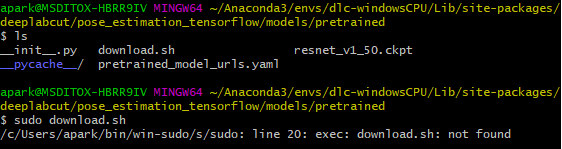
Thanks for the reply. When I run "sudo download.sh" it says "line 20:exec: download.sh: not found"
annieandbrianneedacode
on 5 Nov 2019
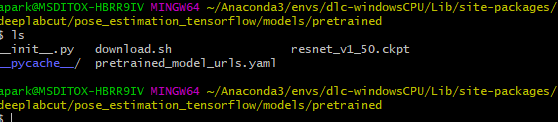
Also resnet_v1_50.ckpt is already there. See screenshot below.
annieandbrianneedacode
on 5 Nov 2019
are you in the subdirectory which has the download.sh script?
MMathisLab
on 5 Nov 2019
Yes, it is there
annieandbrianneedacode
on 5 Nov 2019
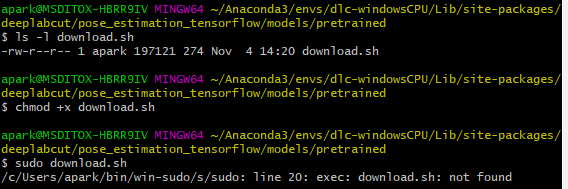
I just realized it doesn't have executable permissions and I can't add them using chmod.
annieandbrianneedacode
on 5 Nov 2019
you can also try sudo bash ./download.sh
MMathisLab
on 5 Nov 2019
but also from your folder screenshot, you DO have the model downloaded, i.e. "resnet_v1_50.cpkt"
MMathisLab
on 5 Nov 2019
Yes I do already have it downloaded but it still wasn't working. So I thought it was the wrong one.
And no I didn't how do I change this?
annieandbrianneedacode
on 5 Nov 2019
can you go into project folder, then dlc-models > interation-0 > projectname-trainset95shuffle1 > train
and open pose_config.yaml and check what is under: init_weights ? i.e. something like:
init_weights: /home/mackenzie/anaconda3/envs/DLC2/lib/python3.6/site-packages/deeplabcut/pose_estimation_tensorflow/models/pretrained/resnet_v1_50.ckpt
MMathisLab
on 5 Nov 2019
Yes it is:
init_weights: C:\Users\apark\Anaconda3\envs\dlc-windowsCPU\lib\site-packages\deeplabcut\pose_estimation_tensorflow\models\pretrained\resnet_v1_50.ckpt
annieandbrianneedacode
on 5 Nov 2019
I also don't know if the permissions are fine for running the project in the downloads folder of Windows (I'm not a windows user).
As from the screenshot of your error, it's looking somewhere very funny:

So it must be you have several env or such? idk where the path "yourComputerName" etc is coming from?
MMathisLab
on 5 Nov 2019
can you type:
import deeplabcut
deeplabcut.__file__
and see where it is installed?
MMathisLab
on 5 Nov 2019
Yup!

annieandbrianneedacode
on 5 Nov 2019
Right, so seems it's looking in the wrong folder for some reason, unclear to me. Can you get rid of the other env/ namely the Anacoda3\deeplabcut-master\ ...?
MMathisLab
on 5 Nov 2019
Yeah sure just remove the whole thing?
annieandbrianneedacode
on 5 Nov 2019
So I removed that directory and tried to start training again but it is still paused at "Starting training...."
annieandbrianneedacode
on 5 Nov 2019
did it stop again with the same error message?
It might not be paused, as it prints whatever display iterations you set, the default is 1000, which on a CPU would take many hours. You can hit cntrl+C to stop, then set
deeplabcut.train_network(configpath, displayiters=1)
MMathisLab
on 5 Nov 2019
Ah ok I'll try to not be so impatient. When I changed the iterations it worked! It is running!
Thank you so much! Getting this set up on a pc was a nightmare for me. It was a lot easier to set it up on my mac laptop, but obviously not practical. Thank you! :)
annieandbrianneedacode
on 5 Nov 2019
yeah, LINUX >>> windows.... and windows GPU is worse ;). If you can go to linux do!
MMathisLab
on 5 Nov 2019
Hi sorry,
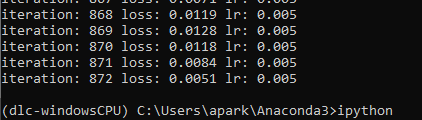
I just came to check back and it looks like it quit out while training the network?
Thanks,
Annie
annieandbrianneedacode
on 5 Nov 2019
can you tell me what version of tensorflow and CUDA you have installed? - we can discuss on gitter = https://gitter.im/DeepLabCut/community?utm_source=badge&utm_medium=badge&utm_campaign=pr-badge
MMathisLab
on 5 Nov 2019
Sure I have tensorflow 1.12.0 and I'm not running it on a GPU so I don't have CUDA installed.
annieandbrianneedacode
on 6 Nov 2019
Related issues
 phcao101
·
4Comments
phcao101
·
4Comments
 haofanglee
·
3Comments
haofanglee
·
3Comments
 cvKDean
·
4Comments
cvKDean
·
4Comments
 monajalal
·
4Comments
monajalal
·
4Comments
 WernTanj
·
3Comments
WernTanj
·
3Comments