Deeplabcut: Using GPU in analyse_videos(): CudNN failed to initialize
Describe the bug
I am not sure about the nature of the bug, and will be using tensorflow-CPU for the time being. We use RTX 2080ti.
To Reproduce
Run:
deeplabcut.analyze_videos(
    path_config_file, video_filepaths, videotype='avi', save_as_csv=True,
    trainingsetindex=0, gputouse=0
)
Expected behavior
Terminal output:
Using snapshot-180000 for model D:\Get_positioning\Balance-Can-2019-07-05\dlc-models\iteration-0\BalanceJul5-trainset95shuffle1
WARNING:tensorflow:From c:\users\morland_lab\miniconda3\envs\dlc\lib\site-packages\tensorflow\python\framework\op_def_library.py:263: colocate_with (from tensorflow.python.framework.ops) is deprecated and will be removed in a future version.
Instructions for updating:
Colocations handled automatically by placer.
WARNING:tensorflow:From c:\users\morland_lab\miniconda3\envs\dlc\lib\site-packages\tensorflow\python\framework\op_def_library.py:263: colocate_with (from tensorflow.python.framework.ops) is deprecated and will be removed in a future version.
Instructions for updating:
Colocations handled automatically by placer.
WARNING:tensorflow:From c:\users\morland_lab\miniconda3\envs\dlc\lib\site-packages\tensorflow\python\training\saver.py:1266: checkpoint_exists (from tensorflow.python.training.checkpoint_management) is deprecated and will be removed in a future version.
Instructions for updating:
Use standard file APIs to check for files with this prefix.
WARNING:tensorflow:From c:\users\morland_lab\miniconda3\envs\dlc\lib\site-packages\tensorflow\python\training\saver.py:1266: checkpoint_exists (from tensorflow.python.training.checkpoint_management) is deprecated and will be removed in a future version.
Instructions for updating:
Use standard file APIs to check for files with this prefix.
INFO:tensorflow:Restoring parameters from D:\Get_positioning\Balance-Can-2019-07-05\dlc-models\iteration-0\BalanceJul5-trainset95shuffle1\train\snapshot-180000
INFO:tensorflow:Restoring parameters from D:\Get_positioning\Balance-Can-2019-07-05\dlc-models\iteration-0\BalanceJul5-trainset95shuffle1\train\snapshot-180000
Starting to analyze %  D:\Get_positioning\Videos\1 week (1)\GOPR0434.avi
Loading  D:\Get_positioning\Videos\1 week (1)\GOPR0434.avi
Duration of video [s]:  61.78 , recorded with  59.94 fps!
Overall # of frames:  3703  found with (before cropping) frame dimensions:  1280 720
Starting to extract posture
  0%|                                                                                         | 0/3703 [00:00<?, ?it/s]2019-07-11 07:42:26.846897: E tensorflow/stream_executor/cuda/cuda_dnn.cc:334] Could not create cudnn handle: CUDNN_STATUS_ALLOC_FAILED
2019-07-11 07:42:26.853319: E tensorflow/stream_executor/cuda/cuda_dnn.cc:334] Could not create cudnn handle: CUDNN_STATUS_ALLOC_FAILED
---------------------------------------------------------------------------
FileNotFoundError                         Traceback (most recent call last)
c:\users\morland_lab\miniconda3\envs\dlc\lib\site-packages\deeplabcut\pose_estimation_tensorflow\predict_videos.py in AnalyzeVideo(video, DLCscorer, trainFraction, cfg, dlc_cfg, sess, inputs, outputs, pdindex, save_as_csv, destfolder)
    282         # Attempt to load data...
--> 283         pd.read_hdf(dataname)
    284         print("Video already analyzed!", dataname)

c:\users\morland_lab\miniconda3\envs\dlc\lib\site-packages\pandas\io\pytables.py in read_hdf(path_or_buf, key, mode, **kwargs)
    346             raise compat.FileNotFoundError(
--> 347                 'File %s does not exist' % path_or_buf)
    348

FileNotFoundError: File D:\Get_positioning\Videos\1 week (1)\GOPR0434DeepCut_resnet50_BalanceJul5shuffle1_180000.h5 does not exist

During handling of the above exception, another exception occurred:

UnknownError                              Traceback (most recent call last)
c:\users\morland_lab\miniconda3\envs\dlc\lib\site-packages\tensorflow\python\client\session.py in _do_call(self, fn, *args)
   1333     try:
-> 1334       return fn(*args)
   1335     except errors.OpError as e:

c:\users\morland_lab\miniconda3\envs\dlc\lib\site-packages\tensorflow\python\client\session.py in _run_fn(feed_dict, fetch_list, target_list, options, run_metadata)
   1318       return self._call_tf_sessionrun(
-> 1319           options, feed_dict, fetch_list, target_list, run_metadata)
   1320

c:\users\morland_lab\miniconda3\envs\dlc\lib\site-packages\tensorflow\python\client\session.py in _call_tf_sessionrun(self, options, feed_dict, fetch_list, target_list, run_metadata)
   1406         self._session, options, feed_dict, fetch_list, target_list,
-> 1407         run_metadata)
   1408

UnknownError: Failed to get convolution algorithm. This is probably because cuDNN failed to initialize, so try looking to see if a warning log message was printed above.
         [[{{node resnet_v1_50/conv1/Conv2D}}]]
         [[{{node Sigmoid}}]]

During handling of the above exception, another exception occurred:

UnknownError                              Traceback (most recent call last)
<ipython-input-1-dd5fd7959785> in <module>()
      7
      8 path_config_file = os.path.realpath('D:/Get_positioning/Balance-Can-2019-07-05/config.yaml')
----> 9 deeplabcut.analyze_videos(path_config_file, video_filepaths, videotype='avi', save_as_csv=True, trainingsetindex=0, gputouse=0)

c:\users\morland_lab\miniconda3\envs\dlc\lib\site-packages\deeplabcut\pose_estimation_tensorflow\predict_videos.py in analyze_videos(config, videos, videotype, shuffle, trainingsetindex, gputouse, save_as_csv, destfolder, cropping)
    166         #looping over videos
    167         for video in Videos:
--> 168             AnalyzeVideo(video,DLCscorer,trainFraction,cfg,dlc_cfg,sess,inputs, outputs,pdindex,save_as_csv, destfolder)
    169
    170         os.chdir(str(start_path))

c:\users\morland_lab\miniconda3\envs\dlc\lib\site-packages\deeplabcut\pose_estimation_tensorflow\predict_videos.py in AnalyzeVideo(video, DLCscorer, trainFraction, cfg, dlc_cfg, sess, inputs, outputs, pdindex, save_as_csv, destfolder)
    299         print("Starting to extract posture")
    300         if int(dlc_cfg["batch_size"])>1:
--> 301             PredicteData,nframes=GetPoseF(cfg,dlc_cfg, sess, inputs, outputs,cap,nframes,int(dlc_cfg["batch_size"]))
    302         else:
    303             PredicteData,nframes=GetPoseS(cfg,dlc_cfg, sess, inputs, outputs,cap,nframes)

c:\users\morland_lab\miniconda3\envs\dlc\lib\site-packages\deeplabcut\pose_estimation_tensorflow\predict_videos.py in GetPoseF(cfg, dlc_cfg, sess, inputs, outputs, cap, nframes, batchsize)
    213
    214                 if batch_ind==batchsize-1:
--> 215                     pose = predict.getposeNP(frames,dlc_cfg, sess, inputs, outputs)
    216                     PredicteData[batch_num*batchsize:(batch_num+1)*batchsize, :] = pose
    217                     batch_ind = 0

c:\users\morland_lab\miniconda3\envs\dlc\lib\site-packages\deeplabcut\pose_estimation_tensorflow\nnet\predict.py in getposeNP(image, cfg, sess, inputs, outputs, outall)
     94     ''' Adapted from DeeperCut, performs numpy-based faster inference on batches.
     95         Introduced in https://www.biorxiv.org/content/10.1101/457242v1 '''
---> 96     outputs_np = sess.run(outputs, feed_dict={inputs: image})
     97
     98     scmap, locref = extract_cnn_outputmulti(outputs_np, cfg) #processes image batch.

c:\users\morland_lab\miniconda3\envs\dlc\lib\site-packages\tensorflow\python\client\session.py in run(self, fetches, feed_dict, options, run_metadata)
    927     try:
    928       result = self._run(None, fetches, feed_dict, options_ptr,
--> 929                          run_metadata_ptr)
    930       if run_metadata:
    931         proto_data = tf_session.TF_GetBuffer(run_metadata_ptr)

c:\users\morland_lab\miniconda3\envs\dlc\lib\site-packages\tensorflow\python\client\session.py in _run(self, handle, fetches, feed_dict, options, run_metadata)
   1150     if final_fetches or final_targets or (handle and feed_dict_tensor):
   1151       results = self._do_run(handle, final_targets, final_fetches,
-> 1152                              feed_dict_tensor, options, run_metadata)
   1153     else:
   1154       results = []

c:\users\morland_lab\miniconda3\envs\dlc\lib\site-packages\tensorflow\python\client\session.py in _do_run(self, handle, target_list, fetch_list, feed_dict, options, run_metadata)
   1326     if handle is None:
   1327       return self._do_call(_run_fn, feeds, fetches, targets, options,
-> 1328                            run_metadata)
   1329     else:
   1330       return self._do_call(_prun_fn, handle, feeds, fetches)

c:\users\morland_lab\miniconda3\envs\dlc\lib\site-packages\tensorflow\python\client\session.py in _do_call(self, fn, *args)
   1346           pass
   1347       message = error_interpolation.interpolate(message, self._graph)
-> 1348       raise type(e)(node_def, op, message)
   1349
   1350   def _extend_graph(self):

UnknownError: Failed to get convolution algorithm. This is probably because cuDNN failed to initialize, so try looking to see if a warning log message was printed above.
         [[node resnet_v1_50/conv1/Conv2D (defined at c:\users\morland_lab\miniconda3\envs\dlc\lib\site-packages\deeplabcut\pose_estimation_tensorflow\nnet\pose_net.py:63) ]]
         [[node Sigmoid (defined at c:\users\morland_lab\miniconda3\envs\dlc\lib\site-packages\deeplabcut\pose_estimation_tensorflow\nnet\pose_net.py:95) ]]

Caused by op 'resnet_v1_50/conv1/Conv2D', defined at:
  File "c:\users\morland_lab\miniconda3\envs\dlc\lib\runpy.py", line 193, in _run_module_as_main
    "__main__", mod_spec)
  File "c:\users\morland_lab\miniconda3\envs\dlc\lib\runpy.py", line 85, in _run_code
    exec(code, run_globals)
  File "C:\Users\Morland_lab\Miniconda3\envs\dlc\Scripts\ipython.exe\__main__.py", line 9, in <module>
    sys.exit(start_ipython())
  File "c:\users\morland_lab\miniconda3\envs\dlc\lib\site-packages\IPython\__init__.py", line 125, in start_ipython
    return launch_new_instance(argv=argv, **kwargs)
  File "c:\users\morland_lab\miniconda3\envs\dlc\lib\site-packages\traitlets\config\application.py", line 658, in launch_instance
    app.start()
  File "c:\users\morland_lab\miniconda3\envs\dlc\lib\site-packages\IPython\terminal\ipapp.py", line 353, in start
    self.shell.mainloop()
  File "c:\users\morland_lab\miniconda3\envs\dlc\lib\site-packages\IPython\terminal\interactiveshell.py", line 459, in mainloop
    self.interact()
  File "c:\users\morland_lab\miniconda3\envs\dlc\lib\site-packages\IPython\terminal\interactiveshell.py", line 450, in interact
    self.run_cell(code, store_history=True)
  File "c:\users\morland_lab\miniconda3\envs\dlc\lib\site-packages\IPython\core\interactiveshell.py", line 2683, in run_cell
    interactivity=interactivity, compiler=compiler, result=result)
  File "c:\users\morland_lab\miniconda3\envs\dlc\lib\site-packages\IPython\core\interactiveshell.py", line 2793, in run_ast_nodes
    if self.run_code(code, result):
  File "c:\users\morland_lab\miniconda3\envs\dlc\lib\site-packages\IPython\core\interactiveshell.py", line 2847, in run_code
    exec(code_obj, self.user_global_ns, self.user_ns)
  File "<ipython-input-1-dd5fd7959785>", line 9, in <module>
    deeplabcut.analyze_videos(path_config_file, video_filepaths, videotype='avi', save_as_csv=True, trainingsetindex=0, gputouse=0)
  File "c:\users\morland_lab\miniconda3\envs\dlc\lib\site-packages\deeplabcut\pose_estimation_tensorflow\predict_videos.py", line 158, in analyze_videos
    sess, inputs, outputs = predict.setup_pose_prediction(dlc_cfg)
  File "c:\users\morland_lab\miniconda3\envs\dlc\lib\site-packages\deeplabcut\pose_estimation_tensorflow\nnet\predict.py", line 23, in setup_pose_prediction
    net_heads = pose_net(cfg).test(inputs)
  File "c:\users\morland_lab\miniconda3\envs\dlc\lib\site-packages\deeplabcut\pose_estimation_tensorflow\nnet\pose_net.py", line 94, in test
    heads = self.get_net(inputs)
  File "c:\users\morland_lab\miniconda3\envs\dlc\lib\site-packages\deeplabcut\pose_estimation_tensorflow\nnet\pose_net.py", line 90, in get_net
    net, end_points = self.extract_features(inputs)
  File "c:\users\morland_lab\miniconda3\envs\dlc\lib\site-packages\deeplabcut\pose_estimation_tensorflow\nnet\pose_net.py", line 63, in extract_features
    global_pool=False, output_stride=16,is_training=False)
  File "c:\users\morland_lab\miniconda3\envs\dlc\lib\site-packages\tensorflow\contrib\slim\python\slim\nets\resnet_v1.py", line 274, in resnet_v1_50
    scope=scope)
  File "c:\users\morland_lab\miniconda3\envs\dlc\lib\site-packages\tensorflow\contrib\slim\python\slim\nets\resnet_v1.py", line 205, in resnet_v1
    net = resnet_utils.conv2d_same(net, 64, 7, stride=2, scope='conv1')
  File "c:\users\morland_lab\miniconda3\envs\dlc\lib\site-packages\tensorflow\contrib\slim\python\slim\nets\resnet_utils.py", line 146, in conv2d_same
    scope=scope)
  File "c:\users\morland_lab\miniconda3\envs\dlc\lib\site-packages\tensorflow\contrib\framework\python\ops\arg_scope.py", line 182, in func_with_args
    return func(*args, **current_args)
  File "c:\users\morland_lab\miniconda3\envs\dlc\lib\site-packages\tensorflow\contrib\layers\python\layers\layers.py", line 1155, in convolution2d
    conv_dims=2)
  File "c:\users\morland_lab\miniconda3\envs\dlc\lib\site-packages\tensorflow\contrib\framework\python\ops\arg_scope.py", line 182, in func_with_args
    return func(*args, **current_args)
  File "c:\users\morland_lab\miniconda3\envs\dlc\lib\site-packages\tensorflow\contrib\layers\python\layers\layers.py", line 1058, in convolution
    outputs = layer.apply(inputs)
  File "c:\users\morland_lab\miniconda3\envs\dlc\lib\site-packages\tensorflow\python\keras\engine\base_layer.py", line 1227, in apply
    return self.__call__(inputs, *args, **kwargs)
  File "c:\users\morland_lab\miniconda3\envs\dlc\lib\site-packages\tensorflow\python\layers\base.py", line 530, in __call__
    outputs = super(Layer, self).__call__(inputs, *args, **kwargs)
  File "c:\users\morland_lab\miniconda3\envs\dlc\lib\site-packages\tensorflow\python\keras\engine\base_layer.py", line 554, in __call__
    outputs = self.call(inputs, *args, **kwargs)
  File "c:\users\morland_lab\miniconda3\envs\dlc\lib\site-packages\tensorflow\python\keras\layers\convolutional.py", line 194, in call
    outputs = self._convolution_op(inputs, self.kernel)
  File "c:\users\morland_lab\miniconda3\envs\dlc\lib\site-packages\tensorflow\python\ops\nn_ops.py", line 966, in __call__
    return self.conv_op(inp, filter)
  File "c:\users\morland_lab\miniconda3\envs\dlc\lib\site-packages\tensorflow\python\ops\nn_ops.py", line 591, in __call__
    return self.call(inp, filter)
  File "c:\users\morland_lab\miniconda3\envs\dlc\lib\site-packages\tensorflow\python\ops\nn_ops.py", line 208, in __call__
    name=self.name)
  File "c:\users\morland_lab\miniconda3\envs\dlc\lib\site-packages\tensorflow\python\ops\gen_nn_ops.py", line 1026, in conv2d
    data_format=data_format, dilations=dilations, name=name)
  File "c:\users\morland_lab\miniconda3\envs\dlc\lib\site-packages\tensorflow\python\framework\op_def_library.py", line 788, in _apply_op_helper
    op_def=op_def)
  File "c:\users\morland_lab\miniconda3\envs\dlc\lib\site-packages\tensorflow\python\util\deprecation.py", line 507, in new_func
    return func(*args, **kwargs)
  File "c:\users\morland_lab\miniconda3\envs\dlc\lib\site-packages\tensorflow\python\framework\ops.py", line 3300, in create_op
    op_def=op_def)
  File "c:\users\morland_lab\miniconda3\envs\dlc\lib\site-packages\tensorflow\python\framework\ops.py", line 1801, in __init__
    self._traceback = tf_stack.extract_stack()

UnknownError (see above for traceback): Failed to get convolution algorithm. This is probably because cuDNN failed to initialize, so try looking to see if a warning log message was printed above.
         [[node resnet_v1_50/conv1/Conv2D (defined at c:\users\morland_lab\miniconda3\envs\dlc\lib\site-packages\deeplabcut\pose_estimation_tensorflow\nnet\pose_net.py:63) ]]
         [[node Sigmoid (defined at c:\users\morland_lab\miniconda3\envs\dlc\lib\site-packages\deeplabcut\pose_estimation_tensorflow\nnet\pose_net.py:95) ]]
Desktop (please complete the following information about your system):
- OS: Windows 10
- DeepLabCut Version 2.0.7.1
- Browser: Chrome
Additional context
The dNN training ran without any problems. This is the first function to present this error.
 caniko
All 8 comments
Seems your Cuda and tensorflow don’t match. I don’t use or support miniconda so cannot trouble shoot this further.
for a CPU you cannot set gputouse=0 - that means it's looking for GPU number 0; you need to set gputouse=none
If you ask for help on a function it will tell you:
deeplabcut.train_network?
Signature: deeplabcut.train_network(config, shuffle=1, trainingsetindex=0, gputouse=None, max_snapshots_to_keep=5, autotune=False, displayiters=None, saveiters=None, maxiters=None)
Docstring:
Trains the network with the labels in the training dataset.
Parameter
----------
config : string
Full path of the config.yaml file as a string.
shuffle: int, optional
Integer value specifying the shuffle index to select for training. Default is set to 1
trainingsetindex: int, optional
Integer specifying which TrainingsetFraction to use. By default the first (note that TrainingFraction is a list in config.yaml).
gputouse: int, optional. Natural number indicating the number of your GPU (see number in nvidia-smi). If you do not have a GPU put None.
See: https://nvidia.custhelp.com/app/answers/detail/a_id/3751/~/useful-nvidia-smi-queries
Additional parameters:
max_snapshots_to_keep: int, or None. Sets how many snapshots are kept, i.e. states of the trained network. Every savinginteration many times
a snapshot is stored, however only the last max_snapshots_to_keep many are kept! If you change this to None, then all are kept.
See: https://github.com/AlexEMG/DeepLabCut/issues/8#issuecomment-387404835
autotune: property of TensorFlow, somehow faster if 'false' (as Eldar found out, see https://github.com/tensorflow/tensorflow/issues/13317). Default: False
displayiters: this variable is actually set in pose_config.yaml. However, you can overwrite it with this hack. Don't use this regularly, just if you are too lazy to dig out
the pose_config.yaml file for the corresponding project. If None, the value from there is used, otherwise it is overwritten! Default: None
saveiters: this variable is actually set in pose_config.yaml. However, you can overwrite it with this hack. Don't use this regularly, just if you are too lazy to dig out
the pose_config.yaml file for the corresponding project. If None, the value from there is used, otherwise it is overwritten! Default: None
maxiters: this variable is actually set in pose_config.yaml. However, you can overwrite it with this hack. Don't use this regularly, just if you are too lazy to dig out
the pose_config.yaml file for the corresponding project. If None, the value from there is used, otherwise it is overwritten! Default: None
Example
--------
for training the network for first shuffle of the training dataset.
>>> deeplabcut.train_network('/analysis/project/reaching-task/config.yaml')
--------
for training the network for second shuffle of the training dataset.
>>> deeplabcut.train_network('/analysis/project/reaching-task/config.yaml',shuffle=2)
 MMathisLab
on 11 Jul 2019
MMathisLab
on 11 Jul 2019
I can vouch for Miniconda, and that it has worked just fine with my two other DLC workstations. There is no difference of significance for this case between Anaconda and Miniconda:
https://stackoverflow.com/questions/45421163/anaconda-vs-miniconda
The command mentioned is for use with GPU, and not CPU. I merely stated that I would be using dlc-CPU for the time being to avoid this bug.
However, there is truth in your comment. My TF version does indeed not match my CUDA version. This is very weird as the network training went just fine. Interesting, I will report back when I test with another version of CUDA.
I suggest we reopen this thread. It was closed for the wrong reasons.
caniko
on 11 Jul 2019
It’s a tensorflow / CUDA issue, hence why I closed it (it’s not a deeplabcut bug)
MMathisLab
on 11 Jul 2019
My apologies it seemed you closed it because of it being Miniconda, and because I used gputouse parameter in a CPU session (which I did not). Cheers
caniko
on 11 Jul 2019
An update on the same issue. I was getting the exact same error as @caniko2 {Ubuntu18.0, GeForce RTX2080 Cuda 10.2 Driver 430.26}
From nvidia-smi, the .../envs/dc-ubuntu-GPU/bin/python was using about 7.9GB of GPU memory, and it was breaking with CudNN failing to initialize.
I followed some other git issues from TensorFlow , and one of them had suggested something simiar for another issue:
import tensorflow as tf
gpu_options = tf.GPUOptions(per_process_gpu_memory_fraction=0.8)
sess = tf.Session(config=tf.ConfigProto(gpu_options=gpu_options))
which is basically restricting the amount of GPU memory that can be used by a single process.
I have kept it at 80%, and my current usage stands at:
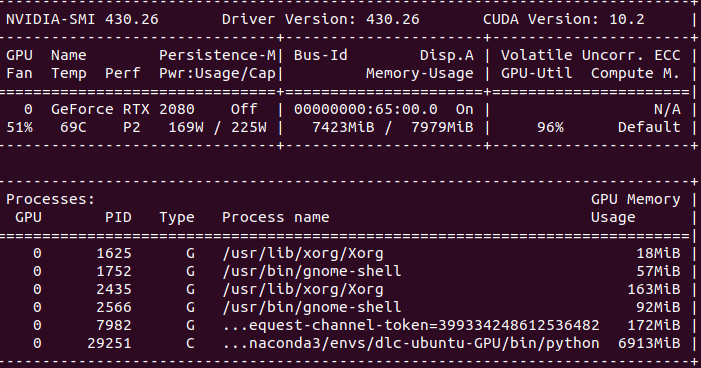
But thankfully, the network is training, (albeit I suspect slowly). So, this could be a temporary fix for this issue.
A follow-up question is, Is there any way one can check which function/python module/ part of code is using how much of the GPU memory (rather than a blanket ".../bin/python process is using 90%" info)
I'm worried if I did some configuration mistake/code changes that might be causing a memory leak/exception handling somewhere which might be flooding the GPU memory. Any ideas?
Thank you!
 ambareeshsrja16
on 22 Aug 2019
ambareeshsrja16
on 22 Aug 2019
I had a similar issue on the system:
Win10 with Anaconda installation (TF v1.3)
NVIDIA GeForce RTX 2060
Driver 440.97
CUDA 10.0
Similar to @ambareeshsrja16 I was able to fix the issue by restricting the memory to a lower use (0.6) or running it with allow_growth (which sometimes still broke).
It seems to be a bug in TF since at least 2017 (https://github.com/tensorflow/tensorflow/issues/6698), still existing in 1.8. I have fixed it for my personal DLC installation by going through source code and changing all lines with sess = tf.Session() to
config = tf.ConfigProto()
config.gpu_options.per_process_gpu_memory_fraction = 0.6
sess = tf.Session(config=config)
I have found it to be used in the following places:
- deeplabcut/pose_estimation_tensorflow/train.py:line 147 - needed for training
- deeplabcut/pose_estimation_tensorflow/nnet/predict.py:line 37 - needed for evaluate_network
- same file, line 192 - needed for analyze_videos
And these functions broke if the memory was not restricted.
Since the amount of memory allocated is not directly available to the user of DLC, the error message blames TF/cuDNN installation and the majority of issue reports suggest changing the version of TF/CuDNN/CUDA (which does not help and wastes a lot of time), it may be worth adding the per_process_gpu_memory_fraction parameter to DLC functions.
Best
 nishbo
on 3 Dec 2019
nishbo
on 3 Dec 2019
Firstly, you can restrict process growth already in dlc without any code changes, see:
https://github.com/AlexEMG/DeepLabCut/pull/458#issuecomment-546973637
Secondly the tf issue you highlight is indeed quite illuminating, but also that people commonly solve it by a) switching tf/cuda etc and b) deleting idle processes or c) restricting capacity as above.
From: Anton Sobinov notifications@github.com
Sent: Monday, December 2, 2019 20:29
To: AlexEMG/DeepLabCut
Cc: Subscribed
Subject: Re: [AlexEMG/DeepLabCut] Using GPU in analyse_videos(): CudNN failed to initialize (#358)
I had a similar issue on the system:
Win10 with Anaconda installation (TF v1.3)
NVIDIA GeForce RTX 2060
Driver 440.97
CUDA 10.0
Similar to @ambareeshsrja16https://urldefense.proofpoint.com/v2/url?u=https-3A__github.com_ambareeshsrja16&d=DwMCaQ&c=WO-RGvefibhHBZq3fL85hQ&r=11wEEDBv3Ke3n3b8dICjuQC5vgZ23dfGPax018VOZ2g&m=HYKAX1zWYjwkincByCctMYVvzlUeQK1blbrfRmIT6GQ&s=xYouPIy_j_b29renM7uHYjuS5q6USMhR_AkDbQoWiIA&e= I was able to fix the issue by restricting the memory to a lower use (0.6) or running it with allow_growth (which sometimes still broke).
It seems to be a bug in TF since at least 2017 (tensorflow/tensorflow#6698https://urldefense.proofpoint.com/v2/url?u=https-3A__github.com_tensorflow_tensorflow_issues_6698&d=DwMCaQ&c=WO-RGvefibhHBZq3fL85hQ&r=11wEEDBv3Ke3n3b8dICjuQC5vgZ23dfGPax018VOZ2g&m=HYKAX1zWYjwkincByCctMYVvzlUeQK1blbrfRmIT6GQ&s=9mLzcDe41D6m7n_Kg1DRFynlflMFV96AMZH8BLjylDI&e=), still existing in 1.8. I have fixed it for my personal DLC installation by going through source code and changing all lines with sess = tf.Session() to
config = tf.ConfigProto()
config.gpu_options.per_process_gpu_memory_fraction = 0.6
sess = tf.Session(config=config)
I have found it to be used in the following places:
- deeplabcut/pose_estimation_tensorflow/train.py:line 147 - needed for training
- deeplabcut/pose_estimation_tensorflow/nnet/predict.py:line 37 - needed for evaluate_network
- same file, line 192 - needed for analyze_videos
And these functions broke if the memory was not restricted.
Since the amount of memory allocated is not directly available to the user of DLC, the error message blames TF/cuDNN installation and the majority of issue reports suggest changing the version of TF/CuDNN/CUDA (which does not help and wastes a lot of time), it may be worth adding the per_process_gpu_memory_fraction parameter to DLC functions.
Best
—
You are receiving this because you are subscribed to this thread.
Reply to this email directly, view it on GitHubhttps://urldefense.proofpoint.com/v2/url?u=https-3A__github.com_AlexEMG_DeepLabCut_issues_358-3Femail-5Fsource-3Dnotifications-26email-5Ftoken-3DAE7CMXUFQFN2XPGI2I7TNATQWWY5ZA5CNFSM4IAD6VCKYY3PNVWWK3TUL52HS4DFVREXG43VMVBW63LNMVXHJKTDN5WW2ZLOORPWSZGOEFXYHTQ-23issuecomment-2D560956366&d=DwMCaQ&c=WO-RGvefibhHBZq3fL85hQ&r=11wEEDBv3Ke3n3b8dICjuQC5vgZ23dfGPax018VOZ2g&m=HYKAX1zWYjwkincByCctMYVvzlUeQK1blbrfRmIT6GQ&s=MOaNBjE79POoMPLUxmHtHerQKV2s3OE_xoNTZwYGfPo&e=, or unsubscribehttps://urldefense.proofpoint.com/v2/url?u=https-3A__github.com_notifications_unsubscribe-2Dauth_AE7CMXRUQPLWJCIVDGSJUJTQWWY5ZANCNFSM4IAD6VCA&d=DwMCaQ&c=WO-RGvefibhHBZq3fL85hQ&r=11wEEDBv3Ke3n3b8dICjuQC5vgZ23dfGPax018VOZ2g&m=HYKAX1zWYjwkincByCctMYVvzlUeQK1blbrfRmIT6GQ&s=XAEvb-RI6M4u3D5Lh_sV8YHDejCQxlNTdc2CrLfB5e0&e=.
 AlexEMG
on 3 Dec 2019
AlexEMG
on 3 Dec 2019
Also check out this related issue: https://github.com/tensorflow/tensorflow/issues/24828
AlexEMG
on 21 Mar 2020
Related issues
 guyts
·
3Comments
guyts
·
3Comments
 lauritk
·
3Comments
lauritk
·
3Comments
 monajalal
·
4Comments
monajalal
·
4Comments
 mschart
·
4Comments
mschart
·
4Comments
 WernTanj
·
3Comments
WernTanj
·
3Comments
Most helpful comment
I had a similar issue on the system:
Win10 with Anaconda installation (TF v1.3)
NVIDIA GeForce RTX 2060
Driver 440.97
CUDA 10.0
Similar to @ambareeshsrja16 I was able to fix the issue by restricting the memory to a lower use (0.6) or running it with
allow_growth(which sometimes still broke).It seems to be a bug in TF since at least 2017 (https://github.com/tensorflow/tensorflow/issues/6698), still existing in 1.8. I have fixed it for my personal DLC installation by going through source code and changing all lines with
sess = tf.Session()toI have found it to be used in the following places:
And these functions broke if the memory was not restricted.
Since the amount of memory allocated is not directly available to the user of DLC, the error message blames TF/cuDNN installation and the majority of issue reports suggest changing the version of TF/CuDNN/CUDA (which does not help and wastes a lot of time), it may be worth adding the
per_process_gpu_memory_fractionparameter to DLC functions.Best