Deeplabcut: HDF5 files not being saved by tf.train.Saver in example notebooks
Your Operating system and DeepLabCut version
CentOS 7
DLC ver: 2.0.6.3 | commit hash ef8d67fabbf1c06da7734bdb33a75a9c5c797df5
Anaconda environment
Package list:
# Name Version Build Channel
_tflow_select 2.1.0 gpu
absl-py 0.7.1 py36_0
asn1crypto 0.24.0 py36_0
astor 0.7.1 py36_0
astroid 2.2.5 py36_0
attrs 19.1.0 py36_1
backcall 0.1.0 py36_0
blas 1.0 mkl
bleach 3.1.0 py36_0
blosc 1.16.3 hd408876_0
bokeh 1.2.0 py36_0
bzip2 1.0.6 h14c3975_5
c-ares 1.15.0 h7b6447c_1
ca-certificates 2019.3.9 hecc5488_0 conda-forge
cairo 1.14.12 h8948797_3
certifi 2019.3.9 py36_0 conda-forge
cffi 1.12.3 py36h2e261b9_0
chardet 3.0.4 py36_1
click 7.0 py36_0
cloudpickle 1.1.1 py_0
cryptography 2.7 py36h72c5cf5_0 conda-forge
cudatoolkit 10.0.130 0
cudnn 7.6.0 cuda10.0_0
cupti 10.0.130 0
cycler 0.10.0 py36_0
cytoolz 0.9.0.1 py36h14c3975_1
dask-core 1.2.2 py_0
dbus 1.13.6 h746ee38_0
decorator 4.4.0 py36_1
deeplabcut 2.0.6.3 dev_0 <develop>
defusedxml 0.6.0 py_0
easydict 1.9 py_0 conda-forge
entrypoints 0.3 py36_0
expat 2.2.6 he6710b0_0
ffmpeg 4.0 hcdf2ecd_0
fontconfig 2.13.0 h9420a91_0
freeglut 3.0.0 hf484d3e_5
freetype 2.9.1 h8a8886c_1
fribidi 1.0.5 h7b6447c_0
gast 0.2.2 py36_0
gettext 0.19.8.1 hd7bead4_3
glib 2.56.2 hd408876_0
gmp 6.1.2 h6c8ec71_1
graphite2 1.3.13 h23475e2_0
grpcio 1.16.1 py36hf8bcb03_1
gst-plugins-base 1.14.0 hbbd80ab_1
gstreamer 1.14.0 hb453b48_1
h5py 2.7.1 py36ha1f6525_2
harfbuzz 1.8.8 hffaf4a1_0
hdf5 1.10.2 hba1933b_1
holoviews 1.12.3 py_0 pyviz/label/dev
hvplot 0.4.0 py_0 pyviz/label/dev
icu 58.2 h9c2bf20_1
idna 2.8 py36_0
imageio 2.3.0 py36_0
intel-openmp 2019.4 243
ipykernel 5.1.1 py36h39e3cac_0
ipython 7.5.0 py36h39e3cac_0
ipython_genutils 0.2.0 py36_0
isort 4.3.20 py36_0
jasper 2.0.14 h07fcdf6_1
jedi 0.13.3 py36_0
jinja2 2.10.1 py36_0
joblib 0.13.2 py36_0
jpeg 9b h024ee3a_2
jsonschema 3.0.1 py36_0
jupyter_client 5.2.4 py36_0
jupyter_core 4.4.0 py36_0
keras-applications 1.0.8 py_0
keras-preprocessing 1.1.0 py_1
kiwisolver 1.1.0 py36he6710b0_0
lazy-object-proxy 1.4.1 py36h7b6447c_0
libedit 3.1.20181209 hc058e9b_0
libffi 3.2.1 hd88cf55_4
libgcc-ng 8.2.0 hdf63c60_1
libgfortran-ng 7.3.0 hdf63c60_0
libglu 9.0.0 hf484d3e_1
libopencv 3.4.2 hb342d67_1
libopus 1.3 h7b6447c_0
libpng 1.6.37 hbc83047_0
libprotobuf 3.8.0 hd408876_0
libsodium 1.0.16 h1bed415_0
libstdcxx-ng 8.2.0 hdf63c60_1
libtiff 4.0.10 h2733197_2
libuuid 1.0.3 h1bed415_2
libvpx 1.7.0 h439df22_0
libxcb 1.13 h1bed415_1
libxml2 2.9.9 he19cac6_0
lz4-c 1.8.1.2 h14c3975_0
lzo 2.10 h49e0be7_2
markdown 3.1.1 py36_0
markupsafe 1.1.1 py36h7b6447c_0
matplotlib 3.1.0 py36h5429711_0
mccabe 0.6.1 py36_1
mistune 0.8.4 py36h7b6447c_0
mkl 2019.4 243
mkl-service 2.0.2 py36h7b6447c_0
mkl_fft 1.0.12 py36ha843d7b_0
mkl_random 1.0.2 py36hd81dba3_0
mock 3.0.5 py36_0
moviepy 0.2.3.5 py_0 conda-forge
mypy 0.701 py_1
mypy_extensions 0.4.1 py36_0
nbconvert 5.5.0 py_0
nbformat 4.4.0 py36_0
ncurses 6.1 he6710b0_1
networkx 2.3 py_0
notebook 5.7.8 py36_0
numexpr 2.6.9 py36h9e4a6bb_0
numpy 1.16.4 py36h7e9f1db_0
numpy-base 1.16.4 py36hde5b4d6_0
olefile 0.46 py36_0
opencv 3.4.2 py36h6fd60c2_1
openssl 1.1.1b h14c3975_1 conda-forge
packaging 19.0 py36_0
pandas 0.24.2 py36he6710b0_0
pandoc 2.2.3.2 0
pandocfilters 1.4.2 py36_1
panel 0.6.0 py_0 pyviz/label/dev
pango 1.42.4 h049681c_0
param 1.9.1 py_0 pyviz/label/dev
parso 0.4.0 py_0
patsy 0.5.1 py36_0
pcre 8.43 he6710b0_0
pexpect 4.7.0 py36_0
pickleshare 0.7.5 py36_0
pillow 6.0.0 py36h34e0f95_0
pip 19.1.1 py36_0
pixman 0.38.0 h7b6447c_0
prometheus_client 0.6.0 py36_0
prompt_toolkit 2.0.9 py36_0
protobuf 3.8.0 py36he6710b0_0
psutil 5.4.8 py36h7b6447c_0
ptyprocess 0.6.0 py36_0
py-opencv 3.4.2 py36hb342d67_1
pycparser 2.19 py36_0
pyct 0.4.6 py_0 pyviz/label/dev
pyct-core 0.4.6 py_0 pyviz/label/dev
pygments 2.4.2 py_0
pylint 2.3.1 py36_0
pyopenssl 19.0.0 py36_0
pyparsing 2.4.0 py_0
pyqt 5.9.2 py36h05f1152_2
pyrsistent 0.14.11 py36h7b6447c_0
pysocks 1.7.0 py36_0
pytables 3.4.4 py36h4f72b40_1 conda-forge
python 3.6.8 h0371630_0
python-dateutil 2.8.0 py36_0
pytz 2019.1 py_0
pyviz_comms 0.7.2 py_0 pyviz/label/dev
pywavelets 1.0.3 py36hdd07704_1
pyyaml 5.1 py36h7b6447c_0
pyzmq 18.0.0 py36he6710b0_0
qt 5.9.7 h5867ecd_1
readline 7.0 h7b6447c_5
requests 2.22.0 py36_0
ruamel-yaml 0.15.97 pypi_0 pypi
scikit-image 0.15.0 py36he6710b0_0
scikit-learn 0.21.2 py36hd81dba3_0
scipy 1.2.1 py36h7c811a0_0
send2trash 1.5.0 py36_0
setuptools 41.0.1 py36_0
sip 4.19.8 py36hf484d3e_0
six 1.12.0 py36_0
snappy 1.1.7 hbae5bb6_3
sqlite 3.28.0 h7b6447c_0
statsmodels 0.9.0 py36h035aef0_0
tensorboard 1.13.1 py36hf484d3e_0
tensorflow 1.13.1 gpu_py36h3991807_0
tensorflow-base 1.13.1 gpu_py36h8d69cac_0
tensorflow-estimator 1.13.0 py_0
tensorflow-gpu 1.13.1 h0d30ee6_0
termcolor 1.1.0 py36_1
terminado 0.8.2 py36_0
testpath 0.4.2 py36_0
tk 8.6.8 hbc83047_0
toolz 0.9.0 py36_0
tornado 6.0.2 py36h7b6447c_0
tqdm 4.32.1 py_0
traitlets 4.3.2 py36_0
typed-ast 1.3.4 py36h7b6447c_0
urllib3 1.24.2 py36_0
wcwidth 0.1.7 py36_0
webencodings 0.5.1 py36_1
werkzeug 0.15.4 py_0
wheel 0.33.4 py36_0
wrapt 1.11.1 py36h7b6447c_0
wxpython 4.0.4 py36hc99224d_0
xz 5.2.4 h14c3975_4
yaml 0.1.7 had09818_2
zeromq 4.3.1 he6710b0_3
zlib 1.2.11 h7b6447c_3
zstd 1.3.7 h0b5b093_0
Describe the bug
Upon trying both the Demo_labeledexample_Openfield.ipynb and Demo_labeledexample_MouseReaching.ipynb notebooks, training appears to proceed correctly, but no hdf5 file is saved to disk. This results in the following error when running evaluate_network in the next cell:
FileNotFoundError                         Traceback (most recent call last)
/data/external_repos/DeepLabCut/deeplabcut/pose_estimation_tensorflow/evaluate.py in evaluate_network(config, Shuffles, plotting, show_errors, comparisonbodyparts, gputouse)
    152                 try:
--> 153                     DataMachine = pd.read_hdf(resultsfilename,'df_with_missing')
    154                     print("This net has already been evaluated!")

/scratch/miniconda3/envs/deeplabcut/lib/python3.6/site-packages/pandas/io/pytables.py in read_hdf(path_or_buf, key, mode, **kwargs)
    365             raise compat.FileNotFoundError(
--> 366                 'File {path} does not exist'.format(path=path_or_buf))
    367

FileNotFoundError: File /data/external_repos/DeepLabCut/examples/openfield-Pranav-2018-10-30/evaluation-results/iteration-0/openfieldOct30-trainset95shuffle1/DeepCut_resnet50_openfieldOct30shuffle1_80-snapshot-80.h5 does not exist

During handling of the above exception, another exception occurred:

TypeError                                 Traceback (most recent call last)
<ipython-input-19-81e3acf2ea63> in <module>
----> 1 deeplabcut.evaluate_network(path_config_file,plotting=False)

/data/external_repos/DeepLabCut/deeplabcut/pose_estimation_tensorflow/evaluate.py in evaluate_network(config, Shuffles, plotting, show_errors, comparisonbodyparts, gputouse)
    161                     print("Analyzing data...")
    162                     for imageindex, imagename in tqdm(enumerate(Data.index)):
--> 163                         image = io.imread(os.path.join(cfg['project_path'],imagename),mode='RGB')
    164                         image = skimage.color.gray2rgb(image)
    165                         image_batch = data_to_input(image)

/scratch/miniconda3/envs/deeplabcut/lib/python3.6/site-packages/skimage/io/_io.py in imread(fname, as_gray, plugin, flatten, **plugin_args)
     59
     60     with file_or_url_context(fname) as fname:
---> 61         img = call_plugin('imread', fname, plugin=plugin, **plugin_args)
     62
     63     if not hasattr(img, 'ndim'):

/scratch/miniconda3/envs/deeplabcut/lib/python3.6/site-packages/skimage/io/manage_plugins.py in call_plugin(kind, *args, **kwargs)
    208                                (plugin, kind))
    209
--> 210     return func(*args, **kwargs)
    211
    212

/scratch/miniconda3/envs/deeplabcut/lib/python3.6/site-packages/imageio/core/functions.py in imread(uri, format, **kwargs)
    200
    201     if 'mode' in kwargs:
--> 202         raise TypeError('Invalid keyword argument "mode", '
    203                         'perhaps you mean "pilmode"?')
    204

TypeError: Invalid keyword argument "mode", perhaps you mean "pilmode"?
The files we do see exported are in the DeepLabCut/examples/openfield-Pranav-2018-10-30/dlc-models/iteration-0/openfieldOct30-trainset95shuffle1/train directory:
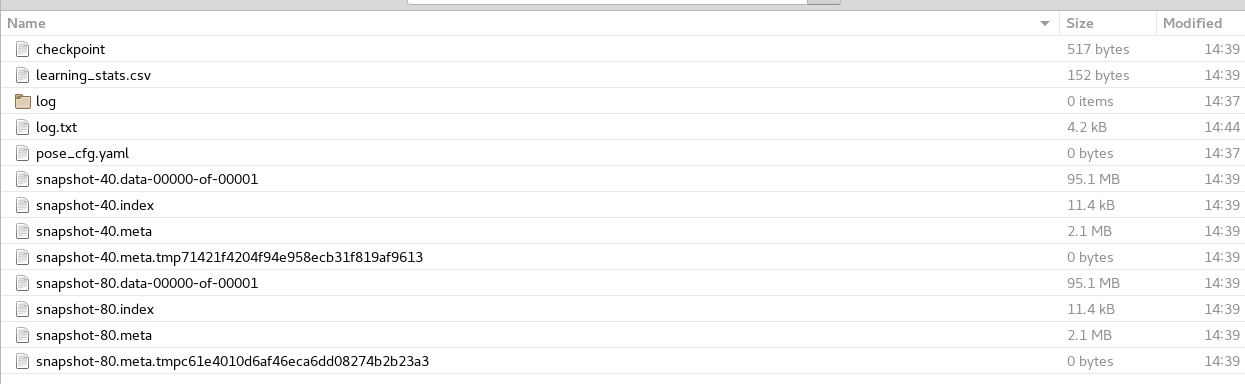
The DeepLabCut/examples/openfield-Pranav-2018-10-30/evaluation-results/iteration-0/openfieldOct30-trainset95shuffle1 folder is completely empty.
To Reproduce
The step to reproduce in our case is simply to execute either of the example notebooks. Note that because we are on a Linux distribution, there was no supplied environment file, so we had to install the packages manually via conda. If someone has a working conda environment on a Linux install, we would be happy to try it out.
 zbarry
All 7 comments
Perhaps you just have a typo in the command you passed, since it's a file not found error, but it does exist. Can you post the exact full command you used to run evaluate_network please?
 MMathisLab
on 10 Jun 2019
MMathisLab
on 10 Jun 2019
Thanks for the response @MMathisLab. In this case, all we did was run straight down the notebook. This would be:
# Importing the toolbox (takes several seconds)
import deeplabcut

# Loading example data set
import os
# Note that parameters of this project can be seen at: *Reaching-Mackenzie-2018-08-30/config.yaml*
from pathlib import Path
path_config_file = os.path.join(os.getcwd(),'openfield-Pranav-2018-10-30/config.yaml')
deeplabcut.load_demo_data(path_config_file)

#Perhaps plot the labels to see how the frames were annotated:
deeplabcut.check_labels(path_config_file)

deeplabcut.train_network(path_config_file, shuffle=1, displayiters=10, saveiters=40)

deeplabcut.evaluate_network(path_config_file,plotting=False)
The file is indeed missing; if you add a print statement for resultsfilename in evaluate.evaluate_network, it gives us:
DeepLabCut/examples/openfield-Pranav-2018-10-30/evaluation-results/iteration-0/openfieldOct30-trainset95shuffle1/DeepCut_resnet50_openfieldOct30shuffle1_80-snapshot-80.h5
But DeepLabCut/examples/openfield-Pranav-2018-10-30/evaluation-results/iteration-0/openfieldOct30-trainset95shuffle1/ is strangely completely empty.
Note that the error message / stack trace we see above comprises two separate errors: the first being the FileNotFoundError and the second being a TypeError.
zbarry
on 10 Jun 2019
Here is a yaml file for an env (with CPU only support, for Ubuntu 16.04; I don't have a CentOS machine to test anything on, hence why we say Ubuntu is currently only supported.
I'll check out the error in the meantime in the notebook!
MMathisLab
on 10 Jun 2019
@MMathisLab - no dice on the env file. Note that I had to install wxpython via conda, because some CentOS 7 library versions in their repos are too old to be able to compile it...
zbarry
on 10 Jun 2019
^ yep, unfortunately that will not directly work, but you can edit the wxpython out and use as a base, I guess. Also, I tested the notebook on my edit, and I have no errors in running the code... Check under your dlc-model folder, it seems you have some strange tmp files, perhaps delete those, as they could throw off the loader (I have no idea what those are; I have never seen that):

MMathisLab
on 10 Jun 2019
^ and, yes of course the file is missing from evaluate, that that is what should be created after running evaluate_network, the issue for you is it's not loading the snapshot-80 as it cannot find it in the dlc-models folder.
MMathisLab
on 10 Jun 2019
Looks like I was mistaken; I have it! Here's an environment file to get it to work on a GPU on CentOS 7 (and I bet it's fine with Ubuntu, as well; I took yours and added wxpython, cudatoolkit=10.0, cudnn=7 and swapped out for tensorflow-gpu):
name: deeplabcutwithenv
channels:
  - anaconda-fusion
  - defaults
dependencies:
  - ca-certificates=2019.5.15=0
  - certifi=2019.3.9=py36_0
  - libedit=3.1.20181209=hc058e9b_0
  - libffi=3.2.1=hd88cf55_4
  - libgcc-ng=8.2.0=hdf63c60_1
  - libstdcxx-ng=8.2.0=hdf63c60_1
  - ncurses=6.1=he6710b0_1
  - openssl=1.1.1c=h7b6447c_1
  - pip=19.1.1=py36_0
  - python=3.6.8=h0371630_0
  - readline=7.0=h7b6447c_5
  - setuptools=41.0.1=py36_0
  - sqlite=3.28.0=h7b6447c_0
  - tk=8.6.8=hbc83047_0
  - wheel=0.33.4=py36_0
  - xz=5.2.4=h14c3975_4
  - zlib=1.2.11=h7b6447c_3
  - wxpython
  - cudatoolkit=10.0
  - cudnn=7
  - pip:
    - absl-py==0.7.1
    - astor==0.8.0
    - chardet==3.0.4
    - click==7.0
    - cloudpickle==1.2.0
    - cycler==0.10.0
    - dask==1.2.2
    - decorator==4.4.0
    - deeplabcut==2.0.6.3
    - easydict==1.9
    - gast==0.2.2
    - grpcio==1.21.1
    - h5py==2.9.0
    - idna==2.8
    - imageio==2.3.0
    - intel-openmp==2019.0
    - ipython==6.0.0
    - ipython-genutils==0.2.0
    - jedi==0.13.3
    - keras-applications==1.0.8
    - keras-preprocessing==1.1.0
    - kiwisolver==1.1.0
    - markdown==3.1.1
    - matplotlib==3.1.0
    - mock==3.0.5
    - moviepy==0.2.3.5
    - networkx==2.3
    - numexpr==2.6.9
    - numpy==1.14.6
    - opencv-python==3.4.5.20
    - pandas==0.21.0
    - parso==0.4.0
    - patsy==0.5.1
    - pexpect==4.7.0
    - pickleshare==0.7.5
    - pillow==6.0.0
    - prompt-toolkit==1.0.16
    - protobuf==3.8.0
    - ptyprocess==0.6.0
    - pygments==2.4.2
    - pyparsing==2.4.0
    - pypubsub==4.0.3
    - python-dateutil==2.7.3
    - pytz==2019.1
    - pywavelets==1.0.3
    - pyyaml==5.1.1
    - requests==2.22.0
    - ruamel.yaml==0.15.0
    - scikit-image==0.14.2
    - scikit-learn==0.19.2
    - scipy==1.1.0
    - simplegeneric==0.8.1
    - six==1.11.0
    - statsmodels==0.9.0
    - tables==3.5.2
    - tensorboard==1.13.1
    - tensorflow-gpu==1.13.1
    - tensorflow-estimator==1.13.0
    - termcolor==1.1.0
    - toolz==0.9.0
    - tqdm==4.32.1
    - traitlets==4.3.2
    - urllib3==1.25.3
    - wcwidth==0.1.7
    - werkzeug==0.15.4
Thanks for your help!
zbarry
on 10 Jun 2019
Related issues
 haofanglee
·
3Comments
haofanglee
·
3Comments
 N-Sensho
·
3Comments
N-Sensho
·
3Comments
 cvKDean
·
4Comments
cvKDean
·
4Comments
 phcao101
·
4Comments
phcao101
·
4Comments
 jennymsmith94
·
3Comments
jennymsmith94
·
3Comments