Deeplabcut: Ignorable errors(But It really gets to me..) 1.manipulating max_iter, 2. Executing on new Kernel 3.create_new_project with copy_videos=True
Your Operating system and DeepLabCut version
Windows 10 , with an Anaconda Env & DeepLabcut 2.0
Describe the problem
I tried to change max_iter, but I couldn't find where I can change cfg.multi_step (so that change max_iter)
So I tried to just comment it and make new max_iter
max_iter = int(cfg.multi_step[-1][1])
max_iter = 200
But It makes this error..
------------------------------------error--------------------------------------------------------------------------
2018-11-09 13:31:05.795991: W tensorflow/core/kernels/queue_base.cc:277] _0_fifo_queue: Skipping cancelled enqueue attempt with queue not closed
Exception in thread Thread-1:
Traceback (most recent call last):
File "C:\ProgramData\Anaconda3\envs\DLCdependencies\lib\site-packages\tensorflow\python\client\session.py", line 1278, in _do_call
return fn(*args)
File "C:\ProgramData\Anaconda3\envs\DLCdependencies\lib\site-packages\tensorflow\python\client\session.py", line 1263, in _run_fn
options, feed_dict, fetch_list, target_list, run_metadata)
File "C:\ProgramData\Anaconda3\envs\DLCdependencies\lib\site-packages\tensorflow\python\client\session.py", line 1350, in _call_tf_sessionrun
run_metadata)
tensorflow.python.framework.errors_impl.CancelledError: Enqueue operation was cancelled
[[Node: fifo_queue_enqueue = QueueEnqueueV2[Tcomponents=[DT_FLOAT, DT_FLOAT, DT_FLOAT, DT_FLOAT, DT_FLOAT], timeout_ms=-1, _device="/job:localhost/replica:0/task:0/device:CPU:0"](fifo_queue, _arg_Placeholder_0_0, _arg_Placeholder_1_0_1, _arg_Placeholder_2_0_2, _arg_Placeholder_3_0_3, _arg_Placeholder_4_0_4)]]
During handling of the above exception, another exception occurred:
Traceback (most recent call last):
File "C:\ProgramData\Anaconda3\envs\DLCdependencies\lib\threading.py", line 914, in _bootstrap_inner
self.run()
File "C:\ProgramData\Anaconda3\envs\DLCdependencies\lib\threading.py", line 862, in run
self._target(self._args, *self._kwargs)
File "C:/Program Files/Git/DeepLabCut1.0/pose-tensorflow/train.py", line 49, in load_and_enqueue
sess.run(enqueue_op, feed_dict=food)
File "C:\ProgramData\Anaconda3\envs\DLCdependencies\lib\site-packages\tensorflow\python\client\session.py", line 877, in run
run_metadata_ptr)
File "C:\ProgramData\Anaconda3\envs\DLCdependencies\lib\site-packages\tensorflow\python\client\session.py", line 1100, in _run
feed_dict_tensor, options, run_metadata)
File "C:\ProgramData\Anaconda3\envs\DLCdependencies\lib\site-packages\tensorflow\python\client\session.py", line 1272, in _do_run
run_metadata)
File "C:\ProgramData\Anaconda3\envs\DLCdependencies\lib\site-packages\tensorflow\python\client\session.py", line 1291, in _do_call
raise type(e)(node_def, op, message)
tensorflow.python.framework.errors_impl.CancelledError: Enqueue operation was cancelled
[[Node: fifo_queue_enqueue = QueueEnqueueV2[Tcomponents=[DT_FLOAT, DT_FLOAT, DT_FLOAT, DT_FLOAT, DT_FLOAT], timeout_ms=-1, _device="/job:localhost/replica:0/task:0/device:CPU:0"](fifo_queue, _arg_Placeholder_0_0, _arg_Placeholder_1_0_1, _arg_Placeholder_2_0_2, _arg_Placeholder_3_0_3, _arg_Placeholder_4_0_4)]]
Caused by op 'fifo_queue_enqueue', defined at:
File "C:/Program Files/Git/DeepLabCut1.0/pose-tensorflow/train.py", line 141, in
train()
File "C:/Program Files/Git/DeepLabCut1.0/pose-tensorflow/train.py", line 83, in train
batch, enqueue_op, placeholders = setup_preloading(batch_spec)
File "C:/Program Files/Git/DeepLabCut1.0/pose-tensorflow/train.py", line 35, in setup_preloading
enqueue_op = q.enqueue(placeholders_list)
File "C:\ProgramData\Anaconda3\envs\DLCdependencies\lib\site-packages\tensorflow\python\ops\data_flow_ops.py", line 339, in enqueue
self._queue_ref, vals, name=scope)
File "C:\ProgramData\Anaconda3\envs\DLCdependencies\lib\site-packages\tensorflow\python\ops\gen_data_flow_ops.py", line 3977, in queue_enqueue_v2
timeout_ms=timeout_ms, name=name)
File "C:\ProgramData\Anaconda3\envs\DLCdependencies\lib\site-packages\tensorflow\python\framework\op_def_library.py", line 787, in _apply_op_helper
op_def=op_def)
File "C:\ProgramData\Anaconda3\envs\DLCdependencies\lib\site-packages\tensorflow\python\util\deprecation.py", line 454, in new_func
return func(args, *kwargs)
File "C:\ProgramData\Anaconda3\envs\DLCdependencies\lib\site-packages\tensorflow\python\framework\ops.py", line 3155, in create_op
op_def=op_def)
File "C:\ProgramData\Anaconda3\envs\DLCdependencies\lib\site-packages\tensorflow\python\framework\ops.py", line 1717, in __init__
self._traceback = tf_stack.extract_stack()
CancelledError (see above for traceback): Enqueue operation was cancelled
[[Node: fifo_queue_enqueue = QueueEnqueueV2[Tcomponents=[DT_FLOAT, DT_FLOAT, DT_FLOAT, DT_FLOAT, DT_FLOAT], timeout_ms=-1, _device="/job:localhost/replica:0/task:0/device:CPU:0"](fifo_queue, _arg_Placeholder_0_0, _arg_Placeholder_1_0_1, _arg_Placeholder_2_0_2, _arg_Placeholder_3_0_3, _arg_Placeholder_4_0_4)]]
------------------------------------error--------------------------------------------------------------------------
Second, After making my kernel and executing ipynb on chrome, I got this error on git bash(which I typed source activate ~~, export ~~chrome, jupyter notebook)
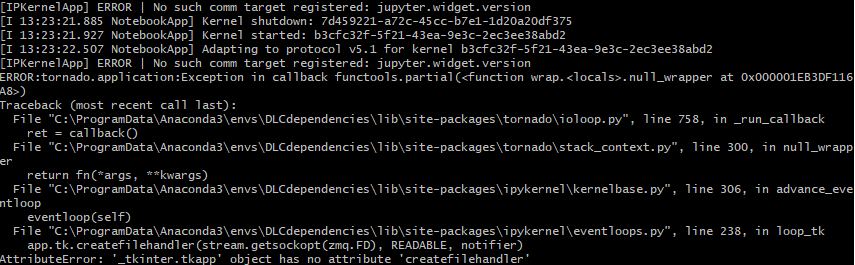
------------------------------------error--------------------------------------------------------------------------
[IPKernelApp] ERROR | No such comm target registered: jupyter.widget.version
ERROR:tornado.application:Exception in callback functools.partial(
Traceback (most recent call last):
File "C:\ProgramData\Anaconda3\envs\DLCdependencies\lib\site-packages\tornado\ioloop.py", line 758, in _run_callback
ret = callback()
File "C:\ProgramData\Anaconda3\envs\DLCdependencies\lib\site-packages\tornado\stack_context.py", line 300, in null_wrapper
return fn(args, *kwargs)
File "C:\ProgramData\Anaconda3\envs\DLCdependencies\lib\site-packages\ipykernel\kernelbase.py", line 306, in advance_eventloop
eventloop(self)
File "C:\ProgramData\Anaconda3\envs\DLCdependencies\lib\site-packages\ipykernel\eventloops.py", line 238, in loop_tk
app.tk.createfilehandler(stream.getsockopt(zmq.FD), READABLE, notifier)
AttributeError: '_tkinter.tkapp' object has no attribute 'createfilehandler'
------------------------------------error--------------------------------------------------------------------------
Also, When I launched Demo_labeledexample_MouseReaching.ipynb, I could see this message
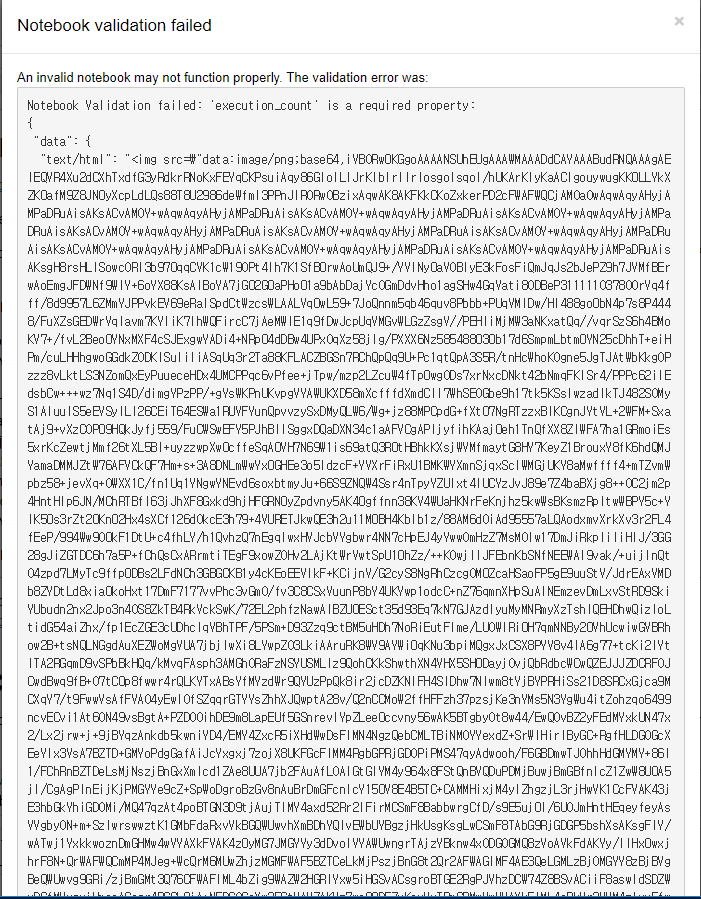
with the message in git bash
[E 14:26:46.657 NotebookApp] Notebook JSON is invalid: 'execution_count' is a required property
Failed validating 'required' in execute_result:

On instance['cells'][21]['outputs'][2]:
{'data': {'text/html': '<img '
                       'src="data:image/png;base64,iVBORw0KGgoAAAANSUhEUgAAAWMAAADd...',
          'text/plain': '<IPython.core.display.HTML object>'},
 'metadata': {},
 'output_type': 'execute_result'}
Lastly, I got error when I do create_new_project with copy_videos=True
------------------------------------error--------------------------------------------------------------------------
TypeError Traceback (most recent call last)
2 experimenter='KAIST' # Enter the name of the experimenter
3 video=['C:\Users\user\Desktop\Video_files_Deeplabcut\Linear chamber\20180906\Trial 1.mpg', 'C:\Users\user\Desktop\Video_files_Deeplabcut\Linear chamber\20180906\Trial 2.mpg'] # Enter the paths of your videos you want to grab frames from.
----> 4 deeplabcut.create_new_project(task,experimenter,video, working_directory='C:\Users\user\Desktop', copy_videos=True) #change the working directory to where you want the folders created.
C:\ProgramData\Anaconda3\envs\DLCdependencies\lib\site-packages\deeplabcut\create_project\new.py in create_new_project(project, experimenter, videos, working_directory, copy_videos)
96 print("Copying the videos")
97 for src, dst in zip(videos, destinations):
---> 98 shutil.copy(src,dst)
99 else:
100 # creates the symlinks of the video and puts it in the videos directory.
C:\ProgramData\Anaconda3\envs\DLCdependencies\lib\shutil.py in copy(src, dst, follow_symlinks)
237
238 """
--> 239 if os.path.isdir(dst):
240 dst = os.path.join(dst, os.path.basename(src))
241 copyfile(src, dst, follow_symlinks=follow_symlinks)
TypeError: _isdir: illegal type for path parameter
------------------------------------error--------------------------------------------------------------------------
Surely these things are ignorable errors(It does not prevent to execute things behind) but I always see whenever I execute it.
Could you please help me?
How to Reproduce the problem
For Max_iter problem,
- goto pose_tensorflow -> train.py
- comment max_iter = int(cfg.multi_step[-1][1])
- type max_iter = 200 below
For Executing on new Kernel
- open git bash
- source activate ~~(For me it's DLCdependencies)
- type python -m ipykernel install --name DLC2
- type jupyter notebook
- open DeepLabCut/examples/Demo_yourowndata.ipynb#
- change kernel to DLC2
- execute import deeplabcut
8(for error2-1). open DeepLabCut/examples/Demo_labeledexample_MouseReaching.ipynb
For create_new_project with copy_videos=True

 timegate
All 8 comments
Why are you trying to change max_iters? Please describe what you are trying to achieve with this.
I have no idea what’s wrong with your notebook environment. I would just open them as you normally would. The mouse reaching works on Ubuntu 16, 18, Windows 7 and Windows 10 for beta testers. So, seems it’s your system...
Re: create_new_project, it tells you the error: TypeError: _isdir: illegal type for path parameter
You’re not formatting the paths correctly. See the wiki troubleshooting section for guidance... but I will paste it here. Also file names should not have spaces in them!
The path must be a string that is passed for videos and for the working directory. If not, you will get errors! i.e. in windows enter paths by either:
r`C:\Users\computername\Videos\reachingvideo1.avi'
`C:\ \Users\ \computername\ \Videos\ \reachingvideo1.avi' (with two \ \ at each \ )
 MMathisLab
on 9 Nov 2018
MMathisLab
on 9 Nov 2018
Why are you trying to change max_iters? Please describe what you are trying to achieve with this.
I have no idea what’s wrong with your notebook environment. I would just open them as you normally would. The mouse reaching works on Ubuntu 16, 18, Windows 7 and Windows 10 for beta testers. So, seems it’s your system...
Re: create_new_project, it tells you the error: TypeError: _isdir: illegal type for path parameter
You’re not formatting the paths correctly. See the wiki troubleshooting section for guidance... but I will paste it here. Also file names should not have spaces in them!
The path must be a string that is passed for videos and for the working directory. If not, you will get errors! i.e. in windows enter paths by either:
r`C:\Users\computername\Videos\reachingvideo1.avi'
`C:\Users\computername\Videos\reachingvideo1.avi'
- It's because I wanted to train all the videos with the same number of times(max_iter). You know, if max_iter is high, than overfitting happened. Or max_iter is low, than underfitting happened. And In fact, I feel 1030000(which is the number in existing program, cfg.multi_step[-1][1]) is too big number for our training. Surely I can stop it by interrupting during executing the training, but I don't want to watching the whole iteration step all the time and stop it in same iteration. So I thought manipulating max_iter is needed.
- Umm.. the error happened in line number 4.
----> 4 deeplabcut.create_new_project(task,experimenter,video, working_directory='C:\Users\user\Desktop', copy_videos=True) #change the working directory to where you want the folders created.
Could you let me know the meaning of "The path must be a string that is passed for videos and for the working directory."? Do you mean that the working directory cannot be a new directory?(should it be existing directory with some file?)
And unfortunately, I tried 'C:\Users\user\Desktop' and r'C:\Users\user\Desktop' in line number 4, but the same errors happened.
Also, as your advice, I changed line number 3 by r'C:\Users\user\Desktop\Video_files_Deeplabcut\LinearChamber\20180906\Trial(1).mpg', r'C:\Users\user\Desktop\Video_files_Deeplabcut\LinearChamber\20180906\Trial(2).mpg'
which have no spaces. Thanks for letting me know this.
timegate
on 9 Nov 2018
Why do you run this step? Source activate already opens the environment? That’s like trying to open and env inside an env...
“type python -m ipykernel install --name DLC2”
When I followed your instruction in https://github.com/AlexEMG/DeepLabCut/tree/master/examples (source activate~~ jupyter notebook), after opening ipynb file, all import ~ thing doesn't work. So I thought it was a problem of kernel, and making new kernel which has my env's information is needed. But maybe it was an mistake..? maybe I should have done making ipykernel after deactivating the env or copy env to ipykernel in some way? umm..
timegate
on 9 Nov 2018
You can change the max_iter by changing the learning rate schedule in https://github.com/AlexEMG/DeepLabCut/blob/master/deeplabcut/pose_cfg.yaml
before you create the training split (or afterwards if you directly change the pose_cfg.yaml of that project).
The default learning rate schedule for the SGD optimiser, is given by:
multi_step:
- [0.005, 10000]
- [0.02, 430000]
- [0.002, 730000]
- [0.001, 1030000]
you can e.g. set it to
multi_step:
- [0.005, 10000]
- [0.02, 400000]
to stop after 400k iterations.
 AlexEMG
on 9 Nov 2018
AlexEMG
on 9 Nov 2018
multi_step:
- [0.005, 10000]
- [0.02, 400000]
You can change the max_iter by changing the learning rate schedule in
https://github.com/AlexEMG/DeepLabCut/blob/master/deeplabcut/pose_cfg.yaml
before you create the training split (or afterwards if you directly change thepose_cfg.yamlof that project).
The default learning rate schedule for the SGD optimiser, is given by:multi_step: - [0.005, 10000] - [0.02, 430000] - [0.002, 730000] - [0.001, 1030000]you can e.g. set it to
multi_step:
- [0.005, 10000]
- [0.02, 400000]
to stop after 400k iterations.
I'm sorry, I spent the weekend and came back now.
Could u give me answers for my another replies?
1.The error happened in line number 4.
----> 4 deeplabcut.create_new_project(task,experimenter,video, working_directory='C:\Users\user\Desktop', copy_videos=True) #change the working directory to where you want the folders created.
Could you let me know the meaning of "The path must be a string that is passed for videos and for the working directory."? Do you mean that the working directory cannot be a new directory?(should it be existing directory with some file?)
And unfortunately, I tried 'C:\Users\user\Desktop' and r'C:\Users\user\Desktop' in line number 4, but the same errors happened.
- When I followed your instruction in https://github.com/AlexEMG/DeepLabCut/tree/master/examples (source activate~~ jupyter notebook), after opening ipynb file, all import ~ thing doesn't work. So I thought it was a problem of kernel, and making new kernel which has my env's information is needed. But maybe it was an mistake..? maybe I should have done making ipykernel after deactivating the env or copy env to ipykernel in some way? umm..
timegate
on 12 Nov 2018
- Yes, the working directory should be a correctly formatted path, i.e.
r`C:\Users\computername\Videos'
`C:\ \Users\ \computername\ \Videos\ \'
- You need to install e.g. the nb conda kernels package, to switch conda envioronments in jupyter. See https://stackoverflow.com/questions/47191297/how-to-switch-environment-on-jupyter-notebook-for-new-notebook
AlexEMG
on 12 Nov 2018
**For future users
If you have an error
AttributeError: '_tkinter.tkapp' object has no attribute 'createfilehandler'
than you can find old eventloop.py file in
https://github.com/ipython/ipykernel/blob/249354dc791455eb5b9f499629ecd3c053d43be0/ipykernel/eventloops.py and please replace the existing eventloop.py file(you could know where it is by seeing your error message).
timegate
on 16 Nov 2018
In the latest release, we added a stopping variable (optional), you can use it by:
deeplabcut.train_network(config,maxiters=int(10**4))
This call will stop training after 10k iterations. Make sure that there are snapshots saved before this will happen...
AlexEMG
on 20 Nov 2018
Related issues
 lauritk
·
3Comments
lauritk
·
3Comments
 dusa2
·
3Comments
dusa2
·
3Comments
 mschart
·
4Comments
mschart
·
4Comments
 Jonathan-Oehley
·
4Comments
Jonathan-Oehley
·
4Comments
 cvKDean
·
4Comments
cvKDean
·
4Comments
Most helpful comment
In the latest release, we added a stopping variable (optional), you can use it by:
deeplabcut.train_network(config,maxiters=int(10**4))This call will stop training after 10k iterations. Make sure that there are snapshots saved before this will happen...