Deconz-rest-plugin: Can i use a Xiaomi curtain on RaspBee?
I wanted to connect a Xiaomi curtain to RaspBee and it had connected and reported as a below.
But, it couldn't be used.
Can I use it on RaspBee?
Thanks SungOk.
- Information
{
"ExtAddress": "0x00158d00022c80b5",
"NodeDescriptor": "AUCOXxF/ZAAAAGQAAA==",
"NwkAddress": "0x2d46",
"SceneX": 386.0,
"SceneY": 360.0,
"SimpleDescriptors": [
"AQQBAgIBCwAABAADAAUACgACAQ0AEwAGAAEABgQIGQAKAA0AAgETAAYAAQAGBA=="
],
"UserDescriptor": ""
}
 sungokay
All 45 comments
Interesting, I’ve had my eyes on these for some time, but they’re not supported by deCONZ (yet). Could you please post deCONZ GUI screenshots of:
- The node with dropped down endpoints and clusters;
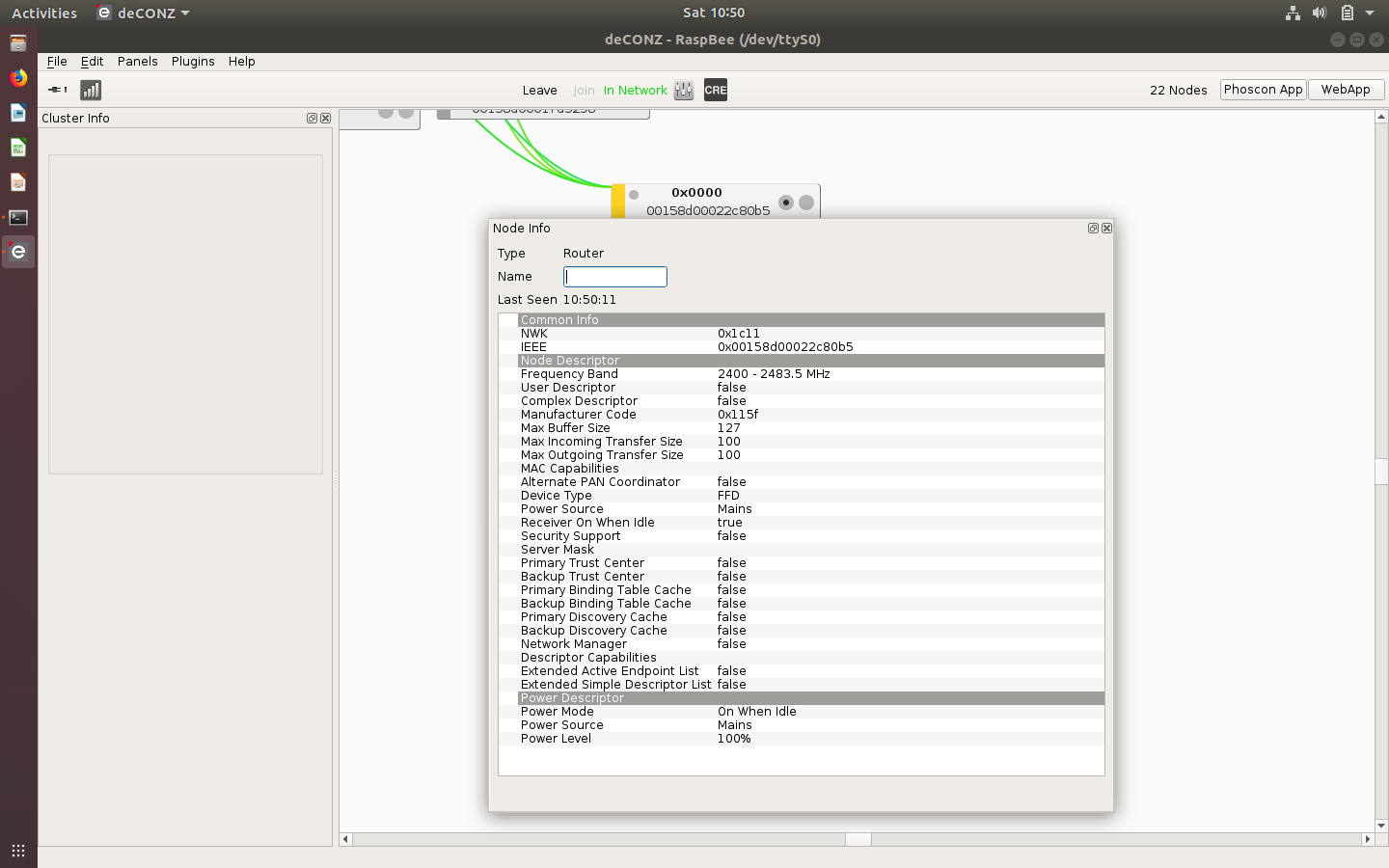
- The node info panel;
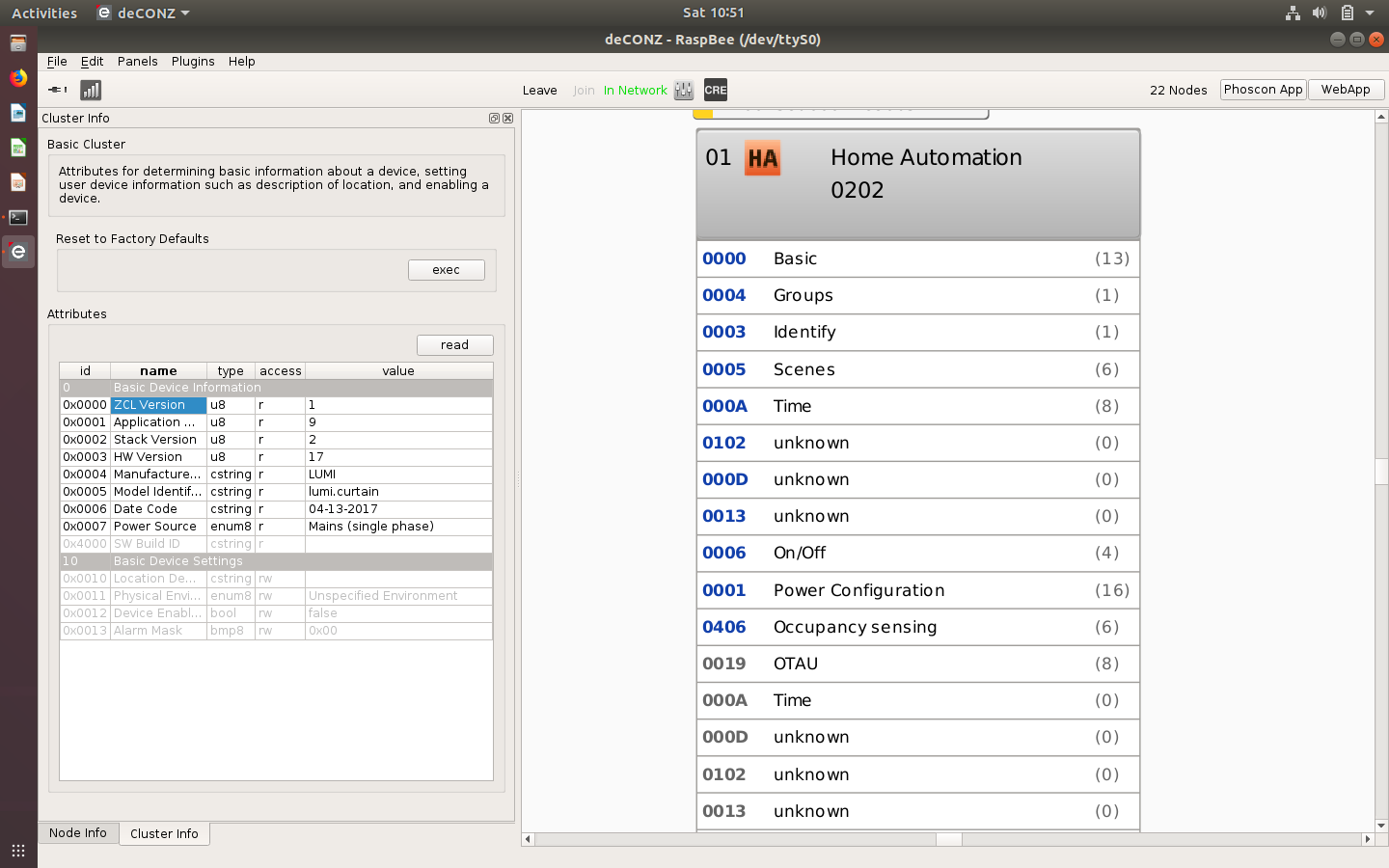
- The cluster into panel of the _Basic_ cluster (after manually reading the attributes)?
 ebaauw
on 19 May 2018
ebaauw
on 19 May 2018
I had attached them.


sungokay
on 19 May 2018
Thanks. It uses manufacturer code 0x115f and it’s a ZigBee router, just as the Xiaomi plug and newer wall switches (lumi.ctrl_ln). However, it seems to support over-the-air firmware updates, so it could be a different ZigBee stack.
From the clusters listed, I have no clue how the controller reports its state, nor which commands the controller accepts. They could very well be using the 0x000d, 0x0013, and/or 0x0102 clusters. They need to be defined in general.xml.
It will be straightforward to expose the _OnOff_ cluster (as an On/Off light) and the _Occupancy Sensing_ cluster (as a ZHAPresence sensor), but I’m not sure if that’ll do any good. Can you try in the deCONZ GUI:
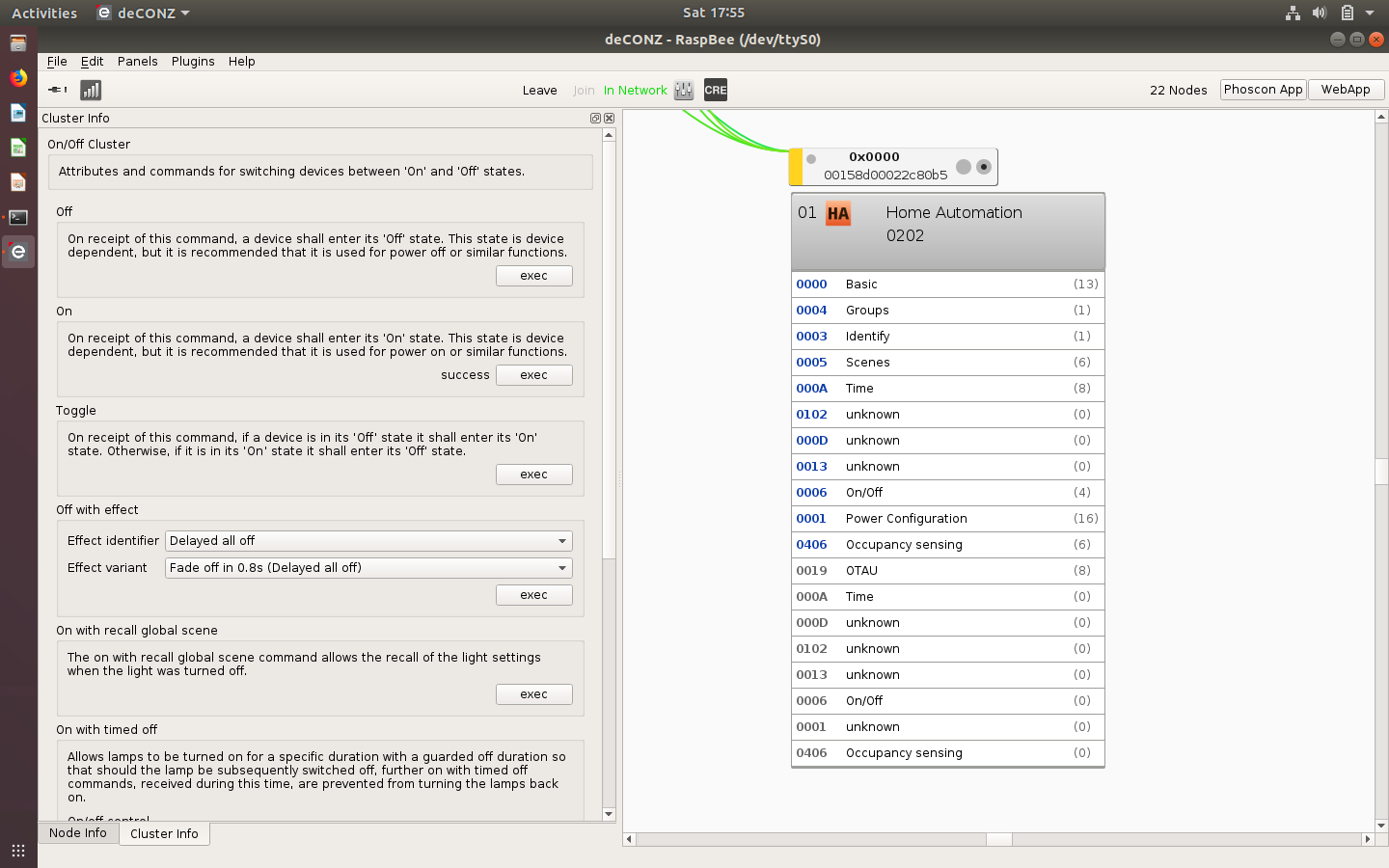
- Does the controller react to commands (_On_, _Off_, _Toggle_) to the _OnOff_ cluster?
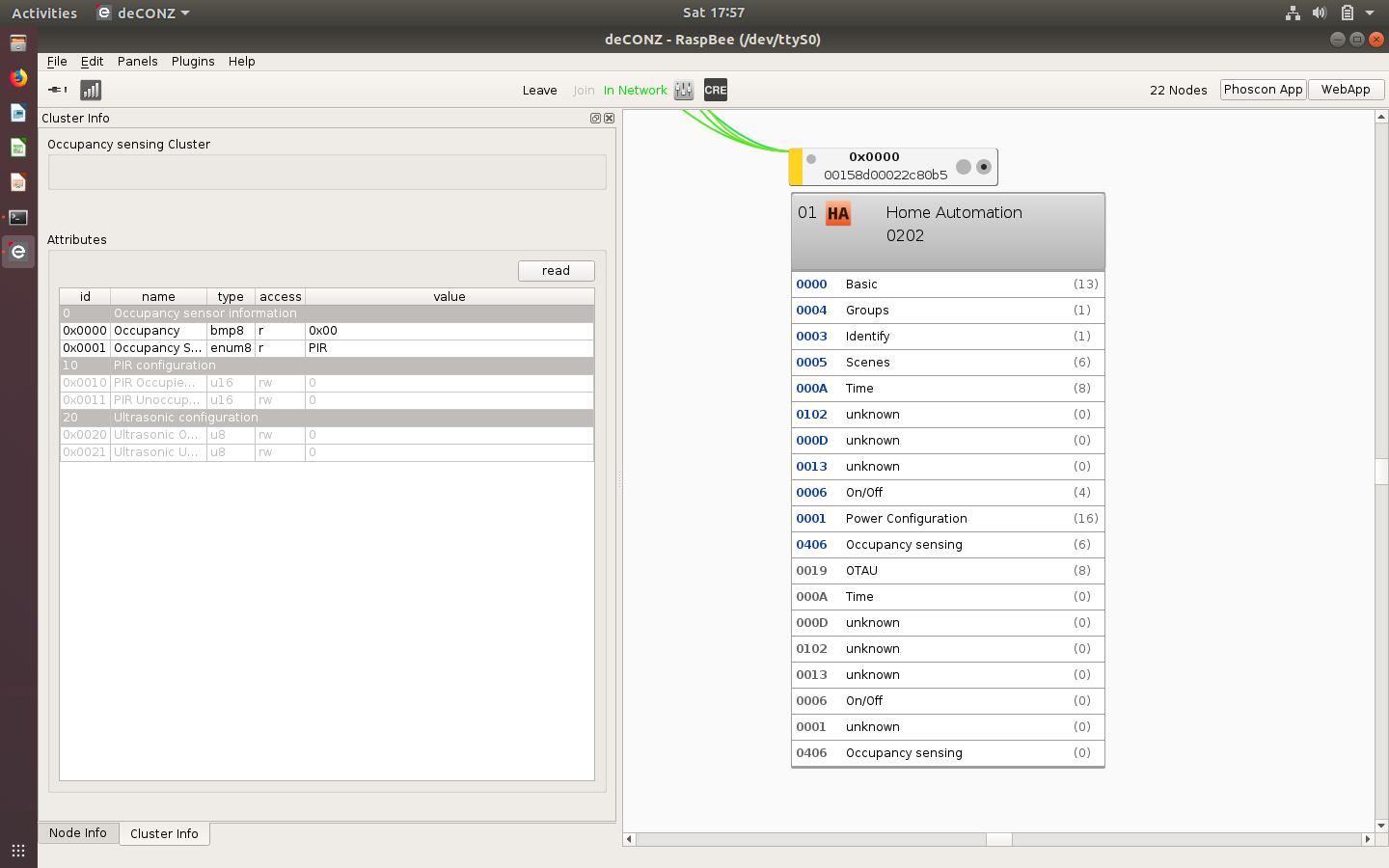
- Does it report anything on the _Occupancy Sensing_ cluster?
ebaauw
on 19 May 2018
See https://community.smartthings.com/t/xiaomi-curtain-motors/105802/24. It should react to _On_, by alternating between fully opening and closing the curtains.
ebaauw
on 19 May 2018
The controller had reacted to commands and the Occupancy Sensing had just reported "PIR" values as a attached images.

sungokay
on 19 May 2018
Could you check if the _OnOff_ attribute of the _OnOff_ cluster changes value? and the _Occupancy_ attribute of the _Occupancy Sensing_ cluster? I've created PR #597 with basic experimental support for these clusters. Could you compile and test that commit and report what resources are created? I'm not sure wether the /lights resource will work, in particular if the value of state.on reflects whether the curtains are open or closed.
I checked the ZigBee documentation:
- Device ID 0x0202 = Window covering device
- Cluster 0x000D = Analog Output (basic)
- Cluster 0x0012 = Multistate Output (basic)
- Cluster 0x0102 = Window Covering
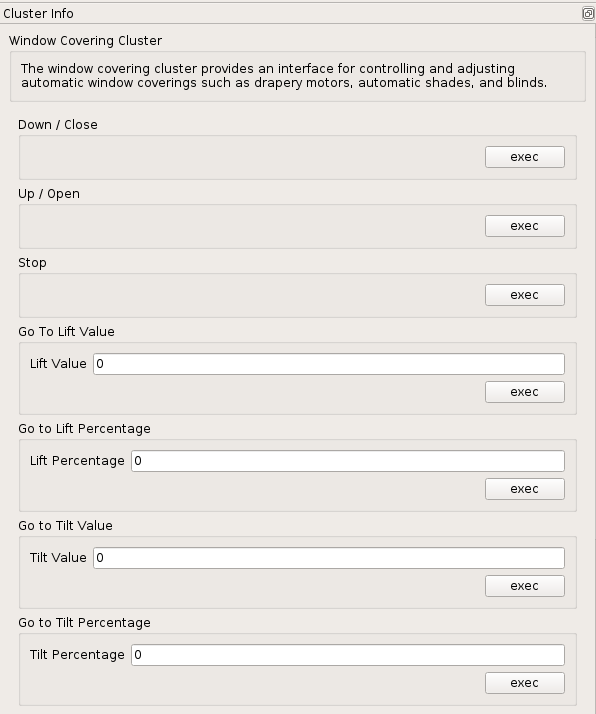
I think cluster 0x0102 is what we want to be looking into. It defines mandatory commands _Up/Open_, _Down/Close_, and _Stop_; optional commands to _Lift_ or _Tilt_ to a specific value or percentage; and reportable attributes for _Current Position - Lift Percentage_ and _Current Position - Tilt Percentage_. If the lumi.curtain supports these, we might use state.bri as a percentage for how much the curtains are open/closed.
I'll see if I can add this cluster to the definitions in general.xml, so you could test them in the deCONZ GUI. @manup, what's the progress of including general.xml in the REST API Plugin repository?
ebaauw
on 19 May 2018
Here's the general.xml with the 0x0102 cluster added:
Unzip and install to /usr/share/deCONZ/zcl.
ebaauw
on 19 May 2018
The OnOff value has changed to "true". If the curtain had closed.
But, The Occupancy attribute of the Occupancy Sensing cluster hadn't changed.
Anyway, I have no experience to compile it. But, I'll try and update it's result.
Thanks.
sungokay
on 19 May 2018
If I click the "Up/Open". The curtain is closed.
"Down/Close" -> Curtain Open.
So, I had changed a below lines.
    <command id="0x00" dir="recv" name="Down / Close" required="m"></command>
    <command id="0x01" dir="recv" name="Up / Open" required="m"></command>
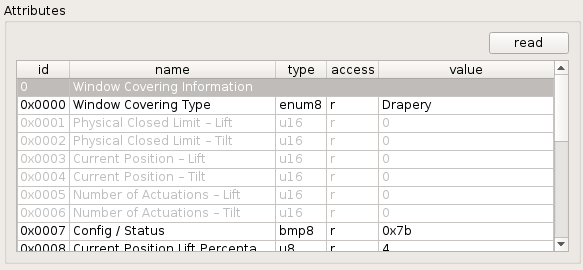
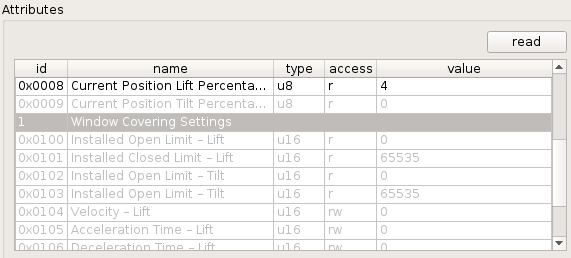
Can you post screenshots of the 0x0102 cluster? What attributes does the controller support? Maybe the _Reversed_ bit needs to be set or cleared.
Can you set a percentage or value?
ebaauw
on 19 May 2018
Here is..
I could just set a percentage of "Go to Lift Percentage".

sungokay
on 19 May 2018
I had compiled the patch successfully and tested it.
The curtain can be saw as an outlet in a Homekit and can be opened/closed.
But, I had turned off it. the curtain has opened with the modified general.xml file by me.
sungokay
on 19 May 2018

sungokay
on 19 May 2018
I had compiled the patch successfully and tested it.
Cool. Can you please list the resources (or simply attach the debug dump file from homebridge-hue, see https://github.com/ebaauw/homebridge-hue#debug-dump-file)?
The curtain can be saw as an outlet in a Homekit and can be opened/closed.
Yes, I'll need to change homebridge-hue to expose the curtain controller more appropriately to HomeKit. Need to figure out what it supports first, see below.
But, I had turned off it. the curtain has opened with the modified general.xml file by me.
With my PR, the REST API plugin only uses the _On/Off_ cluster to control the curtains. For now, the changes to general.xml are only used for the deCONZ GUI.
I could just set a percentage of "Go to Lift Percentage".
So if you set it to, say 50, and press _exec_, the curtains move to halfway? Does the _Current Position Lift Percentage_ attribute change value? If you re-read it? Does it also change when you use the _On_ or _Off_ commands?
I might have made a mistake in general.xml. Can you try this one: general.xml.zip? Could you also please double-click on the _Config / Status_ and, if supported, _Mode_ attributes and provide a screenshot of the details?
With the attached general.xml, does it show the _Mode_ attribute as supported? Can you change the _Reversed_ bit? Does that "swap" the _Up/Open_ and _Down/Close_ commands? Does the _Stop_ command stop the current motion, if you _exec_ that while the curtains are closing or opening?
One more thing: could you run homebridge --debug-info=2 and, after an hour or so, check the log for a line:
0x00158D00022C80B5 extract Xiaomi special
Could you please list the corresponding of (this is for a weather sensor):
May 19 13:08:54 pi2 deCONZ[842]: 13:08:52:059 APS-DATA.indication srcAddr: 0x7bf2, dstAddrMode: 2, profile: 0x0104, cluster: 0x0000, lqi: 215, rssi: -64
May 19 13:08:54 pi2 deCONZ[842]: 13:08:52:060 no button map for: lumi.sensor_magnet.aq2 cl: 0x0000 cmd: 0x0A pl[0]: 001
May 19 13:08:54 pi2 deCONZ[842]: 13:08:52:060 ZCL attribute report 0x00158D0001E45934 for cluster 0x0000, ep 0x01
May 19 13:08:54 pi2 deCONZ[842]: 13:08:52:060   payload: 01ff421d0121bd0b0328190421a8130521d500062401000000000a210a51641000
May 19 13:08:54 pi2 deCONZ[842]: 13:08:52:060 0x00158D0001E45934 extract Xiaomi special
May 19 13:08:54 pi2 deCONZ[842]: 13:08:52:060   01 battery 3005 (0x0BBD)
May 19 13:08:54 pi2 deCONZ[842]: 13:08:52:060   03 temperature 25 °C
May 19 13:08:54 pi2 deCONZ[842]: 13:08:52:060   04 unknown 5032 (0x13A8)
May 19 13:08:54 pi2 deCONZ[842]: 13:08:52:060   05 unknown 213 (0x00D5)
May 19 13:08:54 pi2 deCONZ[842]: 13:08:52:060   06 unknown 4294967296 (0x0000000100000000)
May 19 13:08:54 pi2 deCONZ[842]: 13:08:52:060   64 on/off 0
May 19 13:08:54 pi2 deCONZ[842]: 13:08:52:060 Node data 0x00158d0001e45934 profileId: 0x0104, clusterId: 0x0000
May 19 13:08:54 pi2 deCONZ[842]: 13:08:52:060 Update Sensor 0x00158D0001E45934 Basic Cluster
Just a hunch: does the _Occupancy_ attribute change when you open/close the curtains manually?
ebaauw
on 19 May 2018
Here is the "homebridge-hue.json.gz"
sungokay
on 19 May 2018
So if you set it to, say 50, and press exec, the curtains move to halfway? Does the Current Position Lift Percentage attribute change value? If you re-read it? Does it also change when you use the On or Off commands?
=> Yes, It moves to 50% and stop. The Current Position Lift Percentage attribute changed in all of cases.
I might have made a mistake in general.xml. Can you try this one: general.xml.zip? Could you also please double-click on the Config / Status and, if supported, Mode attributes and provide a screenshot of the details?
=>

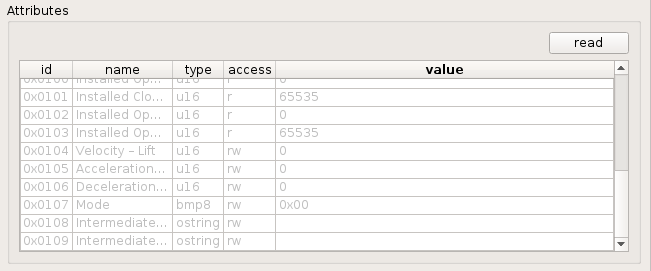
With the attached general.xml, does it show the Mode attribute as supported? Can you change the Reversed bit? Does that "swap" the Up/Open and Down/Close commands? Does the Stop command stop the current motion, if you exec that while the curtains are closing or opening?
=>
I can't change the Mode. Furthermore, If I had clicked "Up/Open" button. The curtain has been closed.
Anyway, If I click the "Stop" Button during closing or opening. it stop.
sungokay
on 19 May 2018
Just a hunch: does the Occupancy attribute change when you open/close the curtains manually?
=> No
sungokay
on 19 May 2018
One more thing: could you run homebridge --debug-info=2 and, after an hour or so, check the log for a line:
=> It didn't startup with a below error.
- error log.
May 19 22:54:47 raspberrypi systemd[1]: Started Node.js HomeKit Server.
May 19 22:54:49 raspberrypi homebridge[16400]: error: unknown option `--debug-info'
May 19 22:54:49 raspberrypi systemd[1]: homebridge.service: Main process exited, code=exited, status=1/FAILURE
May 19 22:54:49 raspberrypi systemd[1]: homebridge.service: Unit entered failed state.
May 19 22:54:49 raspberrypi systemd[1]: homebridge.service: Failed with result 'exit-code'.
sungokay
on 19 May 2018
I had checked both of general.xml files but there is no different.
sungokay
on 19 May 2018
Here is the "homebridge-hue.json.gz"
Thanks. The /lights resource is what I expected/hoped:
{
  "etag": "ba597eb12a73c141cc13c8b000a99780",
  "hascolor": false,
  "manufacturername": "LUMI",
  "modelid": "lumi.curtain",
  "name": "Curtain",
  "state": {
    "alert": "none",
    "on": true,
    "reachable": true
  },
  "swversion": null,
  "type": "Window covering device",
  "uniqueid": "00:15:8d:00:02:2c:80:b5-01"
}
The /sensors resource is missing, though. I don't understand why. Could you please open the network from Phoscon or the old web app and, in the deCONZ GUI, re-read the basic cluster? Just to make sure.
I can't change the Mode
I had checked both of general.xml files but there is no different.
Somehow, I managed to attach the old general.xml, instead of the changed one: general.xml.zip
One more thing: could you run homebridge --debug-info=2 and, after an hour or so, check the log for a line:
=> It didn't startup with a below error.
I need some more coffee: --dbg-info=2 is a flag to deCONZ, not to homebridge. I think you're running on a Raspberry Pi? Probably easiest to edit /etc/systemd/system/deconz-gui.service and change the ExecStart line to:
ExecStart=/usr/bin/deCONZ --http-port=80 --dbg-info=2
Yes, It moves to 50% and stop. The Current Position Lift Percentage attribute changed in all of cases.
Cool! We should be able to map the percentage to state.bri for fine-grained control.
Did _Current Position Lift Percentage_ change spontaneously or did you have to re-read the attribute?
If I click the "Stop" Button during closing or opening. it stop.
Cool! We could use that for bri_inc once that'll be implemented.
ebaauw
on 19 May 2018
I'm using a RaspBee on a Raspberry Pi.
After updated the general.xml. I can change the Mode as a below image.
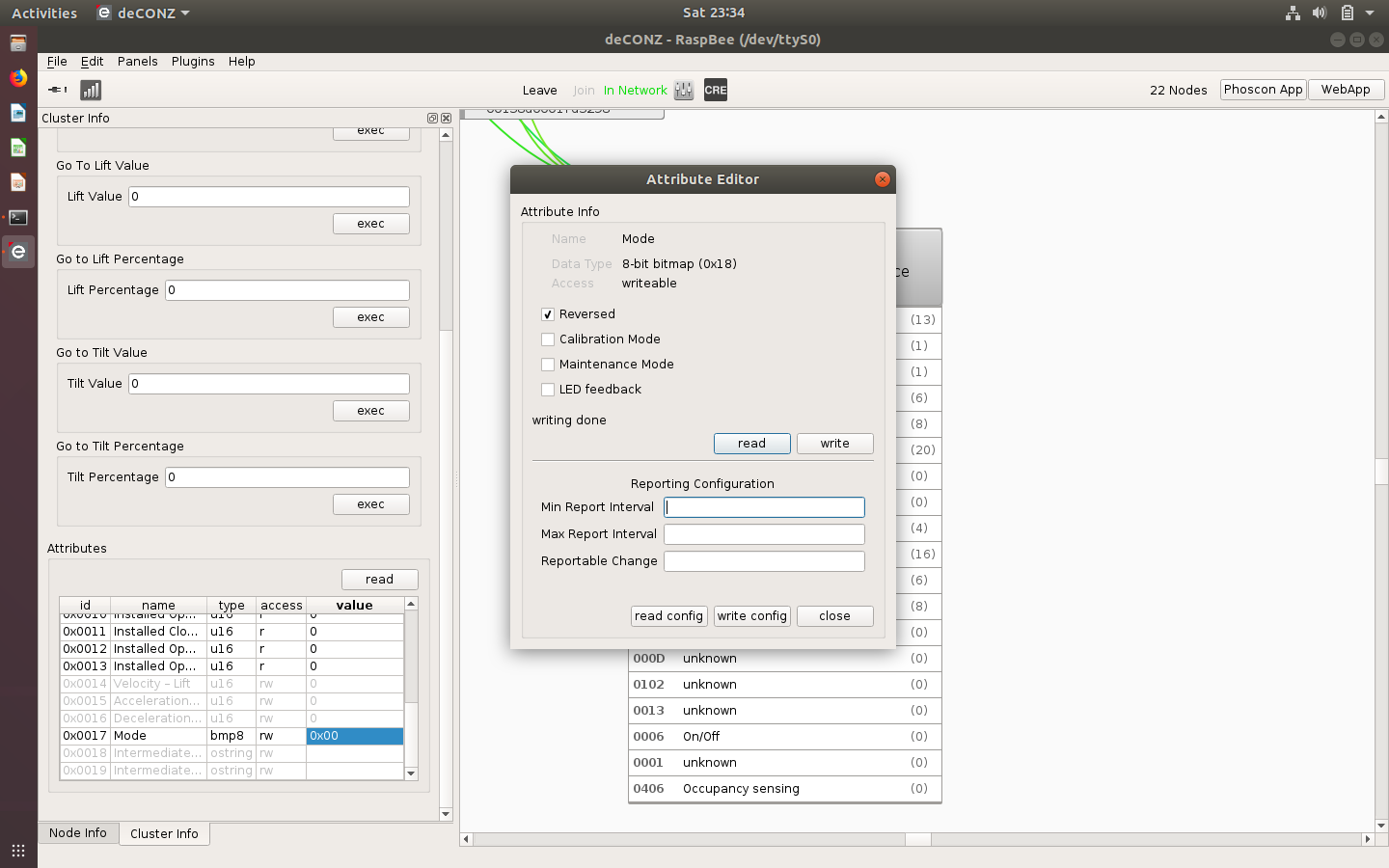
But, If I hadn't set up the "Reversed" and I click the "Up/Open". The curtain is closed.
sungokay
on 19 May 2018
The /sensors resource is missing, though. I don't understand why. Could you please open the network from Phoscon or the old web app and, in the deCONZ GUI, re-read the basic cluster? Just to make sure.
=> I need more detail instructions to do that.
sungokay
on 19 May 2018
May 19 23:49:18 raspberrypi deCONZ[3196]: 23:49:14:959 no button map for: lumi.weather cl: 0x0000 cmd: 0x0A pl[0]: 001
May 19 23:49:18 raspberrypi deCONZ[3196]: 23:49:14:959 ZCL attribute report 0x00158D00022CAABE for cluster 0x0000, ep 0x01
May 19 23:49:18 raspberrypi deCONZ[3196]: 23:49:14:959 payload: 01ff42250121c70b0421a813052105000624010000000064293b0a6521cb15662b8d8a01000a212674
May 19 23:49:18 raspberrypi deCONZ[3196]: 23:49:14:959 0x00158D00022CAABE extract Xiaomi special
May 19 23:49:18 raspberrypi deCONZ[3196]: 23:49:14:959 01 battery 3015 (0x0BC7)
May 19 23:49:18 raspberrypi deCONZ[3196]: 23:49:14:959 04 unknown 5032 (0x13A8)
May 19 23:49:18 raspberrypi deCONZ[3196]: 23:49:14:959 05 unknown 5 (0x0005)
May 19 23:49:18 raspberrypi deCONZ[3196]: 23:49:14:959 06 unknown 4294967296 (0x0000000100000000)
May 19 23:49:18 raspberrypi deCONZ[3196]: 23:49:14:959 64 temperature 2619
May 19 23:49:18 raspberrypi deCONZ[3196]: 23:49:14:959 65 humidity 5579
May 19 23:49:18 raspberrypi deCONZ[3196]: 23:49:14:960 66 pressure 1010
May 19 23:49:18 raspberrypi deCONZ[3196]: 23:49:14:960 Node data 0x00158d00022caabe profileId: 0x0104, clusterId: 0x0000
May 19 23:49:18 raspberrypi deCONZ[3196]: 23:49:14:961 Update Sensor 0x00158D00022CAABE Basic Cluster
sungokay
on 19 May 2018
May 19 23:49:18 raspberrypi deCONZ[3196]: 23:49:14:959 0x00158D00022CAABE extract Xiaomi special
Thanks, but this is for one of your weather sensors. I need these messages for the curtain, mac address 0x00158D00022C80B5.
But, If I hadn't set up the "Reversed" and I click the "Up/Open". The curtain is closed
Sorry, I’m not sure I understand. If you select _Reversed_ (and then press _Write_), _Up/Open_ opens? And if you deselect it (and then press _Write_) _Up/Open_ closes? Or does it close in both cases?
The /sensors resource is missing, though. I don't understand why. Could you please open the network from Phoscon or the old web app and, in the deCONZ GUI, re-read the basic cluster? Just to make sure.
=> I need more detail instructions to do that.
In the web app, click the _Open Network_ button on the _Settings_ page (under _Menu_ in the upper right corner. Then, in de deCONZ GUI, go to the _Cluster Info_ panel of the _Basic_ cluster and press the _Read_ button. That should trigger the creation of the ZHAPresence /sensors resource.
ebaauw
on 19 May 2018
- 0x00158D00022C80B5's information
May 19 23:52:42 raspberrypi deCONZ[3196]: 23:52:40:263 ZCL attribute report 0x00158D00022C80B5 for cluster 0x0000, ep 0x01
May 19 23:52:42 raspberrypi deCONZ[3196]: 23:52:40:263 payload: 01ff421c03282305211700642004082109110727000000000000000009210004
May 19 23:52:42 raspberrypi deCONZ[3196]: 23:52:40:263 0x00158D00022C80B5 extract Xiaomi special
May 19 23:52:42 raspberrypi deCONZ[3196]: 23:52:40:263 03 temperature 35 °C
May 19 23:52:42 raspberrypi deCONZ[3196]: 23:52:40:263 05 unknown 23 (0x0017)
May 19 23:52:42 raspberrypi deCONZ[3196]: 23:52:40:264 08 unknown 4361 (0x1109)
May 19 23:52:42 raspberrypi deCONZ[3196]: 23:52:40:264 07 unknown 0 (0x0000000000000000)
May 19 23:52:42 raspberrypi deCONZ[3196]: 23:52:40:264 09 unknown 1024 (0x0400)
- If I selected the "Reversed"
Up/Open => Open
If I deselected the "Reversed"
Up/Open => Close
sungokay
on 19 May 2018
0x00158D00022C80B5's information
Thanks. It does report (coarse grained) temperature, to be exposed as config.temperature in the sensor resource. I’ll add the other fields to the list of what we still need to figure out. I probably need to suppress creating config.battery.
If I selected the "Reversed"
Up/Open => Open
If I deselected the "Reversed"
Up/Open => Close
Cool! It’s probably just how you install the controller and the rails which way the motor rotates, and you can adjust that through this setting. We should probably expose this through the REST API as a config attribute, but we don’t have these on /lights resources (yet?). Also, state.bri for lights runs from 1 to 254 (which homebridge-hue translates to 0% to 100%), where the _Current Position Lift Percentage_ takes values 0 to 100. I need to figure out how best to deal with that, still think it’s easier to re-use state.bri instead of introducing a new attribute. @manup, what’s your view?
ebaauw
on 19 May 2018
After I had selected the "Reversed". The "Go to Lift Percentage" hadn't been working.
So, I had decided to change the general.xml.
sungokay
on 19 May 2018
After applied the PR #597. The Xiaomi curtain can be used on a RaspBee.
Thanks
SungOk.
sungokay
on 24 May 2018
Got myself a lumi.curtain, but the rails haven't arrived yet. Initially, the GUI would only show a _Basic_ cluster after pairing (to my test network). Re-pairing after powering down the XBee-s and moving the controller closer to the RaspBee fixed that.
I see the controller continuously sends attribute reports for _Current Position Lift Percentage_ while the motor is moving - no need to get this info from the Xiaomi magic report. This means we could indeed use state.bri as level. I think it also makes sense to use "bri_inc": 0 for stop, as for the shutters (see https://github.com/dresden-elektronik/deconz-rest-plugin/pull/727).
Somehow the _Current Position Lift Percentage_ remains at value 255, probably because the controller hasn't been calibrated yet. Also, the motor keeps running until I send a _Stop_ command. @sungokay, did you do anything special to calibrate the controller, or did it just take a hint when the rails wouldn't move any further?
ebaauw
on 22 Aug 2018
@ebaauw (Sorry for the necro) have you received your rails yet?
If not: It calibrates by running slowly the first time, until it senses that it can't move anymore.
I just got my Conbee, but I have had the curtains setup since January, so if you need any more help, please just ask :-)
 cnrd
on 11 Oct 2018
cnrd
on 11 Oct 2018
Yes, got them last Friday, and installed them the same day. Indeed the motor did calibrate spontaneously, but it doesn’t always close the curtains to 0%, mostly it sticks at 1% or 2%. I tried to reset the motor (holding the small button for 10 sec), so it would re-calibrate, but I don’t think it does.
Of course Xiaomi reversed the value they report from the ZigbBee standard, see #746. I created a workaround, see #836, and also get the position percentage from the Xiaomi special attribute report. The motor also seems to report the percentage thru the _Analog Input_ cluster, but I don’t use that one. Added support to homebridge-hue as well, so it’s exposed to HomeKit as a _Window Covering_, incl. animations in Apple’s Home app, and even notifications.
ebaauw
on 11 Oct 2018
I'll test it out at some point, I'm slowly moving stuff to deCONZ from my hue bridge and Xiaomi gateway. Are you sure the values are always reversed? I think the Xiaomi app may actually be asking you if you have the motor on the left or right.
Do you have yours on the left or right?
cnrd
on 11 Oct 2018
Left or right doesn’t matter; the band still runs the same direction. What does matter is which slider that pulls the curtains is attached on the back of the band. If the right slider is attached to the back, and the left slider to the front, the curtains close when the motor turns clockwise. The other way around, the curtains close counter clockwise. However, the motor can be configured (thru the deCONZ GUI only) to cope with that.
The issue is that it reports 100% for open and 0% for closed where ZCL has defined the values reversed. Interestingly, HomeKit uses 100% for open as well.
ebaauw
on 11 Oct 2018
So does HASS: current_position: 100 when the curtains are open, pretty sure HASS grabs it directly from the gateway: https://github.com/home-assistant/home-assistant/blob/3f87d413813de84935ea67b5212c55348524447f/homeassistant/components/cover/xiaomi_aqara.py#L66
EDIT:
Yep, I just captured the package from the gateway using Wireshark:
{"cmd":"report","model":"curtain","sid":"158d0001e4ce71","short_id":50674,"data":"{\"curtain_level\":\"0\"}"}
And after opening them again:
{"cmd":"report","model":"curtain","sid":"158d0001e4ce71","short_id":50674,"data":"{\"curtain_level\":\"100\"}"}
It apparently also send a heartbeat with a voltage?
{"cmd":"heartbeat","model":"curtain","sid":"158d0001e4ce71","short_id":50674,"data":"{\"voltage\":3600,\"curtain_level\":\"0\"}"}
Ah that voltage is also sent from switches, so I'm guessing that it's something to do with battery, which the motor of course does not have.
I think that the 0/100 may also be the same discussion as on/off for curtains, I have had a long discussion with my wife wether a curtain is open or closed when it's on. Everyone defines on as the curtains being open, but this does not make sense in our native language.
cnrd
on 11 Oct 2018
@ebaauw Now that I have everything setup, it seems like my curtains goes to 100 when open and 0 when closed. They don't seem to have the problem of staying at 1-2.
https://imgur.com/a/pMwR2Pp
cnrd
on 12 Oct 2018
Finally figured out how to force the lumi.curtain to re-calibrate. There's an additional motor reset button and green LED underneath the cover (holding the ZigBee module, the ZigBee reset button and the blue LED), see: https://www.youtube.com/watch?v=3lqIXm73qbk. To reset the motor, you need to keep the button pressed for several seconds until the green LED flashes five times in a row. It twice flashes a single time - just be patient and keep the button pressed.
After the reset it reports value 255 for _Current Position Tilt Percentage_. You need to open and close the curtains for the motor to learn the new distance. I found that the _Reversed_ bit in the _Mode_ attribute wasn't reset, but the reversed modus was. I had to clear and re-set the bit for the correct open/close direction.
ebaauw
on 15 Oct 2018
Can I ask you where you bought the rails? As I have been trying to find somewhere in Europe where I can by compatible ones, as I would really want to get some in one piece instead of 1m cut ups.
cnrd
on 15 Oct 2018
Can I ask you where you bought the rails? As I have been trying to find somewhere in Europe where I can by compatible ones
I couldn't find any in Europe so I ordered them on AliExpress. The first shop wouldn't deliver them: shipment canceled, even after several attempts, but my money was refunded without any issue. The second shop, Ding Xin Store, delivered really fast and was very helpful in the chat. They turned out to be cheaper as well, despite charging separately for deliver (through FedEx). I ordered 4m for EUR 104.23 (incl. delivery). It came in four pieces, 2x 1m and 2x ~0.9m (to offset the length of the endpoints), with three connectors.
I would really want to get some in one piece instead of 1m cut ups.
I suppose having the rails in two pieces isn't too bad if you have double curtains (open on both sides and closing in the middle). In that case, the runners needn't cross the connector. I live in an old house, where the ceiling isn't completely level, so I had to wiggle one of the outer connections until the runner would cross it. It's working fine now, but the runners make some more noise crossing the connections. If I had the choice, I would be happy to pay some more to get two pieces instead of four.
The rails and especially fasteners and connectors are quite large and ugly. I probably want to hide them behind a board.
I had to cut the rails (and the band moving the curtains), since I needed "only" 3.8m or something. It was an interesting experience, but next time, I'll make sure to measure and order the precise length. I also had to order some additional runners (and re-calibrate the motor after installing them).
ebaauw
on 15 Oct 2018
Okay so same experience as me.
cnrd
on 15 Oct 2018
Finally figured out how to force the
lumi.curtainto re-calibrate. There's an additional motor reset button and green LED underneath the cover (holding the ZigBee module, the ZigBee reset button and the blue LED), see: https://www.youtube.com/watch?v=3lqIXm73qbk. To reset the motor, you need to keep the button pressed for several seconds until the green LED flashes five times in a row. It twice flashes a single time - just be patient and keep the button pressed.After the reset it reports value 255 for _Current Position Tilt Percentage_. You need to open and close the curtains for the motor to learn the new distance. I found that the _Reversed_ bit in the _Mode_ attribute wasn't reset, but the reversed modus was. I had to clear and re-set the bit for the correct open/close direction.
Sorry for my question out of order. Can you tell me how to reset the zigbee module? I deleted it from my raspbee and wants to add it to conbee, but I cant find it. So I thought to reset the module, but I cannot find any documentation for it.
 Wyphorn
on 8 Apr 2019
Wyphorn
on 8 Apr 2019
That's kinda hit and miss for me. I would expect it's holding the reset button until the blue led starts to blink, but it doesn't always seem to work. Maybe you need to power cycle it just before. Or hold the reset button while powering it.
ebaauw
on 8 Apr 2019
That's kinda hit and miss for me. I would expect it's holding the reset button until the blue led starts to blink, but it doesn't always seem to work. Maybe you need to power cycle it just before. Or hold the reset button while powering it.
Plan to get this one and integrate with me Deconz and node-red platform. Any other zigbee option available for curtain than Aqara?
 deven2020
on 22 Jul 2019
deven2020
on 22 Jul 2019
I'm also looking for curtains solution.
 phrfpeixoto
on 20 Nov 2020
phrfpeixoto
on 20 Nov 2020
Related issues
 felixstorm
·
4Comments
felixstorm
·
4Comments
 horchi
·
5Comments
horchi
·
5Comments
 mvasicek
·
4Comments
mvasicek
·
4Comments
 philko123
·
3Comments
philko123
·
3Comments
 ReeChip
·
5Comments
ReeChip
·
5Comments
Most helpful comment
Plan to get this one and integrate with me Deconz and node-red platform. Any other zigbee option available for curtain than Aqara?