Deconz-rest-plugin: Support request for BTicino DIN power consumption module
Hi, I have installed a RaspBee for my home automation.
I can connect some BTicino products, using Legrand integration .... under the list of functioning products.
I can't connect a DIN module for power measurement.
I attach below the screenshots.
Thanks in advance and congratulations for the work you are doing.
Domenico
Working Products:
- BTicino K4003C equal to Legrand 067773
- BTicino 3584C equal to Legrand 064888
- BTicino K4531C equal to Legrand 067775
Non-functioning products:


 meco489
All 273 comments
Could you be a bit more precise on what non-functional means? I'd assume you don't see it in Phoscon (which is kind of expected) and you don't have any power sensor and readings?
Happy to fiddle in the few lines to add it as supported device somewhere the next days.
@Smanar Legrand is you domain as I read ;)
 SwoopX
on 16 Feb 2020
SwoopX
on 16 Feb 2020
Right .... I can't associate it in Phoscon ...
Sorry: I took it for granted even if it wasn't!
Thanks
meco489
on 16 Feb 2020
@SwoopX , lol, yep, I can make this integration, all the code is already in place, will be fast.
@meco489
Can you take the same screenshoot but with consumption effective ? I ask that because for exemple on plug legrand use Voltage + Current + Power, but in reality only Power is working (other value stay at 0)
The device is out of the box, or you already have updated it with bticino gateway ? (legrand electrical mesurement don't work without update)
And if I make code modification, do you know how to compile it to test ?
 Smanar
on 17 Feb 2020
Smanar
on 17 Feb 2020
Hi, when I made the screeshot that I sent you the BTicino module was connected .... I also saw that the active power was 0 .. but surely the reading was about 800W ??
P.S.
On the BTicino APP it only displays the active power.
The device is updated with the latest firmware available.
Is the compilation the same as described here? https://github.com/Smanar/deconz-rest-plugin/blob/master/README.md
meco489
on 17 Feb 2020
But surely the reading was about 800W ??
So you can confirm me, at a moment you have a value at 0x050B attribute ?
And, yep, it's less or more this link, you have the official one at deconz github (it 's same than on my fork) https://github.com/dresden-elektronik/deconz-rest-plugin and you just need to change an url.
Give me an hour, I will give you a new link. I need to delete the previous one and remake one.
Smanar
on 17 Feb 2020
Ok done, so you can follow the procedure "Install deCONZ development package (optional, Linux only)"
But with using this command at step 1:
git clone https://github.com/Smanar/deconz-rest-plugin.git
I haven't compiled it yet, my production machine is busy, but the code is so easy, I don't think I have make error. https://github.com/Smanar/deconz-rest-plugin/commit/0dfab3ae5bea74bd0487d201eeca6f22aaee1d3e
I haven't found your device id (0x000d) So for the moment I imagined a new one "DIN power measurement" (will see later).
If I m right you will have only 1 device created, a sensor one, but use "add new light" in phoscon to add it.
PS:
This code is using V2_05_73 of deconz APÏ (but I don't think you need to update your deconz version)
Smanar
on 17 Feb 2020
Super fast !!!
After following your instructions here is what I managed to do:
- I managed to associate the instrument with Phoscon APP and on deCONZ-GUI I read the active power.

- On the integration of Home Assistant I see the tool and I can have the instantaneous active power

- Strangely, on Phoscon App I don't see the tool anywhere ...
I have achieved the goal of integration with Home Assistant .... I am at your disposal to carry out further tests to improve the Plug-in.
Let me know what I can do for you!
Thanks so much!
meco489
on 17 Feb 2020
Hi! I have a similiar case. I have a smart relay, which has alot of data shown in deconz, but only on/off switch in Phoscon. Can you help me get all features available to home assistant? I created another issue, https://github.com/dresden-elektronik/deconz-rest-plugin/issues/2464
Looks like you know what to do, maybe you can help me? @Smanar
 espen4001
on 18 Feb 2020
espen4001
on 18 Feb 2020
@espen4001 Don't worry @SwoopX did more integration than me ^^.
But your issue need same screenshoot than this one (at minimum basic cluster, to be sure we are on good device + cluster list + electrical maesurement cluster for create a device for it). And I think the JSON will be usefull too (as the device is already created)
@meco489 Yep, legrand is easy, all the code is already on place in deconz, so it's fast.
And yes not all device can be show in Phoscon, but this app is closed source, so we can't do nothing for that.
I will try to find what is the device type 0x000d, but If this device don't have more feature, I will PR the code as it.
Thx too for adding a new device in legrand branch ^^, we have same device too here.
Smanar
on 18 Feb 2020
Don't worry, I got the Develco stuff covered, even without screenshots. The technical documentation is really good ;)
SwoopX
on 18 Feb 2020
@meco489 Which deconz version are you currently running? If it's ok for you, could you update to .73? I'm curious to see if that 0x000d device ID thingy has been resolved. Made some additions in that regard for this particular version.
SwoopX
on 19 Feb 2020
@SwoopX I'm stuck ....
         marthoc/deconz Firmware Flashing Script

                   Version: 0.5
Listing attached devices...
/usr/bin/GCFFlasher_internal.bin: /lib/arm-linux-gnueabihf/libc.so.6: version `GLIBC_2.28' not found (required by /usr/lib/libwiringPi.so)
Enter the full device path, or press Enter now to exit.
Device Path : /dev/ttyAMA0
Firmware available for flashing:
deCONZ_ConBeeII_0x26490700.bin.GCF
deCONZ_ConBeeII_0x264a0700.bin.GCF
deCONZ_Rpi_0x26330500.bin.GCFEnter the firmware file name from above, including extension,
or press Enter now to exit.File Name : /usr/share/deCONZ/firmware/deCONZ_Rpi_0x26330500.bin.GCF
Device: /dev/ttyAMA0
Firmware File: /usr/share/deCONZ/firmware/deCONZ_Rpi_0x26330500.bin.GCF
Are the above device and firmware values correct?
Enter Y to proceed, any other entry to exit: yFlashing...
/usr/bin/GCFFlasher_internal.bin: /lib/arm-linux-gnueabihf/libc.so.6: version `GLIBC_2.28' not found (required by /usr/lib/libwiringPi.so)
Flashing Error! Please re-run this script...
... some idea?
meco489
on 20 Feb 2020
Hm, I got no clue about the docker stuff... However, from what I can see from the screenshots, you're running a deconz version which is at least half a year old. Which version is it?
I've heard marthoc/deconz releases follow pretty quick after a new deconz release. Maybe on on .73 is already available? Hope there's also some guidance on migration.
SwoopX
on 21 Feb 2020
I was a little behind ..... solved!
Device ID OK!

If it's okay for you at this point I would report it as closed ....
meco489
on 21 Feb 2020
Sweet. I'd prefer to leave it open as I'd expect that the electrical measurement data is not available yet unless you haven't compiled my repo.
SwoopX
on 21 Feb 2020
The only electrical measurement that displays the device, even with the original app, is the instantaneous active power .... I read it even earlier in Home Assistant.
Have you changed anything?
meco489
on 21 Feb 2020
The only electrical measurement that displays the device, even with the original app, is the instantaneous active power .... I read it even earlier in Home Assistant.
Have you changed anything?
I basically copied Smanar's changes. So from one of your earlier posts, I'm not sure if you compiled and tried his version. Anyway, if you also get reasonable readings in HA, then perfect. Fine to close the request then.
SwoopX
on 21 Feb 2020
Sorry maybe I was not exhaustive .... I compiled and tried the version of Smanar: the reading of the active power in HA was precise.
Thanks again for your work.
meco489
on 23 Feb 2020
Hi all!
@meco489 how did you manage to see Power readings? In my HA the device is seen as light and obviously has no attributes
 erbagiovanni
on 5 Mar 2020
erbagiovanni
on 5 Mar 2020
You may need to delete the device and re-pair it.
SwoopX
on 5 Mar 2020
I just tried, but via Phoscon I can't find it as a sensor, but just as a light, and then in HA. Where am I wrong? Thanks
erbagiovanni
on 6 Mar 2020
Maybe this?
@SwoopX , lol, yep, I can make this integration, all the code is already in place, will be fast.
@meco489
Can you take the same screenshoot but with consumption effective ? I ask that because for exemple on plug legrand use Voltage + Current + Power, but in reality only Power is working (other value stay at 0)
The device is out of the box, or you already have updated it with bticino gateway ? (legrand electrical mesurement don't work without update)
And if I make code modification, do you know how to compile it to test ?
SwoopX
on 6 Mar 2020
@erbagiovanni
Hi, in phoscon I have never seen it .... it was associated with phoscon but only displayed on deconz-gui.
In HA it was automatically recognized as a current sensor.
Good luck
meco489
on 6 Mar 2020
And @SwoopX is right, on my side I have never see a Legrand device works for measurement without update.
IDK for bticino, but are you using an updated device or one "out of the box" ?
And yes sensor is invisible on Phoscon.
Smanar
on 6 Mar 2020
Maybe this Is what I am missing. What you mean with "updated"? I see firmware version and It says 35.
erbagiovanni
on 6 Mar 2020
So you have the same than @meco489 , no reason for yours don't work.
This device can create 2 devices, 1 light because it's a wired device (but useless) and a sensor device.
Are you sure you have nothing news in HASS ?
Dou you know ho to acess to sensors list using JSON and webbrowser ?
With an url like this one > http://deconz_ip:deconz_port/api/api_key/sensors
Smanar
on 6 Mar 2020
A deconz restart (and HASS as well) also sometimes helps.
SwoopX
on 6 Mar 2020
I have the same problem. DIN module with firmware 35 is integrated in deconz but is not seen in phoscon or in hassio. I tried to reset the din module and reintegrate it but nothing. i tried restarting deconz and hassio but nothing.
 seymourddr
on 6 Mar 2020
seymourddr
on 6 Mar 2020
@erbagiovanni @seymourddr just to close the obvious out. You are both running on .74, right?
SwoopX
on 7 Mar 2020
Yes, .74. Tomorrow I'll try to get sensor list via JSON and put it here.
I'll also try ti see the component in deconz GUI
Il sab 7 mar 2020, 01:05 SwoopX notifications@github.com ha scritto:
@erbagiovanni https://github.com/erbagiovanni @seymourddr
https://github.com/seymourddr just to close the obvious out. You are
both running on .74, right?—
You are receiving this because you were mentioned.
Reply to this email directly, view it on GitHub
https://github.com/dresden-elektronik/deconz-rest-plugin/issues/2456?email_source=notifications&email_token=AOM4Z3B6LYOKF7ONOJOHROLRGGFTBA5CNFSM4KWCD232YY3PNVWWK3TUL52HS4DFVREXG43VMVBW63LNMVXHJKTDN5WW2ZLOORPWSZGOEODHPEI#issuecomment-596014993,
or unsubscribe
https://github.com/notifications/unsubscribe-auth/AOM4Z3FDBJ2T27KWSL37MXDRGGFTBANCNFSM4KWCD23Q
.
erbagiovanni
on 7 Mar 2020
Yep, thx.
And if you can compare that you see in the GUI with the screenshoot on previous post, to see is something is different,pls
Smanar
on 7 Mar 2020
Done, here what i see, via JSON I see it under lights and not under sensors


erbagiovanni
on 7 Mar 2020
Ok, so it's because the last version.
The device called "Misuratore potenza assorbita" is the conbee.
https://github.com/dresden-elektronik/deconz-rest-plugin/issues/2525
Long story, but during your inclusion phase, was not the device that was detected but the conbee.
The biticione device is the one that start with 000474
And ATMit's unreachable on your screen, the name is grayed.
and the pairing process have failed because you have as name the nwk 0x482f
Smanar
on 7 Mar 2020
Ok, if I understand well from other threads there we'll be a fix in next days. Many thanks for your support!
erbagiovanni
on 7 Mar 2020
The fix will be for the name problem, not for the device integration.
For me the pairing have missed, if it work you will see the node with yellow bar connected to the node with blue bar (the conbee).
Better with ungrayed name
More better with correct name "Consumption awarness device"
I havent this device to test, but it haven"t led to check process ?
Smanar
on 7 Mar 2020
@erbagiovanni @seymourddr just to close the obvious out. You are both running on .74, right?
yes

 seymourddr
on 7 Mar 2020
seymourddr
on 7 Mar 2020
Question: the device is already associated with the legrand gateway. Could this be the problem?
erbagiovanni
on 7 Mar 2020
Nope, because you need to reset it, to pair it with the conbee.
Smanar
on 7 Mar 2020
ok, so you can confirm it's forbidden to have une device paired to more than one network (in my case one with legrand GW, the other with Conbee)? Sorry for all this questions but I'm new to this world.
If so, is there any chance to solve my problem (avoiding to buy a second device)?
erbagiovanni
on 7 Mar 2020
@erbagiovanni It's not forbidden, it's simply not possible afaik. It is pretty much like with wifis. The wifi ID is the PAN ID in zigbee and the network key which as a similar function is zigbee. The exception is that a device can only remeber the gateway it is currently associated with. Otherwise, it must be reset and paired again.
That's probably also the reason why you haven't any line drawn in your screenshot.
SwoopX
on 7 Mar 2020
Now it's clear to me. All my BTicino devices are integrated in HA via "integrations" functionality and legrand gateway, but for some reason this module is not seen there. So, thanks again all for tour support, I'll find another way!
erbagiovanni
on 8 Mar 2020
But you are using the official Legrand gateway or the conbee ?
And you want to use wich one ?
Smanar
on 8 Mar 2020
At the moment I have both. I would like to keep official Legrand to let my family use their own app (easier...) and conbee to control with HA everything, legrand devices and other sensors. This mixed scenario is ok for all devices except this power module, as even if connected to legrand gateway it's not shown in HA (while all lights and power outlets are correctly mapped)
erbagiovanni
on 9 Mar 2020
HI all, OK, I'm trying to pair the bTicino F20T60A module. The module is joined to the network but cannot understand how to read the values in Home Assistant. In HA integrations tab, scrolling the list of the devices paired with the ConBeeII I cannot find anything.
I'm running deconz in docker, version .75. I'm sure I'm missing something very stupid, I don't find it.
Can you help me?

 rotragit
on 23 Mar 2020
rotragit
on 23 Mar 2020
Hello, I think you device is bad paired.
The name is grayed and (but I can't be sure yet) if all is good you will have a "name" instead of 0x4e17.
If all is good you will see 2 new devices in HA, a light useless, and a new sensor.
²
And I m not using HA, but on some app, you need to "synchronise" the app with deconz after adding a device.
BTW @seymourddr, it s working on your side now ?
Smanar
on 23 Mar 2020
Thank you. I think there is something wrong with the database, because I've
reset the F20T60A module (red light is always on) and I deleted the node in
the deConz GUI. But if I restart deConz the node is still there.
Can I check the database in any way?
Thank you.
romano
Il lun 23 mar 2020, 19:58 Smanar notifications@github.com ha scritto:
Hello, I think you device is bad paired.
The name is grayed and (but I can't be sure yet) if all is good you will
have a "name" instead of 0x4e17.If all is good you will see a new sensor (not light) in HA.
—
You are receiving this because you commented.
Reply to this email directly, view it on GitHub
https://github.com/dresden-elektronik/deconz-rest-plugin/issues/2456#issuecomment-602793449,
or unsubscribe
https://github.com/notifications/unsubscribe-auth/AFSG4VVYH2M4WDMM45SE5RLRI6WLXANCNFSM4KWCD23Q
.
rotragit
on 23 Mar 2020
Ok, found on the db:
sqlite> select * from devices;
...
17|00:04:74:00:00:a1:32:f0|1584857930|19991
but it is not in nodes nor in sensors. Thereis a "lights" table? I don't
see it with .tables......
thank you
r.
On Mon, Mar 23, 2020 at 8:30 PM Romano Trampus romano.trampus@gmail.com
wrote:
Thank you. I think there is something wrong with the database, because
I've reset the F20T60A module (red light is always on) and I deleted the
node in the deConz GUI. But if I restart deConz the node is still there.Can I check the database in any way?
Thank you.
romanoIl lun 23 mar 2020, 19:58 Smanar notifications@github.com ha scritto:
Hello, I think you device is bad paired.
The name is grayed and (but I can't be sure yet) if all is good you will
have a "name" instead of 0x4e17.If all is good you will see a new sensor (not light) in HA.
—
You are receiving this because you commented.
Reply to this email directly, view it on GitHub
https://github.com/dresden-elektronik/deconz-rest-plugin/issues/2456#issuecomment-602793449,
or unsubscribe
https://github.com/notifications/unsubscribe-auth/AFSG4VVYH2M4WDMM45SE5RLRI6WLXANCNFSM4KWCD23Q
.
rotragit
on 23 Mar 2020
nodes is the lights table, i.e. the table containing the /lights resources. devices contains the nodes as shown in the GUI; device_gui contains the screen coordinates, and device_descriptors contains the simple descriptor per endpoint (as a BLOB). These are linked to devices by id; nodes and sensors are linked by mac, which is the prefix for uniqueid (which is called mac in nodes).
 ebaauw
on 23 Mar 2020
ebaauw
on 23 Mar 2020
@rotragit don't loose your time trying to delete it
Just re-include it, will be faster, and I think you will need somes other tries ^^ (the new setting will overwrite the previous one).
The node is stll here but I think the NKW (the 0xXXXX name) have changed ?
Smanar
on 23 Mar 2020
@ebaauw @Smanar thank you. I tried several times but it's only paired as a light (and router). I have cleaned the db now, it's a 3 minutes work or less.
Just not to pair in the wrong mode: I have to pair in deConz or in Phoscon? In the latter, as a sensor, switch or light?
rotragit
on 24 Mar 2020
It must be Phoscon. Should not really matter, what you use for the search.
SwoopX
on 24 Mar 2020
OK, this is the situation at the moment. In the db it's listed in devices but not in sensors nor in nodes.

If I delete the node, reset the bTicino module and pair again, the result is the same.
Should I expect to find a line in sensors?
rotragit
on 24 Mar 2020
Now it's fine, don't touch your network ^^.
And yes, even it don't work, you need to have a new sensor.
Can you show the JSON of your device, the light one, and if you find it the sensor one.
There is many way to have itn but the easier way is using a web browser
http://IP:PORT/api/API_KEY/lights/
http://IP:PORT/api/API_KEY/sensors/
You have few device, so it will be easy to see them (or it if the sensor not working).
If you select the second circle in the node, you have "Consumption awareness device" ?
Can you compare your device with this one too (the first table, you will have more information on the second one)
Smanar
on 24 Mar 2020
Thereis not in lights and not in sensors :-( and not in the tables on the sqlite3 db...
{"1":{"etag":"ee2bced91e6b123a6cc72ecd2e3a8dc0","hascolor":false,"manufacturername":"IKEA of Sweden","modelid":"TRADFRI bulb E14 W op/ch 400lm","name":"corridoio","state":{"alert":"none","bri":254,"on":true,"reachable":false},"swversion":"1.2.214","type":"Dimmable light","uniqueid":"08:6b:d7:ff:fe:01:fe:13-01"},"2":{"etag":"ee2bced91e6b123a6cc72ecd2e3a8dc0","hascolor":false,"manufacturername":"IKEA of Sweden","modelid":"TRADFRI bulb E14 W op/ch 400lm","name":"Dimmable light 2","state":{"alert":"none","bri":254,"on":true,"reachable":false},"swversion":"1.2.214","type":"Dimmable light","uniqueid":"08:6b:d7:ff:fe:07:6b:58-01"},"3":{"etag":"ee2bced91e6b123a6cc72ecd2e3a8dc0","hascolor":false,"manufacturername":"IKEA of Sweden","modelid":"TRADFRI bulb E14 W op/ch 400lm","name":"Dimmable light 3","state":{"alert":"none","bri":254,"on":true,"reachable":false},"swversion":"1.2.214","type":"Dimmable light","uniqueid":"08:6b:d7:ff:fe:2f:20:99-01"},"4":{"ctmax":65535,"ctmin":0,"etag":"ee2bced91e6b123a6cc72ecd2e3a8dc0","hascolor":true,"manufacturername":"IKEA of Sweden","modelid":"TRADFRI bulb E27 WS opal 1000lm","name":"Erica","state":{"alert":"none","bri":254,"colormode":"ct","ct":370,"on":true,"reachable":false},"swversion":"2.0.022","type":"Color temperature light","uniqueid":"cc:cc:cc:ff:fe:e9:a6:a8-01"},"6":{"etag":"469a757bb9e213525e55e09012b0db4f","hascolor":false,"manufacturername":"IKEA of Sweden","modelid":"TRADFRI bulb E27 WW 806lm","name":"Cucina","powerup":7,"state":{"alert":"none","bri":254,"on":true,"reachable":true},"swversion":"2.1.022","type":"Dimmable light","uniqueid":"ec:1b:bd:ff:fe:31:95:fe-01"},"7":{"etag":"83955565fe6c3d29d6419f5172eb95e2","hascolor":false,"manufacturername":"dresden elektronik","modelid":"ConBee II","name":"Configuration tool 7","state":{"reachable":true},"swversion":"0x264a0700","type":"Configuration tool","uniqueid":"00:21:2e:ff:ff:05:03:6f-01"}}
{"1":{"config":{"configured":true,"on":true,"sunriseoffset":30,"sunsetoffset":-30},"etag":"6002dc26fd8410f37e9d204a2105ba60","manufacturername":"Philips","modelid":"PHDL00","name":"Daylight","state":{"dark":false,"daylight":false,"lastupdated":"2020-03-24T16:55:50","status":180,"sunrise":"2020-03-24T05:03:11","sunset":"2020-03-24T17:25:47"},"swversion":"1.0","type":"Daylight","uniqueid":"00:21:2e:ff:ff:05:03:6f-01"},"10":{"config":{"battery":100,"on":true,"reachable":true,"temperature":1800},"ep":1,"etag":"0609a0bf5ef854f99da0b9ed3d2c8a68","manufacturername":"LUMI","modelid":"lumi.sensor_magnet.aq2","name":"Finestra camino","state":{"lastupdated":"2020-03-24T16:31:41","open":false},"swversion":"20161128","type":"ZHAOpenClose","uniqueid":"00:15:8d:00:03:f2:46:76-01-0006"},"11":{"config":{"battery":100,"offset":0,"on":true,"reachable":false},"ep":1,"etag":"6002dc26fd8410f37e9d204a2105ba60","manufacturername":"LUMI","modelid":"lumi.weather","name":"Cucina","state":{"lastupdated":"2020-03-22T17:30:00","temperature":1912},"swversion":"20161129","type":"ZHATemperature","uniqueid":"00:15:8d:00:04:65:92:6f-01-0402"},"12":{"config":{"battery":100,"offset":0,"on":true,"reachable":false},"ep":1,"etag":"6002dc26fd8410f37e9d204a2105ba60","manufacturername":"LUMI","modelid":"lumi.weather","name":"Cucina","state":{"humidity":5417,"lastupdated":"2020-03-22T17:30:00"},"swversion":"20161129","type":"ZHAHumidity","uniqueid":"00:15:8d:00:04:65:92:6f-01-0405"},"13":{"config":{"battery":100,"on":true,"reachable":false},"ep":1,"etag":"6002dc26fd8410f37e9d204a2105ba60","manufacturername":"LUMI","modelid":"lumi.weather","name":"Cucina","state":{"lastupdated":"2020-03-22T17:30:00","pressure":980},"swversion":"20161129","type":"ZHAPressure","uniqueid":"00:15:8d:00:04:65:92:6f-01-0403"},"14":{"config":{"battery":95,"offset":0,"on":true,"reachable":false},"ep":1,"etag":"6002dc26fd8410f37e9d204a2105ba60","manufacturername":"LUMI","modelid":"lumi.weather","name":"Multi Sensor","state":{"lastupdated":"2020-03-22T17:31:38","temperature":1876},"swversion":"20161129","type":"ZHATemperature","uniqueid":"00:15:8d:00:04:65:91:d4-01-0402"},"15":{"config":{"battery":95,"offset":0,"on":true,"reachable":false},"ep":1,"etag":"6002dc26fd8410f37e9d204a2105ba60","manufacturername":"LUMI","modelid":"lumi.weather","name":"Multi Sensor","state":{"humidity":4862,"lastupdated":"2020-03-22T17:31:38"},"swversion":"20161129","type":"ZHAHumidity","uniqueid":"00:15:8d:00:04:65:91:d4-01-0405"},"16":{"config":{"battery":95,"on":true,"reachable":false},"ep":1,"etag":"6002dc26fd8410f37e9d204a2105ba60","manufacturername":"LUMI","modelid":"lumi.weather","name":"Multi Sensor","state":{"lastupdated":"2020-03-22T17:31:38","pressure":980},"swversion":"20161129","type":"ZHAPressure","uniqueid":"00:15:8d:00:04:65:91:d4-01-0403"},"3":{"config":{"battery":100,"on":true,"reachable":true,"temperature":1700},"ep":1,"etag":"0f9e3d2ff84a8766fb15a2a04a2d8560","manufacturername":"LUMI","modelid":"lumi.sensor_magnet.aq2","name":"Finestra antenna","state":{"lastupdated":"2020-03-24T16:25:52","open":false},"swversion":"20161128","type":"ZHAOpenClose","uniqueid":"00:15:8d:00:03:cb:13:11-01-0006"},"4":{"config":{"battery":91,"on":true,"reachable":true,"temperature":2100},"ep":1,"etag":"b6b013730e2da831de60efcb51df6a39","manufacturername":"LUMI","modelid":"lumi.sensor_magnet.aq2","name":"Finestra letto","state":{"lastupdated":"2020-03-24T16:37:10","open":false},"swversion":"20161128","type":"ZHAOpenClose","uniqueid":"00:15:8d:00:04:44:d9:46-01-0006"},"5":{"config":{"battery":100,"offset":0,"on":true,"reachable":true},"ep":1,"etag":"16de5a4a5d97827786f1061724a8d0ff","manufacturername":"LUMI","modelid":"lumi.weather","name":"Soffitta tavolo","state":{"lastupdated":"2020-03-24T16:51:01","temperature":1807},"swversion":"20161129","type":"ZHATemperature","uniqueid":"00:15:8d:00:04:65:92:35-01-0402"},"6":{"config":{"battery":100,"on":true,"reachable":true,"temperature":1400},"ep":1,"etag":"afab61954a65ce6e14c0c6f711241ec1","manufacturername":"LUMI","modelid":"lumi.sensor_magnet.aq2","name":"Finestra bagno","state":{"lastupdated":"2020-03-24T16:49:00","open":false},"swversion":"20161128","type":"ZHAOpenClose","uniqueid":"00:15:8d:00:03:f2:46:1a-01-0006"},"7":{"config":{"battery":91,"on":true,"reachable":true,"temperature":2400},"ep":1,"etag":"952ae6a105631b43029e7e3afc8aa2ea","manufacturername":"LUMI","modelid":"lumi.sensor_magnet.aq2","name":"Parete","state":{"lastupdated":"2020-03-24T16:30:10","open":false},"swversion":"20161128","type":"ZHAOpenClose","uniqueid":"00:15:8d:00:03:f2:47:e8-01-0006"},"8":{"config":{"battery":100,"offset":0,"on":true,"reachable":true},"ep":1,"etag":"16de5a4a5d97827786f1061724a8d0ff","manufacturername":"LUMI","modelid":"lumi.weather","name":"Soffitta tavolo","state":{"humidity":4819,"lastupdated":"2020-03-24T16:51:01"},"swversion":"20161129","type":"ZHAHumidity","uniqueid":"00:15:8d:00:04:65:92:35-01-0405"},"9":{"config":{"battery":100,"on":true,"reachable":true},"ep":1,"etag":"16de5a4a5d97827786f1061724a8d0ff","manufacturername":"LUMI","modelid":"lumi.weather","name":"Soffitta tavolo","state":{"lastupdated":"2020-03-24T16:51:01","pressure":983},"swversion":"20161129","type":"ZHAPressure","uniqueid":"00:15:8d:00:04:65:92:35-01-0403"}}
rotragit
on 24 Mar 2020
Yes, if I select the second circle in the node, I have "Consumption awareness device".

rotragit
on 24 Mar 2020
Have you used phoscon for inclusion ?
You can force the API device creation with a tips
- set phoscon in permit join
- in the Node Info panel, read the Basic cluster attributes (select the Cluster "Basic" 0000, on the new panel there is a button "read" a the bottom)
And ofc without reseting/deleting the device.
Smanar
on 24 Mar 2020
Bingo!
Yes, I used phoscon for inclusion. With your tips now I see the sensor also in HA.
(Thank you)E+1000 :-)
rotragit
on 24 Mar 2020
NP, IDK what happened, but it s like the device was included but directly with deconz.
Perhaps you have a too big permit join duration on it ?
Smanar
on 24 Mar 2020
@Smanar Just out of curiosity, is there a space before the manufacturer and modelID? I had a quite similar behavior just a couple of days back while trying to have the sensors for a Huawei device created. Reading some basic attributes didn't help, so I had to implement a rather exotic change...
@rotragit Glad it finally worked out.
SwoopX
on 24 Mar 2020
@SwoopX heyyyy, You are right (good eyes again ^^), I m looking in wireshark there is 0x20 before the string for both and I think all legrand device
But It work when I do
if (sensor->modelId() == QLatin1String("Dimmer switch w/o neutral") ) then ...
Perhaps some functions trim the string (but not all) ?
For exemple the string is trimmed in the API but not in deconz.
Edit
void LightNode::setModelId(const QString &modelId)
{
    item(RAttrModelId)->setValue(modelId.trimmed());
}
const QString &LightNode::modelId() const
{
    return item(RAttrModelId)->toString();
}
So for me if you are using X->modelId() all will be ok.
Smanar
on 24 Mar 2020
Hm, good question. It's an assumption.
This is the only place I could spot any impact on the defined modelID at the beginning of de_web_plugin.cpp (first glimpse). And on the bindings...
However, it might be that you're right and the strings get trimmed.
SwoopX
on 24 Mar 2020
@Smanar , the first ten attempts was done from Phoscon for sure, because only after about ten failures I have investigated on how connect to deconz inside the docker container (I had done some experiments the month before trying to export DISPLAY and running the program from outside but without success, then I understand how to connect using VNC, etc etc).
For sure one or two attempts was done trying to join into deconz directly. But I'm sure the last attempt (and a few before it) was done again in Phoscon because I removed from the db the entry, and I asked what is the correct way to pair the module and you told me: Phoscon.
In the dconz the max time to permit join is 254 second. I never put it "always open".
Anyway, I have other two modules like that (I've got three for 25 euro each :-) ). So today I will try with one just "out of the box" and I let you know if the problem is the same...
rotragit
on 25 Mar 2020
Nice, @rotragit
@SwoopX Right, there is nothing in this fonction (to trim const QString &modelId) but I have take a look where the fonction is called
On de_web_plugin, in void DeRestPluginPrivate::addSensorNode(const deCONZ::Node *node, const deCONZ::NodeEvent *event) we have
modelId = sensor->modelId(); or modelId = lightNode->modelId();
then if (!isDeviceSupported(node, modelId))
So for me it's ok
but in
void DeRestPluginPrivate::delayedFastEnddeviceProbe(const deCONZ::NodeEvent *event)
In a rare situation we can have
modelId = attr.toString();
then if (!modelId.isEmpty() && !isDeviceSupported(node, modelId))
Without trim for me, but not sure it concern you ?
Smanar
on 25 Mar 2020
@Smanar , same with the new one out of the box: paired in deconz but sensor is not created. BUT after Phoscon elapses the time for pairing the led on the module is still red.That should mean, as far as I understand, the module doesn't receive an acknowledge message? The red light should mean the module is not paired.
After I apply your tips, Phoscon reaches the "Ready" status, the sensor is created, the led on the module turns green and go off as paired.
I confirm the space before the manufacture and model name.
Let me know if I can do some more tests. I can also try to setup a dev environment with an IDE and set a breakpoint in the code. Just tell me witch IDE you usually use and where you think I have to set the breakpoint to understand something. I can delete this module and I have another new to try, anyway.
rotragit
on 25 Mar 2020
Lol, how this device it have a reset buton ?
On other legrand devices, when the led stay red, it mean the inclusion have missed like you said, so this part in normal.
But why the device finish the pairing itself when you use the tips .... That is suprising. You have perhaps find a tips for thoses that will have problem with legrand device.
When you reset the device, it join the network (and appear in deconz), use a legrand specific command, and leave if it don't work (and the title becomes grayed in the node), so the led go green or stay red, but after it retry itself many time.
So perhaps it have succed on an other tries during the deconz manipulation, because this manipulation can only create API entry for devices already in network, it can't help (normally) for device inclusion, it's for that I have asked you for a device title name in black and not grayed.
Just to be sure, you still have one device not paired ? Try to include it without the tips. I don't think the bug is from the api code, we are using the same for all devices. But rather from precedure or device specificity.
Smanar
on 25 Mar 2020
OK, the third :-)
1) connected to power supply, led is red
2) in Phoscon add sensor, other, 3 minutes, "failed to connect", the led still red, but in deconz the node is present and the title is black.
At this point I long pressed the reset button, the led flashed and become green. With the first one I've done that before your tips, in the second one I did that after your tips. Anyway after your tips Phoscon ends the scanning with "Ready". So it's possible that the pairing is ok for the module when I long press the reset button until the led flash. With first one the led flash was blue and then gone to green, with the second the flash was red then gone to green. Finally led is off on both.
I don't know if is right to long press the reset button, I don't have the bTicino gateway and on the module instruction is written to look at the gateway manual for pairing. So I've just done what made sense to me....
Now, with the third. If I rescan to add a sensor the NWK id changes but the led remains red.
Let me know if you want I long press before the tips, or after, or I just stop here at the moment.
I'm not sure that if reset the module and move to another deploy of deconz the behavior is the same as "out of the box". But I can try with one of the first two before "compromising" the "new state" of the third ;-)
rotragit
on 25 Mar 2020
Ok, after a while the node title goes gray in deconz. Don't know after how many minutes.... something between my previous posting and this one....
rotragit
on 25 Mar 2020
Ok, after a while the node title goes gray in deconz. Don't know after how many minutes.... something between my previous posting and this one....
Yes, if the led is still red, the pairing is not finished (the device will leave the network soon, it s something specific to legrand to protect your network from intrusion)
The procedure we are using ATM.
- 1 long press, around 8s, the led blink before, but you need to stay pressed
- The led go red fixe, reset finished.
- short press for inclusion
- wait for magic
If the led go green > all perfect
If the led stay red > fail
If the led go purple/blue > bad pairing, can work but not all feature.
- When permit join is finished the led go off.
- If you set the gateway in permet join again, the led go green or blue again (for all Legrand devices).
On my side, I do long press / short press / wait 10s / long press / short press / wait 10s.
And another thing, when you power on a clean device (out of the box) it try to join immediatly (like philips) without pressing on button, you can see it on deconz, but the pairing will fail.
Discussion here > https://github.com/dresden-elektronik/deconz-rest-plugin/issues/883#issuecomment-587515910
He have paired his device without using the reset button, he have failed, but the device can be see in phoscon.
The better method is using phoscon, without the deconz tips to force device creation in API, and playing with short/long press up you have a green led, even if phoscon say "ready".
It's not a probleme, because you don't need to delete the API entries (or device), just make the procedure again, deconz will complete missing entries itself.
Tell me if it have worked for the one that stay with the red led, pls.
Smanar
on 25 Mar 2020
ok...well, but it seems to me that the deconz tips is one shot to get the module paired despite the long/short pressing that is fuzzy. I think there are two kind of problems: the first is that the pair process doesn't end correctly until you press the reset button and the led blink, the second is the pair process not always create the sensor expected.
Probably a message is missing from the module to deconz or vice versa....
But this discussion will be useful for further users, anyway :-)
rotragit
on 25 Mar 2020
@Smanar Can you sniff what's been send where you mentioned "short press for inclusion"? Last week, I went quite deeply through the sensor creation parts of the code and spread quite some additional debug output.
One observation I made was that the manufacturer has been read automatically (expected it to be the modelID). Even with changing that, it didn't work out, but that could be related to the cursed sensor I was trying to integrate. Eventually, and that is my theory, the modelID required for sensor creation is not available during the pairing process and consequently fails. Maybe the short press does exactly that (the Xiaomi sensors do). At least, your tip of reading the basic attributes does it.
If anybody is willing or interested to complite the plugin and give it a go for further analysis and investigation, be my guest, I can share it ;)
SwoopX
on 25 Mar 2020
the first is that the pair process doesn't end correctly until you press the reset button and the led blink
I don't find that stange on my side ?
the second is the pair process not always create the sensor expected.
Yes, for me it(s that the mystery.
But you are the first one with this bug, if we don't count this one that have tried without the reset buton, perhaps it s from the device ...
@SwoopX for a sensor I can understand but this one is a "light", so how it can be in deconz and not the API, there is no whitelist or blacklist for light. He miss the consumption sensor but the light device too.
If the pairing process fail for a "light", you will have an incomplete device in API, but you always have one, no ?
I need to check if there is something in the code that can prevent deconz add a "light" device in the API.
BTW @rotragit you are using the "add new light" or "add new sensor" feature in phoscon for pairing ?
Legrand have a protection to protect your installation from intrusion, when a device join the network it ask to others device how many time they are online, and if the result is bad, it leave the network itself.
This protection make the pairing random, for exemple the device can ask to ikea devices and have bad reponse, or it can ask to conbee but have the answer too late.
If you don't have Legrand device, only the conbee can give good answer, but if you alread have legrand devices, you can power cycle them, the pairing will be easier.
On normal use, you just need to power off/ power on the device and start permit join (if you don't need to reset), you don't need short press.
On my side I never power off the device, I think the power on trigger the same thing than the short press.
But It's same on zigate, you need to short press too, I never see the "normal pairing without touching the reset button" working on deconz, even with power cycle. Phoscon say "ready", the device appear in deconz but leave somes minuts after. And I think the device is created in API too.
The long press is for the reset, useless on a new device (But it seem in @rotragit situation it's something necessary)
BTW another thing I have forget to ask @rotragit, idk if it's too late or not.
On your last try you haven't the sensor device in the API, but have you the "light" one ?
Smanar
on 26 Mar 2020
@SwoopX
Ok, so I have tried to sniff packet when I press the button.
It s like it try to force the conbee in permit mode.
I have "mgmt permit joining Req (180s)" in broadcast and just after all other Legrand device answer to it "mgmt permit joining Rsp"^^.
All Led on Legrand device go to green.
It s perhaps with that the device reconize all other Legrand devices.
Lol, another magic legrand mode, but I think its something specific to them.
Smanar
on 26 Mar 2020
BTW @rotragit you are using the "add new light" or "add new sensor" feature in phoscon for pairing ?
"add new sensor", mainly because I have 10minutes as timeout for lights and 3 minutes for sensors.
The long press is for the reset, useless on a new device (But it seem in @rotragit situation it's something necessary)
If I short press (1 second) nothing happen, if I "long" press (5/6 seconds) the led blinks and the module pairs, if I "very long" press (more then 10 seconds) the module is reset.
BTW another thing I have forget to ask @rotragit, idk if it's too late or not.
On your last try you haven't the sensor device in the API, but have you the "light" one ?
No sensor nor light. Really with the first two modules that are now paired I have only the sensor entry but none lght. Here is the json for lights:
{"1":{"etag":"ee2bced91e6b123a6cc72ecd2e3a8dc0","hascolor":false,"manufacturername":"IKEA of Sweden","modelid":"TRADFRI bulb E14 W op/ch 400lm","name":"corridoio","state":{"alert":"none","bri":254,"on":true,"reachable":false},"swversion":"1.2.214","type":"Dimmable light","uniqueid":"08:6b:d7:ff:fe:01:fe:13-01"},"2":{"etag":"ee2bced91e6b123a6cc72ecd2e3a8dc0","hascolor":false,"manufacturername":"IKEA of Sweden","modelid":"TRADFRI bulb E14 W op/ch 400lm","name":"Dimmable light 2","state":{"alert":"none","bri":254,"on":true,"reachable":false},"swversion":"1.2.214","type":"Dimmable light","uniqueid":"08:6b:d7:ff:fe:07:6b:58-01"},"3":{"etag":"ee2bced91e6b123a6cc72ecd2e3a8dc0","hascolor":false,"manufacturername":"IKEA of Sweden","modelid":"TRADFRI bulb E14 W op/ch 400lm","name":"Dimmable light 3","state":{"alert":"none","bri":254,"on":true,"reachable":false},"swversion":"1.2.214","type":"Dimmable light","uniqueid":"08:6b:d7:ff:fe:2f:20:99-01"},"4":{"ctmax":65535,"ctmin":0,"etag":"ee2bced91e6b123a6cc72ecd2e3a8dc0","hascolor":true,"manufacturername":"IKEA of Sweden","modelid":"TRADFRI bulb E27 WS opal 1000lm","name":"Erica","state":{"alert":"none","bri":254,"colormode":"ct","ct":370,"on":true,"reachable":false},"swversion":"2.0.022","type":"Color temperature light","uniqueid":"cc:cc:cc:ff:fe:e9:a6:a8-01"},"6":{"etag":"6f89081e1309c38c5f26d60e50340aa4","hascolor":false,"manufacturername":"IKEA of Sweden","modelid":"TRADFRI bulb E27 WW 806lm","name":"Cucina","powerup":7,"state":{"alert":"none","bri":254,"on":true,"reachable":false},"swversion":"2.1.022","type":"Dimmable light","uniqueid":"ec:1b:bd:ff:fe:31:95:fe-01"},"7":{"etag":"83955565fe6c3d29d6419f5172eb95e2","hascolor":false,"manufacturername":"dresden elektronik","modelid":"ConBee II","name":"Configuration tool 7","state":{"reachable":true},"swversion":"0x264a0700","type":"Configuration tool","uniqueid":"00:21:2e:ff:ff:05:03:6f-01"}}
rotragit
on 26 Mar 2020
how it can be in deconz and not the API, there is no whitelist or blacklist for light.
There is, actually, but on different attributes than for sensors. From memory on _Receiver on When Idle_ (from the device announcement and/or _Node Descriptor_), _Profile ID_, _Device Type_, and (server) clusters (from the _Simple Descriptors_).
If the pairing process fail for a "light", you will have an incomplete device in API, but you always have one, no ?
Devices (deCONZ::Node instances) are managed by the deCONZ core. In fact, all deCONZ:: objects are. They’re declared in /usr/include/deconz/*.h, which are installed by the deconz-dev package.
ebaauw
on 26 Mar 2020
Ok so I was totally wrong, just with cluster list, I think it can be a reason for deconz don't add "light" device.
If I short press (1 second) nothing happen, if I "long" press (5/6 seconds) the led blinks and the module pairs, if I "very long" press (more then 10 seconds) the module is reset.
Lol, on my side I have never tried the medium press (luckily there is only one reset button :) )
So with the medium press, the device is included, the led is green, but no entry in API ?
Just by curiosity, can you make a test with "add new light" ?
Seriously I realy don't understand.
- The code use only the modelid "DIN power consumption module" for detection.
- It have already worked without the "special tips", but perhaps the code have changed since.
After ebaauw reaction, now I think there is too much reason for the device will not be created^^.
The only way I see is using the debug mode.
@rotragit if you have time, a thing you can do.
- Delete the device with all entries.
- Run deconz with debug enabled, take care, it can be huge, not good at all for sd card.
- Re-include the device.
Hoping to find something usefull.
Smanar
on 26 Mar 2020
The first module was paired with "add light" because I read in a previous
comment to do like that. The behaviour was the same.
Ok, I'll work on it in the weekend. The debug mode act also as a sniffer?
rotragit
on 26 Mar 2020
The debug mode act also as a sniffer?
Sort of, but with some limitations:
- It'll only show traffic to/from the coordinator, not traffic between other devices (you'd need the firmware that comes with ZShark for that);
- It's limited to (I think) ZDP and APS traffic (that uses ZCL), but typically that's enough to reverse engineer how devices work;
- It's limited to traffic to/from the device clusters defined in
general.xmland advertised in the _Simple Descriptors_.
ebaauw
on 26 Mar 2020
Ok, thank you. I should have one or two cc2531 module somewhere on my desk,
buy if the debug mode is enoght I don't waste time to check te firmware,
setup wireshark and so on....
rotragit
on 26 Mar 2020
I find WireShark a lot easier than the deCONZ debug log to find out how devices work. The log is very verbose, and the messages have inconsistent formatting, making filtering almost impossible.
ebaauw
on 26 Mar 2020
Ok, I'll try to capture the traffic with wireshark :-)
Il gio 26 mar 2020, 20:37 Erik Baauw notifications@github.com ha scritto:
I find WireShark a lot easier than the deCONZ debug log to find out how
devices work. The log is very verbose, and the messages have inconsistent
formatting, making filtering almost impossible.—
You are receiving this because you were mentioned.
Reply to this email directly, view it on GitHub
https://github.com/dresden-elektronik/deconz-rest-plugin/issues/2456#issuecomment-604642641,
or unsubscribe
https://github.com/notifications/unsubscribe-auth/AFSG4VXCIUWZ2I3OQAISPILRJOVIRANCNFSM4KWCD23Q
.
rotragit
on 26 Mar 2020
how it can be in deconz and not the API, there is no whitelist or blacklist for light.
@ebaauw you were faster with your reply than me.
In "addLightNode, we have some whitelisting but not too much debug output out of the box. I don't think it's related to the larger switch statement for the various deviceids though we introduced a new one here, is it?
@rotragit I personally started to prefer L2 debug in combination with a sniff ;)
SwoopX
on 26 Mar 2020
I think it will be more usefull using deconz log than sniffing zigbee traffic.
The pairing work, and the device is included in deconz, so there is no "zigbee problem', the problem is only the no device creation, so for me the problem is in the API, deconz logs will be usefull to trace the way taked by the device during integration into the API and see if the procedure is stopped somewhere (by a whitelist / blacklist), probably by the same kind of problem evoked by SwoopX.
Smanar
on 27 Mar 2020
@Smanar True, but I do not fully agree. A traffic sniff, imho, always helps to better understand what's exactly going on in the air. However, in the case I previously described, I got all the required entries in deconz' DB bit the sensors have just not been created. I had to add half a ton of additional debug output to identify the exact location where the miss occurred.
From my perspective remarkable, the "issue" was way later than I expected. Any previous checks on manufacturer code and modelID were passed, as they were not empty but simply contained garbage. Not sure if that makes any sense here.
SwoopX
on 28 Mar 2020
OK, sorry, I had to flash the sniffer firmware on the CC2531 dongle and to setup wireshark with the network keys. Now I'm ready. I can capture the traffic and log with debug in deconz. So I can give you both :-)
Now, you want I pair the F20T60A module AND "medium press" the reset button to complete the pairing, right? At this point I will not have the sensor setup. After that I apply the tips to have also the sensor.
Is that right? I don't have other modules "new" so I can do only one test :-)
rotragit
on 28 Mar 2020
On my side, I will be happy with a succeded try.
Delete the sensor, and you can use the method you want, I just need the device suceesful included in deconz but not present in API.
To see why in your situation the api ignore it.
And don't worry, we have time :)
Smanar
on 28 Mar 2020
You may want to compile the current version of the deconz rest plugin, but exchange de_web_plugin.cpp with the version found here:
https://github.com/SwoopX/st_playground
It significantly produces more debug output for sensor creation. While doing the tests, I'd also recommend to go with "--dbg-info=2 --dbg-error=1" ;)
SwoopX
on 28 Mar 2020
OK, I'll setup and compile on my pc tomorrow :-)
rotragit
on 28 Mar 2020
One question: on docker I have version .75. On Ubuntu now I see stable version is .74 and beta version is .75. It's OK I go with the beta .75?
rotragit
on 29 Mar 2020
Yep, better with last version, even I m sure it's not the case, the problem can come from a modification between the 74 an d the 75.
Smanar
on 29 Mar 2020
Mac addr of the module is 00:04:74:00:00:a1:32:f6. Attached zip file with deconz log + wireshark pcapng.
First attempt: module "out of the box", pair with Phoscon -> Sensors. Apparently in deCONZ but not in sensors table. It's row is present in devices table:
sqlite> sqlite> select * from sensors;
1|Daylight|Daylight|PHDL00|Philips|00:21:2e:ff:ff:05:03:6f-01|1.0|{"dark":true,"daylight":false,"lastupdated":"2020-03-29T18:20:19","status":210,"sunrise":"2020-03-29T05:00:32","sunset":"2020-03-29T17:38:52"}|{"configured":true,"lat":"45.545479","long":"11.535421","on":true,"sunriseoffset":30,"sunsetoffset":-30}||normal|1
sqlite>
It disappear from deCONZ (gray) at 20:32.
rotragit
on 29 Mar 2020
Second attempt, same as above. Pressed "medium" (three times, I don't know way this way....). Finally led is green, module is paired.
No sensor created, module is in devices table:
sqlite> select * from sensors;
1|Daylight|Daylight|PHDL00|Philips|00:21:2e:ff:ff:05:03:6f-01|1.0|{"dark":true,"daylight":false,"lastupdated":"2020-03-29T18:39:49","status":210,"sunrise":"2020-03-29T05:00:32","sunset":"2020-03-29T17:38:52"}|{"configured":true,"lat":"45.545479","long":"11.535421","on":true,"sunriseoffset":30,"sunsetoffset":-30}||normal|1
sqlite>
rotragit
on 29 Mar 2020
The green led stay on for a log time, I guess the same time to go gray in the first attempt. Now if I apply the tips I get the sensor. So.... a timeout problem?
rotragit
on 29 Mar 2020
@rotragit Did you use my file for the testing? Both logs are almost fully calm in terms of sensor discovery.
SwoopX
on 29 Mar 2020
Yes, I used your file...
rotragit
on 29 Mar 2020
Yes, I used your file...
I've compiled with your file and copied the resulting .so file in place of
the original one.
Or I think I have done so....
>
rotragit
on 29 Mar 2020
Sidenote: The device has a manufacturer specific attribute 0xF000 in the basic cluster, Uint32 with value 0000005D
SwoopX
on 29 Mar 2020
Guys, open discussion now.
To be honest, I currently don't get why the device should be exposed as a light at all. Not sure where that came from (and yes, I'm too lazy to read through all the post again ;)), but I also seem not to have taken a close enough look at what I did in terms of supporting it. The device does also not have any on/off cluster, so from a pure functionality perspective, imho it is a mains powered sensor, which is kind of rare.
Now, that I have taken a closer look, I'm even more astonished that sensor creation worked out at all. There's indeed two occurrences which catch it. However, the reason, why the power sensor does not get initially now makes more sense to me. Although the device seems to enter fast probe mode according to deconz log, it immediately get kicked out since it is:
- an FFD device and
- has rxOnWhenIdle set to true and
- does not seem to report any power data (at least not out of the box or before being paired to a Legrand gateway if I recall correctly)
Please note that the above goes primarily for the first attempt.
For the second attempt, I don't see any active endpoint or simple descriptor request in the PCAP, so no idea what happened there.
Maybe another, 3rd attempt with a previous device reset and updated firmware through the Legrand gateway would give additional insights. So much for my 2 cents.
SwoopX
on 29 Mar 2020
why the device should be exposed as a light at all.
It’s not exposed as a light; it’s exposed using (also) an inaptly named /lights resource. /lights resources have always been used to expose other devices than just lights, even back when I started with the Hue API, well over five years ago: the OSRAM smart plugs and the Philips LivingWhite smart dimmer plugs (I never managed to get my hands on one).
Originally, it made sense to expose all mains-powered, router actuators using /lights resources and all battery-powered, end-device sensors using /sensors resources. Most of the REST API plugin code still makes this distinction, especially the pairing, persist/restore, and polling logic. Today, this distinction doesn’t make sense; there’s too many devices that combine capabilities typically associated with /lights resources as well as with /sensors resources. The only true solution is to drop this outdated distinction and use /devices resources, as proposed for API v2.
The first siren exposed by the REST API plugin was the Heiman Siren. It’s exposed using two resources:
- I decided to expose the _IAS WD_ cluster as a
/lightsresource, because it is an actuator and because of the server _Groups_ cluster. In the then current API version,/groupsresources could only contain/lightsresources. Of course nowadays in the Hue API, a/groupsresource can contain/sensorsresources as well, but (still?) not as actuators. - I decided to expose the _IAS Zone_ and _Power Configuration_ clusters as a
/sensorsresource, in line with other _IAS Zone_ devices.
This was indeed the first /lights resource without state.on. Later followed by _Window Covering_ clusters (that imho should have used open, lift, and tilt instead of mutilating on, bri, and sat) and repeaters (also without on). _Thermostat_ clusters are an interesting case: positioning the temperature setpoint as config attribute sort-a makes sense, but the (not yet implemented) valve position really feels, smells, and behaves like an actuator. The Eurotronic Spirit doesn’t expose _Groups_; I don’t know about any other thermostats. I can only imagine the fun discussions we’ll have exposing door locks...
Back to the Power Consumption Module (with apologies for the detour, but you did ask for an open discussion ;-). It carries a _Groups_ and even a _Scenes_ cluster, but I don’t see any groupable actuator clusters. Maybe the 0xFC01 cluster provides something, but the _Electrical Measurement_ cluster should be exposed as a ZHAPower /sensors resource. The code is already there, you’d only need to whitelist the device to create the resource and to scale the reported values.
ebaauw
on 30 Mar 2020
Maybe another, 3rd attempt with a previous device reset and updated firmware through the Legrand gateway would give attitional insights.
I cannot help here, I don't own the Legrand/bTicino gateway.
I've done another test, after resetting the module and deleting the device form deconz (if I don't do that the module join the network immediately, without creation of the sensor, the light was never created btw, also for the ones that were paired with the tips).
I have opened join permission in Phoscon as a sensor. As soon as the module is shown in deconz, I apply the tips without pressing the reset button. Well, the module leave the network as you can see in wireshark attached. And of course no sensor entry is in the db.
the Electrical Measurement cluster should be exposed as a ZHAPower /sensors resource.
Yes, when paired (with reset button pressing and applying the tips) the sensor created is like that.
3attempt.zip
rotragit
on 30 Mar 2020
@ebaauw Thanks once again for all the details. Although I (by now) know most of it, I'm always learning, especially since you to all the history around from the beginning ;) And yes, I wanted to have the open discussion!
Maybe I'm just to eager to bend deconz into the direction it should go. I know, times were different those days but I guess we need to try to catch up a bit. And we must reduce complexity significantly (and where feasible) for further optimization and interoperability. But enough of that in this context as there's quite extensive room for discussion and preference ;)
Back to the Power Consumption Module (with apologies for the detour, but you did ask for an open discussion ;-). It carries a Groups and even a Scenes cluster, but I don’t see any groupable actuator clusters. Maybe the 0xFC01 cluster provides something, but the Electrical Measurement cluster should be exposed as a ZHAPower /sensors resource. The code is already there, you’d only need to whitelist the device to create the resource and to scale the reported values.
I, personally, do not pay much attention on the device's scenes and groups cluster, at least not for the very purpose desired being power measurement and totally agree that is does not seem to have any actuator clusters. In that sense, only the ZHAPower sensor should be exposed where I concur once again. Like I said, maybe I got that with a light wrong while being too lazy to read everything again. However, the code for sensor creation is already there and working, but as to my understanding only with a device reset and manual interaction during join. I'd prefer to get rid of that manual step reading anything but if that would result in too much code bending, we leave it at that but should share the info. During my last tests, I got the impression that the modelID and manufacturer code are not forced to be read (or not always as it should). Doesn't take too long before I start to refactor light and sensor creation to fiddle around though C++/Qt is not my home turf 😁
@rotragit Does your 3rd attempt also contain the successful sensor creation later? Can have a look in the evening... Since @Smanar mentioned a connection and firmware update would be required for the sensor to be working, I took that for granted. Maybe this device is an exception?
SwoopX
on 30 Mar 2020
Does your 3rd attempt also contain the successful sensor creation later?
@SwoopX no, at the end the sensor was not created, no light was created and the module left the network remaining with the red led on.
rotragit
on 30 Mar 2020
@rotragit Could you also collect that information, when it does successfully? Would love to see what's going over the air then.
SwoopX
on 30 Mar 2020
Yes, I'll do that this afternoon (hope before your evening work ;-) )
rotragit
on 30 Mar 2020
Sidenote: The device has a manufacturer specific attribute 0xF000 in the basic cluster, Uint32 with value 0000005D
Yes, this is normal, it's the Legrand protection.
I m still reading the rest, so muh thing to read ...
BTW, if the device is not included during the test, you can give up logs, totally unusable, the legrand device need to pass the legrand protection to be usable, else it will don't respect protocol and leave the network itself.
Maybe the 0xFC01 cluster provides something, but the Electrical Measurement cluster should be exposed as a ZHAPower /sensors resource. The code is already there, you’d only need to whitelist the device to create the resource and to scale the reported values.
It's already done, the device is working fine. But on his situation the sensor is not created using normal pairing.
I m looking the debug and there is some things I don't understand.
- Why in the fonction DeRestPluginPrivate::handleDeviceAnnceIndication(const deCONZ::ApsDataIndication &ind) the light part is skipped ? I don't see the condition for that ?
Edit:
In rest_sensor.cpp, The device wil trigger void DeRestPluginPrivate::handleIndicationSearchSensors(const deCONZ::ApsDataIndication &ind, deCONZ::ZclFrame &zclFrame) line 2338
But never finish it (never reach line 2378)
We can make a test with forcing it to test with
        else if (macCapabilities & deCONZ::MacDeviceIsFFD)
        {
            if (checkMacVendor(ext, VENDOR_LDS))
            { //  Fix to allow Samsung SmartThings plug sensors to be created (7A-PL-Z-J3, modelId ZB-ONOFFPlug-D0005)
            }
            else if (checkMacVendor(ext, VENDOR_JASCO))
            { //  Fix to support GE mains powered switches
            }
            else if (checkMacVendor(ext, VENDOR_LEGRAND))
            { //  Fix to test
            }
            else
            {
                return;
            }
        }
I say that according the 2 attemp, I don't see in log "set fast probe address to" and he have said the pairing have worked.
Smanar
on 30 Mar 2020
4attempt, module paired pressing reset button after it appears in deconz and applying the tips. In Phoscon the joining procedure ends with "Ready". The sensor is created in sensors table:
sqlite> select * from sensors;
1|Daylight|Daylight|PHDL00|Philips|00:21:2e:ff:ff:05:03:6f-01|1.0|{"dark":false,"daylight":true,"lastupdated":"2020-03-30T11:53:08","status":170,"sunrise":"2020-03-30T04:58:37","sunset":"2020-03-30T17:40:10"}|{"configured":true,"lat":"45.545479","long":"11.535421","on":true,"sunriseoffset":30,"sunsetoffset":-30}||normal|1
2|DIN power consumption module|ZHAPower|DIN power consumption module|Legrand|00:04:74:00:00:a1:32:f6-01-0b04|01b|{"lastupdated":"2020-03-30T11:54:40","power":0}|{"on":true,"reachable":true}|{"d":13,"ep":1,"in":[2820],"p":260}|normal|1
sqlite>
There is not any entry in nodes table (lights):
sqlite> select * from nodes;
00:21:2e:ff:ff:05:03:6f-01|1|normal|Configuration tool 1|65520|1|ConBee II|dresden elektronik|0x264a0700|{"attr/manufacturername":"dresden elektronik","attr/modelid":"ConBee II","attr/name":"Configuration tool 1","attr/swversion":"0x264a0700","attr/type":"Configuration tool","attr/uniqueid":"00:21:2e:ff:ff:05:03:6f-01","state/reachable":true}
00:12:4b:00:0b:e8:6e:0e-08|2|normal|On/Off light 2|65520|8||LUMI||{"attr/manufacturername":"LUMI","attr/modelid":null,"attr/name":"On/Off light 2","attr/swversion":null,"attr/type":"On/Off light","attr/uniqueid":"00:12:4b:00:0b:e8:6e:0e-08","state/alert":null,"state/on":null,"state/reachable":false}
ec:1b:bd:ff:fe:31:95:fe-01|3|normal|Dimmable light 3|65520|1|TRADFRI bulb E27 WW 806lm|IKEA of Sweden|2.1.022|{"attr/manufacturername":"IKEA of Sweden","attr/modelid":"TRADFRI bulb E27 WW 806lm","attr/name":"Dimmable light 3","attr/swversion":"2.1.022","attr/type":"Dimmable light","attr/uniqueid":"ec:1b:bd:ff:fe:31:95:fe-01","config/powerup":7,"state/alert":null,"state/bri":254,"state/on":true,"state/reachable":false}
sqlite>
Attached deconz.log and whireshark capture.
4attempt.zip
rotragit
on 30 Mar 2020
I say that according the 2 attemp, I don't see in log "set fast probe address to" and he have said the pairing have worked.
@Smanar Right, that doesn't really fit the picture. And the code location you mentioned above is the one I meant.
SwoopX
on 30 Mar 2020
Yep, so you want to make modification to test, or I do it ?
Smanar
on 30 Mar 2020
Must be done by someone owning the device. I'd prefer not yet to add it to my repo. Would that be ok?
SwoopX
on 30 Mar 2020
We can make a test with forcing it to test with
        else if (macCapabilities & deCONZ::MacDeviceIsFFD)
        {
            if (checkMacVendor(ext, VENDOR_LDS))
            { //  Fix to allow Samsung SmartThings plug sensors to be created (7A-PL-Z-J3, modelId ZB-ONOFFPlug-D0005)
            }
            else if (checkMacVendor(ext, VENDOR_JASCO))
            { //  Fix to support GE mains powered switches
            }
            else if (checkMacVendor(ext, VENDOR_LEGRAND))
            { //  Fix to test
            }
            else
            {
                return;
            }
        }
No success. First the timeout was gone and "Connection failed". Then I repeat the join, pressed the reset button. No sensor created anyway. Attached 5attempt.
EDIT: I've also checked I'm running the "right" deconz:
(base) root@romano-SATELLITE-PRO-L850:/# find . -name libde_rest_plugin.so
./opt/libde_rest_plugin.so
./usr/share/deCONZ/plugins/libde_rest_plugin.so
The first is the compiled plugin, the second where it has been copied to. Because I had a doubt the plugin was copied in the wrong directory...
rotragit
on 30 Mar 2020
You haven't sensor created, but the sensor was included in deconz ?
Else the code can't be usefull.
BTW this log is more usefull. It's realy better
20:29:05:954 ZDP indication search sensors 0x0004740000A132F6 (0x51EF) cluster 0x8002
20:23:34:203 [3] get simple descriptor 0x01 for 0x0004740000a132f6
20:23:34:290 [444] Model ID: à5œ)š
20:23:34:290 [444] Model ID: 2E8A8D90
20:23:34:290 [444] Manufacturer: à5œ)š
20:23:34:290 [444] Manufacturer: 2E8A8D90
20:23:34:359 [555] Creating sensors
What is that ? There is a memory corruption somewhere ?
But idk if the log are usefull because we can see the device join again later, so it mean the first announce was useless.
20:23:34:102 DB sql exec UPDATE devices SET nwk = 23945 WHERE mac = '00:04:74:00:00:a1:32:f6';INSERT INTO devices (mac,nwk,timestamp) SELECT '00:04:74:00:00:a1:32:f6', 23945, strftime('%s','now') WHERE (SELECT changes() = 0);
20:29:05:943 DB sql exec UPDATE devices SET nwk = 20975 WHERE mac = '00:04:74:00:00:a1:32:f6';INSERT INTO devices (mac,nwk,timestamp) SELECT '00:04:74:00:00:a1:32:f6', 20975, strftime('%s','now') WHERE (SELECT changes() = 0);
20:29:59:584 DB sql exec UPDATE devices SET nwk = 17921 WHERE mac = '00:04:74:00:00:a1:32:f6';INSERT INTO devices (mac,nwk,timestamp) SELECT '00:04:74:00:00:a1:32:f6', 17921, strftime('%s','now') WHERE (SELECT changes() = 0);
For "no sensor created" I mean there is no entry in the sensor table in zll.db. If the sensor is not listed in the table, I think is not in the API, also.
What do you mean with "sensor created in deconz"? There is anything else can I check?
rotragit
on 30 Mar 2020
@rotragit Did you use my de_web_plugin.cpp for attempt #4? Asking because it doesn't look like that because the extended debug output is missing. If yes, could you repeat it once again? Deconz log would be sufficient this time. Thanks!
SwoopX
on 30 Mar 2020
@Smanar If I understand all information correctly, we may change the code a bit to have the required Legrand attribute read automatically during pairing. Eventually, a simple check, well placed, for the manufacturer code, followed by triggering "handleBasicClusterIndication" you previously introduced (or at least the initial version) by maybe reading one or more basic attributes could do the trick.
20:29:05:954 ZDP indication search sensors 0x0004740000A132F6 (0x51EF) cluster 0x8002
20:23:34:203 [3] get simple descriptor 0x01 for 0x0004740000a132f6

20:23:34:290 [444] Model ID: à5œ)š�
20:23:34:290 [444] Model ID: 2E8A8D90
20:23:34:290 [444] Manufacturer: à5œ)š�
20:23:34:290 [444] Manufacturer: 2E8A8D90
20:23:34:359 [555] Creating sensors
What is that ? There is a memory corruption somewhere ?
Good question, but it kept me busy a few days back. No idea, maybe an unresolved address? At least, it doesn't look right.
SwoopX
on 30 Mar 2020
@SwoopX OK, of course if you say the debug info are missing the only reason could be the plugin was not the right one. I've checked the command history but I have to admit I cannot give a prove the plugin used was that with your file because there is a apt update; apt upgrade in the middle and I used several console, so the history is not consistent among them.
I'm really sorry for that.
In this moment the MD5 file signature are:
554a921982c5464286455c91dc20e51d de_web_plugin.cpp
018fcfdf2053b1e53d3572217a312684 de_web_plugin.cpp.original
the first one is your file.
These are the command used today:
2009 qmake && make -j2
2010 sudo cp ../libde_rest_plugin.so /usr/share/deCONZ/plugins
2011 /usr/bin/deCONZ --dbg-info=2 --dbg-error=1 > deconz.log
2012 mv deconz.log /home/romano/6attempt-deconz.log
2013 cd /home/romano
2014 zip 6attempt.zip 6attempt-*
2015 history
rest_sensors.cpp is the package one without the modification.
After the module appears in deCONZ I pressed the reset button and the led gone green. Within the timeout of Phoscon (add sensor, 3 minutes timeout) I applied the tips and Phoscon ended with "Ready".
In zll.db, in the table sensors, the row is inserted only after I press "Ready" in Phoscon. And now the sensors table is:
1|Daylight|Daylight|PHDL00|Philips|00:21:2e:ff:ff:05:03:6f-01|1.0|{"dark":true,"daylight":false,"lastupdated":"2020-03-31T04:26:50","status":130,"sunrise":"2020-03-31T04:56:43","sunset":"2020-03-31T17:41:27"}|{"configured":true,"lat":"45.545479","long":"11.535421","on":true,"sunriseoffset":30,"sunsetoffset":-30}||normal|1
2|DIN power consumption module|ZHAPower|DIN power consumption module|Legrand|00:04:74:00:00:a1:32:f6-01-0b04|01b|{"lastupdated":"2020-03-31T04:27:00","power":0}|{"on":true,"reachable":true}|{"d":13,"ep":1,"in":[2820],"p":260}|normal|1
There is not any entry related to the module in nodes table.
Attached the log and wireshark.
6attempt.zip
rotragit
on 31 Mar 2020
This is the same as #6 but with the modified rest_sensor.cpp. Deconz log + wireshark.
rotragit
on 31 Mar 2020
For "no sensor created" I mean there is no entry in the sensor table in zll.db. If the sensor is not listed in the table, I think is not in the API, also.
What do you mean with "sensor created in deconz"? There is anything else can I check?
If the device not appear in deconz, it mean the pairing have failed, so the log is useless.
To check the problem, we need the device was correctly included in deconz, to check why it s not in the API too.
And we need to device correctly included, it mean stable, if it leave 2m after because the protection, it's a failed try too.
And without using the "special trick"
ATM i m looking the 5 attemps, the device was included in deconz in this one ?
Smanar
on 31 Mar 2020
No, in attempt 5 the sensor was not created. You can look at #6 and #7
But I think there was a misunderstanding. If the sensor is not in the sensors table, of course is not in the API / json. If the sensor is in the sensors table then is always also in the API / json. I never met the case that is in the sensors table but is not in the API / json.
I'm sorry if I was not able to explain myself. I think there is a misunderstanding on this point. One problem is that the sensors table is not populated if I don't apply the tips (re-read the attributes from the basic cluster using the deconz GUI). But first the problem is that the module is not complete paired if I don't press the reset button, and I think the two problems are related: pressing the reset button "forces" the module to consider the pairing OK so it will not leave the network after a while because a reply message is missing. But stopping the process with the reset button leaves deconz in the half of its own process and the row in sensors table is not executed.
rotragit
on 31 Mar 2020
@rotragit Thanks for your efforts. Attempt 6 (deconz log) now confirms what I expected. I'd like to try something: by adding some additional code to read an attribute of the basic cluster, maybe that helps to do the automagic. I'll let you know when I got the changes ready.
SwoopX
on 31 Mar 2020
@SwoopX thank to you for your time trying to resolve this issue. I'm not sure that if you read an attribute of the basic cluster the problem is solved, because if I read the basic cluster attributes with the deConz GUI but I have not pressed the reset button then the module leave the network immediately. The mission should be to understand how to avoid pressing the reset button to make the join of the module to the network. And I believe that if this solution is found, then the second problem will disappear.
EDIT: or we have to setup a process like:
1) in Phoscon go to add a sensor
2) while Phoscon is scanning, give power to the module
3) wait 20/30 seconds
4) deconz is "pairing" the module but the module will leave the network if reset button is not pressed
5) press the reset button
6) wait for the green led, normally in 10/20 seconds from the reset button released
7) read the basic cluster attribute after a while but before the Phoscon scanning ends
8) "ready" button in Phoscon should appear, press it!
9) done
....mumble....
rotragit
on 31 Mar 2020
Ah, so pushing the reset switch seems to be key here, not reading the cluster attributes?!
Weired, I don't see any hints in the traffic sniff what the difference could be based on the reset button press. Maybe another Legrand security feature?
SwoopX
on 31 Mar 2020
Yes, I think that if that step is avoided all the problems are solved.
It would be nice to sniff the network when pairing with the Legrand gateway, but I don't have it (and it's not cheap to buy....). We have to find someone who own it, and able to capture the traffic....
rotragit
on 31 Mar 2020
Yeah, indeed.
Just to be sure here. Have you already tried a slight modification of your proposed steps above? Namely the following:
- Reset the device
- Give power to the module
- Don't do anything, just wait for like 30 secs.
- Start Phoscon sensor search
- Immediately reset the device
- Read just one attribute of the basic cluster (I would propose modelID) if necessary
SwoopX
on 31 Mar 2020
Not exactly the same. I try this evening because I'm "at work" now (well.... smart working of course, but I have to give precedence to work of course ;-) )
rotragit
on 31 Mar 2020
But I think there was a misunderstanding. If the sensor is not in the sensors table, of course is not in the API / json. If the sensor is in the sensors table then is always also in the API / json. I never met the case that is in the sensors table but is not in the API / json.
The device can be in deconz but not in the API, I mean you can see it in the GUI, but no sensor is created.
For me the problem is not the pairing process, if you need to press the reset buton, just press it, it 's here for that.
My problem is why the device not appear in the API when it s correctly added in deconz.
BTW, thx for for your patience and attemps logs number 7 and 6 ^^, new reading for me too, I hope you don't need to make the attemps number 47.
Edit
But you have used the "special trick" in attemps 6 and 7 ?
On the 7 try, there is one where the device was correctly included and without the "special trick" ?
Smanar
on 31 Mar 2020
The device can be in deconz but not in the API, I mean you can see it in the GUI, but no sensor is created.
Yes, in that case I wrote "no sensor created" (no entry in sensors table) and the device is created (there is an entry in devices table, but this is not a prove because if I delete the node in deconz the entry in devices table is not removed. For this reason every time I repeat the process I manually perform a "delete from devices where id=...." and, if it's the case "delete from sensors where sid=...").
For me the problem is not the pairing process, if you need to press the reset buton, just press it, it 's here for that.
Could be, but deconz is able to detect that the button is pressed? Else it doesn't know when is the time to read the attributes.
My problem is why the device not appear in the API when it s correctly added in deconz.
because the sensors table in the db is not populated with a row related to the device :-) Why the table is not populated? Because pressing the button the pairing process is broken, imho :-)
BTW, thx for for your patience and attemps logs number 7 and 6 ^^, new reading for me too, I hope you don't need to make the attemps number 47.
ahah, no problem for me :-)
But you have used the "special trick" in attemps 6 and 7 ?
Yes
On the 7 try, there is one where the device was correctly included and without the "special trick" ?
No.
The only situation where the device is "included correctly without the special trick" is when the same device was first included WITH the special trick AND then is reset (red led) WITHOUT cleaning from deconz (node removed from the GUI AND entries removed from the tables in zll.db). I think this is because the network still remember the pairing some way.
rotragit
on 31 Mar 2020
See my comment in the other issue: https://github.com/dresden-elektronik/deconz-rest-plugin/issues/2629#issuecomment-606704568
The only situation where the device is "included correctly without the special trick" is when the same device was first included WITH the special trick AND then is reset (red led) WITHOUT cleaning from deconz (node removed from the GUI AND entries removed from the tables in zll.db). I think this is because the network still remember the pairing some way.
The pairing info (i.e. the network key, id, channel, etc) is stored on the device, and lost when you reset it, or when it leaves the network. On network level, there's no database of paired devices: if a device knows the key, it has access to the network.
The device descriptors are saved in the deCONZ database (devices and device_descriptors tables); the _Basic_ attributes might be saved in the database as well (zcl_values table); the resource attributes are saved in the nodes (for lights) and sensors tables. If you pair the same device again, while this info is still available, some of the steps in the pairing process might be skipped, since the info is already available.
ebaauw
on 31 Mar 2020
@ebaauw yes, here something is missing between point 3 and 4.... We think some security response to the device, because the device leaves the network itself after a while.
Is the source code of deconz open?
rotragit
on 31 Mar 2020
For the deconz REST API, yes (this is where we are). For deconz core, (unfortunately) no.
SwoopX
on 31 Mar 2020
Is the source code of deconz open?
No, it's not, and it won't be, see https://github.com/dresden-elektronik/deconz-rest-plugin/issues/1688#issuecomment-531196164. No big deal, though, any security response should be handled by the REST API plugin anyways.
yes, here something is missing between point 3 and 4....
I've seen some intermittent issues that sometimes deCONZ won't read the _Simple Descriptors_ while the network is open (it simply doesn't send the request). Restarting deCONZ might help here. Otherwise, close the network (PUT {"permitjoin": 0} to /config), manually read the descriptors, re-open the network (PUT {"permitjoin": 120} to /config), read the _Basic_ attributes to continue the pairing process.
Not sure what's causing this; I haven't tried de-activating the REST API plugin when this happens (in the _REST API plugin_ popup window under the _Plugins_ menu), to see if that's somehow interfering.
ebaauw
on 31 Mar 2020
See my comment in the other issue: #2629 (comment)
@ebaauw have you a sequence diagram with deconz core, phoscon and rest api entities? I have to admit that some steps are obscure to me. For example I think the problem is between step 3 and 4 in your comment, and that steps are deconz core, but you say the security must be handled by rest api. So I understand that in the middle rest api comes somehow in action.... In source code of rest api I see "INSERT INTO devices" lines, but there is not any "INSERT INTO sensors". I'm a little bit confused :-)
rotragit
on 31 Mar 2020
have you a sequence diagram with deconz core, phoscon and rest api entities
No such thing, I'm afraid. The objects managed by the deCONZ core all start with deCONZ::. They're defined in /usr/include/deconz/*.h which is installed by the deconz-dev package. There used to be a documentation site for this C++ API used by plugins to communicate with the core, but that's gone MIA. I think it was probably generated from the comments in the header files, so most info is still available (although not easily readable).
Phoscon is a separate web application, that communicates to deCONZ (or rather to the REST API plugin) over the REST API. Like the core, it's not open source and not part of this GitHub library. In essence it's a collection of html5 and client-side javascript files, that might be served from any web server (no server-side logic). These files are included in the deconz package and installed into /usr/share/deCONZ/webapp/pwa (/usr/share/deCONZ/webapp contains the old web app). There's a server with dresden elektronik somewhere that serves the latest developer version of Phoscon, but I don't know the address.
The core handles the interaction with the radio device (RaspBee or ConBee), using the device's serial interface. The device itself handles the coordinator function in firmware; the core provides access to the ZigBee devices in the coordinator's network through the GUI and through the C++ plugin API. ZigBee messages are received by the device, passed to the core over the serial interface, passed to the REST API over the C++ plugin API, passed to Phoscon over the REST API. Commands from Phoscon are passed to the REST API plugin over the REST API, passed to the core using the C++ plugin API, passed to the device using the serial interface.
For example I think the problem is between step 3 and 4 in your comment, and that steps are deconz core
Could be, but then it's the intermittent problem I've described above. There's no other interaction with the device needed nor possible between these "steps". Any gateway/hub/bridge pairing devices needs to read the descriptors first, before it knows what device it's dealing with and how to configure it.
but you say the security must be handled by rest api.. So I understand that in the middle rest api comes somehow in action
No, the "security" (I understand some magic configuration command, so the device knows it's paired to the right network) comes _after_ reading the descriptors.
see "INSERT INTO devices" lines, but there is not any "INSERT INTO sensors". I'm a little bit confused
They use REPLACE INTO, see https://www.sqlitetutorial.net/sqlite-replace-statement/.
ebaauw
on 31 Mar 2020
Just to be sure here. Have you already tried a slight modification of your proposed steps above? Namely the following:
1. Reset the device
2. Give power to the module
3. Don't do anything, just wait for like 30 secs.
4. Start Phoscon sensor search
5. Immediately reset the device
6. Read just one attribute of the basic cluster (I would propose modelID) if necessary
@SwoopX Here you are. The module leaves the network as soon as I read a attribute. I don't know how to read ONLY modelID. I've selected modelID and pressed READ, but I think deconz has read all the aattributes. Attached 8attempt.zip, as usual.
8attempt.zip
rotragit
on 1 Apr 2020
This 9attempt is..... just to prove the reset button here makes the difference. The module was already paired, then I reset the module BUT I don't clean deconz (do not delete the node and do not clean the db). Then I try to pair again and here comes the difference: in Phoscon the scanning goes "Ready" without I have to press the button. I know that's because some info are already in deconz/rest api/db so some steps are skipped. BUT the led remains red and after a while the module itself leaves the network (node goes gray in deconz). Attached 9attemp as usual.
rotragit
on 1 Apr 2020
@ebaauw thank you for the explanation :-)
Could be, but then it's the intermittent problem I've described above. There's no other interaction with the device needed nor possible between these "steps". Any gateway/hub/bridge pairing devices needs to read the descriptors first, before it knows what device it's dealing with and how to configure it.
Well, in my case is not intermittent the problem. Any attempt to pair the module has the problem.
Why is not possible an interaction between that steps? I agree the gateway has to read the descriptors before dealing and configuring the module, but why cannot be there a security step? Is in the zigbee specs there could be not?
I say this because from my point of view, If I want to "secure" the network (i.e. make able only my devices to connect to my gateway) I could check only the mac addr of the module before reading the descriptors. And if I want to add the "feature" so that my module can be paired only with my gateway I can install a firmware on the module so that it leaves the network if a "special message" is not received......
(.......mmmhhhh, looks like the situation we have.......)
rotragit
on 1 Apr 2020
I say this because from my point of view, If I want to "secure" the network (i.e. make able only my devices to connect to my gateway) I could check only the mac addr of the module before reading the descriptors.
Sure, you only need to change the ZigBee protocol, providing custom firmware for all your devices.
And if I want to add the "feature" so that my module can be paired only with my gateway I can install a firmware on the module so that it leaves the network if a "special message" is not received......
The coordinator needs to know which device it’s dealing with so it knows to send the special message.
ebaauw
on 1 Apr 2020
I belive you (and I'm not and expert of zigbee protocol). My question was because we are between NWK and APL layers. I'm not sure the OSI layers are broken if somebody puts a security control between them. In TCP/IP is usual to do that (packet filters, ip filters, ....) but nobody declare out of standard or the protocol is changed if a network has a firewall implemented. But we are off topic for sure. And also if that's the case (something as Legrand/bTicino has implemented some sort of knockp protocol) we don't know the key to access it. And I have tons of ideas on how they could have implemented an unbreakable handshake based on pub/priv keys.
rotragit
on 1 Apr 2020
I'm not and expert of zigbee protocol
I’m no expert either, but I have been using deCONZ for a couple of years. I’m quite familiar with the upper layers in the stack (where REST API support for new devices happens), but I don’t know the NWK and MAC details (e.g. the routing issues are beyond me).
My question was because we are between NWK and APL layers.
There is no such in between. The radio firmware handles MAC and NWK and passes the APS payload “up” to the serial client (i.e. the deCONZ core). The core handles the GUI based on the ZDO or ZCL payload in the APS, and passes the APS with the ZDO or ZCL payload to its plugins. If you want to do stateful packet inspection at NWK level, this needs to happen in the device firmware. Or in IP terms: on the router or switch. Afaik there is no ZigBee standard for that (and even if there were, I’m pretty sure each manufacturer would come up with brilliant new interpretations of this standard, making cross-manufacturer compatibility an illusion).
And I have tons of ideas on how they could have implemented an unbreakable handshake based on pub/priv keys.
Unlikely, as they advertise the ZHA (Zigbee Home Automation) profile. I don’t know the details, but professional grade ZigBee networks (based on other profiles like smart energy, building automation, ...) use a more advanced security model, not based on a factory pre-configured shared “secret” to exchange the network key. Each device needs to be configured with a network-specific secret, before it can join the network. I suspect “my” smart electricity meter and “my” smart gas meter are using that (i.e. the smart meters that the network company installed in my home). I think the tool to configure the devices alone will set you back several hundreds of euros; not at all suited for the consumer market.
ebaauw
on 1 Apr 2020
Yes, I agree. This evening / night I'll try to do a script to join this module, but first I have to implement an API in rest_api to have the devices table out (I've seen only sensors and lights in json). In this way we can prompt the user to press the button and then go on reading the descriptors. I think this will be the easiest way to implement the module without a fuzzy press/long press/short/press/medium press/hope/hope/hope process :-)
rotragit
on 1 Apr 2020
Too much to read, but I have a question.
If I m right you have already successfull pairing the device without the trick ?
By sucesssfull pairing I mean in deconz not in the API, and stable, without leaving.
It s the first thing I have asked at the start. First, have the device included and after use the trick.
BTW legrand pairing will be always random, because it depend the device you already have on the netowrk, and the neighboard the device will have.
Smanar
on 1 Apr 2020
@Smanar no, never. I have always pressed the reset button.
rotragit
on 1 Apr 2020
but first I have to implement an API in rest_api to have the devices table out (I've seen only sensors and lights in json). In this way we can prompt the user to press the button and then go on reading the descriptors.
I don't think that'll work. The database is only written later, so when the row in the devices table appears, the device will have long left the network. You would need to hook onto the NodeAdded event, where the core informs the plugin that it has created a new node.
https://github.com/dresden-elektronik/deconz-rest-plugin/blob/ca72c46fd147dcf5c0b04304a96316d2c97ff477/de_web_plugin.cpp#L10944
ebaauw
on 1 Apr 2020
@Smanar no, never. I have always pressed the reset button.
No when I say special trick, I mean set phoscon in permet join and read attribute.
The button reset is not a trick, it is here for pairing, you need to use it.
Before all, you need to include the device only with the reset button and setting permit join in phoscon, without using deconz, like for other zigbee devices.
Like that
https://github.com/dresden-elektronik/deconz-rest-plugin/issues/2456#issuecomment-603322966
And using the log taked in this try, we can check why deconz don't add the device in api (and I speak about API database , not Deconz database).
If the device is not included in deconz during the procedure, all you can do is useless. If the device don't pass the legrand check, it will make craps as request.
Smanar
on 1 Apr 2020
@Smanar ok, the log are in there two comments:
(https://github.com/dresden-elektronik/deconz-rest-plugin/issues/2456#issuecomment-605681818)
(https://github.com/dresden-elektronik/deconz-rest-plugin/issues/2456#issuecomment-606168336)
rotragit
on 1 Apr 2020
@Smanar @rotragit If you take a look at my open pull request, the changes for the iHorn sensors, that could eventually do the trick without explicitly reading the cluster. Although it kinda feels like a dirty hack (it probably is), @manup directly intruduced this himself above for the Trust device.
SwoopX
on 1 Apr 2020
So on 5th attemp (the 2nd is useless, was before the modification)
20:23:33:914 device announce 0x0004740000A132F6 (0x5D89) mac capabilities 0x8E
20:23:33:914 set fast probe address to 0x0004740000A132F6 (0x5D89)
20:23:34:130 [2] get active endpoints for 0x0004740000a132f6
20:23:34:197 ZDP indication search sensors 0x0004740000A132F6 (0x5D89) cluster 0x8005
20:23:34:197 ZDP indication search sensors 0x0004740000A132F6 (0x5D89) clear timeout on cluster 0x8005
20:23:34:203 [3] get simple descriptor 0x01 for 0x0004740000a132f6
20:23:34:272 void deCONZ::zmNode::setFetched(deCONZ::RequestId, bool) fetched item: 5, node: 0x5D89
20:23:34:272 ~Resource() /lights 0x7fff2e8a87f8
20:23:34:272 [555] Checking for new sensors
20:23:34:290 [000] simple descriptor - EP 0x01
20:23:34:290 [000] simple descriptor - SD 0x00
20:23:34:290 [000] simple descriptor - BREAK
20:23:34:290 [444] Model ID empty
20:23:34:290 [444] Model ID length: 0
20:23:34:290 [444] Model ID: à5œ)š
20:23:34:290 [444] Model ID: 2E8A8D90
20:23:34:290 [444] Manufacturer: à5œ)š
20:23:34:290 [444] Manufacturer: 2E8A8D90
20:23:34:290 [444] unsupp pushback
20:23:34:359 [555] Creating sensors <<< According to your debug file it mean modelid exist.
20:23:34:360 Clear fast probe timeout for cluster 0x0000, 0x0004740000A132F6
20:23:34:365 [000] simple descriptor - EP 0x01
20:23:34:366 [000] simple descriptor - SD 0x00
20:23:34:366 [000] simple descriptor - BREAK
20:23:34:366 [444] return 1 << According to your debug file It mean device is supported.
And we have other sensor (already included ?) that are (re)trying to be included too
20:24:39:397 Node data 0x0004740000a132f0 profileId: 0x0104, clusterId: 0x0B04
20:24:39:398 [555] Checking for new sensors
20:24:39:398 [555] Model ID still empty
20:24:39:398 [555] Device not supported
20:24:39:398 ZCL attribute report 0x0004740000A132F0 for cluster: 0x0B04, ep: 0x01, frame control: 0x18, mfcode: 0x0000
Deconz inclusion is event based, so I m searching wich one event is the last and provoke device memorisation in database and see why it's not trigger by this device but
20:25:00:468 node 00004740000A132F6 leave wait state
So bad inclusion, useless too.
I can't say how using deconz can help the device to be included, but for the moment, the inclusion is don't made correctly.
If someone else with the device can say how he have included it without deconz, I will be happy to know his procedure. @meco489 ?
BTW @SwoopX your file with better debug is so usefull, I think we can add some of your debug line in the official version.
Smanar
on 2 Apr 2020
@Smanar yes, of course. The module we are trying to pair has mac addr 00:04:74:00:00:a1:32:f6.
rotragit
on 2 Apr 2020
@Smanar Erik pointed me on a mistake I made regarding the garbage in the modelid and manufacturer. Will try to get that sorted out quickly.
Also though about pulling the additional debug output. Not sure if it would have any performance impact while not being used.
SwoopX
on 2 Apr 2020
Guys, I've updated my debug version of de_web_plugin.cpp a bit and tweaked sensor creation as well. Worked like a charm for the humidity sensor which gave me a hard time back in the days. It's again to be found here: https://github.com/SwoopX/st_playground/blob/master/de_web_plugin.cpp
@rotragit if it's not too much for you, could you please compile it and join the device once more with that version? Use toe reset switch to have a successful pairing but omit reading the basic attributes. If all goes well, that won't be necessary any more. Thanks!
SwoopX
on 3 Apr 2020
MD5 signature of your file used:
9a6a5f54c6ef972f0697ebbdf60c79da de_web_plugin.cpp
Sorry, the sensor was not created. I start sensor scanning in Phoscon, power the module, when the module is in deConz (checking the deConz GUI, else I don't know how) I press the reset button, the led goes green, Phoscon goes timeout with "Failed to connect". Module is in devices table, no sensor is in sensor table.
Attached as usual 10attempt :-)
10attempt.zip
P.S: two warning when compiling your file (nothing important anyway):
de_web_plugin.cpp: In member function ‘void DeRestPluginPrivate::addSensorNode(const deCONZ::Node, const deCONZ::NodeEvent)’:
de_web_plugin.cpp:3772:13: warning: unused variable ‘inClusterCount’ [-Wunused-variable]
int inClusterCount = i->inClusters().size();
^~~~~~
de_web_plugin.cpp:3773:13: warning: unused variable ‘outClusterCount’ [-Wunused-variable]
int outClusterCount = i->outClusters().size();
rotragit
on 3 Apr 2020
You have keep this modification https://github.com/dresden-elektronik/deconz-rest-plugin/issues/2456#issuecomment-605940522 on rest_sebsor.cpp ?
I m going to breakfast, so I will check log later, but I think the procedure will be fine, if phoscon say "failed to connect" but the device appear in deconz (and stay on place) it will be ok for me.
Smanar
on 3 Apr 2020
You have keep this modification #2456 (comment) on rest_sebsor.cpp ?
Yes
I m going to breakfast, so I will check log later, but I think the procedure will be fine, if phoscon say "failed to connect" but the device appear in deconz (and stay on place) it will be ok for me.
Yes, that is from beginning without any modification.
rotragit
on 3 Apr 2020
I have perhaps something this time, we can see on wireshark log
- device make announce
- gateway ask for node descriptor > answer
- gateway ask for simple descriptor > answer
- gateway ask for attribute > no answer
- Legrand check > correct answer
- Leave
- device announce
- gateway ask for node descriptor > answer
- Legrand check
- Match descriptor request (device to brodcast)
- Device correctly include starting sending information
I m seing too lot of "permit join request" from device to broadcast on the second try, it happen when you press the reset buton.
So as idea I have.
- It seem deconz make the "pairing event suite" only 1 time.
- It seem deconz ask for attribute too early, before the legrand check.
- The first try was perhaps before you press the reset buton.
- Idk why the device have leaved on first try.
- What is match descriptor request ?
- Why deconz haven't make the "pairing event suite" on the second try ?
On log on the second try we can see
07:56:01:801 device announce 0x0004740000A132F6 (0xD047) mac capabilities 0x8E
07:56:04:464 void deCONZ::zmNode::setFetched(deCONZ::RequestId, bool) fetched item: 8, node: 0xD047
And nothing more ....
It's like we have 2 situations.
- The api make the "pairing event suite" and the device leave.
- The API fail, and the device is correctly included, but without creating sensor OFC.
Smanar
on 3 Apr 2020
A stupid question : What is "probe" ?
It's the "probe step" to have device information ? Using Request attribute ?
The request is launched only one time, even the device make 3/7 device announce, because the first one is not finished.
It's one step in the "pairing event suite" ?
Smanar
on 4 Apr 2020
You mean the fast enddevice probe?
Short and vague answer: it takes care of identifying potentual sensors during pairing.
I can offer a more elaborate explanaition based on my understanding this evening, as I need to have the code in front of me. Code-wise, there's some jumps around and it is a bit complex.
It should also be noted that the short address changes after the reset button has been pressed to complete the pairing. If I looked close enough, this causes the device not to enter fast probe again (the logs confirm this). Eventually, this could be a timing issue.
I'd prefer to see what happens when:
- The device has been reset
- Search for sensors in Phoscon (without the magic reset button press) and wait for a minute
- Press the reset button to hopefully let the pairing complete successfully
SwoopX
on 4 Apr 2020
Yep, I think too there is something to to with physical action, I know the legrand inclusion is random, but not impossible.
BTW, I m thinking too at another approach, delay the "probe step" to start after the legrand check, or make it start at every new announce (just for test, not a defnitive solution)
Smanar
on 4 Apr 2020
@Smanar No offense, but imho, you're trying to bend the crap out of deconz to make it work, which you shouln't do. I'm after the root cause and it looks to me that you're after a workaround more or less.
As I currently see it, the changing short address is the show stopper after the reset switch press to make it pair successfully.
Before the button is pressed, it enters fast probe alright and some small changes I made in my latest file have been triggered. In theory, that should have triggered sensor creation but the device leaves before. I discussed that small change also with Erik and he's not sure if it might have a negative impact (which could very well be) so it has to be considered as experimental. At least, it solved the issues I had with one sensor.
After the button press, it does not enter fast probe again so the sensor creation on that route is missed. If there's any timer involved, it must end before re-entering it.
Eventually, handling the leave indication and thereby "resetting" the fast probe or a variable in there could do the trick. But I don't have any devices giving leave messages, so I can't test it.
SwoopX
on 4 Apr 2020
For me it's not "bend the crap" but adaptation for legrand, I have make lot of tries whith theses devices, and I know one thing, all you can do before the legrand check can't be take as guarantee, on the log you can see the gateway asking for attribute, and the device never answer, making his check, and leave.
Ok reset the probing step if the device leave can be a good thing, but on first try, with probling not started, it haven't worked.
Gonna check for leaving phase.
Edit:
So the line
07:56:50:333 node 0EC1BBDFFFE3195FE leave wait state
Don't come from the API (or I haven't found where).
There is a function void DeRestPluginPrivate::handleMgmtLeaveRspIndication(const deCONZ::ApsDataIndication &ind) but I don't know it at all.
Smanar
on 5 Apr 2020
@rotragit as ugly hack, to try can you edit this part in DeRestPluginPrivate::handleIndicationSearchSensors
        if (!fastProbeTimer->isActive())
        {
            fastProbeTimer->start(900);
        }
And instead of 900 (I think it's 900ms) use 2000.
If I m right on your zigbee log on wireshark, you will see the gateway ask for basic attribute but after the legrand check.
Smanar
on 5 Apr 2020
Of course I can do that (I'll this evening). But, how do you know the user
press the reset button to make the module paired? The module is joined to
the zigbee network "as soon as" the module has power, but you don't know if
the user press the rest button afer 900ms, 2000ms or 10000ms.....
On Sun, Apr 5, 2020 at 3:16 PM Smanar notifications@github.com wrote:
@rotragit https://github.com/rotragit as ugly hack, to try can you edit
this part in DeRestPluginPrivate::handleIndicationSearchSensorsif (!fastProbeTimer->isActive()) { fastProbeTimer->start(900); }And instead of 900 (I think it's 900ms) use 2000.
If I m right on your zigbee log on wireshark, you will see the gateway ask
for basic attribute but after the legrand check.—
You are receiving this because you were mentioned.
Reply to this email directly, view it on GitHub
https://github.com/dresden-elektronik/deconz-rest-plugin/issues/2456#issuecomment-609415022,
or unsubscribe
https://github.com/notifications/unsubscribe-auth/AFSG4VWP7WVNAU7PPFZVITDRLCACZANCNFSM4KWCD23Q
.
rotragit
on 5 Apr 2020
Here you are, 11attempt.zip with deconz.log and wireshark as usual. Reset button pressed to make pair, scan failed in Phoscon.
11attempt.zip
rotragit
on 5 Apr 2020
Ok this time it's the opposite
Nothing usefull on wireshark log. You don't take logs on same time ? Because on this one, I can see only 1 device announce accepted by the gateway, but no request at all from it after (and the device was correctly paired)
But on deconz log, there is at least one time, it have amost worked
18:38:24:795 [444] Model ID: DIN power consumption module
18:38:24:795 [444] Manufacturer length: 8
18:38:24:795 [444] Manufacturer: Legrand
18:38:24:795 [444] No sensor, let's add it?
18:38:24:795 [555] Checking for new sensors
18:38:24:795 [555] Device not supported
So the function if (!isDeviceSupported(node, modelId)) have failed but why ? I realy don't see the problem. It doesn't appear here , but there is "garbage space" on the log.
It haven't trigger
       if (!modelId.isEmpty() && !isDeviceSupported(node, modelId))
       {
          DBG_Printf(DBG_INFO, "[444] return 1 (modelId empty or device not supported)\n");
          return;
     }
Edit:
About garbage space
At this place the code use only
manufacturer = attr.toString();
modelId = attr.toString();
In this part values are not memorised using LightNode::setModelId() so not trimmed and can be used as it, with garbage space.
But except display bad result in log, I don't see where it can be a problem in the code for this device.
The mystery is in void DeRestPluginPrivate::addSensorNode()
Sorry, but I need to make a new file with some more debug lines.
Smanar
on 5 Apr 2020
@Smanar the PCAP is alright. The first join attempt even did what you tried: the basic attributes were read before the legrand specific. However, the devices still leaves on the first attempt...
SwoopX
on 5 Apr 2020
@Smanar yes, the log are at the same time of course.
I never never have seen a light entry using this module (in nodes table or in lights json), even if the module is correctly paired with the tips.
rotragit
on 6 Apr 2020
@SwoopX ha ?
I m seing the device announce at 67.9, the legrand check at 74.2 but not basic attribute asked by the gateway ?
Except a "onoff" read attribute at 108.2
And no leave, you are checking the 11 attemps ?
BTW, new day, news try, new file > https://github.com/Smanar/Zigbee_firmware/blob/master/de_web_plugin.cpp
It's the same than @SwoopX but with more debug line (I haven't tested the file, but I have made it whith copy/paste)
On this try I will try to check why the fonction DeRestPluginPrivate::addSensorNode() don't succed.
And for not light was added, it's something normal, the device haven't the good cluster for that, but we can force that.
Smanar
on 6 Apr 2020
@Smanar I don't know what you're looking at, but you have not decrypted the zigbee traffic. At least not the part above the place you're referring to. And the leave is there as well.
SwoopX
on 6 Apr 2020
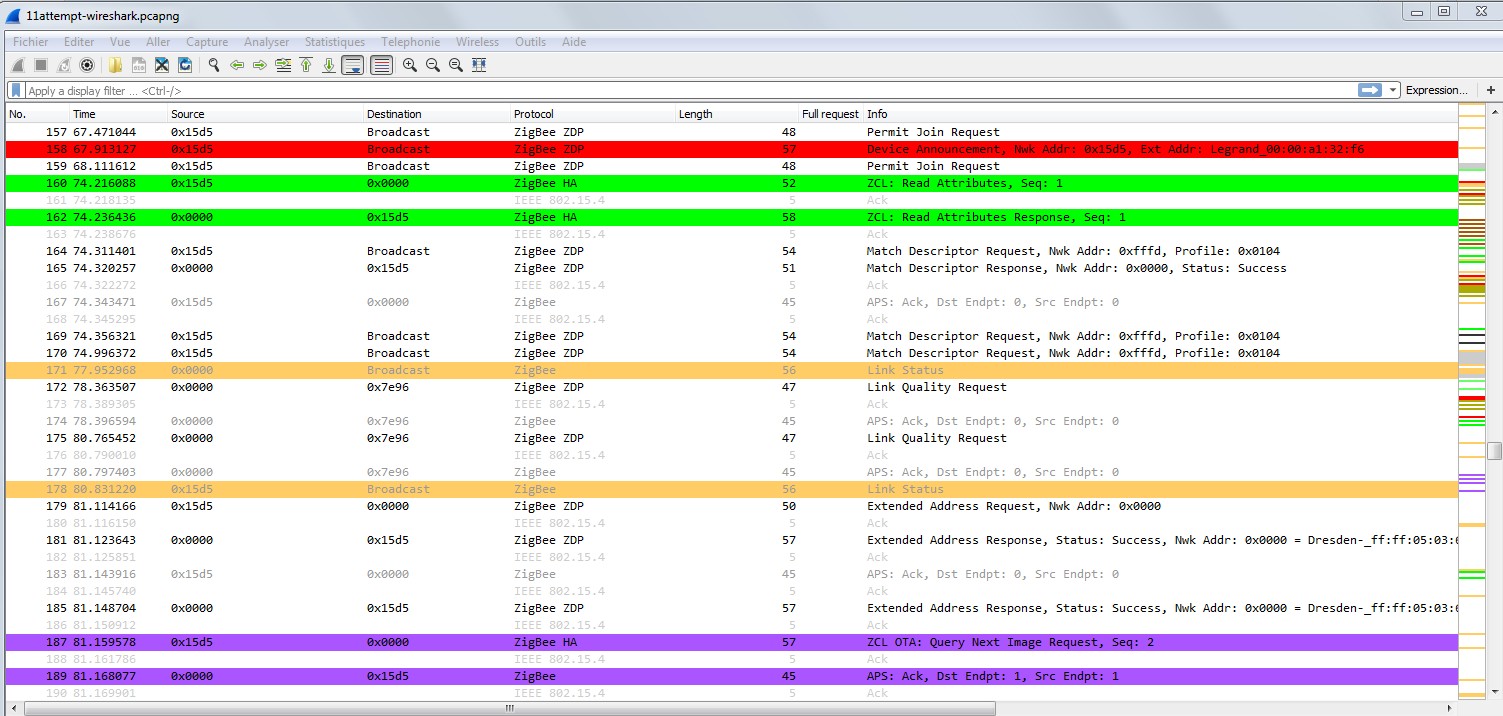
Here is the only Legrand check I m seing with answer.
You have one more before the leave (in black) but without answer, so check failed, not usable.
I m trying to make the device make the legrand check before the gateway ask for basic attribute.
On the first announce, the gateway have ask for basic attribute without legrand check.
On the second (Rejoin, same network ID), the device have ask for check, without answer, and the gateway haven't ask for basic attributes > so leave.
On the third, all was ok, the gateway haven't ask basic attribute, but if datas are persistent (according to Unique ID), I don't think it's a problem, this try should have been a success.
But I m not sure for persistent data, because of the "[555] Model ID still empty" we have after the 3 th try.
Smanar
on 6 Apr 2020
@Smanar My bad with the basic attributes, reverse sort order. So yes, it didn't work out as you wanted.
However, this is probably what you haven't seen.
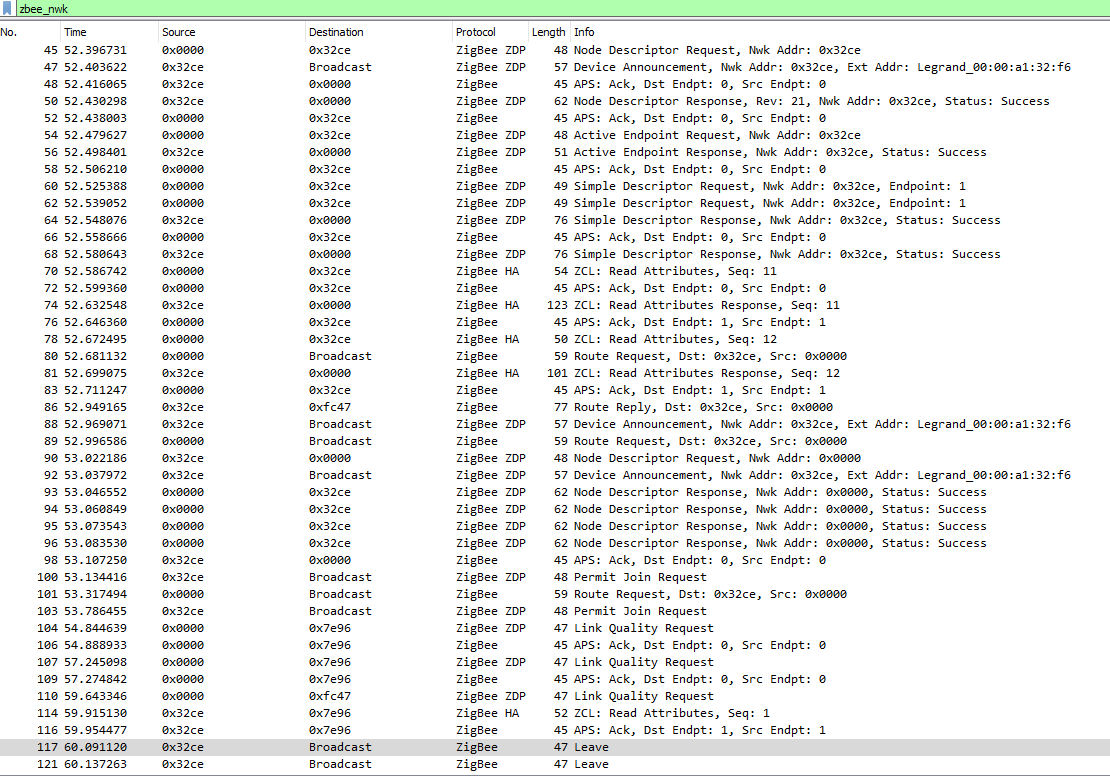
EDIT: Some of the "[555]" debug output originates from nodeEvent(), so it's not too surprising so see a couple of messages stating the manufacturer is still empty.
SwoopX
on 6 Apr 2020
@Smanar if you feel like it, ping me on Discord. I may have an idea how you can achive what you're after.
SwoopX
on 7 Apr 2020
Something complex ? Because you was right with your "bend the crap".
I m on that "just to test", because my first objective is not make the Legrand integration better with good/bad code (even better it will be randomm ) but make the API create sensor when deconz and the device are working.
Like I have said, why on the third try, It haven't worked ? Even whit bad long/short/medium press, with check earlier or later, with power cycle or not, deconz have worked, the device was included, why not in the API.
The leak is here for me, but I have lot of problems to check the way taked by the device in the code, and the missing datas.
Smanar
on 7 Apr 2020
@Smanar It shouldn't be to complex, I can give you the code (or at least a starting point). It's even comparably clean and not too much of a hack.
SwoopX
on 7 Apr 2020
You can't publish it here, pls ?
Smanar
on 7 Apr 2020
Added the code to the debug repo. Completely untested and just an idea, it may require further amendments. Starting at line 670.
EDIT: Made some adjustments so it compiles without errors and should have the values set for the Legrand device.
SwoopX
on 7 Apr 2020
Hello.
Hu, sorry, but I don't find your debug repo ?
Smanar
on 9 Apr 2020
SwoopX
on 9 Apr 2020
Ha ok, so you are waiting for Legrand check, and make a new request just after for the 2 attributes to be sure we have it ?
Ps: I have the file, you can remove this modification if you need.
Smanar
on 9 Apr 2020
Sorry if missed something. Do you want I test this version?
rotragit
on 9 Apr 2020
@Smanar Right, that was the idea. No clue if that would work out, but the code could instantly fire after the Legrand check. However, that's a quick and dirty solution, but will hopefully do alright for some testing.
SwoopX
on 9 Apr 2020
Hello @rotragit ^^
Can you try first the previous one here https://github.com/dresden-elektronik/deconz-rest-plugin/issues/2456#issuecomment-609784840
With at least one succesful inclusion.
I hope this code with more debug will help me to see why deconz don't create sensor ressource.
If you want to try theses modification I will add it in the next try. Or I will test them myself next week.
It can make (perhaps) the Legrand inclusion easier, but for me we still have a weak point in the deconz procedure on device creation with successfull inclusion.
Smanar
on 9 Apr 2020
@Smanar I get an error compiling with your file. Maybe you've changed some other file?
make -f Makefile.Release
make[1]: Entering directory '/opt/deconz-rest-plugin'
g++ -c -pipe -Wno-attributes -Wno-psabi -Wall -O2 -std=gnu++11 -Wall -W -D_REENTRANT -fPIC -DDECONZ_DLLSPEC=Q_DECL_IMPORT -DUSE_WEBSOCKETS -DHAS_SQLITE3 -DGW_SW_VERSION="2.05.75" -DGW_SW_DATE=1584521967 -DGW_API_VERSION="1.16.0" -DGIT_COMMMIT="ca72c46fd147dcf5c0b04304a96316d2c97ff477" -DGW_AUTO_UPDATE_AVR_FW_VERSION=0x260b0500 -DGW_AUTO_UPDATE_R21_FW_VERSION=0x26420700 -DGW_MIN_AVR_FW_VERSION=0x26330500 -DGW_MIN_R21_FW_VERSION=0x26490700 -DGW_MIN_DERFUSB23E0X_FW_VERSION=0x22030300 -DGW_DEFAULT_NAME="Phoscon-GW" -DQT_NO_DEBUG -DQT_PLUGIN -DQT_WIDGETS_LIB -DQT_GUI_LIB -DQT_SERIALPORT_LIB -DQT_WEBSOCKETS_LIB -DQT_NETWORK_LIB -DQT_CORE_LIB -I. -I../.. -I../../common -isystem /usr/include/x86_64-linux-gnu/qt5 -isystem /usr/include/x86_64-linux-gnu/qt5/QtWidgets -isystem /usr/include/x86_64-linux-gnu/qt5/QtGui -isystem /usr/include/x86_64-linux-gnu/qt5/QtSerialPort -isystem /usr/include/x86_64-linux-gnu/qt5/QtWebSockets -isystem /usr/include/x86_64-linux-gnu/qt5/QtNetwork -isystem /usr/include/x86_64-linux-gnu/qt5/QtCore -Irelease -isystem /usr/include/libdrm -I. -I/usr/lib/x86_64-linux-gnu/qt5/mkspecs/linux-g++ -o release/de_web_plugin.o de_web_plugin.cpp
de_web_plugin.cpp: In member function ‘void DeRestPluginPrivate::addSensorNode(const deCONZ::Node, const deCONZ::NodeEvent)’:
de_web_plugin.cpp:3772:13: warning: unused variable ‘inClusterCount’ [-Wunused-variable]
int inClusterCount = i->inClusters().size();
^~~~
de_web_plugin.cpp:3773:13: warning: unused variable ‘outClusterCount’ [-Wunused-variable]
int outClusterCount = i->outClusters().size();
^~~~~
de_web_plugin.cpp:4367:72: error: request for member ‘toLocal8Bit’ in ‘(& node->deCONZ::Node::nodeDescriptor())->deCONZ::NodeDescriptor::manufacturerCode()’, which is of non-class type ‘uint16_t {aka short unsigned int}’
QByteArray ba1 = node->nodeDescriptor().manufacturerCode().toLocal8Bit();
^~~
Makefile.Release:642: recipe for target 'release/de_web_plugin.o' failed
make[1]: * [release/de_web_plugin.o] Error 1
make[1]: Leaving directory '/opt/deconz-rest-plugin'
Makefile:40: recipe for target 'release' failed
make: * [release] Error 2
rotragit
on 9 Apr 2020
My bad, this file is compiling, sorry. > https://github.com/Smanar/Zigbee_firmware/blob/master/de_web_plugin.cpp
Smanar
on 10 Apr 2020
@Smanar How have you discovered that "Legrand handshake", sniffed the traffic with the gateway? Probalby have a device here which behaves similarly...
SwoopX
on 10 Apr 2020
Yep I have see it at the start https://github.com/dresden-elektronik/deconz-rest-plugin/issues/883#issuecomment-431661174 using sniffer, but wasn't a problem at this time.
But 1 years later this handshake have supress all special features on new included devices, and we have spend so much time to undersand the issue.
What is your device ?
For legrand this attribute is a timer check, it's to prevent including the neighbors device, with original gateway, you need to power cycle the whole installation before procedure. So you can see a tips in the user manual.
Smanar
on 10 Apr 2020
@Smanar this is yours 12attempt.zip. Device created. No sensor created.
12attempt.zip
rotragit
on 10 Apr 2020
@SwoopX this is yours 13attempt.zip. And...... yes! Module paired and sensor created!
In the log and wireshark you will find two attempts because on the first one Phoscon has gone "Ready" but the led was still red. So I did a new scan, pressed again the button, Phoscon gone "Ready" and finally also the led is gone green.
It takes a while for the led to go green. I can count the seconds if you want.
rotragit
on 10 Apr 2020
@Smanar It's the Sercomm siren #2629 #2051
@rotragit 👍 Now we just need to find out, who did what do make it work and if it's a sustainable solution.
SwoopX
on 10 Apr 2020
What is the differente beetween the 12th an the 13th try ^^ ?
Not the same code ?
Smanar
on 10 Apr 2020
@rotragit there is excatly the same issue on zigbeemqtt and with a wireshark log, I m on it atm, but nothing strange on bad logs.
The enrollement have failled nope ? But I don't know IAS at all ....
And it have worked before for them, the leave is something new.
Smanar
on 10 Apr 2020
@Smanar @SwoopX
12th try is with de_web_plugin.ccp from https://raw.githubusercontent.com/Smanar/Zigbee_firmware/master/de_web_plugin.cpp
while 13th try is with de_web_plugin.cpp from https://raw.githubusercontent.com/SwoopX/st_playground/master/de_web_plugin.cpp
I like zigbee2mqtt a lot, and I really hope a mqtt publish option will come soon on deconz, so it will be easy to integrate graphana. At the moment I have a few CC2531 dongles, but wireless range is horrible. I have to find time and put an external antenna. Conbee II seems to me more stable at the hardware/firmware level, but I want to investigate why I see the network key in any link status message (you find it on the wiresharks log). I'm not sure if it's a bug in Conbee II or in some device or I see it because I have the keys in wireshark.
About the leave, I don't know. I have only these DIN module from Legrand. It's also possible they get their own light/switched working in someways and didn't spent time to investigate if the pairing procedure was repeatable.... Or the pairing process is different for end point devices vs electrical cabinet components...
rotragit
on 10 Apr 2020
For zigbee2mqtt, you will can soon use the conbee with zigbee2mqtt engine, it's already in beta test.
For an easier way for device integration on deconz, yeahhhhh ^^, I m dreaming of that too. There is an API V2 planned, but no real decisions yet.
The network key appaear in all log, it s something normal, it's like that on all zigbee inclusion.
And about the leave, I was speaking about the smartthing siren leave :).
I haven't check the logs yet, but honestly I m realy shy to use the code used in your 13th try, because It's not something standard, and can provoke other reaction for others devices.
Smanar
on 10 Apr 2020
@rotragit there is excatly the same issue on zigbeemqtt and with a wireshark log, I m on it atm, but nothing strange on bad logs.
The enrollement have failled nope ? But I don't know IAS at all ....And it have worked before for them, the leave is something new.
@Smanar I guess that was meant for me? Saw the issue on z2m as well. I have the device at hand but haven't yet included support. Maybe that changes something, we'll see. I'll report back on the original issue.
SwoopX
on 11 Apr 2020
Ok so according to 12th attempt, there is for sure a problem
15:08:33:905 [444] Model ID: DIN power consumption module
15:08:33:905 [444] mfcode: 0x1021
15:08:33:905 [555] Device not supported
All the code is on the same place, so theses debug line aren't from different functions.
And the code used in the 13th attemp need to be revised, it have spammed read attribute, a real spam, realy too much requests. It continu after the inclusion.
15:21:11:215 [XXX] get basic cluster attr 0x0005 for 0x00007ffec0cd7460
15:21:11:215 [XXX] get basic cluster attr 0x0004 for 0x00007ffec0cd7460
15:21:11:216 [XXX] Failed to receive response for basic cluster
15:21:11:275 Node data 0x0004740000a132f6 profileId: 0x0104, clusterId: 0x0000
15:21:11:275 Update Sensor 0x0004740000A132F6 Basic Cluster
15:21:11:275 [XXX] get basic cluster attr 0x0005 for 0x00007ffec0cd7460
15:21:11:275 [XXX] get basic cluster attr 0x0004 for 0x00007ffec0cd7460
15:21:11:276 [XXX] Failed to receive response for basic cluster
15:21:11:335 Node data 0x0004740000a132f6 profileId: 0x0104, clusterId: 0x0000
15:21:11:335 Update Sensor 0x0004740000A132F6 Basic Cluster
15:21:11:335 [XXX] get basic cluster attr 0x0005 for 0x00007ffec0cd7460
15:21:11:335 [XXX] get basic cluster attr 0x0004 for 0x00007ffec0cd7460
15:21:11:336 [XXX] Failed to receive response for basic cluster
15:21:11:395 Node data 0x0004740000a132f6 profileId: 0x0104, clusterId: 0x0000
15:21:11:395 Update Sensor 0x0004740000A132F6 Basic Cluster
15:21:11:396 [XXX] get basic cluster attr 0x0005 for 0x00007ffec0cd7460
15:21:11:396 [XXX] get basic cluster attr 0x0004 for 0x00007ffec0cd7460
On the 13th try too, all the blocking part (present in the 12th) was skipped
15:20:05:668 [555] Checking for new sensors
15:20:05:668 [555] Creating sensors
Like the device was not deleted before.
@SwoopX do you know someone with the original gateway to compare request ?
Smanar
on 11 Apr 2020
@rotragit I have found the problem, a forgotten space in the line
{ VENDOR_LEGRAND, "DIN power consumption module", legrandMacPrefix }, // Legrand DIN power consumption module
I have updated the file https://github.com/Smanar/Zigbee_firmware/blob/master/de_web_plugin.cpp
Sorry, was my fault, can you make another try with this file pls ?
Smanar
on 11 Apr 2020
@Smanar here I am. Sorry for the delay. Attached is 14attempt.zip (deconz log and wireshark). The sensor was created :+1:
14attempt.zip
I have noted that just after the device is in deConz, bebore pressing the reset button, the red led flashes one time. I cannot say that behavior never occurred before, but it's the first time I notice it. I pressed the reset button after the red flashing.
rotragit
on 13 Apr 2020
You have made a power cycle before your test ? If yes it can explain the device reaction before you press the reset button.
But now, we need to remember what we have modified on the code, to find the usefull change ...
There is this one > https://github.com/dresden-elektronik/deconz-rest-plugin/issues/2456#issuecomment-609415022
And this one https://github.com/dresden-elektronik/deconz-rest-plugin/issues/2456#issuecomment-605940522
If I m right ? Because It haven't worked after the second modification.
Knowing that it could just happen by chance, thoses device are still random for inclusion.
Smanar
on 13 Apr 2020
@Smanar yes, for sure I power cycled the device, because I first reset completely it. To tho that I:
1) with Conbee unplugged and deconz stopped I reset the device (long press the rest button -> red led -> I unplug the device)
2) with the device unplugged I clean deconz (delete node in deconz + delete from sensors where sid=xx + delete from devices where id=yy)
Then I start pairing.
Yes, the timeout is 2000ms.
Knowing that it could just happen by chance, thoses device are still random for inclusion.
I don't know. I tell you that before the modification the sensor was NEVER included, after the modification the sensor is ALWAYS included. But I don't know if this is valid only for the DIN Power Consumption module or for any Legrand device.
Anyway, if you need any other trys, I'm here :-)
rotragit
on 13 Apr 2020
Lol, thx.
I need to check the code history more closely, perhaps this "space" was already in code at this moment.
So yes, at power on, the legrand device try to join the network, and appear in deconz without action from you (perhpas this can provoke a blink) but it have never worked.
Smanar
on 13 Apr 2020
aha, yes, for me it worked (as to create the device in deconz) but then leaves if reset button is not pressed. The sensor is not inserted if the reset button is not pressed and when I press the reset button it changes the NWK address, as you know.
I've seen the join is not repeatable if the device is not completely cleaned from deconz. It's possible that the previous "random" joining was due because the steps were done across multiple attempts and not from a completely reset situation every time, in my opinion.
rotragit
on 13 Apr 2020
And another thing I have see, but not tested yet, Legrand would not support more than 4 attributes (simultaneous) when receive an Attribute request, IDK if it's something standard or not, but It's another thing I need to check, if deconz ask for too much attribute in one request during inclusion, it can be a problem.
Smanar
on 13 Apr 2020
Ok so I m lost in files versions.
It seem I have used a bad version from @SwoopX tests, so my version was bugged since the start whiles his version was corrected.
So I think you can remove
            else if (checkMacVendor(ext, VENDOR_LEGRAND))
            { //  Fix to test
            }
in
        else if (macCapabilities & deCONZ::MacDeviceIsFFD)
        {
            if (checkMacVendor(ext, VENDOR_LDS))
            { //  Fix to allow Samsung SmartThings plug sensors to be created (7A-PL-Z-J3, modelId ZB-ONOFFPlug-D0005)
            }
            else if (checkMacVendor(ext, VENDOR_JASCO))
            { //  Fix to support GE mains powered switches
            }
            else if (checkMacVendor(ext, VENDOR_LEGRAND))
            { //  Fix to test
            }
            else
            {
                return;
            }
        }
This device is a light, so IDK why this part would also be important.
But can you make a try just with probe at 900 and 2000. I don't need log, if there is realy a difference I will make a special part just for this device.
Smanar
on 14 Apr 2020
Yes, ok, I do that this afternoon.
I'm always very confused when you write about "light" because a light is never created, is not in the nodes table and is not in the lights json.
rotragit
on 14 Apr 2020
Yep it's normal, because the device haven't "light" cluster to be displayed
Edit:
So roolback, It seem if you remove
            else if (checkMacVendor(ext, VENDOR_LEGRAND))
            { //  Fix to test
            }
The device can't be created, I think the code use 1 way directly for sensor and 1 way for light (in first part) then sensor (in a second part) from the same device, but as this device doesn't have light node, I think it prevent the sensor creation.
So for me, It's that the more important modification.
Smanar
on 14 Apr 2020
@Smanar I think so. Do you want I try removing that lines or not?
rotragit
on 14 Apr 2020
If you have time, but I m sure we will have the same log than your first attempt.
But I realy can't understand why we need it and more important how to make a condition for just this device and not all legrand device.
Im not sure it's a good thing to enble FB for all devices.
Smanar
on 14 Apr 2020
OK, I finish sniffing a Saswell SEA801-Zigbee TRV (going to be a new issue ;-) ) and I do the job.
rotragit
on 14 Apr 2020
@Smanar I confirm, removed
else if (checkMacVendor(ext, VENDOR_LEGRAND))
{ // Fix to test
}
the sensor is not included. Attached logs as usual (15attempt.zip)
15attempt.zip
rotragit
on 14 Apr 2020
Ok so first news, delay attribute request seem useless, on this log there is no attribute request and the device have leave at leat one time.
@rotragit but In this attempt, the device was not included at all ? No green LED ?
@ebaauw if you have some time, I need your knowledge or advice ?
- This device is a router FFD type, but without light cluster, so the light entry is not created.
- By defaut this device triger addSensorNode() up to node creation but the modelID stay unknow, on wireshark log deconz never ask for attributes.
- It work if I force the detection using white list in handleIndicationSearchSensors()
I have 2 problems:
- Why this working mode, this device have nothing special. Why deconz don't start the attribute asking phase ?
- How I can make a better condition if the only way is using the whitelist, I can't use this tricks for all Legrand device, and I don't see what I can use other.
Smanar
on 14 Apr 2020
As I understand, a /lights resource is created when:
- The _Node Descriptor_ advertises
receiverOnWhenIdle(), or when the _Manufactuer Code_ is whitelisted (for light sleepers or devices with wrong _Node Descriptor_); - Endpoint has ZHA, ZLL, or Digi Drop-In networking profile;
- Endpoint contains a server (blue) _On/Off_, _Window Covering_, or _IAS WD_ cluster;
- Endpoint has whitelisted _Device Type_ for profile, and corresponding server (blue) _On/Off_, _Window Covering_, or _IAS WD_ cluster;
_Consumption Awareness Device_ is not whitelisted for ZHA, so no /lights resource.
I think therein lies you problem: It would seem the REST API plugin doesn't want to read the _Basic_ cluster attributes for FFD devices without a /lights resource, so the /sensors resource is never created, because the modelId doesn't match. I think if you whitelist the _Consumption Awareness Device_ and create /lights resource without state.on (cf. the coordinator), the _Basic_ cluster attributes will be read, the /sensors resource will be created.
Note that this _is_ magic, and I don't fully understand it, but below my understanding:
There's only three places in the code where a _Read Attributes_ command is issued:
- In
readAttributes(), which requires aRestNodeBase *parameter, so it can only be used _after_ the resource (LightNodeorSensorNode) has been created; - In
delayedFastEnddeviceProbe()for the _Basic_ cluster; - In
delayedFastEnddeviceProbe()for the _IAS Zone_ cluster (to get the _IAS Zone Type_.
delayedFastEnddeviceProbe only considers searchSensorsCandidates, which are selected in handleIndicationSearchSensors() in rest_sensors.cpp. It seems that any device is selected on receiving a _Device Announcement_, but only end devices on receiving a ZHA or ZLL message. There's also the infamous, and @SwoopX's favourite check that macCapabilities must not be 0.
As I said, I don't fully understand this, but it seems like a big catch-22: the _Basic_ attributes for a resource-less device are read, when a _Read Attributes Response_ or a _Report Attributes_ for the _Basic_ attributes is received. I think the trick with resetting the device causes a new _Device Announcement_ to break this catch-22. You might try and power cycle the device, instead of resetting it (so it keeps the NWK address).
ebaauw
on 14 Apr 2020
@Smanar Based on the feedback from @rotragit, my version worked (see https://github.com/dresden-elektronik/deconz-rest-plugin/issues/2456#issuecomment-612027361)
15:18:58:044 [000] simple descriptor - EP 0x01
15:18:58:044 [000] simple descriptor - SD 0x00
15:18:58:044 [000] simple descriptor - BREAK
15:18:58:044 [444] Model ID empty
15:18:58:044 [444] Manufacturer empty
15:18:58:044 [444] Model ID length: 0
15:18:58:044 [444] Model ID:
15:18:58:044 [444] Manufacturer length: 0
15:18:58:044 [444] Manufacturer:
15:18:58:044 [444] unsupp pushback
15:18:58:044 [444] unsupp pushback
15:18:58:044 [4] get basic cluster attr 0x0005 for 0x0004740000a132f6
15:18:58:044 [4] get basic cluster attr 0x0004 for 0x0004740000a132f6
15:18:58:116 Node data 0x0004740000a132f6 profileId: 0x0104, clusterId: 0x0000
15:18:58:116 [555] Checking for new sensors
15:18:58:116 [555] Creating sensors
15:18:58:116 [666] Adding API items
15:18:58:116 [666] Generating UID
15:18:58:116 sql exec SELECT * FROM sensors
15:18:58:116 don't close database yet, keep open for 900 seconds
15:18:58:116 [666] Saving sensor data
15:18:58:116 SensorNode 5: Power 5 added
That excerpt was from the very beginning of the log file back then. What I did, in the used version, was a (granted) dirty hack to read modelId and manufacturer again after the Legrand attribute. As it absolutely had no tweaking whatsoever, the logs and the sniff got hammered with useless stuff all over the place.
Sidenotes:
- As I see it, the short reset button press during pairing is responsible for the device issuing the leave request.
- The leave command resets the device.
EDIT:
Memory is comming back. So the reason why it worked out on attempt13 is probably the combination of @Smanar bypassing the check in rest_sensors.cpp to enter delayedFastEnddeviceProbe()
            else if (checkMacVendor(ext, VENDOR_LEGRAND))
            { //  Fix to test
            }
and my dirty hack to read the basic attributes after the Legrand attribute. I was totally focused on the order 1st Legrand attribute, then basic cluster attributes.
I think if you whitelist the Consumption Awareness Device and create /lights resource without state.on (cf. the coordinator), the Basic cluster attributes will be read, the /sensors resource will be created.
@ebaauw proposed solution could indeed be the fast path if the order doesn't matter.
SwoopX
on 14 Apr 2020
Memory is comming back. So the reason why it worked out on attempt13 is probably the combination of @Smanar bypassing the check in
rest_sensors.cppto enterdelayedFastEnddeviceProbe()and my dirty hack to read the basic attributes after the Legrand attribute. I was totally focused on the order 1st Legrand attribute, then basic cluster attributes.
Yes, then it worked both with your "dirty hack" or with the last @Smanar version from comment
EDIT: I think is correct to re-read the NWK after the Legrand check as the device changes it after the reset button pressing.
rotragit
on 15 Apr 2020
Thx all ^^.
@rotragit If you are agree, I can understand if you are bored by theses tests ^^.
My future test will be the last solution proposed by both
We will create a light sensor, to see how the code will react, and hoping for sensor creation.
We will try to hide it later, but If it works I will prefer this solution as use withelist for all legrand device in handleIndicationSearchSensors().
As I see it, the short reset button press during pairing is responsible for the device issuing the leave request.
IDK, but it's realy strange, it's not because of Attribute request, they haven't them, the legrand check is fine, but the device have leave ...
EDIT: I think is correct to re-read the NWK after the Legrand check as the device changes it after the reset button pressing.
No problem for that deconz don't miss a NWK id change, or we can ask what are doing deconz dev.
Smanar
on 15 Apr 2020
@Smanar , I'm not bored, don't worry ^^ I have here the device and I don't have to move "to production" in the next months. I've got three of them because the price was very good but this is a spare one ^^
rotragit
on 15 Apr 2020
So https://github.com/Smanar/deconz-rest-plugin/commit/4fbd0ed2d68439b3651887dbdc9044661ec028b7
Only 3 lines to change, it's the way I m using to make a light entry on a sensor, so I m sure it will work. Just put "true" instead of "false" in the second line (I m using the same fork for more than one test device, sorry I m not organised)
The condition is not restrictive enought for the moment, but it's for test. If it work I will use a better way.
You can let the 2000 time for probe but stay removed
else if (checkMacVendor(ext, VENDOR_LEGRAND))
{ // Fix to test
}
If I m right it will use the normal way used for wired device, not the one for enddevice.
Smanar
on 16 Apr 2020
@Smanar sorry, failed. Attached the logs as usual.
I double checked I used the right file. I used this one: de_web_plugin.cpp
16attempt.zip
rotragit
on 16 Apr 2020
@Smanar Why haven't you used
                case DEV_ID_CONSUMPTION_AWARENESS_DEVICE:
                    {
                        if (node->nodeDescriptor().manufacturerCode() == VENDOR_LEGRAND)
                        {
                            lightNode.setHaEndpoint(*i);
                        }
                    }
                    break;
to extend the switch statement and where does the && (false) come from in your commit?
SwoopX
on 16 Apr 2020
Because I m lazy and not organised.
The code I have used do same and it will work for sure, I will not use this one later, it's just for test, and for the (false) as I have said before It need to be replaced by true to make test.
It's because there is another person that are trying to integrate another legrand device, he is using same code and this one don't know c++ as good as @rotragit.
But Yeah I know, I can make 1 branch by device, my fault.
Edit:
BTW, you have changed the false to true ? It have paired, but no sensor at all ?
Smanar
on 17 Apr 2020
@Smanar ^^ my organization is also very bad.
Here you have the right 17attempt, with TRUE. All runs fine, sensor inserted.
17attempt.zip
rotragit
on 17 Apr 2020
🥳 Without any button press?
SwoopX
on 17 Apr 2020
@SwoopX always pressing the reset button, else the device leaves the network.
But I make another test just know to be sure...
rotragit
on 17 Apr 2020
I have see on z2m, someone saying it's possible (without pressing button), but just after, another user with inclusion problem, so I still don't think it's possible (at least not without a special trick somewhere)
And pipiche have spend so much time on legrand device and haven't suceed too.
So @rotragit it works with their method ? The only problem you have is an useless device in "light" ?
If yes, I will make a cleaner code and final one I hope.
Smanar
on 17 Apr 2020
@Smanar ^^ Yes, I have useless light entry (in nodes table). The entries in nodes and sensors tables are create both for the device I'm pairing AND for the device with different mac addr that was paired on the "production server".
If I don't press the button, scan fails and sensor is not inserted. Led remains red.
rotragit
on 17 Apr 2020
@Smanar @SwoopX ...so it worked on the 17th attempt, a Friday 17th of a leap year, with an asteroid coming and a pandemic going on ...
rotragit
on 17 Apr 2020
Ok so I have another problem (again).
I think we need to create the node, for the code work, not possible asking attributes for an inexistant node.
I don't think it's a good idea at all to create the light node and hide it in API.
So I think this device will create 2 devices, and if you realy are bored by the light one, you can delete it later.
I don't see how to avoid light device creation.
On my side I don't think it's a bad thing having a light ressource, this device is a router not and end-device. For exemple in the future if we make a filter with maccapability or power type.
So ATM I have just cleaned the code, and remove state/on > https://github.com/Smanar/deconz-rest-plugin/commit/cdedb32088941b1eda78c1a8c00e08b0fcfd5fb5
Smanar
on 18 Apr 2020
why don't you let to automatically delete after the pairing? I think you have just to read the attributes and if fails you delete it...
rotragit
on 18 Apr 2020
Here you are, 19attempt.zip. Wireshark stopped capturing at some time, I don't know why. Let me know if you want I repeat the try or it has captured enough information.
19attempt.zip
rotragit
on 18 Apr 2020
You don't need to sniff or make log ^^, I think the code have worked ? There is no change compared to the previous.
Yep, I think it's possible to delete the "light" device after the "sensor" device creation, but for me it's realy ugly, nope ? It s realy a problem having the "light" device ?
Smanar
on 18 Apr 2020
Yes, has worked ^^ Well, should be nice to have it in sensors group :-)
rotragit
on 18 Apr 2020
But you have it, nope ?
You have the mesurement in sensor group and a useless device in light no ?
Smanar
on 18 Apr 2020
I mean in Phoscon interface. There is lights tab, but there is none in Sensors tab.
But it's in sensors table in zll.db.
rotragit
on 18 Apr 2020
Phoscon is closed source and unless explicitly added by DE, the device will not show up in sensors tab.
I believe the explicit whitelisting for Legrand in rest_sensors.cpp is superflous due to adding the small code passage in de_web_plugin.cpp for Consumption Awareness Device. Every call of addLightNode() is followed by a addSensorNode(). So if the magic was in adding the light and reading all the attributes, than the whitlisting in rest_sensors.cpp as well an any timer modifications of fast probe shouldn't be necessary any more.
If you feel funny, you may test that once again (no need for sniffing or logs).
SwoopX
on 18 Apr 2020
For probe, yep, I think it's totally useless too, I have let 900 on my side.
But I haven't see the whitelisting in rest_sensors.cpp ?
Smanar
on 19 Apr 2020
@Smanar Meant this one https://github.com/dresden-elektronik/deconz-rest-plugin/issues/2456#issuecomment-614779643
SwoopX
on 19 Apr 2020
That's already removed.
rotragit
on 19 Apr 2020
Yep, this one is already removed.
So except if someone have an idea to don't expose light sensor or if it's a big problem, we stop attempt here ?
Smanar
on 19 Apr 2020
For me it's ok. Thanks.
rotragit
on 19 Apr 2020
Ok, so so much for that, the magic deconz working mode will be clarified another time ^^.
Thx to you, for your ..... 19th attempt witll both logs everytime.
BTW: what is the better pairing method for you ?
Smanar
on 20 Apr 2020
@Smanar I missed your last question, sorry ^^
what is the better pairing method for you ?
I'm not sure to understand the question. The first answer is "the one that works" ^^. I think now is the best that's possible: at beginning the module is new or it's reset. Start scanning in Phscon, press reset button and wait. Simple and easy :+1:
rotragit
on 29 Apr 2020
Lol, my question isn't "which one you prefer to use ?" but "wich one is working better for you ?" ^^.
I ask that, because people have sometime alternative working procedure. For example, I have never used the "medium press"
Smanar
on 29 Apr 2020
There is no difference from "short" and "medium" press, finally. They do the same but the led goes green after a while (8-10 sec) from pressing the button. I don't really know if I was impatient at beginning or something is changed with attribute request timing in the new version. I remember that at the first attempts I had no success short pressing the button, also waiting the scan failure. But to be sure I should make another test and..... I think we don't get any important evidence from that ^^
So, module reset, start scanning, press the button, be patient and wait. After a while the led goes green. After some other time the scanning goes "Ready" and the sensor is inserted ^^.
Easy & repeatable ^^
rotragit
on 1 May 2020
Thx a lot :)
Smanar
on 1 May 2020
Hi,
I'm new in this thread but I'm more-or-less in the same situation.
I use HA and DeCONZ as HA add-on (2.05.57). Today I also recompiled (inside docker) the deconz plugin from Smanar fork to be sure to use all your precious work done here (any way to test if I correctly placed the plugin value?).
I got a Bticino DIN power monitor. I did many looking-good pairings ending with a device in deconz-gui and HA (nothing in Phoscon as we know) but the Power monitor value is always 0. I don't have the Bticino gateway so no firmware update for me: deconz-gui and HA say I got a 016 firmware (maybe old). Following what Smanar says I could think that it can't work without a firmware update but... during my early tests (using a bulb and the device connected with some wires on the floor) it started to work ("WOW, I don't need the gateway!") and I was able to get the values in HA. After placing the device in the main box of the house... nothing... 0W. For me this means that I could get it work even with this old firmware but now I'm not able to replicate the scenario in the final placement.
Some screenshots to gather some information:


 mario-tux
on 6 May 2020
mario-tux
on 6 May 2020
I have FW version 01b. I don't know how you can update it. Anyway I understand correctly that you have paired from deconz and not using Phoson? If so try deleting the node in deconz and pair again using Phoscon and let us know.
rotragit
on 6 May 2020
I have FW version 01b. I don't know how you can update it. Anyway I understand correctly that you have paired from deconz and not using Phoson? If so try deleting the node in deconz and pair again using Phoscon and let us know.
I did MANY attempts: I usually used Phoscon to start the pairing (at light). This is the most common procedure:
- reset DIN module holding for at least 10s the small button: fixed red led;
- removed the node from the deconz-gui graph;
- started from Phoscon the pairing as light;
- pushed 1-2s the button on the DIN module: fixed green, new node on deconz-gui but Phoscon continues to search...;
- after Phoscon stop to search, the led turn off.
On HA and deconz-gui I can see only 0 on the Power usage.
mario-tux
on 6 May 2020
OK, it's most like the procedure I used. The only difference is that I never used the light scanning but the sensor scanning. Yes, after you press 1-2s the button on the DIN module the led goes fixed green. In Phoscon wait until the scanning finish and reports "Ready". It's correct that the led goes off when the module is paired. LIght scanning could take much longer than sensor scanning in Phoscon.
I think you can first verify the pairing is OK. If you are on linux and you know a little, you can identify zll.db file, open it with sqlite3 and look inside the sensors table for an entry with module mac addr. If you find it than the 0W is a firmware problem for sure, imho.
EDIT: of course you need to have a bulb powered on or anything else to see the consumption.
EDIT2: if you see the module in HA I think the pairing should be OK, anyway
rotragit
on 6 May 2020
@rotragit It works almost the same using "add as sensor" in Phoshon with a final "ready" ack.
In the zll.db I can spot the row on the last pairing:
34|DIN power consumption module|ZHAPower|DIN power consumption module|Legrand|00:04:74:00:00:92:33:b4-01-0b04|016|{"current":0,"lastupdated":"2020-05-06T12:32:43","power":0,"voltage":0}|{"on":true,"reachable":true}|{"d":13,"ep":1,"in":[2820],"p":260}|normal|1
On my "on the floor" tests I used a bulb and it worked (at least once). Now it is in the main electrical box of the house and in the ring is passing the Line of the whole house. As long as I understand I'm respecting the official scheme and the arrow on the ring is "from the power source to the house".
mario-tux
on 6 May 2020
OK, the pairing is correct. I don't know, I think you should see the vaule in deconz anyway. If it's 0W it should not be a problem of deconz/phoscon. I suggest to check the connector and the cable of the ring. The connector is very light plastic on the module, as you have seen. If you removed the plug and have inserted again when moving in the main box it's possible you have put it reverse?
If you are checking the power in HA, try restarting HA. I've found sometime HA doesn't read the values from deconz if deconz is started after HA or restarted when HA is running.
rotragit
on 6 May 2020
Hello
during my early tests (using a bulb and the device connected with some wires on the floor) it started to work ("WOW, I don't need the gateway!") and I was able to get the values in HA
So it have already worked ?
I don't remember for this device, but the led take wich one color ? You need green one, not purple for other devices (but IDK which one color this device can take)
Edit; or you have placed it as it in your installation ? So It have first worked, then stop without modifications ? So I m thinking like last @rotragit comment.
Smanar
on 6 May 2020
@Smanar I don't remember the color of the led (only red, green and blu is possible) when it worked but I was able to use it in HA for at least 15 minutes. Then I went to sleep detaching everything from the network. I then mounted all the stuff in the box two days later. HA reading was "0 W" so I did the first-of-many attempts to pair again the device... without luck!
I usually restart HA after a new pairing in Phoscon/Deconz. In any case I should be able to see power lecture under the specific cluster of the node (using 'read' button), right?
This evening I will check again (I already did) the connections but it is very strange.
mario-tux
on 6 May 2020
@Smanar the module is paired correctly and the sensor is inserted in the db. He said the power reading was OK once, so it's not an attribute reading problem. And he see the module also in HA. The only problem is the value is 0 Watt. For me it's not a decond/phoscon pairing problem. The module is defect or the ring is not properly connected, imho.
rotragit
on 6 May 2020
Yep, I m thinking same.
And yes, if you press the "read" button it will update value, for information voltage and current are available but not used so you will have 0 for them.
Smanar
on 6 May 2020
@Smanar Sry, hijacking this quickly. Mind joining deconz' Discord channel? https://discord.gg/QzpZNm
SwoopX
on 6 May 2020
Ok some more information for memory about this device find by @jd1900.
On cluster 0x0B04 there is some others attributes usables
- 0xf000 : return value > 2 if the consumption > threshold value.
- 0xf001 : type 0x10 , value 0x01 or 0x00 enable/disable alarm
- 0xf002 : type 0x29, threshold value
Smanar
on 14 Jun 2020
Ok some more information for memory about this device find by @jd1900.
On cluster 0x0B0A there is some others attributes usables
- 0xf000 : return value > 2 if the consumption > threshold value.
- 0xf001 : type 0x10 , value 0x01 or 0x00 enable/disable alarm
- 0xf002 : type 0x29, threshold value
If you need further help, let me known. I have the gateway and a sniffer, and that's the way I got the information.
 jd1900
on 14 Jun 2020
jd1900
on 14 Jun 2020
@jd1900 @Smanar : in my DIN component with firmware 016 I can't see the cluster 0xB0A: this could be a new feature of more recent firmware.
@jd1900: I don't own the gateway. Have you been able to sniff the firmware update of the Bticino components? I'm not sure it this kind of information should be sniffed in the zigbee network or in the tcp/ip side (within the gateway and the firmware server)? The latter file could be useful in any way.
mario-tux
on 14 Jun 2020
You have the cluster 0x0B0A, else the device can't work, it's the electrical mesurement cluster, you have it even without device update.
For the moment it's just for information/memory, because its easier to use the home automation application to do that.
And yes, you need to sniff the zigbee traffic, not the tcp/ip one.
Smanar
on 14 Jun 2020
You have the cluster 0x0B0A, else the device can't work, it's the electrical mesurement cluster, you have it even without device update.
It looks that here the cluster of type "Electrical Measurement" is 0x0B04.

For the moment it's just for information/memory, because its easier to use the home automation application to do that.
Without the gateway one can't use the application (you mean the mobile app, right?) so one can't set the threshold. Furthermore, the alarm should be exposed to, for example, HA as event or binary sensor. Right?
mario-tux
on 14 Jun 2020
See my pull request for Zigbee2mqtt. Just writing 2 attributes you can set the alarm. And, yes, I exposed as a power sensor in HA.
jd1900
on 14 Jun 2020
Oups, you are right, was a typo, its 0B04 not 0x0B0A ....
And no , by home automation application I mean, domoticz, HA, jeedom, openHab and other. It easier to do a 4 lines script in it to do the same feature.
Smanar
on 14 Jun 2020
Oups, you are right, was a typo, its 0B04 not 0x0B0A ....
But with my old firmware the feature is missing:

And no , by home automation application I mean, domoticz, HA, jeedom, openHab and other. It easier to do a 4 lines script in it to do the same feature.
I agree: it is easier.
mario-tux
on 14 Jun 2020
IDk if you can see it with old firmwre, but ATM this attribute is not yet in deconz, so you can't see it using the GUI.
I will addd it one day, but it's not in my priority list ATM.
Smanar
on 15 Jun 2020
IDk if you can see it with old firmwre, but ATM this attribute is not yet in deconz, so you can't see it using the GUI.
OK, I understand. I suspected something like this but I was not sure as I don't know the internal structure of DeconZ.
Thanks.
mario-tux
on 15 Jun 2020
@jd1900 got a reference? If attributes are just missing, we can easily add them I guess.
SwoopX
on 15 Jun 2020
@jd1900 got a reference? If attributes are just missing, we can easily add them I guess.
What do you mean?
I've implemented it in zigbee2mqtt. Source is available. However, I don't understand what do you need as "reference".
jd1900
on 15 Jun 2020
My bad, night was extremely short.
SwoopX
on 15 Jun 2020
Lol, yes I can imagine, 2 time in the same day ^^
I have copy/paste the values here https://github.com/dresden-elektronik/deconz-rest-plugin/issues/2456#issuecomment-643735995
But I will not make a PR just for that, perhaps later. I have more legrand correction to do.
Smanar
on 15 Jun 2020
So, does that look about right? I don't know what datatype 0xf000 has and if it's writable...
<attribute-set id="0xf000" description="Legrand specific" mfcode="0x1021">
    <attribute id="0xf000" name="Threshold exceeded" type="s16" access="r" required="m" mfcode="0x1021"></attribute>
    <attribute id="0xf001" name="Enable Alarm" type="bool" access="rw" required="m" mfcode="0x1021"></attribute>
    <attribute id="0xf002" name="Alarm Threshold Value" type="s16" access="rw" required="m" mfcode="0x1021"></attribute>
</attribute-set>
I think it's ok, what can be the utility to make it writable too, for me it's enought.
Smanar
on 16 Jun 2020
So, does that look about right? I don't know what datatype 0xf000 has and if it's writable...
<attribute-set id="0xf000" description="Legrand specific" mfcode="0x1021">
    <attribute id="0xf000" name="Threshold exceeded" type="s16" access="r" required="m" mfcode="0x1021"></attribute>
    <attribute id="0xf001" name="Enable Alarm" type="bool" access="rw" required="m" mfcode="0x1021"></attribute>
    <attribute id="0xf002" name="Alarm Threshold Value" type="s16" access="rw" required="m" mfcode="0x1021"></attribute>
</attribute-set>
I'd say they are fine.
A few notes:
- 0xf000 --> Returns 0x10 (2 in decimal) when exceeded.
- 0xf002 --> Is defined in watt per hour. In the app, the minimum value is 1.5 Kwh (and sends 1500 as value). Negative values are possible as well.
jd1900
on 16 Jun 2020
@jd1900 Thanks (also to you Smanar). For 0xf000, then u8 would be more appropriate to not waste anything. Anybody can try that for the 0x0b04 cluster?
SwoopX
on 16 Jun 2020
@mario-tux I'm experiencing the same issue you had, it reports 0W active power all the time.
I also have firmware version 16 and recent deconz version, how did you get it working?
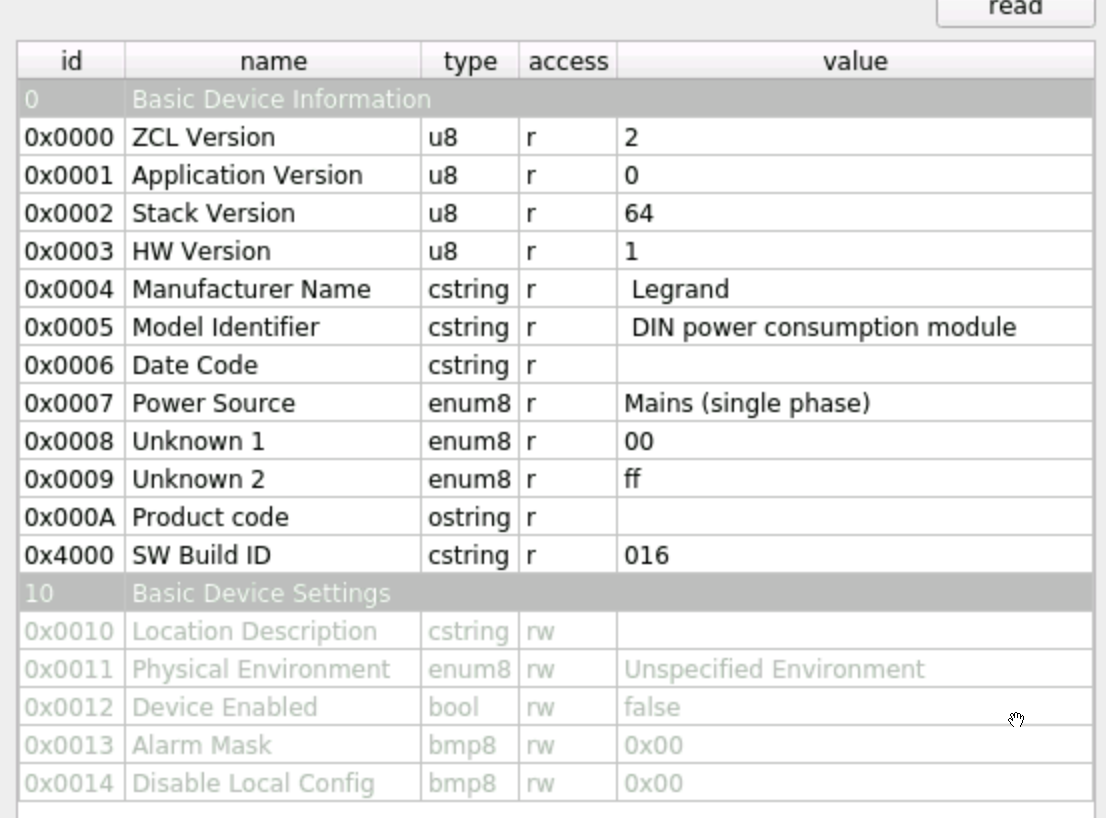
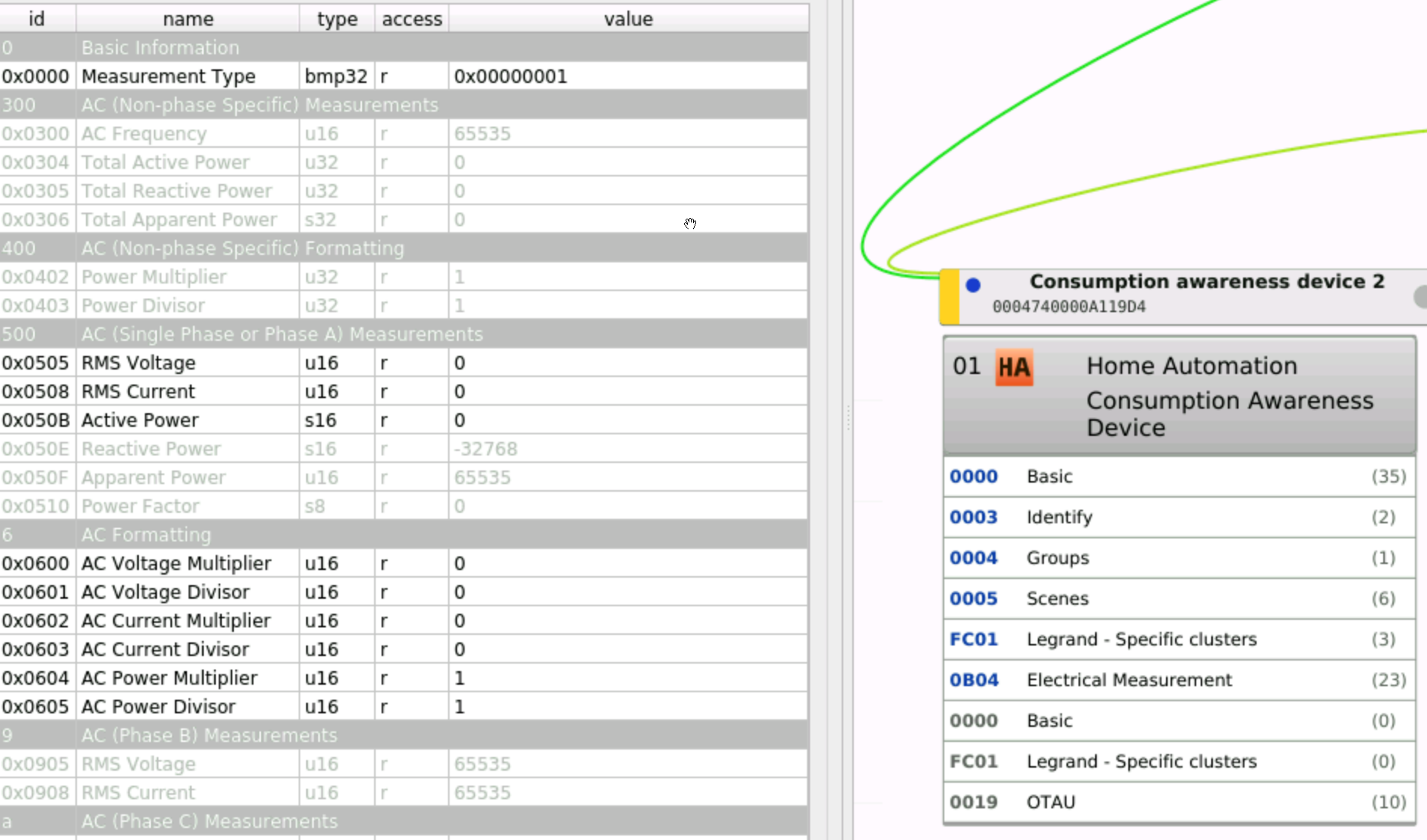
 bettio
on 15 Oct 2020
bettio
on 15 Oct 2020
@mario-tux I'm experiencing the same issue you had, it reports 0W active power all the time.
I also have firmware version 16 and recent deconz version, how did you get it working?
In my case, it was a stupid/strange thing: I had to reverse the magnet sense. I'm still convinced that it had to be placed in the other way, but it didn't work in that way. Try.
mario-tux
on 15 Oct 2020
@mario-tux just for double checking: is the arrow now pointing to your energy utility meter or to the differential switch? Are you using it on the brown/black wire (the phase cable in italy)?
Their schematic:
bettio
on 15 Oct 2020
@mario-tux just for double checking: is the arrow now pointing to your energy utility meter or to the differential switch? Are you using it on the brown/black wire (the phase cable in italy)?
I'm away so I can't check the installation. If you did the installation, you can just try to change the verse of the arrow (which wire you used should not matter). I can just confirm that it is working using firmware 0x16 and actual DeconZ.
mario-tux
on 15 Oct 2020
@mario-tux I'm experiencing the same issue you had, it reports 0W active power all the time.
I also have firmware version 16 and recent deconz version, how did you get it working?In my case, it was a stupid/strange thing: I had to reverse the magnet sense. I'm still convinced that it had to be placed in the other way, but it didn't work in that way. Try.
Thanks, it worked. This doesn't make sense, but ok.
TL;DR version: v16 firmware is ok, and zero counters might mean reversed toroid.
bettio
on 22 Oct 2020
Related issues
 stevenwfoley
·
3Comments
stevenwfoley
·
3Comments
 felixstorm
·
4Comments
felixstorm
·
4Comments
 wizkidorg
·
3Comments
wizkidorg
·
3Comments
 7wells
·
4Comments
7wells
·
4Comments
 ScharV
·
5Comments
ScharV
·
5Comments