Deconz-rest-plugin: Smart Lock support?
As I understand all Zigbee devices are suppose to be supported by Deconz but has anyone actually got a smart lock working? These devices are really expensive so I would like some confidence before buying it.
Thanks
 chrisvella
All 31 comments
Home Assistant has just merged support for the Aqara lock through the Xiaomi component. It would be great if Deconz could support even just one Zigbee lock. I wanted to stay away from the Xiaomi platform but this is an important feature.
chrisvella
on 14 Jun 2018
As I understand all Zigbee devices are suppose to be supported by Deconz but has anyone actually got a smart lock working?
"All" ZHA and ZLL devices are supported by deCONZ itself (as in visible in the GUI), but not necessarily by the REST API plugin, let alone by the Phoscon web app.
There are some limitations to support by the deCONZ core:
- It doesn't support all ZCL data types; and
- The ZCL clusters, commands, and attributes need to be defined in the ZCLDB file (general.xml). Luckily you can edit this file yourself.
A device must be supported by deCONZ, before it can be supported by the REST API plugin. It supports most "lights" out-of-the-box, but "sensors" need to be whitelisted explicitly. This includes the "sensor" bit of "lights" used for measurement. The REST API plugin only knows /lights resources (with writeable state attributes) and /sensors resources (with read-only state attributes, and writeable config attributes). In the old days, "lights" were expected to be mains-powered, and "sensors" to be battery-powered, but there's plenty of exceptions these days, all whitelisted explicitly.
Support by the Phoscon app requires support by the REST API plugin. Again, "lights" are supported out-of-the-box, but "sensors" need explicit coding.
These devices are really expensive so I would like some confidence before buying it.
Understandable, but a bit of a catch 22. To proceed, we need some-one to (try and) pair a smart lock to deCONZ, and post the usual screenshots. As no smart locks are supported currently and they're quite different from other devices (see #401), we probably need some-one to sniff it's ZigBee traffic as well. I'm happy to assist, but I won't buying a smart lock myself in the foreseeable future. On top of my wish list are: curtain control, thermostat/radiator control, and some smart fans (as opposed to dumb fans attached to smart plugs).
 ebaauw
on 14 Jun 2018
ebaauw
on 14 Jun 2018
Hi Erik. Apologies for not replying to this sooner. Thanks for the detailed explanation.
In your opinion would the Aqara Smart Door Lock be suitable candiate? I notice in the home assistant component it can't be controlled via HA. Do you think Deconz would have this limitation?
chrisvella
on 30 Jun 2018
In your opinion would the Aqara Smart Door Lock be suitable candiate?
As long as it's doing ZigBee Home Automation.
I notice in the home assistant component it can't be controlled via HA. Do you think Deconz would have this limitation?
I really don't know. It could be a limitation of the smart lock itself, of the Xiaomi gateway's API, of the Home Assistant component, or of Home Assistant itself.
ebaauw
on 30 Jun 2018
This issue has been automatically marked as stale because it has not had recent activity. It will be closed if no further activity occurs. Thank you for your contributions.
![stale[bot] picture](https://avatars3.githubusercontent.com/in/1724?v=4&s=40) stale[bot]
on 23 Nov 2018
stale[bot]
on 23 Nov 2018
It has has been a few months since this was last looked at. I want to see if we could get locks supported. I have two Yale YRD210 locks with zigbee modules. I got a great deal on them ($80 a piece) about a 1.5 years ago. I haven't been using the zigbee portion but would like to try now. Ultimately I would like to use them in home assistant but first we need to get it working in the deCONZ rest plugin.
The deCONZ GUI does recognize the locks as locks. I can even control them with the deCONZ GUI software. So what do we need to get support in the rest plugin. I have provided a link to the Yale Lock integrators guide. Not sure we need that but good to have.
http://maxicom.net/public/Yale%20Locks%20ZigBee%20HA%20Integrators%20Guide%20RevC.pdf
Below are screenshots of the node and clusters that deCONZ sees. I am very willing to help out where I can, I am just not a programmer.
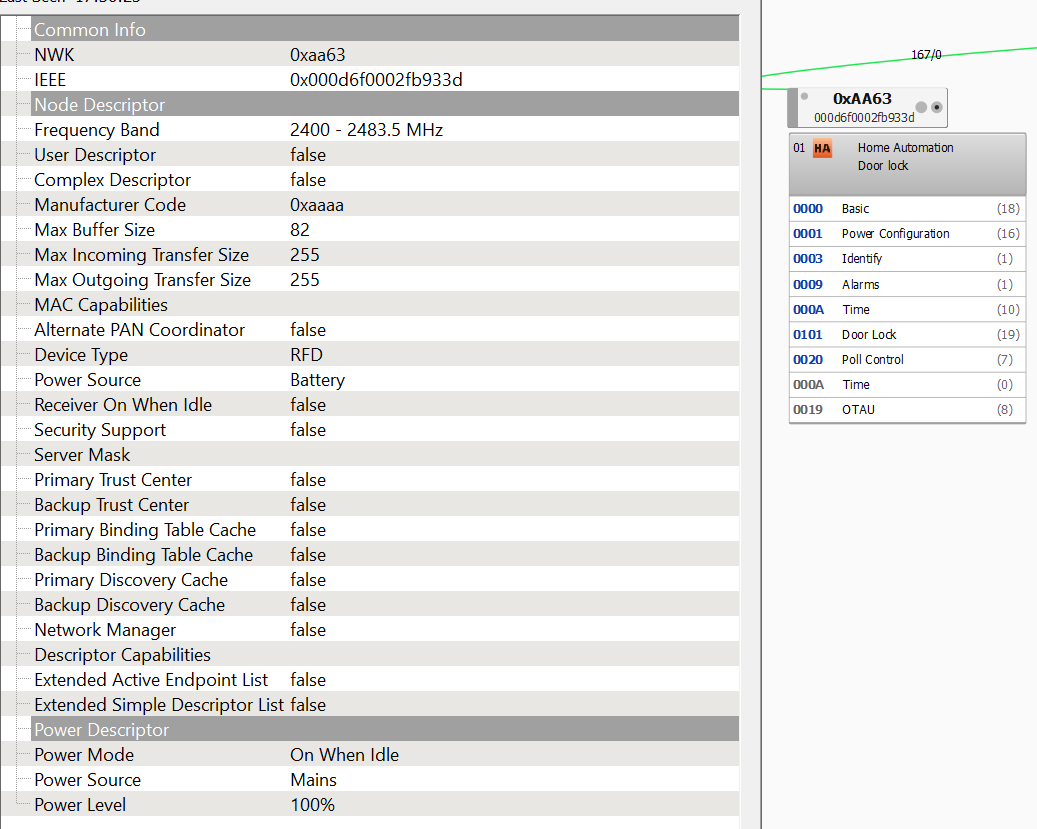
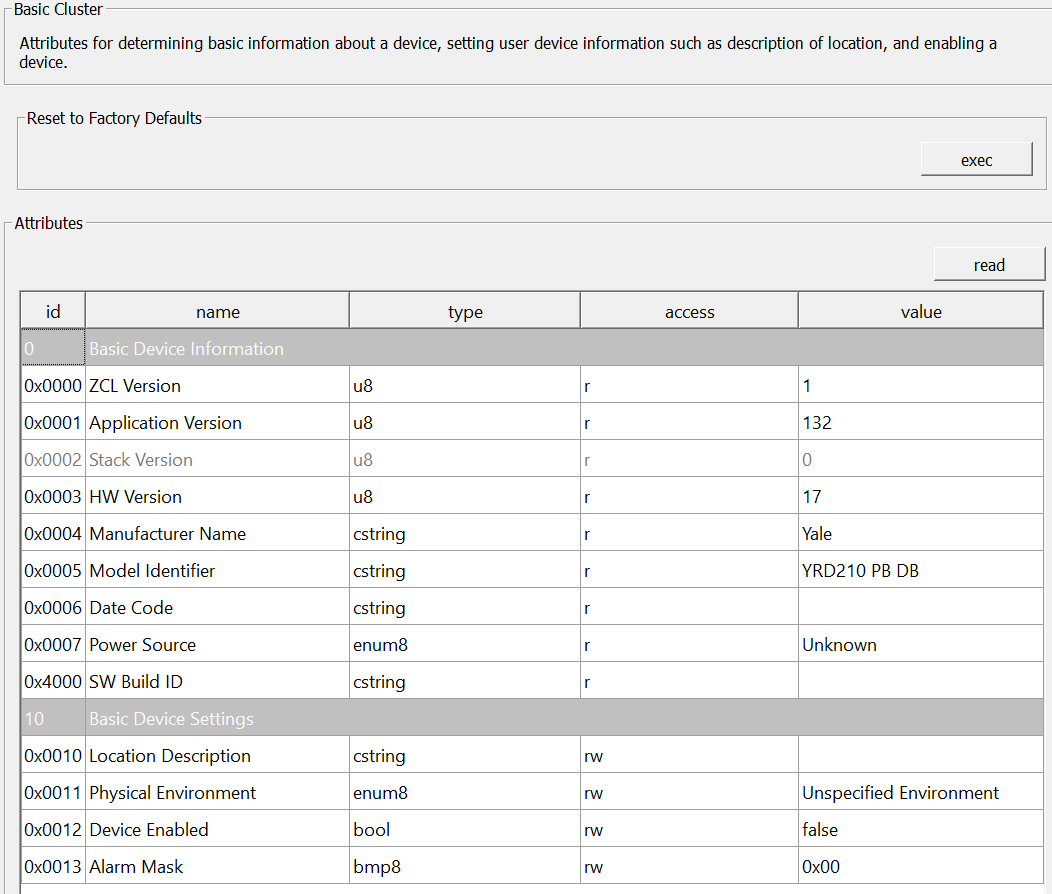

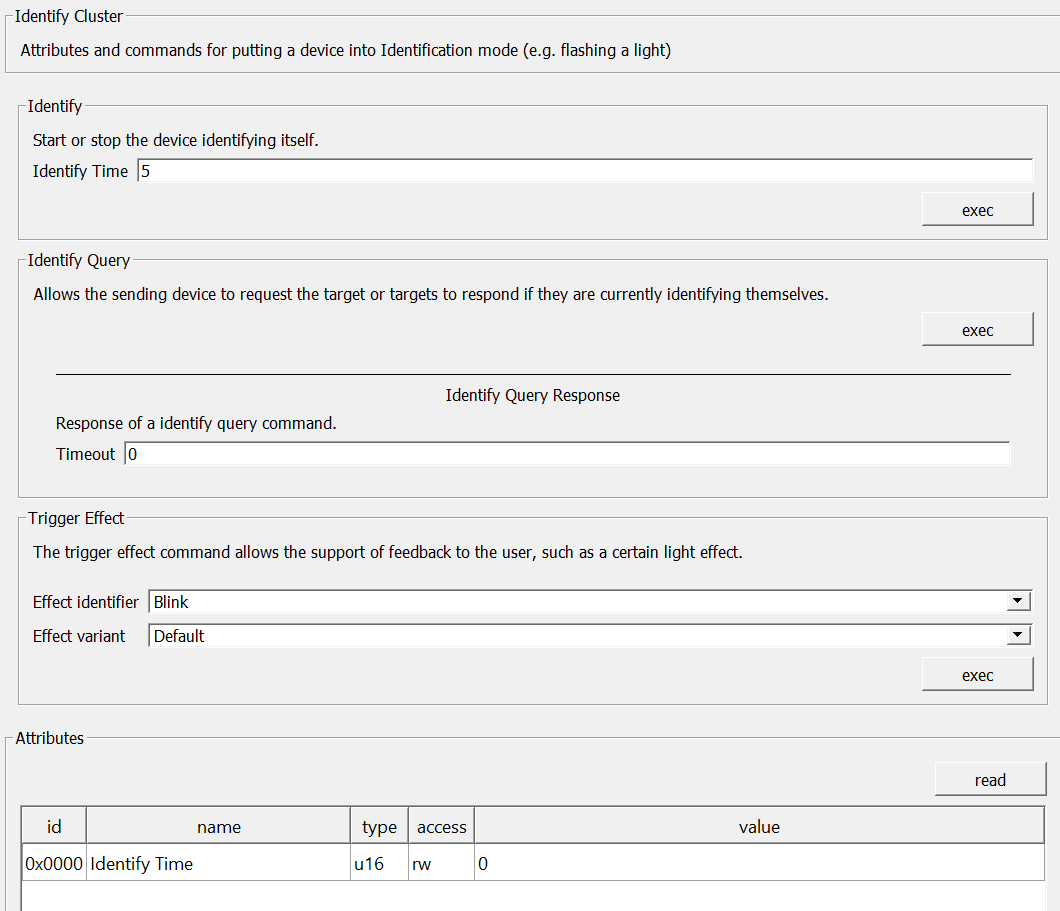
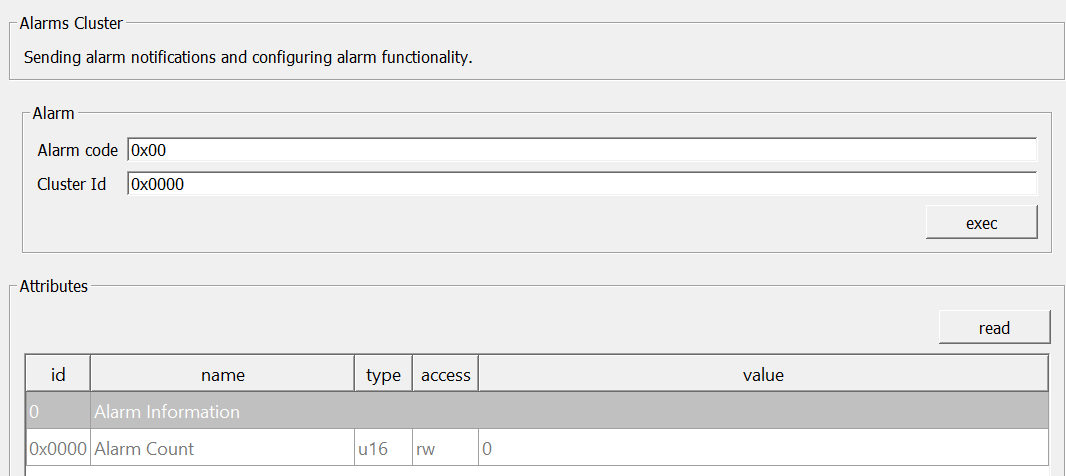


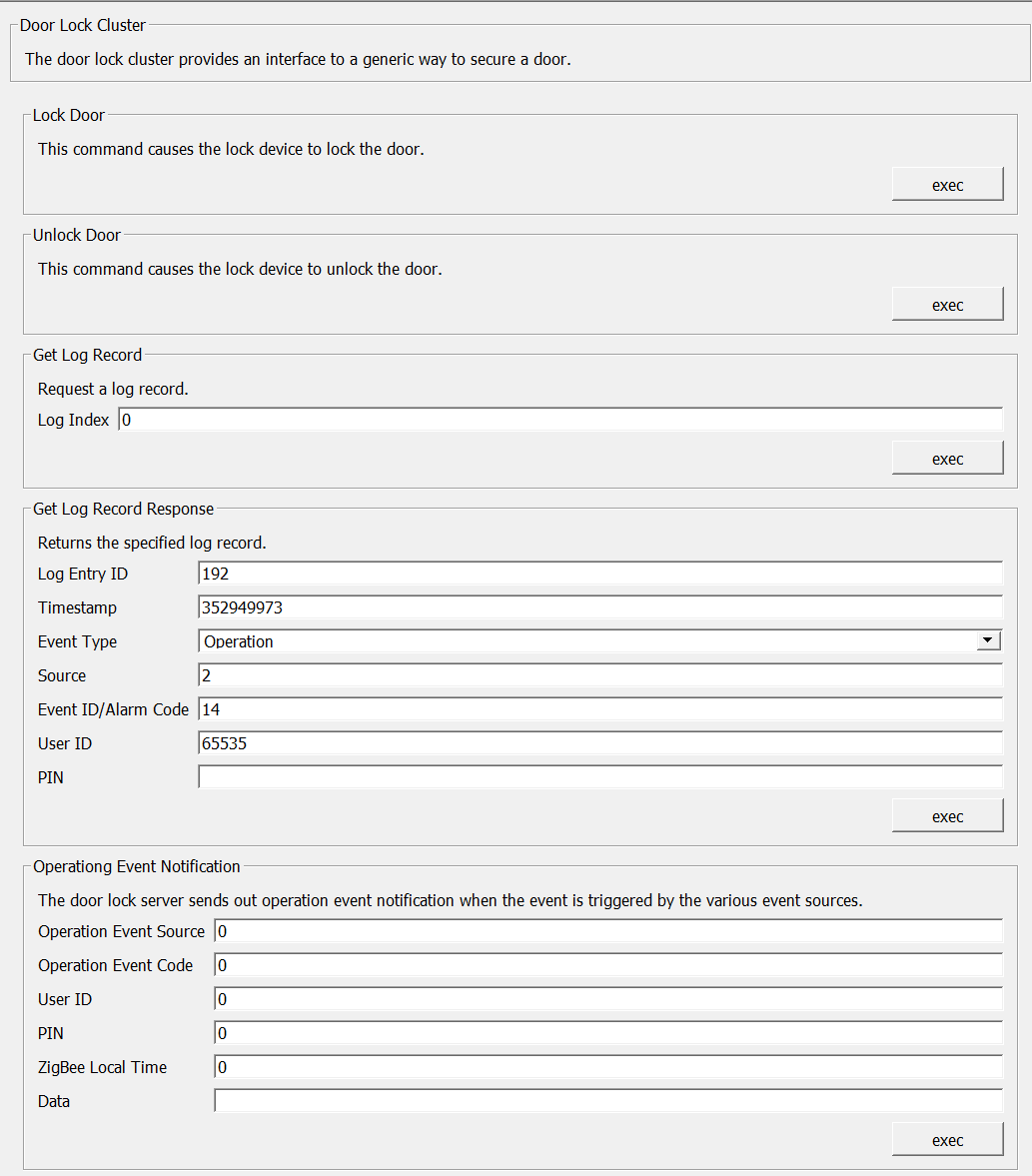

The door lock attributes list goes on for quite a bit. If we need more information I can provide it.
 adamalli7
on 1 Feb 2019
adamalli7
on 1 Feb 2019
Looks promising, I'd propose we provide this door lock under the new /devices endpoint.
For example:
GET /devices/00:0d:6f:00:02:fb:93:3d
{
    "manufacturername": "Yale",
    "modelid": "YRD 210 PB DB",
    "swversion": "1.0.1",
    "sub": [ {
        "name": "Yale lock",
        "type": "ZHALock",
        "uniqueid": "00:0d:6f:00:02:fb:93:3d-01-0101",
        "config": {
            "reachable": true,
            "on": true,
            "battery": 100
        },
        "state": {
            "locked": true,
            "lastupdated": "2019-02-02T10:56:10"
        }
    }]
}
And to control the lock:
PUT /devices/00:0d:6f:00:02:fb:93:3d-01-0101/state

{ "locked": false }
 manup
on 2 Feb 2019
manup
on 2 Feb 2019
Would it also be exposed under /sensors? I'm not thrilled by the prospect of adding support for /devices to homebridge-hue, especially since we're still figuring out the API details (e.g. will /devices be included in the GET /?).
I think we'll need a writeable config.locked attribute in addition to the read-only (!) state.locked to distinguish between target and current locked state.
ebaauw
on 3 Feb 2019
@adamalli7, Would you mind sharing how you connected your lock to deCONZ? I seemy Yale SYDL220 in the GUI, though I don't see the cluster at all.
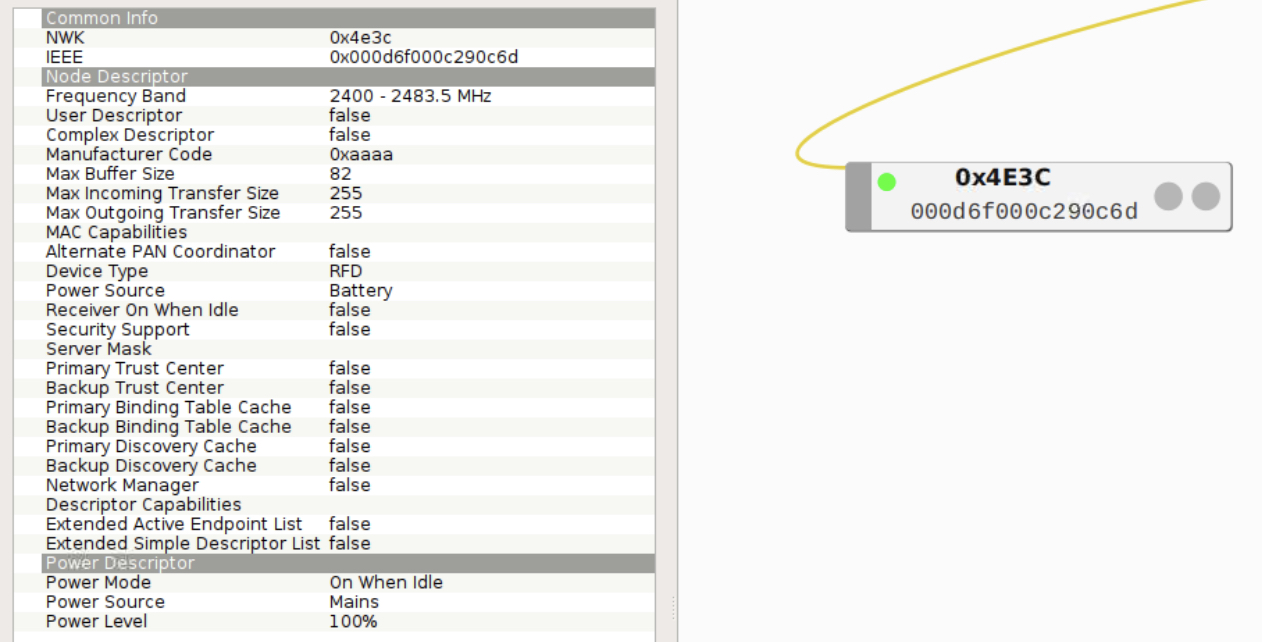
 thimic
on 3 Feb 2019
thimic
on 3 Feb 2019
Never mind, I figured it out. Now feeling slightly stupid. Here's the info on the Yale SYDL220 with the ZBM-1 ZigBee communication module installed:
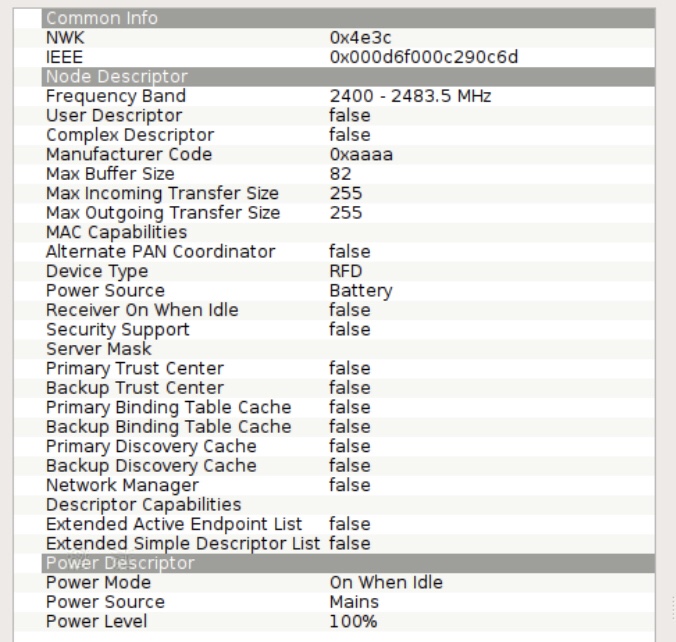


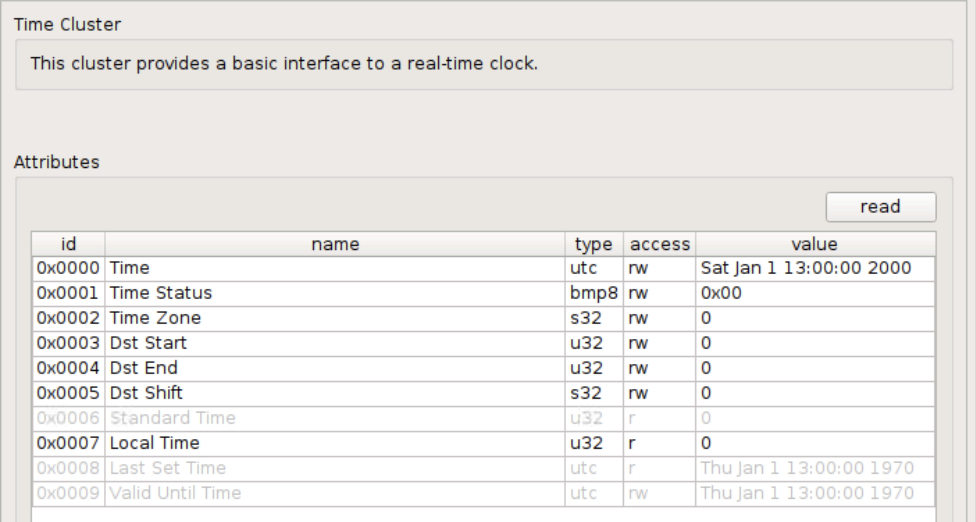
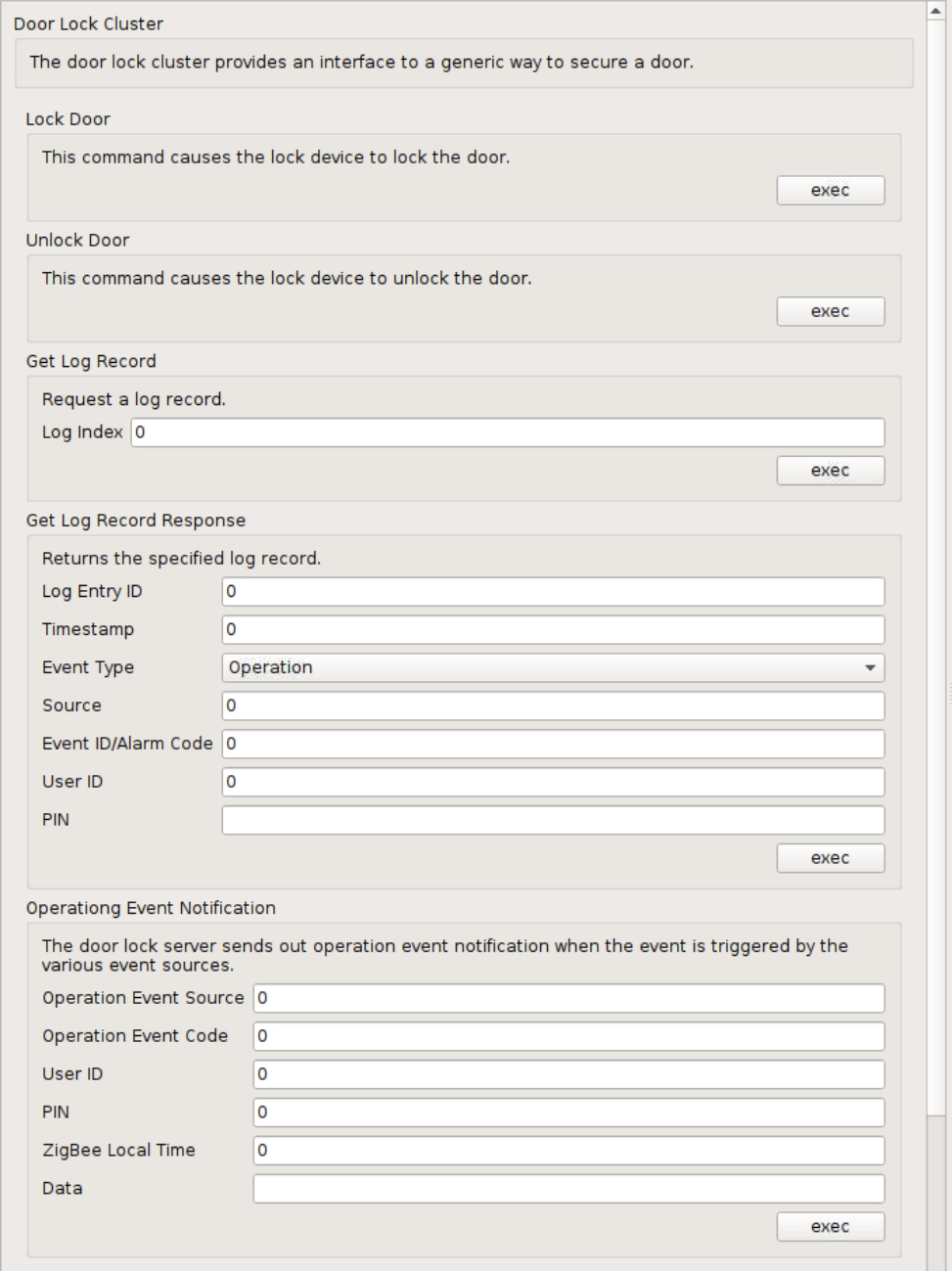
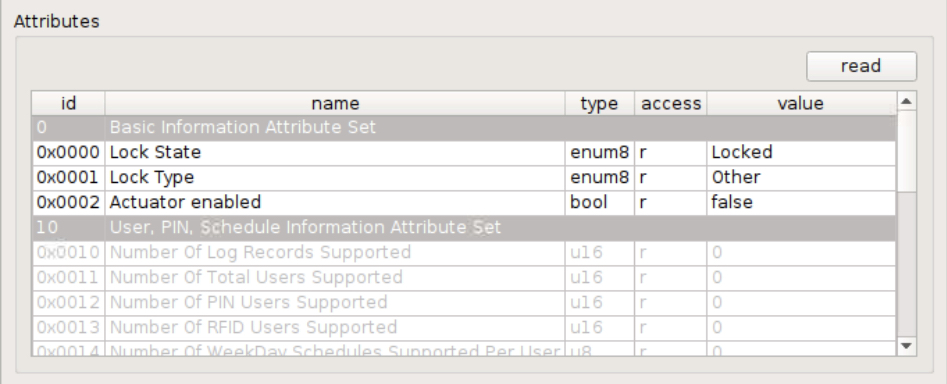
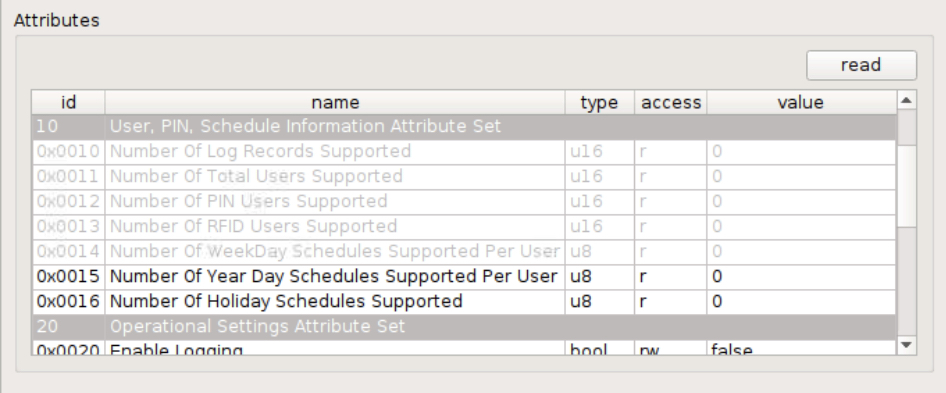
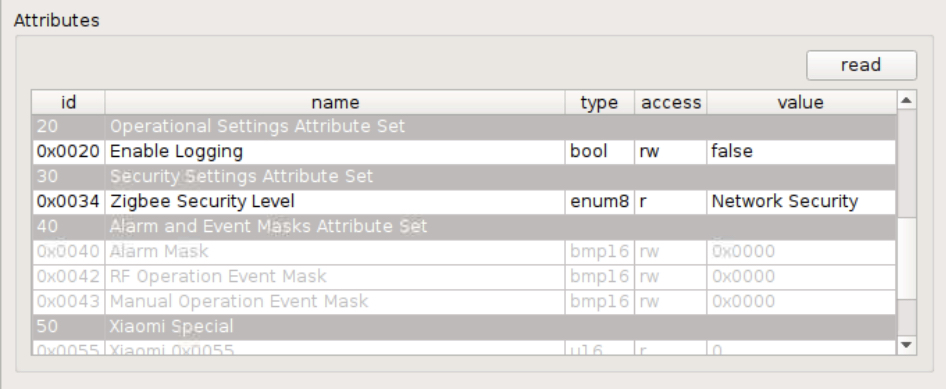
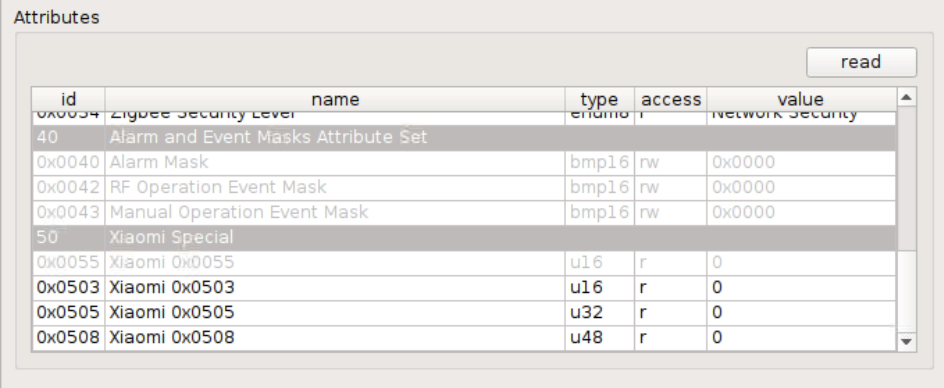

I'd also love to help you test this if I can assist in any way.
thimic
on 3 Feb 2019
Would it also be exposed under /sensors? I'm not thrilled by the prospect of adding support for /devices to homebridge-hue, especially since we're still figuring out the API details (e.g. will /devices be included in the GET /?).
I've skimmed over the linked documentation (very nice one), it looks like this door lock has many features. It's a very interesting device due it's capabilities. I'm afraid it can't be easily represented by just sensors; the way I see it it is a rather a complex device out of a mix of an actuator and perhaps multiple sensor parts.
Side note the documentation describes the device is an actuator.
Sensor
- state.locked
- state.buttonevent (keypad operation: locked/unlocked)
- Various alarms (hit wrong code entry limit, tamper, deadbolt jammed, low battery, manual locked, auto locked, ...)
- Logging (255 log records)
Actuator
- action.lock/unlock (sure requires config.pending)
Similar to lights this is the part which controls the device and isn't represented well as sensor.
Configuration
- Multiple PIN codes
- Multiple users which can be configured (status and type)
- Multiple schedules (7 per user)
- Modes (normal, vacation and privacy)
- Languages
I think we'll need a writeable config.locked attribute in addition to the read-only (!) state.locked to distinguish between target and current locked state.
Agree this for sure should be working very reliable, so that the operation is confirmed to be processed :)
To be honest I don't know what is the best way to implement this device, I would really try to avoid to to make a hack and put the whole device under sensors. Also it feels like a bit overkill to make 3 sensor resources and one actuator resource.
Maybe we should try some ideas to figure out if and how this device can be represented in the most simple way for REST-API users.
Another humble attempt, door lock without sub devices:
{
    "manufacturername": "Yale",
    "modelid": "YRD 210 PB DB",
    "swversion": "1.0.1",
    "name": "Test Yale lock",
    "type": "ZHALock",
    "uniqueid": "00:0d:6f:00:02:fb:93:3d-01-0101",
    "config": {
            "reachable": true,
            "on": true,
            "battery": 100,
            "pending": [ "lock", "mode_vacation" ],
            "locked": true,
            "users": [{ "id": 1, "pin": "123456", "schedules": [] }],
            "mode": "normal",
            "lockedby": "keypad"
    },
    "state": {
            "locked": true,
            "locked_t": "2019-02-02T10:56:10",
            "alarm": 7,
            "alarm_t":  "2019-02-01T07:18:52"
    }
}
Merging multiple sensors into one can be done by getting rid of lastupdated. In this example the <attribute>_t are auto generated for state attributes based on the ResourceItem timestamp. The alarm attribute is a bitmap.
The actuator part is represented by the config.locked (still needed?) and config.pending attributes.
manup
on 3 Feb 2019
I like the tri-partition into Sensor, Actuator, and Configuration. I think there should be a fourth: Capabilities, where we would list the static aspects of a device, like the supported colour gamut, colour temperature range, or button events.
I think for API v2, these for categories should be in separate objects:
statefor Sensor. Read-only, i.e. GET reports back the device state, no PUT;actionfor Actuator. Write-only, i.e. PUT sets the action, GET reports back the last value PUT;configfor Configuration. Read / (delayed) write (usingconfig.pendingfor sleepy devices);capabilitiesfor Capabilities (cf. the more recent versions of the Hue API). Read-only.
We already use state vs action for groups, but only state for lights. Also the current use is rather inconsistent. There are state attributes which are PUT only, some are not returned by GET (bri_inc, ct_inc, etc), but others are (alert, effect). Some state attributes are GET-only (colormode, reachable), others can be PUT (on, bri, etc). The separation between state vs action makes that clear, and also provides a clean way to support commands like _Toggle_ (PUT action with {"toggle": true} rather than writing a string value to a boolean attribute ({"on": "toggle"}).
The distinction between state/action vs config is somewhat arbitrary. Intuitively, I would place "administrator-only" attributes in config and "end-user" attributes in state/action. Maybe limit rule conditions to state attributes?
I think we would only need pending for config attributes. By comparing state vs action, a client knows when the action has been completed (you really want to know the real-world state (did the lock lock, did the curtains open), not the fact whether the Zigbee command was sent. I doubt many actuators are deep sleepy anyways (i.e. don't poll their parent every couple of seconds).
I think sub-devices make sense, for different clusters. Each sub-device would have their own state, action, config, and capabilities objects (where appropriate). I think we only need one state.lastupdated per sub-device: the time of the last attributes report or read attributes response. This would of course create some odd changes for those familiar with the current API:
config.batterywould actually becomestate.batteryfor the sub-device related to the power configuration cluster- A colour light would be three sub-devices, for _On/Off_, _Level Control_, and _Color Control_. Both the _On/Off_ and _Level Control_ sub-devices would support
action.ontranslating into commands _On_, _Off_ vs _Move to Level (with On/Off)_.
We might still need a separate level for endpoints to report the device type and profile (ZHA vs ZLL). Also, some devices report different values for the _Basic_ cluster attributes (at least _Model Identifier_) on different endpoints. Alternatively, we could de-normalise ep, and modelid into each sub-device.
Putting this to the test, a Hue motion sensor might look something like:
{
  "manufacturername": "Philips",
  "modelid": "SML001",
  "name": "Living Room Motion Sensor",
  "swversion": "6.1.0.18912",
  "uniqueid": "00:17:88:01:02:02:7f:1a",
  "reachable": true,
  "sub": [
    {
      "uniqueid": "00:17:88:01:02:02:7f:1a-02-0000",
      "type": "ZHABasic",
      "name": "Living Room Motion Sensor",
      "config": {
        "ledindication": false,
        "usertest": false,
        "pending": []
      }
    },
    {
      "uniqueid": "00:17:88:01:02:02:7f:1a-02-0001",
      "type": "ZHABattery",
      "name": "Living Room Motion Sensor",
      "state": {
        "battery": 100,
        "lastupdated": "2019-02-03T15:03:33"
      },
      "config": {
        "on": true
      }
    },
    {
      "uniqueid": "00:17:88:01:02:02:7f:1a-02-0003",
      "type": "ZHAIdentify",
      "name": "Living Room Motion Sensor",
      "action": {
        "alert": null
      }
    },
    {
      "uniqueid": "00:17:88:01:02:02:7f:1a-02-0400",
      "type": "ZHALightLevel",
      "name": "Living Room Light Level",
      "state": {
        "lightlevel": 17731,
        "lux": 59,
        "dark": false,
        "daylight": true,
        "lastupdated": "2019-02-03T15:03:33"
      },
      "config": {
        "tholddark": 12000,
        "tholdoffset": 4000,
        "on": true
      }
    },
    {
      "uniqueid": "00:17:88:01:02:02:7f:1a-02-0402",
      "type": "ZHATemperature",
      "name": "Living Room Temperature",
      "state": {
        "temperature": 2149,
        "lastupdated": "2019-02-03T14:59:33"
      },
      "config": {
        "offset": 0,
        "on": true
      }
    },
    {
      "uniqueid": "00:17:88:01:02:02:7f:1a-02-0406",
      "type": "ZHAPresence",
      "name": "Living Room Motion",
      "state": {
        "presence": false,
        "lastupdated": "2019-02-03T14:59:33"
      },
      "config": {
        "delay": 0,
        "sensitivity": 2,
        "on": true,
        "pending": []
      },
      "capabilities": {
        "sensitivitymax": 2
      }
    }
  ]
}
Notes:
- This matches almost 1:1 to the way homebridge-hue exposes the Hue motion sensor to HomeKit: one accessory for the device with a service per sub-device. Only the ZHABasic and ZHAIdentify sub-devices are combined into a single _Accessory Information_ service;
- Note the subtle use of
config.pending: only on sub-devices whoseconfigattributes need to be written to the device. - We might want to add
state.lastupdatedandstate.reachableto each sub-device.
ebaauw
on 3 Feb 2019
That's pretty cool, very clear separation between state/action.
one accessory for the device with a service per sub-device.
I really like that, this way every complex device can be composed in a generic way.
We might want to add
state.lastupdatedandstate.reachableto each sub-device.
Agree, this makes sense, for example we have some industrial light modules which may have 1–4 dimmable light channels (dip switch configuration). These devices might also have light/presence sensors attached which can be unplugged, therefore parts of the whole device could become unreachable.
A colour light would be three sub-devices, for On/Off, Level Control, and Color Control. Both the On/Off and Level Control sub-devices would support action.on translating into commands On, Off vs Move to Level (with On/Off).
Tricky, albeit I understand this fits good in the above structure, we need to make sure the API stays simple. Currently it is possible to set a light to a certain state with one PUT request:
PUT /lights/7

{ "on": true, "bri": 80, "xy": [ 0.5, 0.3 ]}
So either multiple PUT requests would be needed, or they can be combined in one request:
PUT /devices/00:17:88:01:02:03:04:05

{
    "00:17:88:01:02:03:04:05-0b-0008": {
        "action": { "on": true, "bri": 80 }
    },
    "00:17:88:01:02:03:04:05-0b-0300": {
        "action": { "xy": [ 0.5, 0.3 ] }
    }
}
A internal dispatcher would just call PUT /devices/00:17:88:01:02:03:04:05-0b-0008/action and so on for each item.
manup
on 3 Feb 2019
Like that. Taking it even further, we might use shortcuts for the IDs of the sub-devices instead of / in addition to the full uniqueid.
Next, we could expose multiple paths to the same object:
/devices/00:17:88:01:02:03:04:05/0b/0008/action
/devices/00:17:88:01:02:03:04:05-0b/0008/action
/devices/00:17:88:01:02:03:04:05-0b-0008/action
/devices/00:17:88:01:02:03:04:05/0b/action/0008
/devices/00:17:88:01:02:03:04:05-0b/action/0008
/devices/00:17:88:01:02:03:04:05/action/0b/0008
/devices/00:17:88:01:02:03:04:05/action/0b-0008
and be flexible which part you specify in the resource and which in the body.
E.g. the following would be equivalent:
PUT /devices/00:17:88:01:02:03:04:05/action
{
  "0b-0008": {"on": true, "bri": 80},
  "0b-0300": {"xy": [0.5, 0.3]}
}


md5-080e67df7b3cae3fc724785652d2b2af


PUT /devices/00:17:88:01:02:03:04:05/action


md5-a0fdd63a079e4d33365c6b009a5c4ff1


and:


md5-7cbbd4c1238ec26580d1fc9290ce714b


```json
{
  "0008": {"on": true, "bri": 80},
  "0300": {"xy": [0.5, 0.3]}
}
Thank you guys for jumping right into this. Any chance this will be integrated soon?
adamalli7
on 10 Feb 2019
Just chiming in to say i’d also love to see deconz support some locks too!
I was looking into getting a new smart lock that supports zigbee and deconz.
I’m wanting to replace my two lockitron bolts with something more reliable. I’d love to see Yale’s line of zigbee locks supported. In doing research on different brands that make smart locks this seems to be a good brand making quality products. The
Yale Assure Lock SL with ZigBee - YRD256HA2619 is the one I’m looking into.
 pponce
on 6 Apr 2019
pponce
on 6 Apr 2019
This issue has been automatically marked as stale because it has not had recent activity. It will be closed if no further activity occurs. Thank you for your contributions.
stale[bot]
on 5 Aug 2019
@manup @ebaauw was there no more progress on ZigBee locks?
 oscar-b
on 25 Aug 2019
oscar-b
on 25 Aug 2019
I have a Yale Lock that I was able to see in my network. Just seeing if there is any chance to add this as it's my only Zigbee device not in my home assistant instance.
 hvddrift
on 29 Aug 2019
hvddrift
on 29 Aug 2019
Would be nice to implement Aqara Smart Door Lock support! This is the only device because of which I still have xiaomi hub.
 SeTeM
on 17 Nov 2019
SeTeM
on 17 Nov 2019
I have 3 kwikset “convert” locks (sold as a conversion kit for Amazon Key) that use a zigbee module. They seem to come in as a ZHA lock in DeConz. I’m happy to provide cluster info if it helps. These seem to be a common module used in several kwikset brands. They may be similar/identical to the Yale module.
 Zebble
on 9 Jan 2020
Zebble
on 9 Jan 2020
Hi guys,
I am planning to buy Yale Assure Lock SL with ZigBee - cannot find any information about whether it can be integrated into Deconz or not?
 AntiqS
on 27 May 2020
AntiqS
on 27 May 2020
Still looks like no support through deconz, but should work through zigbee2mqtt or directly through HomeAssistant's ZHA support - both work with the conbee 2 stick although zigbee2mqtt support isn't officially released.
Zebble
on 27 May 2020
Yale Lock support yet ???
TIA
 dem5867
on 15 Nov 2020
dem5867
on 15 Nov 2020
I would love to see it too for the Yale lock.
pponce
on 16 Nov 2020
@pponce @dem5867 @Zebble We need screens from the device to add it. If someone has it: You can request the device to be added.
 Mimiix
on 16 Nov 2020
Mimiix
on 16 Nov 2020
The problem is the ZHALock are not implemented yet.
ATM the actual door lock are using "light" entry.
 Smanar
on 16 Nov 2020
Smanar
on 16 Nov 2020
We need screens from the device to add it. If someone has it: You can request the device to be added.
@Mimiix What do you mean by screens here?
 zeiphon
on 16 Nov 2020
zeiphon
on 16 Nov 2020
@zeiphon you have the same than here ? https://github.com/dresden-elektronik/deconz-rest-plugin/issues/579#issuecomment-460032825
Smanar
on 16 Nov 2020
@Smanar I have a Yale YRD226 arriving soon, just wondering what information I can provide? The same screenshots as in this comment? #579
zeiphon
on 17 Nov 2020
Yep pls, but I think it s better to make a new issue, because (on my side) I can include your device like the previous door lock, but not make the ZHADoorLock (not the same work)
So it s realy different than the subject of this issue.
Smanar
on 17 Nov 2020
Related issues
 salopette
·
4Comments
salopette
·
4Comments
 marthoc
·
6Comments
marthoc
·
6Comments
 jan666
·
4Comments
jan666
·
4Comments
 ReeChip
·
5Comments
ReeChip
·
5Comments
 Thomas-Vos
·
4Comments
Thomas-Vos
·
4Comments
Most helpful comment
@manup @ebaauw was there no more progress on ZigBee locks?