Deck.gl: Support/Demo for First Person View in pydeck
I really like the MapView and OrbitView, but for things like street navigation, I think FirstPersonView would be more convenient for things like street navigation, especially when combined with point clouds and path layers.
According to the deck.gl documentations:
To render, a FirstPersonView needs to be combined with a viewState object with the following parameters:
- longitude (Number, optional) - longitude of the camera
- latitude (Number, optional) - latitude of the camera
- position (Number[3], optional) - meter offsets of the camera from the lng-lat anchor point. Default [0, 0, 0].
- bearing (Number, optional) - bearing angle in degrees. Default 0 (north).
- pitch (Number, optional) - pitch angle in degrees. Default 0 (horizontal).
- maxPitch (Number, optional) - max pitch angle. Default 90 (down).
- minPitch (Number, optional) - min pitch angle. Default -90 (up).
Naturally, I experimented with the FirstPersonView by slightly changing the official Path Layer demo. This is in a jupyter notebook with the latest pydeck version:
import pydeck as pdk
import pandas as pd
import math

DATA_URL = "https://raw.githubusercontent.com/visgl/deck.gl-data/master/website/bart-lines.json"
df = pd.read_json(DATA_URL)

def hex_to_rgb(h):
    h = h.lstrip("#")
    return tuple(int(h[i : i + 2], 16) for i in (0, 2, 4))

df["color"] = df["color"].apply(hex_to_rgb)

view_state = pdk.ViewState(latitude=37.782556, longitude=-122.3484867)
view = pdk.View('FirstPersonView', controller=True)

layer = pdk.Layer(
    type="PathLayer",
    data=df,
    pickable=True,
    get_color="color",
    width_scale=20,
    width_min_pixels=2,
    get_path="path",
    get_width=5,
)

r = pdk.Deck(layers=[layer], initial_view_state=view_state, views=[view], tooltip={"text": "{name}"})
r.to_html("path_layer.html")
Unfortunately, it did not generate anything:

Looking at the browser output, I also found multiple errors:

Does pydeck expect different inputs compared to deck.gl, or is the first person view restricted to only a few layers?
 xhlulu
All 7 comments
I also looked through the docs, but didn't find an example of FirstPersonView used in deck.gl or pydeck. Feel free to point me in the right direction if I missed it!
xhlulu
on 18 Sep 2020
Speaking for deck.gl, if you search the repo you can find a test app https://github.com/visgl/deck.gl/search?p=2&q=FirstPersonView&unscoped_q=FirstPersonView
FirstPersonViewis used e.g. in streetscape.gl- See https://avs.auto/
 ibgreen
on 18 Sep 2020
ibgreen
on 18 Sep 2020
Thanks for the link! I'll try to reimplement it in pydeck and share my progress!
xhlulu
on 19 Sep 2020
Haven't actually tried out the FirstPersonView in pydeck but it does seem to be there. That failed to invert matrix error seems to only occur when mapbox is used as the basemap provider.
import pydeck

point_cloud_layer = pydeck.Layer(
    "PointCloudLayer",
    data=[[0, x * .0001, x * .0001] for x in range(0, 100)],
    get_position="-",
    get_normal=[0, 0, 10000],
    auto_highlight=True,
    get_color=[255, 0, 0],
    highlight_color=[255, 140, 255],
    pickable=True,
    point_size=300,
)

view_state = pydeck.ViewState(**{
    "latitude": 0,
    "longitude": 0
})
view = pydeck.View(
    type="FirstPersonView",
    controller=True
)
r = pydeck.Deck(
    [point_cloud_layer],
    map_provider=None,
    initial_view_state=view_state,
    views=[view]
)
r.to_html(css_background_color='skyblue')
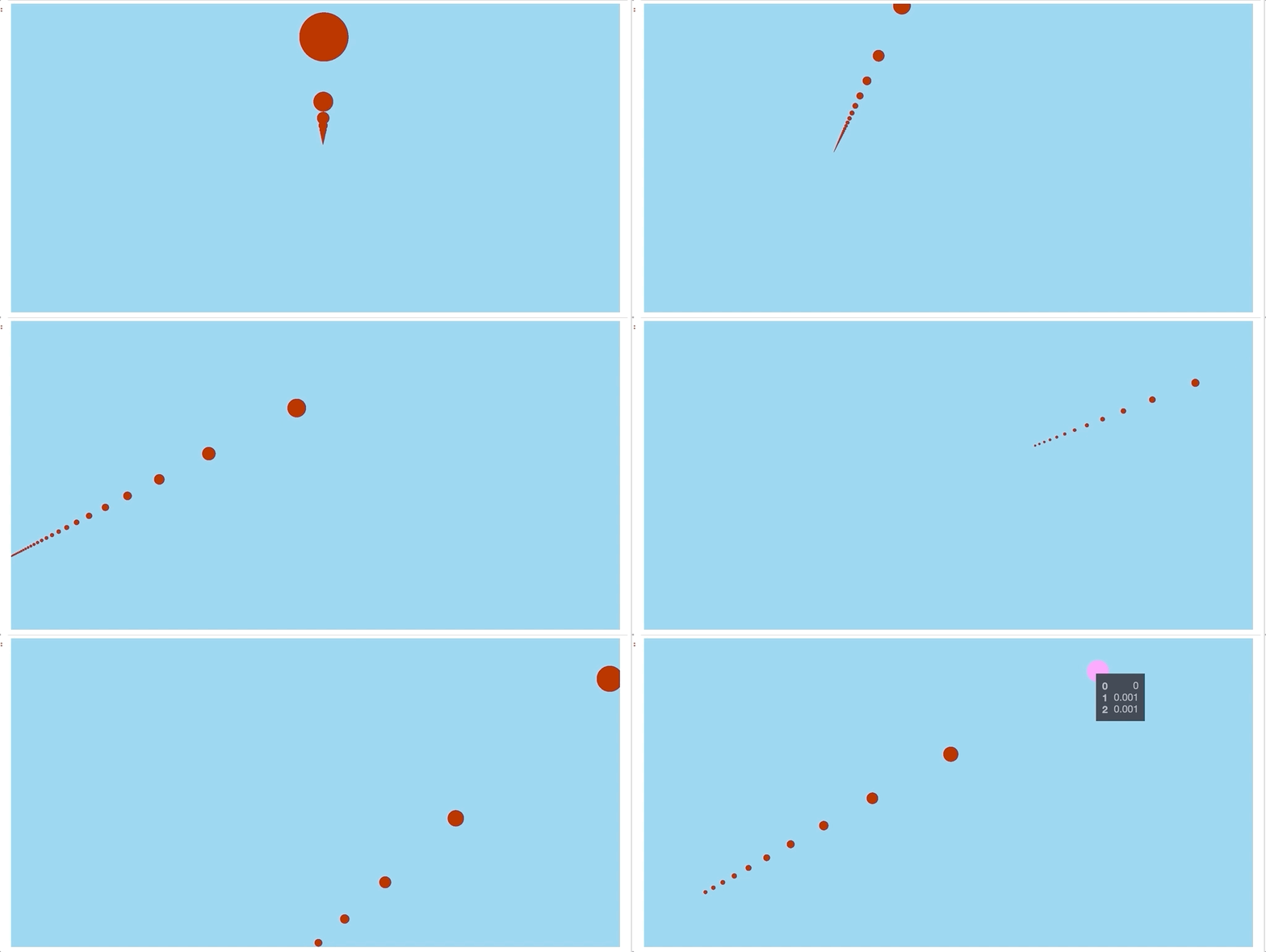
 ajduberstein
on 22 Sep 2020
ajduberstein
on 22 Sep 2020
Good point, When using FirstPersonView in the past, I have always hid the mapbox basemap whenever the pitch is > 60 degrees since mapbox didn't handle that well.
ibgreen
on 22 Sep 2020
@xhlulu let us know if you have any further questions. It does look like FirstPersonView works.
ajduberstein
on 27 Oct 2020
It works very well, sorry for leaving this issue open!
I open-sourced the app that uses first person view to visualize point clouds. The code is here.

xhlulu
on 28 Oct 2020
Related issues
 ibesora
·
4Comments
ibesora
·
4Comments
 heumsi
·
4Comments
heumsi
·
4Comments
 TareqAlqutami
·
3Comments
TareqAlqutami
·
3Comments
 mayteio
·
3Comments
mayteio
·
3Comments
 jianhuang01
·
3Comments
jianhuang01
·
3Comments