Deck.gl: Retaining custom properties on a TileLayer and BitMap to enable redrawing
Hi there,
I'm working on kind-of a custom TileLayer with BitMap layer setup.
In my approach I'm retrieving an array of integer values which I'm then converting into an image in the browser using a particular colour ramp (Edit: perhaps similar to this issue which I found after posting this).
What I'd like to be able to do is reuse my original array of data to regenerate my image based on a new colour ramp without having to redownload the tiles. From example switching from the viridis colour ramp to using a a magma colour ramp.
The first hurdle I've got is that I don't seem to be able to hold onto my original array.
````
new TileLayer({
data: 'http://tiles:3000/{z}/{x}/{y}.pbf',
tileSize: 256,
getTileData: async function (tile) {
const someBuffer = await makeRequest("GET", tile.url);
tile._rawData = someBuffer <--- I want to save the original array

const out = new ImageData(256, 256);
for (let i = 0; i < this.data.length / 4; i++) {
  if (someBuffer.values[i] !== 999) {
    const rgba = d3.interpolateViridis(someBuffer.values[i])
    out.data[i * 4] = rgba[0];
    out.data[(i * 4) + 1] = rgba[1];
    out.data[(i * 4) + 2] = rgba[2];
    out.data[(i * 4) + 3] = 255;
  }
};
return out
},
renderSubLayers: props => {
const {
bbox: {west, south, east, north}
} = props.tile;
return new BitmapLayer(props, {
  data: null,
  image: props.tile.data,
  bounds: [west, south, east, north]
});
}
````
I'm new to deckgl so just poking around the edges at the moment so this may not be the best way to go around this things so I'm open to suggestions, but hopefully you can make sense of the request :)
Thanks,
Rowan
 rowanwins
All 9 comments
One option which kinda works is attaching it to my ImageData object, now I just need to work out how to get my tile / BitmapLayer to redraw...
rowanwins
on 2 Jul 2020
So I'm able to set my new colour ramp, however it only redraws when I subsequently move the map (inc zooming). What I find strange is that it's not redrawing immediately which I would've thought deck.redraw(true) would achieve
function setNewColor () {
ramp = d3.interpolatePlasma
myLyr.state.tileset._cache = new Map()
myLyr.state.tileset.selectedTiles.map(t => {
if (t.data._rawData) {
t.data = computeImg(t.data._rawData, ramp)
}
})
myDeck.redraw(true)
};
rowanwins
on 2 Jul 2020
As you can tell there are two parts to the TileLayer: fetching data through getTileData and creating child deck layers in renderSubLayers. The result of getTileData is cached, so a first idea might be to load only the data in getTileData and apply the colormap in renderSubLayers. The issue here is that renderSubLayers is I think called on every frame, so you don't want to put any compute there. (You could try and see how the performance is).
Alternatively, if you fetch _and_ apply the colormap in getTileData, then the full result is cached, and you don't have access to the intermediate data, so you need to refetch the data every time you want to change the colormap.
The recommendations I'd give are: if you have access to the backend, provide a long cache-control header on the resources, and then use the second approach, where you load and apply the colormap in getTileData, but when you change the colormap the browser can load the original image from the browser's cache. (Use updateTriggers to tell the TileLayer to update when the colormap changes).
Or if you want a more complex but faster approach, you could apply the colormap on the GPU
 kylebarron
on 2 Jul 2020
kylebarron
on 2 Jul 2020
I do not recommend accessing the layer instance via this in getTileData - this may break in the future if we change the TileLayer implementation.
You can simply return the raw data in getTileData:
new TileLayer({
  data: 'http://tiles:3000/{z}/{x}/{y}.pbf',

  // Changing a TileLayer prop will re-evaluate `renderSubLayers` for each tile
  colorScheme: d3.interpolateViridis,

  getTileData: tile => makeRequest("GET", tile.url),

  renderSubLayers: props => {
    const {
      data,
      bbox: {west, south, east, north}
    } = props.tile;

    // Convert buffer to image
    const image = new ImageData(256, 256);
    for (let i = 0; i < data.length / 4; i++) {
      if (data.values[i] !== 999) {
        const rgba = props.colorScheme(data.values[i])
        image.data[i * 4] = rgba[0];
        image.data[(i * 4) + 1] = rgba[1];
        image.data[(i * 4) + 2] = rgba[2];
        image.data[(i * 4) + 3] = 255;
      }
    };

    return new BitmapLayer(props, {
      data: null,
      image,
      bounds: [west, south, east, north]
    });
}
renderSubLayers is only called once for each tile until some TileLayer props change. If you want to introduce other props and avoid recreating the ImageData, wrap the buffer to image conversion in a memoized function.
 Pessimistress
on 2 Jul 2020
Pessimistress
on 2 Jul 2020
Hey @kylebarron & @Pessimistress
Thanks for the input - I've refactored things a little bit but I'm still experiencing the same behaviour where the tiles doesn't update until a zoom or pan action.
The way I've wired things up at the moment is that a click event triggers the change of colourScheme. My click event is changing the colour scheme, and it does appear that the render and renderSubLayers is being called on the click, however the tiles don't change until the zoom or pan. With my click event I'm also having to clear the tileset._cache otherwise my old tiles hang around at the zoom level where they were previously used.
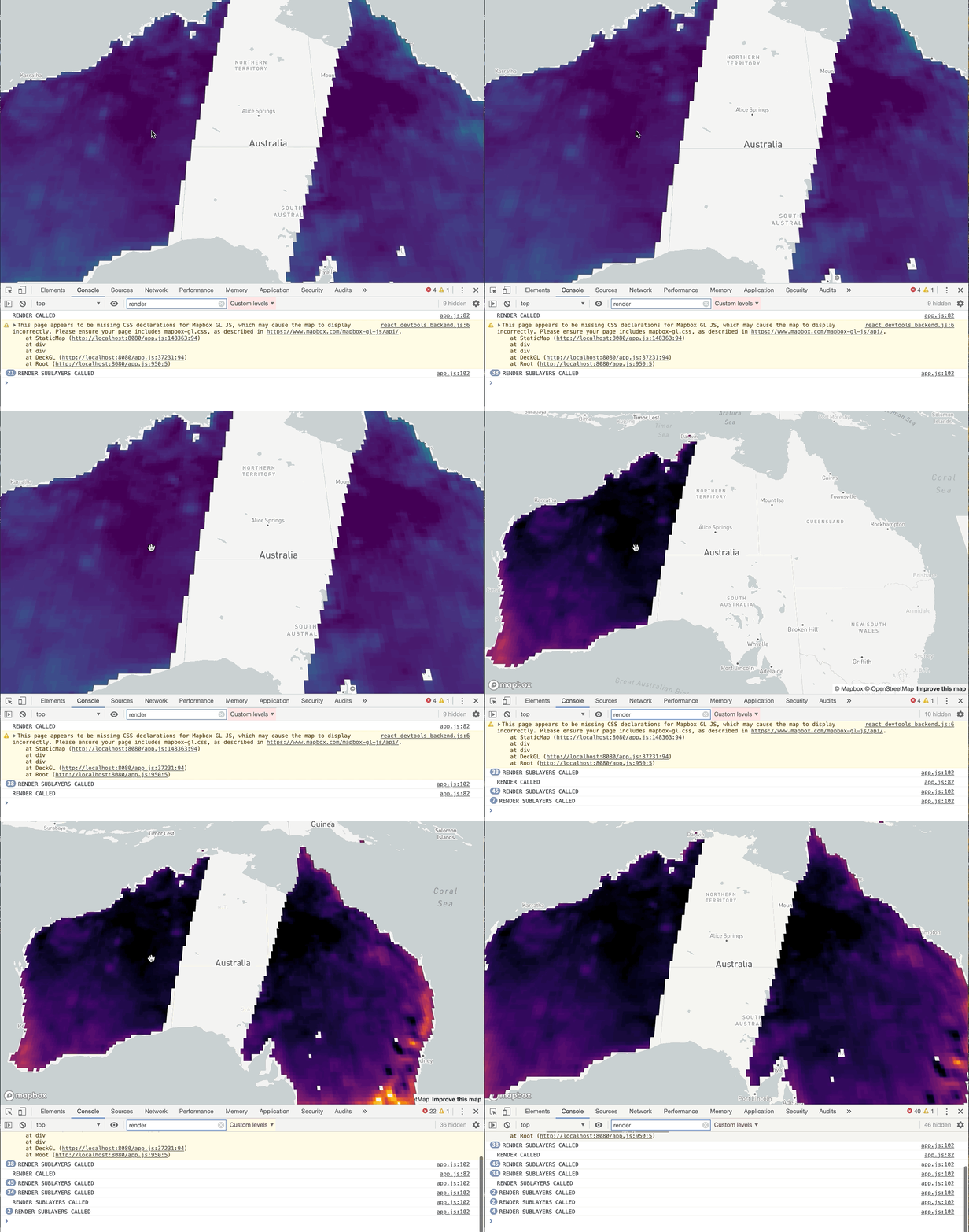
PS Ignore the double click in the video, that's me getting past the video capture screen with the first click.
So I'm wondering if there is some other caching going on somewhere in the deck props or state...?
I've thrown together a gist which shows my setup so far
https://gist.github.com/rowanwins/244620182f586547a4b90c7e3c23ef68
It's probably a little tricky to replicate locally due to the tile server I'm playing with.
PS there is a lot to like in deckgl in terms of being able to have custom layers on top of mapboxgl which looks to be very hard to extend so excited to see what I can do with this :)
rowanwins
on 4 Jul 2020
You must create a new ImageData object between color scheme changes. BitmapLayer does not know that props.image has changed if it’s the same object.
Pessimistress
on 4 Jul 2020
Ok thanks @Pessimistress that has worked! Although the rendering doesn't feel as smooth as hypothesised by @kylebarron
The issue here is that renderSubLayers is I think called on every frame, so you don't want to put any compute there. (You could try and see how the performance is).
I had a go with the updateTriggers approach but didn't have much luck there initially but I'll keep tinkering. Think I'm getting a better understanding of the layer lifecycle though now so happy to close :)
rowanwins
on 5 Jul 2020
I think Pessimisstress is probably right that renderSubLayers is only called when props change, and I was wrong
kylebarron
on 5 Jul 2020
So just jotting a final note on this - I'm fairly happy with where I've handed.
Ignore the dodgy gif quality - was just trying to keep under the github limits :)

One thing I did notice was that when I changed by props, such as my color ramp, the more I'd browsed around previously the slower the re-rendering would take. From what I could tell it looked like the renderSubLayers method was being called for every tile that had been visited previously, irrespective of whether that tile was currently visible or not, I'm not sure if this is expected behaviour or not... So I've hacked around it by doing
this.deck.layerManager.layers = []
Related issues
 nagix
·
3Comments
nagix
·
3Comments
 rjimenezda
·
3Comments
rjimenezda
·
3Comments
 pybokeh
·
3Comments
pybokeh
·
3Comments
 ibesora
·
4Comments
ibesora
·
4Comments
 FilipHusnjak
·
3Comments
FilipHusnjak
·
3Comments
Most helpful comment
I do not recommend accessing the layer instance via
thisingetTileData- this may break in the future if we change the TileLayer implementation.You can simply return the raw data in
getTileData:renderSubLayersis only called once for each tile until someTileLayerprops change. If you want to introduce other props and avoid recreating the ImageData, wrap the buffer to image conversion in a memoized function.