Deck.gl: The oldest webGL context will be removed when creating deck.gl instance many times
Version: v5.0.0
Issue:
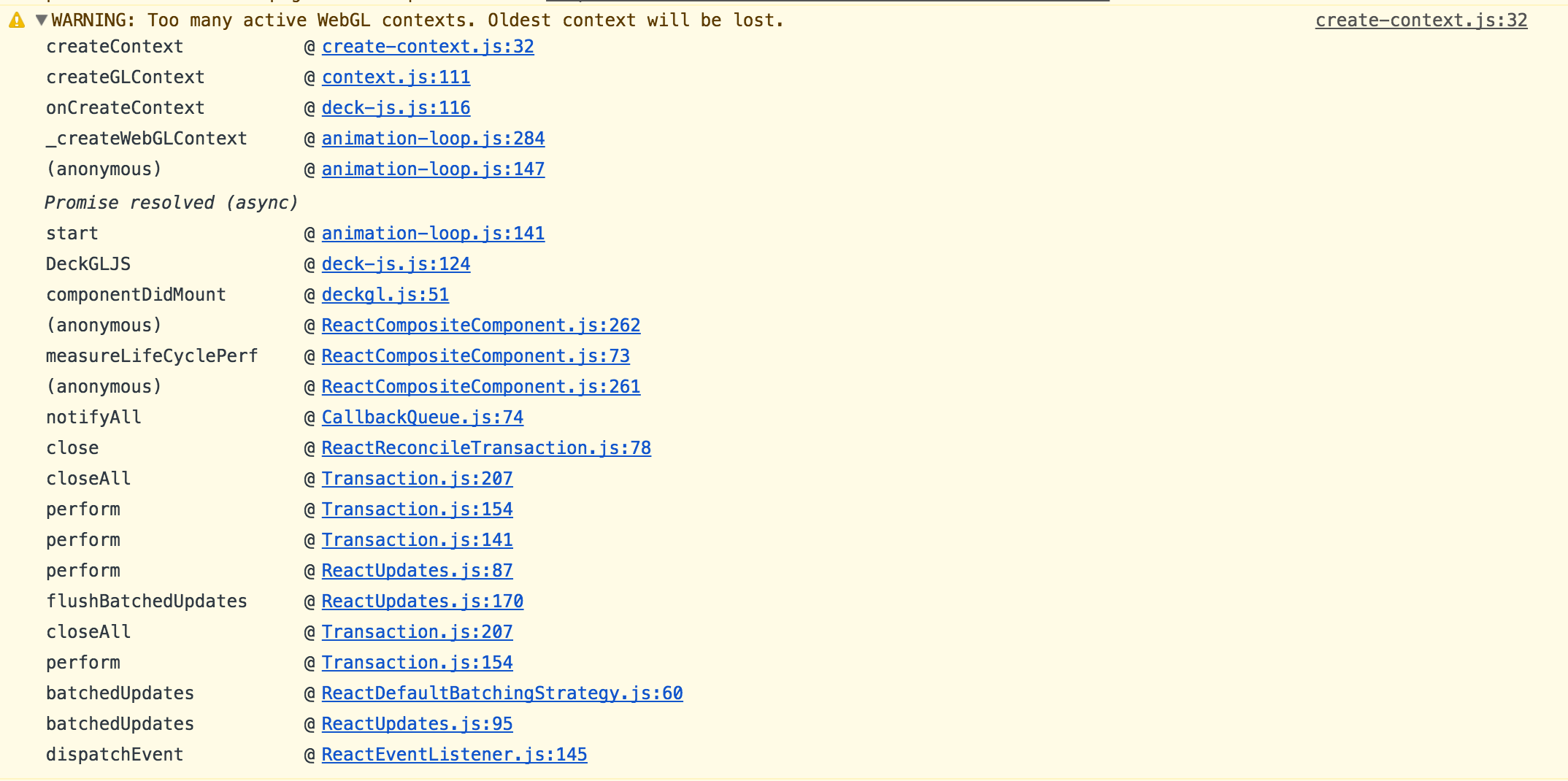
The console got 'WARNING: Too many active WebGL contexts. Oldest context will be lost' when creating deck.gl instances several times. End up the first/oldest webGL context become empty.
How to reproduce it:
- Create one deck.gl instance
- Add the second deck.gl instance
- Remove the second instance and repeat step 2-3 several times.
Expected result:
The first deck.gl instance should be intact.
Actual result:
The first instance become empty but all the click/hover interaction still works.
 javidhsueh
All 20 comments
javidhsueh
on 11 Jan 2018
Application seem to create multiple instances of deck.gl, need to find out if WebGL context being destroyed when DOM (holding deck.gl instance) is destroyed.
 1chandu
on 11 Jan 2018
1chandu
on 11 Jan 2018
@javidhsueh , can you confirm if this not present in deck.gl 4.1, thanks!
1chandu
on 11 Jan 2018
this might be an issue of mapbox-gl-js
 howtimeflies0
on 11 Jan 2018
howtimeflies0
on 11 Jan 2018
This is a well know limitation. Not super clear what to do about this:
- There is no API for properly destroying WebGL contexts, they rely on garbage collection, so it is easy to open too many.
- A key point is that contexts are associated with HTML canvases.
- If we can keep the canvas alive and reuse it (maybe cache it on DeckGL destroy and then reparent it) we could perhaps make this work, it would require a bit of semi-hacky work in the framework.
 ibgreen
on 11 Jan 2018
ibgreen
on 11 Jan 2018
Update: in the step 2, I actually added an IconMap component(MapboxGL+DeckGL). The root cause could be MapboxGL doesn't release the gl context resource. I'll investigate more.
javidhsueh
on 11 Jan 2018
Yes they both create a context, so that is double pressure on the WebGL system.
I added experimental support for reusing maps in react-map-gl 3.2 which was just published, but it is not well tested. But maybe worth testing in your case? If so, search the react-map-gl docs for reuseMaps prop.
ibgreen
on 11 Jan 2018
@ibgreen I just tested using reuseMap prop in react-map-gl 3.2;
The first MapGL instance looks fine. But when I destroy the first one and instantiate the second one, I only got the deck.gl result without map layer. See the pictures below:
First time to instantiate the IconMap:

Second time to instantiate the IconMap:

javidhsueh
on 12 Jan 2018
Related threads:
https://github.com/mapbox/mapbox-gl-js/issues/5585
https://github.com/mapbox/mapbox-gl-js/issues/2656
Someone suggested ways to enforce GC to remove a GL context, not sure if it is feasible to include those calls in react-map-gl.
Also, it seems mapbox-gl-js allows passing in predefined GL context,
https://github.com/mapbox/mapbox-gl-js/blob/master/src/gl/context.js#L92-L93
Maybe we can add a reuseGLContext prop in parallel with reuseMaps, and pass it in with mapOptions.
https://github.com/uber/react-map-gl/blob/master/src/mapbox/mapbox.js#L162
A hacky fix would be to separate the map component from its current parent component and keep it alive with the whole app.
 gnavvy
on 12 Jan 2018
gnavvy
on 12 Jan 2018
I don't see anything definite in the answers except resize canvas to 1x1 after we are done. That is certainly an option, it wouldn't hurt. Although that mainly affects default render buffer, many other resources won't be released by that.
Also, it seems mapbox-gl-js allows passing in predefined GL context,
https://github.com/mapbox/mapbox-gl-js/blob/master/src/gl/context.js#L92-L93
That would be an option but as far as I can tell Context is an internal class in their WebGL wrapper lib. Do you see a way to forward props to it from the top level map class?
I think deck.gl can also take a context parameter but it is probably completely untested.
A hacky fix would be to separate the map component from its current parent component and keep it alive with the whole app.
If I understood you correctly, that's what the reuseMap prop in react-map-gl is intended to do, essentially. It just needs more testing...
ibgreen
on 12 Jan 2018
Also, it seems mapbox-gl-js allows passing in predefined GL context,
https://github.com/mapbox/mapbox-gl-js/blob/master/src/gl/context.js#L92-L93
If not, we could intercept calls to canvas.getContext and "spoon feed" them our context...
ibgreen
on 12 Jan 2018
Here's my component (IconMap) looks like:

After I fixed the reuseMaps function in react-map-gl:
https://github.com/uber/react-map-gl/blob/3.2-release/src/mapbox/mapbox.js#L165-L175
We're able to recycle the canvas of the Mapbox map, but it doesn't stop deck.gl from creating new WebGL context. So end up after create/destroy the IconMap component multiple times, we will get the same error "Too many active WebGL contexts. Oldest context will be lost."
Maybe we could try to recycle the context of deck.gl, too?
javidhsueh
on 10 Feb 2018
Maybe we could try to recycle the context of deck.gl, too?
Yes, I think that would be a nice, to have matching features in deck.gl and react-map-gl.
ibgreen
on 10 Feb 2018
@ibgreen experiencing this same error "Too many active WebGL contexts. Oldest context will be lost." when using deck.gl on top of react-map-gl. We have to redraw the deck-gl layer quite a few times and as a result, many contexts get created. Is there a way to remove those contexts?
 kamillejohnson
on 31 May 2018
kamillejohnson
on 31 May 2018
. We have to redraw the deck-gl layer quite a few times and as a result, many contexts get created. Is there a way to remove those contexts?
@kamillejohnson
Unfortunately, the WebGL standard does not provide a way to destroy a WebGL context. It gets destroyed automatically when it is garbage collected, which can be quite a bit after you stop using it, so when quickly creating/destroying contexts it is common to run into this error.
Now, rhe first order of business is to determine if you are creating/destroying the DeckGL React component unnecessarily. Simply re-rendering the component should not cause a new context to be created, unless one react render cycle includes the DeckGL component, and the next one does not. Then unmounting/mounting will happen. So maybe just reorganizing your react app a little can fix it.
But if your UI is truly creating many different maps with deck.gl instances, things will be trickier.
- Perhaps you could keep the same
DeckGLinstance alive, just feed it new layers and view state? - react-map-gl has a 'reuseMaps` option, that should make react-map-gl use less contexts, reducing the overall pressure on contexts.
- I believe that DeckGL accepts a gl context but this is not well tested and may not work.
Hope this helps as a start.
ibgreen
on 1 Jun 2018
That is very helpful @ibgreen , thank you! I was able to feed it new layers with different ids based on our changing state and that fixed it. Thanks for the suggestions!
kamillejohnson
on 4 Jun 2018
@ibgreen Is it possible for deck.gl to use the WEBGL_lose_context extension here?
This is how three.js handles it - https://github.com/mrdoob/three.js/blob/363648ed473639c7abe3c78b9bbe61386344e297/src/renderers/WebGLRenderer.js#L310
It looks like mapbox-gl did end up adding this as well - https://github.com/mapbox/mapbox-gl-js/pull/2950/files#diff-274e90d38623e2e16a5e7d34414f33c7R1061
Some related discussion about using it - https://www.khronos.org/webgl/public-mailing-list/public_webgl/1611/msg00029.php
 contra
on 4 Dec 2018
contra
on 4 Dec 2018
Just tested, it does work (at least in chrome, haven't tested elsewhere yet). For anyone who needs a workaround -
Add to your component:
  componentWillUnmount() {
    if (this.gl) {
      const extension = this.gl.getExtension('WEBGL_lose_context')
      if (extension) extension.loseContext()
    }
  }
  setGL(gl) {
    this.gl = gl
  }
Then add this prop to DeckGL:
onWebGLInitialized={this.setGL}
@contra
Hmm, interesting! I always thought of that extension as a "test harness" thing, but perhaps you are right, maybe this extension can be used to implement the missing WebGL "DestroyContext" function.
One approach could be to export a luma.gl destroyGLContext function that does this if the extension is available. @1chandu
ibgreen
on 4 Dec 2018
This issue is referring to a very old release of deck.gl. We have implemented more rigorous resource tracking since then and it's enforced with unit tests.
Reopen if the issue can be reproduced with the latest release.
 Pessimistress
on 31 Oct 2020
Pessimistress
on 31 Oct 2020
Related issues
 nagix
·
3Comments
nagix
·
3Comments
 SymbolixAU
·
4Comments
SymbolixAU
·
4Comments
 jfuehner
·
3Comments
jfuehner
·
3Comments
 flowsipher
·
3Comments
flowsipher
·
3Comments
 ctriley
·
3Comments
ctriley
·
3Comments