Decidim: Move password fields to new account tab
_Adapted from @xabier on October 20, 2017 22:40_
This is a bug report
When trying to upload an image into my user profile to be used as an Avatar, weirdly the page asks me to introduce the password again, when I do I get back to the first step, not being capable to update my profile with my image.
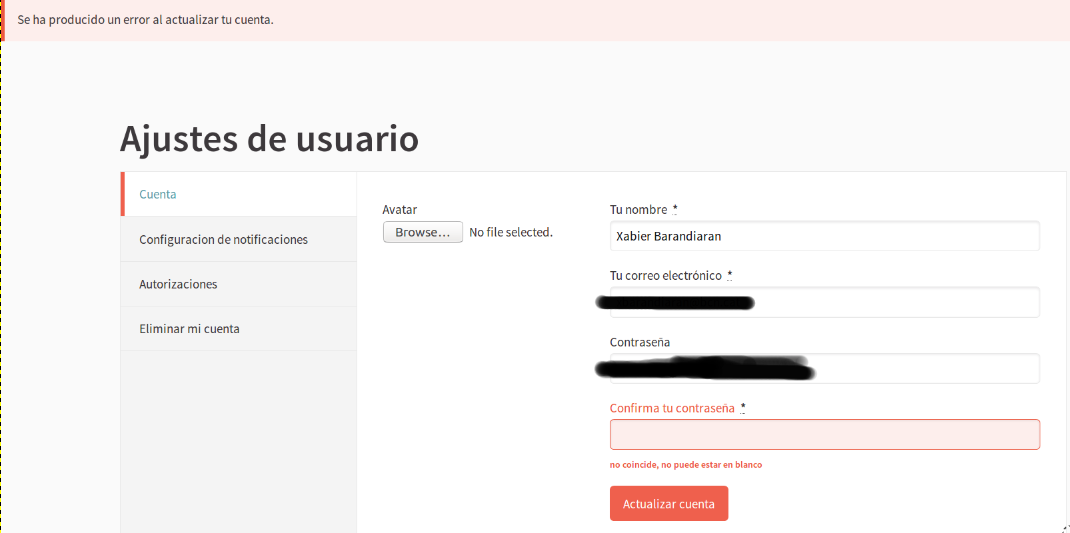
This is due to browsers (Firefox, in this case) autofilling the password field. The field is in the DOM, but hidden via CSS, so the browser fills it, but does not fill the password confirmation field. Since the field is hidden, the user does not see this. Submitting the form will cause errors, because the passwords field is filled, but the confirmation isn't.
This would be solved if we moved these password fields to a new side tab.
_Adapted from original issue: AjuntamentdeBarcelona/decidim-barcelona#157_
 mrcasals
All 3 comments
I think this could be easily solvable by putting autocomplete="off" in the password fields.
 josepjaume
on 24 Oct 2017
josepjaume
on 24 Oct 2017
@josepjaume nice quick fix! But I am not sure how different browsers handle this kind of fields.
 xabier
on 24 Oct 2017
xabier
on 24 Oct 2017
All of them respecte the autocomplete="off" thing. What's happening here is that the fields are getting filled on the background even if they're not visible!
josepjaume
on 24 Oct 2017
Related issues
 carolromero
·
4Comments
carolromero
·
4Comments
 tramuntanal
·
4Comments
tramuntanal
·
4Comments
 andreslucena
·
4Comments
andreslucena
·
4Comments
josepjaume
·
4Comments
andreslucena
·
4Comments
andreslucena
·
4Comments
josepjaume
·
4Comments
Most helpful comment
I think this could be easily solvable by putting
autocomplete="off"in the password fields.