Ddev: Can't connect to Xdebug via PHPStorm using ddev via Docker Toolbox on Windows 10
Hi
I’m trying to set up xdebug with PHPStorm and ddev on Windows 10 home using Docker Toolbox .
I’ve got the website running locally through ddev, that all works fine. The part I’m struggling with is getting PHPStorm to listen to the correct version of PHP. (I think this is what's causing xdebug not to work, if I'm completely off base please let me know).
I feel like if I can get PHPStorm to listen to ddev’s php 7.2 instead of Docker’s php 7.1 then xdebug will start working. (Maybe not but I don’t have any better ideas what might be stopping it from listening!)
To Reproduce
Steps to reproduce the behavior:
- Install Docker Toolbox, ddev
- Run ddev config, ddev start. Website is now accessible in the browser.
- Create a test script, add a breakpoint in PHPStorm
- Reload the page, PHPStorm doesn't point
Expected behavior
Turn on listening in PHPStorm, add a breakpoint and the script pauses when I access my
http://aaaa-website.ddev.local site.
Screenshots
Running docker inspect ddev-bit-website-web I can see that:
- "DDEV_PHP_VERSION=7.2",
- "PHP_DEFAULT_VERSION=7.1",
...
"Env": [
                "DDEV_URL=http://bit-website.ddev.local",
                "DOCROOT=",
                "DDEV_PHP_VERSION=7.2",
                "DDEV_WEBSERVER_TYPE=nginx-fpm",
                "DDEV_PROJECT_TYPE=wordpress",
                "DDEV_ROUTER_HTTP_PORT=80",
                "DDEV_ROUTER_HTTPS_PORT=443",
                "DDEV_XDEBUG_ENABLED=true",
                "DEPLOY_NAME=local",
                "VIRTUAL_HOST=bit-website.ddev.local",
                "COLUMNS=80",
                "LINES=24",
                "HTTP_EXPOSE=80:80,8025",
                "HTTPS_EXPOSE=443:80",
                "SSH_AUTH_SOCK=/home/.ssh-agent/socket",
                "PATH=/usr/local/sbin:/usr/local/bin:/usr/sbin:/usr/bin:/sbin:/bin",
                "PHP_VERSIONS=php5.6 php7.0 php7.1 php7.2",
                "PHP_DEFAULT_VERSION=7.1",
                "PHP_INI=/etc/php/7.1/fpm/php.ini",
                "DRUSH_VERSION=8.1.15",
                "WP_CLI_VERSION=1.4.1",
                "MAILHOG_VERSION=1.0.0",
                "BACKDROP_DRUSH_VERSION=0.0.6",
                "DEBIAN_FRONTEND=noninteractive",
                "TERM=xterm",
                "MH_SMTP_BIND_ADDR=127.0.0.1:1025",
                "NGINX_SITE_TEMPLATE=/etc/nginx/nginx-site.conf",
                "APACHE_SITE_TEMPLATE=/etc/apache2/apache-site.conf",
                "WEBSERVER_DOCROOT=/var/www/html",
                "NGINX_DOCROOT=/var/www/html",
                "COMPOSER_ALLOW_SUPERUSER=1",
                "COMPOSER_CACHE_DIR=/mnt/composer_cache",
                "COMPOSER_PROCESS_TIMEOUT=2000",
                "NGINX_SITE_VARS=$WEBSERVER_DOCROOT,$NGINX_DOCROOT",
                "APACHE_SITE_VARS=$WEBSERVER_DOCROOT"
            ],
"Cmd": [
                "/start.sh"
            ],
            "Healthcheck": {
                "Test": [
                    "CMD",
                    "/healthcheck.sh"
                ],
                "Interval": 2000000000,
                "Retries": 5
            },
            "ArgsEscaped": true,
            "Image": "drud/ddev-webserver:v1.4.0",
            "Volumes": {
                "/mnt/ddev_config": {},
                "/var/www/html": {}
            },
...
My ddev site is using the DDEV_PHP_VERSION, when I access the URL in the web browser and check out phpinfo, I can see that it is using PHP 7.2.12
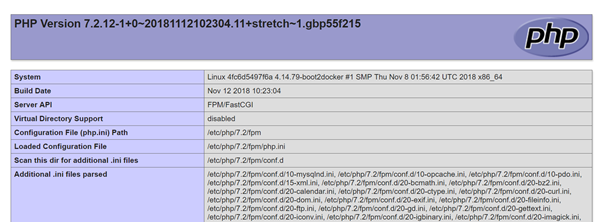
When I run the php script through PHPStorm it is running through the Docker PHP_DEFAULT_VERSION:
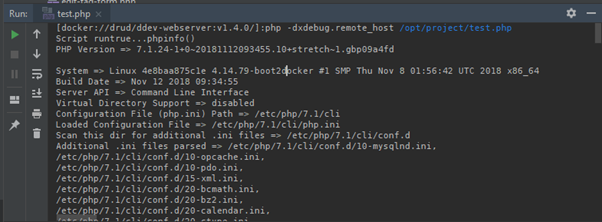
I’ve had a look at my PHPStorm settings to change the CLI interpreter to php 7.2 but the Docker server that it finds php 7.1

The Docker server is set up to connect to the Docker default machine that is started when I open the Docker Quickstart Terminal.

Version and configuration information (please complete the following information):
- Windows 10 Home
- Docker Version: 18.03.0-ce
- ddev version 1.4.1
- config.yaml contents:
APIVersion: v1.4.1
name: bit-website
type: wordpress
docroot: ""
php_version: "7.2"
webserver_type: nginx-fpm
router_http_port: "80"
router_https_port: "443"
xdebug_enabled: true
additional_hostnames: []
additional_fqdns: []
provider: default
- no custom config
Other things I've been reading for reference
Some of the posts I’ve been looking at in case these are useful for people in the future:
https://ddev.readthedocs.io/en/latest/users/step-debugging/
https://www.pascallandau.com/blog/setup-phpstorm-with-xdebug-on-docker/#fix-xdebug-on-phpstorm-when-run-from-a-docker-container
 graham73may
All 11 comments
I'll give this a try but have you worked through the steps in https://stackoverflow.com/a/49696596/215713 as well?
Note that you should not have to do any configuration of your local (host) php interpreter, and PHPStorm does not need to know anything about docker. What you're doing here is the equivalent of debugging php on a remote machine.
Please try the simplest project you can think of (maybe just an index.php with a single line in it, and use project type "php") and try setting that up, using the docs you've quoted.
 rfay
on 23 Nov 2018
rfay
on 23 Nov 2018
BTW, before you spend more time with this: I confirm your experience. It turns out that the "host.docker.internal" hostname is not supported in Docker Toolbox. Amazing that you're the first one to ever mention tripping on that. I think a workaround won't be too hard.
rfay
on 23 Nov 2018
Here's a workaround for you, we'll try to solve this in a future version of ddev. I tried this and it worked out of the box.
Create the file .ddev/docker-compose.xdebug.yaml with these contents. As you see in the instructions, you may have to change the IP address in your environment.
# For docker-toolbox users; Docker has not yet supported the "host.docker.internal"
# convention that is used from ddev v0.18.0. But if you add this file as
# .ddev/docker-compose.xdebug.yaml it should sort that out.
# Note that the IP address in your environment might not be 192.168.99.1,
# Find out what address to use with "docker-machine ip default"
# It will probably give 192.168.99.100.
# Replace the last digit of the ip with "1", so 192.168.99.100 becomes 192.168.99.1
version: "3.6"
services:
web:
extra_hosts:
- "host.docker.internal:192.168.99.1"
# Find out what address to use with "docker-machine ip default"
# It will probably give 192.168.99.100.
# Replace the last digit of the ip with "1", so 192.168.99.100 becomes 192.168.99.1
Don't forget that when you start listening in PHPStorm, you'll most likely have to allow the network connection. On my system I saw this right away:

rfay
on 23 Nov 2018
Hi Randy!
Note that you should not have to do any configuration of your local (host) php interpreter, and PHPStorm does not need to know anything about docker. What you're doing here is the equivalent of debugging php on a remote machine.
I've always used the "Zero-configuration" method in the past but after that didn't work I thought it might be something to do with having to run Docker via Virtualbox. Managed to convince myself that treating the Virtualbox like a remote machine seemed sensible enough, glad to hear that's not the case :-)
BTW, before you spend more time with this: I confirm your experience. It turns out that the "host.docker.internal" hostname is not supported in Docker Toolbox. Amazing that you're the first one to ever mention tripping on that. I think a workaround won't be too hard.
:+1: Great!
Here's a workaround for you, we'll try to solve this in a future version of ddev. I tried this and it worked out of the box.
Wow, that was super fast, thank you very much! I'll try and test/confirm this weekend but failing that I'll report back on Monday from Work. Thank you.
graham73may
on 24 Nov 2018
Hi @rfay,
Thank you for taking the time to get back to me last week. I had a chance to sit down and give this a go this morning.
I made a blank/simple project as you recommended with the docker-compose.xdebug.yaml file, told PHPStorm to start listening and refreshed my page in the browser but it's not picking up. Am I meant to use the settings in your solution with the remote debug settings? Or should that config make "zero-configuration debugging" work?
- Updated the IP as the comments instructed
- PHPStorm is allowed through Windows firewall from previous work

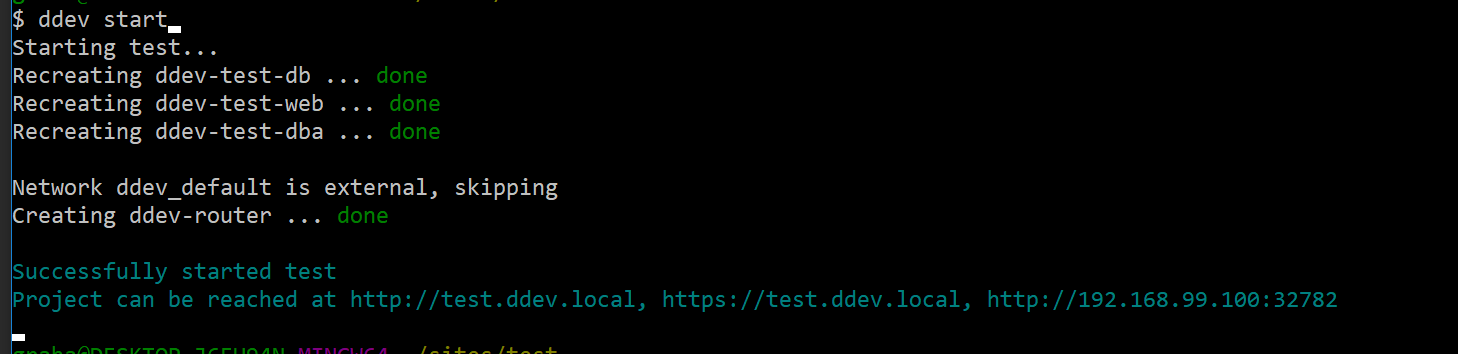
Apologies if it's a mistake on my part... Is there something I need to do to make ddev recognise the docker-composer.xdebug.yaml file? Maybe it already has and it just doesn't output anything on load.
Thanks,
graham73may
on 26 Nov 2018
Now we're back where you should be able to use the debugging strategies in https://stackoverflow.com/a/49696596/215713 to figure out what's going on. Can you ping host.docker.internal from within the web container? Can you telnet to host.docker.internal port 9000?
rfay
on 26 Nov 2018
First, reread the docs.
Done, tried both Zero and Run/Debug configuration methods.
Slightly different names in the EAP PHPStorm I'm using but have set up as shown in the docs:

Make sure xdebug has been enabled; it's disabled by default from v0.16.0 on. I usually enable it in the project's .ddev/config.yaml (xdebug_enabled: true) but you can also ddev exec enable_xdebug
xdebug_enabled: true is in the config.yaml
ddev ssh into the web container. Can you ping host.docker.internal (and get responses)? If you can't, you might have an over-aggressive firewall.
Pings as expected

In PHPStorm, disable the "listen for connections" button so it won't listen. Or just exit PHPStorm.
ddev ssh: Can telnet host.docker.internal 9000 connect? If it does, you have something else running on port 9000, probably php-fpm. Use lsof -i :9000 -sTCP:LISTEN to find out what is there and stop it, or change the xdebug port and configure PHPStorm to use the new one . Don't continue until your telnet command does not connect.
PHPStorm closed, telnet doesn't connect.

Now click the listen button on PHPStorm to start it listening for connections.
ddev ssh and try the telnet host.docker.internal 9000 again. It should connect. If not, maybe PHPStorm is not listening, or not configured to listen on port 9000? (Note that previous instructions used a different port, if you used XDebug before v0.18.0, you might have PHPStorm set to a different port.)
Listening enabled, but don't get any response.

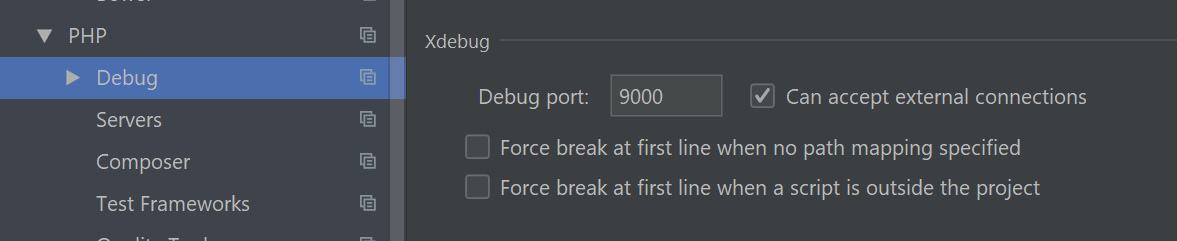
Port is definitely 9000 in PHPStorm.
Check to make sure that xdebug is enabled. You can use php -i inside the container, or use any other technique you want that gives the output of phpinfo(), including Drupal's admin/reports/status/php. You should see This program makes use of the Zend Scripting Language Engine...with Xdebug v2.6.0 and xdebug.remote_enable: On.
It's definitely enabled on the server

Set a breakpoint in the first relevant line of the index.php of your project and then run the site. It should stop there.
https://vimeo.com/268685753 gives a quick screencast overview of XDebug in practice.
No luck...

graham73may
on 26 Nov 2018
Sounds like you've got everything just right. Try setting the options to always break at first line:
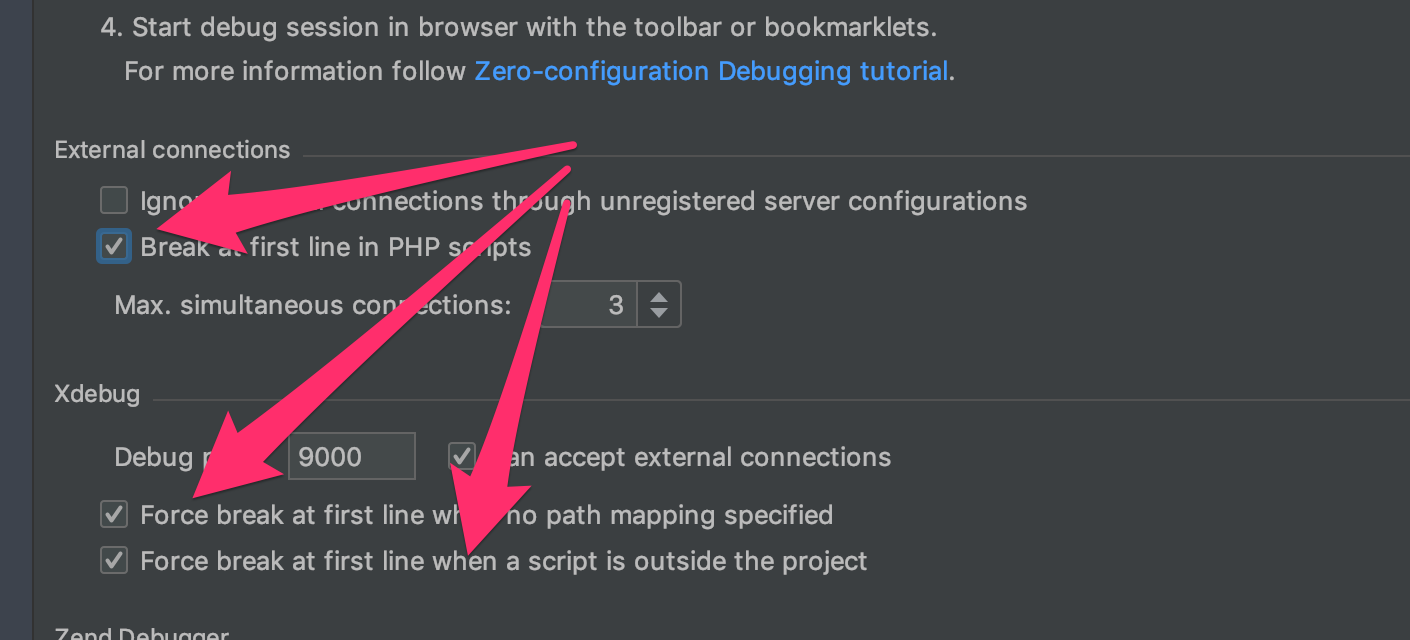
Did you hit http://test.ddev.local/test.php with your browser to test?
rfay
on 26 Nov 2018
BTW, we're always in slack #ddev on both Drupal and TYPO3 slack, happy to help you interactively there.
rfay
on 26 Nov 2018
Update: RESOLVED!
Discussing the issue with rfay on Drupal Slack, got as far as testing the ports / firewalls.
Received this message, firewall completely turned off:
Log opened at 2018-11-26 16:26:17
I: Connecting to configured address/port: host.docker.internal:9000.
W: Creating socket for 'host.docker.internal:9000', poll success, but error: Operation now in progress (29).
E: Could not connect to client. :-(
Log closed at 2018-11-26 16:26:17
rfay advised to use a custom port:
https://ddev.readthedocs.io/en/latest/users/step-debugging/#using-xdebug-on-a-port-other-than-the-default
My current situation:
ddev loading: .ddev/php/xdebug.ini which contains:
[xdebug]
xdebug.remote_log = /var/tmp/xdebug.log
xdebug.remote_port = 11011
Along with the .ddev/docker-compose.xdebug.yaml file which contains:
# For docker-toolbox users; Docker has not yet supported the "host.docker.internal"
# convention that is used from ddev v0.18.0. But if you add this file as
# .ddev/docker-compose.xdebug.yaml it should sort that out.
# Note that the IP address in your environment might not be 192.168.99.1,
# Find out what address to use with "docker-machine ip default"
# It will probably give 192.168.99.100.
# Replace the last digit of the ip with "1", so 192.168.99.100 becomes 192.168.99.1
version: "3.6"
services:
    web:
        extra_hosts:
            - "host.docker.internal:192.168.99.100"
            # Find out what address to use with "docker-machine ip default"
            # It will probably give 192.168.99.100.
            # Replace the last digit of the ip with "1", so 192.168.99.100 becomes 192.168.99.1
Running phpinfo() I can see all three configs:

PHPStorm set to listen to 11011:
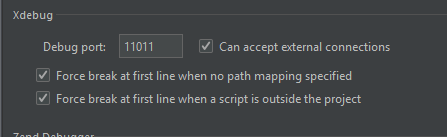
ddev ssh in and view the /var/tmp/xdebug.log file, however there is a similar message:
Log opened at 2018-11-28 07:57:55
I: Connecting to configured address/port: host.docker.internal:11011.
W: Creating socket for 'host.docker.internal:11011', poll success, but error: Operation now in progress (29).
E: Could not connect to client. :-(
Log closed at 2018-11-28 07:57:55
By this point I feel like I've set this test site up enough times, I think I've gone a bit blind to it all. I start to re-do everything from scratch for the nth time and meticulously re-reading everything. Whilst going through the comments in the docker-compsose.xdebug.yaml file this one jumps out:
# Replace the last digit of the ip with "1", so 192.168.99.100 becomes 192.168.99.1
On my latest run through of the instructions I've missed this out!
# For docker-toolbox users; Docker has not yet supported the "host.docker.internal"
# convention that is used from ddev v0.18.0. But if you add this file as
# .ddev/docker-compose.xdebug.yaml it should sort that out.
# Note that the IP address in your environment might not be 192.168.99.1,
# Find out what address to use with "docker-machine ip default"
# It will probably give 192.168.99.100.
# Replace the last digit of the ip with "1", so 192.168.99.100 becomes 192.168.99.1
version: "3.6"
services:
    web:
        extra_hosts:
            - "host.docker.internal:192.168.99.1"
            # Find out what address to use with "docker-machine ip default"
            # It will probably give 192.168.99.100.
            # Replace the last digit of the ip with "1", so 192.168.99.100 becomes 192.168.99.1
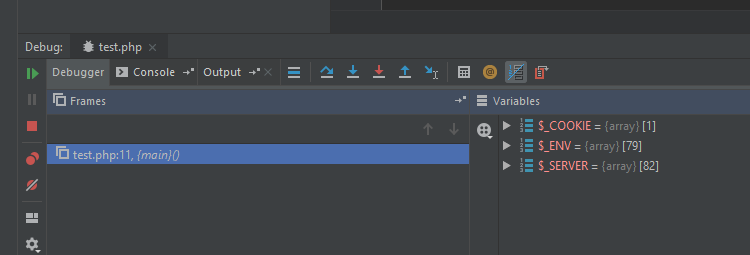
Finally my perfect storm has come together, it essentially boiled down to:
- Removing all of the complicated remote server stuff from PHPStorm and just using the "zero configuration debugging" method.
- Setting
host.docker.internal(properly, without the00at the end of the IP) - Using a custom port (never did find out what was on port 9000...)
graham73may
on 28 Nov 2018
Yay! Thanks for persevering. I'm reopening this so we can get it solved without a docker-compose workaround.
rfay
on 28 Nov 2018
Related issues
 mglaman
·
4Comments
mglaman
·
4Comments
 juergen-venne
·
7Comments
juergen-venne
·
7Comments
 rickmanelius
·
4Comments
rickmanelius
·
4Comments
 jfastnacht
·
6Comments
jfastnacht
·
6Comments
 rvolk
·
4Comments
rvolk
·
4Comments
Most helpful comment
Update: RESOLVED!
Discussing the issue with rfay on Drupal Slack, got as far as testing the ports / firewalls.
Received this message, firewall completely turned off:
rfay advised to use a custom port:
https://ddev.readthedocs.io/en/latest/users/step-debugging/#using-xdebug-on-a-port-other-than-the-default
My current situation:
ddev loading:
.ddev/php/xdebug.iniwhich contains:Along with the
.ddev/docker-compose.xdebug.yamlfile which contains:Running
phpinfo()I can see all three configs:PHPStorm set to listen to 11011:
ddev sshin and view the/var/tmp/xdebug.logfile, however there is a similar message:By this point I feel like I've set this test site up enough times, I think I've gone a bit blind to it all. I start to re-do everything from scratch for the nth time and meticulously re-reading everything. Whilst going through the comments in the
docker-compsose.xdebug.yamlfile this one jumps out:On my latest run through of the instructions I've missed this out!
Finally my perfect storm has come together, it essentially boiled down to:
host.docker.internal(properly, without the00at the end of the IP)