Dbatools: Get-DbaDbMirror minimal permissions
Hi DBATOOLS Community,
I'm facing a little issue on the Get-DbaDbMirror command and I would like your help on it.
The issue is permission related. Actually, I've developed a SQL Statistic tool based on PS module and when deploying the InfoSec team in my company pushed us to use granular permissions for the service account running the statistics instead of just granting sysadmin role. Therefore I've been through you code and granted SELECT permissions on all the SYS views that are involved in the commands I'm using. However, it seems I've missed some because when I run this command with my account ( which is sysadmin) on a secondary mirror SQL Server i'm getting infos about the mirrored databases and the primary partner but not with the service account.
So far I've granted the below permissions :
Select on Master Database on SYS.DATABASE_MIRRORING_WITNESSES, SYS.DATABASES and on other views and functions related to GET-DBADBFILE command.
Here is the out come of the command :
Running under My SYSADMIN Account :
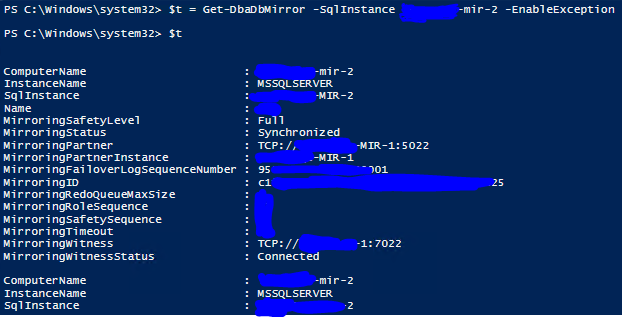
Running under the service account :

Thanks a lot for you help in advance. 😃
 habibhammy
All 9 comments
Hi,
Sorry to raise this subject again. Can you please give me some help?
Many Thanks.
@potatoqualitee @niphlod @wsmelton @joshcorr
habibhammy
on 26 Jul 2019
@habibhammy - Couple of questions:
- Have you attempted to not output the information to the variable to see if this throws a specific error?
- Have you attempted to run profiler on the target with it filtered to the account you are using in an attempt to see what errors get thrown (using with RPC starting/RPC ending, Errors in profiler selection). This might provide more detail on what permissions you are having trouble with.
 sirsql
on 1 Aug 2019
sirsql
on 1 Aug 2019
I would add...
Have you tried running these two lines of code from Get-DbaDbMirror under the reduced credentials?
$dbs = Get-DbaDatabase -SqlInstance $instance -SqlCredential $SqlCredential
$partners = $dbs | Where-Object MirroringPartner
and if those work, then
$witnesses = $dbs[0].Parent.Query("select distinct database_name, principal_server_name, safety_level, safety_level_desc, partner_sync_state from master.sys.database_mirroring_witnesses")
 joshcorr
on 1 Aug 2019
joshcorr
on 1 Aug 2019
Hi all,
Thanks for your suggestions.
@sirsql for your questions :
1-Have you attempted to not output the information to the variable to see if this throws a specific error?
==> yes and no error is coming.
2-Have you attempted to run profiler on the target with it filtered to the account you are using in an attempt to see what errors get thrown (using with RPC starting/RPC ending, Errors in profiler selection). This might provide more detail on what permissions you are having trouble with.
==> Actually yes, I've tried to verify with the SQL Profiler and see if some exceptions are thrown but the only one I can get are :
Cannot drop the table '#SVer' because it does not exist or you do not have permission.
For me it's normal as I'm not seeing any CREATE #SVER before the error ! For references here is the script catched by the trace for this error attached SQLTrace.txt
The database "XXXX" cannot be opened. It is acting as a mirror database.
For me it's also normal as we are querring the secondary node of a mirror server.
@joshcorr for your question:
Actually I've already granted permissions on the database_mirroring_witeness sys view to the service account and this script is successfully executed on the server.
But for the code :
$dbs = Get-DbaDatabase -SqlInstance $instance -SqlCredential $SqlCredential
$partners = $dbs | Where-Object MirroringPartner
when running under the service account the $parteners variable is empty while $dbs is not.
habibhammy
on 1 Aug 2019
Okay, could you drop the object you are getting for $dbs (and redact it if needed). Think we are having issues with the filter on this cmdlet with the Where-Object. Looking at it in my own area as well to confirm.
joshcorr
on 1 Aug 2019
@joshcorr Here is the $dbs object I'm getting with the service account.
dbs_var.xlsx
habibhammy
on 2 Aug 2019
Looks like the MirroringPartner stuff is NULL because of permissions..
Looking at Microsoft Docs for the sys.database_mirroring objects
To see the row for a database other than master or tempdb, you must either be the database
owner or have at least ALTER ANY DATABASE or VIEW ANY DATABASE server-level permission or
CREATE DATABASE permission in the master database. To see non-NULL values on a mirror database,
you must be a member of the sysadmin fixed server role.
@habibhammy Any word on if this resolved your issue?
joshcorr
on 7 Aug 2019
Hi,
Sorry for not coming back on this before. I had a lot of workload and I did not had time to test it.
So thanks a lot @joshcorr for your lead. Actually, the VIEW ANY DATABASE Permission did not resolve the problem for me. However, after further checking (as i got the queried View) it seems that unless it's a SYSADMIN role member, the service account is unable to retrieve data from the SQL Server and all the rows (even the non-NULL ones) are just coming as NULL values.
Therefore the minimum permissions needed by the _GET-DBADBMIRRIOR_ command to be run successfullly is _SYSADMIN role_.
Many Thanks.
habibhammy
on 7 Aug 2019
Related issues
 Zhunya
·
3Comments
Zhunya
·
3Comments
 DiHo78
·
4Comments
DiHo78
·
4Comments
 amon09
·
5Comments
amon09
·
5Comments
 bigbearzhu
·
4Comments
bigbearzhu
·
4Comments
 shaneis
·
3Comments
shaneis
·
3Comments