Dbatools: Find-DbaStoredProcedure does not report TextHeader content
Before submitting a bug report:
- [X] Ensure you are able to reproduce it on the latest released version (_we release often_)
- [X] Verified this bug is not already reported in an issue
- [X] Verified errors are not related to permissions
- [X] Can reproduce in a clean PowerShell session (_clean =
powershell -NoProfile_)
Putting this as a feature request instead of a bug report as the documentation clearly states that the command will report on the textbody.
However, WITH RECOMPILE gets reported/stored in the 'TextHeader', not the 'TextBody'.
It's returning an result for the stored procedure but nothing for the text found property.
Having to check if any WITH RECOMPILE was present, and whether it was commented out or not ( --WITH RECOMPILE, /* WITH RECOMPILE */ ) , required extra steps that I'm hoping we can add to the command.
Steps to Reproduce
CREATE PROCEDURE dbo.TextHeaderHasTheGoodies

    @IntParam int

    WITH RECOMPILE

    AS
    BEGIN

        SELECT @IntParam AS NotImportant

    END
GO
$FindRecompileParams = @{
     SqlInstance = 'localhost'
     Database    = 'DBA'
     Pattern     = 'RECOMPILE'
}
Find-DbaStoredProcedure @FindRecompileParams
Expected Behavior
Procedure correctly reports that the stored procedure contains the word 'RECOMPILE' and the 'StoredProcedureTextFound' property shows the line number and string e.g.
(LineNumber: 7) WITH RECOMPILE
Actual Behavior
Procedure correctly reports that the stored procedure contains the word 'RECOMPILE'.
However, the 'StoredProcedureTextFound' does not show the line number or the string.

Environmental data
- PowerShell:
5.1.16299.251 - SQL Server:
Microsoft SQL Server 2016 (SP1) (KB3182545) - 13.0.4001.0 (X64) Oct 28 2016 18:17:30 Copyright (c) Microsoft Corporation Developer Edition (64-bit) on Windows 10 Pro 6.3 <X64> (Build 16299: )
 shaneis
All 3 comments
Further investigation reveals more fun 😃
If you pass in the switch IncludeSystemObjects this doesn't get reported.
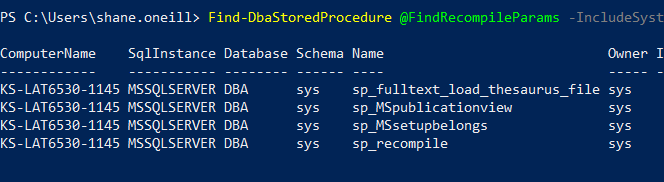
So it's not a bug/feature/issue then!
TL;DR
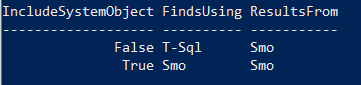
The only difference when using the switch IncludeSystemObject and not using it is, when we don't include that switch we check using T-SQL first for performance reasons i.e.
                # If system objects aren't needed, find stored procedure text using SQL
                # This prevents SMO from having to enumerate

                if (!$IncludeSystemObjects) {
This uses the sys.modules.definition and that is used to match on our pattern ( _I'm ignoring the old style joins_ 😆 )
$sql = "SELECT OBJECT_SCHEMA_NAME(p.object_id) as ProcSchema, p.name, m.definition as TextBody FROM sys.sql_modules m, sys.procedures p WHERE m.object_id = p.object_id"
This definition includes the TextHeader so we find the pattern in there.
We then go back to the Smo for that procedure and return the results from the 'TextBody' property which, since we've used Smo, doesn't have our pattern and nothing gets spit out.`
When we do include the switch IncludeSystemObjects, we go straight to the Smo so the pattern isn't found and our whole procedure is ignored.
Such fun! 😄
shaneis
on 15 Jun 2018
Added features / fixes - see https://github.com/sqlcollaborative/dbatools/pull/5340 . @potatoqualitee / @wsmelton , if you are good with these changes, can you please close this issue. Thanks!
 mikepetrak
on 8 Apr 2019
mikepetrak
on 8 Apr 2019
done didley! thanks mike!
 potatoqualitee
on 8 Apr 2019
potatoqualitee
on 8 Apr 2019
Related issues
 Zhunya
·
3Comments
Zhunya
·
3Comments
 trush99
·
3Comments
trush99
·
3Comments
 bigbearzhu
·
4Comments
bigbearzhu
·
4Comments
 habibhammy
·
9Comments
habibhammy
·
9Comments
 garethnewman
·
8Comments
garethnewman
·
8Comments
Most helpful comment
done didley! thanks mike!