Datetimepicker: Different UI on iOS 14
Summary
I am currently preparing my app for the iOS 14. I have noticed that the date picker is not what it used to be.
Here is what it looks like on iOS 13.7:

Here is the iOS 14 version:


There is now an extra step, instead of spinning the wheel, I need to press it to trigger another calendar popup.
I use display: "spinner" prop.
Is there any way I can still use the wheel on iOS 14?
Environment info
react-native info output:
System:
    OS: macOS 10.15.5
    CPU: (4) x64 Intel(R) Core(TM) i5-7360U CPU @ 2.30GHz
    Memory: 391.89 MB / 8.00 GB
    Shell: 5.7.1 - /bin/zsh
  Binaries:
    Node: 12.13.0 - /usr/local/bin/node
    Yarn: 1.15.2 - /usr/local/bin/yarn
    npm: 6.14.8 - /usr/local/bin/npm
    Watchman: Not Found
  Managers:
    CocoaPods: 1.9.3 - /Users/pavelermakov/.rvm/gems/ruby-2.6.5/bin/pod
  SDKs:
    iOS SDK:
      Platforms: iOS 13.5, DriverKit 19.0, macOS 10.15
    Android SDK:
      API Levels: 23, 24, 25, 26, 27, 28, 29
      Build Tools: 23.0.1, 23.0.3, 25.0.0, 25.0.1, 25.0.2, 25.0.3, 26.0.1, 26.0.3, 27.0.0, 27.0.1, 27.0.3, 28.0.0, 28.0.2, 28.0.3, 29.0.3
      System Images: android-22 | Google APIs Intel x86 Atom, android-23 | Intel x86 Atom_64, android-23 | Google APIs Intel x86 Atom_64, android-27 | Google Play Intel x86 Atom
      Android NDK: Not Found
  IDEs:
    Android Studio: 3.6 AI-192.7142.36.36.6392135
    Xcode: 11.5/11E608c - /usr/bin/xcodebuild
  Languages:
    Java: 1.8.0_171 - /usr/bin/javac
    Python: 2.7.16 - /usr/bin/python
  npmPackages:
    @react-native-community/cli: Not Found
    react: 16.13.1 => 16.13.1
    react-native: 0.63.2 => 0.63.2
    react-native-macos: Not Found
Library version: 3.0.2
 pavermakov
All 55 comments
I am having the same issue. The user flow is actually correct. That is how the new date picker from iOS 14 works, but the styling is a bit broken / not optimized for the new flow.
 jChris85
on 21 Sep 2020
jChris85
on 21 Sep 2020
facing the same issue, it makes users have to click two times to choose the date. any help on this?
 ajengrf
on 21 Sep 2020
ajengrf
on 21 Sep 2020
I found a quick fix for this issue. You can override your preferred Style of the UIDatePicker in your native iOS workspace. Just add the following lines of code in the function didFinishLaunchingWithOptions in your ios/APP_NAME/AppDelegate file.
if (@available(iOS 14, *)) {
  UIDatePicker *picker = [UIDatePicker appearance];
  picker.preferredDatePickerStyle = UIDatePickerStyleWheels;
}
After restarting your app the date picker should show the old wheel style.
This fix can be removed after this package is updated with the new user flow and styling for the iOS 14 date picker.
jChris85
on 21 Sep 2020
@jChris85 That works, thank you!
pavermakov
on 22 Sep 2020
@pavermakov I'm glad this is working for you. However, we should leave the issue open until this package is updated.
jChris85
on 22 Sep 2020
Regarding the documentation setting the prop display to spinner worked for me as well without the need of the native "fix".
jChris85
on 22 Sep 2020
@jChris85 you're a legend. Thaaanks
 joaom182
on 23 Sep 2020
joaom182
on 23 Sep 2020
display={Platform.OS === 'ios' ? 'inline' : 'default'}
 yt-dev
on 23 Sep 2020
yt-dev
on 23 Sep 2020
Setting display="spinner" still showing new default ios14 UI
I've deleted npm packages, cleared cache, reinstalled, cleared pod cache, and reinstalled pods. Same behavior.
 daybreaker
on 24 Sep 2020
daybreaker
on 24 Sep 2020
@daybreaker
I have to use the react-native-date-picker at the moment.
 vinhnglx
on 25 Sep 2020
vinhnglx
on 25 Sep 2020
I noticed that in a brand new project the display options were working correctly, and so I tried deleting all caches with the following commands, and it worked.
watchman watch-del-all &&
rm -rf $TMPDIR/react-native-packager-cache-* &&
rm -rf $TMPDIR/metro-bundler-cache-* &&
rm -rf node_modules/
&& npm cache clean --force &&
npm install &&
npm start -- --reset-cache
 rodrigoarantes
on 25 Sep 2020
rodrigoarantes
on 25 Sep 2020
Setting display="spinner" still showing new default ios14 UI
I've deleted npm packages, cleared cache, reinstalled, cleared pod cache, and reinstalled pods. Same behavior.
@daybreaker: Try to delete all available cache files and then restart your app.
Solution provided by @rodrigoarantes
I noticed that in a brand new project the display options were working correctly, and so I tried deleting all caches with the following commands, and it worked.
watchman watch-del-all && rm -rf $TMPDIR/react-native-packager-cache-* && rm -rf $TMPDIR/metro-bundler-cache-* && rm -rf node_modules/ && npm cache clean --force && npm install && npm start -- --reset-cache
jChris85
on 25 Sep 2020
@jChris85 @rodrigoarantes Thanks a bunch - that seems to have done the trick! I wasnt deleting enough caches! :-P
daybreaker
on 26 Sep 2020
if (@available(iOS 14, *)) {
  UIDatePicker *picker = [UIDatePicker appearance];
  picker.preferredDatePickerStyle = UIDatePickerStyleWheels;
}
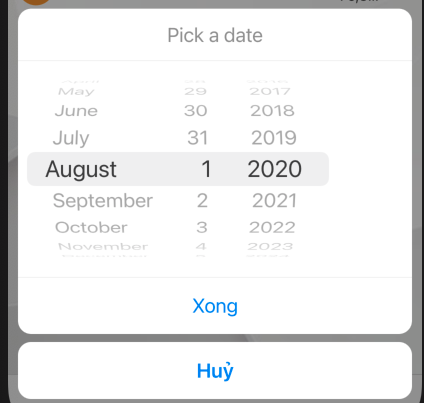
Hi @jChris85,
I want to display center
Can you help me pls?
 phuocantd
on 28 Sep 2020
phuocantd
on 28 Sep 2020
@phuocantd this was happening to me too, when trying the AppDelegate.m hack
Try removing that, and doing the cache deletion steps @rodrigoarantes mentioned:
watchman watch-del-all &&
rm -rf $TMPDIR/react-native-packager-cache-* &&
rm -rf $TMPDIR/metro-bundler-cache-* &&
rm -rf node_modules/
&& npm cache clean --force &&
npm install &&
npm start -- --reset-cache
Deleting all the caches and restarting brought back the old, centered spinner.
daybreaker
on 28 Sep 2020
facing the same issue, it makes users have to click two times to choose the date. any help on this?
Facing same
 m4devgeek
on 28 Sep 2020
m4devgeek
on 28 Sep 2020
@m4devgeek This is the new iOS 14 date picker behaviour. However, did you try the solutions provided in this thread?
To reset the date picker to use the spinner wheel follow these steps:
- Set the date picker prop display to
spinner - Delete all cache files
watchman watch-del-all &&
rm -rf $TMPDIR/react-native-packager-cache-* &&
rm -rf $TMPDIR/metro-bundler-cache-* &&
rm -rf node_modules/
&& npm cache clean --force &&
npm install &&
npm start -- --reset-cache
- restart your app
jChris85
on 28 Sep 2020
This works locally but when it goes though my build server, bitrise, I get the following error:
ios/MY_APP/AppDelegate.m:54:39: use of undeclared identifier 'UIDatePickerStyleWheels'
picker.preferredDatePickerStyle = UIDatePickerStyleWheels;
Any ideas?
 donaldparker
on 29 Sep 2020
donaldparker
on 29 Sep 2020
@donaldparker you need to use xcode 12, that should make the error go away
 vonovak
on 29 Sep 2020
vonovak
on 29 Sep 2020
Yes that fixed the issue, thank you.
donaldparker
on 30 Sep 2020
Swift version
if #available(iOS 14, *) {
let picker = UIDatePicker()
picker.preferredDatePickerStyle = .wheels
}
 anhtuank7c
on 1 Oct 2020
anhtuank7c
on 1 Oct 2020
Out of curiosity, is there any way to toggle that datepicker popup directly, without having to go through the wheel or the new iOS 14 date inputs? ie. If I wanted to use a unified display to hold the text value, but onPress it would show the Android DatePicker or the new iOS picker modal?
 kendallroth
on 5 Oct 2020
kendallroth
on 5 Oct 2020
UPDATE: Solved this issue by updating Xcode version in Bitrise. Thanks @Hless, for your suggestion
@jChris85 Clearing the cache helped us as well on our local machine, but when we try and create a production build using Bitrise, it fails (similar to @donaldparker's comment). I've tried clearing Bitrise's cache, but that didn't solve our problem.
I'm not going to paste in all the errors we got related to this library, but I'll share the beginning portion to see if anyone else has this issue or an idea to solve.
Thanks!
▸ Compiling RNDateTimePickerManager.m
❌ /Users/vagrant/git/node_modules/@react-native-community/datetimepicker/ios/RNDateTimePickerManager.m:23:20: expected a type
RCT_ENUM_CONVERTER(UIDatePickerStyle, (@{
^
❌ /Users/vagrant/git/node_modules/@react-native-community/datetimepicker/ios/RNDateTimePickerManager.m:24:19: use of undeclared identifier 'UIDatePickerStyleAutomatic'; did you mean 'UIActionSheetStyleAutomatic'?
@"default": @(UIDatePickerStyleAutomatic),
^
❌ /Users/vagrant/git/node_modules/@react-native-community/datetimepicker/ios/RNDateTimePickerManager.m:25:19: use of undeclared identifier 'UIDatePickerStyleCompact'
@"compact": @(UIDatePickerStyleCompact),
^
❌ /Users/vagrant/git/node_modules/@react-native-community/datetimepicker/ios/RNDateTimePickerManager.m:26:19: use of undeclared identifier 'UIDatePickerStyleWheels'
@"spinner": @(UIDatePickerStyleWheels),
^
❌ /Users/vagrant/git/node_modules/@react-native-community/datetimepicker/ios/RNDateTimePickerManager.m:30:5: use of undeclared identifier 'UIDatePickerStyleAutomatic'; did you mean 'UIActionSheetStyleAutomatic'?
}), UIDatePickerStyleAutomatic, integerValue)
^
❌ /Users/vagrant/git/node_modules/@react-native-community/datetimepicker/ios/RNDateTimePickerManager.m:23:1: implicit conversion of 'NSInteger' (aka 'int') to 'id' is disallowed with ARC
RCT_ENUM_CONVERTER(UIDatePickerStyle, (@{
^
...
❌ /Users/vagrant/git/node_modules/@react-native-community/datetimepicker/ios/RNDateTimePickerManager.m:70:9: unknown type name 'UIDatePickerStyle'; did you mean 'UIDatePickerMode'?
UIDatePickerStyle determinedDisplayValue = view.datePickerStyle;
^
⚠️ /Users/vagrant/git/node_modules/@react-native-community/datetimepicker/ios/RNDateTimePickerManager.m:73:94: incompatible integer to pointer conversion sending 'UIDatePickerMode' (aka 'enum UIDatePickerMode') to parameter of type 'id' [-Wint-conversion]
@"determinedDisplayValue": [RNDateTimePickerManager datepickerStyleToString:determinedDisplayValue],
^~~~~~~~~~~~~~~~~~~~~~
❌ /Users/vagrant/git/node_modules/@react-native-community/datetimepicker/ios/RNDateTimePickerManager.m:89:39: property 'datePickerStyle' not found on object of type 'RNDateTimePicker *'; did you mean 'datePickerMode'?
if (@available(iOS 14.0, *) && view.datePickerStyle != UIDatePickerStyleWheels) {
^
...
▸ Compiling RNDateTimePicker.m
▸ Compiling RNDateTimePicker-dummy.m
▸ Compiling RNDateTimePickerManager.m
❌ /Users/vagrant/git/node_modules/@react-native-community/datetimepicker/ios/RNDateTimePickerManager.m:23:20: expected a type
RCT_ENUM_CONVERTER(UIDatePickerStyle, (@{
^
...
 trackwell-mike
on 7 Oct 2020
trackwell-mike
on 7 Oct 2020
Eu encontrei uma solução rápida para esse problema. Você pode substituir seu prefferedStyle do UIDatePicker em seu espaço de trabalho iOS nativo. Basta adicionar as seguintes linhas de código à função
didFinishLaunchingWithOptionsem seuios/APP_NAME/AppDelegatearquivo.if (@available(iOS 14, *)) { UIDatePicker *picker = [UIDatePicker appearance]; picker.preferredDatePickerStyle = UIDatePickerStyleWheels; }Depois de reiniciar seu aplicativo, o seletor de data deve mostrar o estilo de roda antigo.
Esta correção pode ser removida depois que este pacote for atualizado com o novo fluxo de usuário e estilo para o selecionador de data do iOS 14.
works to me thxs
 Dev4ster
on 7 Oct 2020
Dev4ster
on 7 Oct 2020
Out of curiosity, is there any way to toggle that datepicker popup directly, without having to go through the wheel or the new iOS 14 date inputs? ie. If I wanted to use a unified display to hold the text value, but
onPressit would show the Android DatePicker or the new iOS picker modal?
Facing the same issue. Anyone found a viable solution? Thanks!
 lorenzosignoretti
on 8 Oct 2020
lorenzosignoretti
on 8 Oct 2020
@jChris85 Clearing the cache helped us as well on our local machine, but when we try and create a production build using Bitrise, it fails (similar to @donaldparker's comment). I've tried clearing Bitrise's cache, but that didn't solve our problem.
@trackwell-mike You might want to try and switch to XCode 12+, iOS 14 API's will not be available otherwise. You can find those in Bitrise's Stack tab.
 Hless
on 9 Oct 2020
Hless
on 9 Oct 2020
I found a quick fix for this issue. You can override your prefferedStyle of the UIDatePicker in your native iOS workspace. Just add the following lines of code in the function
didFinishLaunchingWithOptionsin yourios/APP_NAME/AppDelegatefile.if (@available(iOS 14, *)) { UIDatePicker *picker = [UIDatePicker appearance]; picker.preferredDatePickerStyle = UIDatePickerStyleWheels; }After restarting your app the date picker should show the old wheel style.
This fix can be removed after this package is updated with the new user flow and styling for the iOS 14 date picker.
I found a quick fix for this issue. You can override your prefferedStyle of the UIDatePicker in your native iOS workspace. Just add the following lines of code in the function
didFinishLaunchingWithOptionsin yourios/APP_NAME/AppDelegatefile.if (@available(iOS 14, *)) { UIDatePicker *picker = [UIDatePicker appearance]; picker.preferredDatePickerStyle = UIDatePickerStyleWheels; }After restarting your app the date picker should show the old wheel style.
This fix can be removed after this package is updated with the new user flow and styling for the iOS 14 date picker.
@jChris85 Thank you for this fix. However, when I put your code in the AppDelegate.m in the didFinishLaunchingWithOptions function but I am getting the following errors on my build:
1) AppDelegate.m:31:12: Property 'preferredDatePickerStyle' not found on object of type 'UIDatePicker *'
2) Use of undeclared identifier 'UIDatePickerStyleWheels'
Do you know what is causing them and how I can proceed to resolve them? Thank you.
 rosentoshev
on 13 Oct 2020
rosentoshev
on 13 Oct 2020
@rosenexpend Most probably it's an outdated Xcode version. You need at least Xcode 11.4 according to apple docs.
 burivuhster
on 15 Oct 2020
burivuhster
on 15 Oct 2020
I also have the same issue using the latest Xcode. the time spinner is not centered. I have also deleted the cache as recommended.
 unicornRainbows
on 19 Oct 2020
unicornRainbows
on 19 Oct 2020
I found a quick fix for this issue. You can override your prefferedStyle of the UIDatePicker in your native iOS workspace. Just add the following lines of code in the function
didFinishLaunchingWithOptionsin yourios/APP_NAME/AppDelegatefile.if (@available(iOS 14, *)) { UIDatePicker *picker = [UIDatePicker appearance]; picker.preferredDatePickerStyle = UIDatePickerStyleWheels; }After restarting your app the date picker should show the old wheel style.
This fix can be removed after this package is updated with the new user flow and styling for the iOS 14 date picker.
I have tried this but still not getting the spinner like old version
 akiladevinda
on 20 Oct 2020
akiladevinda
on 20 Oct 2020
@m4devgeek This is the new iOS 14 date picker behaviour. However, did you try the solutions provided in this thread?
To reset the date picker to use the spinner wheel follow these steps:
- Set the date picker prop display to
spinner- Delete all cache files
watchman watch-del-all &&
rm -rf $TMPDIR/react-native-packager-cache-* &&
rm -rf $TMPDIR/metro-bundler-cache-* &&
rm -rf node_modules/
&& npm cache clean --force &&
npm install &&
npm start -- --reset-cache
- restart your app
Trying to remove cache with suggested commands, while running
rm -rf $TMPDIR/react-native-packager-cache-* and rm -rf $TMPDIR/metro-bundler-cache-*
comes out following errors:
zsh: no matches found: /var/folders/1y/26nzt9ld4737blg1s89sxyk40000gn/T//metro-bundler-cache-*
zsh: no matches found: /var/folders/1y/26nzt9ld4737blg1s89sxyk40000gn/T//react-native-packager-cache-*
I am already using Xcode 12, and have erased content in simulator,
but still having the problem after running those commands. Any alternative ideas on how to solve it? Thanks.
 jagwingchoy
on 29 Oct 2020
jagwingchoy
on 29 Oct 2020
@m4devgeek This is the new iOS 14 date picker behaviour. However, did you try the solutions provided in this thread?
To reset the date picker to use the spinner wheel follow these steps:
- Set the date picker prop display to
spinner- Delete all cache files
watchman watch-del-all &&
rm -rf $TMPDIR/react-native-packager-cache-* &&
rm -rf $TMPDIR/metro-bundler-cache-* &&
rm -rf node_modules/
&& npm cache clean --force &&
npm install &&
npm start -- --reset-cache
- restart your app
Trying to remove cache with suggested commands, while running
rm -rf $TMPDIR/react-native-packager-cache-*andrm -rf $TMPDIR/metro-bundler-cache-*
comes out following errors:zsh: no matches found: /var/folders/1y/26nzt9ld4737blg1s89sxyk40000gn/T//metro-bundler-cache-* zsh: no matches found: /var/folders/1y/26nzt9ld4737blg1s89sxyk40000gn/T//react-native-packager-cache-*I am already using Xcode 12, and have erased content in simulator,
but still having the problem after running those commands. Any alternative ideas on how to solve it? Thanks.
Sorry my bad, found out that I need to add display="spinner" to datepicker.ios.js.
jagwingchoy
on 29 Oct 2020
UPDATE: Solved this issue by updating Xcode version in Bitrise. Thanks @Hless, for your suggestion
@jChris85 Clearing the cache helped us as well on our local machine, but when we try and create a production build using Bitrise, it fails (similar to @donaldparker's comment). I've tried clearing Bitrise's cache, but that didn't solve our problem.
I'm not going to paste in all the errors we got related to this library, but I'll share the beginning portion to see if anyone else has this issue or an idea to solve.
Thanks!
▸ Compiling RNDateTimePickerManager.m

❌  /Users/vagrant/git/node_modules/@react-native-community/datetimepicker/ios/RNDateTimePickerManager.m:23:20: expected a type

RCT_ENUM_CONVERTER(UIDatePickerStyle, (@{
                                                                     ^


❌  /Users/vagrant/git/node_modules/@react-native-community/datetimepicker/ios/RNDateTimePickerManager.m:24:19: use of undeclared identifier 'UIDatePickerStyleAutomatic'; did you mean 'UIActionSheetStyleAutomatic'?

    @"default": @(UIDatePickerStyleAutomatic),
                   ^


❌  /Users/vagrant/git/node_modules/@react-native-community/datetimepicker/ios/RNDateTimePickerManager.m:25:19: use of undeclared identifier 'UIDatePickerStyleCompact'

    @"compact": @(UIDatePickerStyleCompact),
    ^


❌  /Users/vagrant/git/node_modules/@react-native-community/datetimepicker/ios/RNDateTimePickerManager.m:26:19: use of undeclared identifier 'UIDatePickerStyleWheels'

    @"spinner": @(UIDatePickerStyleWheels),
                  ^


❌  /Users/vagrant/git/node_modules/@react-native-community/datetimepicker/ios/RNDateTimePickerManager.m:30:5: use of undeclared identifier 'UIDatePickerStyleAutomatic'; did you mean 'UIActionSheetStyleAutomatic'?

}), UIDatePickerStyleAutomatic, integerValue)
                  ^


❌  /Users/vagrant/git/node_modules/@react-native-community/datetimepicker/ios/RNDateTimePickerManager.m:23:1: implicit conversion of 'NSInteger' (aka 'int') to 'id' is disallowed with ARC

RCT_ENUM_CONVERTER(UIDatePickerStyle, (@{
                  ^


...


❌  /Users/vagrant/git/node_modules/@react-native-community/datetimepicker/ios/RNDateTimePickerManager.m:70:9: unknown type name 'UIDatePickerStyle'; did you mean 'UIDatePickerMode'?

        UIDatePickerStyle determinedDisplayValue = view.datePickerStyle;
    ^


⚠️  /Users/vagrant/git/node_modules/@react-native-community/datetimepicker/ios/RNDateTimePickerManager.m:73:94: incompatible integer to pointer conversion sending 'UIDatePickerMode' (aka 'enum UIDatePickerMode') to parameter of type 'id' [-Wint-conversion]

                 @"determinedDisplayValue": [RNDateTimePickerManager datepickerStyleToString:determinedDisplayValue],
                                                                                             ^~~~~~~~~~~~~~~~~~~~~~


❌  /Users/vagrant/git/node_modules/@react-native-community/datetimepicker/ios/RNDateTimePickerManager.m:89:39: property 'datePickerStyle' not found on object of type 'RNDateTimePicker *'; did you mean 'datePickerMode'?

  if (@available(iOS 14.0, *) && view.datePickerStyle != UIDatePickerStyleWheels) {
                                                           ^


...


▸ Compiling RNDateTimePicker.m
▸ Compiling RNDateTimePicker-dummy.m
▸ Compiling RNDateTimePickerManager.m

❌  /Users/vagrant/git/node_modules/@react-native-community/datetimepicker/ios/RNDateTimePickerManager.m:23:20: expected a type

RCT_ENUM_CONVERTER(UIDatePickerStyle, (@{
    ^

...
Any solution for this issue?
 kasun-ascentic
on 6 Nov 2020
kasun-ascentic
on 6 Nov 2020
Out of curiosity, is there any way to toggle that datepicker popup directly, without having to go through the wheel or the new iOS 14 date inputs? ie. If I wanted to use a unified display to hold the text value, but
onPressit would show the Android DatePicker or the new iOS picker modal?
I'm also wondering about this! Will investigate and see if I can figure out a way of popping it directly.
 pinpointpanda
on 19 Nov 2020
pinpointpanda
on 19 Nov 2020
I am using it the default way and it shows just a date and when you tap it the new date picker opens in modal styles.
The only thing I could not solve so far is aligning it to the right (it is inline-block style).
 karlludwigweise
on 19 Nov 2020
karlludwigweise
on 19 Nov 2020
I found a quick fix for this issue. You can override your prefferedStyle of the UIDatePicker in your native iOS workspace. Just add the following lines of code in the function
didFinishLaunchingWithOptionsin yourios/APP_NAME/AppDelegatefile.if (@available(iOS 14, *)) { UIDatePicker *picker = [UIDatePicker appearance]; picker.preferredDatePickerStyle = UIDatePickerStyleWheels; }After restarting your app the date picker should show the old wheel style.
This fix can be removed after this package is updated with the new user flow and styling for the iOS 14 date picker.
it works on simulator but does not work on real device
Any ideas ?
On real device calendar dont apear
 dmitryshelomanov
on 20 Nov 2020
dmitryshelomanov
on 20 Nov 2020
@phuocantd did you got the solution of the center alignment of wheels
 sumitagarwal31
on 20 Nov 2020
sumitagarwal31
on 20 Nov 2020
@phuocantd did you got the solution of the center alignment of wheels
yes, i resolved it
phuocantd
on 21 Nov 2020
What solution for expo "managed workflow"?
 NozhenkoD
on 23 Nov 2020
NozhenkoD
on 23 Nov 2020
I found a quick fix for this issue. You can override your prefferedStyle of the UIDatePicker in your native iOS workspace. Just add the following lines of code in the function
didFinishLaunchingWithOptionsin yourios/APP_NAME/AppDelegatefile.if (@available(iOS 14, *)) { UIDatePicker *picker = [UIDatePicker appearance]; picker.preferredDatePickerStyle = UIDatePickerStyleWheels; }After restarting your app the date picker should show the old wheel style.
This fix can be removed after this package is updated with the new user flow and styling for the iOS 14 date picker.
Sorry for the newb question but I am running React Native, Expo managed and not ejecting it to an ios file. Where would I create my AppDelegate file in this instance?
 oporter1
on 24 Nov 2020
oporter1
on 24 Nov 2020
Any Solution for Expo ?
 imshreyansh
on 25 Nov 2020
imshreyansh
on 25 Nov 2020
Any Solution for Expo ?
The following code worked for me on Expo:
display={Platform.OS === 'ios' ? 'inline' : 'default'}
Using "@react-native-community/datetimepicker": "^3.0.6"
 rafaelcanical
on 26 Nov 2020
rafaelcanical
on 26 Nov 2020
I found a quick fix for this issue. You can override your preferred Style of the UIDatePicker in your native iOS workspace. Just add the following lines of code in the function
didFinishLaunchingWithOptionsin yourios/APP_NAME/AppDelegatefile.if (@available(iOS 14, *)) { UIDatePicker *picker = [UIDatePicker appearance]; picker.preferredDatePickerStyle = UIDatePickerStyleWheels; }After restarting your app the date picker should show the old wheel style.
This fix can be removed after this package is updated with the new user flow and styling for the iOS 14 date picker.
:warning: Update: This quick fix is no longer recommended. Instead you should use the option display as described in the documentation: https://github.com/react-native-datetimepicker/datetimepicker#display-optional
There are many good solutions already in this thread.
Here is the one which worked for my team.
- If you want back the old spinner wheel for the datepicker on iOS 14 you need to set it explicitly.
display={Platform.OS === "ios" ? "inline" : "default"}
- Clear all caches
watchman watch-del-all &&
rm -rf $TMPDIR/react-native-packager-cache-* &&
rm -rf $TMPDIR/metro-bundler-cache-* &&
rm -rf node_modules/
&& npm cache clean --force &&
npm install &&
npm start -- --reset-cache
- Restart your application
This works for emulators as well for real devices.
We are running this with:
- Xcode 12.2
- react-native 0.63
- @react-native-community/datetimepicker 3.0.6
jChris85
on 26 Nov 2020
resolved
what is solution for center alignment of wheels?
 akshaypunchh
on 2 Dec 2020
akshaypunchh
on 2 Dec 2020
Any solution for expo..?
I have try many thing but not work.
Plz help
 komelabbbas
on 3 Dec 2020
komelabbbas
on 3 Dec 2020
@komelabbbas Here is a workaround for you
https://github.com/mmazzarolo/react-native-modal-datetime-picker/issues/473#issuecomment-737664197
imshreyansh
on 3 Dec 2020
@komelabbbas Here is a workaround for you
mmazzarolo/react-native-modal-datetime-picker#473 (comment)
Now it working perfectly.
I have upgrade expo sdk to latest and also update react-native-modal-datetime-picker.
komelabbbas
on 5 Dec 2020
Hey everyone, facing the same on Expo 38 with @react-native-community/datetimepicker installed (managed workflow).
Clearing caches and everything above does not help. Seems to be a wide-spread issue that many people ran into.
I can't go up to the 39th SDK yet.
Is there any solution for Expo or any ongoing work to figure it out? 🙏
 alekseiaksenov
on 7 Dec 2020
alekseiaksenov
on 7 Dec 2020
@jChris85 Hello, I did that:
if (@available(iOS 14, *)) {
  UIDatePicker *picker = [UIDatePicker appearance];
  picker.preferredDatePickerStyle = UIDatePickerStyleWheels;
}
And this work until last week, but now not woking, does everyone have tips?
RESOLVED:
add this code, in the first line of function
- (BOOL)application:(UIApplication *)application didFinishLaunchingWithOptions:(NSDictionary *)launchOptions
{
if (@available(iOS 14, *)) {
  UIDatePicker *picker = [UIDatePicker appearance];
  picker.preferredDatePickerStyle = UIDatePickerStyleWheels;
}
...
}
I needed to add this props isDarkModeEnabled={true} in Tag
 robertoconceicao
on 9 Dec 2020
robertoconceicao
on 9 Dec 2020
Hey everyone, so today the emulator client asked for an update and after updating, at least it shows the same date picker for emulator and standalone app, but still the spinner style DP does not work
alekseiaksenov
on 12 Dec 2020
I used this code in appdelegate.
if (@available(iOS 14, *)) {
  UIDatePicker *picker = [UIDatePicker appearance];
  picker.preferredDatePickerStyle = UIDatePickerStyleWheels;
}
But now the output is
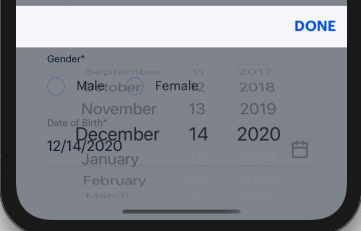
Please kindly help for this.. Thanks in advance
 SriSamVictor
on 14 Dec 2020
SriSamVictor
on 14 Dec 2020
I used this code in appdelegate.
if (@available(iOS 14, *)) {
  UIDatePicker *picker = [UIDatePicker appearance];
  picker.preferredDatePickerStyle = UIDatePickerStyleWheels;
}But now the output is
Please kindly help for this.. Thanks in advance
if (@available(iOS 13.0, *)) {
rootView.overrideUserInterfaceStyle = UIUserInterfaceStyleLight;
}
u might have to use this
 devanshsadhotra25
on 24 Dec 2020
devanshsadhotra25
on 24 Dec 2020
if (@available(iOS 14, *)) {
  UIDatePicker *picker = [UIDatePicker appearance];
  picker.preferredDatePickerStyle = UIDatePickerStyleWheels;
}Hi @jChris85,
I want to display center
Can you help me pls?
i had the same problem with DatePickerIOS inside a modal try settimeout to re render
const DateTimePickerCUSTOM = (props) => {
    const [show, setshow] = useState(false)
    useEffect(() => {
        setTimeout(() => {
            setshow(true);
        }, 1);
    }, [])

    if (show){
        return (
            <DatePickerIOS {...props} />
        )
    }
};

 disnoa
on 30 Dec 2020
disnoa
on 30 Dec 2020
Out of curiosity, is there any way to toggle that datepicker popup directly, without having to go through the wheel or the new iOS 14 date inputs? ie. If I wanted to use a unified display to hold the text value, but
onPressit would show the Android DatePicker or the new iOS picker modal?Facing the same issue. Anyone found a viable solution? Thanks!
also looking for a way to do this. Probably requires a new issue?
 codr36
on 9 Feb 2021
codr36
on 9 Feb 2021
Does anyone have the solution for that with expo?
This is my code:
<DatePicker
        style={{ width: '80%' }}
        date={selectedDate}
        mode="date"
        placeholder="select date"
        format="DD-MM-YYYY"
        minDate="11-2-2021"
        maxDate="1-1-2022"
        confirmBtnText="Confirm"
        cancelBtnText="Cancel"
        customStyles={{
          dateIcon: {
            position: 'absolute',
            left: 0,
            top: 4,
            marginLeft: 0,
          },
          dateInput: {
            marginLeft: 36,
          },
          // ... You can check the source to find the other keys.
        }}
        onDateChange={(date) => {
          setDate(date)
        }}
        display={Platform.OS === 'ios' ? 'inline' : 'default'}
      />
 dorbenzvi
on 11 Feb 2021
dorbenzvi
on 11 Feb 2021
Related issues
 mustafaskyer
·
5Comments
mustafaskyer
·
5Comments
 corradio
·
5Comments
corradio
·
5Comments
 FDiskas
·
3Comments
FDiskas
·
3Comments
 nadav2051
·
5Comments
nadav2051
·
5Comments
 sorinsi
·
5Comments
sorinsi
·
5Comments
Most helpful comment
I found a quick fix for this issue. You can override your preferred Style of the UIDatePicker in your native iOS workspace. Just add the following lines of code in the function
didFinishLaunchingWithOptionsin yourios/APP_NAME/AppDelegatefile.After restarting your app the date picker should show the old wheel style.
This fix can be removed after this package is updated with the new user flow and styling for the iOS 14 date picker.