Datetimepicker: Compiling against the iOS 14 SDK changes the look of the native APIs, so this library looks extremely weird.
Bug report
Summary
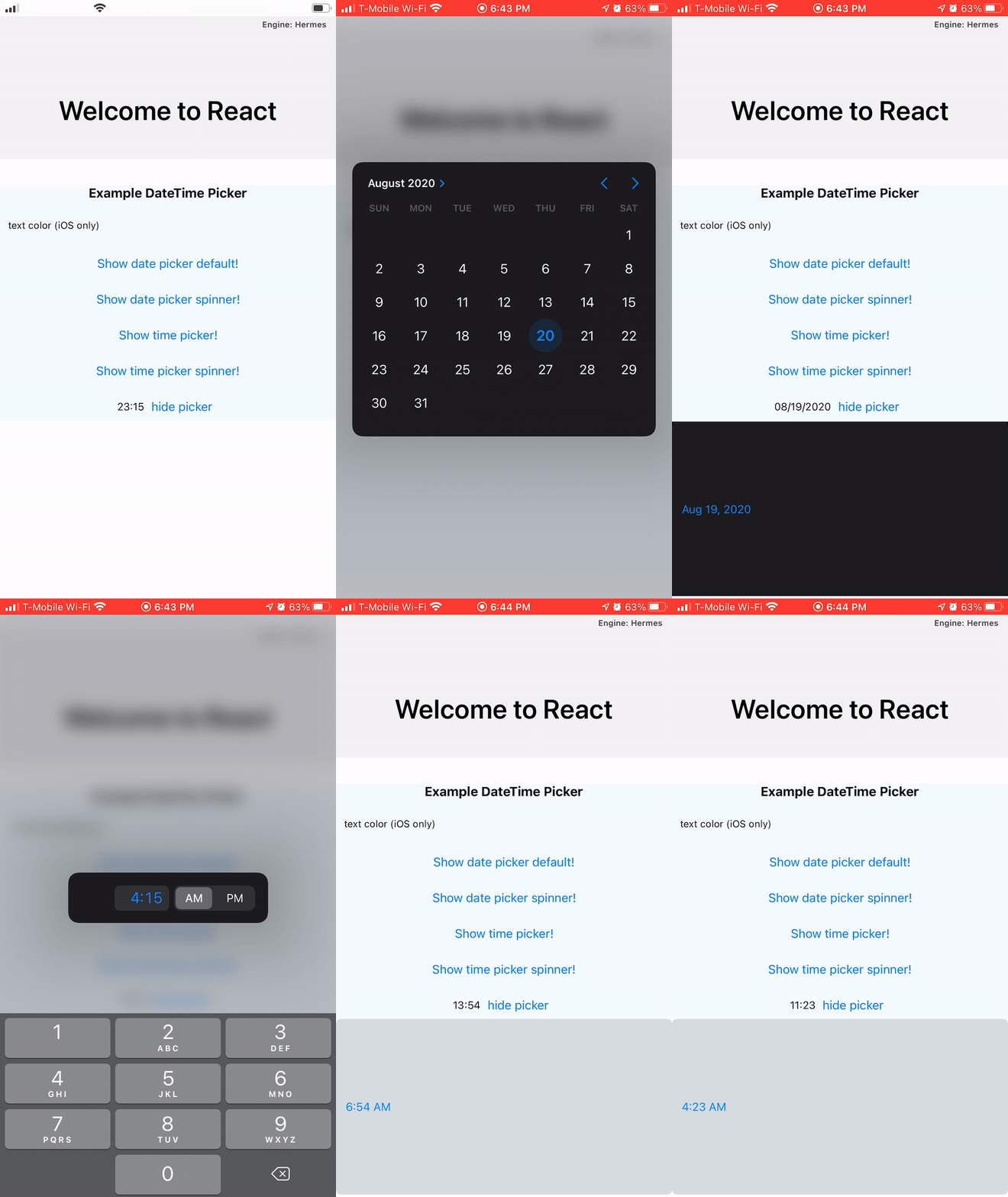
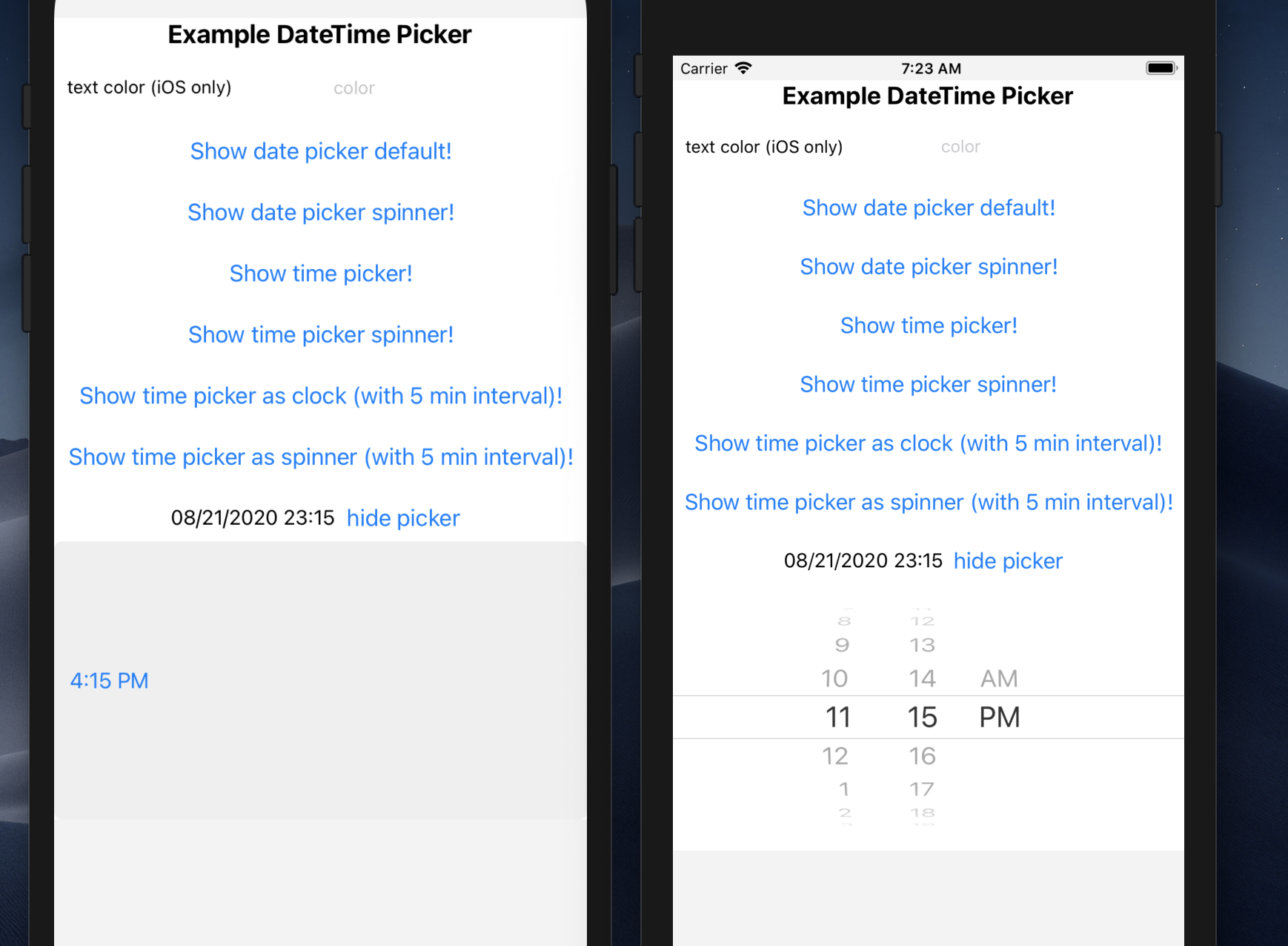
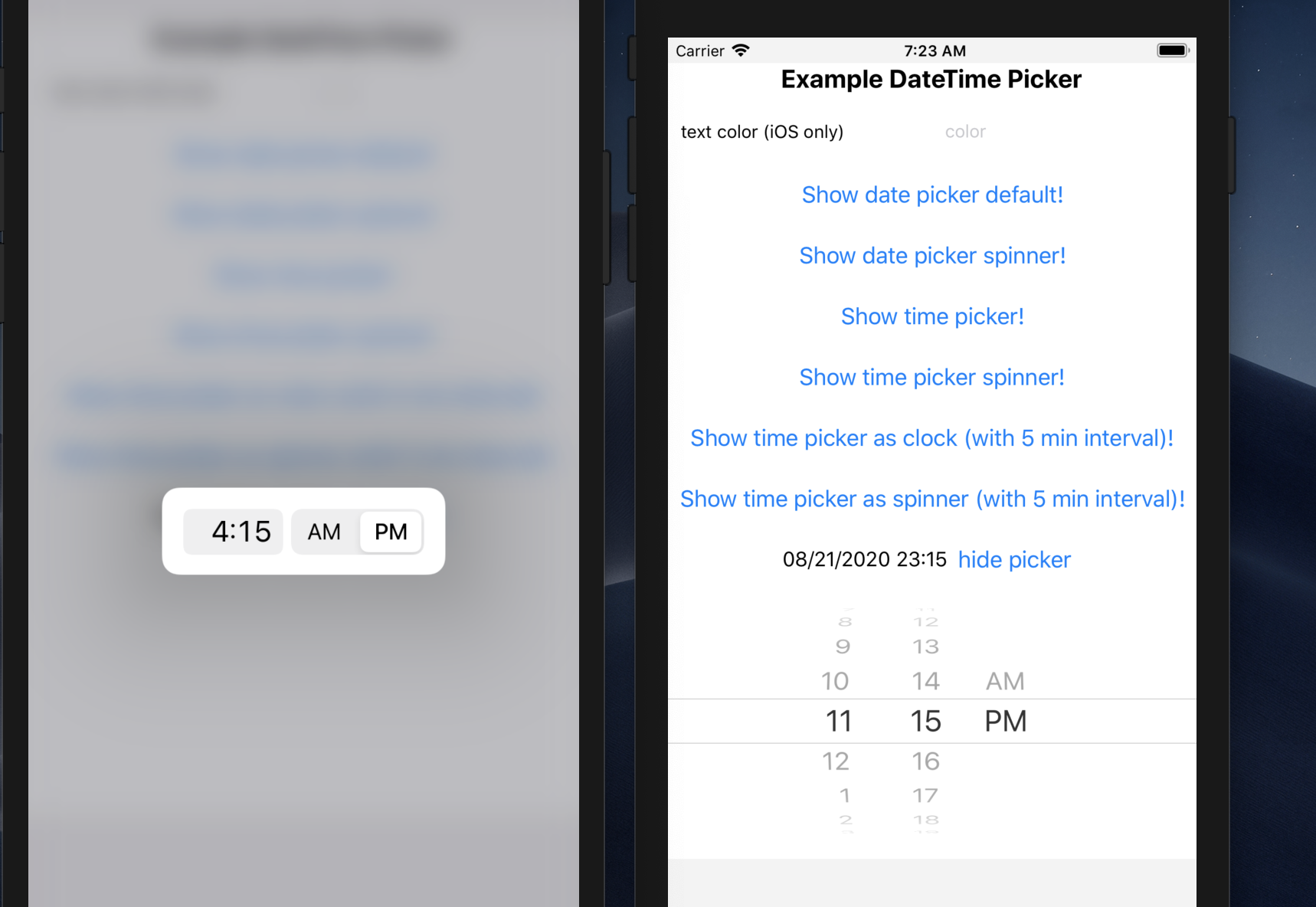
Compiling against the iOS 14 SDK changes the look of the native APIs, so this library looks extremely weird. Namely, the pickers have way too much spacing surrounding them.
Library version: 2.4.2
Using the example app to demonstrate, they look like this:
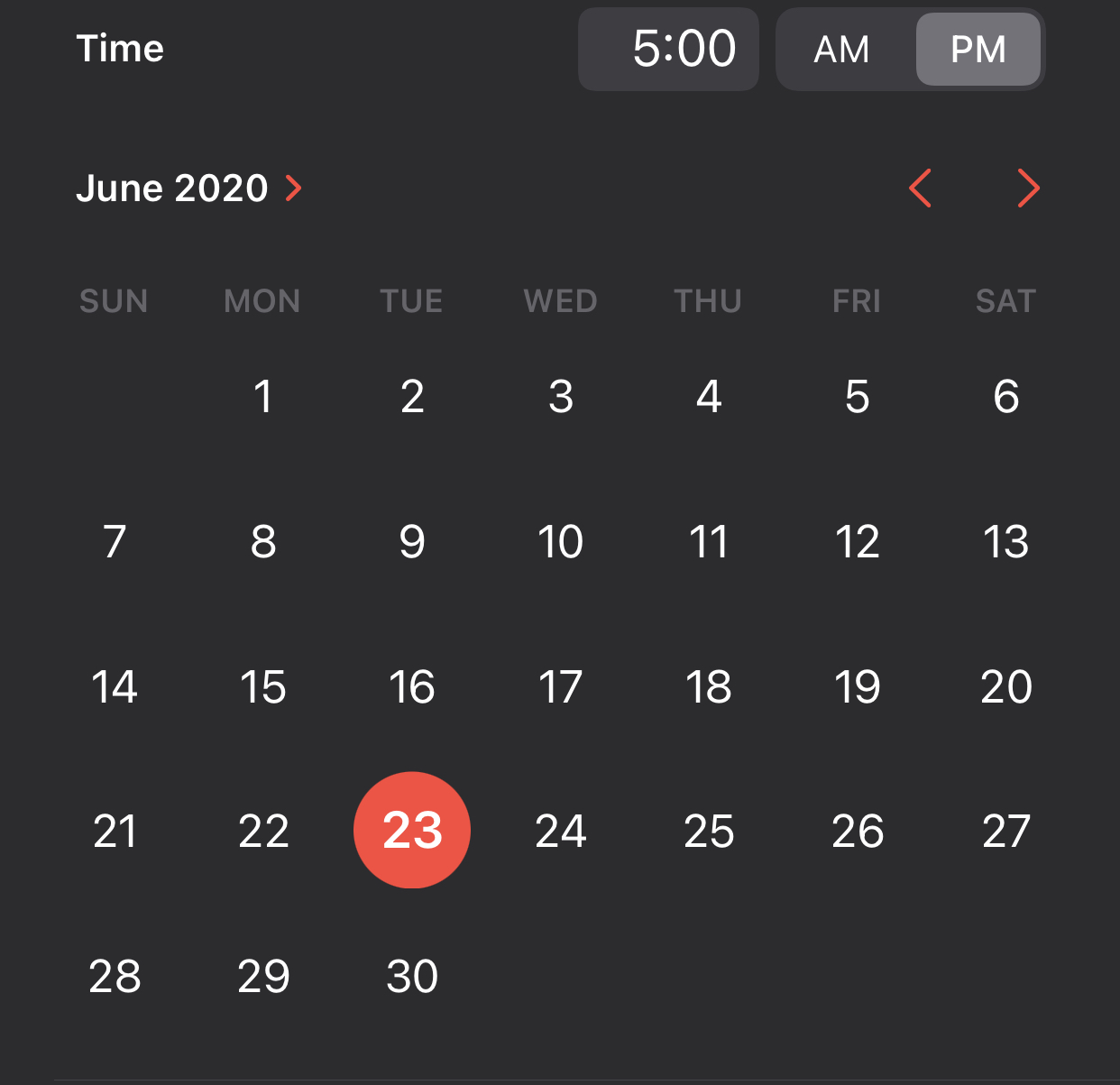
An example of both natively used is in the Calendar app:
 SConaway
All 12 comments
I had this issue too. I read this article and looked into the docs and found out that the preferredDatePickerStyle can be set to UIDatePickerStyle value of Wheels, which is the integer 1.
Similar conclusion for a non-react-native project is mentioned here.
If there would be a way to add an optional property (iOS only) to this component to override the preferredDatePickerStyle to wheels, that would be great! I would create a PR if i knew enough about actual native development.
There is already a style and mode prop so it could be confusing. I would propose a property of appearance that is optional and iOS only that defaults to automatic but can be set to;
EDIT:
If anyone needs it I, was able to get a 24-hour timepicker working in the old style by (ab)using the Picker component.
The code for the CustomPicker is here;
import React, {useState} from 'react';
import {View, Picker, StyleSheet} from 'react-native';
const CustomPicker = props => {
const [hour, setHour] = useState(12);
const [minute, setMinute] = useState(30);
let hours = [];
let minutes = [];
for (let i = 0; i <= 24; i++) {
hours.push(<Picker.Item value={i} label={i.toString()} />);
}
for (let i = 0; i <= 60; i++) {
minutes.push(<Picker.Item value={i} label={i.toString()} />);
}
return (
<View style={styles.container}>
<Picker
selectedValue={hour}
style={styles.picker}
onValueChange={itemValue => {
setHour(itemValue);
props.onValueChange(itemValue, minute);
}}
mode="dialog">
{hours}
</Picker>
<Picker
selectedValue={minute}
style={styles.picker}
onValueChange={itemValue => {
setMinute(itemValue);
props.onValueChange(hour, itemValue);
}}
mode="dialog">
{minutes}
</Picker>
</View>
);
};
export default CustomPicker;
const styles = StyleSheet.create({
picker: {
flex: 1,
margin: 10,
},
container: {
flex: 1,
paddingHorizontal: 10,
alignItems: 'center',
flexDirection: 'row',
},
});
 jwktje
on 1 Jul 2020
jwktje
on 1 Jul 2020
Thanks for looking into it. I'll try to make a PR addressing that tomorrow.
SConaway
on 1 Jul 2020
PR half-completed. I can't figure out objective-c.
On Jul 1, 2020, 9:43 AM -0700, Steven Conaway notifications@github.com, wrote:
Thanks for looking into it. I'll try to make a PR addressing that tomorrow.
—
You are receiving this because you are subscribed to this thread.
Reply to this email directly, view it on GitHub, or unsubscribe.
SConaway
on 3 Jul 2020
Just as an added thing, the previously introduced textColor prop crashes with these new APIs, as shown here:
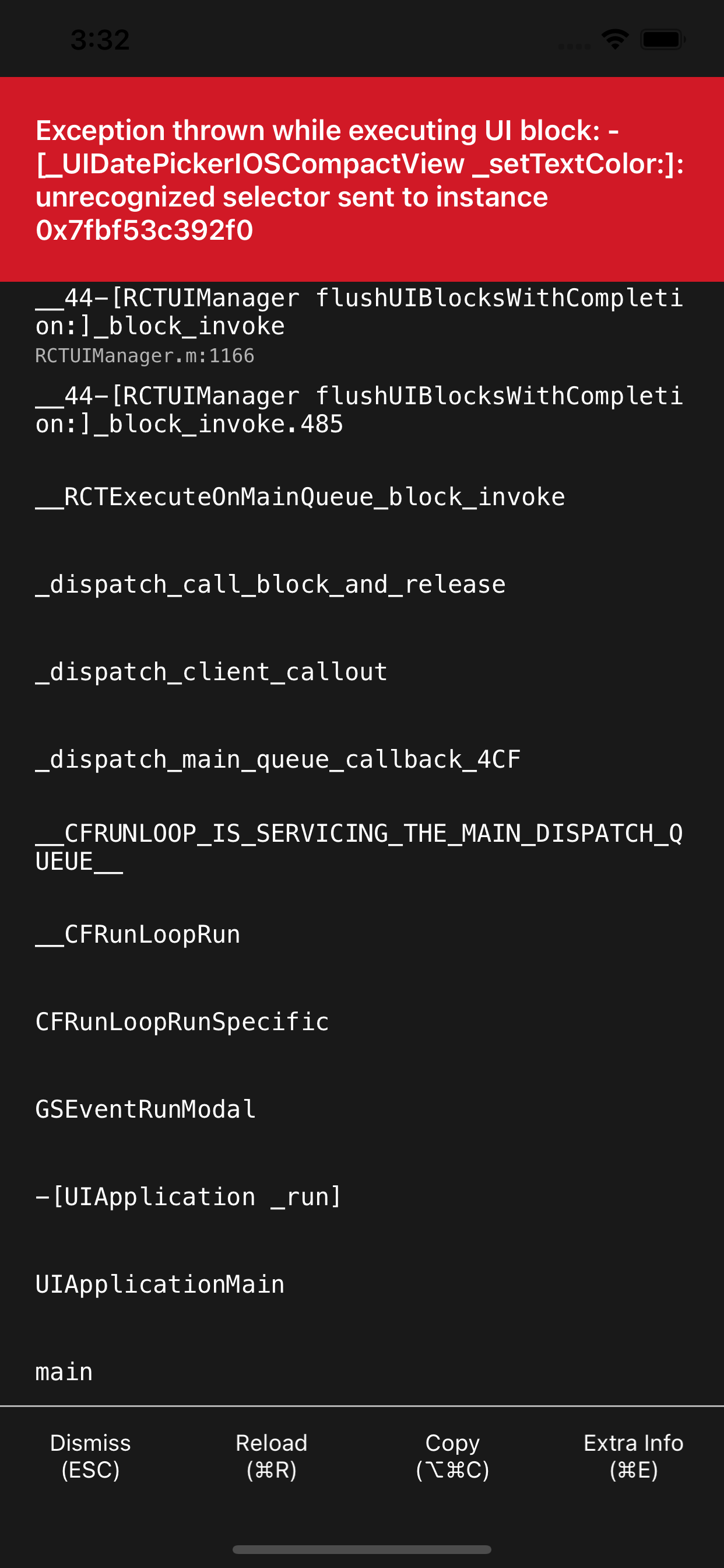
Removing the textColor prop stops the crash.
 somoso
on 6 Jul 2020
somoso
on 6 Jul 2020
@SConaway can you tell me what does it mean to "Compile against iOS 14 SDK", exactly? Cause I got similar problem, though I didn't change anything. With this package, though on iOS 14 it looks like it is supposed to, but on iOS 13 it is just blank for some reason (only on real device)
 gazedash
on 10 Jul 2020
gazedash
on 10 Jul 2020
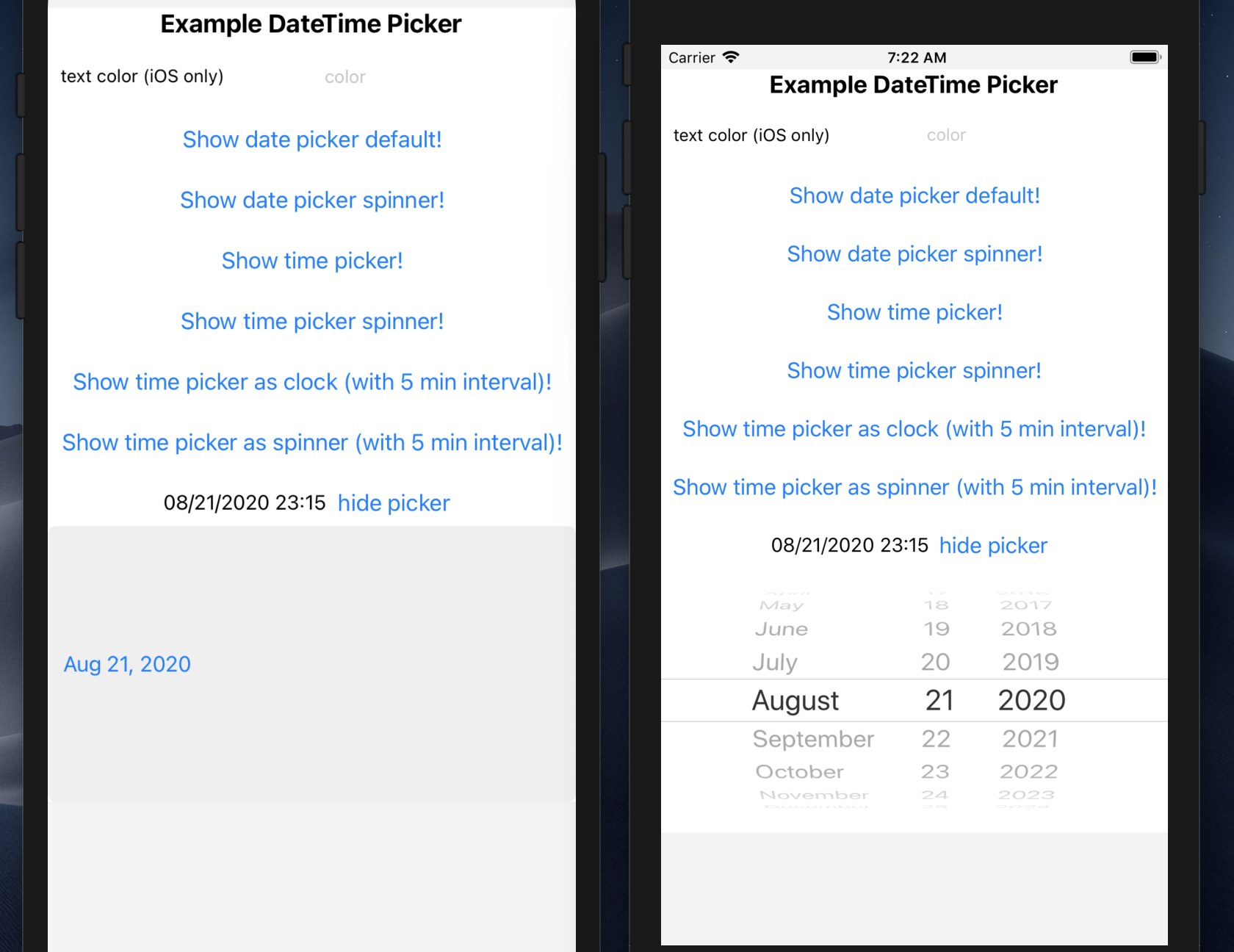
When you're using iOS 14, the appearance changes. See the attached screenshots. iOS 14 is on the left; iOS 12 on the right.

SConaway
on 11 Jul 2020
It seems, that this lib needs maintenance for ios 14.
 NeliHarbuzava
on 30 Jul 2020
NeliHarbuzava
on 30 Jul 2020
@NeliHarbuzava I expect to get this done in a week or two
 vonovak
on 30 Jul 2020
vonovak
on 30 Jul 2020
Sounds good. Feel free to add more to my PR
SConaway
on 30 Jul 2020
Here's a workaround until library gets updated. Add this in AppDelegate.m in your didFinishLaunchingWithOptions:
- (BOOL)application:(UIApplication *)application didFinishLaunchingWithOptions:(NSDictionary *)launchOptions
{
  // ...
  // Workaround until this lands:
  // https://github.com/react-native-community/datetimepicker/issues/203
  if (@available(iOS 13.4, *)) {
    [UIDatePicker appearance].preferredDatePickerStyle = UIDatePickerStyleWheels;
  }
  // ...
}
 scarlac
on 6 Aug 2020
scarlac
on 6 Aug 2020
:tada: This issue has been resolved in version 2.6.2 :tada:
The release is available on:
Your semantic-release bot :package::rocket:
vonovak
on 11 Aug 2020
:tada: This issue has been resolved in version 3.0.0 :tada:
The release is available on:
Your semantic-release bot :package::rocket:
vonovak
on 11 Aug 2020
Related issues
 nadav2051
·
5Comments
nadav2051
·
5Comments
 gokulkulkarni1987
·
3Comments
gokulkulkarni1987
·
3Comments
 Kamalnrf
·
3Comments
Kamalnrf
·
3Comments
 ctohster
·
3Comments
ctohster
·
3Comments
 pro-nasa
·
4Comments
pro-nasa
·
4Comments
Most helpful comment
Here's a workaround until library gets updated. Add this in
AppDelegate.min yourdidFinishLaunchingWithOptions: