Dataverse: File Upload - allow files with same MD5 (or other checksum) in a dataset
If someone uploads a file in a dataset that Dataverse notices already has a file with the same content (both files have the same MD5), Dataverse shows an error and doesn't allow the "duplicate" file to be uploaded.

Issues with this feature have been discussed in another github issue (https://github.com/IQSS/dataverse/issues/2955, closed when File Replace was released in Dataverse 4.6.1), in Dataverse's Google Group here and here, and in a recent Dataverse support ticket, where a depositor wrote that "for uploading shape files for two different polygons but the same projection, it might be nice to be able to upload both at the same time." For this researcher, a common workaround, uploading the file in different double-zipped archived files (7-Zip, tar file, etc) won't work because the journal policy doesn't allow depositors to upload archived files.
 jggautier
All 29 comments
Is the issue here a hash collision or something else? Otherwise, wouldn't the different polygons have different hashes?
 oscardssmith
on 5 Jul 2018
oscardssmith
on 5 Jul 2018
I'm not sure. The files in question for that support ticket are .prj files, defined here as:
an optional file that contains the metadata associated with the shapefiles coordinate and projection system.
So I think the content is the same, but they're meant for different polygons. (It looks like the journal allowed the author to upload the second file in a zip file.)
jggautier
on 21 Aug 2018
- Since we have file hierarchy now (and code deposit in the future), we should re-evaluate this.
 djbrooke
on 10 Jul 2019
djbrooke
on 10 Jul 2019
There's some related discussion in the "Add a checkbox to disable unzipping" issue at https://github.com/IQSS/dataverse/issues/3439#issuecomment-512906912 and below.
Also, as we think about pulling in files from GitHub (#2739 and #5372), we should consider that identical files are somewhat common. There could be identical .gitignore files, for example. It's also common in Python projects to have empty __init__.py files (which all have the same checksum, of course) all over: https://docs.python.org/3/tutorial/modules.html#packages . Geoconnect has a bunch of these:

 pdurbin
on 18 Jul 2019
pdurbin
on 18 Jul 2019
Here's another example of the need to have two files with same content, but different filenames (3D files at UVA):
I have 3 different 3D files that I need to upload. The files include dependencies, for example, the OBJ format includes a .obj (geometry), .jpg (texture) and .mtl (material file that connects the texture with the geometry). I have 2 different OBJ files I need to upload to my dataset. Each has a .jpg texture file that is the same file but named differently. This is necessary for the OBJ file to be able to connect to its specific texture file. DV won't let me upload both files because it thinks the other is the same file even though it is named differently. I need to have both files uploaded.
 shlake
on 13 Aug 2019
shlake
on 13 Aug 2019
@shlake great real world, non-code example. Thanks!
pdurbin
on 13 Aug 2019
May make sense to discuss at the same time as #6574.
djbrooke
on 24 Jan 2020
Technically, this should be straightforward to remove this check. A couple of questions:
Should we remove completely or only if in different folder (i.e. with different paths)?
From the above seems like completely might fill all use cases, but then we do lose something.
In its place, should there be a warning in the UI? ("Note: this file has the same md5 as another file in this dataset")
For the API, we would either not warn or need to implement functionality similar to what we do for move Dataset where we return the warnings and require an extra parameter of "force=true". This seems more problematic with file upload, though, since we wouldn't want the user to have to re upload.
Another alternative for either UI or API could be to have this warning be on publish.
 scolapasta
on 3 Feb 2020
scolapasta
on 3 Feb 2020
In UVa's case above, the "duplicate" is in the same directory. So I vote "no" to just check if in a different folder.
I like a "warning" message, versus a "stop - you can't do that" (and the file not get uploaded).
shlake
on 3 Feb 2020
Definitely UI warning msg confirmation popup at time of upload. Similar to how we warn users in file replace workflow if the new file is a different type than the original, where we ask the user if they want to continue or not.
 mheppler
on 3 Feb 2020
mheppler
on 3 Feb 2020
Thanks @mheppler for offering to include a mockup here so that we can bring it into a sprint soon.
djbrooke
on 3 Feb 2020
_File Type Different popup..._

_Duplicate File popup..._

mheppler
on 4 Feb 2020
For the duplicate file, do we know that the file is a duplicate, or might it be a file with the same name?
 TaniaSchlatter
on 4 Feb 2020
TaniaSchlatter
on 4 Feb 2020
If it's checking MD5 or other checksums (SHA, et al), it is the same file, contents and all.
mheppler
on 4 Feb 2020
@mheppler but a file with same content (same MD5) could have a different filename. So would there need to be a different popup for that? I see two types of duplicates: one with same filename & same content AND one with different filename & same content.
shlake
on 4 Feb 2020
If the user does not want to keep the file, at the time the popup is generated, is the system deleting the file, or canceling the upload/ingest?
TaniaSchlatter
on 4 Feb 2020
We should put together a requirements doc to collect feedback, rather than jamming this issue up with questions and comments.
https://docs.google.com/document/d/1Tm9Vl5_YPcULqzb2EUmC6EIb9bmjICirtRtftXc9vzI/edit
Enjoy. @shlake I already granted you access to that document. We would greatly appreciate your input on your use cases.
mheppler
on 4 Feb 2020
Closed the related issue _Update File Ingest Documentation To Explain Duplicate File Handling #2956_ and making note here that we need to thoroughly review the current documentation of this feature and properly document it the guides.
mheppler
on 4 Feb 2020
@shlake
... but a file with same content (same MD5) could have a different filename. So would there need to be a different popup for that? I see two types of duplicates: one with same filename & same content AND one with different filename & same content.
If somebody tries to upload a file with the name that's already in the dataset, we handle that automatically by adjusting the file name (by adding numeric suffixes) until it's unique.
 landreev
on 5 Feb 2020
landreev
on 5 Feb 2020
Adding some context here re the kind of useful pop-up information.
It would help the user if both (all) duplicate files are identified by name/location . I'm finding myself trying to de-dupe files in a dataset today with hundreds of files in nested folders on account of the bug, but it would be much easier to do if the existing error notice told us the names of both of the files (i.e., duped content, different file names)
 steeleworthy
on 7 Feb 2020
steeleworthy
on 7 Feb 2020
Outcomes from team discussion. Next steps:
[x] Document all the states we need to create warnings for and the states that trigger them
[ ] Have team review the doc
[ ] Draft/document warning messages, UI states that trigger them, feedback/system response
[ ] Share warning messages with the community
TaniaSchlatter
on 12 Feb 2020
Code for checking md5 should be centralized so that all use cases call it - whether through UI, native API, or Sword, and considering zip vs individual files.
scolapasta
on 5 Mar 2020
For API, we do want to still want to provide some form of warning. Rather than failing with the warning (requiring a user to call API a 2nd time with an extra "forcing" parameter), @mheppler suggest we succeed with a warning. In that case, a second call would only be required if the user didn't actually mean to add that file, in which case they would call delete (dataset version would still be draft).
scolapasta
on 5 Mar 2020
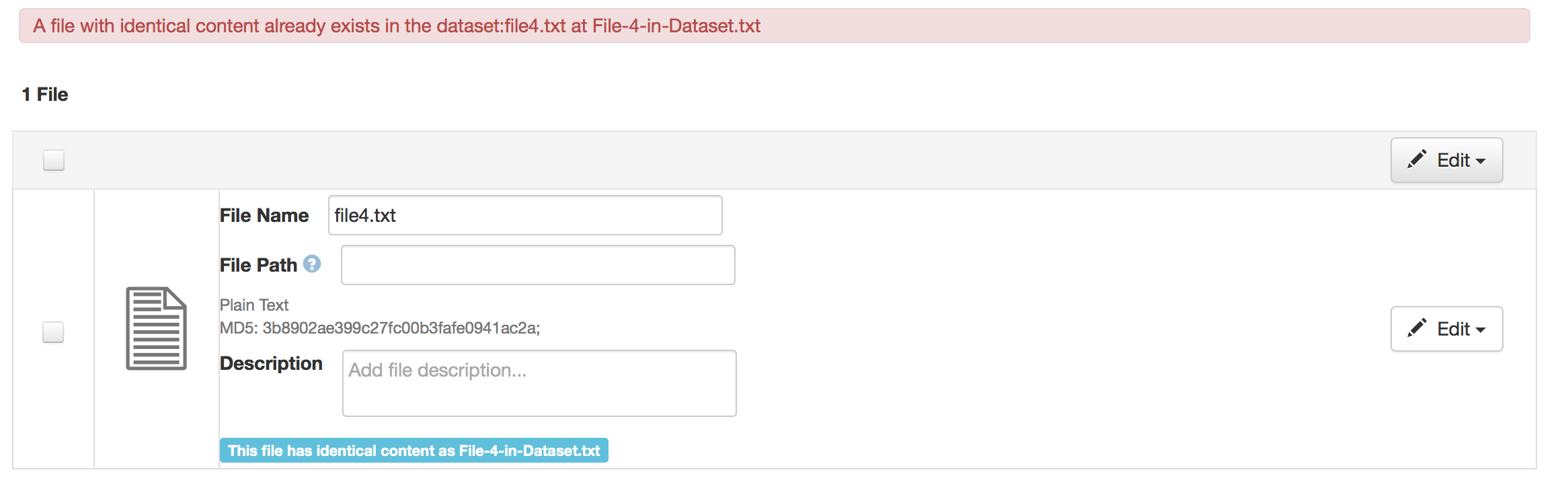
 sekmiller
on 2 Jun 2020
sekmiller
on 2 Jun 2020
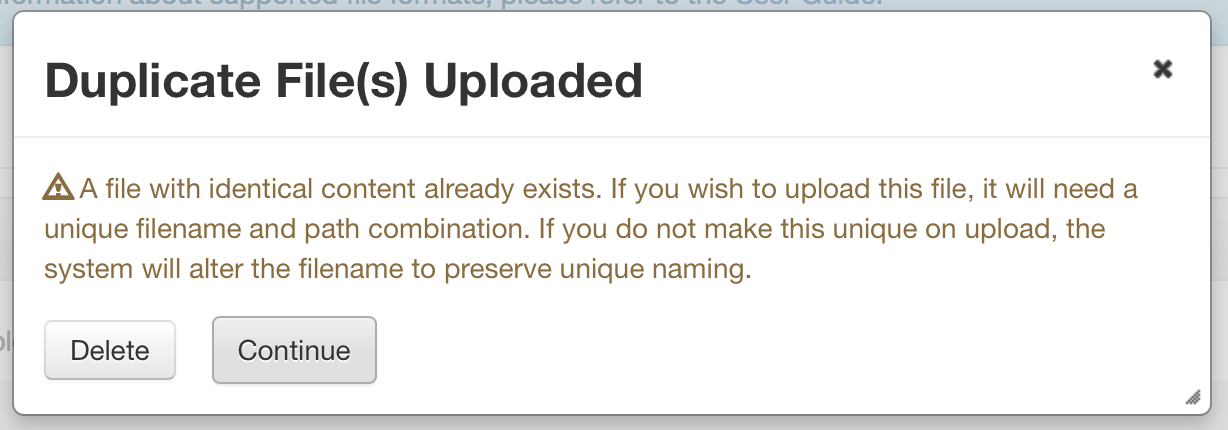
sekmiller
on 2 Jun 2020
Moving notes from Tania here so we don't lose them:
Which workflows do these messages relate to?
_The popup above relates to uploading a file with identical content to a file that already exists in the current version of the dataset. (published or draft)_if the user continues once they have seen the popup, might we address the comment from M. Steelworthy in the issue, and have the appended name include a step back in the path, truncated if necessary? (filep...ath/filename)
_We are adding a note to the uploaded files including the name of the existing file (and path, if available) See the file list above._- I would like the message to state the system rule that has triggered the message, to help educate the user and make system behavior more transparent (or reference where to go for that explanation in the guides). However, I am not sure which rule applies, so, am stuck as to how to change this message. I would like something like, "Dataverse allows files with the same content and same name in different folders, but not the same folder. A file with identical content already exists in the dataset you are adding to. Select "Continue" to have Dataverse append the name of the duplicate file, so each file has a unique name, or delete the file."
_I can update the message in the popup to reflect that._ - The button would be more clear if it said "Delete Duplicate File(s)"
_I can make that change_ How does appending the name address the situation of files with the same content? Its okay to have the same content if the names are different?
_Yes, the new rule is that files with the same content can exist in the same dataset. They can even have the same name if they are in different directories._It sounds like the only situation that is not okay (and thus triggers renaming), is same name, same content, same folder/directory? (Further clarification of bullet 1)
sekmiller
on 2 Jun 2020
All of Tania's notes above have been addressed. moving back to CR.
sekmiller
on 9 Jun 2020
Summary of formatting feedback from the design review. Message text review is in progress.
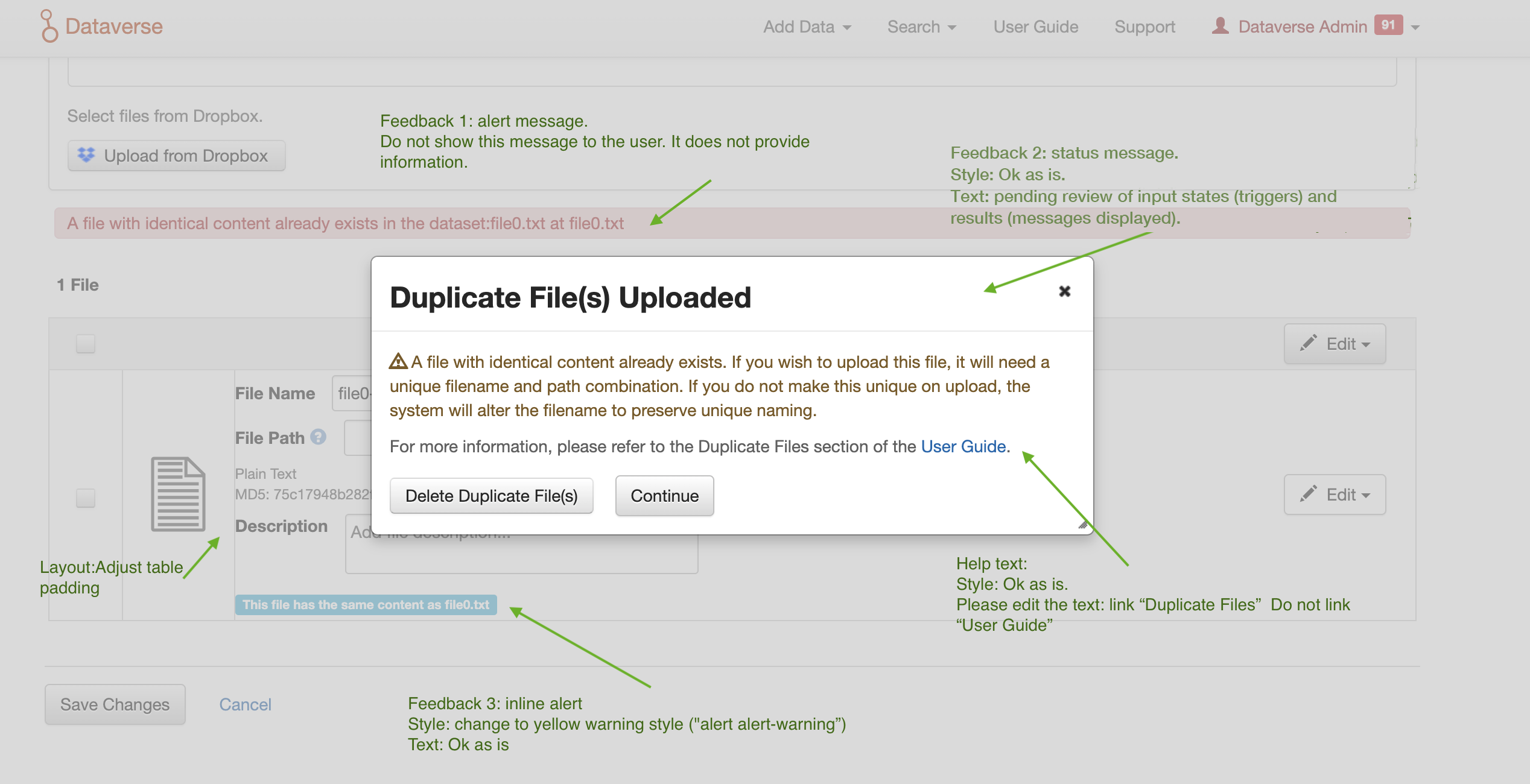
TaniaSchlatter
on 9 Jul 2020
For _documentation and QA_:
Document of use cases and messages
TaniaSchlatter
on 29 Jul 2020
Related issues
 eaquigley
·
44Comments
jggautier
·
80Comments
pdurbin
·
51Comments
eaquigley
·
44Comments
jggautier
·
80Comments
pdurbin
·
51Comments
 borsna
·
60Comments
borsna
·
60Comments
 qqmyers
·
79Comments
qqmyers
·
79Comments
Most helpful comment
Adding some context here re the kind of useful pop-up information.
It would help the user if both (all) duplicate files are identified by name/location . I'm finding myself trying to de-dupe files in a dataset today with hundreds of files in nested folders on account of the bug, but it would be much easier to do if the existing error notice told us the names of both of the files (i.e., duped content, different file names)