Dataverse: Dataset Files DataTable - Paginator, Selection, Download, Counter
Based on feedback from @scolapasta @TaniaSchlatter and @djbrooke on the issue _Spike: Files DataTable, Selection, Paginator vs Scroll #4437_, creating a new issue for development.
Revise the dataset files table to improve UX of the table with improvements to paginator, selection, counter, download and potentially sort features of the dataset pg files table. Bug and feature request issues have been consolidated and included in _Dataset - File UI Improvements #3404_.
If there is anything we learn about performance of this files table, we should add it to this issue, _Performance degradation investigation #3631_.
Defined scope:
- Swap out dataTable liveScroll attribute and instead use the Paginator (out of box paginator will need CSS hacking to look more Bootstrapy)
- Dynamic file counter that shows how many files are being displayed in the table, in addition to how many files total, and how many files are selected
- Text links for selecting all and clearing selections displayed along with the dynamic count of how many files are currently selected
- Review how the current Download button in the dataTable header works with relation to the "select all" hack (#4051) added to the checkbox in the dataTable header

 mheppler
All 28 comments
Regarding performance, there can be front-end refactoring improvements to optimize the XHTML, towards small gains in render and load time.
For example, in filesFragment.xhtml include file for the dataTable, there are 16 references to the DatasetPage.editMode render logic, but in dataset.xhtml there is render logic for empty DatasetPage.editMode that does not display the tab containing the datatable in the include.
<p:tab id="dataFilesTab" title="#{bundle.files}"
        rendered="#{(!DatasetPage.workingVersion.deaccessioned
            or (DatasetPage.workingVersion.deaccessioned and DatasetPage.canUpdateDataset()))
            and (empty DatasetPage.editMode)}">
    <ui:include src="filesFragment.xhtml">
        <ui:param name="fileDownloadHelper" value="#{DatasetPage.fileDownloadHelper}"/>
    </ui:include>
</p:tab>
We had a good discussion about this in Sprint Planning today but there was not consensus on the scope and the approach to take. If anyone from the team is interested in championing this and bringing it back for a future Backlog Grooming or Sprint Planning meeting, I'm happy to facilitate a meeting or other discussions.
 djbrooke
on 9 May 2018
djbrooke
on 9 May 2018
Thanks for working on this again! I love the "Download all files" buttons, but for the same reasons brought up on the recent community group thread, it'd be very helpful to also have an actually working "select all" button. The fact that the select all button works only for visible files is at best inkonvenient (that's for us at QDR as experienced curators) and at worst dangerous, as per the use case reported on the list where a self-depositing user doesn't properly restrict access to all files.
From the thread:
I've just discovered this issue and it is a HUGE issue. If you're restricting files and click the select all box it doesn't restrict all the files in the dataset unless you've scrolled down first. This can cause major problems. This is not clear at all.
 adam3smith
on 17 May 2018
adam3smith
on 17 May 2018
We reviewed and defined behavior for selecting checkboxes:
checkboxes remain selected across pages in the dataset
actions will be performed on selected files, even if files are not visible. Feedback will indicate that the action will be performed on all selected files, and indicate the number of items selected out of the total number of files.
download button text is dynamic and changes to indicate the number of files (selected) that will be downloaded
selecting the checkbox at the top left of the table selects all visible files and provides feedback indicating: number of files selected, total number of files in the dataset, ability to select all files in the dataset, ability to deselect (select none) all files in the dataset.
 TaniaSchlatter
on 24 May 2018
TaniaSchlatter
on 24 May 2018
it'd be very helpful to also have an actually working "select all" button
The comment above my @adam3smith make sense to me and when I saw these mockups at a design meeting last week I said that in general they look great but in addition to the pagination controls, it might be nice to have the ability to "show all". In recent usability tests of Data Explorer (#4249), I'm pretty sure all three participants made use of the "Records Per Page" toggle in the the corner, which looks like this:

This would be especially handy if I have eleven files in my dataset, which is just beyond the pagination cutoff of ten files.
 pdurbin
on 29 May 2018
pdurbin
on 29 May 2018
See the 4th bullet in my comment above, @pdurbin, for how we decided to provide "select all" functionality at this time.
We also discussed adding functionality to "Download all" – the ability to select archival or original formats, which would address issue #4000
TaniaSchlatter
on 29 May 2018
Putting this on ice so that we can get _UI - Primefaces 6.2 Upgrade #4220_ merged to take advantage of the paginator features that were (maybe?) introduced in 6.1 (release notes).
The paginatorTopLeft facet in the showcase example allows for buttons to easily be added and positioned in the dataTable header.
        <f:facet name="paginatorTopLeft">
            <p:commandButton type="button" icon="fa fa-sync" />
        </f:facet>
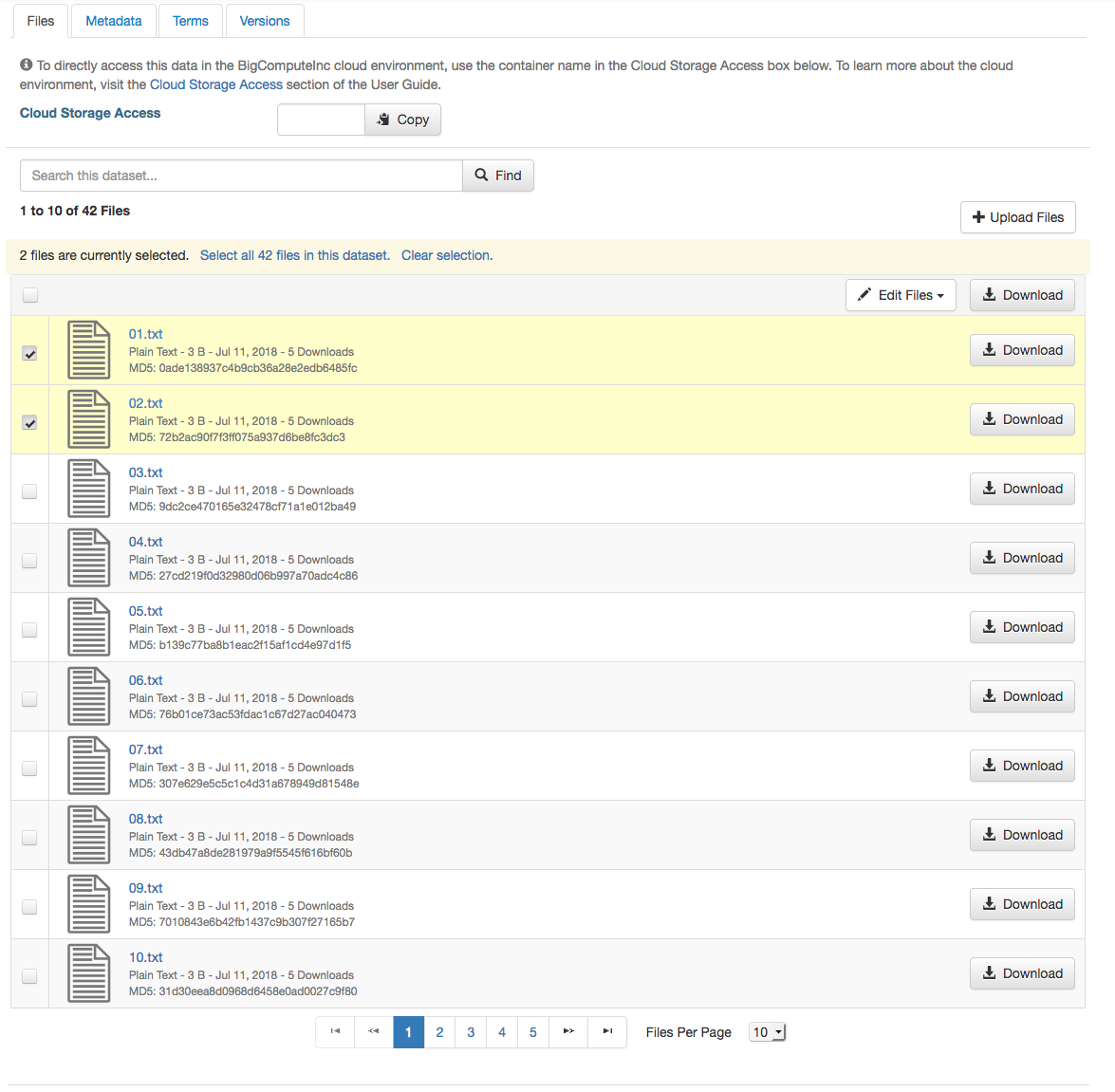
Here is a screenshot of the current progress of the UI. It is pretty close to ready. Other than getting the "Upload Files" and the dynamic counter positioned correctly compared to the mockups, there isn't a whole lot left. There were some bugs related to the dynamic counter and the select-all checkbox, which I had mentioned to @sekmiller as a heads up for future swarming.
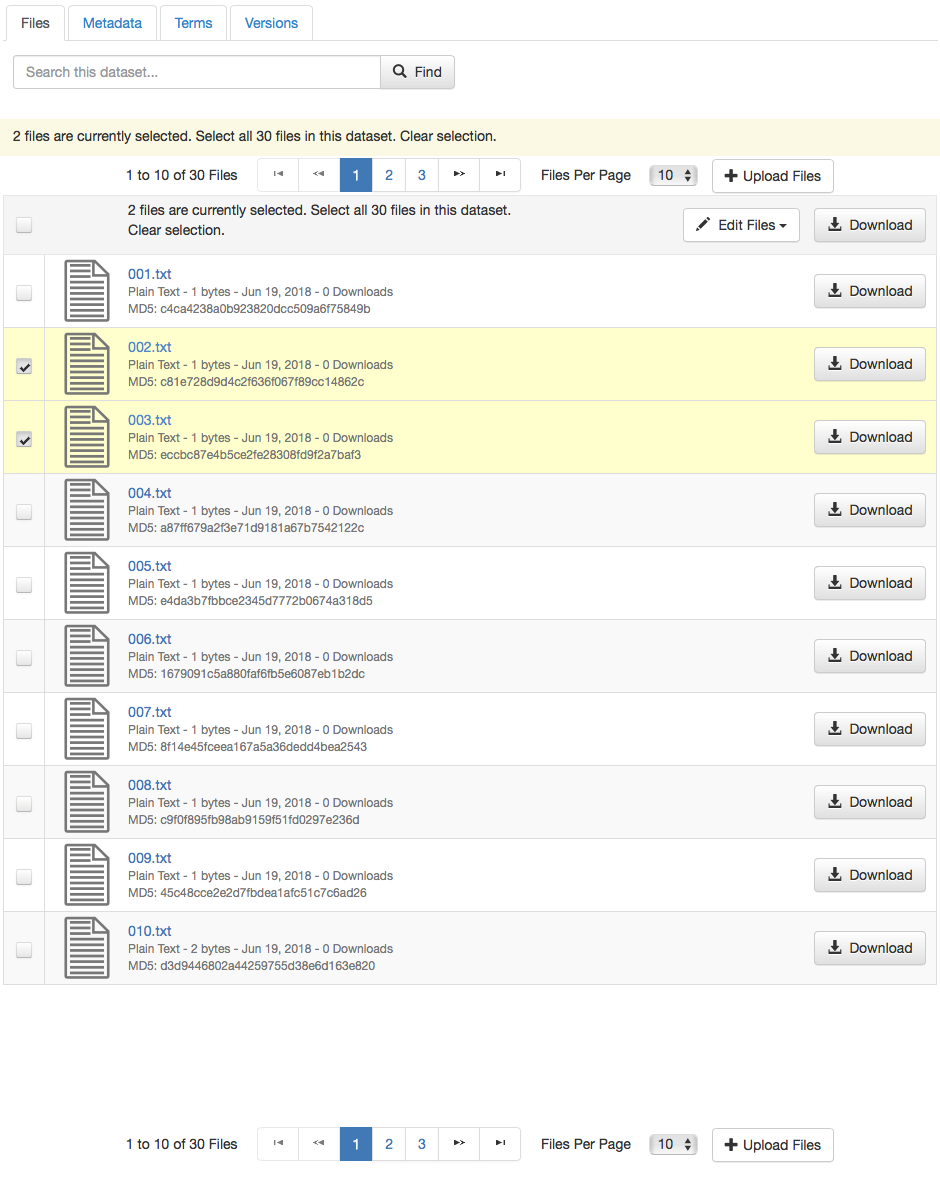
mheppler
on 20 Jun 2018
Found an example of the dataTable dynamic counter work that was done for the File Permissions pg as part of #2716.
                            <p:outputPanel id="selectionRemoveCounter">
                                <p>
                                    <h:outputFormat styleClass="highlightBold" value="#{bundle['dataverse.permissionsFiles.files.selected']}">
                                        <f:param value="#{manageFilePermissionsPage.selectedRoleAssignmentRows.size()}"/>
                                        <f:param value="#{manageFilePermissionsPage.roleAssignments.size()} "/>
                                        <f:param value="#{!empty manageFilePermissionsPage.selectedFile ? bundle['dataverse.permissionsFiles.files.roleAssignees'] : bundle['dataverse.permissionsFiles.files']}"/>
                                    </h:outputFormat>
                                </p>
                            </p:outputPanel>

                            <p:dataTable id="assignedRoles" var="roleAssignment" value="#{manageFilePermissionsPage.roleAssignments}"
                                         selection="#{manageFilePermissionsPage.selectedRoleAssignmentRows}" rowKey="#{roleAssignment.id}"
                                         sortBy="#{!empty manageFilePermissionsPage.selectedFile ? roleAssignment.assigneeDisplayInfo.title : roleAssignment.definitionPoint.displayName}"
                                         scrollable="true" scrollHeight="300" disabledSelection="#{!roleAssignment.definitionPoint.instanceofDataFile}">

                                <p:ajax event="rowSelectCheckbox"  update=":rolesPermissionsForm:selectionRemoveCounter" />
                                <p:ajax event="rowUnselectCheckbox"  update=":rolesPermissionsForm:selectionRemoveCounter" />
                                <p:ajax event="toggleSelect"  update=":rolesPermissionsForm:selectionRemoveCounter" />

                                <p:column selectionMode="multiple" style="width:2%;text-align:center"/>
                                <p:column width="98%" headerText="#{bundle['dataverse.permissionsFiles.usersOrGroups.tabHeader.userOrGroup']}" rendered="#{!empty manageFilePermissionsPage.selectedFile}">
                                    <h:outputText value="#{roleAssignment.assigneeDisplayInfo.title}"/> <h:outputText value=" (#{roleAssignment.assigneeDisplayInfo.affiliation})" rendered="#{!empty roleAssignment.assigneeDisplayInfo.affiliation}"/>
                                </p:column>
                                <p:column width="98%" headerText="#{bundle['dataverse.permissionsFiles.files.tabHeader.fileName']}" rendered="#{!empty manageFilePermissionsPage.selectedRoleAssignee}">
                                    <h:outputText value="#{roleAssignment.definitionPoint.displayName}"/>
                                </p:column>
                            </p:dataTable>
The bugs with the dynamic counter the File Permissions pg seem similar to the bugs with the dataset pg, so hopefully this solution also applies here.
mheppler
on 25 Jun 2018
Also, found a minor bug locally and on demo (4.9) related to the files dataTable and selection. The file thumbnail preview is broken in the files dataTable on the dataset pg when you select files, the page refreshes, and you then hover over the thumbnail to show the preview popover.
mheppler
on 25 Jun 2018
Reminder, check structure.css for ui-datatable-scrollable class name references and revise/remove those as necessary.
div[id$="filesTable"].ui-datatable.ui-datatable-scrollable {padding-right:12px;}

#file-replace-original-block div[id$="filesTable"].col-sm-10 {border:1px solid #ddd;padding:0;}
#file-replace-original-block div[id$="filesTable"] .col-file-thumb {width:74px !important;padding:4px 10px;}
#file-replace-original-block div[id$="filesTable"] .col-file-metadata {padding:4px 10px;}

/* HACK */
div[id$="filesTable"] div.ui-datatable-scrollable-body > table, div[id$="filesTable"] div.ui-datatable-tablewrapper > table {margin-bottom:140px;}
@mheppler and I just discussed this issue. To start the plan is to merge #4780 (4220-primefaces-6-2) and #4806 (4219-bootstrap-upgrade) into the 4656-filetable-paginator branch and then put the code up on https://dev1.dataverse.org so that we call all look at the GUI and decide what the remaining TODO items are for this issue. At a high level I think of this issue as providing relief from the "live scroll" we added in c9b0e1c (v4.2.1 - https://github.com/IQSS/dataverse/releases/tag/v4.2.1 ) which has been a bit problematic in a variety of ways.
pdurbin
on 11 Jul 2018
Somewhat related to selecting files + download, _Restricted Files Download - Fix Height for Warning Popup with Large File List #4472_.
mheppler
on 11 Jul 2018
I just did all the merging described above and below is a screenshot as of 5c3b1fc with Primefaces 6.2 and Bootstrap 3.3.7 from https://dev1.dataverse.org/dataset.xhtml?persistentId=doi:10.5072/FK2/WGWEOM
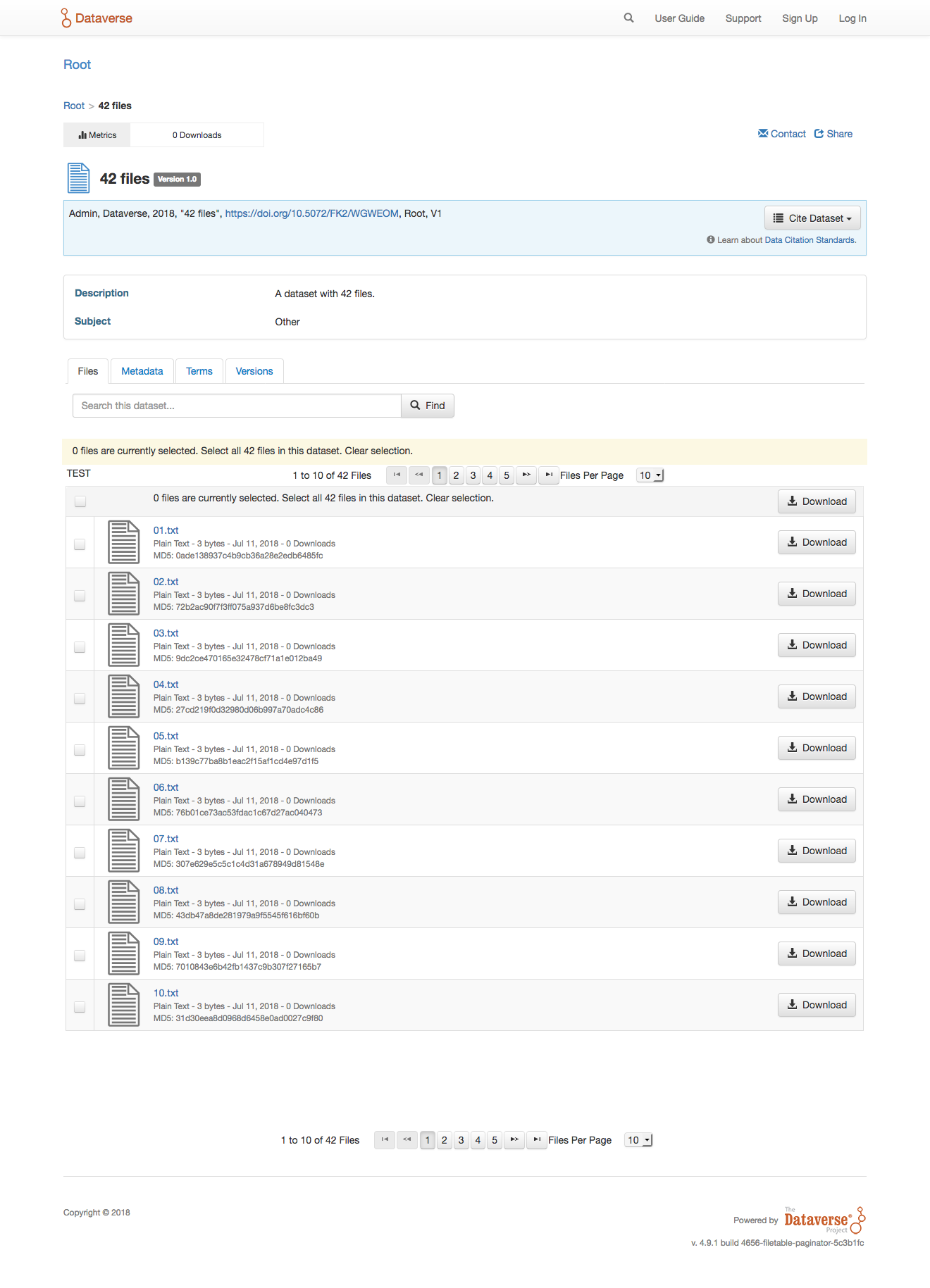
Obviously, we need to remove "TEST", but what else should go on the todo list before we can move this issue to code review?
pdurbin
on 11 Jul 2018
@mheppler and I just came up with this TODO list:
- [x] Remove one of the duplicate "selection messages" (i.e. "0 files are currently selected. Select all 42 files in this dataset. Clear selection."). Done in e85acee.
- [x] Make "Clear selection" link work (actually do something). Fixed in 68ba2b0.
- [x] Make "Select all NN files" link work (actually do something). Fixed in 68ba2b0.
- [x] Select all checkbox (in table header) bugs: Clicking checkbox doesn't change selection message. Fixed in 68ba2b0.
- [x] Decide on a better wording for a single file instead of "Select all 1 files in this dataset." Fixed in 8008558.
- [x] Move all English text to Bundle.properties. Fixed in 8008558.
- [x] Remove "TEST"
- [x] Right align "Upload Files" button.
- [x] Styling of the paginator has been lost. Make more Bootstrappy.
- [x] Move pagination to only display at bottom, like it does on dataverse pg
- [x] Add render logic to pagination to only display if there are more than 10 files
- [x] Add render logic to "selection messages" to only display "select all" message if there is more than one file and selected files is not greater than/equal to total file count
- [x] Remove old Restrict and Delete buttons from top of table that were moved in 4.6.2
- [x] Selection message does not show up on the first selection ...but it does on the second?
- [x] Selection message still reads "file(s)", add dynamic logic (e.g
{0, choice, 0#Files|1#File|2#Files}) - [x] Dynamic counter is only displayed in pagination at the bottom of table, move to the top of table (needs custom solution and not just
{CurrentPageReport}used in dataTablepaginatorTemplateattribute). Done in 53415d6 and 76c6c33. - [x] Revert the hacks in pull request #4363 to undo the change to the behavior of the "select all files on page" checkbox that we implemented in #4051. Done in 53415d6.
pdurbin
on 11 Jul 2018
@mheppler and I just discussed the state of the code as of 2fcc12f and poked around where it is deployed at https://dev1.dataverse.org
We agreed that he's going to go ahead and make commits to fix the left-align, right-align, and styling items in the checklist above so I'll add him to this issue.
I'll leave myself on the issue for now. I will need to pick @sekmiller 's brain because Mike wants us to undo the hacks added in pull request #4363 for the "select all" checkbox. He and I also noticed a bug with file selection counts when you start using the "select all" checkbox. Here's a demo of the bug. When you click the "select all" checkbox, it still says "2 file(s) are currently selected":
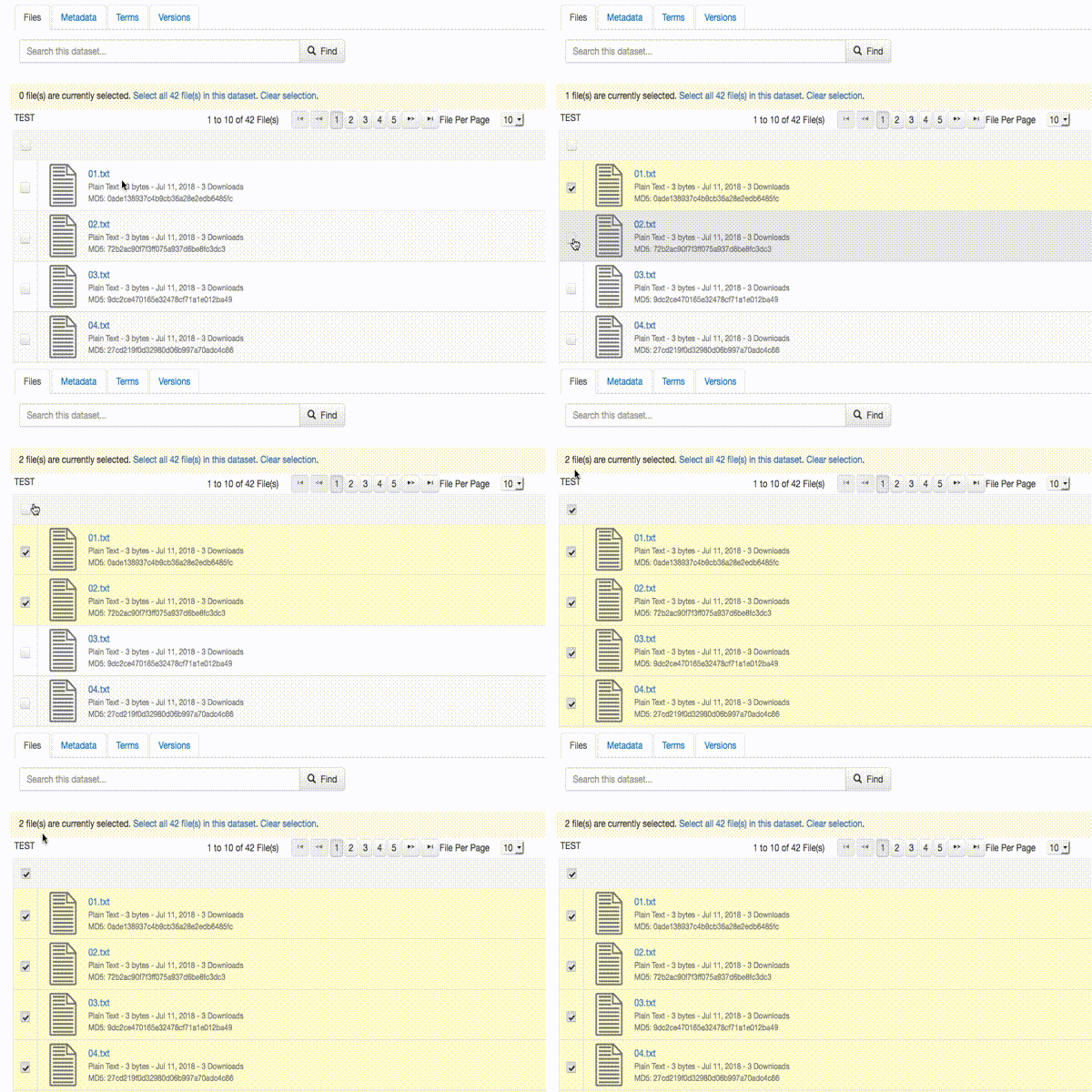
(I used "OS X Screencast to animated GIF" at https://gist.github.com/dergachev/4627207 by the way!)
pdurbin
on 12 Jul 2018
I just showed @sekmiller the screen recording above and he said he'd take a look. The branch is "4656-filetable-paginator". We also tried with no files selected and only clicking the "select all" checkbox results in "0 file(s) are currently selected".
pdurbin
on 13 Jul 2018
@sekmiller fixed the bug above in 45981b3 and he and I have resolved to stop calling that checkbox the "select all" checkbox because it's misleading. When a dataset has 42 files "select all" implied that all files will be selected. That's not what the checkbox does. It selects all the files that are visible on the current page. So if you want all the files on page 2 and 4, you navigate to page 2, check the box, navigate to page 3 (the box will no longer be checked), navigate to page 4 (still unchecked), and the check the box again, bringing your total count of selected files to 20 (using the default of 10 files per page). I guess we could call it the "select all files on page" checkbox but that's a mouthful. Thankfully, it behaves more or less the same as Gmail, so that's a good mental model for it.
Related to this, @sekmiller and I just double-checked with @djbrooke that for this issue we are definitely reverting the hacks in pull request #4363 and so undoing the change to the behavior of that checkbox that we implemented in #4051. Since @sekmiller made that pull request he is in a much better place than I am to back it out and test that nothing was broken in the process and he's happy to do it, so I'm removing myself from this issue. I'll add an item above to revert the pull request in the TODO list above. @mheppler is still working on the UI related fixes.
pdurbin
on 13 Jul 2018
I put the latest code (63efaf5) on https://dev1.dataverse.org and @TaniaSchlatter @jggautier @djbrooke @scolapasta @mheppler @dlmurphy and I just talked through the current state during a design meeting. Here's a screenshot:
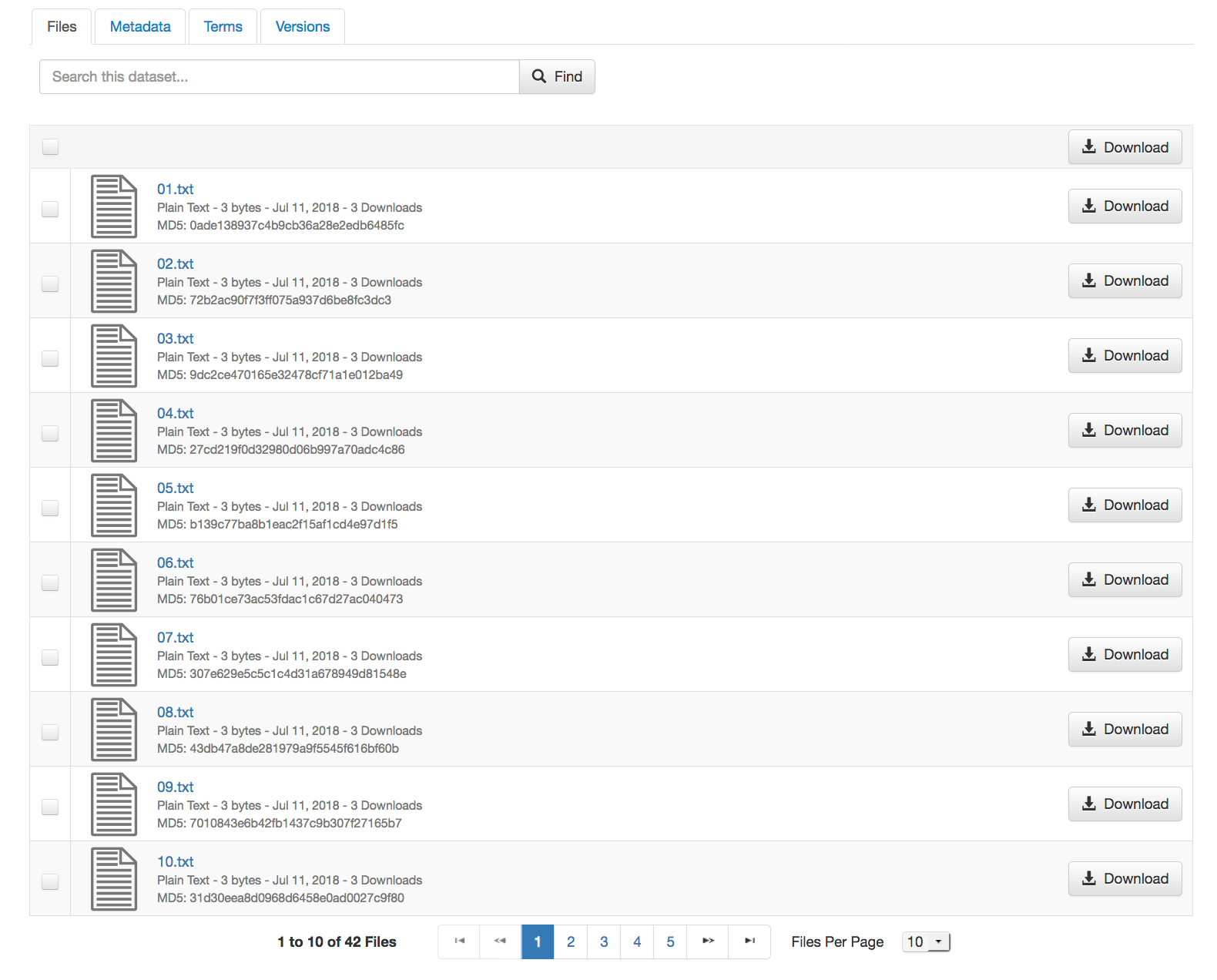
@mheppler talked through the need to have more information above the table and @scolapasta suggested looking at https://stackoverflow.com/questions/17487670/update-component-at-change-of-page-on-primefaces-datagrid-with-pagination
pdurbin
on 17 Jul 2018
In #2506, there was a commit 5367b8ca0a3164b1bd8d3700e77dae72c42c90c4 to disable a sort button on the dataset pg files table, because it was too buggy to ship. The button code and render logic was left in the XHTML however. I am removing it in this branch, and we can revisit this feature as part of #2506.
<div id="sortBlock" class="button-block btn-group pull-right" jsf:rendered="#{DatasetPage.sortButtonEnabled and DatasetPage.fileMetadatas.size() gt 1}">
                        <button type="button" class="btn btn-default dropdown-toggle" data-toggle="dropdown">
                            <!--SORT BUTTON-->
                            <span class="glyphicon glyphicon-sort"/> #{bundle['file.results.btn.sort']} <span class="caret"></span>
                        </button>
                        <ul class="dropdown-menu multi-level pull-right text-left" role="menu">
                            <li>
                                <p:commandLink update="@form,:messagePanel" actionListener="#{DatasetPage.updateFileListing(DatasetPage.fileSortFieldName, DatasetPage.sortByAscending)}">
                                    <h:outputText value="#{bundle['file.results.btn.sort.option.nameAZ']}"/>
                                </p:commandLink>
                            </li>
                            <li>
                                <p:commandLink update="@form,:messagePanel" actionListener="#{DatasetPage.updateFileListing(DatasetPage.fileSortFieldName, DatasetPage.sortByDescending)}">
                                    <h:outputText value="#{bundle['file.results.btn.sort.option.nameZA']}"/>
                                </p:commandLink>
                            </li>
                            <li>
                                <p:commandLink update="@form,:messagePanel" actionListener="#{DatasetPage.updateFileListing(DatasetPage.fileSortFieldDate, DatasetPage.sortByAscending)}">
                                    <h:outputText value="#{bundle['file.results.btn.sort.option.newest']}"/>
                                </p:commandLink>
                            </li>
                            <li>
                                <p:commandLink update="@form,:messagePanel" actionListener="#{DatasetPage.updateFileListing(DatasetPage.fileSortFieldDate, DatasetPage.sortByDescending)}">
                                    <h:outputText value="#{bundle['file.results.btn.sort.option.oldest']}"/>
                                </p:commandLink>
                            </li>
                            <li>
                                <p:commandLink update="@form,:messagePanel" actionListener="#{DatasetPage.updateFileListing(DatasetPage.fileSortFieldSize, DatasetPage.sortByDescending)}">
                                    <h:outputText value="#{bundle['file.results.btn.sort.option.size']}"/>
                                </p:commandLink>
                            </li>
                            <li>
                                <p:commandLink update="@form,:messagePanel" actionListener="#{DatasetPage.updateFileListing(DatasetPage.fileSortFieldType, DatasetPage.sortByAscending)}">
                                    <h:outputText value="#{bundle['file.results.btn.sort.option.type']}"/>
                                </p:commandLink>
                            </li>
                        </ul>
                    </div>
I spoke with @mheppler this morning and it sounds like we're going to try https://stackoverflow.com/questions/17487670/update-component-at-change-of-page-on-primefaces-datagrid-with-pagination so I guess I'll give it a shot.
pdurbin
on 18 Jul 2018
The two checklist items in the comment from Phil still require attention. In my latest commit, I added a TO-DO list into filesFragment.xhtml above the static counter I returned to the top of the dataTable, so that it may be dynamisized(?).
- [x] Convert static "1 to 10 of..." to dynamic counter wired to dataTable paginator with p:ajax
- [x] Use h:outputFormat and f:param as we see here, with {0} and {1} in the bundle message rather than multiple bundle strings currently used in currentPageReportTemplate
- [x] Conditional display dynamic "# to # of..." if the paginator is required (e.g. "1 File", "10 Files", "1 to 10 of 11 Files")
- [x] Remove {CurrentPageReport} from paginatorTemplate attribute, as well as currentPageReportTemplate attribute. Done in 76c6c33.
- [x] Sanity check configurable Compute UI elements above the dataTable to make sure we didn't break nothing
- [x] Fix misleading "# Files Selected on Upload Files/Edit Files pg? Fixed in 5c8b182.
- ?Copy over new selection message to Upload Files/Edit Files pg? (out of scope)
That should be every thing. Will meet with @pdurbin in person to make sure he's on board.
mheppler
on 18 Jul 2018
As I mentioned at standup, I'm blocked trying to implement the StackOverflow suggestion above. In 8e1796f I pushed my progress with FIXMEs but I need help from someone who knows and loves JSF.
pdurbin
on 19 Jul 2018
@sekmiller is working on this: Revert the hacks in pull request #4363 to undo the change to the behavior of the "select all files on page" checkbox that we implemented in #4051.
He also tried to implement the StackOverflow suggestion above and couldn't get it working. (I spent about three hours trying to get it to work). Since we're both blocked, I'm adding @scolapasta to unblock us. Either we get it working or we need a new plan/design.
pdurbin
on 20 Jul 2018
I have been able to get the update of the files displayed to work when the page is changed (1-10 changed to 11-20 when you go to page 2). Still working on the update when change is from 10 files per page to 25 or 50.
 sekmiller
on 23 Jul 2018
sekmiller
on 23 Jul 2018
@sekmiller great news! You don't seem to be blocked to I narrowed the assignees for this issue to be just you. If there's an opportunity to swarm on this, please let me know!
pdurbin
on 23 Jul 2018
I just deployed 53415d6 to https://dev1.dataverse.org if anyone wants to take a look. Thanks, @sekmiller !!! You are my JSF hero.
There's still a little cleanup Mike wanted so I'm going to jump on the branch and see what I can do.
pdurbin
on 23 Jul 2018
I just updated the to do lists above and made pull request #4881 and will move this to code review.
One of the items was to sanity check how the compute button looks so here's a screenshot:
pdurbin
on 23 Jul 2018
Generally works well. Found a few file count display issues:
- [x] Changing the display size can corrupt the file count
1,901 to 1,000 of 1,000 Files
To reproduce:
-upload 1000 files (probably would happen with less but >2x50
-Click on button to go to end of pages.
-Change files per page to 25, then to 50. Notice count displayed is recalculated incorrectly.
[x] Uploading files on dataset creation displays an unusual file count on upload page:
51 to {1} of {2} {2}. Fixed in 3daf217.[x] Upload files after dataset creation says files selected on upload page, rather than just files as in previous version:
10 Files Selected (Fixed in 5c8b182.)
OK everything works on multiple browsers.
On a personal note, would be nice to have the paginator at top too and numbers also at bottom. I'm finding it awkward to page, scroll up, look at numbers, scroll down, page again, etc.
 kcondon
on 24 Jul 2018
kcondon
on 24 Jul 2018
Related issues
 eaquigley
·
52Comments
eaquigley
·
52Comments
 borsna
·
60Comments
borsna
·
60Comments
 pameyer
·
55Comments
adam3smith
·
51Comments
pameyer
·
55Comments
adam3smith
·
51Comments
 astrofrog
·
62Comments
astrofrog
·
62Comments