Dataverse: As a researcher, I want to enter or upload the provenance for my file so that I can provide other researchers with additional information about the history of my data.
The mockups supporting this user story are available here:
https://drive.google.com/file/d/1AO_L0utJwjHEBxpj5b2xNiVkOjOG545D/view
This story covers the submission and validation of a JSON file, and the submission of manually entered provenance.
 djbrooke
All 69 comments
In cc09abf I stubbed out the validation that the prov file is JSON and can be parsed an a JSON object rather than a JSON array.
 pdurbin
on 7 Dec 2017
pdurbin
on 7 Dec 2017
In our usability testing of our Provenance mockups yesterday, we had one major piece of UI feedback that applied to this mockup:

When you upload a provenance file, the "Upload Provenance File" box is still displayed and active. This led the participant to think that it was possible to upload more than one provenance file. Because he is very familiar with provenance, he was startled to think that we'd messed this up and allowed multiple file upload.
An easy fix is to simply remove the file upload box once a provenance file has been uploaded, and only display it again if the user clicks the "X Remove" button.
 dlmurphy
on 8 Dec 2017
dlmurphy
on 8 Dec 2017
As of 7948579 we are storing both types of provenance data:
- "Bundle File" (PROV-JSON, a W3C standard): stored as an "auxillary" file for a datafile (like thumbnails)
- "Description" ("free-form", a text box): stored to a new
provfreeformcolumn on thefilemetadatatable
To be clear, this is where the two types will go after you click "Save Changes". There's still staging work to do for the UI. Clicking "Cancel" means nothing that's been staged will be persisted at all.
pdurbin
on 8 Dec 2017
Usability testing yesterday also got us feedback on some of the instructional text for this popup:

Based on our participant's feedback, I recommend changing this message:
"Please add any information required to accurately document the history of this data file, including how it was created and how it was transformed."
TO
"In addition to a bundle file, or in place of one, you may add any information required to accurately document the history of your data file, including how it was created and how it was transformed."
I also recommend changing Description to Provenance Description.
dlmurphy
on 8 Dec 2017
Lastly, @mheppler pointed out during usability testing that we need a "Cancel" button added to this popup modal:

dlmurphy
on 8 Dec 2017
What we are building
Include recommendations from testing as outlined above by @dlmurphy and ok'd by @taniaschlatter and @djbrooke and the following:
File Upload Pg
- Edit button for each file with dropdown menu for Provenance (combine "Edit Tags" button as a dropdown option, as well as Delete, Restrict and Unrestrict)
- New Edit dropdown button in the table header, consistent with the Edit File dropdown button in the files table header on the dataset pg (the Provenance option will not be linked from this button, we are not supporting batch/multi-file editing for Provenance)
Provenance (Edit) Popup
- New Provenance popup will provide help text and form input for the "Provenance Bundle" and the "Provenance Description", along with Save Changes and Cancel buttons
- Provenance Bundle form input is a file upload widget that validates JSON format (a nice to have is to validate against the W3C schema)
- Upon uploading valid bundle, the upload widget is hidden, and a Remove and Preview button are displayed next to the bundle file name
- Remove button removes uploaded bundle file, the upload widget is then displayed again
- Preview button opens Provenance graph in new window
- Provenance Description form input is a textarea component
- Save Changes stages changes as part of the File Upload workflow
- Cancel deletes changes
Provenance (Confirmation) Popup
- Warning text explaining user must preview the Provenance info they added before publish, because you can not change it after you publish your dataset
- Continue button brings user back to File Upload workflow
- Cancel button brings user back to Provenance (Edit) popup
 mheppler
on 11 Dec 2017
mheppler
on 11 Dec 2017
When we have a better sense of the graph, it may make more sense and streamline the flow to include the Preview in a modal.
 TaniaSchlatter
on 12 Dec 2017
TaniaSchlatter
on 12 Dec 2017
Mockup of the Edit dropdown button in the table header for File Upload pg, as referenced in checklist above.
This is intended to bring the functionality of the same Edit Files dropdown button on the dataset pg to the File Upload pg.

mheppler
on 12 Dec 2017
Sorry, meant to delete a comment not close the story!
 matthew-a-dunlap
on 12 Dec 2017
matthew-a-dunlap
on 12 Dec 2017
Questions:
- The Provenance (Confirmation) Popup happens when clicking "Save Changes" on the file upload page? Or does it happen when clicking save changes on the provenance (Upload) popup?
- The notes on this popup says "explaining user must preview the Provenance". Are we enforcing this? In other words, are we requiring they view the graph and only allowing publication if that has happened?
matthew-a-dunlap
on 13 Dec 2017
One more:
- On the file upload page, do we want to change the buttons for the multi-file restrict and delete? Not sure if it needs it but it may be good to re-align it with the new per-file dropdown.
matthew-a-dunlap
on 13 Dec 2017
@matthew-a-dunlap
- Confirmation popup is after save on the Provenance popup, before the user is returned to the File Upload pg
- There is no enforcing of a preview
- Yes, we want consistency with all our Edit buttons as scalible solutions going forward for all the actions related to files
mheppler
on 13 Dec 2017
High level To-Do:
- [x] Freeform provenance commands: read, delete, update
- [x] JSON-based provenance commands: read, delete, update
- [x] Wire up file page for provenance editing: option in dropdown and popups
- [x] Wire up upload page for provenance editing: updating file table with per file dropdowns, edit global dropdown and and popups
- [x] Provenance main popup aesthetics
- [x] Provenance confirm popup aesthetics
- [x] Error dialog on save failure
- [x] Code cleanup
- [x] API tests for Provenance read/delete
- [x] Ensure normal upload work
Known bugs and issues:
- [x] Cannot save blank freeform provenance info via UI, likely due to nature of freeform text box.
- [x] Save after removing provenance json via popup does not complete. Pretty sure it worked before adding the confirm popup. This also causes the popup to get into a state where it won't reopen
- [x] Are the update commands needed? it just calls remove followed by create, and should probably be taken out of the codebase.
matthew-a-dunlap
on 19 Dec 2017
Cleaned up the layout of the new Edit button in the table header on File Upload pg.
NOTE: Discovered that the file upload does not work. Once you select a file from your computer, it does not display in the file table, and there are no errors logged by glassfish. I assume that @matthew-a-dunlap is aware of this, based on the lengthy to-do checklist in his comment above.
Also, merged develop branch and resolved conflicts in structure.css in order to get bug fixes from @sekmiller in the work on #4051.

mheppler
on 20 Dec 2017
I've finished the parts of the Provenance user guide that I can write from just the mockups. Once this reaches a point where I can demo the feature, I'll want to go back and make a few additions.
dlmurphy
on 21 Dec 2017
Working on the upload functionality now and thinking about the flow. Here are some questions I have in the same vein:
- If a user has uploaded provenance data to a file the past and goes to look at provenance for the file, how should that be represented and how should the popup look?
- If its an uploaded provenance file, should it be shown similar to https://github.com/IQSS/dataverse/issues/4343#issuecomment-350377415? Does there need to be some difference to communicate that this file is already saved)?
- If a user goes to this popup and doesn't input any changes, should we still say "save changes" (which may confuse the user that they have made changes that they haven't)?
matthew-a-dunlap
on 10 Jan 2018
Hi Mathew,
Comments inline below:
On Jan 9, 2018, at 7:41 PM, matthew-a-dunlap notifications@github.com wrote:
If a user has uploaded provenance data to a file the past and goes to look at provenance for the file, how should that be represented and how should the popup look?
If its an uploaded provenance file, should it be shown similar to #4343 (comment)? Does there need to be some difference to communicate that this file is already there?
It should look like the mock-up in the comment. It shows a provenance file (test-prov.json) has been uploaded and it there. The upload box should not show, however, as per Derek’s comment.
If a user goes to this popup and doesn't input any changes, should we still say "save changes" (which may confuse the user that they have made changes that they haven't)?
It should say “save changes” as shown in the mock-up in the comment. The user can cancel if they don’t put in any changes.
Thanks!
- Tania
> —
> You are receiving this because you were mentioned.
> Reply to this email directly, view it on GitHub, or mute the thread.
>
TaniaSchlatter
on 10 Jan 2018
@TaniaSchlatter The problem that I see is that there are two different states:
- A user has uploaded a provenance file but not saved it
- A user previously uploaded a provenance filed, saved it, and is now looking at the file through this screen
Is our intention to have the same visual state (as shown in the mockup) for both? Won't our users be confused if they say... upload the file, click save, reopen the popup to be sure and see the same UI as before they clicked save?
matthew-a-dunlap
on 10 Jan 2018
The same visual state works for both. We could say “save” on the button in both rather than “save changes,” but I don’t think it is necessary, and would not want to do that without checking for consistency of wording on save-type buttons in general.
- Tania
On Jan 9, 2018, at 8:18 PM, matthew-a-dunlap notifications@github.com wrote:
@TaniaSchlatter The problem that I see is that there are two different states:
A user has uploaded a provenance file but not saved it
A user previously uploaded a provenance filed, saved it, and is now looking at the file through this screen
Is our intention to have the same visual state (as shown in the mockup) for both? Won't our users be confused if they upload the file, click save, reopen the popup to be sure and see the same UI as before?—
You are receiving this because you were mentioned.
Reply to this email directly, view it on GitHub, or mute the thread.
TaniaSchlatter
on 10 Jan 2018
I have updated my checklist above with the state of this story. All the main functionality works and is wired up. The confirm popup is not committed but mostly done on my local branch. Hopefully will be able to wrap this up on Tuesday.
matthew-a-dunlap
on 12 Jan 2018
@matthew-a-dunlap in your to-do above, you ask, _What should happen if either form of provenance data fails to save?_
I suggest using an error message from the bundle, like we do for Solr, that reads something like, _Due to an internal error, your provenance information was not saved_.
mheppler
on 16 Jan 2018
My most recent commit was not tagged correctly to show up here, but was committed to the branch ( https://github.com/IQSS/dataverse/compare/4343-prov-upload-valid ). The confirm popup is now functional.
I have also updated the list above with a few more bugs/issues that need to be worked on. None of them look major at all.
matthew-a-dunlap
on 17 Jan 2018
Cleaned up UI of Provenance workflow on File Upload pg. Checked off the following to-do items:
- Provenance main popup aesthetics
- Provenance confirm popup aesthetics
Was not able to replicate the following bug:
- If provenance popup is closed, cannot be reopened without refreshing page
mheppler
on 17 Jan 2018
This branch is ready for code review. I decided not to expose the provenance get commands via api at this point as I think there is still some flux in that space (though likely it would be just returning the json file each time). I have added a note to the relevant provenance story.
matthew-a-dunlap
on 18 Jan 2018
@dlmurphy was looking this over for documentation and noticed an issue where the provenance data will not save correctly when editing is accessed from the file upload and create dataset pages. I had lost track of this need when programming, so I am pulling this back into development.
This also made me realize another issue: on the edit files page: it is confusing what all the "Save Changes" buttons are doing. In the provenance popup, should clicking "save changes" here save the provenance data to the database?

or should it just stage the changes until save changes is then presssed again here?

If we want the provenance data to not be committed until the Edit Files Page save changes button is clicked, it still feels to me to be a bit ambiguous.
matthew-a-dunlap
on 19 Jan 2018
I discussed the above issue with @mheppler , the save should happen when the page (not the popup) is saved. We will be changing the popup "save changes" to "continue" as clarification.
Digging into this deeper, because of the misunderstanding of where we were saving, the code was designed to only stage the provenance metadata for one file at a time. I will have to rewrite the code to stage multiple files provenance data and ensure the popup is refreshed correctly when switching between files. My hopes of having this done today are highly unlikely.
matthew-a-dunlap
on 22 Jan 2018
A second clarification from @mheppler :
"When you open the Provenance popup, that form should still have a Save Changes button. The button text that I suggested changing was on the confirmation popup that warns you about previewing before publishing. That confirmation popup button text should be changed Continue."
We also discussed confusion around all the metadata editing paths saying "Save Changes" even tho these changes are not actually saved until the page is saved. This will be reviewed at a later date (5.0?).
matthew-a-dunlap
on 22 Jan 2018
I need to tweak how one of our commands is called and do code cleanup. Otherwise its good.
I deployed the current state to https://apitest.dataverse.org , which is close enough to be looked over @dlmurphy @mheppler @TaniaSchlatter
Note: The alert is also non functional, will fix 2moro
matthew-a-dunlap
on 25 Jan 2018
Had a discussion with the design team this morning. They've identified the need to add the popup to the file page. This is not as simple as just wiring the popup up for another page, as the popup in this page needs to trigger saving within itself. Its not that much work in the end, but I bet it won't be done today.
I pointed out a design issue I saw, that the saving of provenance changes is inconsistent depending on the page. In the file page saving happens in the popup while on the other pages users can complete the popup and leave without their work being saved. I also pointed out that our approach of wiring up these interactions in many places introduces complexity to the codebase which overall can impact the ability to work with the code.
matthew-a-dunlap
on 25 Jan 2018
This branch is complete besides one minor issue due to how we calculate DataFile equality. We check if DataFile.id is equal, but because DataFiles can have null as their id this check will return true for different DataFiles. I could work around it but I think it is best to talk to @scolapasta on Monday if we could expand on the equals method.
matthew-a-dunlap
on 26 Jan 2018
Comment by @jacksonokuhn in #4381
On the upload page, can we refer to the provenance as "Documents" rather than "Bundles"? We're storing the data as bundles on the backend, but they're gonna be uploaded as standard PROV-JSON docs. The current wording may confuse people.
mheppler
on 29 Jan 2018
After discussing with Jackson, we're going with "Provenance File" as our terminology. I've updated the UI to reflect this, and I'm currently updating the documentation.
dlmurphy
on 30 Jan 2018
There are a few "outstanding issues" related to the popup work:
- [x] The provenance popup rendering is not tied to any sort of set-up variable to inform it whether the prov system exists for the installation. There are open questions about whether the prov system will be more required or optional.
- [x] Saving provenance data should only be possible if the file in question did not have prov data in previous published version. Currently one can go and change the provenance after publication.
- [x] Provenance json api upload does not take into account provenance already existing.
- [x] Maybe move provenance save functionality to before ingest
These may require pulling the popup code back into development, but I think the code in https://github.com/IQSS/dataverse/pull/4422 should be reviewed as-is for other issues first.
matthew-a-dunlap
on 1 Feb 2018
Had discussion with @scolapasta & @ekraffmiller around equality and entity objects today. Tomorrow I plan to move forward on those.
matthew-a-dunlap
on 6 Feb 2018
I have rewritten functionality for the provenance popup to better handle issues around testing equality of datafiles. Also, provenance dropdown options and popup will only show up if a provenance address has been set via rest call. I plan to ask around tomorrow about how best to check if a datafile in a previous version had provenance and tie that into render logic.
I have turned off rendering of dropdown elements for tags/restrict/unrestrict/delete that were added to the editDataFiles.xhml on the branch. The work to make these functional is non-trivial, especially due to the sprawling nature of the file pages. Even with restrict/unrestrict/delete, where there are already methods to do an action based on selected checkboxes (and we are looking to allow a user to directly act on one file) I still feel this work should be handled in its own story. We have discussed that for #3488 we may want to refactor the tags functions, and a similar discussion should be had for restrict/unrestrict/delete.
matthew-a-dunlap
on 7 Feb 2018
This is the current look of the provenance popup after the provenance json has been sent to CPL and can no longer be edited. If anything, we should probably use different wording for the freeform string @dlmurphy @mheppler

I was unsure whether any of the prov json options should be shown. I went with no because it seemed confusing to allow the user to preview the original prov file after there have been new additions. Let me know if I should take another approach.
matthew-a-dunlap
on 8 Feb 2018
@mheppler and I have put together some screenshots depicting new messaging for the provenance popup, along with what it should look like in the use case @matthew-a-dunlap just mentioned. Please excuse any minor layout weirdness in these mockups, the only real difference here is the text. Also, the "User Guide" text should be a hyperlink to the Provenance section of the Dataset + File Management page of the user guide.


dlmurphy
on 9 Feb 2018
Just collaborated with @TaniaSchlatter to rewrite the text in that yellow warning popup. Here's a mockup:

And here's the text for easy copy/paste:
Once you publish this dataset, your provenance file can not be edited or replaced.
Select "Cancel" to return the previous page, where you can preview your provenance file to confirm it is correct.
dlmurphy
on 9 Feb 2018
I'm realizing that we need some more text on the upload screen :/ Basically we need to tell users that the title they give their datafile should be the same as the title it has in the prov they're uploading. The other option (which is way more of a pain in the butt) is to actually add another input box where they can give us the name of their datafile in the uploaded provenance. We need this in order to connect the prov getting uploaded to the prov in our system.
 jacksonokuhn
on 11 Feb 2018
jacksonokuhn
on 11 Feb 2018
@jacksonokuhn We can get the name of their datafile from the db and pass it in the rest call when we send the provenance to CPL. Is there some reason we need the user to specify it instead?
matthew-a-dunlap
on 12 Feb 2018
@jacksonokuhn - instead of relying on the name being the same, which could be problematic across datasets and installations, can we use the file DOI/PID?
 sekmiller
on 12 Feb 2018
sekmiller
on 12 Feb 2018
either way works actually, so long as we make it clear to the user
On Mon, Feb 12, 2018 at 11:50 AM, Stephen Kraffmiller <
[email protected]> wrote:
@jacksonokuhn https://github.com/jacksonokuhn - instead of relying on
the name being the same, which could be problematic across datasets and
installations, can we use the file DOI/PID?—
You are receiving this because you were mentioned.
Reply to this email directly, view it on GitHub
https://github.com/IQSS/dataverse/issues/4343#issuecomment-364985805,
or mute the thread
https://github.com/notifications/unsubscribe-auth/ANf1lMBWRoCngMBwyM5r-XFDqOPmlkcpks5tUGvxgaJpZM4Q1aPb
.
jacksonokuhn
on 12 Feb 2018
This is being pulled back into development as we need the user to provide us extra information for use when sending their upload prov.json to CPL. Specifically, we are unable to tell in many cases which file mentioned in the provenance json relates to the DataFile we are sending provenance for. This can often be inferred by comparing file names but if names have been changed for some reason the user should still be able to work with CPL.
To solve this, when the user uploads their provenance json we will mine the filenames out of the json and use them to help the user tell us which file relates to the DataFile they are on. This interaction will happen under the file upload dialog in the main popup. At a later date we may also show the user a preview of their provenance graph to assist them, but this enhancement can be done during/after work to interface with the visualization library in #4346.
There are some outstanding questions on this work:
- The number of file options presented to the user may be very large, too large for a dropdown. How are we going to help the user with this selection? An autocomplete text box has been suggested.
- If the names match, it would be best to present that option to the user first. Is this a hard requirement? If so, how do we do this alongside the selection process above.
- UI interaction is one thing, but how do we do this via command line? The easiest option is to require API users to provide the correct name along with their json in the call.
matthew-a-dunlap
on 13 Feb 2018
ToDo list to tackle the json parsing, dropdown work, and code review from before this was pulled back into develop.
UI:
- [x] Make dropdown required if file is uploaded. Currently throws error to main page after popup saved instead of stoping saving when button clicked.
- [x] Add dropdown label
- [x] Needed: Dropdown description text and error message for not selecting an element from the dropdown.
- [x] If a user uploads a json file, removes it and uploads a different one the UI does not show the 2nd uploaded file, even though the upload is successful behind the scenes. For some reason the second time through it looks like the update in fileUpload either breaks silently or or happens before the upload is finished.
- May be related to miuse of the EntityManager
- [x] If a user attempts to remove a json file without selecting the bundleNode, a error message is shown and remove does not take place
- [x] Representation of the selected dropdown entity can be improved. At least, if there is no name it should not be blank.
- [x] Hitting enter in the prov node search on the file page triggers file delete. May also happen in other places.
- [x] Popup UI update weird. Can be seen by uploading a broken prov file, closing the popup and reopening.
- [x] UI changes from review, including dropdown sorting (reverse alphabetical based on entity name)
Behind:
- [x] Solve bug with calling two commands that both call ctxt.files().save(dataFile), with the second one erroring saying "The object cannot be merged because it has changed or been deleted since it was last read."
- [x] Solve other context bug with save on some pages causing duplicates of the DataFile.
- [x] Fix ProvIT tests now that storing ProvJson requires extra user input
- Also now that the ProvJson command returns a datafile not the json. The API endpoint can still return json if we want.
- [x] Fix fragment tests, maybe write more as well
- [x] Ensure that the json string variable being thrown around in the fragmentbean always has the content expected.
- [x] Fix api calls to make sure they use the call that saves the context
- Need to make sure saving works along with other edits at same save
- [x] After deleting json in file page and saving, reopening the popup before refresh causes null pointer (does not break interaction)
- This is because the context is bad after saving... I need to understand EntityManager better to solve multiple save issues
- [x] Some json will cause the parsing code to seize up and not complete, causing the ui to not finish updating (prov-sample.json)
- [x] Tabular ingest may be broken. "buttons were locked, but there was no ingest banner for the file, just a download btn" (Pretty sure this was broken do to json parsing issues that are fixed)
- [x] Create a method for actually returning search results. The autocomplete should return a subset of the entries depending on the user inputted string.
- [x] If an error happens during json upload and parsing, inform user after rollback.
- [x] Make doubly sure everything works from the create dataset page, that page has not been used heavily during the development.
- [x] Code/comment cleanup
matthew-a-dunlap
on 14 Feb 2018
The current state of affairs (before my long weekend): No code has been started for this story but after discussing the need in our meeting yesterday I investigated the use of an autocomplete dropdown for the task. The code for the autocomplete in permissions was able to copy-pasted into the popup fragment cleanly and is a good starting point. The next step is understand the w3c provenance spec a tiny bit better and parse the json. The basic need is to parse all the sub-tags to the activity tag and present those as options using the name tag inside each sub-tag if it exists ("*:name" to be specific, for example "rdt:name"). I was also going to check to see if the DataFile Name matches the sub-tag name and present it first in the suggestion list.
With this information in hand, the last piece will be to store the needed name to be sent off at pubish. I'm not quite sure how we should save this, and I half think the best option is to store it as part of the prov.json filename just to keep them bundled together.
There is still an open question of what to do if two nodes share the same name. My idea for an approach was present them both as options, but maybe try to parse out some other identifying piece of info. Doing this in a way that is useful generically is likely challenging. Aside from this edge case I do not see this work as taking that much time, tho I have not had to do much json parsing in java (I have done xml parsing and remember dealing with those libraries to be more painful than I expected).
matthew-a-dunlap
on 15 Feb 2018
@mheppler This is ready for you to look over. There is remaining work, but its either in the backend or API work. The one exception to this is the UI issue related to upload => remove => upload again. I'm pretty stumped on that one.
matthew-a-dunlap
on 24 Feb 2018

@mheppler @dlmurphy Here is the error dialog that happens when there is an error during uploading and parsing of the provenance json. Let me know what you think of the wording. We will also need another error (or warning?) for when the provenance uploaded by the user does not have any entities (files) that can be parsed out for the user to select as connected to their DataFile.
matthew-a-dunlap
on 27 Feb 2018

Here is a sample of the provenance autocomplete for selecting the entity @dlmurphy @jacksonokuhn
matthew-a-dunlap
on 27 Feb 2018
All that looks to be left is fixing the IT tests and maybe writing another test or two for the parser code!
matthew-a-dunlap
on 2 Mar 2018
Deployment notes:
- Run db updates (4.8.5 to 4.9)
- Make sure this system setting is in place (The documentation is is #4364). curl -X PUT -d 'http://localhost:7777' http://localhost:8080/api/admin/settings/:ProvServiceUrl
- The url contents do not matter for this branch, just its existence is needed to enable provenance
Testing notes:
- Provenance popup can be accessed from these locations: Dataset creation, file upload, edit files (off main page), file page. These all need to be tested, especially file page as its flow is the most different.
- Its possible there is an edge case I've missed when adding and removing the prov json from the popup. Test adding, removing and readding while the popup is up, or adding, removing, closing and reopening. Etc etc.
- You will need prov json examples with entities in them. I pulled mine from https://github.com/CamFlow/cytoscape.js-prov/tree/master/json (elisabeth & example look good)
matthew-a-dunlap
on 5 Mar 2018
Noticed a bug while I was poking at the test server. When using the entity connector dropdown on the add provenance window from the create dataset page, I used the scroll wheel on my mouse, and it caused the dropdown to move up and down on the screen while everything else stayed static:
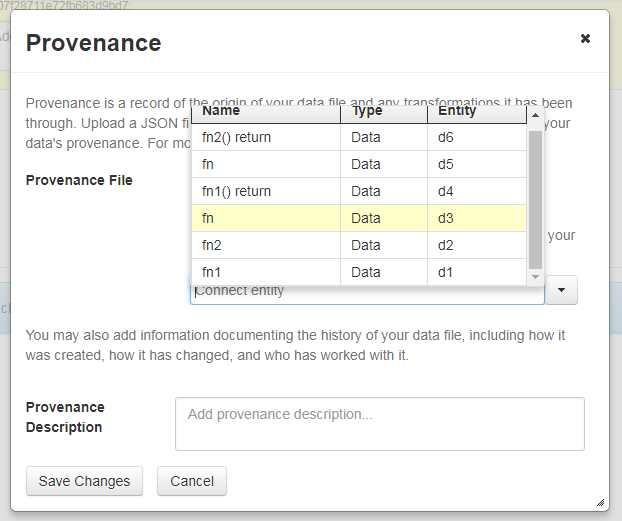
I was using Chrome. Spoke with Matthew about it and he said he's seeing this bug on Chrome and Safari as well.
dlmurphy
on 6 Mar 2018
Thanks to @mheppler for the info on fixing the dropdown scroll. I also fixed autocomplete dropdowns in these popups as they were all exhibiting this behaviour and js fix is pretty benign:
Also touched autocomplete dropdowns in:
- Harvest Clients (Destination Dataverse),
- Manage Groups (Role Asignee Name),
- Dataset Permissions Manage Files (User/ Group Name Assign),
- Role Assign (User / Group Role Assign)
matthew-a-dunlap
on 8 Mar 2018
Review fixes:
- [x] Store cplId in the same format in the database as it is in the code (Pete)
- [x] Check if provenance is enabled before running its saving function on DatasetPage & EditDataFilesPage (Pete)
- [x] Use a different system variable (not ProvServiceUrl) to enable or disable the provenance popup
- [x] Add new system variable to the guides
- ProvCollectionEnabled has been added to config.rst . It may need to be mentioned in dataset-management.rst , but as of writing we have not decided if the prov popup will be enabled by default.
- [x] Update javascript file version tag so the browser updates it correctly for use in prov (Steven).
- This was unneeded as we do the updating automatically. When a new release is cut and the version number changes, this will no longer be an issue.
- [x] Fix issue with save context for api delete (Steven)
- [x] Prov class api endpoint is set to "files", as is files itself. This has potential for name collisions and should probably be changed (Steven)
- As of now there are no collisions and the placement is fairly ok. Maybe the prov commands should live somewhere else in the api?
- [x] FileMetadata is not being copied between versions (Steven)
- seems to get wacky too, file is uploaded but dropdown won't let me select anymore. Not surprised tbh...
- [x] Dropdown of prov entities isn't getting purged completely when opened across multiple dvobjects, as seen on fileupload
- [x] Check bundle name provided when adding provenance via command line.
- Will probably require altering and moving some functions out of the popup fragment into a util fragment for use by both the popup and the api.
- [x] Move cplId & entityName from filemetadata to datafile table, as these should not be tied to versions
- [x] Add Prov Json file preview
- [x] Save prov freeform in a versioned way (fix normal draft flow and file page flow)
- [x] View prov freeform in a versioned way
- [x] Create conditional popup messaging based upon: which provenance has been edited, the page provenance is being edited from, whether the DataFile has been released and maybe whether the dataset is in draft.
- [x] Check/fix render logic so unpublished datafiles can have their provenance json edited while published datafiles cannot
- [x] Also make sure when users access the published version of a dataset with a draft they can't edit the freeform either
- [x] On file page saving freeform and json at once on an unpublished file causes entity name to not be saved.
- May be something else weird breaking under the hood.
- [x] Weirdness around popup holding and dropping data
- Cancelling out of prov popup with json uploaded but no entity selected should clear out json, but does not.
- Something similar happens when removing on file page, the popup still thinks it has an uploaded file until you refresh.
- Moving back and forth between popup-upload and popup-confirm causes entity name or json to be cleared.
- [x] Popup confirm text issues
- [x] Messaging triggers do not take into account file remove and entity changing
- [x] Text itself is a stub. Ordering may need to change too.
- [x] Logic consolidation and review
- [x] Add preview to confirm
- [x] Comment clean-up, lots of debug comments
- [x] Documentation:
- [x] for api get commands (get freeform and get json)
- [x] We need to mention the prov preview functionality in dataset-management.rst
- [x] Mention that only dataset editors can view prov data at this time. This will change.
- [x] Deploy to apitest before vacation
matthew-a-dunlap
on 23 Mar 2018
Note: With the review fixes done so far, a new system variable is needed to enable provenance, ProvCollectionEnabled . It is a boolean. We may want to have it enabled by default.
matthew-a-dunlap
on 26 Mar 2018
Prov is in a pretty good place as I leave for a few days. Aside from the new messaging, there are only a few outstanding bugs, mostly related to the prov popup not being updated correctly by jsf at certain points. The more backend stuff is pretty solid. See the checklist above for more info.
In terms of confirm dialog messaging, folks should be able to walk through the flows and see the outputted sentence structure. The ordering almost certainly needs changing alongside the words themselves.
matthew-a-dunlap
on 11 Apr 2018
Reviewing the latest and greatest from @matthew-a-dunlap in this branch on the apitest server, and I found a few things of note:
- [x] Edit Files pg > no success msg about "Provenance information will be added to this version of this dataset once you click on the Save Changes button" after clicking Continue btn in Provenance popup, resulting in no visual indicator to the depositor that anything happened when the popup closed
- [x] Provenance popup > Data File Entity label should have required asterisk after you upload Provenance File, clicking continue without connecting entity results in validation error saying it is required
- [x] Provenance popup > maybe some of the warning text msg about "Your Provenance File will become permanent once you..." from the confirmation popup could be displayed above the upload component when the prov file is added to an existing published file, just like the "This Provenance File has been published and cannot be replaced or removed" msg is displayed
- [x] Provenance confirmation popup > fix display of msg text so it does not break to a second line after the warning icon, maybe move Preview button out of the bottom action btns and into the popup message body
- [x] Versions tab > no transaction is recorded when creating a new draft by adding prov to existing file
- [x] Version Differences Details popup > same as the Version tab, no transaction is recorded when creating a new draft by adding prov to existing file
mheppler
on 19 Apr 2018
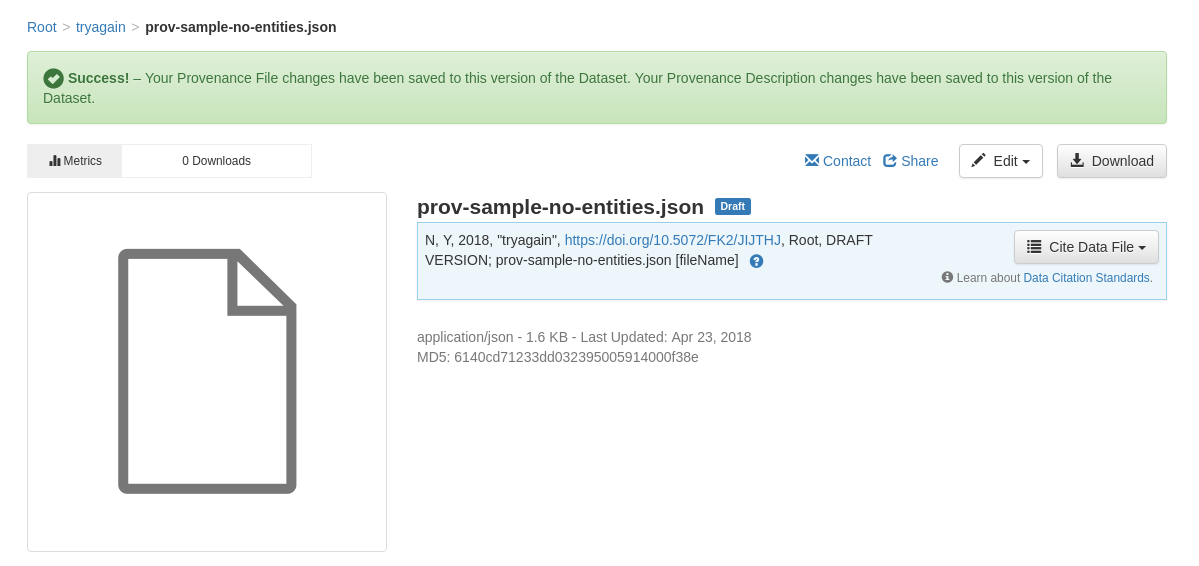
I've implemented the changes pointing out by @mheppler . There is text related to the new alert dialogs that should probably be reviewed @dlmurphy . Due to limitations of the File Page I went with the solution of only showing one alert dialog per popup save, even if both Provenance Description and Provenance File are saved.
matthew-a-dunlap
on 24 Apr 2018
Note: During discussion @mheppler and I discussed how a user on the editDataFiles page may go to upload their prov file and then think they need to save. That save is unneeded and will cause a draft to be created. At the time of writing we were of the opinion this should be dealt at a later date by preventing users from saving empty drafts.
Note 2: I fixed an outstanding bug with selected entity not being displayed correctly after changing other prov data for a DataFile.
matthew-a-dunlap
on 24 Apr 2018
Deployment and use notes:
- Run db updates (4.8.6 to 4.9)
- Enable provenance : curl -X PUT -d 'true' http://localhost:8080/api/admin/settings/:ProvCollectionEnabled
- I've pulled prov-json examples from https://github.com/CamFlow/cytoscape.js-prov/tree/master/json . elisabeth.json is a working example, matt.json is a broken one (which is needed to test our parsing)
Testing cases (sorted in order of importance, somewhat):
- Saving actions: Prov Description vs Prov JSON vs both at once
- Note: Description is versioned, JSON is not
- Note: JSON requires a selected entity
- Also: creating JSON vs deleting JSON vs both-in-one-save
- Pages: Dataset creation vs edit metadata vs file page
- DataFile State: unpublished vs published
Other Testing notes:
- 6 api calls created
- There is dynamic messaging both in the popup confirm and in the alert after clicking save. This takes into account published/unpublished and json/description/both.
- Part of what had this story take so long are some weird edge cases:
- To provide users a list of the selected entities, we have to parse the provided JSON for entity sections.
matthew-a-dunlap
on 26 Apr 2018
Issues:
- [X] on edit file metadata with prov disabled, there is a multi edit button that does nothing and the indiv file edit button only allows tags so delete/restrict are missing, also happens on file upload. Using Chrome. Menu appears like it might be functional but appears beneath table. Works with FF.
- [X] with prov enabled, edit file page, indiv file edit menu select list shows below table and need to scroll on last file/only file in table. (This was a browser caching issue)
- [X] Using Chrome, cannot save a prov file. Seems like popup goes deaf after selecting an entity, buttons do nothing. Works with FF.
- [x] Prov desc does not show up on file versions tab under differences but does appear on dataset versions tab. Not sure whether this is a problem.
- [X] Prov popup does not open in Chrome if prov file previously saved. Works if none or just prov desc. Version 66.0.3359.117 (Official Build) (64-bit)
- [x] Dataset version details contain no details for addition of prov file only. Also related and perhaps by design, adding a prov file to a published version does not create a draft version (because prov files are not versioned?)
- [x] Server log error on edit popup if access via edit file metadata, update prov desc, continue, then edit prov again without saving file metadata, error on popup load in log, user does not see it, seems to work still:
[2018-04-27T14:59:45.869-0400] [glassfish 4.1] [WARNING] [] [javax.enterprise.resource.webcontainer.jsf.lifecycle] [tid: _ThreadID=53 _ThreadName=jk-connector(4)] [timeMillis: 1524855585869] [levelValue: 900] [[
  /editFilesFragment.xhtml @268,158 binding="#{provPopupFragmentBean.updatePopupState(fileMetadata, EditDatafilesPage.dataset)}": java.lang.NullPointerException
javax.el.ELException: /editFilesFragment.xhtml @268,158 binding="#{provPopupFragmentBean.updatePopupState(fileMetadata, EditDatafilesPage.dataset)}": java.lang.NullPointerException
- [X] If upload prov file, do not select entity, save. First time, every time visit file landing page and choose, see prov popup warning about permanence on publish but not error re: no entity, until exit popup and choose prov again, same page load. In other words, would not be reminded about lack of entity unless you viewed/exited/viewed prov popup on same file landing page view. (seems to be a caching issue because not allowed after refresh)
- [X] Can publish dataset even if prov entity is not selected. Not sure if this is a problem but popup does indicate it is required and shows errors in UI if not selected. Otherwise not a problem functionally. (not allowed after refresh cache).
- [x] While editing prov from edit file metadata page, if add prov file, continue but don't save dataset, edit prov again, remove file, continue, but don't save dataset, then edit prov again add back prov file, save & save dataset, prov file is not saved. prov desc does get saved in same scenario.
- [x] Create prov file api fails with entity error. API does not indicate how to choose entity and also misses upload file parameter. Might provide curl example? Entity name provided does not match any entities parsed from the uploaded prov json
- [x] Create prov file api allows updating/ replacing prov file after published.
- [x] Create prov files does not check whether prov is enabled, works when disabled.
- [x] Delete prov file api allows deleting published prov file.
- [x] Delete prov desc api says ok but does not delete anything. On draft says, {"status":"OK","data":true} on published says, {"status":"OK","data":false}
- [x] Adding a file on create dataset using Safari fails in UI, either silently w/ not file or hangs on upload with error in server log, ArrayIndexOutofBoundsException: 5. Works on /develop
- [x] Saving prov file not working on Chrome on Windows or Edge even after shift-reload. Version 65.0.3325.181 (Official Build) (64-bit), Microsoft Edge 41.16299.371.0 works on FF Quantum but have not tried prior version
 kcondon
on 26 Apr 2018
kcondon
on 26 Apr 2018
Thanks again @kcondon for the digging. Here are a few notes on some of the issues uncovered. We can touch base Monday afternoon when I am back in the office:
- Regarding on edit file metadata with prov disabled : For me in chrome 66.0.3359.139 the multi-menu shows up correctly infront of the table, and has options for delete/restrict/unrestrict.
- Regarding Using Chrome, cannot save a prov file : I'm unable to reproduce this on my machine running chrome 66.0.3359.139 . Was this a consistent issue?
- Regarding Prov popup does not open in Chrome if prov file previously saved : I'm not able to reproduce this in Chrome 66.0.3359.139.
- With the chrome-related issues above, even if I can't reproduce it these problems may point to the code being brittle if a plugin or something is making things slightly out of wack.
- Regarding Dataset version details : version details should not have any info on the prov file as only the description is versioned.
- Regarding Prov desc does not show up on file versions tab... : Good catch, I forgot there was version info on that page!
- Regarding While editing prov from edit file metadata page... continue but don't save dataset : Good catch, I think I'm not clearing out my delete action correctly.
- Regarding various issues around saving without prov entity : Once the popup rendering issues are fixed the user should be unable to save without an entity for the prov JSON. I did not add an extra safety check on publish for it but can do so if needed. For what its worth I'm unable to get the popup to save without an entity
After we touch base and you are done with any checks for this round I'll create a todo checklist to capture the needed work.
matthew-a-dunlap
on 28 Apr 2018
Thank you @kcondon and @matthew-a-dunlap for coordinating on the Chrome browser issues and resolving those as merely browser CSS caching issues.
Found a minor UI issue and demo'd it for Matthew on dataverse-internal...
- If prov file previously saved for unpublished draft, when you go back to prov popup the "Data File Entity" selection is not retained in the dropdown.
mheppler
on 30 Apr 2018
Here are the issues I've fixed but should be QA'ed again:
- Prov desc does not show up on file versions tab...
- Server log error on edit popup if access via edit file metadata...
matthew-a-dunlap
on 1 May 2018
OK, tested the above fixes and they work.
kcondon
on 1 May 2018
More fixes info:
- Fixed: "If prov file previously saved for unpublished draft" (Mike's)
- I think I fixed but couldn't quite reproduce: "While editing prov from edit file metadata page, if add prov file"
- Fixed: All API issues. As part of this I removed the DeleteProvFreeform API command as it was redundant/unneeded (update can be used for the same functionality). Also note that Prov JSON can be uploaded for a published DataFile as long as JSON doesn't already exist.
I have addressed all the issues I am aware of at this point. We'll see what else comes up!
matthew-a-dunlap
on 2 May 2018
All of the above are fixed. A minor note about maybe providing a curl example for create prov, showing --upload-file
kcondon
on 2 May 2018
After discussion with @scolapasta and @sekmiller , it looks like one of the saving flows on the editDatasetPage is not saving with best practice and the fileMetadata is likely not in a useful state afterwards for the prov command to use and save. Its possible prov could work around this but it'd be pretty messy, I'm going to first take a look at what a SaveDataFileCommand would look like.
matthew-a-dunlap
on 4 May 2018
After talking with @landreev , I was able to arrive at a fix that did not involve digging deep into saving commands. Prov changes now trigger the full dataset update in editDatafilePage, instead of the optimized but less robust flow.
When investigating this change, here are the things to look for:
- Saving prov json and prov freeform from editDatafilePage after a file upload (not editing prov during the upload action) should work.
- Try doing this with a tabular file and tabular data tags, there was some change these could conflict with each other tho from my testing it looked ok
- Along with this I found a bug where editing just the entityId did not save. Should work now.
- Please reconfirm other prov popup flows, especially ones on the editDatafilePage. I ran through them but I often seem to miss things.
I was unable to reproduce the windows prov file issues in windows 8 on IE and Chrome (Edge is not available for windows 8). While investigating I uncovered an issue on the file page where repeatedly saving the prov popup to delete and then create prov json didn't not clean up completely and caused entity saving to fail.
matthew-a-dunlap
on 4 May 2018
Tested the above cases and all work. Mike confirmed his issue is fixed. Win browser issues appear to be caching related. Now retesting other workflows, then merge!
kcondon
on 7 May 2018
Related issues
 poikilotherm
·
3Comments
poikilotherm
·
3Comments
 bsilverstein
·
4Comments
bsilverstein
·
4Comments
 shlake
·
4Comments
shlake
·
4Comments
 jggautier
·
4Comments
jggautier
·
3Comments
jggautier
·
4Comments
jggautier
·
3Comments