Datasets: c4/multilingual produces Dataflow job file too big (38MB >> 10MB)
Short description
We are trying to extract the Norwegian (and eventually other Nordic languages) portion of c4/multilingual. Since there is no easy way to download only the data for one language, we are processing the entire c4/multilingual corpus first.
Environment information
- Operating System:
Debian GNU/Linux 10 - Python version:
Python 3.8.5(miniconda) tensorflow-datasets/tfds-nightlyversion:4.1.0/4.1.0.dev202011080107tensorflow/tf-nightlyversion:2.3.1/2.5.0.dev20201108(tried with and withouttf-nightly)
- Does the issue still exists with the last
tfds-nightlypackage (pip install --upgrade tfds-nightly) ?
Yes, it does. We read all issues related to C4 and incorporated the necessary changes: pinningdillversion and adding options for 450 workers andexperiments=shuffle_mode=servicein Apache Beam.
Reproduction instructions
On a clean VM with 8vCPU and 32GB of RAM, we installed miniconda and run the next commands:
DATASET_NAME=c4
DATASET_CONFIG=multilingual
GCP_PROJECT=...
GCS_BUCKET=...
GCS_BUCKET_REGION=...

# Add all 72 dumps
rm wet.paths.urls
echo "CC-MAIN-2013-20" >> wet.paths.urls
...
echo "CC-MAIN-2020-40" >> wet.paths.urls

# Put them in the bucket
for wetpath in `cat wet.paths.urls` ; do curl -s https://commoncrawl.s3.amazonaws.com/crawl-data/$wetpath/wet.paths.gz | gunzip | pv --name $wetpath --bytes | gsutil -q cp - "$GCS_BUCKET/tensorflow_datasets/downloads/manual/crawl-data/$wetpath/web.paths" ; done

# Prepare requirements
rm /tmp/beam_requirements.txt
echo "tensorflow_datasets[$DATASET_NAME]" >> /tmp/beam_requirements.txt
echo "tfds-nightly[gcp,$DATASET_NAME]" >> /tmp/beam_requirements.txt
echo "google-apitools" >> /tmp/beam_requirements.txt
# there's an error with avro-python3 and dill, dill version needs to be fixed
# https://github.com/tensorflow/datasets/issues/2636#issuecomment-722551597
echo "dill==0.3.1.1" >> /tmp/beam_requirements.txt
python -m pip install tensorflow tf-nightly
python -m pip install -r /tmp/beam_requirements.txt

# Run main command
python -m tensorflow_datasets.scripts.download_and_prepare \
  --datasets=$DATASET_NAME/$DATASET_CONFIG \
  --data_dir=$GCS_BUCKET/tensorflow_datasets \
  --beam_pipeline_options=\
"region=$GCS_BUCKET_REGION,runner=DataflowRunner,project=$GCP_PROJECT,job_name=$DATASET_NAME-gen,"\
"staging_location=$GCS_BUCKET/binaries,temp_location=$GCS_BUCKET/temp,"\
"dataflow_job_file=gs://$GCS_BUCKET/job_file.json,"\
"requirements_file=/tmp/beam_requirements.txt,max_num_workers=450,experiments=shuffle_mode=service" 2>&1 | tee nb-mc4.log
Link to logs
We removed information about our project and bucket in the logs:
- Process log: nb-mc4.log
- JSON job file: job_file.zip
Expected behavior
We would have expected for the script to successfully launch the pipeline in Dataflow, but the JSON job file seems to be too big (37.5MB when max is 10MB), therefore all we get is a Your client issued a request that was too large error message (formatted as a HTML page in the console output).
Sample of the output
  <title>Error 413 (Request Entity Too Large)!!1</title>
  <p><b>413.</b> <ins>That���s an error.</ins>
  <p>Your client issued a request that was too large.</p>
  <ins>That���s all we know.</ins>
Additional context
If there is any other way to extract a language portion of c4/multilingual we'd be eager to try it as well.
 versae
All 104 comments
@adarob FYI
 Conchylicultor
on 9 Nov 2020
Conchylicultor
on 9 Nov 2020
@versae I'd recommend generating all languages you want at the same time since it has to process all of the data either way. However, I think if you added a new config with only the languages you want, you'd avoid the JSON issue.
@Conchylicultor we would need to allow them to add a new config to the dataset with only the languages they are interested in. What's the recommended way for them to do that?
 adarob
on 9 Nov 2020
adarob
on 9 Nov 2020
Thanks for the quick replies, @Conchylicultor and @adarob. We thought about the custom config, but had troubles figuring out how to make it work. Even with a custom config, it's still not clear to us how to run the download_and_prepare code, either in command or script mode.
After inspecting the source code, it seems it should be possible to only process the data for one language, even if we have to download everything, but not sure about how to do it.
versae
on 9 Nov 2020
You should be able to add a config similar to 'multilingual', but with only the nordic languages listed. Let's say you name it
'nordic'. Then you can call download_and_prepare with c4/nordic as the dataset.
You'd make the change to a local clone of the repo and then you can run pip install -e . to install it on the master VM.
adarob
on 9 Nov 2020
I see. It feels unnecessarily complicated, but we'll give it a try :crossed_fingers: Really, it'd be great if some jobfile size control was allowed or implemented directly within the download_and_prepare script. The official docs recommend to restructure the pipeline to avoid such errors. We hope downloading only Nordic or Norwegian languages would do the trick, but honestly it seems the issue is a bit deeper.
I wonder, if the limit it's 10MB and the current code generates a jobfile of almost 40MB, is there a way to lift, even temporarily, this limitation to at least be able to launch the job?
In any case, thanks for the help.
versae
on 9 Nov 2020
The issue is the large number of splits (>100) that are produced by this pipeline. Limiting to ~10 languages should reduce the json size by a factor of 10, I believe.
Other options to fix the deeper problem would involve either having the DataFlow team raise the limit or merge some of the downstream steps in the TFDS sharding and writing portions of the pipeline.
adarob
on 9 Nov 2020
Thinking about, if the downloading and processing of the data happens in the workers, the information about the languages is not available until the query is already sent and in execution, isn't it? Limiting the languages, or for that matter, selecting specific splits, would still generate the same jobfile to be sent to Dataflow I believe.
versae
on 9 Nov 2020
The actual pipeline "blueprint" is pre-generated and sent to the DataFlow service, which is where I think your issue is. This blueprint includes all of the per-language stages.
adarob
on 9 Nov 2020
We finally tried our custom config for Norwegian (excluding no-validation) but the jobfile is still too big (10.2MB), so Dataflow is rejecting the request for 200KB :\
versae
on 9 Nov 2020
Can you try also removing c4_utils.UNKNOWN_LANGUAGE here https://github.com/tensorflow/datasets/blob/0371b59f96c1d6698f9b87311a35a1c4135d5ad5/tensorflow_datasets/text/c4.py#L391
adarob
on 9 Nov 2020
Tried with and without that line. The request now went through but Dataflow still failed and complained about size, since it's still a tiny bit larger than 10MB (~10.2MB)
{
  "error": {
    "code": 400,
    "message": "(ffddc5dbfa10dae9): The job graph is too large. Please try again with a smaller job graph, or split your job into two or more smaller jobs.",
    "status": "INVALID_ARGUMENT"
  }
}
Adding the updated job_file.json (compressed) in case it's useful. There are a couple of big chunks of binary data taking most of the size of the file.
Wondering if the hard limit of 10MB could be lifted temporarily at least or for individual projects.
versae
on 9 Nov 2020
I'll see if we can get some help from the dataflow team.
adarob
on 10 Nov 2020
Thank you so much.
versae
on 10 Nov 2020
If possible its best to reduce the nodes in the graph, for example multiplexing the values into a source. @adarob we should look at the pipeline in more detail to look at that.
In the mean time you can make use of --experiments=upload_graph with the Dataflow pipeline arguments, which allow larger than 10MB pipelines. Although note things like the UI will have limitations with this experimental flag.
 rezarokni
on 11 Nov 2020
rezarokni
on 11 Nov 2020
Interesting. This experiments=upload_graph argument replaces experiments=shuffle_mode=service, or is there a way to have them both?
versae
on 11 Nov 2020
You can have both in a list
rezarokni
on 11 Nov 2020
The job now went through and it appears workers are being started. Adding more languages to the config also works.
Just one question though, should we use max_num_workers or directly num_workers?
Thanks!
versae
on 11 Nov 2020
I think num_workers is the way to go, and also disabling auto scale.
On Wed, Nov 11, 2020 at 6:42 AM Javier de la Rosa notifications@github.com
wrote:
The job now went through and it appears workers are being started. Adding
more languages to the config also works.Just one question though, should we use max_num_workers or directly
num_workers?Thanks!
—
You are receiving this because you were mentioned.
Reply to this email directly, view it on GitHub
https://github.com/tensorflow/datasets/issues/2711#issuecomment-725376332,
or unsubscribe
https://github.com/notifications/unsubscribe-auth/AAIJV2BXXG3AF36Q7UCMM2LSPJ2DPANCNFSM4TPDD2ZQ
.
adarob
on 11 Nov 2020
It's been working for 23 hours now but we don't see any progress, neither in the log of the process, the dataflow log, or the dataflow diagram. Total allocated HDD is 10.99TB, which is insufficient for the entire corpus, although we don't know if the corpus is downloaded in chunks, processed, and then discarded.
Moreover, nothing is being written to the bucket. And after a few hours, we started to see a lot of messages like these ones:
I1112 06:43:57.139022 139788711368448 transport.py:183] Refreshing due to a 401 (attempt 1/2)
I1112 06:43:58.973949 139788711368448 transport.py:183] Refreshing due to a 401 (attempt 1/2)
I1112 07:18:52.325422 139788711368448 transport.py:183] Refreshing due to a 401 (attempt 1/2)
I1112 07:18:54.354025 139788711368448 transport.py:183] Refreshing due to a 401 (attempt 1/2)
I1112 08:18:31.006261 139788711368448 transport.py:183] Refreshing due to a 401 (attempt 1/2)
Nothing else written in the process log. Our guess is that 401 is some sort of unauthorized OAuth bearer token issue? But we don't know if we should worry about it, just let it run for another couple of hours, or stop it right away. It's been some 24 expensive hours for us running 450 workers :)
versae
on 12 Nov 2020
Do you not see any counters? @rezarokni is this a side effect of upload_graph?
If the job is not crashing my suspicion is that it's working. The input dataset is 71x the size of the original C4, so it going to take quite a bit longer. I'm not sure how much longer, but it sould be less than 71x as long.
adarob
on 12 Nov 2020
If by counters you mean the stages of each box in the diagram, a few boxes at the beginning are outlined in dashed green (started), but most of them are greyed out (not even started yet). All counters are at 0 (zero), none reported to succeed yet. Attaching a screenshot for reference.

PS: If this is off-topic now for the current issue, I can create another issue and move the discussion there.
versae
on 12 Nov 2020
When the job starts running properly, you should see a "Custom Counters" section on the right as well, assuming the upload_graph option isn't disabling it somehow.
Just to be clear, have you downloaded all of the WET files to the manual directory?
adarob
on 12 Nov 2020
We have 72 files like this one in the bucket: BUCKET/tensorflow_datasets/downloads/manual/crawl-data/CC-MAIN-2013-20/wet.paths, one for each Common Crawl dump. Are the WET paths files what we need or should we have downloaded the actual contents of all the URLs inside the WET files into the bucket?
We used the next code to put the wet.paths files in the bucket:
# Add all 72 dumps
rm wet.paths.urls
echo "CC-MAIN-2013-20" >> wet.paths.urls
...
echo "CC-MAIN-2020-40" >> wet.paths.urls

# Put them in the bucket
for wetpath in `cat wet.paths.urls` ; do curl -s https://commoncrawl.s3.amazonaws.com/crawl-data/$wetpath/wet.paths.gz | gunzip | pv --name $wetpath --bytes | gsutil -q cp - "$GCS_BUCKET/tensorflow_datasets/downloads/manual/crawl-data/$wetpath/web.paths" ; done
Is there any other indicator or flag that the job is actually running?
versae
on 13 Nov 2020
The experimental upload_graph option can cause issues in the UI.
If you click through to the logs from the UI, you should still see the logs in the log UI, which should give some indications.
You may also see some of the metrics using the gcloud options:
https://cloud.google.com/sdk/gcloud/reference/beta/dataflow/metrics
rezarokni
on 13 Nov 2020
Attaching the Dataflow metrics as returned by the CLI command: c4-nordic-gen.metrics.txt Nothing of interest there we believe.
In the UI, workers logs are empty, and the jobs log hasn't returned anything since 36 hours ago:

The download_and_prepare script keeps telling 401 a couple of times every hour, always (attempt 1/2). We are starting to really worry nothing is happening.
versae
on 13 Nov 2020
Our only hope is that some workers look like this:

versae
on 13 Nov 2020
It sounds like you only download the wet path files, not the actual wet
files. I'm not sure why it's not just crashing when it can't find them in
your manual directory.
I can try to set it up to download on the workers instead of requiring you
to do it ahead of time, but it's not straightforward due to how TFDS
download manager stores all of the files in the same directory.
I'll spend a bit of time on it this morning.
On Fri, Nov 13, 2020 at 3:58 AM Javier de la Rosa notifications@github.com
wrote:
Our only hope is that some workers look like this:
[image: image]
https://user-images.githubusercontent.com/173537/99048958-8b75b000-2596-11eb-9a3e-cf9fea6af07f.png—
You are receiving this because you were mentioned.
Reply to this email directly, view it on GitHub
https://github.com/tensorflow/datasets/issues/2711#issuecomment-726637011,
or unsubscribe
https://github.com/notifications/unsubscribe-auth/AAIJV2FMVXJ3Z3MCDZCYTFDSPTYKDANCNFSM4TPDD2ZQ
.
adarob
on 13 Nov 2020
Just to be clear, you are saying that what we need to put into the bucket are WET files (files ending with .wet), and not the wet.paths files we are putting as of now, is that right? If that's the case we better stop this pipeline before it drains our budget.
versae
on 13 Nov 2020
Yes, that is the case.
On Fri, Nov 13, 2020 at 9:29 AM Javier de la Rosa notifications@github.com
wrote:
Just to be clear, you are saying that what we need to put into the bucket
are WET files (files ending with .wet), and not the wet.paths files we
are putting as of now, is that right? If that's the case we better stop
this pipeline before it drains our budget.—
You are receiving this because you were mentioned.
Reply to this email directly, view it on GitHub
https://github.com/tensorflow/datasets/issues/2711#issuecomment-726795116,
or unsubscribe
https://github.com/notifications/unsubscribe-auth/AAIJV2E7VKIYTEGYESDHRBDSPU7DFANCNFSM4TPDD2ZQ
.
adarob
on 13 Nov 2020
Thanks. So WET files as they are, not the compressed versions they are now in the wet.paths files. What should we do with the file path, the part with crawl-data/CC-MAIN-2020-45/segments/1603107863364.0/wet/CC-MAIN-20201019145901-20201019175901-00006.warc.wet.gz?
versae
on 13 Nov 2020
FYI, I am implementing a part of the pipeline that will download everything you need for you. Sit tight :)
adarob
on 13 Nov 2020
I really thought the actual WET files were downloaded and processed by the workers. Thanks, @adarob!
versae
on 13 Nov 2020
That is the case for the original C4 but due to some limitations in TFDS,
it was not possible for mC4. However, I will make it so :)
On Fri, Nov 13, 2020 at 12:34 PM Javier de la Rosa notifications@github.com
wrote:
I really thought the actual WET files were downloaded and processed by the
workers. Thanks, @adarob https://github.com/adarob!—
You are receiving this because you were mentioned.
Reply to this email directly, view it on GitHub
https://github.com/tensorflow/datasets/issues/2711#issuecomment-726899921,
or unsubscribe
https://github.com/notifications/unsubscribe-auth/AAIJV2GIBFTYISA5LBQLB6LSPVUZTANCNFSM4TPDD2ZQ
.
adarob
on 13 Nov 2020
I have a change that I've verified works for me on a subset of the WET files. I need to clean it up a bit and then I'll make a PR later tonight.
adarob
on 13 Nov 2020
That's excellent news, we really appreciate it. Looking forward to test it in a dozen workers before launching the big job.
versae
on 13 Nov 2020
adarob
on 14 Nov 2020
This is cool. So once it's merged, all we need to do is just run the download_and_prepare script, so no more manual handling of WET files, is that case?
versae
on 14 Nov 2020
We launched a small job test with 50 workers. We hope to see counters counting soon in the UI. Will the bucket start to fill up only in the later stages of the pipeline?
Moreover, since we've just invested so much in these attempts, is there a way to get the data we need directly from you? At some point you have run this code, it worked for you, and you got somewhere the 20GB of Norwegian data we need. Or maybe you could point me to someone who has already downloaded this data and have it available.
We are doing this at the National Library of Norway for the public good, but our budget is also not that much. So I was wondering if there is some sort of GCP credits we could access to as a public institution.
versae
on 16 Nov 2020
Unfortunately we are not able to host the preprocessed data ourselves. You should see the files being downloading in the bucket once the workers are up and running. They will be in gs://$BUCKET/tfds_datasets/tensorflow_datasets/downloads/c4_wet_files. Let me know if you don't start seeing them in there.
adarob
on 16 Nov 2020
The bucket seems stuck at 1.39 GiB and no logs from the workers or the job itself.
versae
on 16 Nov 2020
Could it be a permissions or quota thing?
versae
on 16 Nov 2020
I'm honestly not sure -- this seems quite odd, as even in the original case you should have gotten an error message when it couldn't find the files. I think you'll need to get support from DataFlow directly. I'm sorry about that.
adarob
on 16 Nov 2020
Immediately after we start the job, a total of 145 files of the type comm.s3*wet.path*.gz are downloaded to the bucket. After that, absolutely nothing seems to happen. We are watching the size of the bucket with gsutil du -s gs://BUCKET and it reports exactly 1.39 GiB (1487344103) size. The UI is reporting this:
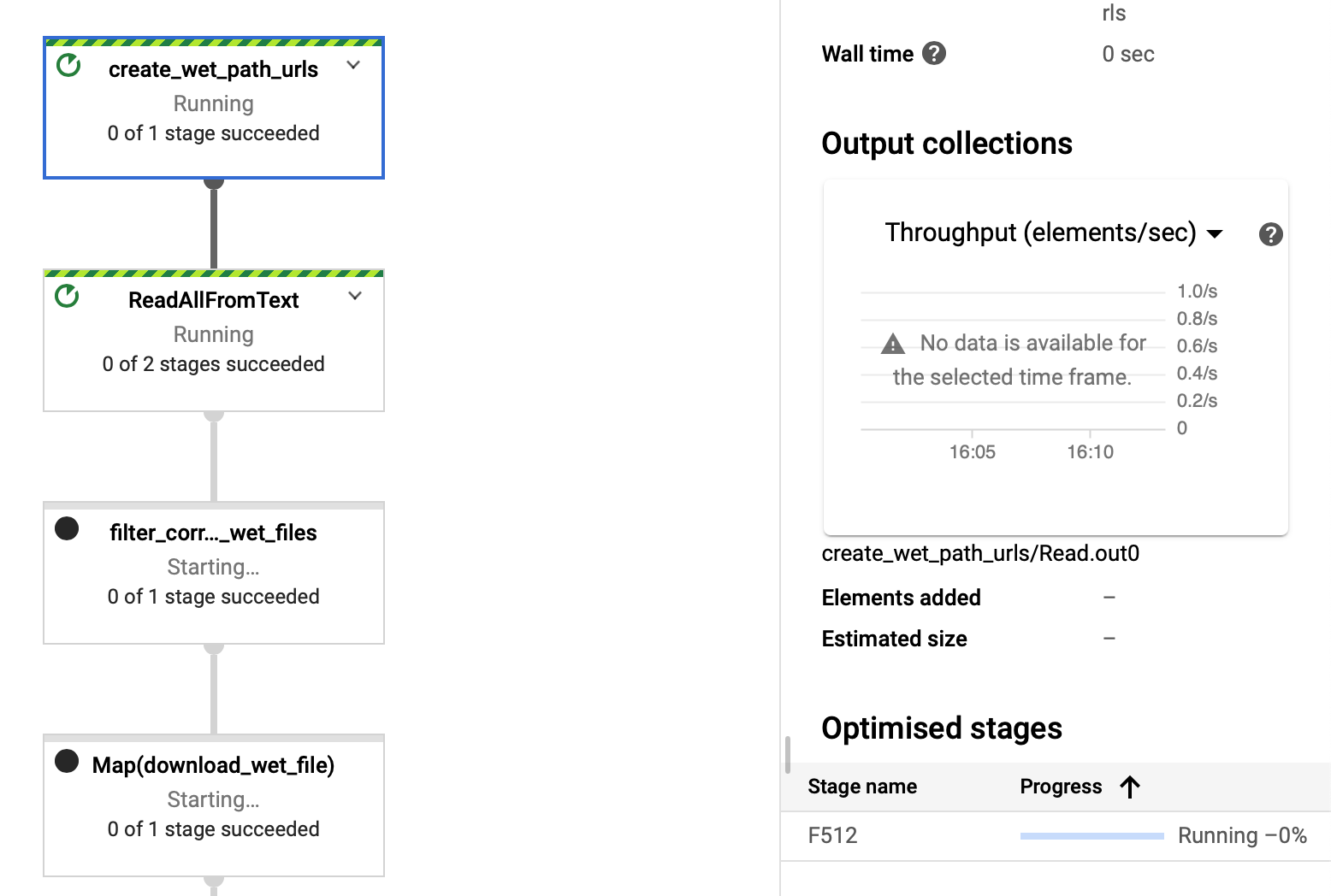
Is there anyone in particular we should reach out to in the Dataflow team?
versae
on 16 Nov 2020
Before we completely give up on this, @adarob, do you think it would be possible to reduce the size of the job graph so we don't need the experimental features in Dataflow?
versae
on 17 Nov 2020
I really don't think that should be necessary. I used the same experimental flag and was still seeing logs and counters. @rezarokni can you please help with DataFlow support?
adarob
on 17 Nov 2020
Can you please raise a support ticket.
rezarokni
on 18 Nov 2020
Not sure I know how to do that.
--
Sent using a cell-phone, so sorry for the typos and wrong auto-corrections.
On Wed, Nov 18, 2020, 1:14 AM Reza Rokni notifications@github.com wrote:
Can you please raise a support ticket.
—
You are receiving this because you modified the open/close state.
Reply to this email directly, view it on GitHub
https://github.com/tensorflow/datasets/issues/2711#issuecomment-729291551,
or unsubscribe
https://github.com/notifications/unsubscribe-auth/AABKLYKUQS2DZ7RGAR3VHRTSQMGUXANCNFSM4TPDD2ZQ
.
versae
on 18 Nov 2020
Do you have any of the support plans with your account?
https://cloud.google.com/support/docs
If not, just some items from the top of mind, is the zone in which the workers running in the same region as the source and the same region as the destination? In case things are working but slower than expected.
In the logs for the failed job, do you see any messages that might be showing any permission issues ( please select all logs ):
https://cloud.google.com/dataflow/docs/guides/logging#MonitoringLogs
rezarokni
on 18 Nov 2020
It seems we have Bronze support, which doesn't seem to include Dataflow?
We think so, we used the --beam_pipeline_options argument to set region to us-central1. Both bucket and the machine launching the job are us-central1.
In the failed job that lasted for 24 hours, after a few hours we started to see a lot of messages like these ones:
1112 06:43:57.139022 139788711368448 transport.py:183] Refreshing due to a 401 (attempt 1/2)
1112 06:43:58.973949 139788711368448 transport.py:183] Refreshing due to a 401 (attempt 1/2)
1112 07:18:52.325422 139788711368448 transport.py:183] Refreshing due to a 401 (attempt 1/2)
1112 07:18:54.354025 139788711368448 transport.py:183] Refreshing due to a 401 (attempt 1/2)
1112 08:18:31.006261 139788711368448 transport.py:183] Refreshing due to a 401 (attempt 1/2)
Nothing else written in the process log. Our guess is that 401 is some sort of unauthorized OAuth bearer token issue? In the later shorter tests (2-4 hours) we didn't see the issue. Moreover, it never said attempt 2/2.
versae
on 18 Nov 2020
@adarob sorry didnt have chance to dig into the pipeline code, but whats the overall flow for creating the file_paths:
"create_wet_path_urls" >> beam.Create(file_paths["wet_path_urls"])
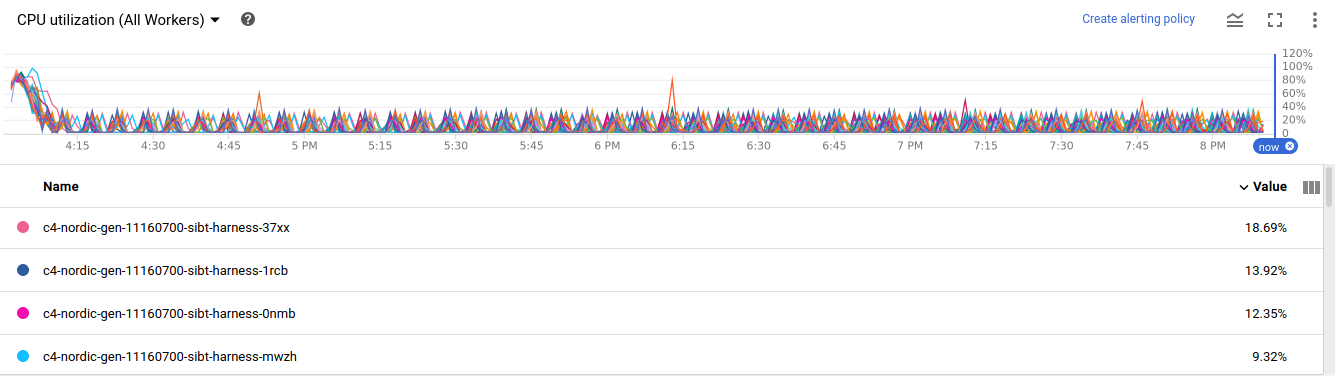
@versae in the slow pipeline what did the CPU graph look like? Was there one machine at high CPU with the rest all low for the pipeline that used @adarob new code.
rezarokni
on 18 Nov 2020
Not really. Here's previous code (worked for 24 hours with 450 workers):
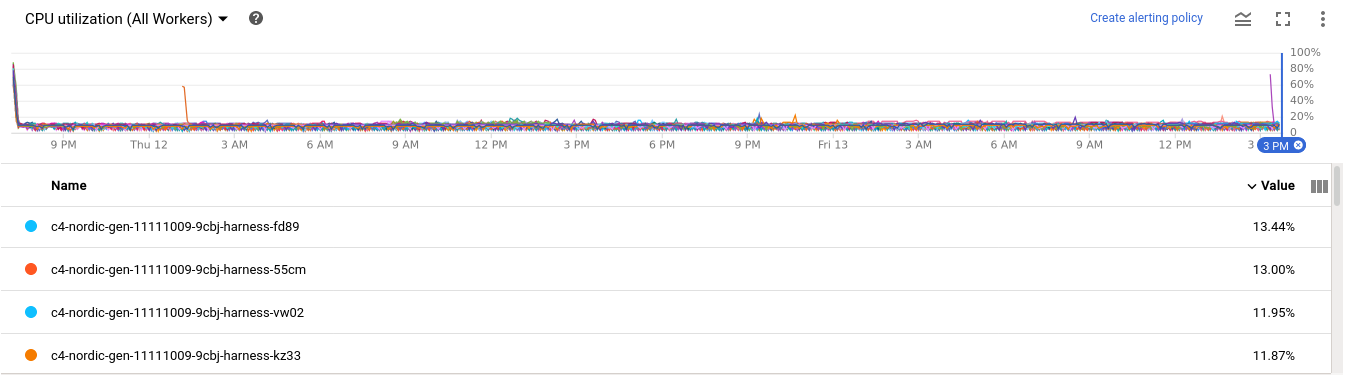
And here the short test based on the new code (4 hours with 50 workers):
versae
on 18 Nov 2020
As of #2734 (not yet merged), the initial pipeline looks like:
pipeline
        | "create_wet_path_urls" >> beam.Create(file_paths["wet_path_urls"])
        | beam.io.ReadAllFromText(
            compression_type=beam.io.filesystem.CompressionTypes.UNCOMPRESSED)
        | "filter_corrupt_wet_files" >> beam.Filter(
            lambda p: p not in _KNOWN_CORRUPT_WET_FILES)
        | beam.Map(
            download_wet_file,
            dl_dir=os.path.join(dl_manager.download_dir, "c4_wet_files")))
file_paths["wet_path_urls"] is ~72 files
adarob
on 18 Nov 2020
So the beam.Create([]) should return 72 elements.
@versae In the dataflow job when you clicked on the create_wet_path_urls transform did you see any of the element counters move up from 0? Or was everything stuck at 0?
@adarob I assume that file_paths does not need lots of machines? If the answer to the above is that it was stuck at 0, then one test would be to simply run that first step with the directrunner from a small vm in the project. Just to check if its permissions etc.. If the output from Create was 72 elements then we can look at the next step. I assume ReadALlFromText is just reading files that contain paths, which your filter then checks against a known set of corrupt files? Basically we need to figure out if the beam.Map(download_wet_file) is getting input or not. If it is then we can move to that function to see if we can find out what issue there potentially is.
rezarokni
on 19 Nov 2020
Everything was stuck at zero. Regarding the 72 wet.paths files, I download them manually for the current version of tfds. The version in the PR does the download by itself.
versae
on 19 Nov 2020
Using DirectRunner at least we see workers logs (lines starting with Splitting file in the log), which never became available through the DataFlow UI: nb-mc4-direct.log
versae
on 19 Nov 2020
Even the bucket seems to be growing in size.
versae
on 19 Nov 2020
This could be some form of permission issue, but there should be a log of errors, sorry if you have tried this already:
In the previous job if you could goto logs and then on the 2nd drop down window which is by default set to something job_messages and select All , which will then include worker logs etc. If that doesnt have any error messages then we will need to work through the steps.
@adarob are each of the 72 files very large? Could the direct runner on a small machine deal with one file end to end?
rezarokni
on 19 Nov 2020
@versae I checked with one of my colleagues and not sure if your work here would qualify or not, but you may want to have a look at the link under faculty:
rezarokni
on 19 Nov 2020
In all cases workers logs are empty, no matter what I set the level filter to. I'm attaching all job logs (they are CSVs but I had to change them to TXT so I can attach them to this issue):
- tfds from master, run 450 workers, 24 hours: nordic-mc4-24h-all-logs.txt
- tfds from PR, run 50 workers, 4 hours:
nordic-mc4-4h-all-logs.txt
And thanks, @rezarokni, but as a non-profit public institution outside of the US I'm not sure we qualify.
versae
on 19 Nov 2020
Let me try and chat to @adarob more on what the scripts are doing and then we can see what to dig into.
rezarokni
on 19 Nov 2020
Just reporting that after an hour or so of running the DirectRunner locally, the process just stopped. No error. It simply stopped after a few Splitting file operations.
versae
on 19 Nov 2020
Just wondering if there is any progress on this.
versae
on 23 Nov 2020
@versae I have not had a chance to connect yet ( difficult timezones ). But worse case I will see if I can setup a test rig one of my evenings this week. That will help me dig around to try and emulate what you are seeing on your side.
rezarokni
on 23 Nov 2020
Thanks, @rezarokni. If there is anything I could do just let me know.
versae
on 23 Nov 2020
Any chance to get this working?
versae
on 30 Nov 2020
Didnt get a chance last week as most folks out on the holiday, will try and connect this week.
Are you able to raise your support level to be able to raise a support ticket? With a ticket number I could help @adarob track this down more easier.
rezarokni
on 30 Nov 2020
@versae The instructions at the top are what I assume you tried with the full download. Do you have the commands that you used for the newer code @adarob added ? With that I can check tonight if the env setup for things like the library are being pulled onto the workers ok.
rezarokni
on 30 Nov 2020
Almost identical, but getting rid of the uploading of the wet.paths files manually
python -m tensorflow_datasets.scripts.download_and_prepare \
  --datasets=$DATASET_NAME/$DATASET_CONFIG \
  --data_dir=$GCS_BUCKET/tensorflow_datasets \
  --beam_pipeline_options=\
  "region=$GCS_BUCKET_REGION,runner=DataflowRunner,project=$GCP_PROJECT,job_name=$DATASET_NAME-$DATASET_CONFIG-gen," \
  "staging_location=$GCS_BUCKET/binaries,temp_location=$GCS_BUCKET/temp," \
  "dataflow_job_file=$GCS_BUCKET/job_file.json," \
  "requirements_file=/tmp/beam_requirements.txt," \
  "autoscaling_algorithm=NONE,num_workers=450," \
  "experiments=shuffle_mode=service,experiments=upload_graph" 2>&1 | tee nb-mc4-direct.log
Here, $DATASET_CONFIG is set to nordic, which we added to datasets locally: nordic.patch.txt
versae
on 30 Nov 2020
Just FYI that we use clean=False for mC4 since it is uses heuristics for en. However, it will probably work fine for Nordic languages since the alphabet is mostly the same.
adarob
on 30 Nov 2020
@adarob is the information in the c4.py config being used within the pipeline DoFns? The same one that is being added to the requirements.txt? Or is that information just being statically added as pipeline parameters before the pipeline is submitted?
rezarokni
on 2 Dec 2020
@adarob also does the nightly have to be used? Looks like the pip install for it takes a long time, which I suspect will use up a lot of time on the workers. Custom containers would probably help with this, but if we can use one of the normal releases it should speed things up.
rezarokni
on 2 Dec 2020
tf-nightly does need to be used to get the most recent changes. The C4Config is used to build the graph. The reference in requirements.txt is just to make sure the correct dependencies are installed since c4 has some that are non-default for tfds.
adarob
on 2 Dec 2020
OK as the c4 config is used for graph creation time then its not a source of the issue. If it was used at runtime then the local change would not be available as the requirments.txt would pull the original onto the workers.
I think custom containers would be useful when using tf-nightly, but let me see what else I can find.
rezarokni
on 3 Dec 2020
@versae Could you please confirm if you see pip messages in the log files, for example stuff like "Successfully installed" ... followed the package names that should have been installed. This should show up when clicking through to the Logs View and selecting all log types.
rezarokni
on 4 Dec 2020
In the main process log I see
Executing command: ['/home/versae/miniconda3/envs/python38/bin/python', '-m', 'pip', '
download', '--dest', '/tmp/dataflow-requirements-cache', '-r', '/tmp/beam_requirements.txt', '--exists-action', 'i', '--no-binary', ':all:']
And it all goes well. But I haven't figured out a way to see the workers logs yet.
I'll re-run with the latest master changes to see if anything has changed.
versae
on 4 Dec 2020
@versae Its worth waiting while we do a little more investigation.
In the Dataflow logs there should be some pip command output along the lines of "Successfully installed". If that is not there it could be that the workers are not able to build from the tf-nightly due to an env issue. This should be testable with a small run that has a noop DoFn which does a simple log statement after an import statement from the library.
Each worker will do the pip installs work on startsup getting the env ready for the work. ( Custom containers will help remove this step moving forwards, but for now we can try and pin down the issue).
Although this should result in the failure of the job rather than stalling. But if you could confirm those messages are there it would be useful.
rezarokni
on 4 Dec 2020
I understand. I never got access to the workers log so I cannot tell whether the requirements are being installed or not. There is no pip message in the Dataflow main process log either. The only place I see that pip successfully installed the dependencies is in my own log of the main process as running in the machine that launches the job.
I am not entirely sure how the dependencies get into the workers, because if I modify locally tensorflow_datasets to include a new Config for nordic languages, installing from PyPI won't ever work. However, I remember looking at the bucket and finding there the source dependencies, so maybe they are available that way to the workers.
versae
on 4 Dec 2020
You should be able to see all of the worker logs from the Dataflow UI, in the Job page on the bottom expand the logs panel. In that panel on the top right there is a go to logs viewer icon. Once there you can use the filter marked dataflow.googleapis... and change it from jobmessages to all logs. This will give you access to all of the log output from all of the workers.
The config issue was exactly the disucssion I was having with @adarob further up in this conversation. It looks like the config is only used at graph creation time, essentially the DAG which is used for the computations. So its ok for that config file not to be on the worker as the DAG is built before the job starts.
rezarokni
on 4 Dec 2020
Re-run again from scratch:
I1204 10:40:42.228224 140310862292800 stager.py:570] Executing command: ['/home/versae/miniconda3/envs/python38/bin/python', '-m', 'pip', 'download', '--dest', '/tmp/dataflow-requirements-cache', '-r', '/tmp/beam_requirements.txt', '--exists-action', 'i', '--no-binary', ':all:']
I1204 10:46:15.222324 140310862292800 stager.py:737] Downloading source distribution of the SDK from PyPi
I1204 10:46:15.222736 140310862292800 stager.py:744] Executing command: ['/home/versae/miniconda3/envs/python38/bin/python', '-m', 'pip', 'download', '--dest', '/tmp/tmpqfiv_svg', 'apache-beam==2.25.0', '--no-deps', '--no-binary', ':all:']
I1204 10:46:16.599947 140310862292800 stager.py:641] Staging SDK sources from PyPI: dataflow_python_sdk.tar
I1204 10:46:16.601231 140310862292800 stager.py:710] Downloading binary distribution of the SDK from PyPi
I1204 10:46:16.601369 140310862292800 stager.py:744] Executing command: ['/home/versae/miniconda3/envs/python38/bin/python', '-m', 'pip', 'download', '--dest', '/tmp/tmpqfiv_svg', 'apache-beam==2.25.0', '--no-deps', '--only-binary', ':all:', '--python-version', '38', '--implementation', 'cp', '--ab$', 'cp38', '--platform', 'manylinux1_x86_64']
I1204 10:46:17.554307 140310862292800 stager.py:657] Staging binary distribution of the SDK from PyPI: apache_beam-2.25.0-cp38-cp38-manylinux1_x86_64$whl
W1204 10:46:17.557861 140310862292800 environments.py:281] Make sure that locally built Python SDK docker image has Python 3.8 interpreter.
I1204 10:46:17.558015 140310862292800 environments.py:289] Using Python SDK docker image: apache/beam_python3.8_sdk:2.25.0. If the image is not availble at local, we will try to pull from hub.docker.com
I1204 10:46:19.866038 140310862292800 auth.py:108] Setting socket default timeout to 60 seconds.
I1204 10:46:19.866218 140310862292800 auth.py:110] socket default timeout is 60.0 seconds.
I1204 10:46:19.872775 140310862292800 apiclient.py:630] Starting GCS upload to gs://nordic-mc4-us-central1/binaries/c4-nordic-gen.1607078778.442433/pipeline.pb...
Still can't see workers log.
versae
on 4 Dec 2020
So no logs at all in the log viewer? For example messages like:
"2020-11-25 15:45:14.121 HKT Python sdk harness started with pipeline_options: .."
rezarokni
on 4 Dec 2020
Are you still needing to make use of experiments=upload_graph btw? This does limit what can be seen in the UI. One other options, without being able to raise a support ticket, is to directly log into the worker. If you goto compute engine in the console, the worker vm's will be shown with a tag that matches the run if I recall. You can vm into them and have a look at the logs directly by connecting via docker ps.
rezarokni
on 4 Dec 2020
Job logs seem mostly fine:
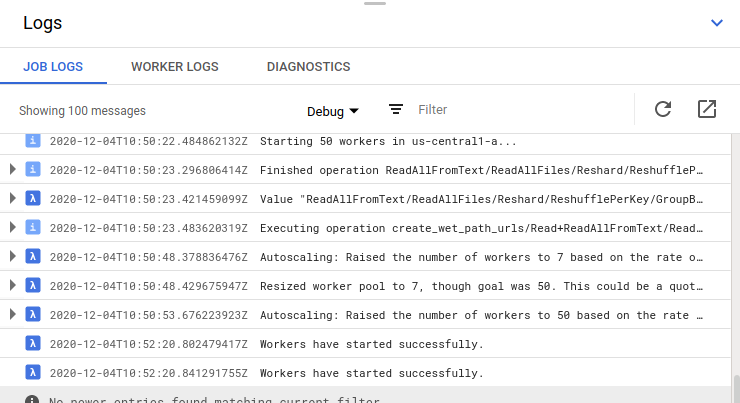
But workers log are empty as always no matter what level I choose to show:
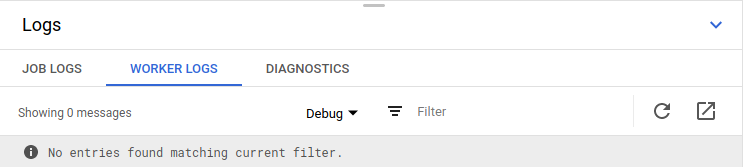
If I remove the experiments=upload_graph flag, the job wouldn't even hit Dataflow since the job graph file is bigger than 10MB. Is that limitation now removed?
versae
on 4 Dec 2020
I got into one of the vms spawn up by Dataflow, but I couldn't attach nor exec using docker or kubectl:
versae@c4-nordic-gen-12040250-nmtb-harness-thg2 ~ $ docker ps
CONTAINER ID        IMAGE                  COMMAND                  CREATED              STATUS              PORTS               NAMES
e3a9bebbf707        de85782bee5e           "/opt/google/dataflo…"   About a minute ago   Up About a minute                       k8s_healthchecker_dataflow-c4-nordic-gen-12040250-nmtb-harness-thg2_default_8e5b5591d75afec8cb4c6f7c6f307ec3_2
25143e56b5c5        a2197f010291           "/opt/google/dataflo…"   About a minute ago   Up About a minute                       k8s_vmmonitor_dataflow-c4-nordic-gen-12040250-nmtb-harness-thg2_default_8e5b5591d75afec8cb4c6f7c6f307ec3_2
dc9032da86e4        1f1945da0e3f           "/opt/google/dataflo…"   About a minute ago   Up About a minute                       k8s_shuffle_dataflow-c4-nordic-gen-12040250-nmtb-harness-thg2_default_8e5b5591d75afec8cb4c6f7c6f307ec3_2
19ec14cc436a        k8s.gcr.io/pause:3.1   "/pause"                 About a minute ago   Up About a minute                       k8s_POD_dataflow-c4-nordic-gen-12040250-nmtb-harness-thg2_default_8e5b5591d75afec8cb4c6f7c6f307ec3_1
versae
on 4 Dec 2020
Search in the vm /var/log, but nothing containing "HKT", "started", or "pipeline". I did found messages like this:
dataflow/taskrunner/harness/boot-json.log:{"severity":"DEBUG","time":"2020/12/04 11:41:09.777197","line":"download.go:289","message":"Debug: validating 61:dataflow_python_sdk.tar [#9]"}
Could it be that those vms and pods come with stuff preinstalled on boot and therefore do not install the dependencies for the job?
versae
on 4 Dec 2020
Interesting that you could not attach...
So rather than the 'worker logs' tab could you please also check the detailed log viewer? Its the square with the diagonal arrow next to the refresh icon, in the image you shared above.
rezarokni
on 4 Dec 2020
Oh well, I can see them now in the Logs Viewer!
I see a lot of Error syncing pod errors, but what's even more interesting is that effectively the local clone of tensorflow_datasets with the custom Config is not being installed because it is not found (I guess) in the workers. I added it to the beam_requitements.txt file with -e datasets/ and that works in the main process, but that folder does not exist in the workers.
ERROR: datasets/ is not a valid editable requirement. It should either be a path to a local project or a VCS URL (beginning with svn+, git+, hg+, or bzr+).",
Is the custom Config needed in the workers or only by the main process launching the Dataflow job?
versae
on 4 Dec 2020
The custom config is not needed by the workers. It's okay that the installed version doesn't include it.
Just to be clear, I was able to run this with no issue back when I submitted #2734. I'm not sure why you are still having trouble.
adarob
on 4 Dec 2020
@versae best to delete the comment with txt file as the raw info is not needed.
rezarokni
on 4 Dec 2020
@adarob, @rezarokni thanks for all the help, we're all in good faith here :) I wish it just worked for me. After removing the local clone from the workers dependencies, getting rid of the experimental flag (job graph file is now 1.3MB instead of 13MB), it now seems we have reached a milestone. I can now see workers logs in the UI and the first stage (counter) has completed successfully. We are now getting this tracebacks in the workers:
An exception was raised when trying to execute the workitem 7861000946831734554 : Traceback (most recent call last):
  ...
  File "/home/versae/datasets/tensorflow_datasets/text/c4.py", line 403, in download_wet_file
    name=f"{lang}-validation",
NameError: name 'uuid' is not defined

During handling of the above exception, another exception occurred:

Traceback (most recent call last):
  ...
  File "/home/versae/datasets/tensorflow_datasets/text/c4.py", line 403, in download_wet_file
    name=f"{lang}-validation",
NameError: name 'uuid' is not defined [while running 'Map(download_wet_file)']

Note: imports, functions and other variables defined in the global context of your __main__ file of your Dataflow pipeline are, by default, not available in the worker execution environment, and such references will cause a NameError, unless the --save_main_session pipeline option is set to True. Please see https://cloud.google.com/dataflow/faq#how-do-i-handle-nameerrors for additional documentation on configuring your worker execution environment.
However, since there are issues installing tfds-nightly (#2827), I used regular tensorflow_datasets as a dependency in the workers (adding git+https://... did not work either since git is not available in the workers). So not sure the error I'm getting now is related to that or not.
versae
on 4 Dec 2020
I see a lot of Error syncing pod errors
This error indicates that a worker Docker container failed to start.
This typically happens when one of the containers is crashlooping on startup,
or a container image cannot be pulled.
If the container is crashlooping, look for an error message
describing the failure in worker-startup, harness-startup or docker logs.
Startup crashes are commonly caused by dependency issues with Python jobs,
which can be due to incompatible specified dependencies or network issues that
cause the specified repositories to be unreachable. Note that Apache Beam Python
SDK installed in the container should be the same as the SDK used to launch the
job.
If you are using a custom container image with your job and the workers are
unable to pull the image, verify that the image name and tag are correct,
and that the image is accessible by the Dataflow workers.
 tvalentyn
on 4 Dec 2020
tvalentyn
on 4 Dec 2020
After downgrading pip to "<20.0" we got it to work. It's been running for almost 18 hours now. So far we've got a few errors related to downloading of WET files (a HTTP 503 downloading https://commoncrawl.s3.amazonaws.com/crawl-data/CC-MAIN-2015-27/segments/1435375090887.26/wet/CC-MAIN-20150627031810-00254-ip-10-179-60-89.ec2.internal.warc.wet.gz, a HTTP 500 for https://commoncrawl.s3.amazonaws.com/crawl-data/CC-MAIN-2019-09/segments/1550247479627.17/wet/CC-MAIN-20190215224408-20190216010408-00436.warc.wet.gz, but also Remote end closed connection without response, Connection reset by peer, and Connection broken). Hopefully, the impact of those errors is not too big.
It has shuffled almost 40TB of data on 132k WET files and counting (so nice to be able to see all the counters). I'm closing the issue and will write a small TL;DR when it's done for anyone following. Thank you so much for all the work, @adarob, @rezarokni, and @tvalentyn!
versae
on 6 Dec 2020
@adarob, @rezarokni, any way to estimate how long the process will take?
versae
on 7 Dec 2020
If it crashes for any reason, is there a way to resume processing?
versae
on 7 Dec 2020
any way to estimate how long the process will take?
It's tricky and depends on the pipeline and even the Dataset. Besides trying the pipeline on datasets of different sizes, it would be prudent to check that pipeline can scale and data is ~evenly distributed between workers (no hot keys).
If it crashes for any reason, is there a way to resume processing?
I don't think it is possible at this time. However Dataflow will retry failing work item at least 4 times before giving up.
tvalentyn
on 8 Dec 2020
We have enabled shuffle_mode=service, not sure if it mitigates the hot key thing, but we haven't got any errors related to hot keys yet.
To be honest, we are a bit worried. This is costing us around $1000 a day. We are small unit at the National Library of Norway trying to get a mono-lingual Norwegian BERT model released to the public. We are a non-profit European organization (no grant awarding, so not eligible for free GCP credits AFAICT). A rough estimate of the total time would be really helpful. It would be terrible running out of funds before the process finishes with no chance of resuming it later.
There is full activity on all the VMs (~80% CPU), and it has processed 120TB of data so far. Here's a screenshot of the counters. Looking at the downloaded WET files (~320k), and calculating an average of 60k WET files per dump (there are 72), we estimated we are at about 15% of processing after 60 hours, so we still need 2 full weeks (400 hours) to get the Norwegian part of the mC4. But not sure if that's in any way realistic.

versae
on 8 Dec 2020
I've never built one of these datasets on DataFlow with more than 1 crawl (the default for English only). For multilingual, we used 72 crawls to help get enough data for the tail languages, but we only ran it on our internal system which used many more workers. Based on this estimate (which is actually only for the first stage of processing), I'd highly suggest you reduce the number of crawls you use in the config.
adarob
on 8 Dec 2020
As you pointed out, it seems unreasonable for us to run this for all the crawls. It seems like even restricting it to one crawl will be a significant expense. We are trying to build a very large corpus for Norwegian (and the other Nordic languages), and this looks like a very good source. Are you able to give us a rough estimate (based on your experience) on how much data one crawl would give us? We do have access to the OSCAR dataset based on Common Crawl. Would you happen to know how would one crawl differ from this dataset on one or two crawls?
versae
on 21 Dec 2020
If you let me know the languages you're interested in, I can compute ~ how
many documents you'll get from one crawl.
On Mon, Dec 21, 2020 at 8:11 AM Javier de la Rosa notifications@github.com
wrote:
As you pointed out, it seems unreasonable for us to run this for all the
crawls. It seems like even restricting it to one crawl will be a
significant expense. We are trying to build a very large corpus for
Norwegian (and the other Nordic languages), and this looks like a very good
source. Are you able to give us a rough estimate (based on your experience)
on how much data one crawl would give us? We do have access to the OSCAR
dataset based on Common Crawl. Would you happen to know how would one crawl
differ from this dataset on one or two crawls?—
You are receiving this because you were mentioned.
Reply to this email directly, view it on GitHub
https://github.com/tensorflow/datasets/issues/2711#issuecomment-748966142,
or unsubscribe
https://github.com/notifications/unsubscribe-auth/AAIJV2FGYRX5DQKKXQDFETDSV5CRLANCNFSM4TPDD2ZQ
.
adarob
on 21 Dec 2020
Sure, the languages we're interested in are Norwegian, Swedish, Danish, Icelandic, an Faroese (although I think this one is not included in mC4). The ISO codes are no, sv, da, and is (Faroese would be fo).
versae
on 21 Dec 2020
It'd be also great to know how many words or GB of raw text would be.
versae
on 21 Dec 2020
First off, I found a significant bottleneck that reduces the parallelism to ~71 instead of your number of workers. It will be fixed in https://github.com/tensorflow/datasets/pull/2895.
Here are the number of documents from 1 common crawl dump:
beam:ParDo(_PredictLanguageFn):MetricName(namespace=language-filter, name=passed:da) | 3,163,698 (15 GB)
beam:ParDo(_PredictLanguageFn):MetricName(namespace=language-filter, name=passed:is) | 219,188 (1 GB)
beam:ParDo(_PredictLanguageFn):MetricName(namespace=language-filter, name=passed:no) | 2,617,118 (12 GB)
beam:ParDo(_PredictLanguageFn):MetricName(namespace=language-filter, name=passed:sv) | 5,900,912 (26 GB)
hi @versae thanks for creating the issue...
did you guys finish it successfully(extracting the specific language from mc4) ?
if it did..how long does it take?
i'm also planning to extract specific language from mc4 using dataflow beam dataset..
any tips to prepare it or maybe code how to do it would be helpful
thanks
 acul3
on 8 Jan 2021
acul3
on 8 Jan 2021
Related issues
 EmanueleGhelfi
·
5Comments
EmanueleGhelfi
·
5Comments
 lgeiger
·
5Comments
lgeiger
·
5Comments
 lopeselio
·
5Comments
lopeselio
·
5Comments
 AmitMY
·
4Comments
AmitMY
·
4Comments
 zaabek
·
5Comments
zaabek
·
5Comments
Most helpful comment
Let me try and chat to @adarob more on what the scripts are doing and then we can see what to dig into.