Datadog-agent: DataDog agent pod - container crashing in latest-jmx image (7.21.0-jmx)
Output of the info page (if this is a bug)
2020-07-17 15:03:13 UTC | PROCESS | INFO | (pkg/process/config/config.go:436 in loadEnvVariables) | overriding API key from env DD_API_KEY value
starting security-agent
2020-07-17 15:03:15 UTC | SECURITY | ERROR | (app/app.go:151 in start) | Error starting health port, exiting: listen tcp 0.0.0.0:5555: bind: address already in use
Error: Error starting health port, exiting: listen tcp 0.0.0.0:5555: bind: address already in use
Usage:
  datadog-security-agent start [flags]
Flags:
  -h, --help   help for start
Global Flags:
  -c, --cfgpath string   path to directory containing datadog.yaml
  -n, --no-color         disable color output
security-agent exited with code 255, signal 0, restarting in 2 seconds
....
2020-07-17 14:47:47 UTC | CORE | INFO | (cmd/agent/app/run.go:181 in StartAgent) | Starting Datadog Agent v7.21.0
2020-07-17 14:47:47 UTC | CORE | ERROR | (cmd/agent/app/run.go:208 in StartAgent) | Error starting health port, exiting: listen tcp 0.0.0.0:5555: bind: address already in use
2020-07-17 14:47:47 UTC | CORE | INFO | (pkg/logs/logs.go:110 in Stop) | Stopping logs-agent
2020-07-17 14:47:47 UTC | CORE | INFO | (pkg/logs/logs.go:123 in Stop) | logs-agent stopped
2020-07-17 14:47:47 UTC | CORE | INFO | (cmd/agent/app/run.go:360 in StopAgent) | See ya!
Error: Error starting health port, exiting: listen tcp 0.0.0.0:5555: bind: address already in use
AGENT EXITED WITH CODE 255, SIGNAL 0, KILLING CONTAINER
process-agent exited with code 256, signal 15, restarting in 2 seconds
security-agent exited with code 256, signal 15, restarting in 2 seconds
system-probe exited with code 256, signal 15, restarting in 2 seconds
[cont-finish.d] executing container finish scripts...
[cont-finish.d] done.
[s6-finish] waiting for services.
s6-svwait: fatal: supervisor died
[s6-finish] sending all processes the TERM signal.
trace-agent exited with code 256, signal 1, restarting in 2 seconds
[s6-finish] sending all processes the KILL signal and exiting.
Describe what happened:
There were a lots of alerts about our DataDog agent pods restarting multiple times across our 2 production clusters, starting around 11PM July 16th 2020 (GMT+7). Checking logs and I found lots of errors as Error starting health port, exiting: listen tcp 0.0.0.0:5555: bind: address already in use, see screenshoot below:
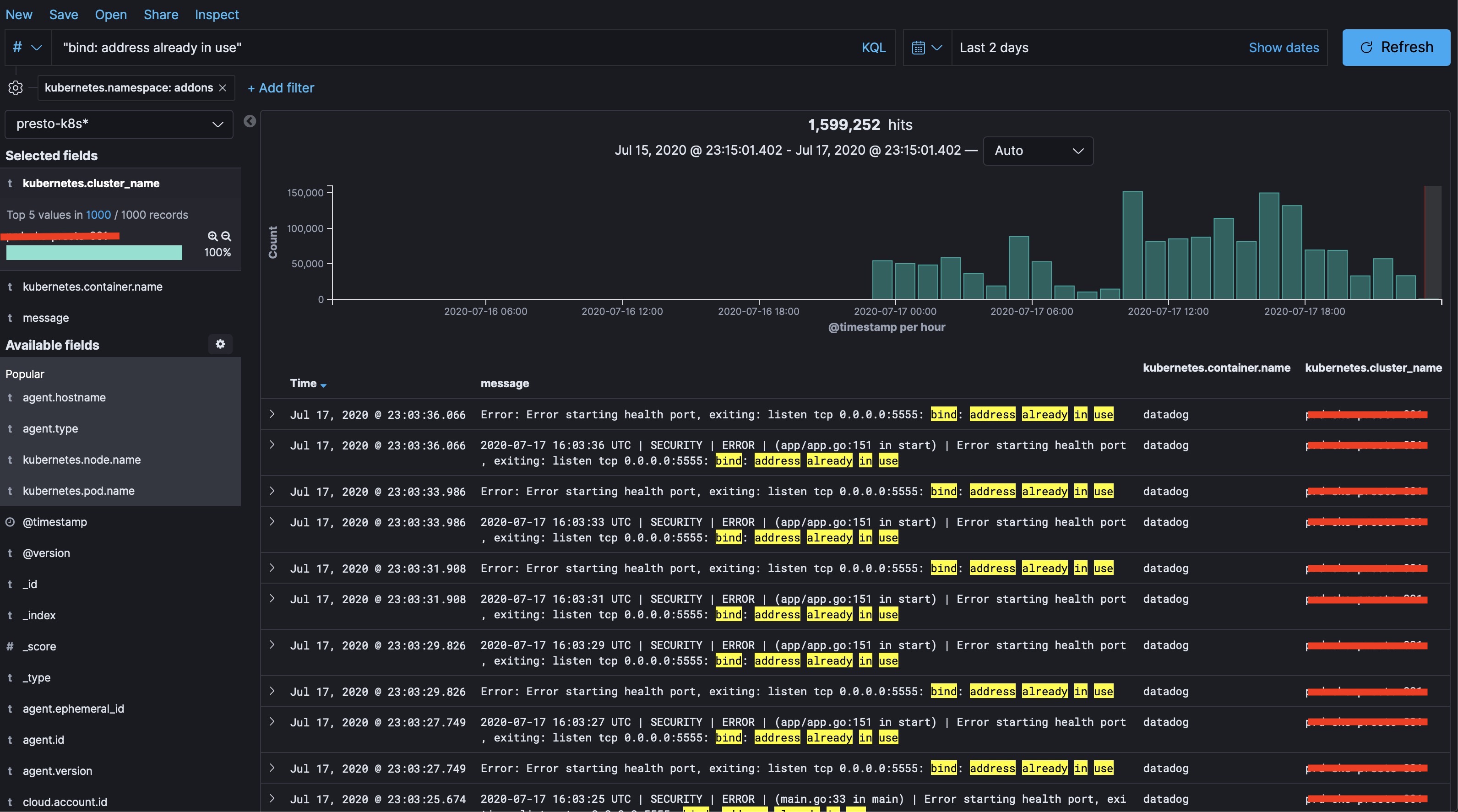
The errors only happens in newly created DataDog agent pods, for the existing pods before 11PM July 16th 2020 (GMT+7) are still running fine. I have a feeling that something wrong with new Docker image, because we're using this tag jmx-latest in our Helm deployment. I ssh'ed to 2 Worker nodes to compare about Docker image tags.
- Node which has failed DataDog agent pod:
# docker image ls | grep datadog
REPOSITORY                                                          TAG                 IMAGE ID            CREATED             SIZE
datadog/agent                                                       latest-jmx          81e129f955b7        24 hours ago        922MB
- Node which has DataDog agent pod running fine:
[root@ip-10-55-99-61 ~]# docker image ls | grep datadog
REPOSITORY                                                          TAG                   IMAGE ID            CREATED             SIZE
datadog/agent                                                       latest-jmx            4ad826ce9c5f        4 weeks ago         782MB
datadog/cluster-agent                                               1.4.0                 b0ca017912e4        8 months ago        140MB
I found the jmx-latest tag was pushed around same time we started seeing error, which is 7.21.0-jmx.
Then I tested by revert the Docker image tag to one version before, which is 7.20.2-jmx and the error is gone, our DataDog agent pods were being replaced and running fine without any error.
Describe what you expected:
DataDog agent pod logs should not be restarted multiple times, and not having this error in logs:
2020-07-17 15:03:15 UTC | SECURITY | ERROR | (app/app.go:151 in start) | Error starting health port, exiting: listen tcp 0.0.0.0:5555: bind: address already in use
Error: Error starting health port, exiting: listen tcp 0.0.0.0:5555: bind: address already in use
Steps to reproduce the issue:
Replace latest-jmx tag in our Helm deployment to 7.20.2-jmx fixed the issue.
Additional environment details (Operating System, Cloud provider, etc):
- AWS EKS version 1.15
➜  ~ kubectl version --short
Client Version: v1.18.6
Server Version: v1.15.11-eks-af3caf
➜  ~ helm list datadog
NAME    REVISION        UPDATED                         STATUS          CHART           APP VERSION     NAMESPACE
datadog 2               Fri Jul 17 23:02:00 2020        DEPLOYED        datadog-1.39.9  7               addons
helm get values datadog:
clusterAgent:
  clusterChecks:
    enabled: true
  enabled: true
  metricsProvider:
    enabled: true
  rbac:
    create: true
daemonset:
  useHostPort: true
datadog:
  apiKey: <redacted>
  appKey: <redacted>
  collectEvents: true
  confd:
    docker.yaml: |-
      init_config: null
      instances:
        - collect_container_size: true
          collect_images_stats: true
          collect_disk_stats: true
          collect_exit_codes: true
  dogStatsDSocketPath: /var/run/datadog/dsd.socket
  env:
  - name: DD_CHECKS_TAG_CARDINALITY
    value: orchestrator
  leaderElection: true
  logLevel: INFO
  nodeLabelsAsTags:
    beta.kubernetes.io/instance-type: aws_instance_type
    kubernetes.io/role: kube_role
  nonLocalTraffic: true
  podAnnotationsAsTags:
    iam.amazonaws.com/role: kube_iamrole
  podLabelsAsTags:
    app: kube_app
    app.kubernetes.io/name: kube_app
    release: helm_release
  resources:
    limits:
      cpu: 2000m
      memory: 5Gi
    requests:
      cpu: 700m
      memory: 1Gi
  tags:
  - cloud:aws
  - distribution:eks
  - cluster_env:prd
  useDogStatsDSocketVolume: true
deployment:
  enabled: true
image:
  repository: datadog/agent
  tag: 7.20.2-jmx
kube-state-metrics:
  rbac:
    create: true
rbac:
  create: true
service:
  type: ClusterIP
 tunguyen9889
All 4 comments
I have the same in my cluster :/
Please, never use image datadog/agent:7 but sha256 or datadog/agent:7.x.y.
Big errors on our clusters. We must revert to 7.20.2 for now.
 JulienBreux
on 19 Jul 2020
JulienBreux
on 19 Jul 2020
Hi folks,
We're very sorry to hear that! I just wanted to let you know that we're working actively on a fix and it's going to be released in the coming hours/days. In the meantime please pin your Agent version to 7.20.2
Sorry again for the trouble, I'll let you know when the fix is ready.
Thanks!
 ahmed-mez
on 20 Jul 2020
ahmed-mez
on 20 Jul 2020
Hi folks,
We're very sorry to hear that! I just wanted to let you know that we're working actively on a fix and it's going to be released in the coming hours/days. In the meantime please pin your Agent version to
7.20.2Sorry again for the trouble, I'll let you know when the fix is ready.
Thanks!
Hi @ahmed-mez,
Don't worry 🤗
Thanks.
JulienBreux
on 21 Jul 2020
Hi again, the fix is now available in Agent 7.21.1 - I'm closing the issue but let us know if you have any other questions. Thanks!
ahmed-mez
on 22 Jul 2020
Related issues
 nimeshksingh
·
4Comments
nimeshksingh
·
4Comments
 bhavin192
·
5Comments
bhavin192
·
5Comments
 oussemos
·
5Comments
oussemos
·
5Comments
 ralmsdeveloper
·
4Comments
ralmsdeveloper
·
4Comments
 omb
·
3Comments
omb
·
3Comments
Most helpful comment
Hi folks,
We're very sorry to hear that! I just wanted to let you know that we're working actively on a fix and it's going to be released in the coming hours/days. In the meantime please pin your Agent version to
7.20.2Sorry again for the trouble, I'll let you know when the fix is ready.
Thanks!