I have got WSL2 up and running on my laptop and installed a conda enviroment with cupy appearing to work.
when I run the following:
from dask_cuda import LocalCUDACluster
from dask.distributed import Client

# Create a Dask Cluster with one worker per GPU
cluster = LocalCUDACluster()
client = Client(cluster)
/home/ouetis_khan/miniconda3/envs/img_linux2/lib/python3.8/site-packages/dask_cuda/utils.py:141: UserWarning: Cannot get CPU affinity for device with index 0, setting default affinity
  warnings.warn(
/home/ouetis_khan/miniconda3/envs/img_linux2/lib/python3.8/site-packages/dask_cuda/utils.py:141: UserWarning: Cannot get CPU affinity for device with index 1, setting default affinity
  warnings.warn(
If I client.close() and rerun
cluster = LocalCUDACluster()
client = Client(cluster)
I get the following error
NVMLError_Unknown                         Traceback (most recent call last)
<ipython-input-4-f36941294e22> in <module>
----> 1 cluster = LocalCUDACluster()
      2 client = Client(cluster)

~/miniconda3/envs/img_linux2/lib/python3.8/site-packages/dask_cuda/local_cuda_cluster.py in __init__(self, n_workers, threads_per_worker, processes, memory_limit, device_memory_limit, CUDA_VISIBLE_DEVICES, data, local_directory, protocol, enable_tcp_over_ucx, enable_infiniband, enable_nvlink, enable_rdmacm, ucx_net_devices, rmm_pool_size, rmm_managed_memory, jit_unspill, **kwargs)
    160             memory_limit, threads_per_worker, n_workers
    161         )
--> 162         self.device_memory_limit = parse_device_memory_limit(
    163             device_memory_limit, device_index=0
    164         )

~/miniconda3/envs/img_linux2/lib/python3.8/site-packages/dask_cuda/utils.py in parse_device_memory_limit(device_memory_limit, device_index)
    478         device_memory_limit = float(device_memory_limit)
    479         if isinstance(device_memory_limit, float) and device_memory_limit <= 1:
--> 480             return int(get_device_total_memory(device_index) * device_memory_limit)
    481
    482     if isinstance(device_memory_limit, str):

~/miniconda3/envs/img_linux2/lib/python3.8/site-packages/dask_cuda/utils.py in get_device_total_memory(index)
    159     pynvml.nvmlInit()
    160     return pynvml.nvmlDeviceGetMemoryInfo(
--> 161         pynvml.nvmlDeviceGetHandleByIndex(index)
    162     ).total
    163

~/miniconda3/envs/img_linux2/lib/python3.8/site-packages/pynvml/nvml.py in nvmlDeviceGetHandleByIndex(index)
    920     fn = get_func_pointer("nvmlDeviceGetHandleByIndex_v2")
    921     ret = fn(c_index, byref(device))
--> 922     check_return(ret)
    923     return device
    924

~/miniconda3/envs/img_linux2/lib/python3.8/site-packages/pynvml/nvml.py in check_return(ret)
    364 def check_return(ret):
    365     if (ret != NVML_SUCCESS):
--> 366         raise NVMLError(ret)
    367     return ret
    368

NVMLError_Unknown: Unknown Error
If I import cupy and run cupy.show_config()
CuPy Version          : 7.8.0
CUDA Root             : /home/ouetis_khan/miniconda3/envs/img_linux2
CUDA Build Version    : 11000
CUDA Driver Version   : 11030
CUDA Runtime Version  : 11000
cuBLAS Version        : 11200
cuFFT Version         : 10201
cuRAND Version        : 10201
cuSOLVER Version      : (10, 6, 0)
cuSPARSE Version      : 11101
NVRTC Version         : (11, 0)
cuDNN Build Version   : 8000
cuDNN Version         : 8000
NCCL Build Version    : 2708
NCCL Runtime Version  : 2708
CUB Version           : Enabled
cuTENSOR Version      : None
I see most of the libraries there except for one. Dask_Cuda could be a bit too early for WSL2 but there does appear to be something here where someone can get something working.
Any thoughts on what could be happening and on how to get this to work?
my laptop build is as follows (ive deleted a few bits for privacy):
WindowsBuildLabEx : 21277.1000.amd64fre.rs_prerelease.201207-1443
WindowsCurrentVersion : 6.3
WindowsEditionId : Core
WindowsInstallationType : Client
WindowsInstallDateFromRegistry : 1/3/2021 3:47:15 PM
WindowsProductId :
WindowsProductName : Windows 10 Home
WindowsRegisteredOrganization : Razer
WindowsRegisteredOwner :
WindowsSystemRoot : C:\WINDOWS
WindowsVersion : 2004
BiosCharacteristics :
BiosBIOSVersion : {ALASKA - 1072009, 5.00, American Megatrends - 5000C}
BiosBuildNumber :
BiosCaption : 5.00
BiosCodeSet :
BiosCurrentLanguage :
BiosDescription : 5.00
BiosEmbeddedControllerMajorVersion : 4
BiosEmbeddedControllerMinorVersion : 0
BiosFirmwareType : Uefi
BiosIdentificationCode :
BiosInstallableLanguages :
BiosInstallDate :
BiosLanguageEdition :
BiosListOfLanguages :
BiosManufacturer : Razer
BiosName : 5.00
BiosOtherTargetOS :
BiosPrimaryBIOS : True
BiosReleaseDate : 5/3/2018 1:00:00 AM
BiosSeralNumber :
BiosSMBIOSBIOSVersion : 5.00
BiosSMBIOSMajorVersion : 3
BiosSMBIOSMinorVersion : 0
BiosSMBIOSPresent : True
BiosSoftwareElementState : Running
BiosStatus : OK
BiosSystemBiosMajorVersion : 5
BiosSystemBiosMinorVersion : 0
BiosTargetOperatingSystem : 0
BiosVersion : ALASKA - 1072009
CsAdminPasswordStatus : Unknown
CsAutomaticManagedPagefile : True
CsAutomaticResetBootOption : True
CsAutomaticResetCapability : True
CsBootOptionOnLimit :
CsBootOptionOnWatchDog :
CsBootROMSupported : True
CsBootStatus : {0, 0, 0, 0...}
CsBootupState : Normal boot
CsCaption :
CsChassisBootupState : Safe
CsChassisSKUNumber :
CsCurrentTimeZone : 0
CsDaylightInEffect : False
CsDescription : AT/AT COMPATIBLE
CsDNSHostName :
CsDomain : WORKGROUP
CsDomainRole : StandaloneWorkstation
CsEnableDaylightSavingsTime : True
CsFrontPanelResetStatus : Unknown
CsHypervisorPresent : True
CsInfraredSupported : False
CsInitialLoadInfo :
CsInstallDate :
CsKeyboardPasswordStatus : Unknown
CsLastLoadInfo :
CsManufacturer : Razer
CsModel : Blade
CsName :
CsNetworkAdapters : {WiFi, Bluetooth Network Connection, Ethernet 2}
CsNetworkServerModeEnabled : True
CsNumberOfLogicalProcessors : 8
CsNumberOfProcessors : 1
CsProcessors : {Intel(R) Core(TM) i7-7700HQ CPU @ 2.80GHz}
CsOEMStringArray : {0, , , ...}
CsPartOfDomain : False
CsPauseAfterReset : -1
CsPCSystemType : Mobile
CsPCSystemTypeEx : Mobile
CsPowerManagementCapabilities :
CsPowerManagementSupported :
CsPowerOnPasswordStatus : Unknown
CsPowerState : Unknown
CsPowerSupplyState : Safe
CsPrimaryOwnerContact :
CsPrimaryOwnerName :
CsResetCapability : Other
CsResetCount : -1
CsResetLimit : -1
CsRoles : {LM_Workstation, LM_Server, NT}
CsStatus : OK
CsSupportContactDescription :
CsSystemFamily : 1A586755
CsSystemSKUNumber : RZ09-01953W53
CsSystemType : x64-based PC
CsThermalState : Safe
CsTotalPhysicalMemory : 17068191744
CsPhyicallyInstalledMemory : 16777216
CsUserName :
CsWakeUpType : PowerSwitch
CsWorkgroup : WORKGROUP
OsName : Microsoft Windows 10 Home Insider Preview
OsType : WINNT
OsOperatingSystemSKU : WindowsHome
OsVersion : 10.0.21277
OsCSDVersion :
OsBuildNumber : 21277
OsHotFixes : {KB4587025}
OsBootDevice : \Device\HarddiskVolume2
OsSystemDevice : \Device\HarddiskVolume4
OsSystemDirectory : C:\WINDOWS\system32
OsSystemDrive : C:
OsWindowsDirectory : C:\WINDOWS
OsCountryCode : 44
OsCurrentTimeZone : 0
OsLocaleID : 0809
OsLocale : en-GB
OsLocalDateTime : 1/4/2021 10:35:13 AM
OsLastBootUpTime : 1/4/2021 9:16:15 AM
OsUptime : 01:18:57.5475818
OsBuildType : Multiprocessor Free
OsCodeSet : 1252
OsDataExecutionPreventionAvailable : True
OsDataExecutionPrevention32BitApplications : True
OsDataExecutionPreventionDrivers : True
OsDataExecutionPreventionSupportPolicy : OptIn
OsDebug : False
OsDistributed : False
OsEncryptionLevel : 256
OsForegroundApplicationBoost : Maximum
OsTotalVisibleMemorySize : 16668156
OsFreePhysicalMemory : 7065500
OsTotalVirtualMemorySize : 23483900
OsFreeVirtualMemory : 6431744
OsInUseVirtualMemory : 17052156
OsTotalSwapSpaceSize :
OsSizeStoredInPagingFiles : 6815744
OsFreeSpaceInPagingFiles : 6677792
OsPagingFiles : {C:\pagefile.sys}
OsHardwareAbstractionLayer : 10.0.21277.1000
OsInstallDate : 1/3/2021 3:47:15 PM
OsManufacturer : Microsoft Corporation
OsMaxNumberOfProcesses : 4294967295
OsMaxProcessMemorySize : 137438953344
OsMuiLanguages : {en-GB, en-US}
OsNumberOfLicensedUsers :
OsNumberOfProcesses : 275
OsNumberOfUsers : 2
OsOrganization : Razer
OsArchitecture : 64-bit
OsLanguage : en-GB
OsProductSuites : {TerminalServicesSingleSession, HomeEdition}
OsOtherTypeDescription :
OsPAEEnabled :
OsPortableOperatingSystem : False
OsPrimary : True
OsProductType : WorkStation
OsRegisteredUser :
OsSerialNumber :
OsServicePackMajorVersion : 0
OsServicePackMinorVersion : 0
OsStatus : OK
OsSuites : {TerminalServices, TerminalServicesSingleSession,
HomeEdition}
OsServerLevel :
KeyboardLayout : en-GB
TimeZone : (UTC+00:00) Dublin, Edinburgh, Lisbon, London
LogonServer : \\
PowerPlatformRole : Mobile
HyperVisorPresent : True
HyperVRequirementDataExecutionPreventionAvailable :
HyperVRequirementSecondLevelAddressTranslation :
HyperVRequirementVirtualizationFirmwareEnabled :
HyperVRequirementVMMonitorModeExtensions :
DeviceGuardSmartStatus : Off
DeviceGuardRequiredSecurityProperties : {0}
DeviceGuardAvailableSecurityProperties : {BaseVirtualizationSupport, SecureBoot, DMAProtection,
6...}
DeviceGuardSecurityServicesConfigured : {0}
DeviceGuardSecurityServicesRunning : {0}
DeviceGuardCodeIntegrityPolicyEnforcementStatus :
DeviceGuardUserModeCodeIntegrityPolicyEnforcementStatus :
On top of the above information I have a Nvidia GTX 1060 GPU in built and a razer core eGPU with GTX1066 . So would be great to hear what you may think because CUDA is running on the my Ubuntu 18.04 with WSL2.
When I run the BlackScholes examples it runs (ok only on GPU 0) but it runs. So I am a bit confused why it can pick up two GPU's but not really work with them.
GPU Device 0: "Turing" with compute capability 7.5

Initializing data...
...allocating CPU memory for options.
...allocating GPU memory for options.
...generating input data in CPU mem.
...copying input data to GPU mem.
Data init done.

Executing Black-Scholes GPU kernel (512 iterations)...
Options count             : 8000000
BlackScholesGPU() time    : 0.543924 msec
Effective memory bandwidth: 147.079411 GB/s
Gigaoptions per second    : 14.707941

BlackScholes, Throughput = 14.7079 GOptions/s, Time = 0.00054 s, Size = 8000000 options, NumDevsUsed = 1, Workgroup = 128

Reading back GPU results...
Checking the results...
...running CPU calculations.

Comparing the results...
L1 norm: 1.741792E-07
Max absolute error: 1.192093E-05

Shutting down...
...releasing GPU memory.
...releasing CPU memory.
Shutdown done.

[BlackScholes] - Test Summary

NOTE: The CUDA Samples are not meant for performance measurements. Results may vary when GPU Boost is enabled.

Test passed
 Sh4zKh4n
All 15 comments
You are right, Dask-CUDA currently doesn't support WSL2. It seems that this is caused by NVML not being capable of querying the GPU. I think you would be able to go around that by passing device_memory_limit to LocalCUDACluster. This is a configuration to enable spilling from GPU memory to system memory that is inferred automatically when not specified. In your case you could set it to the total memory of your GPU, this is a per-GPU configuration, so if you have just one or multiple 8GB cards, you'd set device_memory_limit="8GB".
 pentschev
on 4 Jan 2021
pentschev
on 4 Jan 2021
Ok, I will have a go at that. I was doing some digging around and I think this is the issue:
The permissions are being blocked and I have tried the method attached but I dont think it works for WSL. I can see that with nvidia-smi the permissions are blocked so it's a permissions issue. I have unlocked it on the windows system using the method ascribed but there doesnt seem to be a way otherwise for the wsl distribution. I will let you know if the workaround works.
Sh4zKh4n
on 4 Jan 2021
@pentschev , so I just tried the following:
from dask_cuda import LocalCUDACluster
from dask.distributed import Client

# Create a Dask Cluster with one worker per GPU
cluster = LocalCUDACluster(device_memory_limit="6GB")
client = Client(cluster)
```
/home/ouetis_khan/miniconda3/envs/img_linux2/lib/python3.8/site-packages/dask_cuda/utils.py:141: UserWarning: Cannot get CPU affinity for device with index 0, setting default affinity
warnings.warn(
/home/ouetis_khan/miniconda3/envs/img_linux2/lib/python3.8/site-packages/dask_cuda/utils.py:141: UserWarning: Cannot get CPU affinity for device with index 1, setting default affinity
warnings.warn(
Same issue but something else happens, if i try to client.close() and re the same command

```python
# Create a Dask Cluster with one worker per GPU
cluster = LocalCUDACluster(device_memory_limit="6GB")
client = Client(cluster)
/home/ouetis_khan/miniconda3/envs/img_linux2/lib/python3.8/site-packages/distributed/node.py:151: UserWarning: Port 8787 is already in use.
Perhaps you already have a cluster running?
Hosting the HTTP server on port 33897 instead
  warnings.warn(
So the cluster is running but there's no link tot he cluster for tracking/profiling.
Does it appear to be working and I just can't shut the cluster down and have to restart the kernel?
So there does appear to be something here...it may be alive! sorry...
Sh4zKh4n
on 4 Jan 2021
LocalCUDACluster doesn't print any links, the output above seems right, you will have to connect to address shown when you print cluster but on port 33897 (as per the warning above).
pentschev
on 4 Jan 2021
@pentschev you are very right and i was being stupid not to call the client. I ran the following I got the cluster of 2 GPU's. The thing is this is very strange on the memory limit. It wont change from the 8GB whatever I put in the limit. I have 2 GPUs attached but I limited to 8GB's of ram shared between the two. I had a look at the directx diagnostics tool and my intel has 8226MB, the GpUS have 6052MB and 5992MB resoectively. All 3 have a shared ram of 8138MB. So Am I picking up th intel graphics card or the shared memory? I think I can live with 4GB out of 6Gb. Completely understand that it isnt supported but seems to be a way here to get it to work. I did change the limit to 10Gb and it still came out as 8GB.
from dask_cuda import LocalCUDACluster
from dask.distributed import Client

# Create a Dask Cluster with one worker per GPU
cluster = LocalCUDACluster(device_memory_limit="8GB")
client = Client(cluster)
client
I was not remembering to call the client. It not integrated into the Dask dashboard but I can live with that.
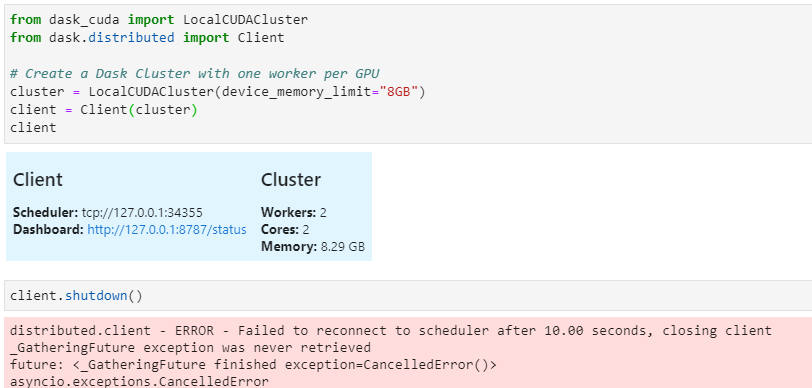
Though what is strange about it is that the memory limit of 8GB is shared between the two GPU's . So each on has 4GB. I am sure I have 6GB on each but if it is true and this is the GPU. 4 out of 6 GB from each isnt too bad. I just wish there was a way to confirm this was the GPUs and not the integrated Intel graphics.
Sh4zKh4n
on 4 Jan 2021
Dask-CUDA only supports dedicated NVIDIA GPUs, so the Intel one will be ignored and you can disregard it for this purpose. You then have 2 x 6GB NVIDIA GPUs, you can set device_memory_limit="6GB", or less than that if you want Dask to start spilling once the data known to Dask goes beyond that limit.
The Memory: 8.29 GB field refers to system (i.e., host) memory only, not GPU memory. The distributed.Client is completely unaware of GPUs or LocalCUDACluster, thus it can't print the memory being used by the GPU. If you want more information from GPUs in JupyterLab you can try https://github.com/rapidsai/jupyterlab-nvdashboard, but again that doesn't support WSL2 officially, so it may or may not work.
pentschev
on 4 Jan 2021
@pentschev , thats really helpful. I think I may stop messing around with nice dashboards and try to get this thing to work with some code. On the memory I understand what you mean now and the value is shared so the shared memory is split equally. I just have to be careful and remember I have 6Gb on each. Really helpful. Now let me see if I can try not to blow up my computer!
Sh4zKh4n
on 4 Jan 2021
It's not shared, you have 6 GB per GPU and device_memory_limit is a per-GPU configuration, meaning the worker in GPU 0 will only start spilling after it reaches 6GB on that GPU, the same for GPU 1. For this particular case we're saying it will only start spilling once the GPU is full, by that time you'll have an out-of-memory error, if you want to prevent that you'll need to tweak it to a value that's smaller than 6GB in your case.
pentschev
on 4 Jan 2021
Sorry I think I confused the situation there.
The 8.29GB, as you pointed out is not to do with the GPU but rather the host memory. Which appears to be shared at around 4GB per worker GPU. So that is split between the two workers as I can see in the dashboard:

That is completely different as you have explained on the device_memory_limit, which I should assign as 6GB or less for spilling into memory. So i need to make sure that I remember these are seperate and different values.
Sh4zKh4n
on 4 Jan 2021
Thanks, I think this issue is closed now and i really appreciate the help. Unless you think I have missed something. Thank you again!
Sh4zKh4n
on 4 Jan 2021
All seems to be working now!
Sh4zKh4n
on 4 Jan 2021
The 8.29GB, as you pointed out is not to do with the GPU but rather the host memory. Which appears to be shared at around 4GB per worker GPU.
Ah yes, sorry I thought you were referring to device_memory_limit.
That is completely different as you have explained on the device_memory_limit, which I should assign as 6GB or less for spilling into memory. So i need to make sure that I remember these are seperate and different values.
That's right, device_memory_limit will spill from GPU to host, and memory_limit (which is automatically inferred to 8GB in your system) is shared among the workers, and that's used to control host to disk spilling.
pentschev
on 4 Jan 2021
@pentschev Thats great, it's interesting that the laptops memory though is 16GB but theres a limit on the pooling. Which really isnt an issue. i just wonder why that is?
Sh4zKh4n
on 4 Jan 2021
If you have 16GB but 8GB is shared with the Intel card as you said previously, you probably only see 8GB available for the system then. The default memory_limit for LocalCUDACluster will be the total system's memory, unless you have a different configuration in distributed.yaml.
pentschev
on 4 Jan 2021
I created a file as the the wsl2 docs suggest and added the following:
[wsl2]
memory=12GB # Limits VM memory in WSL 2 up to 13GB (leave 3GB reserved for windows)
processors=3 # Makes the WSL 2 VM use 3 virtual processors (1 core left for windows)
swap=200GB
swapFile=E:\temp\swap.vhdx
localhostForwarding=true
That seems to do the trick. When I run a dask.distributed client I now have 12.6Gb vs my previous 8GB in wsl2. So thats an improvement. Cupy is working, at least I can use a local dask cuda cluster as i have two (not very good but better than nothing Nvidia GPUs 1060 (embedded) and a eGPU with 1066). So 6Gb on each and 13Gb of ram to play with it. thanks @pentschev
Sh4zKh4n
on 4 Jan 2021
Related issues
 galipremsagar
·
3Comments
galipremsagar
·
3Comments
 pradghos
·
11Comments
pradghos
·
11Comments
 ayushdg
·
10Comments
ayushdg
·
10Comments
 drobison00
·
9Comments
pentschev
·
9Comments
drobison00
·
9Comments
pentschev
·
9Comments