Dask-cuda: [BUG] LocalCUDACluster doesn't work with NVIDIA MIG
(py)nvml does not appear to be compatible with MIG, which prevents various Dask services from working correctly, for example 'LocalCUDACluster'.
While this isn't explicitly Dask-cuda's fault, the end result is the same. Adding this issue for others to reference, and for discussion of potential work arounds.
from dask_cuda import LocalCUDACluster
from dask.distributed import Client

cluster = LocalCUDACluster(device_memory_limit=1.0, rmm_managed_memory=True)
client = Client(cluster)
---------------------------------------------------------------------------
NVMLError_NoPermission                    Traceback (most recent call last)
<ipython-input-1-48e0ebf5a2e9> in <module>
     33
     34
---> 35 cluster = LocalCUDACluster(device_memory_limit=1.0,
     36                            rmm_managed_memory=True)
     37 client = Client(cluster)

/opt/conda/envs/rapids/lib/python3.8/site-packages/dask_cuda/local_cuda_cluster.py in __init__(self, n_workers, threads_per_worker, processes, memory_limit, device_memory_limit, CUDA_VISIBLE_DEVICES, data, local_directory, protocol, enable_tcp_over_ucx, enable_infiniband, enable_nvlink, enable_rdmacm, ucx_net_devices, rmm_pool_size, rmm_managed_memory, jit_unspill, **kwargs)
    166             memory_limit, threads_per_worker, n_workers
    167         )
--> 168         self.device_memory_limit = parse_device_memory_limit(
    169             device_memory_limit, device_index=0
    170         )

/opt/conda/envs/rapids/lib/python3.8/site-packages/dask_cuda/utils.py in parse_device_memory_limit(device_memory_limit, device_index)
    478         device_memory_limit = float(device_memory_limit)
    479         if isinstance(device_memory_limit, float) and device_memory_limit <= 1:
--> 480             return int(get_device_total_memory(device_index) * device_memory_limit)
    481
    482     if isinstance(device_memory_limit, str):

/opt/conda/envs/rapids/lib/python3.8/site-packages/dask_cuda/utils.py in get_device_total_memory(index)
    158     """
    159     pynvml.nvmlInit()
--> 160     return pynvml.nvmlDeviceGetMemoryInfo(
    161         pynvml.nvmlDeviceGetHandleByIndex(index)
    162     ).total

/opt/conda/envs/rapids/lib/python3.8/site-packages/pynvml/nvml.py in nvmlDeviceGetMemoryInfo(handle)
   1286     fn = get_func_pointer("nvmlDeviceGetMemoryInfo")
   1287     ret = fn(handle, byref(c_memory))
-> 1288     check_return(ret)
   1289     return c_memory
   1290

/opt/conda/envs/rapids/lib/python3.8/site-packages/pynvml/nvml.py in check_return(ret)
    364 def check_return(ret):
    365     if (ret != NVML_SUCCESS):
--> 366         raise NVMLError(ret)
    367     return ret
    368

NVMLError_NoPermission: Insufficient Permissions
 drobison00
All 9 comments
Thanks @drobison00 for filing this, indeed we'll have to find a way to work around NVML. I don't know if we have any ways to do so without creating a CUDA context ahead of time, it may be that the only way to do so is forcing the user to specify parameters such as total device memory.
 pentschev
on 19 Apr 2021
drobison00
on 21 Apr 2021
pentschev
on 19 Apr 2021
drobison00
on 21 Apr 2021
I do not have access to an A100, but the latest (unreleased) version of pynvml should include MIG-supported NVML bindings. I believe we will need to modify get_device_total_memory to optionally pass a MIG device handle when necessary. As a first-order functionality test, someone could try adding a try/except for the current NVMLError and retry with a MIG handle - E.g.:
def get_device_total_memory(index=0):
    """
    Return total memory of CUDA device with index
    """
    pynvml.nvmlInit()
    try:
        return pynvml.nvmlDeviceGetMemoryInfo(
            pynvml.nvmlDeviceGetHandleByIndex(index)
        ).total
    except pynvml.NVMLError:
        return pynvml.nvmlDeviceGetMemoryInfo(
            pynvml.nvmlDeviceGetMigDeviceHandleByIndex(index)
        ).total
 rjzamora
on 11 May 2021
rjzamora
on 11 May 2021
Sounds like a good idea @rjzamora . A100s have been very scarce lately, I think we may be able to test that out in a week or two when Selene is open again to general usage.
pentschev
on 11 May 2021
Made the suggested changes on a GCP a100-mig system and hit the error below; the error spams continuously until the process is killed.
I tried using the latest pynvml from conda, as well as a manual install from source.
>>> client = Client(cluster)tornado.application - ERROR - Exception in callback <bound method SystemMonitor.update of <SystemMonitor: cpu: 16 memory: 315 MB fds: 45>>
Traceback (most recent call last):
  File "/root/miniconda3/envs/rapids-21.06/lib/python3.8/site-packages/tornado/ioloop.py", line 905, in _run
    return self.callback()
  File "/root/miniconda3/envs/rapids-21.06/lib/python3.8/site-packages/distributed/system_monitor.py", line 96, in update
    gpu_extra = nvml.one_time()
  File "/root/miniconda3/envs/rapids-21.06/lib/python3.8/site-packages/distributed/diagnostics/nvml.py", line 47, in one_time
    "memory-total": pynvml.nvmlDeviceGetMemoryInfo(h).total,
  File "/root/miniconda3/envs/rapids-21.06/lib/python3.8/site-packages/pynvml/nvml.py", line 1984, in nvmlDeviceGetMemoryInfo
    _nvmlCheckReturn(ret)
  File "/root/miniconda3/envs/rapids-21.06/lib/python3.8/site-packages/pynvml/nvml.py", line 743, in _nvmlCheckReturn
    raise NVMLError(ret)
pynvml.nvml.NVMLError_NoPermission: Insufficient Permissions
We've ran into perm issues in the past, though MIG things might required something else. Possible solutions are documented here:
https://github.com/gpuopenanalytics/pynvml#nvml-permissions
 quasiben
on 30 Jun 2021
quasiben
on 30 Jun 2021
I was able to atleast circumvent the Insufficient Permissions error with the following code:
def get_device_total_memory(index=0, migindex=0):
    """
    Return total memory of CUDA device with index
    """
    import pynvml
    pynvml.nvmlInit()
    try:
        return pynvml.nvmlDeviceGetMemoryInfo(
            pynvml.nvmlDeviceGetHandleByIndex(index)
        ).total
    except pynvml.NVMLError:
        return pynvml.nvmlDeviceGetMemoryInfo(
            pynvml.nvmlDeviceGetMigDeviceHandleByIndex(device = pynvml.nvmlDeviceGetHandleByIndex(index), index=migindex=0)
        ).total
However, as I understand from the API, nvmlDeviceGetMigDeviceHandleByIndex function expects both the handle for the parent GPU and an index for the specific MIG device (here I am passing in 0 for the mig device index) . I believe brief modifications in dask-cuda needs to be added in order to pass in the MIG device index as well if we start the LocalCUDACluster with multiple MIG instances?
 akaanirban
on 12 Jul 2021
akaanirban
on 12 Jul 2021
Yes, the code above is possible now with latest pyNVML. However, I feel that this is still a bit more complicated to handle, Dask-CUDA now needs to know which devices are MIG devices and which ones are not. Presently, it only relies upon CUDA_VISIBLE_DEVICES which is automatically defined as list(range(pynvml.nvmlDeviceGetCount())), and to be honest I haven't had the chance to work with MIG yet and don't know exactly what happens when you have MIG devices available, are they treated just as one more device? For example, imagine there's a system with 2 GPUs configured as follows:
- GPU 0;
* MIG 0;
* MIG 1; - GPU 1.
In the case above, will there 3 indices that can be passed to CUDA_VISIBLE_DEVICES, where 0->GPU 0 MIG 0, 1->GPU 0 MIG 1, 2->GPU 1? And if so, are we able to reliably identify which ones are MIG and which are just regular devices?
pentschev
on 12 Jul 2021
I tested a few things. I have used a VM on AWS which has 8 A100 GPUs. I enabled MIG on GPU 0 and divided that into 7 5GB instances.
MIG instances configuration.
ubuntu@ip-172-31-48-89:~$ sudo nvidia-smi -mig 1 -i 0
Enabled MIG Mode for GPU 00000000:10:1C.0
All done.
ubuntu@ip-172-31-48-89:~$ sudo nvidia-smi mig -cgi 19,19,19,19,19,19,19 -i 0
Successfully created GPU instance ID  9 on GPU  0 using profile MIG 1g.5gb (ID 19)
Successfully created GPU instance ID  7 on GPU  0 using profile MIG 1g.5gb (ID 19)
Successfully created GPU instance ID  8 on GPU  0 using profile MIG 1g.5gb (ID 19)
Successfully created GPU instance ID 11 on GPU  0 using profile MIG 1g.5gb (ID 19)
Successfully created GPU instance ID 12 on GPU  0 using profile MIG 1g.5gb (ID 19)
Successfully created GPU instance ID 13 on GPU  0 using profile MIG 1g.5gb (ID 19)
Successfully created GPU instance ID 14 on GPU  0 using profile MIG 1g.5gb (ID 19)
ubuntu@ip-172-31-48-89:~$ sudo nvidia-smi mig -i 0 -cci -gi 7,8,9,11,12,13,14
Successfully created compute instance ID  0 on GPU  0 GPU instance ID  7 using profile MIG 1g.5gb (ID  0)
Successfully created compute instance ID  0 on GPU  0 GPU instance ID  8 using profile MIG 1g.5gb (ID  0)
Successfully created compute instance ID  0 on GPU  0 GPU instance ID  9 using profile MIG 1g.5gb (ID  0)
Successfully created compute instance ID  0 on GPU  0 GPU instance ID 11 using profile MIG 1g.5gb (ID  0)
Successfully created compute instance ID  0 on GPU  0 GPU instance ID 12 using profile MIG 1g.5gb (ID  0)
Successfully created compute instance ID  0 on GPU  0 GPU instance ID 13 using profile MIG 1g.5gb (ID  0)
Successfully created compute instance ID  0 on GPU  0 GPU instance ID 14 using profile MIG 1g.5gb (ID  0)
ubuntu@ip-172-31-48-89:~$
ubuntu@ip-172-31-48-89:~$ nvidia-smi
Mon Jul 12 22:17:40 2021
+-----------------------------------------------------------------------------+
| NVIDIA-SMI 450.119.03   Driver Version: 450.119.03   CUDA Version: 11.0     |
|-------------------------------+----------------------+----------------------+
| GPU  Name        Persistence-M| Bus-Id        Disp.A | Volatile Uncorr. ECC |
| Fan  Temp  Perf  Pwr:Usage/Cap|         Memory-Usage | GPU-Util  Compute M. |
|                               |                      |               MIG M. |
|===============================+======================+======================|
|   0  A100-SXM4-40GB      On   | 00000000:10:1C.0 Off |                   On |
| N/A   40C    P0    47W / 400W |    102MiB / 40537MiB |     N/A      Default |
|                               |                      |              Enabled |
+-------------------------------+----------------------+----------------------+
|   1  A100-SXM4-40GB      On   | 00000000:10:1D.0 Off |                    0 |
| N/A   40C    P0    56W / 400W |      0MiB / 40537MiB |      0%      Default |
|                               |                      |             Disabled |
+-------------------------------+----------------------+----------------------+
|   2  A100-SXM4-40GB      On   | 00000000:20:1C.0 Off |                    0 |
| N/A   41C    P0    57W / 400W |      0MiB / 40537MiB |      0%      Default |
|                               |                      |             Disabled |
+-------------------------------+----------------------+----------------------+
|   3  A100-SXM4-40GB      On   | 00000000:20:1D.0 Off |                    0 |
| N/A   37C    P0    51W / 400W |      0MiB / 40537MiB |      0%      Default |
|                               |                      |             Disabled |
+-------------------------------+----------------------+----------------------+
|   4  A100-SXM4-40GB      On   | 00000000:90:1C.0 Off |                    0 |
| N/A   40C    P0    55W / 400W |      0MiB / 40537MiB |      0%      Default |
|                               |                      |             Disabled |
+-------------------------------+----------------------+----------------------+
|   5  A100-SXM4-40GB      On   | 00000000:90:1D.0 Off |                    0 |
| N/A   37C    P0    52W / 400W |      0MiB / 40537MiB |      0%      Default |
|                               |                      |             Disabled |
+-------------------------------+----------------------+----------------------+
|   6  A100-SXM4-40GB      On   | 00000000:A0:1C.0 Off |                    0 |
| N/A   42C    P0    55W / 400W |      0MiB / 40537MiB |      0%      Default |
|                               |                      |             Disabled |
+-------------------------------+----------------------+----------------------+
|   7  A100-SXM4-40GB      On   | 00000000:A0:1D.0 Off |                    0 |
| N/A   40C    P0    59W / 400W |      0MiB / 40537MiB |      0%      Default |
|                               |                      |             Disabled |
+-------------------------------+----------------------+----------------------+

+-----------------------------------------------------------------------------+
| MIG devices:                                                                |
+------------------+----------------------+-----------+-----------------------+
| GPU  GI  CI  MIG |         Memory-Usage |        Vol|         Shared        |
|      ID  ID  Dev |           BAR1-Usage | SM     Unc| CE  ENC  DEC  OFA  JPG|
|                  |                      |        ECC|                       |
|==================+======================+===========+=======================|
|  0    7   0   0  |     80MiB /  4864MiB | 14      0 |  1   0    0    0    0 |
|                  |      4MiB /  8191MiB |           |                       |
+------------------+----------------------+-----------+-----------------------+
|  0    8   0   1  |      3MiB /  4864MiB | 14      0 |  1   0    0    0    0 |
|                  |      0MiB /  8191MiB |           |                       |
+------------------+----------------------+-----------+-----------------------+
|  0    9   0   2  |      3MiB /  4864MiB | 14      0 |  1   0    0    0    0 |
|                  |      0MiB /  8191MiB |           |                       |
+------------------+----------------------+-----------+-----------------------+
|  0   11   0   3  |      3MiB /  4864MiB | 14      0 |  1   0    0    0    0 |
|                  |      0MiB /  8191MiB |           |                       |
+------------------+----------------------+-----------+-----------------------+
|  0   12   0   4  |      3MiB /  4864MiB | 14      0 |  1   0    0    0    0 |
|                  |      0MiB /  8191MiB |           |                       |
+------------------+----------------------+-----------+-----------------------+
|  0   13   0   5  |      3MiB /  4864MiB | 14      0 |  1   0    0    0    0 |
|                  |      0MiB /  8191MiB |           |                       |
+------------------+----------------------+-----------+-----------------------+
|  0   14   0   6  |      3MiB /  4864MiB | 14      0 |  1   0    0    0    0 |
|                  |      0MiB /  8191MiB |           |                       |
+------------------+----------------------+-----------+-----------------------+

+-----------------------------------------------------------------------------+
| Processes:                                                                  |
|  GPU   GI   CI        PID   Type   Process name                  GPU Memory |
|        ID   ID                                                   Usage      |
|=============================================================================|
|    0    7    0       5239      C   ...s/rapids-21.06/bin/python       73MiB |
+-----------------------------------------------------------------------------+
Some of the tests are done on a notebook running on bare VM. For other tests, I am using the rapids 21.06 docker container where I restrict which GPUs the container can see using the --gpus flag. I will describe the setup appropriately as needed.
Observations:
Currently,
LocalCUDAClusterrequiresCUDA_VISIBLE_DEVICESargument to haveMIG-GPU-prefix if we want to specify MIG instances: https://github.com/rapidsai/dask-cuda/blob/branch-21.08/dask_cuda/utils.py#L467 . Non MIG gpus can be specified via integers or with a prefixGPU-.LocalCUDAClusterfails when I try to use MIG instances by specifying the MIG enabled GPU by its indexCUDA_VISIBLE_DEVICES="0". This is directly on the VM.
Expand to see Error Details.
from dask.distributed import Client, wait
from dask_cuda import LocalCUDACluster

cluster = LocalCUDACluster(CUDA_VISIBLE_DEVICES="0")
cluster
---------------------------------------------------------------------------
tornado.application - ERROR - Exception in callback <bound method SystemMonitor.update of <SystemMonitor: cpu: 15 memory: 306 MB fds: 53>>
Traceback (most recent call last):
File "/home/ubuntu/miniconda3/envs/rapids-21.06/lib/python3.8/site-packages/tornado/ioloop.py", line 905, in _run
    return self.callback()
File "/home/ubuntu/miniconda3/envs/rapids-21.06/lib/python3.8/site-packages/distributed/system_monitor.py", line 99, in update
    gpu_metrics = nvml.real_time()
File "/home/ubuntu/miniconda3/envs/rapids-21.06/lib/python3.8/site-packages/distributed/diagnostics/nvml.py", line 38, in real_time
    "utilization": pynvml.nvmlDeviceGetUtilizationRates(h).gpu,
File "/home/ubuntu/miniconda3/envs/rapids-21.06/lib/python3.8/site-packages/pynvml/nvml.py", line 2058, in nvmlDeviceGetUtilizationRates
    _nvmlCheckReturn(ret)
File "/home/ubuntu/miniconda3/envs/rapids-21.06/lib/python3.8/site-packages/pynvml/nvml.py", line 743, in _nvmlCheckReturn
    raise NVMLError(ret)
pynvml.nvml.NVMLError_NotSupported: Not Supported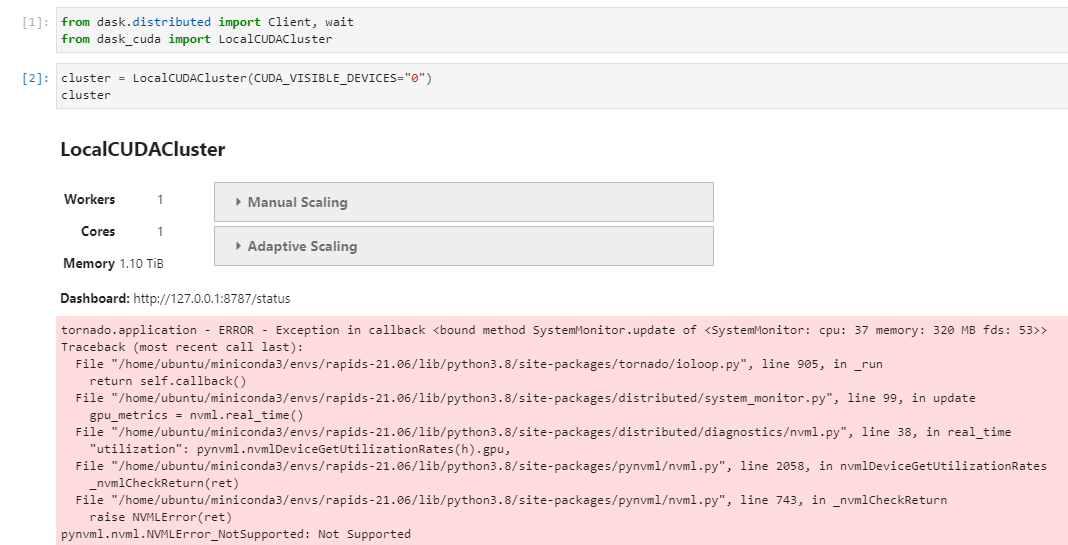
Note: If we test the same by attaching GPU 0 by index to a docker container via :
docker run --gpus '"device=0"' --rm -it rapidsai/rapidsai:21.06-cuda11.0-runtime-ubuntu18.04-py3.8we get the same error as in the next bullet point.LocalCUDAClusterfails when I try to use MIG instances from inside a docker container (a case similar to when we run things with GKE or EKS). I start the docker container withdocker run --gpus '"device=0:0,0:1,0:2"' --rm -it rapidsai/rapidsai:21.06-cuda11.0-runtime-ubuntu18.04-py3.8to allow the container to see only the 1st, 2nd and 3rd MIG instance of GPU 0.
Expand to see Error Details.
from dask.distributed import Client, wait
from dask_cuda import LocalCUDACluster

cluster = LocalCUDACluster(CUDA_VISIBLE_DEVICES="MIG-GPU-0:0,MIG-GPU-0:1,MIG-GPU-0:2")
cluster
---------------------------------------------------------------------------
NVMLError_NoPermission                    Traceback (most recent call last)
<ipython-input-2-7a3566f39e2f> in <module>
----> 1 cluster = (CUDA_VISIBLE_DEVICES="MIG-GPU-0:0,MIG-GPU-0:1,MIG-GPU-0:2")
    2 cluster

/opt/conda/envs/rapids/lib/python3.8/site-packages/dask_cuda/local_cuda_cluster.py in __init__(self, CUDA_VISIBLE_DEVICES, n_workers, threads_per_worker, memory_limit, device_memory_limit, data, local_directory, protocol, enable_tcp_over_ucx, enable_infiniband, enable_nvlink, enable_rdmacm, ucx_net_devices, rmm_pool_size, rmm_managed_memory, rmm_async, rmm_log_directory, jit_unspill, log_spilling, **kwargs)
    214             memory_limit, threads_per_worker, n_workers
    215         )
--> 216         self.device_memory_limit = parse_device_memory_limit(
    217             device_memory_limit, device_index=0
    218         )

/opt/conda/envs/rapids/lib/python3.8/site-packages/dask_cuda/utils.py in parse_device_memory_limit(device_memory_limit, device_index)
    525         device_memory_limit = float(device_memory_limit)
    526         if isinstance(device_memory_limit, float) and device_memory_limit <= 1:
--> 527             return int(get_device_total_memory(device_index) * device_memory_limit)
    528
    529     if isinstance(device_memory_limit, str):

/opt/conda/envs/rapids/lib/python3.8/site-packages/dask_cuda/utils.py in get_device_total_memory(index)
    185     """
    186     pynvml.nvmlInit()
--> 187     return pynvml.nvmlDeviceGetMemoryInfo(
    188         pynvml.nvmlDeviceGetHandleByIndex(index)
    189     ).total

/opt/conda/envs/rapids/lib/python3.8/site-packages/pynvml/nvml.py in nvmlDeviceGetMemoryInfo(handle)
1982     fn = _nvmlGetFunctionPointer("nvmlDeviceGetMemoryInfo")
1983     ret = fn(handle, byref(c_memory))
-> 1984     _nvmlCheckReturn(ret)
1985     return c_memory
1986

/opt/conda/envs/rapids/lib/python3.8/site-packages/pynvml/nvml.py in _nvmlCheckReturn(ret)
    741 def _nvmlCheckReturn(ret):
    742     if (ret != NVML_SUCCESS):
--> 743         raise NVMLError(ret)
    744     return ret
    745

NVMLError_NoPermission: Insufficient Permissions
This error goes away if I made the changes mentioned in https://github.com/rapidsai/dask-cuda/issues/583#issuecomment-878349249 in
nvmlDeviceGetMemoryInfo. ButnvmlDeviceGetMemoryInfoneeds both the handle of the parent GPU and the MIG instance index. These are not passed in correctly at the moment however we are not getting thepermissionserror. Hence we will need to handle these changes indask-cudacode.
Expand to see Image.

LocalCUDAClusterfails when I try to use MIG instances from directly without docker, but with a different error if I useCUDA_VISIBLE_DEVICEStto denote the MIG instances. Need to investigate further.
Expand to see Error Details.
from dask.distributed import Client, wait
from dask_cuda import LocalCUDACluster

cluster = LocalCUDACluster(CUDA_VISIBLE_DEVICES="MIG-GPU-0:0,MIG-GPU-0:1,MIG-GPU-0:2")
cluster
---------------------------------------------------------------------------
    Unable to start CUDA Context
Traceback (most recent call last):
File "/home/ubuntu/miniconda3/envs/rapids-21.06/lib/python3.8/site-packages/numba/cuda/cudadrv/driver.py", line 237, in initialize
    self.cuInit(0)
File "/home/ubuntu/miniconda3/envs/rapids-21.06/lib/python3.8/site-packages/numba/cuda/cudadrv/driver.py", line 300, in safe_cuda_api_call
    self._check_error(fname, retcode)
File "/home/ubuntu/miniconda3/envs/rapids-21.06/lib/python3.8/site-packages/numba/cuda/cudadrv/driver.py", line 335, in _check_error
    raise CudaAPIError(retcode, msg)
numba.cuda.cudadrv.driver.CudaAPIError: [100] Call to cuInit results in CUDA_ERROR_NO_DEVICE

During handling of the above exception, another exception occurred:

Traceback (most recent call last):
File "/home/ubuntu/miniconda3/envs/rapids-21.06/lib/python3.8/site-packages/dask_cuda/initialize.py", line 142, in dask_setup
    numba.cuda.current_context()
File "/home/ubuntu/miniconda3/envs/rapids-21.06/lib/python3.8/site-packages/numba/cuda/cudadrv/devices.py", line 212, in get_context
    return _runtime.get_or_create_context(devnum)
File "/home/ubuntu/miniconda3/envs/rapids-21.06/lib/python3.8/site-packages/numba/cuda/cudadrv/devices.py", line 138, in get_or_create_context
    return self._get_or_create_context_uncached(devnum)
File "/home/ubuntu/miniconda3/envs/rapids-21.06/lib/python3.8/site-packages/numba/cuda/cudadrv/devices.py", line 151, in _get_or_create_context_uncached
    with driver.get_active_context() as ac:
File "/home/ubuntu/miniconda3/envs/rapids-21.06/lib/python3.8/site-packages/numba/cuda/cudadrv/driver.py", line 393, in __enter__
    driver.cuCtxGetCurrent(byref(hctx))
File "/home/ubuntu/miniconda3/envs/rapids-21.06/lib/python3.8/site-packages/numba/cuda/cudadrv/driver.py", line 280, in __getattr__
    self.initialize()
File "/home/ubuntu/miniconda3/envs/rapids-21.06/lib/python3.8/site-packages/numba/cuda/cudadrv/driver.py", line 240, in initialize
    raise CudaSupportError("Error at driver init: \n%s:" % e)
numba.cuda.cudadrv.error.CudaSupportError: Error at driver init:
[100] Call to cuInit results in CUDA_ERROR_NO_DEVICE:
Unable to start CUDA Context
Traceback (most recent call last):
File "/home/ubuntu/miniconda3/envs/rapids-21.06/lib/python3.8/site-packages/numba/cuda/cudadrv/driver.py", line 237, in initialize
    self.cuInit(0)
File "/home/ubuntu/miniconda3/envs/rapids-21.06/lib/python3.8/site-packages/numba/cuda/cudadrv/driver.py", line 300, in safe_cuda_api_call
    self._check_error(fname, retcode)
File "/home/ubuntu/miniconda3/envs/rapids-21.06/lib/python3.8/site-packages/numba/cuda/cudadrv/driver.py", line 335, in _check_error
    raise CudaAPIError(retcode, msg)
numba.cuda.cudadrv.driver.CudaAPIError: [100] Call to cuInit results in CUDA_ERROR_NO_DEVICE
LocalCUDAClustersucceeds if I try to use non-MIG instances from directly with/without docker.
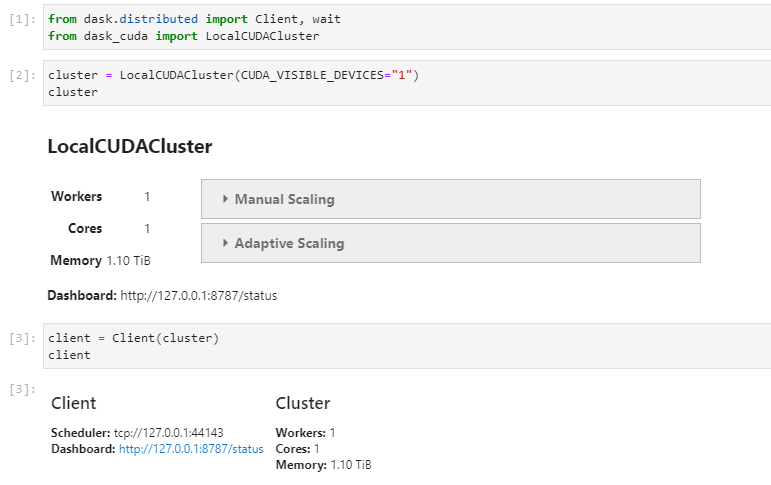
Based on these pocs, there appear to be some existing discrepancies. We think that we need to first properly identify what type of device each device is in CUDA_VISIBLE_DEVICES. Once we do that, we then need to query the GPUs with the right NVML call via right pynvml api in several places such as get_cpu_affinity, get_device_total_memory, etc.
Action Plan after discussion with @pentschev :
- Firstly mapping the MIG counterparts for the
pynvmlapi we use indask_cuda/utils.py. We should be able to write ais_mig_deviceutils function which will parse a device index and return whether it is a MIG device or not. This can be subsequently used inget_cpu_affinity,get_device_total_memoryto use the correctpynvmlapis. - Secondly, add more user-friendly error when trying to start a CUDA worker on a MIG-enabled device. See error 2 above.
Thirdly, add handling of default Dask-CUDA setup when we use a hybrid deployment of MIG enabled and disabled GPUs. Suppose we have a deployment where user wants to have the following configuration:
- GPU 0: (MIG enabled)
- MIG 0
- MIG 1
- GPU1 (MIG not enabled)
Three possible solution approaches are applicable in such a scenario:
a. We rely on the default behavior and create workers only on the non-MIG devices and just create MIG devices when explicitly specified viaCUDA_VISIBLE_DEVICES
b. Add a new argument--migthat will create workers using all MIG devices (and ignore the non MIG ones), where the default behavior (when--migis _NOT_ specified) would be to create workers on all non-MIG devices.
c. Create 3 workers with 3 completely different memory sizes and characteristics. Generally a bad idea.This perhaps need much more discussion before we do something.
- GPU 0: (MIG enabled)
akaanirban
on 13 Jul 2021
Related issues
quasiben
·
3Comments
quasiben
·
7Comments
 daxiongshu
·
7Comments
daxiongshu
·
7Comments
 beckernick
·
10Comments
beckernick
·
10Comments
 vfdev-5
·
6Comments
vfdev-5
·
6Comments
Most helpful comment
I do not have access to an A100, but the latest (unreleased) version of pynvml should include MIG-supported NVML bindings. I believe we will need to modify get_device_total_memory to optionally pass a MIG device handle when necessary. As a first-order functionality test, someone could try adding a try/except for the current
NVMLErrorand retry with a MIG handle - E.g.: