Dash-to-panel: Status icon padding not applied until mouse-over in gnome-shell 3.34
Since the update to gnome-shell 3.34, I'm seeing an issue with the status icon padding setting.
On login, or upon restarting gnome-shell, or upon launching apps that add a tray icon, the custom spacing is not applied. It is only applied once one moves the mouse over the items. Here is a GIF:
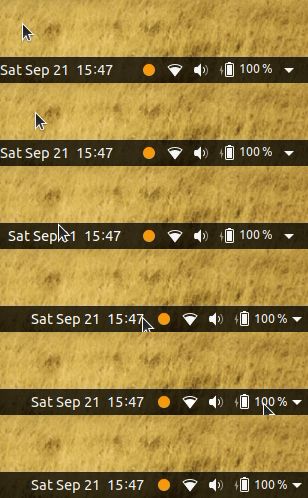
The Status Area Horizontal Spacing extension seems to have the same issue.
If you think this is a regression in gnome-shell itself, perhaps it should be reported there instead. But I thought I would report it here first.
 chrisjbillington
All 11 comments
Hey Chris, I can't reproduce this so far on gnome-shell 3.34.0-2 (wayland and xorg) with the current dtp master. This on Arch right? Thanks!
 charlesg99
on 23 Sep 2019
charlesg99
on 23 Sep 2019
Hi @charlesg99, after updating to master this morning I was also unable to reproduce the problem, but instead Im now seeing that one of the spacing settings is having no effect when used to reduce spacing to less than the default. I think the system status icons are fine and it's the other tray icons and plugins that are not having their spacing reduced.
I'm away from my computer at the moment, but I can more precisely describe the problem when I'm back at my computer.
chrisjbillington
on 23 Sep 2019
Ah I forgot to answer your question, yes, on Arch.
OK, so I am seeing the "custom spacing not applied until mouse-over" problem when I have the "status icon padding" set to a value smaller than default (I have it set to 4), and seemingly it only affects the spacing between the system indicators and the clock. A more obvious manifestation of what looks like the same bug is when you change the clock location between "left of system indicators" and "right of system indicators", the clock does not move until I mouse-over it.
These changes are definitely a change in what gnome-shell is doing, as I saw the other mouse-over-triggering-relayouts issue a while ago whilst using custom gnome-shell patches that hadn't been merged yet (but now they have).
I see other issues too like a plugin wants to change size: the weather plugin I'm using didn't have data and so it was only an icon without a temperature, then upon an update it tried to display the temperature, but only a dot (perhaps the first dot of an ellipsis?) was displayed until I mouse over it, then the full weather is displayed.
I'm starting to think this might not be an issue with dash to panel as much as a change in gnome-shell that may have broken a lot of extension's abilities to update how much space they take up on the panel. But I'm not sure. Perhaps worth waiting if similar reports show up in other extensions, maybe gnome-shell might decide to address it in their code instead.
The other thing I was mentioning is repeatable: prior to updating today, I could set "tray item padding" to 4 pixels and this would reduce the spacing between icons compared to the default. Now, it seems like setting "tray item padding" to 4 pixels has the effect of increasing the spacing by 4 pixels relative to the default - it is no longer possible to reduce the spacing smaller than the default. That applies to the "tray item padding" setting only, the "status icon padding" still allows the spacing to be reduced less than the default.
chrisjbillington
on 24 Sep 2019
A more obvious manifestation of what looks like the same bug is when you change the clock location between "left of system indicators" and "right of system indicators", the clock does not move until I mouse-over it.
Hmm... This also happens on 3.32 with v23. This is definitely a new Clutter bug as the position correctly updates on 3.28. This happens when changing the index of a child without first removing it from its parent (using the likes of clutter_actor_set_child_above_sibling). I just added fix to force the visual update, but it might be a good idea to submit a bug report to Clutter.
I could set "tray item padding" to 4 pixels and this would reduce the spacing between icons compared to the default
A fix for this was also added to master.
Thanks a lot for the detailed report!
charlesg99
on 24 Sep 2019
Thanks for the fixes! They work for me.
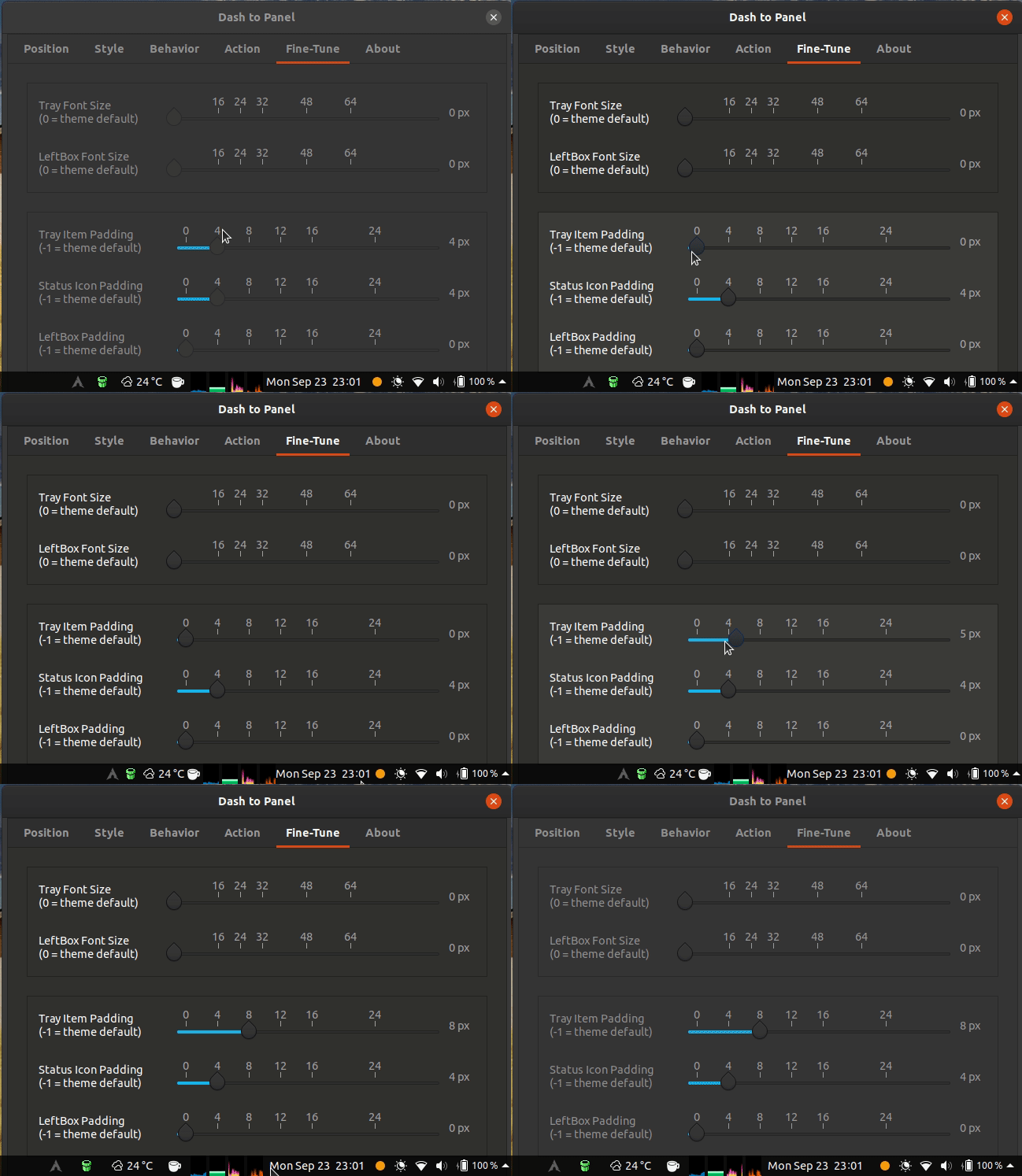
Now that the "can't reduce tray spacing" bug is fixed, I'm seeing the mouseover behaviour consistently. Do you think this is a bug in clutter too? If so I'll report it there.
chrisjbillington
on 24 Sep 2019
i can confirm this issue too, Fedora Silverblue 31, GNOME 3.34, Wayland
 amrmsaraya
on 24 Sep 2019
amrmsaraya
on 24 Sep 2019
That annoys me :) I just pushed a workaround for this, but it clearly is a new 3.34 gnome-shell/ST bug.
I doubt it would get much attention (as on vanilla gnome-shell this padding never changes), but if someone is up to opening a bug report on gnome-shell, please do so. It can easily be reproduced on vanilla gnome-shell by entering this in the looking glass: imports.ui.main.panel.statusArea.aggregateMenu.set_style('-natural-hpadding: 100px');, then hover over the system menu on the top right of the panel to see it jump to the left.
Thanks!
charlesg99
on 25 Sep 2019
The workaround works! Thanks very much.
I reported the issue to gnome-shell here:
chrisjbillington
on 25 Sep 2019
@charlesg99 I'm having the same issue with Dash-to-Panel v23 on Ubuntu 19.10 running GNOME 3.34.1
Re
I just pushed a workaround for this, but it clearly is a new 3.34 gnome-shell/ST bug.
Is the workaround applied in version 23 and does it fix the issue in GNOME 3.34.1?
Thanks for the awesome extension BTW! :smile:
 maqp
on 21 Oct 2019
maqp
on 21 Oct 2019
Hello @maqp, no, the workaround isn't included in v23 and yes it solves the issue in 3.34+ (it was in fact introduced by 3.34, as reported by Chris). We should release v24 soon, but if you can't wait, you could install from Github to solve the issue. Thanks!
charlesg99
on 21 Oct 2019
A more obvious manifestation of what looks like the same bug is when you change the clock location between "left of system indicators" and "right of system indicators", the clock does not move until I mouse-over it.
Hmm... This also happens on 3.32 with v23. This is definitely a new Clutter bug as the position correctly updates on 3.28. This happens when changing the index of a child without first removing it from its parent (using the likes of clutter_actor_set_child_above_sibling). I just added fix to force the visual update, but it might be a good idea to submit a bug report to Clutter.
I could set "tray item padding" to 4 pixels and this would reduce the spacing between icons compared to the default
A fix for this was also added to master.
Thanks a lot for the detailed report!
Can you please point to the commit so I can use it ;) (Found the commit)
What is it that forces the update ?
 izznogooood
on 3 May 2020
izznogooood
on 3 May 2020
Related issues
 ktamp
·
5Comments
ktamp
·
5Comments
 ningacoding
·
6Comments
ningacoding
·
6Comments
 BetaConnector
·
5Comments
BetaConnector
·
5Comments
 Rawleenc
·
6Comments
Rawleenc
·
6Comments
 RomanShumikhin
·
3Comments
RomanShumikhin
·
3Comments
Most helpful comment
The workaround works! Thanks very much.
I reported the issue to gnome-shell here:
https://gitlab.gnome.org/GNOME/gnome-shell/issues/1708