Dash-to-panel: GNOME 3.32: boxPointer._container is undefined
I'm using Fedora Rawhide with GNOME Shell 3.31.2, and this is what happens
boxPointer._container is undefined
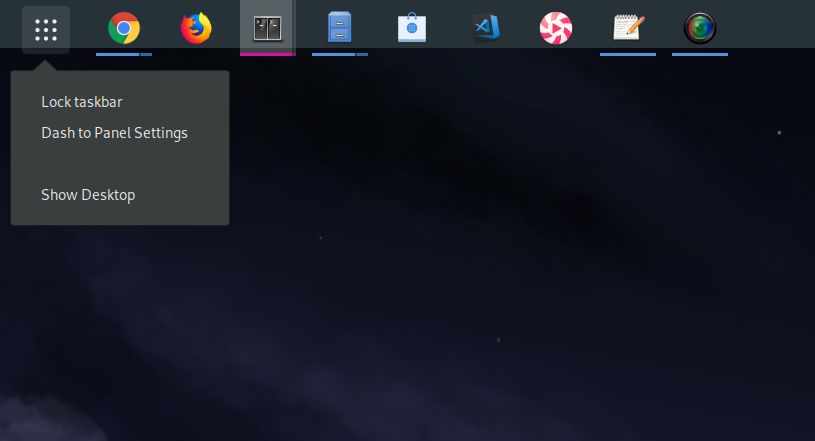
A bit irrelevant but can be the Metro Line a bit shorter on width? it is too large in comparison to icons size
 alex285
All 38 comments
Hello alex285 and thank you for the report! Is it 3.32 time already :)
A fix for the boxPointer on 3.32 was added to master, but the allocation is still broken since gnome-shell removed the generic containers. I'll spend some time trying to adjust it without breaking support for <= 3.30.
 charlesg99
on 2 Jan 2019
charlesg99
on 2 Jan 2019
Hey alex285, some layout fixes were added to master for 3.32, please let us know if you find more issues. Thanks!
charlesg99
on 14 Jan 2019
Hello Charles! First many thanks for fixing this so fast! and second here a couple more issues I found, testing on Xorg
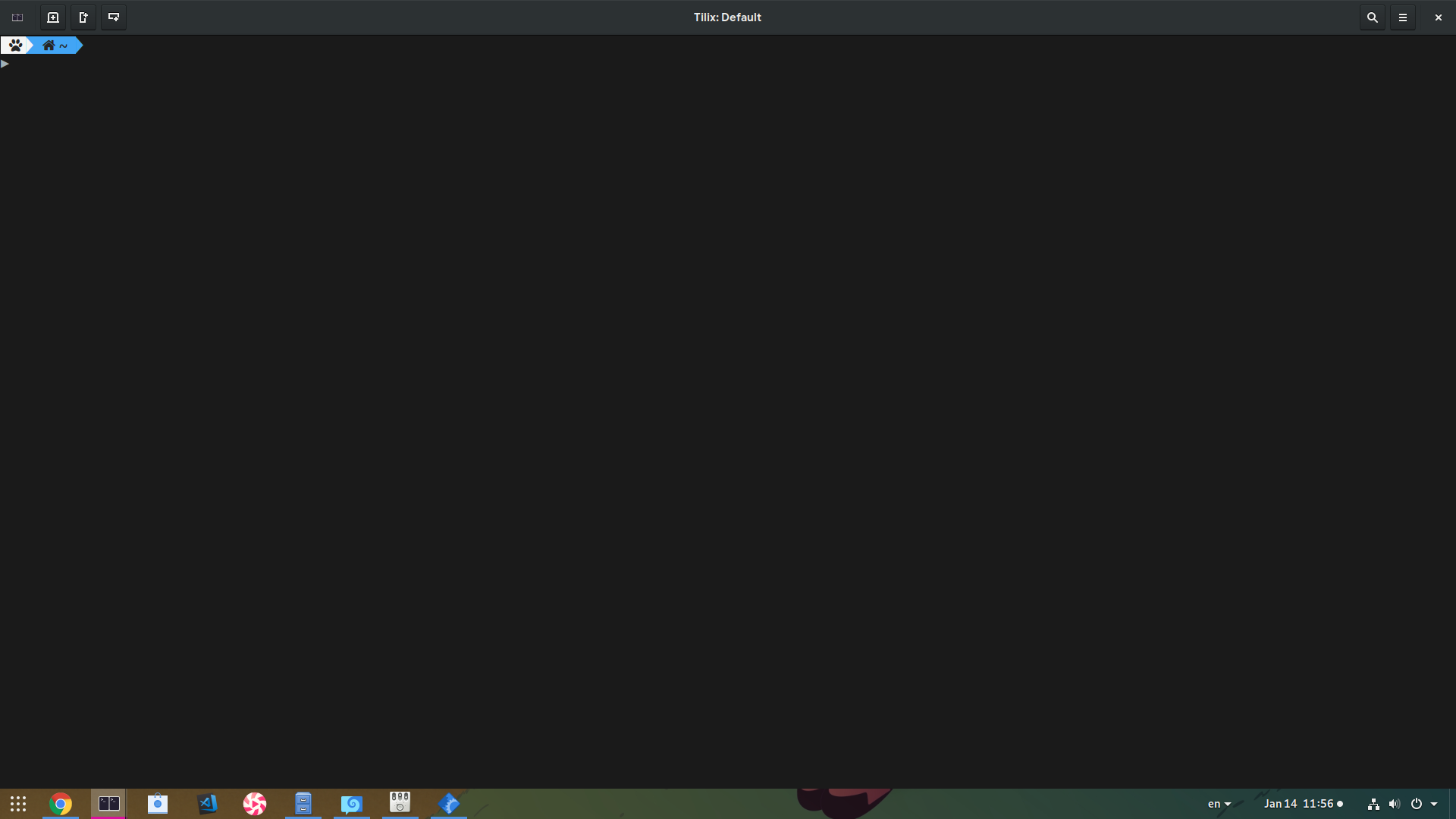
Panel opacity stays even when we maximize windows
(As you can clearly see from that image)
Enter/Exit animations are broken
Reproduce:
- On a new workspace open Tilix (or anything!)
- Press Super: It Enters Overview with an animation
- Press Super again: It Exits Overview but without an animation. If we exit the overview with mouse (eg click on Tilix) the animation will work
Sometimes it happens the opposite. Enter Animation is broken, Exit Animation works. On this video Enter Animation is broken with Super, but it works with mouse
Not sure if you like me to open different bugs on the same bug-report, if you want me I can move those of different issues! In any case many thanks for your work!!
alex285
on 14 Jan 2019
btw both above bugs affect the Wayland session too. I have NVIDIA so I'm testing with EGLStreams backend
alex285
on 14 Jan 2019
Hum weird I don't see these issues on my rawhide installation. Do you see errors in your log? For the transparency, what are your dynamic opacity settings? By default, I removed the "solid" class making the panel opaque on vanilla gnome > 3.26, this could be related.
We can keep the 3.32 issues here for now as it probably will be an ongoing effort. I already spotted some stuff that I broke with my latest commit :) (overview icons don't have their labels anymore)
Thanks!
charlesg99
on 14 Jan 2019
i dont see any related errors on terminal, i have none other ext running, and i also reset GSettings to make sure something isn't stacked, but still the opacity issue (and that animation jump) is there
oh and i can reproduce the missing labels, had seen it before, but i thought it was upstream Shell issue b/c if you disable the Panel and you don't restart Shell, the issue remains, so i probably missed it there!
alex285
on 14 Jan 2019
Some more tweaks were added to master to ensure retro compatibility with older gnome-shell versions and to fix the missing labels in the overview. Did you have a chance to check your dynamic opacity options? Could this be why the panel stays transparent? Thanks!
charlesg99
on 15 Jan 2019
Labels are fixed, and if I manually set the dynamic opacity, then that works, but w/o it doesn't.
What is not fixed for me is that jump lag on Overview, and apart that, the animations w DtP are noticeably less smoother (they lag) than default Shell. Probably this is related to my previous issue?
i dont think it matters, b/c i tried with all default and it was the same, but thats my settings export
[/]
animate-app-switch=true
animate-show-apps=false
dot-color-1='#db109c'
dot-color-2='#db109c'
dot-color-3='#db109c'
dot-color-4='#db109c'
dot-color-override=true
dot-color-unfocused-1='#5294e2'
dot-color-unfocused-2='#5294e2'
dot-color-unfocused-3='#5294e2'
dot-color-unfocused-4='#5294e2'
dot-color-unfocused-different=true
dot-size=3
focus-highlight-color='#d3d7cf'
hot-keys=true
hotkeys-overlay-combo='TEMPORARILY'
middle-click-action='LAUNCH'
multi-monitors=true
panel-size=40
shift-click-action='MINIMIZE'
shift-middle-click-action='LAUNCH'
show-appmenu=false
show-apps-icon-file=''
stockgs-keep-dash=false
trans-bg-color='#000000'
trans-dynamic-anim-target=1.0
trans-panel-opacity=0.45000000000000001
trans-use-custom-bg=true
trans-use-custom-gradient=false
trans-use-custom-opacity=true
trans-use-dynamic-opacity=true
window-preview-height=150
window-preview-padding=5
window-preview-width=250
Thanks!
alex285
on 16 Jan 2019
oh, btw you aren't on NVIDIA, are you? b/c 99% of weird issues w Shell graphics, come from the NVIDIA proprietary driver :)
alex285
on 16 Jan 2019
I'm on nvidia on my host machine (3.30) and I don't see much weirdnesses and the rawhide installation that I have is a virtual machine without a pass-through...
I just added a fix to master for the overview animation (#565), maybe this will solve the 3.32 issue too? Thanks!
charlesg99
on 17 Jan 2019
that fixed the Super Enter/Exit animation, but also panel dynamic opacity! awesome! thank you! one last thing after a lot of testing, is that DtP lags slightly the Shell. That will make more sense to check it out on 3.32 final release, im just heading it up!
thanks again!
alex285
on 17 Jan 2019
oops! no it didnt fix the panel opacity! i just had manual and i forgot it! sorry!
alex285
on 17 Jan 2019
another issue i just discovered is a very obvious lag when you maximize a window, specially reproducable the first time. unmaximize it & maximize it again, not always reproduce the lag
alex285
on 17 Jan 2019
it didnt fix the panel opacity
Hey Alex, do you presently consider that the panel dynamic opacity is broken or is it new on 3.32? I don't understand what you mean as we deliberately disabled the native gnome-shell one. This way people who wish so can have a fixed transparency for their panel, which wasn't possible before. Dynamic opacity must now be explicitly enabled in dtp settings for it to work, as we felt that this way would give more options to the users. Unless the panel doesn't react the way I'm explaining it?
As for the lag, this is strange as we don't modify the native gnome-shell animations. You say that this lag (say the one when you maximize a window) isn't reproducible on vanilla gnome-shell? I'm testing in a vm so everything is laggy :)
Thanks!
charlesg99
on 17 Jan 2019
ah sorry, I misunderstood Dynamic Opacity mechanics. I thought the default should had the similar effect with default Shell. Btw imo that is the correct thing to do; to keep default Shell behavior when overrides are disabled
Now regarding the maximized windows, I uploaded this, and for some reason it stopped to lag that much (it still lags, but sometimes it really really lags), but pay attention to a glitch (sometimes is more, and other places), that I cant reproduce w default Shell. Certainly there is something going on here :)
The only other extension I had enabled was KStatusNotifier, i forgot to disable, but I can reproduce w/o it too
alex285
on 17 Jan 2019
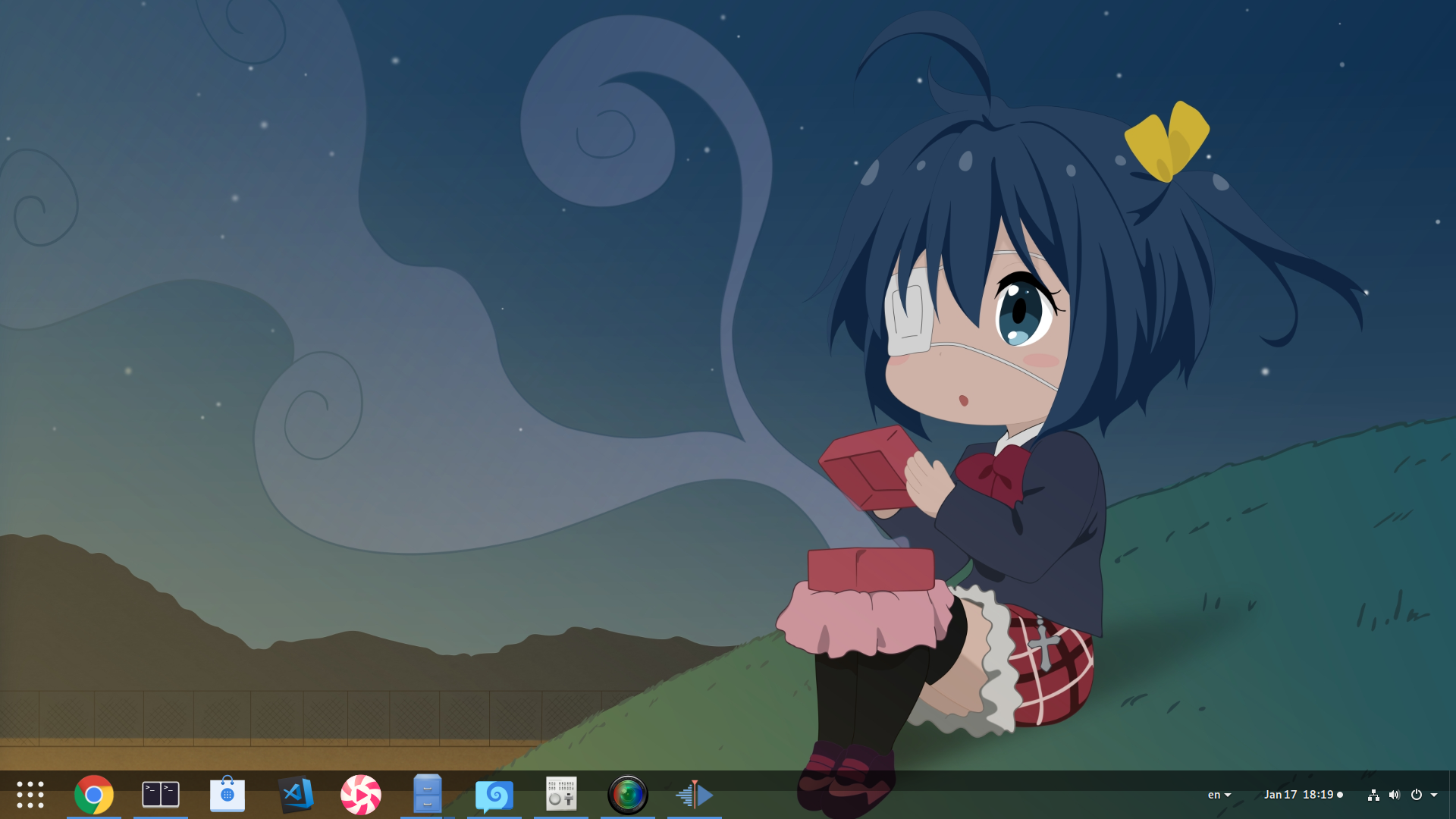
Another issue, is that the first time I enable Panel I get (ALWAYS) something like a gradient opacity. I can reproduce that both w Overrides Enabled, or Fully Disabled. Restart Shell, will fix it ..assuming we are on Xorg and we can restart :p
alex285
on 17 Jan 2019
Strange issues that I can't reproduce so far :( You say this happens even with the dynamic opacity/opacity/color options turned off? It feels like it should be related. Thanks!
charlesg99
on 19 Jan 2019
The only error i can get from systemd journal is Tried to deal with a vfunc that wasn't a function probably from GJS
alex285
on 19 Jan 2019
Interesting, haven't seen this one yet. Can you reproduce it reliably? Is there more info surrounding the error message? Thanks!
charlesg99
on 19 Jan 2019
I can only reproduce it when I login from GDM, but not when I restart Shell, and it doesn't give more context, than it comes from the extension
Btw one more I just found:
JS ERROR: Exception in callback for signal: extension-state-changed: TypeError: this._signalsHandler is null
disable@/home/me/.local/share/gnome-shell/extensions/[email protected]/panel.js:255:9
wrapper@resource:///org/gnome/gjs/modules/_legacy.js:82:22
disable/<@/home/me/.local/share/gnome-shell/extensions/[email protected]/panelManager.js:208:13
disable@/home/me/.local/share/gnome-shell/extensions/[email protected]/panelManager.js:195:9
wrapper@resource:///org/gnome/gjs/modules/_legacy.js:82:22
disable@/home/me/.local/share/gnome-shell/extensions/[email protected]/extension.js:103:5
_enable@/home/me/.local/share/gnome-shell/extensions/[email protected]/extension.js:72:13
enable/extensionChangedHandler<@/home/me/.local/share/gnome-shell/extensions/[email protected]/extension.js:52:13
_emit@resource:///org/gnome/gjs/modules/signals.js:142:27
enableExtension@resource:///org/gnome/shell/ui/extensionSystem.js:137:9
onEnabledExtensionsChanged/<@resource:///org/gnome/shell/ui/extensionSystem.js:289:9
onEnabledExtensionsChanged@resource:///org/gnome/shell/ui/extensionSystem.js:286:5
But I cant reproduce :(
alex285
on 19 Jan 2019
btw that glitch on the video, i said couldnt reproduce on default Shell was my bad really. I can also reproduce on default Shell, but in StP it happens more often and it is more visible, b/c there is some kind of lag on animation, but not always
alex285
on 19 Jan 2019
Another issue always reproducable is that when coming from lock screen, DtP gets disabled
Reproduce:
- Enable DtP
- Lock Screen
- Unlock
Output:
DtP seems disabled, and we get a default Shell session, but if we restart Shell (-r), DtP gets enabled again
alex285
on 20 Jan 2019
Ha, I was on 3.31.3 and had no problems, just updated to 3.31.4 and now I see some of the issues you mentioned. Seems pretty unstable to me as I can't even launch the default gnome-shell settings, even with dtp disabled.
charlesg99
on 20 Jan 2019
Hey alex285, the error Tried to deal with a vfunc that wasn't a function should now be fixed on 3.32. This is what caused dtp to be disabled when unlocking the screen, as you reported. Thanks!
charlesg99
on 9 Feb 2019
Hello @charlesg99! thank you for this, but we have a bigger issue now! GNOME Shell 3.31.90 removed Remote Menu: 7df93458d728ddc52178c32a7e591be6ed648fe8 so the extension doesnt load at all :)
I believe you need to branch out a new version, and completely drop the support of app menus
Btw 3.31.90 is on Rawhide already if you want to test! thanks again!
alex285
on 10 Feb 2019
3.31.4 is still the latest available on my rawhide installation, maybe the closest mirror has a bit of delay or something. I'll be sure to test as soon as 3.31.9 comes out over here! Thanks!
charlesg99
on 10 Feb 2019
you can add Koji and get 3.31.90
https://medium.com/@alex285/how-to-add-koji-repo-in-fedora-812a2a046ff3
alex285
on 10 Feb 2019
Hey alex285, thank you for the tip, I got 3.31.9 from Koji. The app menu wasn't so bad to fix, but gnome-shell dropped the usage of Lang.Class and replaced it with the standard es6 classes. That is gonna break a lot of stuff unfortunately, as I feel it is a much more intrusive than the previous breaking change (ShellGenericContainer).
@jderose9 I threw together a hackish workaround (8ae941ba8bf08e2ffd57eff405a18b6cbf319bf9) so it works for now, but I wonder if we should branch out and replace the Lang.Class moving forward. We would have to support both branches though, so it isn't ideal :( Let me know what you think.
Thanks!
charlesg99
on 13 Feb 2019
oops! sorry i didnt look the code, i thought you had already ported to ES6 native classes :/
btw are you on Twitter?
alex285
on 13 Feb 2019
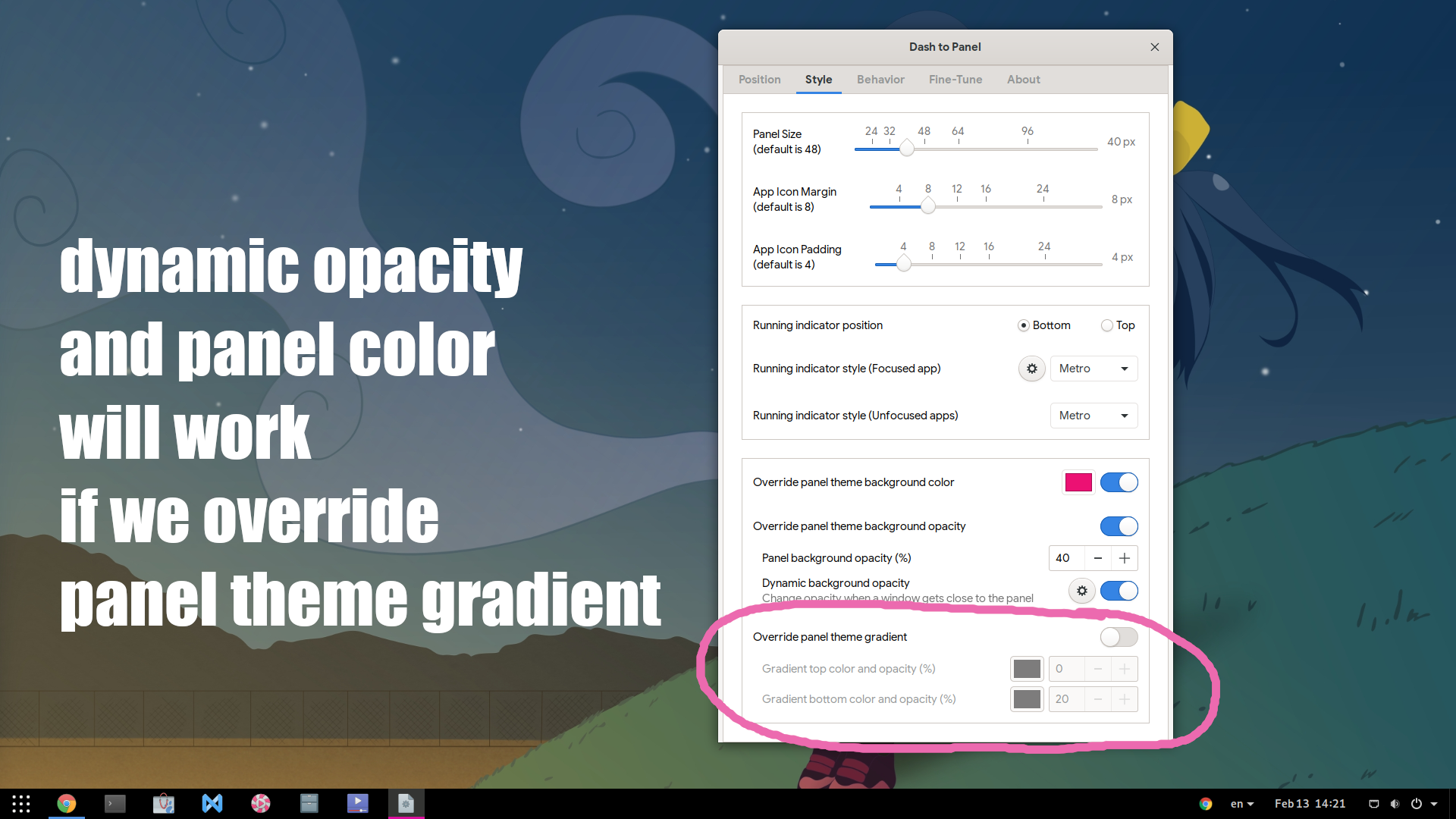
Panel Color and Dynamic Opacity, will only work if we switch-on the gradient override. That is after https://github.com/home-sweet-gnome/dash-to-panel/commit/8ae941ba8bf08e2ffd57eff405a18b6cbf319bf9
Btw the gradient is so important option to have? who will ever use a gradient on panel? :)
alex285
on 13 Feb 2019
I'm not on twitter, I have nothing interesting to report :)
i thought you had already ported to ES6 native classes
Well on 3.31.9 dtp now creates/uses es6 classes, but I had to do it dynamically because completely porting to it would break all previous versions. Older gnome-shell js engines throw exceptions at the mere sight of the keyword "class" in a js file, even if unused (this is why I had to declare the classes with evil evil eval).
Panel Color and Dynamic Opacity, will only work if we switch-on the gradient override
Yeah gnome-shell decided to remove dynamic transpacency and revert back to a fully opaque black top panel. Not sure what to do about it because on older g-s versions the panel is transparent by default. The behavior you're seeing is "normal" as the gradient part of the settings affect the style of the panel, while the dtp transparency settings affect the style of the panelbox (the panel's container). I guess we could set the panel background opacity for all g-s versions to emulate the previous styling.
This is in fact the main reason why the gradient options were added :) Themes sometime define gradients on the panel so the transparency settings wouldn't work at all without the option to remove that gradient. Bonus point is that when gradients come back in style, we'll be ready lol :)
charlesg99
on 13 Feb 2019
A fix for the background color was just added to master, should fix the need to override the panel's gradient to change its color. Thanks!
charlesg99
on 13 Feb 2019
i think now im out of issues :(
alex285
on 13 Feb 2019
i think now im out of issues :(
I think I feel differently about that :) I'm gonna close this one, please let us know if you find something else on 3.32. Thanks!
charlesg99
on 20 Feb 2019
yay! closed!! really im using it all the time and all good here so far! thank you so much for all the work, and the fast fixing for 3.32 release!!!
alex285
on 23 Feb 2019
@charlesg99 I'd like to submit a v19 with these fixes as 3.32 releases next week. All good on your end to release the current master? And of course, thanks to you both for the effort!
 jderose9
on 8 Mar 2019
jderose9
on 8 Mar 2019
@jderose9 Sounds good to me! Hopefully the e.g.o review process catches on as 3.32 comes with some pretty serious breaking changes.
charlesg99
on 8 Mar 2019
@jderose9 Trying out #594 on Debian 9, I just found (of course, ~ 4 hours after the release) a v19 problem on older gnome-shell versions using GJS < 1.49.90 (not exactly sure which, but my guess is <= 3.24). The fix for it is already on master, but after v19 :cry:. It affects the context menu of the showapps button and I think it justifies a v19.1 tag.
charlesg99
on 9 Mar 2019
Related issues
 BoQsc
·
4Comments
BoQsc
·
4Comments
 ktamp
·
5Comments
ktamp
·
5Comments
 ningacoding
·
6Comments
alex285
·
6Comments
ningacoding
·
6Comments
alex285
·
6Comments
 ghost
·
5Comments
ghost
·
5Comments
Most helpful comment
Hello alex285 and thank you for the report! Is it 3.32 time already :)
A fix for the boxPointer on 3.32 was added to master, but the allocation is still broken since gnome-shell removed the generic containers. I'll spend some time trying to adjust it without breaking support for <= 3.30.